2014 DODGE CHARGER seat memory
[x] Cancel search: seat memoryPage 239 of 635

positions. Refer to “Driver Memory Seat” in “Under-
standing The Features Of Your Vehicle” for further
information.
CAUTION!
Do not place any article under the adjustable pedals
or impede its ability to move as it may cause damage
to the pedal controls. Pedal travel may become lim-
ited if movement is stopped by an obstruction in the
adjustable pedal’s path.
WARNING!
Do not adjust the pedals while the vehicle is moving.
You could lose control and have an accident. Always
adjust the pedals while the vehicle is parked.
ELECTRONIC SPEED CONTROL — IF EQUIPPED
When engaged, the Electronic Speed Control takes over
accelerator operations at speeds greater than 25 mph
(40 km/h).
The Electronic Speed Control buttons are located on the
right side of the steering wheel.
3
UNDERSTANDING THE FEATURES OF YOUR VEHICLE 237
Page 350 of 635

selection, touch the “Sound Horn With Lock” soft-key
and select “ON” or “OFF.” Then touch the arrow back
soft-key.
•Remote Door Unlock Order
Touch the “Remote Door Unlock Order” soft-key to
change this display. When Unlock Driver Door Only On
1st Press is selected, only the driver’s door will unlock on
the first press of the Remote Keyless Entry (RKE) trans-
mitter UNLOCK button. When Unlock Driver Door Only
On 1st Press is selected, you must press the RKE trans-
mitter UNLOCK button twice to unlock the passenger’s
doors. When Unlock All Doors On 1st Press is selected,
all of the doors will unlock on the first press of the RKE
transmitter UNLOCK button. NOTE:
If the vehicle is equipped with Keyless Enter-N-
Go™ (Passive Entry) and the EVIC is programmed to
Unlock All Doors On 1st Press, all doors will unlock no
matter which Passive Entry equipped door handle is
grasped. If Unlock Driver Door Only On 1st Press is
programmed, only the driver ’s door will unlock when
the driver ’s door is grasped. With Passive Entry, if
Unlock Driver Door Only On 1st Press is programmed,
touching the handle more than once will only result in
the driver ’s door opening. If Unlock Driver Door Only
On 1st Press is selected, once the driver door is opened,
the interior door lock/unlock switch can be used to
unlock all the doors (or use the RKE transmitter).
• Memory Linked To FOB
Touch the “Memory Linked to FOB” soft-key to change
this display. This feature provides automatic driver seat
positioning to enhance driver mobility when entering
and exiting the vehicle, driver 1 and driver 2 last mode,
348 UNDERSTANDING YOUR INSTRUMENT PANEL
Page 351 of 635

settings and presets. To make your selection, touch the
“Memory Linked to FOB” soft-key and select “ON” or
“OFF.” Then touch the arrow back soft-key.
NOTE:The seat will return to the memorized seat
location (if Recall Memory with Remote Key Unlock is set
to ON) when the RKE transmitter is used to unlock the
door. Refer to “Driver Memory Seat” in “Understanding
The Features Of Your Vehicle” for further information.
• Passive Entry (Keyless Enter-N-Go™)
Touch the “Passive Entry” soft-key to change this display.
This feature allows you to lock and unlock the vehicle’s
door(s) without having to press the RKE transmitter lock
or unlock buttons. To make your selection, touch the
“Passive Entry” soft-key and select “ON” or “OFF.” Then
touch the arrow back soft-key. Refer to “Keyless Enter-
N-Go™” in “Things To Know Before Starting Your Ve-
hicle.”Heated Seats
• Auto Heated Seats — If Equipped
Touch the “Auto Heated Seats” soft-key to change this
display. When the temperatures are below 40° F (4.4° C)
the Driver ’s heated seat will turn on. To make your
selection, touch the “Auto Heated Seats” soft-key and
select “ON” or “OFF.” Then touch the back arrow soft-
key.
Engine Off Options
• Easy Exit Seats — If Equipped
Touch the “Easy Exit Seats” soft-key to change this
display. This feature provides automatic driver seat po-
sitioning to enhance driver mobility when entering and
exiting the vehicle. To make your selection, touch the
“Easy Exit Seats” soft-key, and select “ON” or “OFF.”
4
UNDERSTANDING YOUR INSTRUMENT PANEL 349
Page 352 of 635

Then touch the arrow back soft-key. Refer to “Driver
Memory Seat” in “Understanding The Features Of Your
Vehicle” for further information.
•Headlight Off Delay
Touch the “Headlight Off Delay” soft-key to change this
display. When this feature is selected, the driver can
choose to have the headlights remain on for 0, 30, 60, or
90 seconds when exiting the vehicle. To change the
Headlight Off Delay status, touch the “0,” “30,” “60” or
“90” soft-key. Then touch the arrow back soft-key.
• Engine Off Power Delay
Touch the “Engine Off Power Delay” soft-key to change
this display. When this feature is selected, the power
window switches, radio, Uconnect® phone system (if
equipped), DVD video system (if equipped), power
sunroof (if equipped), and power outlets will remain
active for up to 10 minutes after the ignition is cycled to
OFF. Opening either front door will cancel this feature. To change the Engine Off Power Delay status, touch the “0
seconds,” “45 seconds,” “5 minutes” or “10 minutes”
soft-key. Then touch the arrow back soft-key.
Compass Settings
•
Variance
Touch the Variance soft-key to change this display. Com-
pass Variance is the difference between Magnetic North
and Geographic North. To compensate for the differ-
ences, the variance should be set for the zone where the
vehicle is driven, per the zone map. Once properly set,
the compass will automatically compensate for the dif-
ferences, and provide the most accurate compass head-
ing.
350 UNDERSTANDING YOUR INSTRUMENT PANEL
Page 366 of 635

NOTE:If the vehicle is programmed 1st Press Of Key Fob
Unlocks, all doors will unlock no matter which Passive
Entry equipped door handle is grasped. If 1st Press Of
Key Fob Unlocks is programmed, only the driver ’s door
will unlock when the driver ’s door is grasped. With
Passive Entry, if 1st Press Of Key Fob Unlocks is pro-
grammed touching the handle more than once will only
result in the driver ’s door opening. If driver door first is
selected, once the driver door is opened, the interior door
lock/unlock switch can be used to unlock all doors (or
use RKE transmitter).
• Passive Entry
This feature allows you to lock and unlock the vehicle’s
door(s) without having to press the Remote Keyless
Entry (RKE) transmitter lock or unlock buttons. To make
your selection, touch the Passive Entry soft-key, until a
check-mark appears next to setting, showing that setting
has been selected. Touch the back arrow soft-key to return to the previous menu. Refer to “Keyless Enter-N-
Go™” in “Things To Know Before Starting Your Vehicle.”
•
Personal Settings Linked To FOB — If Equipped
This feature provides automatic driver seat positioning to
enhance driver mobility when entering and exiting the
vehicle. To make your selection, touch the Memory
Linked To FOB soft-key, until a check-mark appears next
to setting, showing that setting has been selected. Touch
the back arrow soft-key to return to the previous menu.
NOTE: The seat will return to the memorized seat
location (if Recall Memory with Remote Key Unlock is set
to ON) when the Remote Keyless Entry (RKE) transmitter
is used to unlock the door. Refer to “Driver Memory
Seat” in “Understanding The Features Of Your Vehicle”
for further information.
364 UNDERSTANDING YOUR INSTRUMENT PANEL
Page 624 of 635
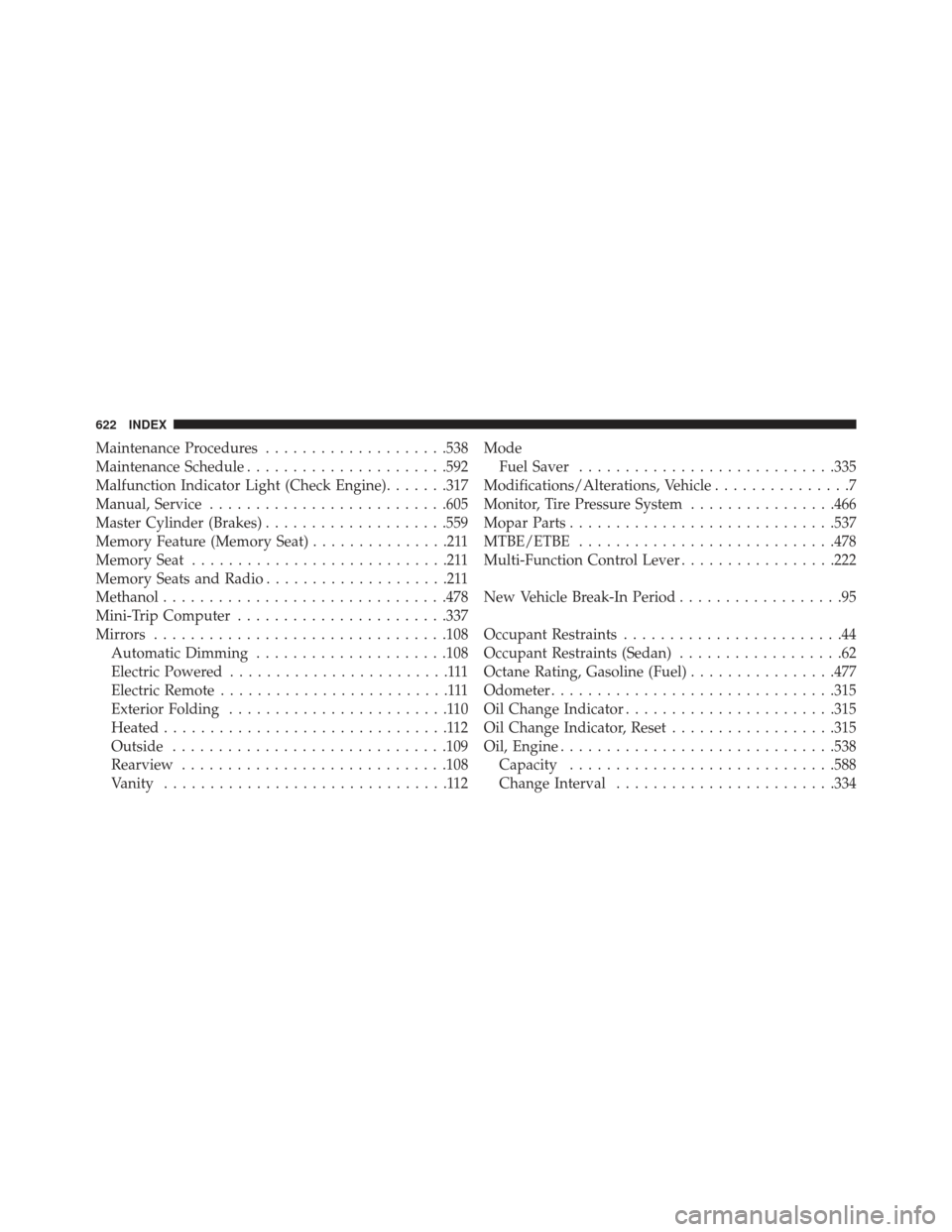
Maintenance Procedures....................538
Maintenance Schedule ..................... .592
Malfunction Indicator Light (Check Engine) .......317
Manual, Service ......................... .605
Master Cylinder (Brakes) ....................559
Memory Feature (Memory Seat) ...............211
Memory Seat ............................211
Memory Seats and Radio ....................211
Methanol .............................. .478
Mini-Trip Computer ...................... .337
Mirrors ............................... .108
Automatic Dimming .....................108
Electric Powered ........................111
Electric Remote .........................111
Exterior Folding ........................110
Heated ...............................112
Outside ............................. .109
Rearview ............................ .108
Vanity ...............................112 Mode
Fuel Saver ........................... .335
Modifications/Alterations, Vehicle ...............7
Monitor, Tire Pressure System ................466
Mopar Parts ............................ .537
MTBE/ETBE ........................... .478
Multi-Function Control Lever .................222
New Vehicle Break-In Period ..................95
Occupant Restraints ........................44
Occupant Restraints (Sedan) ..................62
Octane Rating, Gasoline (Fuel) ................477
Odometer .............................. .315
Oil Change Indicator ...................... .315
Oil Change Indicator, Reset ..................315
Oil, Engine ............................. .538
Capacity ............................ .588
Change Interval ....................... .334
622 INDEX
Page 628 of 635

Adjustable Upper Shoulder Anchorage.........53
And Pregnant Women .....................58
Child Restraint ..........................73
Extender ..............................58
Front Seat .............................48
Inspection .............................97
Operating Instructions ....................49
Pretensioners ...........................56
Rear Seat ..............................48
Untwisting Procedure .....................54
Seats ................................. .197
Adjustment .......................... .197
Easy Entry ........................... .214
Head Restraints ....................... .207
Heated .............................. .200
Height Adjustment ..................... .197
Memory ..............................211
Power .............................. .197
Rear Folding ......................... .209Seatback Release
....................... .209
Tilting .............................. .197
Security Alarm ............................18
Arm The System ........................19
Selection of Coolant (Antifreeze) ...............589
SENTRY KEY® FCC General Information ..................18
Key Programming .......................18
Sentry Key (Immobilizer) ....................16
Sentry Key Replacement .....................17
Service Assistance ........................ .601
Service Contract ......................... .603
Service Engine Soon Light (Malfunction Indicator) . .317
Service Manuals ......................... .605
Shifting ............................... .397
Automatic Transmission ..................397
Shift Lever Override ...................... .523
Shoulder Belts ............................48
Shoulder Belt Upper Anchorage ................53
626 INDEX