Page 280 of 529
The right-hand control is a rocker-type switch with a
push-button in the center and controls the volume and
mode of the sound system. Pressing the top of the rocker
switch will increase the volume, and pressing the bottom
of the rocker switch will decrease the volume.Pressing the center button will make the radio switch
between the various modes available (AM/FM/SAT/
CD/HDD/AUX etc.).
The left-hand control is a rocker-type switch with a
push-button in the center. The function of the left-hand
control is different depending on which mode you are in.
The following describes the left-hand control operation in
each mode.
Radio Operation
Pressing the top of the switch will “Seek” up for the next
listenable station and pressing the bottom of the switch
will “Seek” down for the next listenable station.
The button located in the center of the left-hand control
will tune to the next preset station that you have pro-
grammed in the radio preset pushbutton.
Remote Sound System Controls (Back View Of Steering
Wheel)
4
UNDERSTANDING YOUR INSTRUMENT PANEL 279
Page 282 of 529
NOTE:If you experience difficulty in playing a particular
disc, it may be damaged (e.g., scratched, reflective coat-
ing removed, a hair, moisture or dew on the disc)
oversized, or have protection encoding. Try a known
good disc before considering disc player service.
RADIO OPERATION AND MOBILE PHONES
Under certain conditions, the mobile phone being on in
your vehicle can cause erratic or noisy performance from
your radio. This condition may be lessened or eliminated
by relocating the mobile phone antenna. This condition is
not harmful to the radio. If your radio performance does
not satisfactorily “clear” by the repositioning of the
antenna, it is recommended that the radio volume be
turned down or off during mobile phone operation when
not using Uconnect® (if equipped).
CLIMATE CONTROLS
Automatic Temperature Control (ATC)
The Automatic Temperature Control system automati-
cally maintains the climate in the cabin of the vehicle at
the comfort levels desired by the driver and passenger.
Automatic Temperature Control
4
UNDERSTANDING YOUR INSTRUMENT PANEL 281
Page 338 of 529
related motor noises. These noises are the system per-
forming its self check cycle to ensure that the ABS system
is working properly. This self check occurs each time the
vehicle is started and accelerated past 7 mph (11 km/h).
ABS is activated during braking under certain road or
stopping conditions. ABS-inducing conditions can in-
clude ice, snow, gravel, bumps, railroad tracks, loose
debris, or panic stops.
You also may experience the following when the brake
system goes into anti-lock:
•The ABS motor running (it may continue to run for a
short time after the stop)
• The clicking sound of solenoid valves
• Brake pedal pulsations
• A slight drop or fall away of the brake pedal at the end
of the stop These are all normal characteristics of ABS.
WARNING!
•
The Anti-Lock Brake System (ABS) contains so-
phisticated electronic equipment that may be sus-
ceptible to interference caused by improperly in-
stalled or high output radio transmitting
equipment. This interference can cause possible
loss of anti-lock braking capability. Installation of
such equipment should be performed by qualified
professionals.
• Pumping of the Anti-Lock Brakes will diminish
their effectiveness and may lead to a collision.
Pumping makes the stopping distance longer. Just
press firmly on your brake pedal when you need to
slow down or stop.
(Continued)
5
STARTING AND OPERATING 337
Page 378 of 529

longer display, and a pressure value will display in place
of the dashes. A system fault can occur due to any of the
following:
1. Signal interference due to electronic devices or drivingnext to facilities emitting the same radio frequencies as
the TPM sensors.
2. Installing aftermarket window tinting that contains materials that may block radio wave signals.
3. Accumulation of snow or ice around the wheels or wheel housings.
4. Using tire chains on the vehicle.
5. Using wheels/tires not equipped with TPM sensors.
The EVIC will also display a �SERVICE TPM SYSTEM�
message for a minimum of five seconds when a system
fault related to an incorrect sensor location fault is
detected. In this case, the �SERVICE TPM SYSTEM�message is then followed with a graphic display with
pressure values still shown. This indicates that the pres-
sure values are still being received from the TPM sensors
but they may not be located in the correct vehicle
position. The system still needs to be serviced as long as
the
�SERVICE TPM SYSTEM� message is displayed.
Vehicles with Compact Spare
1. The compact spare tire does not have a TPM sensor. Therefore, the TPMS will not monitor the pressure in
the compact spare tire.
2. If you install the compact spare tire in place of a road tire that has a pressure below the low-pressure warn-
ing limit, upon the next ignition switch cycle, the
“TPM Telltale Light” will remain ON and a chime will
sound. In addition, the graphic in the EVIC will still
display a flashing pressure value and the �Inflate Tire
to XX� message.
5
STARTING AND OPERATING 377
Page 408 of 529
WARNING!
•Take care to avoid the radiator cooling fan when-
ever the hood is raised. It can start anytime the
ignition switch is ON. You can be injured by
moving fan blades.
• Remove any metal jewelry such as rings, watch
bands and bracelets that could make an inadvertent
electrical contact. You could be seriously injured.
• Batteries contain sulfuric acid that can burn your
skin or eyes and generate hydrogen gas which is
flammable and explosive. Keep open flames or
sparks away from the battery.
1. Set the parking brake, shift into PARK (automatic transmission) or 1st gear (manual transmission) and
turn the ignition to LOCK.
2. Turn off the heater, radio, and all unnecessary electri- cal accessories. 3. If using another vehicle to jump-start the battery, park
the vehicle within the jumper cables reach, set the
parking brake and make sure the ignition is OFF.
WARNING!
Do not allow vehicles to touch each other as this
could establish a ground connection and personal
injury could result.
Jump-Starting Procedure
WARNING!
Failure to follow this jump-starting procedure could
result in personal injury or property damage due to
battery explosion.
6
WHAT TO DO IN EMERGENCIES 407
Page 454 of 529
liquid. Please do not use polishes, oils, cleaning fluids,
solvents, detergents, or ammonia-based cleaners to clean
your leather upholstery. Application of a leather condi-
tioner is not required to maintain the original condition.
WARNING!
Do not use volatile solvents for cleaning purposes.
Many are potentially flammable, and if used in
closed areas they may cause respiratory harm.
Cleaning Headlights
Your vehicle has plastic headlights that are lighter and
less susceptible to stone breakage than glass headlights.
Plastic is not as scratch resistant as glass and therefore
different lens cleaning procedures must be followed.To minimize the possibility of scratching the lenses and
reducing light output, avoid wiping with a dry cloth. To
remove road dirt, wash with a mild soap solution fol-
lowed by rinsing.
Do not use abrasive cleaning components, solvents, steel
wool or other aggressive material to clean the lenses.
Glass Surfaces
All glass surfaces should be cleaned on a regular basis
with MOPAR® Glass Cleaner or any commercial
household-type glass cleaner. Never use an abrasive type
cleaner. Use caution when cleaning the inside rear win-
dow equipped with electric defrosters or the right rear
quarter window equipped with the radio antenna. Do
not use scrapers or other sharp instruments that may
scratch the elements.
7
MAINTAINING YOUR VEHICLE 453
Page 463 of 529
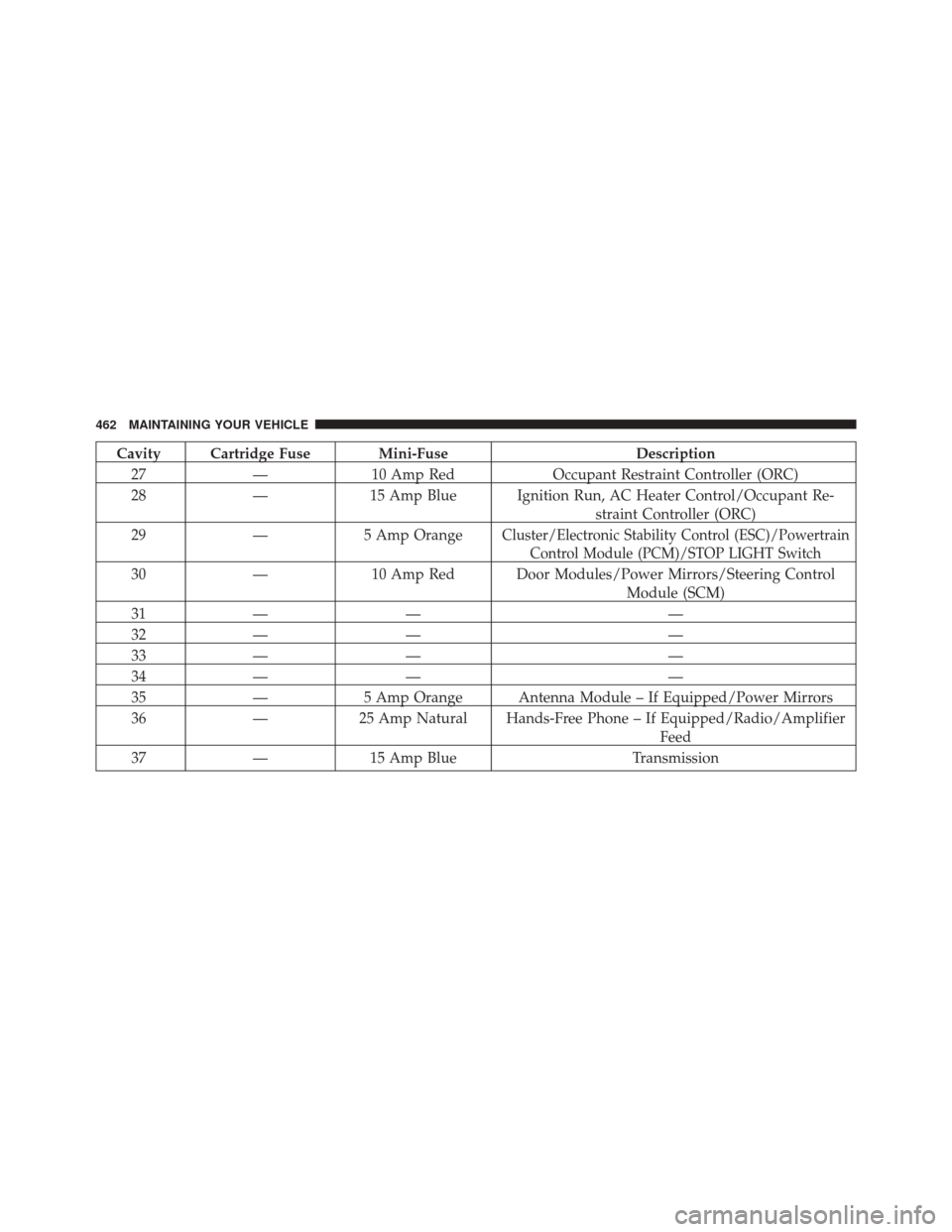
Cavity Cartridge Fuse Mini-FuseDescription
27 —10 Amp Red Occupant Restraint Controller (ORC)
28 —15 Amp Blue Ignition Run, AC Heater Control/Occupant Re-
straint Controller (ORC)
29 —5 Amp Orange
Cluster/Electronic Stability Control (ESC)/Powertrain
Control Module (PCM)/STOP LIGHT Switch
30 —10 Amp Red Door Modules/Power Mirrors/Steering Control
Module (SCM)
31 — — —
32 — — —
33 — — —
34 — — —
35 —5 Amp Orange Antenna Module – If Equipped/Power Mirrors
36 —25 Amp Natural Hands-Free Phone – If Equipped/Radio/Amplifier
Feed
37 —15 Amp Blue Transmission
462 MAINTAINING YOUR VEHICLE
Page 507 of 529
About Your Brakes....................... .332
ABS (Anti-Lock Brake System) ................336
Adding Engine Coolant (Antifreeze) ............439
Adding Fuel ............................ .383
Adding Washer Fluid ..................... .434
Additives, Fuel .......................... .381
Airbag ..................................59
Airbag Deployment ........................70
Airbag Light .............................67
Airbag Maintenance ........................72
Airbag, Side ..............................63
Airbag, Window (Side Curtain) ................63
Air Cleaner, Engine (Engine Air Cleaner Filter) . . . .426
Air Conditioner Maintenance .................429
Air Conditioning Filter .....................288
Air Conditioning, Operating Tips ..............289
Air Conditioning Refrigerant .................429
Air Conditioning System ....................281
Air Pressure, Tires ........................ .361Alarm
Arm The System ........................20
Alarm Light ............................ .220
Alarm, Panic .............................27
Alarm (Security Alarm) ......................19
Alarm System (Security Alarm) ................19
Alterations/Modifications, Vehicle ...............7
Antenna, Satellite Radio .....................267
Antifreeze (Engine Coolant) ..................438
Disposal ............................. .441
Anti-Lock Brake System (ABS) ................336
Anti-Lock Warning Light ....................221
Appearance Care ........................ .449
Arming System (Security Alarm) ...............19
Assistance Towing ........................ .127
Auto Down Power Windows ..................42
Automatic Dimming Mirror ..................108
Automatic Door Locks ......................35
Automatic Headlights ..................... .162
506 INDEX