Page 144 of 240
Failed bulb or lamp
142
JUMPER-PAPIER_EN_CHAP08_AIDE RAPIDE_ED01-2014
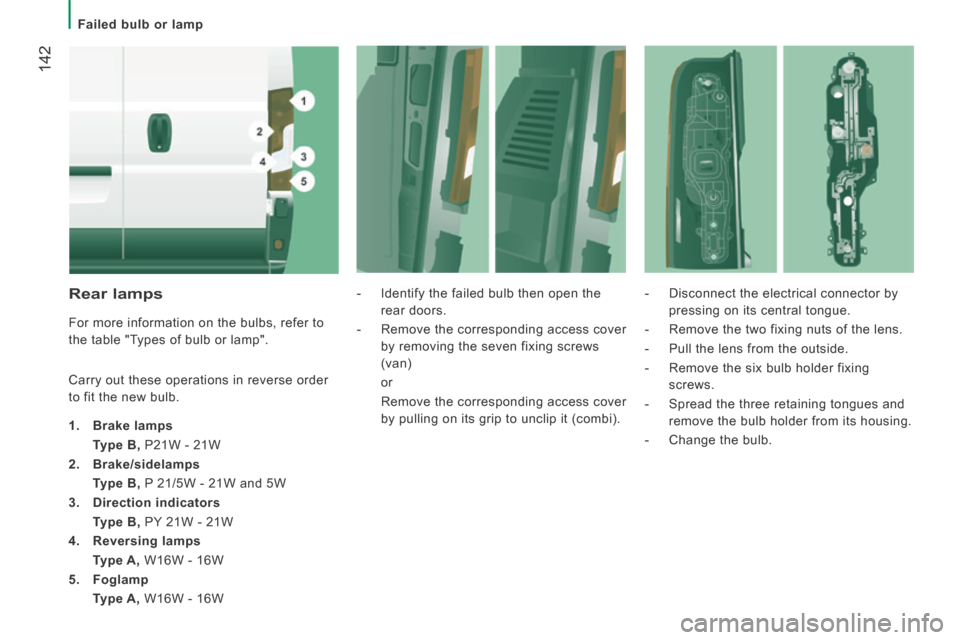
Rear lamps
For more information on the bulbs, refer to
the table "Types of bulb or lamp".
Carry out these operations in reverse order
to fit the new bulb.
1. Brake lamps
Type B, P21W - 21W
2. Brake/sidelamps
Type B, P 21/5W - 21W and 5W
3. Direction indicators
Type B, PY 21W - 21W
4. Reversing lamps
Type A, W16W - 16W
5. Foglamp
Type A, W16W - 16W - Identify the failed bulb then open the
rear doors.
- Remove the corresponding access cover by removing the seven fixing screws
(van)
or
Remove the corresponding access cover by pulling on its grip to unclip it (combi). - Disconnect the electrical connector by
pressing on its central tongue.
- Remove the two fixing nuts of the lens.
- Pull the lens from the outside.
- Remove the six bulb holder fixing screws.
- Spread the three retaining tongues and remove the bulb holder from its housing.
- Change the bulb.
Page 155 of 240
153
9
TECHNICAL DATA
Dimensions
JUMPER-PAPIER_EN_CHAP09_CARACTERISTIQUES TECHNIQUES_ED01-2014
DIMENSIONS
Your vehicle is available in 4 lengths (L1...) and 3 heights (H1...),\
refer to the corresponding tables: VA N
L1 L2 L3 L4
H1 H2 H1 H2 H2 H3 H2 H3
L Overall length 4 963 5 413 5 998 6 363
H Overall height 2 254 2 524 2 254 2 524 2 524 2 764 2 524 2 764
A Wheelbase 3 000 3 450 4 035
B Front overhang 948
C Rear overhang 1 015 1 380
D Overall width (incl./excl. mirrors) 2 508 / 2 050
E Width of front track 1 810
F Width of rear track 1 790
G Height of load floor 535 to 565
I Length of interior floor 2 670 3 120 3 705 4 070
J Maximum interior load height 1 662 1 932 1 662 1 932 1 932 2 172 1 932 2 172
K Maximum interior width 1 870
M Interior width between wheel arches 1 422
Volume (m
3 ) 8 9.5 10 11.5 13 15 15 17
Page 173 of 240
10.7
JUMPER-PAPIER_EN_CHAP10A_AUTORADIO_FIAT-TACTILE-1_ED01-2014
Level 1Level 2Level 3Comment
Radio Briefl y press the symbols for an automatic search. Press and hold the symbols for a quick search.
Radio
Preset
Make a long press on the button to present the current radio station. The current station is highlighted. Press the "All" button to display all of the preset radio stations in the waveband selected.
Radio
Navigate
List of stations Selection a station with a press.
Update the list according to reception.
Press these buttons to scroll through the radio stations received.
Go directly to the desired letter in the list.
Radio
AM/FM
Choose the waveband Choose the audio source.
Radio
Adjustment
Direct adjustment The screen virtual keypad can used to enter a single number corresponding to a station.
The symbols allow precise adjustment of the frequency.
Radio
Info
Information Display information on the current radio station.
Page 177 of 240

04
10.11
JUMPER-PAPIER_EN_CHAP10A_AUTORADIO_FIAT-TACTILE-1_ED01-2014
RADIO
When the system switches to analogue radio, there is a difference of few seconds with sometimes a change in volume.
When the digital signal is restored, the system automatically changes back to "DAB".
Select the " Navigate " tab.
Press on repeatedly on " Radio " to display the "DAB Radio".
Select a list from the fi lters offered: " All ", " Genres ", Multiplex " then select a radio station.
Press the " Update " button to update the list of "DAB Radio" stations received.
Digital radio provides higher quality reception and also the graphical display of current information on the radio station being listened to.
The range of multiplexes available is displayed in alphabetical order.
"DAB" does not cover 100% of the territory.
When the digital radio signal is weak, the " AF " (alternative frequencies) option allows you to continue listening to the same station, by automatically switching to the corresponding "FM" analogue station (if there is one).
If the "DAB" station being listened to is not available, the sound will \
cut out while the digital signal is too weak.
Digital radio - DAB / FM auto tracking DAB (Digital Audio Broadcasting) Digital radio Digital radio DAB (Digital Audio Broadcasting) Digital radio DAB (Digital Audio Broadcasting)
Page 199 of 240
10.33
JUMPER-PAPIER_EN_CHAP10A_AUTORADIO_FIAT-TACTILE-1_ED01-2014
Level 1Level 2Level 3Comment
Settings
Display
Brightness Set the brightness of the screen.
Display mode Manual Set the display mode. Auto
Language
Deutsch
Choose the desired language.
English
Español
Français
Italiano
Nederlands
Polski
Português
Türkçe
Units of measurement
Fuel consumption
Set the units used for the display of fuel consumption, distance and temperature. Distances
Temperature
Touch screen sound On Set the audible signal when touching a screen button. Off
Display trip B On Display Trip B in the driver's screen. Off
Page 201 of 240
10.35
JUMPER-PAPIER_EN_CHAP10A_AUTORADIO_FIAT-TACTILE-1_ED01-2014
Level 1Level 2Level 3Comment
Settings
Voice commands
Voice response time
Brief
Set the response time for the voice system.
Long
Display command list
Never
Display suggestions with the different options during a voice session. With help
Always
Settings
Clock and Date
Set time and format Set the time.
Display time mode
On
Set the display mode for the digital clock in the status bar.
Off
Sync time
On
Set the automatic display of time.
Off
Set date Set the date.
Page:
< prev 1-8 9-16 17-24
 and 3 heights (H1...),\
refer to the")


