2014 Citroen DS5 RHD radio
[x] Cancel search: radioPage 331 of 400
04
329
AUDIO
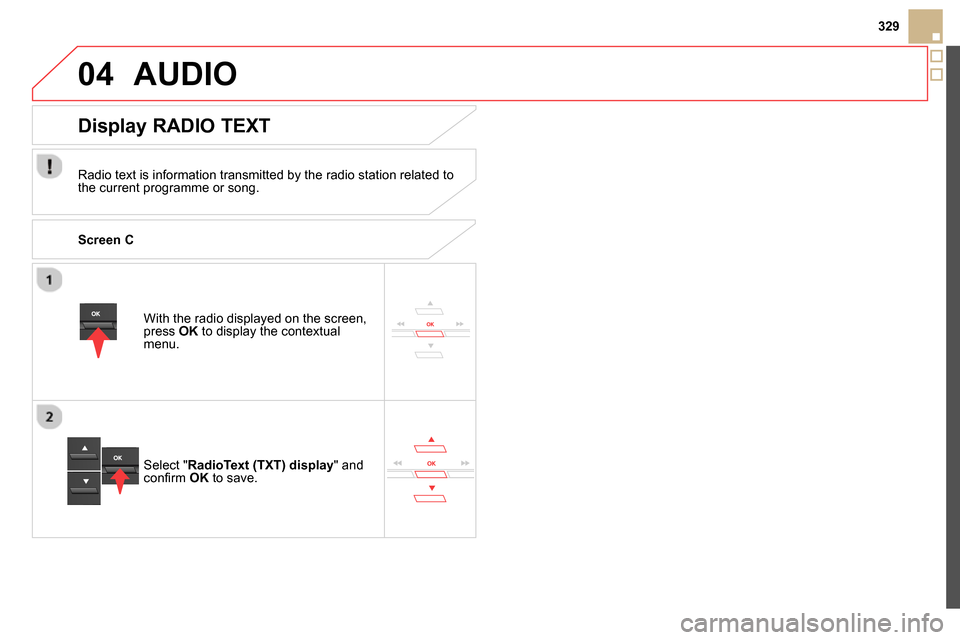
With the radio displayed on the screen,
press OK
to display the contextual
menu.
Select " RadioText (TXT) display
" and
confi rm OK
to save.
Display RADIO TEXT
Radio text is information transmitted by the radio station related to
the current programme or song.
Screen C
Page 347 of 400

06
345
Press
to display the audio settings
menu.
The settings available are:
- Ambience,
- Bass,
- Treble,
- Loudness,
- Distribution: Personalised or Driver,
- Left / right balance,
- Fader (front / rear balance),
- Auto. volume.
Screen C
The distribution (or spatialisation using the Arkamys© system), is
an audio process which allows the sound quality to be improved
according to the setting chosen, corresponding to the position of the
listeners in the vehicle.
AUDIO SETTINGS
Select and confi rm " Other settings…
"
to display the next setting in the list.
The Ambience, Treble and Bass audio settings are different and
independent for each sound source.
On-board audio: Arkamys
©
Sound Staging.
With Sound Staging, the driver and passengers are immersed in an
"audio scene" recreating the natural atmosphere of an auditorium:
truly a part of the scene and its surroundings.
This new sensation is made possible by software in the audio
system which processes the digital signals from the media players
(radio, CD, MP3…) without changing the audio settings. This
processing takes account of the characteristics of the passenger
compartment to produce optimum results.
The Arkamys
© software installed in your audio system processes
the digital signal from the media players (radio, CD, MP3, ...) and
recreates a natural musical scene, with harmonious placement of
instruments and voices in the space in front of passengers, level
with the windscreen.
Page 348 of 400

07 SCREEN MENU MAP(S)
Screen C
MEDIA
Media parameters
Choice of playback mode
Choice of track listing
TELEPHONE
Call
Dial
Directory
Calls list
Voice mail box
Directory management
Consult an entry
Delete an entry
Delete all entries
Telephone management
Telephone status
Hang up
BLUETOOTH CONNECTION
Normal
Random
Random all
Repeat By folders
By artists
By genres
By playlists
Radio parameters
1
2
2
1
2
2
2
2
1
2
2
2
1
2
1
1
1
3
3
3
3
3
3
3
3
1
MAIN FUNCTION
Option A
Option A1
Option A11
Option B...
1
2
2
1
Connections management
Search for a device
Page 350 of 400

FREQUENTLY ASKED QUESTIONS
QUESTION
ANSWER
SOLUTION
There is a difference in
sound quality between
the different audio
sources (radio, CD...).
For optimum sound quality, the audio settings (Volume, Bass, Treble,
Ambience, Loudness) can be adapted to the different sound sources,
which may result in audible differences when changing source (radio,
CD...). Check that the audio settings (Volume, Bass,
Treble, Ambience, Loudness) are adapted to
the sources listened to. It is advisable to set
the AUDIO functions (Bass, Treble, Front-Rear
Fader, Left-Right Balance) to the middle position,
select the musical ambience "None" and set the
loudness correction to the "Active" position in CD
mode or to the "Inactive" position in radio mode.
When changing the
settings for treble and
bass, the ambience
setting is deselected.
When changing the
ambience setting, treble
and bass are reset
to zero. Choosing an ambience imposes settings for treble and bass. Modifying
one without the other is not possible. Modify the treble and bass settings or the
ambience setting to obtain the desired sound
quality.
When changing the
balance setting,
distribution is deselected. Choosing a distribution setting imposes a balance setting. Modifying one
without the other is not possible. Modify the balance setting or the distribution
setting to obtain the desired sound quality. The following tables contain answers to the most frequently asked questions.
Page 351 of 400

349
FREQUENTLY ASKED QUESTIONS
QUESTION
ANSWER
SOLUTION
The quality of reception
of the radio station
listened to gradually
deteriorates or the stored
stations do not function
(no sound, 87.5 MHz is
displayed...). The vehicle is too far from the transmitter used by the station listened
to or there is no transmitter in the geographical area through which the
vehicle is travelling. Activate the RDS function to enable the system
to check whether there is a more powerful
transmitter in the geographical area.
The environment (hills, buildings, tunnels, basement car parks...) block
reception, including in RDS mode. This phenomenon is normal and does not indicate
a failure of the audio equipment.
The aerial is absent or has been damaged (for example when going
through a car wash or into an underground car park). Have the aerial checked by a CITROËN dealer.
Sound cut-outs of 1 to
2 seconds in radio mode. During this brief sound cut-out, the RDS searches for any frequency
permitting better reception of the station. Deactivate the RDS function if the phenomenon is
too frequent and always on the same route.
The traffi c announcement
(TA) is displayed. I do
not receive any traffi c
information. The radio station does not broadcast traffi c information. Tune to a radio station which broadcasts traffi c
information.
The stored stations are
not found (no sound,
87.5 MHz is displayed...). An incorrect waveband is selected. Press the BAND button to return to the waveband
on which the stations are stored.
Page 361 of 400

359Alphabetical index
Radio ...................................................300, 327
Rear foglamp............................... 146, 216, 217
Rear screen (demisting) ........................86, 100
Recharging the battery .......................223, 224
Reduction of electrical load ........................ 225
Regeneration of the particle emissions filter ... 246
Reinitialising the remote control ................... 60
Remote control ........................................ 54- 61
Removing a wheel ......................................206
Removing the mat ......................................... 89
Repair kit, puncture ..................................... 196
Replacing bulbs ................................... 211-218
Replacing fuses .......................................... 219
Replacing the air filter ................................. 246
Replacing the oil filter ................................. 246
R P
Replacing the passenger
compartment filter .................................... 246
Replacing wiper blades.......................158, 226
Resetting the ser vice indicator ..................... 44
Resetting the trip recorder ............................ 46
Reversing camera ....................................... 140
Reversing lamp ................................... 216, 217
Risk areas (update) ..................................... 278
Roof bars ..................................................... 230
Routine checks ................................... 234-247
Running out of fuel (Diesel) ........................ 240
Screen, colour and mapping....................... 271
Screen, instrument panel ........................30, 50
Screen menu map .......................313, 346, 347
Screen, multifunction
(with audio system) ...........................326, 346
Screenwash ................................................ 243
Screenwash fluid level ................................ 243
Screenwash, front ....................................... 156
Seat adjustment ...................................... 78, 79
Seat belts .....................................170, 186 -188
Seat, rear bench .....................................83, 85
Seats, rear ...............................................83, 85
Selector lever,
electronic gearbox .................................... 120
Serial number, vehicle ................................260
Ser vice indicator ........................................... 43
Ser vice warning lamp ................................... 37
S
T
Paint colour code ........................................260
Parking brake, electric ........... 38, 107-113, 247
Parking lamps ............................................. 150
Parking sensors, front ................................. 139
Parking sensors, rear.................................. 138
Particle emission filter ................243, 244, 246
Passenger
compartment filter .................................... 246
Player, CD MP3 ...........................305, 331, 332
Port, USB ..................................... 90, 305, 333
Priming the fuel system .............................. 240
Protecting children ............... 162-177, 188, 190
Puncture ...................................................... 196Ser vicing ....................................................... 25
Setting the clock ..................... 48, 49, 312, 347
Short-cut menus ......................................... 272
Sidelamps .............144, 147, 150, 211, 213 -216
Side repeater .............................................. 215
Ski flap .......................................................... 91
Snow chains ................................................ 210
Spare wheel ................................................ 202
Speed limiter ....................................... 133, 134
Spotlamps, side .................................. 151, 215
Start ............................................................. 223
Starting the vehicle ............. 104, 106, 116, 120
Steering mounted controls,
audio ................................................. 270, 325
Stopping the vehicle ........... 104, 106, 116, 120
Stop & Start .............................. 51, 72, 97, 100,
127, 222, 237, 245
Storage .............................................. 88, 90 -92
Storing driving positions ............................... 80
Stowing rings ................................................ 92
Synchronising the remote control ................. 60
Synthesiser, voice .......................................284
System, navigation...................................... 273
Table of weights .................................. 251, 255
Tables of engines ................................250, 253
Tables of fuses ............................................ 219
Tank, fuel ....................................................... 73
Technical data ..................................... 248 -260
Telephone ...........................................290, 337
Page 377 of 400

5
AdBlue ®
additive
Topping up the AdBlue ®
additive
If the AdBlue ®
additive is spilt outside
of the tank, wash the spillage using
cold water to avoid crystallisation of the
product and damage to surrounding
materials.
If the AdBlue
®
additive has already
formed crystals, wipe them of with a
sponge and hot water.
As soon as the "UREA" warning lamp comes on,
you must fill or top up the additive tank as soon
as possible.
For filling of the AdBlue
®
tank, it is recommended
that you contact a franchised dealer or a
qualified workshop.
This refilling operation forms part of the routine
ser vicing of your vehicle (refer to the ser vicing
booklet).
If the AdBlue
®
additive is completely used up
("starting prevented" or "No start on 0 km"
message), you will not be able to restart the
vehicle.
To allow starting, you can top-up yourself,
adding at least 3.8 litres of the AdBlue
® additive
(equivalent to around 3 000 miles (5 000 km) of
range for the AdBlue
® additive) before making an
appointment with a dealer as soon as possible to
have the AdBlue
® tank filled. If you have to top-up yourself, ensure that the
vehicle is on a flat and level sur face (not over a
kerb or on a slope, ...) so as to ensure correct
filling.
Do not fill the tank when the ambient temperature
is below -10°C.
)
If necessary, use the
screwdriver end of the
towing eye, located in the
boot.
)
Remove the ignition key, or if your vehicle
has one, press the START/STOP button to
switch off the engine.
)
Lift the boot carpet then the cover or spare
wheel for access to the tank filler cap.
)
Unscrew and remove the black cap.
)
Unscrew and remove the 2nd cap (blue).
)
Remove the cap from the AdBlue
®
additive
container
)
To top-up, follow the instructions on the
container.
)
Wipe any splashes of the AdBlue
®
additive
)
Once you have finished topping-up, refit the
blue and then the black cap.
)
Wait for around 5 minutes without doing
anything on the vehicle (opening a door,
radio, …) before switching on the ignition.
Page 383 of 400

5
AdBlue ®
additive
Topping up the AdBlue ®
additive
If the AdBlue ®
additive is spilt outside
of the tank, wash the spillage using
cold water to avoid crystallisation of the
product and damage to surrounding
materials.
If the AdBlue
®
additive has already
formed crystals, wipe them of with a
sponge and hot water.
As soon as the "UREA" warning lamp comes on,
you must fill or top up the additive tank as soon
as possible.
For filling of the AdBlue
®
tank, it is recommended
that you contact a franchised dealer or a
qualified workshop.
This refilling operation forms part of the routine
ser vicing of your vehicle (refer to the ser vicing
booklet).
If the AdBlue
®
additive is completely used up
("starting prevented" or "No start on 0 km"
message), you will not be able to restart the
vehicle.
To allow starting, you can top-up yourself,
adding at least 3.8 litres of the AdBlue
® additive
(equivalent to around 3 000 miles (5 000 km) of
range for the AdBlue
® additive) before making an
appointment with a dealer as soon as possible to
have the AdBlue
® tank filled. If you have to top-up yourself, ensure that the
vehicle is on a flat and level sur face (not over a
kerb or on a slope, ...) so as to ensure correct
filling.
Do not fill the tank when the ambient temperature
is below -10°C.
)
If necessary, use the
screwdriver end of the
towing eye, located in the
boot.
)
Remove the ignition key, or if your vehicle
has one, press the START/STOP button to
switch off the engine.
)
Lift the boot carpet then the cover or spare
wheel for access to the tank filler cap.
)
Unscrew and remove the black cap.
)
Unscrew and remove the 2nd cap (blue).
)
Remove the cap from the AdBlue
®
additive
container
)
To top-up, follow the instructions on the
container.
)
Wipe any splashes of the AdBlue
®
additive
)
Once you have finished topping-up, refit the
blue and then the black cap.
)
Wait for around 5 minutes without doing
anything on the vehicle (opening a door,
radio, …) before switching on the ignition.