Page 47 of 400

45Monitoring
Engine oil level indicator *
Oil level incorrect
This is indicated by the display of the message
"Oil level incorrect" in the instrument panel
screen, accompanied by the ser vice warning
lamp and an audible signal.
If the low oil level is confirmed by a check using
the dipstick, the level must be topped up to
avoid damage to the engine.
Refer to the "Checking levels" section.
Oil level indicator fault
This is signalled by the display of the message "Oil
level measurement invalid" in the instrument panel.
Contact a CITROËN dealer or a qualified
workshop.
In the event of a fault with the electric indicator,
the oil level is no longer monitored.
If the system is faulty, you must check the
engine oil level using the manual dipstick
located under the bonnet.
Refer to the "Checking levels" section.
On versions fitted with an electric oil level
indicator, the state of the engine oil level is
displayed in the instrument panel for a few
seconds, after the ser vicing information.
The level read will only be correct if
the vehicle is on level ground and the
engine has been off for more than
30 minutes.
Oil level correct
*
Depending on version.
Page 48 of 400

System for manual adjustment of the
brightness of the instruments and controls in
relation to the exterior brightness.
Lighting dimmer
Activation
When the lighting is on:
press the button to change the brightness
of the instruments and controls,
when the level of brightness required is
reached, release the button.
Deactivation
When the lighting is off, or in day mode on
vehicles fitted with daytime running lamps,
pressing the button does not have any effect.
The total and trip distances are displayed for thirty seconds when the ignition is switched off, when
the driver's door is opened and when the vehicle is locked or unlocked.
Distance recorders
Total distance recorder
System which measures the total distance
travelled by the vehicle since its first
registration.
To conform to legislation in the country
you are crossing, change the units
of distance (miles or km) via the
configuration menu.
Trip distance recorder
System which measures a distance travelled
during a day or other period since it was reset
to zero by the driver.
With the ignition on, press the button until
zeros appear.
Page 52 of 400
Tr i p c o m p u t e r
System that gives you information on the journey in progress (range, fuel consumption…).
When the trip required is displayed, press
the control for more than two seconds
or use the left hand thumb wheel of the
steering mounted controls.
Trips "1"
and "2"
are independent but their use
is identical.
For example, trip "1"
can be used for daily
figures, and trip "2"
for monthly figures.
Instrument panel screen
Information display
Press the button on the end of the wiper
control stalk
to display the various tabs in
succession.
- The current information tab with:
●
the range,
●
the current fuel consumption,
●
the Stop & Start time counter.
- Tr i p "1"
with:
●
the average speed,
for the first trip.
●
the average fuel consumption.
- Tr i p "2"
with:
●
the average speed,
for the second trip.
●
the average fuel consumption.
Tr i p r e s e t
- Radio or media.
- Satellite navigation.
Page 53 of 400

51Monitoring
If dashes are displayed continuously
while driving in place of the digits,
contact a CITROËN dealer or a
qualified workshop. This value may vary following a change
in the style of driving or the relief,
resulting in a significant change in the
current fuel consumption.
Trip computer, a few definitions…
Range
(miles or km)
This indicates the distance
which can still be travelled with
the fuel remaining in the tank
in relation to the average fuel
consumption over the last few
miles (kilometres) travelled.
When the range falls below 20 miles (30 km),
dashes are displayed. After filling with at least
5 litres of fuel, the range is recalculated and is
displayed when it exceeds 60 miles (100 km). This function is only displayed from
20 mph (30 km/h).
Current fuel consumption
(mpg or l/100 km or km/l)
This is the average fuel consumption
during the last few seconds.
Average fuel
consumption
(mpg or l/100 km or km/l)
This is the average fuel
consumption since the last trip
computer zero reset.
Average speed
(mph or km/h)
This is the average speed calculated
since the last trip computer zero
reset (ignition on).
Stop & Start time
counter
(minutes / seconds or hours /
minutes)
If your vehicle is fitted with Stop & Start, a time
counter calculates the time spent in STOP
mode during a journey.
It resets to zero every time the ignition is
switched on with the START/STOP button.
Page 56 of 400
Electronic key
remote control
Unlocking the vehicle
Complete unlocking
Selective unlocking
System which permits central unlocking or
locking of the vehicle using the lock or from a
distance. It is also used to locate and start the
vehicle, as well as providing protection against
theft.
This setting is done in the
configuration menu.
Complete unlocking is activated by
default.
Unlocking is confirmed by rapid flashing
of the direction indicators for around
two seconds.
At the same time, depending on
version, the door mirrors unfold.
To unlock only the driver's door,
press the open padlock once.
Press the open padlock to unlock
the vehicle.
To unlock the other doors and the boot,
press the open padlock again.
Page 57 of 400
55Access
Unlocking the boot
Locking the vehicle
Locking is confirmed by fixed
lighting of the direction indicators for
approximately two seconds.
The door mirrors fold at the same time.
Press the closed padlock to lock
the vehicle completely.
Hold the button down until the
windows close completely.
Press this button until you hear
the boot unlock. The vehicle is
completely unlocked.
Be aware of children when operating
the windows.
If one of the doors or the boot is not fully
closed, locking does not take place.
When the vehicle is locked, if it is
unlocked inadvertently, it will relock
automatically after about thirty seconds
unless a door is opened.
If the alarm was previously activated, it
will not be reactivated automatically.
Page 58 of 400

Unlocking the vehicle
"Keyless Entry and Starting" system
System that allows the opening, closing
and starting of the vehicle while keeping the
electronic key on your person.
Complete unlocking
With the electronic key on your person
and in the recognition zone A
, pass your
hand behind the door handle to unlock the
vehicle, then pull the handle to open the
door.
Your passengers can also open their
doors, as soon as the electronic key is in
the recognition zone around the vehicle.
Selective unlocking
This setting is done via the
configuration menu.
By default, complete unlocking is
activated.
To unlock only the drivers door, with the
electronic key on your person, pass your
hand behind the driver's door handle then
pull the door handle to open.
To unlock the complete vehicle, pass your
hand behind one of the passenger door
handles on the same side of the vehicle as
the electronic key is located, then pull the
door handle to open.
Unlocking is confirmed by rapid
flashing of the direction indicators for
approximately two seconds.
The door mirrors unfold at the same
time.
If the alarm is on, the audible warning
when opening a door with the key
(integral with the remote control), will
stop on starting the engine.
It can also be used as a remote control;
see the "Electronic key/remote control"
section.
For reasons of safety and theft
protection, do not leave your electronic
key in the vehicle, even when you are
close to it.
It is recommended that you keep it on
your person: in a pocket, bag, ...
Page 59 of 400
57Access
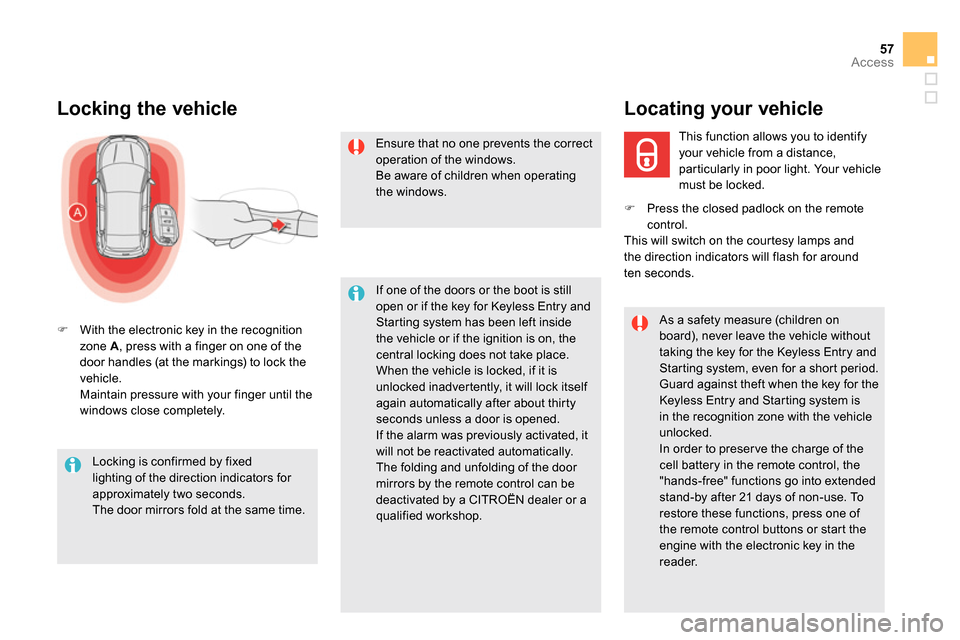
Locking the vehicle
With the electronic key in the recognition
zone A
, press with a finger on one of the
door handles (at the markings) to lock the
vehicle
.
Maintain pressure with your finger until the
windows close completely.
Locking is confirmed by fixed
lighting of the direction indicators for
approximately two seconds.
The door mirrors fold at the same time.
If one of the doors or the boot is still
open or if the key for Keyless Entry and
Starting system has been left inside
the vehicle or if the ignition is on, the
central locking does not take place.
When the vehicle is locked, if it is
unlocked inadvertently, it will lock itself
again automatically after about thirty
seconds unless a door is opened.
If the alarm was previously activated, it
will not be reactivated automatically.
The folding and unfolding of the door
mirrors by the remote control can be
deactivated by a CITROËN dealer or a
qualified workshop.
As a safety measure (children on
board), never leave the vehicle without
taking the key for the Keyless Entry and
Star ting system, even for a shor t period.
Guard against theft when the key for the
Keyless Entry and Starting system is
in the recognition zone with the vehicle
unlocked.
In order to preser ve the charge of the
cell battery in the remote control, the
"hands-free" functions go into extended
stand-by after 21 days of non-use. To
restore these functions, press one of
the remote control buttons or start the
engine with the electronic key in the
reader.
Ensure that no one prevents the correct
operation of the windows.
Be aware of children when operating
the windows.
This function allows you to identify
your vehicle from a distance,
particularly in poor light. Your vehicle
must be locked.
Locating your vehicle
Press the closed padlock on the remote
control.
This will switch on the courtesy lamps and
the direction indicators will flash for around
ten seconds.


