Page 224 of 256
01
MODE
222
FIRST STEPS
On/Off.
Volume (each source is
independent).Select:
-
the next radio frequency up/
down automatically
.
-
the previous/next line in a list or
a menu.
-
the previous/next media folder
.
AM radio buttons 1 to 6: select a preset radio station.
FM buttons 1 to 5: select a preset radio station.
FM list: display the radio stations received.
Long press: preset a radio station.
Back: abandon current operation, up on level in the menu. Display menu and set options.
Rotate: scroll through a list or
change radio station.
Press: confirm the option displayed
in the screen.
Accept an incoming call.
Reject an incoming call.
End call. Select AM, FM and DAB*
wavebands.
Select the BTA (Bluetooth Audio)
and AUX source.
Audio system with Bluetooth®
* Depending on equipment.
Page 225 of 256
MODE
01
223
On/Off.
Volume (each source is
independent).
Select previous/next media folder.
AM radio buttons 1 to 6: select a preset radio station.
FM radio buttons 1 to 5: select a preset radio station.
FM
list: display the radio stations received.
Long press: preset a radio station.
Back: abandon the current operation, go up one level in a menu. Display menu and set options.
Rotate: scroll through a list or
change radio station.
Press: confirm the option displayed
in the screen.
Select:
-
the next radio frequency up/
down automatically
.
-
the previous/next line in a list or
a menu.
Select
AM and FM
wavebands.
Select the BTA (Bluetooth Audio)
and AUX source.
FIRST STEPS
Audio system
B4_en_Chap12b_Autoradio-Toyota-2_ed01-2014
Page 226 of 256
02
224
STEERING MOUNTED CONTROLS
Short press: Select AM and FM
wavebands and BTA (Bluetooth Audio)
and AUX sources.
Long press: Mute / restore sound from
the radio or pause media sources.
Increase volume.
Decrease volume.
Radio: change to preset radio stations
in ascending order.
Media: next track.
Radio: change to preset radio stations
in descending order.
Media: previous track.Accept an incoming call.
Reject the incoming call.
End the call in progress.
Page 227 of 256
03
MODE
MODE
225
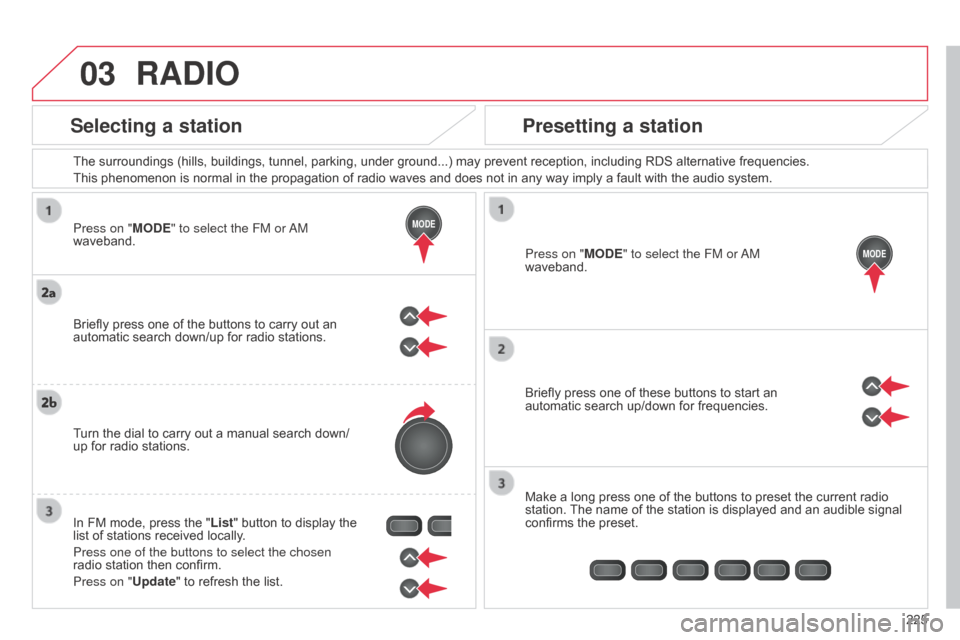
Press on "MODE" to select the FM or
a
M
waveband. The surroundings (hills, buildings, tunnel, parking, under ground...) may prevent reception, including RDS alternative frequencies.
This phenomenon is normal in the propagation of radio waves and does not in any way imply a fault with the audio system.
Press on "MODE" to select the FM or
a
M
waveband.
Briefly press one of these buttons to start an
automatic search up/down for frequencies.
Make a long press one of the buttons to preset the current radio
station. The name of the station is displayed and an audible signal
confirms the preset.
Briefly press one of the buttons to carry out an
automatic search down/up for radio stations.
Turn the dial to carry out a manual search down/
up for radio stations.
In FM mode, press the "List" button to display the
list of stations received locally.
Press one of the buttons to select the chosen
radio station then confirm.
Press on "Update" to refresh the list.
RADIO
Selecting a station
Presetting a station
B4_en_Chap12b_Autoradio-Toyota-2_ed01-2014
Page 229 of 256
03
MODE
227
RADIO
If "DAB AF" tracking is activated, there is a difference of a few
seconds when the system switches to the "FM" analogue radio
station with sometimes a variation in volume.
When the digital signal is restored, the system automatically
changes back to "DAB".
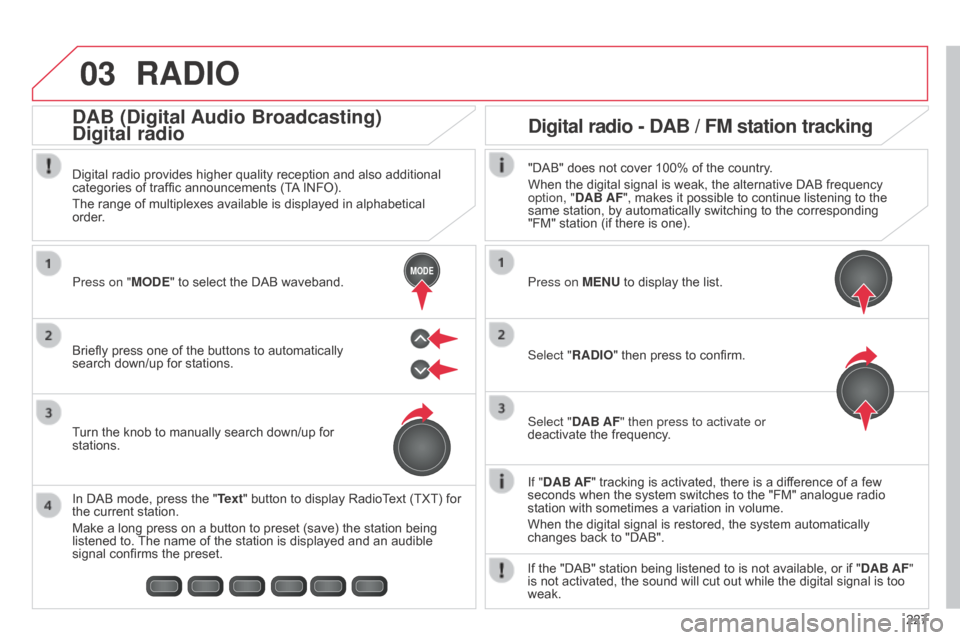
Briefly press one of the buttons to automatically
search down/up for stations. Press on "MODE" to select the DAB waveband.
In DAB mode, press the "Text" button to display RadioText (TXT) for
the current station.
Make a long press on a button to preset (save) the station being
listened to. The name of the station is displayed and an audible
signal confirms the preset. Turn the knob to manually search down/up for
stations. Digital radio provides higher quality reception and also additional
categories of traffic announcements (TA INFO).
The range of multiplexes available is displayed in alphabetical
order.
Press on MENU to display the list.
Select "RADIO" then press to confirm.
Select "DAB AF" then press to activate or
deactivate the frequency."DAB" does not cover 100% of the country.
When the digital signal is weak, the alternative DAB frequency
option, "DAB AF", makes it possible to continue listening to the
same station, by automatically switching to the corresponding
"FM" station (if there is one).
If the "DAB" station being listened to is not available, or if " DAB AF"
is not activated, the sound will cut out while the digital signal is too
weak.
Digital radio - DAB / FM station tracking
DAB (Digital Audio Broadcasting)
Digital radio
B4_en_Chap12b_Autoradio-Toyota-2_ed01-2014


