2014 Citroen BERLINGO mat
[x] Cancel search: matPage 2 of 268

On-line owner's handbook
Referring to the owner's handbook on-line also gives you
access to the latest information available, easily identifi ed by
the bookmark, associated with this symbol:
If the "MyCitroën" function is not available on the CITROËN public\
website for your country, you can fi nd your handbook at the following
address:
http://service.citroen.com Select:
You can fi nd your handbook on the CITROËN website, under
"MyCitroën".
This personal and customisable space allows you to establish direct
and special contact with CITROËN.
The Vehicle documentation link in the home page (no registration is
needed),
the language,
the vehicle, its body style,
the print edition of your handbook appropriate for the date of registrat\
ion
of your vehicle.
You have access to your handbook on line, together with the latest
information, identifi ed by the symbol:
Page 3 of 268

The fi tting of electrical equipment or
accessories which are not recommended
by CITROËN may result in a failure of
your vehicle's electronic system. Please
note this specifi c warning and contact
a CITROËN dealer to be shown the
recommended equipment and accessories.
For any work on your vehicle, use a
qualifi ed workshop that has the technical
information, competence and equipment
required, which a CITROËN dealer is able
to provide. Within the chapters, symbols draw your
attention to specifi c information: CITROËN has a presence on every continent,
a complete product range,
bringing together technology and a permanent spirit of innovation,
for a modern and creative approach to mobility.
We thank you and congratulate you on your choice.
Happy motoring!
PRESENTATION
At the wheel of your new vehicle,
getting to know each system,
each control, each setting,
makes your trips, your journeys
more comfortable and more enjoyable.
directs you to the chapter and section
which contains detailed information
concerning a function,
indicates important information relating
to use of the equipment,
alerts you to the safety of individuals
and equipment on board.
Page 5 of 268

3
Contents
CONTENTS
corresponds to
a left hand drive
vehicle. corresponds to
a right hand drive
vehicle.
9. TECHNOLOGY on BOARD5. ACCESSORIES 128-131
6. CHECKS
132-141
7. QUICK HELP
142-161
Emergency or
assistance 9.1
eMyWay 9.3
Audio system 9.63
Towing a trailer 128
Other accessories 130
Opening the bonnet 133
Petrol engine 134
Diesel engine 135
Levels 136
Checks 138
Fuel 140
Fuel cut-off
141
Diesel priming pump 141 Battery 142
Puncture repair kit 144
Changing a wheel 145
Removable snow
screen 149
Snow chains 150
Changing a bulb 151
a fuse 156
a wiper blade 160
Being towed 161
8. TECHNICAL DATA
162-168
Dimensions 162
Weights 166
Identifi cation markings 167
10. VISUAL SEARCH
169-176
Exterior 169
Instruments and
controls 170
Interior 174
Technical data - Maintenance 176
The "Visual search" section
assists you in fi nding the
controls and functions
and their associated page
numbers on the schematic
outlines of the vehicle
(visual index).
The "Technology on board"
section presents the new
audio/navigation systems.
Page 11 of 268

3
3
7
3
4952151
53,
160
9
1
FAMILIARISATION
Interior
Lighting off.
Sidelamps.
Main beam headlamps (blue).
Dipped beam headlamps
(green). 2 fast.
1 normal.
I intermittent.
0 park.
single wipe.
AUTO, press the stalk down.
Reactivate if the ignition
has been off for more than
one minute.
AUTO, automatic
illumination of headlamps.
VISIBILITY
Motorway function: press the stalk up
or down to fl ash the direction indicator
three times. Lighting stalk
Wiper stalk Changing bulbs
In bad weather or in winter, ensure that
the lamps are not covered with mud or
snow.
Special position for the front wipers
For one minute after switching off the
ignition, any action on the wiper stalk
places the wiper arms and blades
vertically alongside the screen pillars.
Page 12 of 268

3
2
3
9 9
4
5448
57 9.1
9.3,
9.63
108
10
Interior
Cruise control
The vehicle speed must be higher than
25 mph (40 km/h) with at least 4th gear
engaged.
From the time you release the brake
pedal, the vehicle is held for approximately
2 seconds without need to use the parking
brake, to allow you to move off.
DRIVING SAFELY
The minimum speed which can be
programmed is 20 mph (30 km/h). Emergency or roadside assistance call
Hill start assist
Audio system
Grip control
Speed limiter This in-car system allows
you to send an emergency
or roadside assistance call
to the dedicated CITROËN
centres.
ESC (normal mode).
Snow.
Mud.
Sand.
ESC OFF.
Page 17 of 268

15
1
FAMILIARISATION
ECO-DRIVING
Eco-driving is a range of everyday practices that allow the motorist to \
optimise their fuel consumption and CO2
emissions.
Optimise the use of your
gearbox
With a manual gearbox, move
off gently and change up without
waiting. During acceleration change
up early.
With an automatic or electronic
gearbox, give preference to
automatic mode and avoid pressing
the accelerator pedal heavily or
suddenly.
Control the use of your
electrical equipment
Before moving off, if the passenger
compartment is too warm, ventilate it
by opening the windows and air vents
before using the air conditioning.
Above 30 mph (50 km/h), close the
windows and leave the air vents open.
Remember to make use of equipment
that can help keep the temperature
in the passenger compartment down
(sunroof and window blinds...). Switch off the headlamps and front
foglamps when the level of light does
not require their use.
Avoid running the engine before
moving off, particularly in winter; your
vehicle will warm up much faster
while driving.
Drive smoothly
Maintain a safe distance between
vehicles, use engine braking rather
than the brake pedal, and press the
accelerator progressively. These
practices contribute towards a
reduction in fuel consumption and CO
2
emissions and also helps reduce the
background traffi c noise.
If your vehicle has cruise control,
make use of the system at speeds
above 25 mph (40 km/h) when the
traffi c is fl owing well.
As a passenger, if you avoid
connecting your multimedia devices
(fi lm, music, video game...), you
will contribute towards limiting the
consumption of electrical energy, and
so of fuel.
Disconnect your portable devices
before leaving the vehicle. Switch off the air conditioning, unless
it has automatic regulation, as
soon as the desired temperature is
attained.
Switch off the demisting and
defrosting controls, if not automatic.
Switch off the heated seat as soon as
possible.
The gear shift indicator invites you
engage the most suitable gear: as
soon as the indication is displayed in
the instrument panel, follow it straight
away.
For vehicles fi tted with an electronic
or automatic gearbox, this indicator
appears only in manual mode.
Page 19 of 268
17
Access
READY TO GO
2
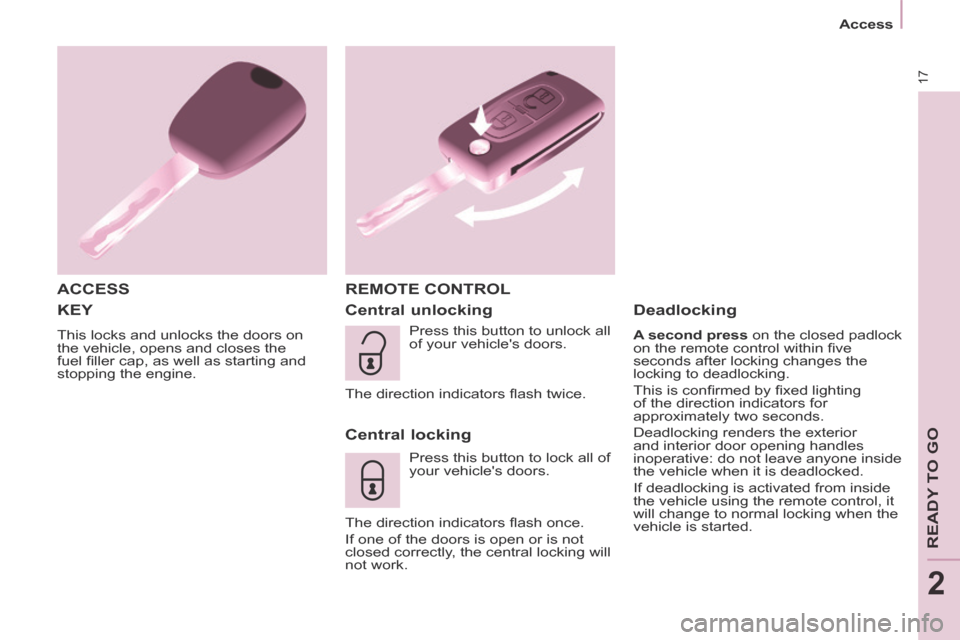
KEY
This locks and unlocks the doors on
the vehicle, opens and closes the
fuel fi ller cap, as well as starting and
stopping the engine.
ACCESS REMOTE CONTROL
Central unlocking
Central locking
Press this button to lock all of
your vehicle's doors.
The direction indicators fl ash once.
If one of the doors is open or is not
closed correctly, the central locking will
not work.
Deadlocking
A second press on the closed padlock
on the remote control within fi ve
seconds after locking changes the
locking to deadlocking.
This is confi rmed by fi xed lighting
of the direction indicators for
approximately two seconds.
Deadlocking renders the exterior
and interior door opening handles
inoperative: do not leave anyone inside
the vehicle when it is deadlocked.
If deadlocking is activated from inside
the vehicle using the remote control, it
will change to normal locking when the
vehicle is started.
Press this button to unlock all
of your vehicle's doors.
The direction indicators fl ash twice.
Page 20 of 268

18
Access
Good practice
Take care not to allow the remote
control to come into contact with
grease, dust, rain or a damp
environment.
A heavy object attached to the key
(keyring, ...) weighing on the shaft of
the key in the switch, may cause a
malfunction.
REMOTE CONTROL
Reinitialising the remote control
Following changing of the remote
control battery or disconnection of the
vehicle battery, the remote control may
have to be reinitialised.
Wait at least one minute before using
the remote control.
Insert the key in the ignition switch with
the buttons (padlocks) of the remote
control facing you.
Switch on the ignition.
Press the locking padlock for at
least fi ve seconds within the next
ten seconds.
Switch off the ignition.
Wait at least one minute before using
the remote control.
The remote control is now working
again.
Use only identical batteries or
batteries of an equivalent type to those
recommended by CITROËN dealers.
Do not discard the remote control
batteries, they contain metals which
are harmful to the environment.
Deposit them at a CITROËN
dealership, or at an authorised
collection point.
Folding / unfolding the key
Changing the battery
Battery ref.: CR1620 / 3 volts.
The "battery fl at" information is given
by an audible signal, accompanied by
a message in the screen.
To replace the battery, unclip the
casing using a coin at the ring.
If the remote control does not work
after the battery has been changed,
reinitialise the remote control.
There is a risk of damage if the
replacement battery is not the correct
type. Press this button to release
the key from its housing.
To fold the key, press this
chromed button then fold
the key into the housing.
If you do not press the button, the
mechanism may be damaged.