2014 CHRYSLER 300 climate control
[x] Cancel search: climate controlPage 353 of 615
CLIMATE CONTROLS
The air conditioning and heating system is designed to
make you comfortable in all types of weather. This
system can be operated through either the controls on the
instrument panel or through the Uconnect® system dis-
play.
When the Uconnect® system is in different modes (Ra-
dio, Player, Settings, More, etc.) the driver and passenger
temperature settings will be indicated at the top of the
display.
General Overview
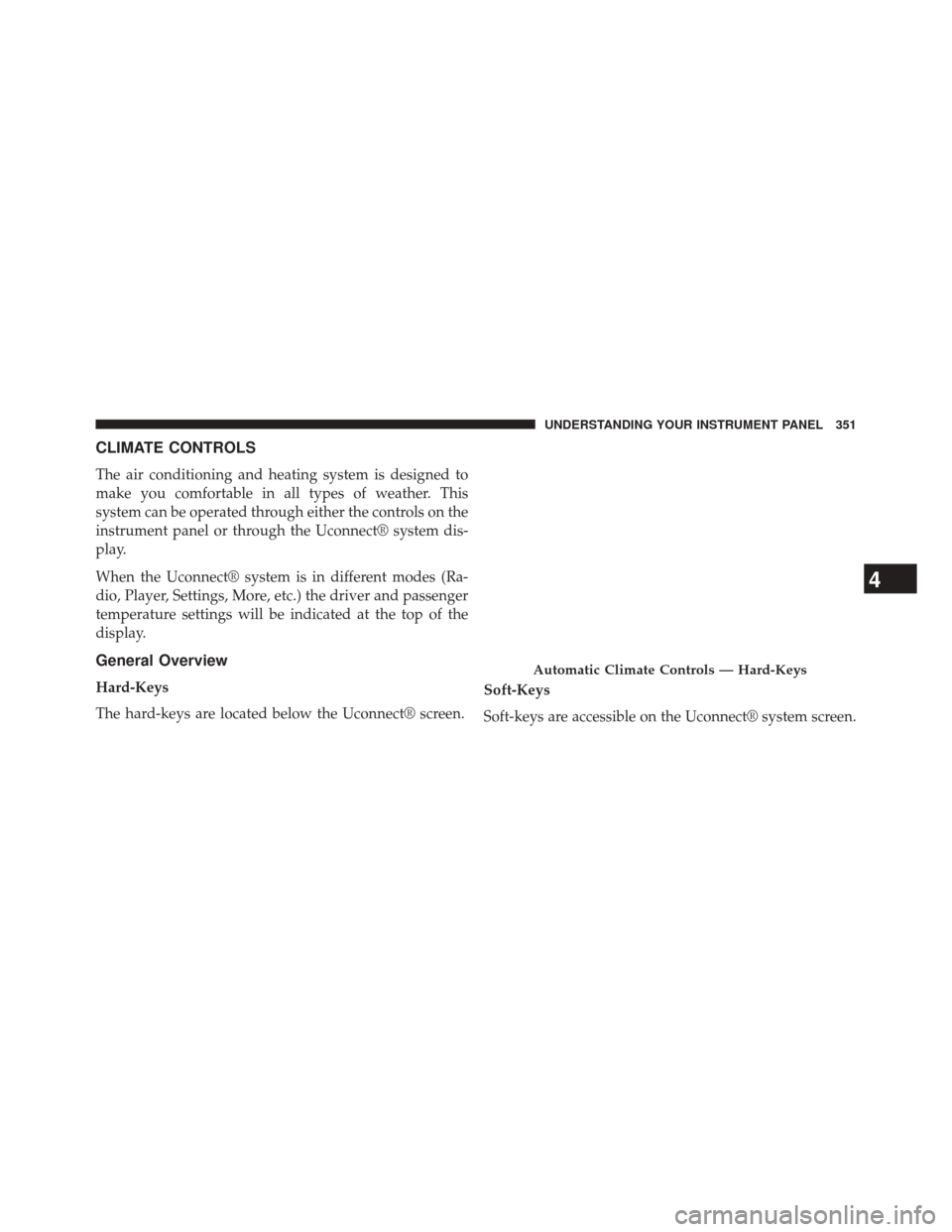
Hard-Keys
The hard-keys are located below the Uconnect® screen.Soft-Keys
Soft-keys are accessible on the Uconnect® system screen.
Automatic Climate Controls — Hard-Keys
4
UNDERSTANDING YOUR INSTRUMENT PANEL 351
Page 355 of 615
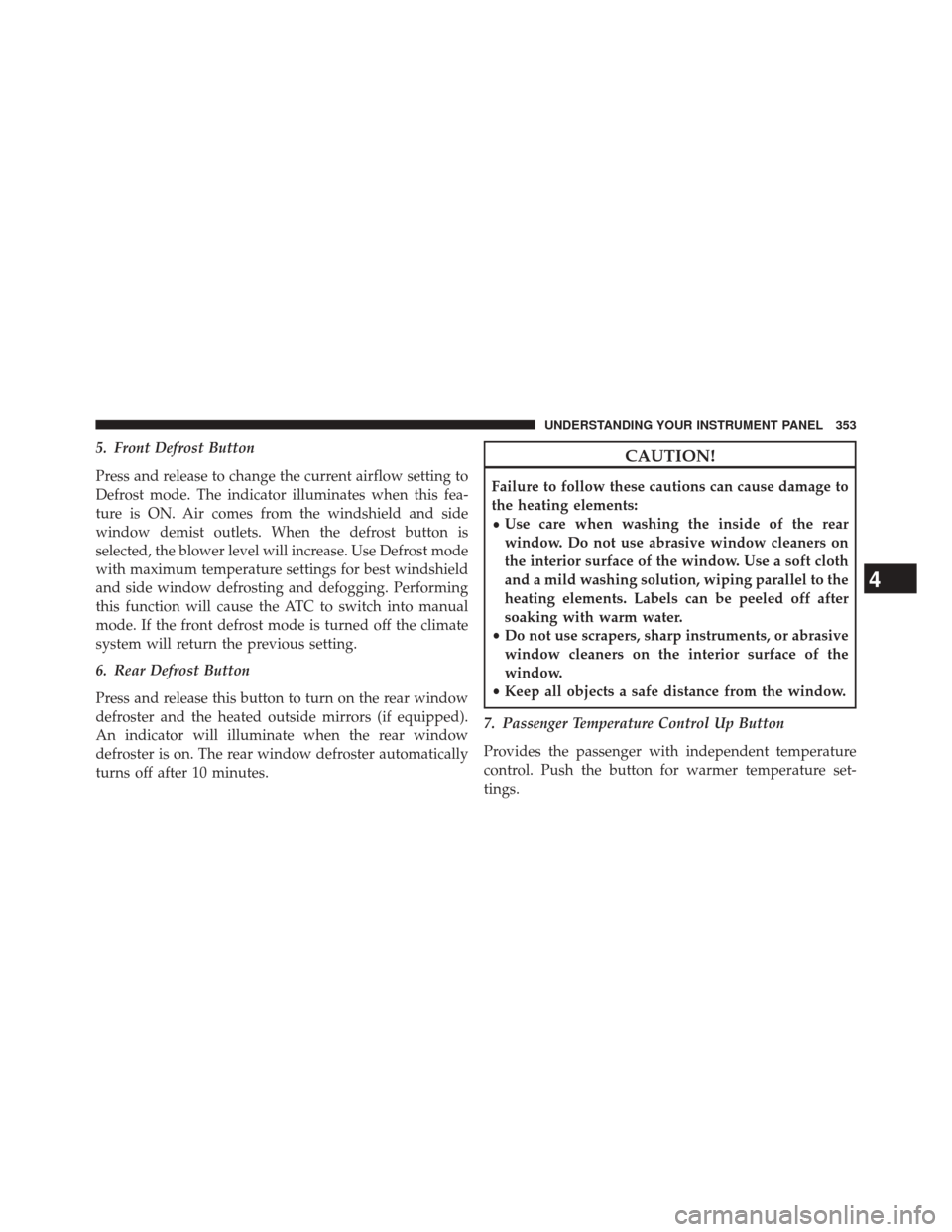
5. Front Defrost Button
Press and release to change the current airflow setting to
Defrost mode. The indicator illuminates when this fea-
ture is ON. Air comes from the windshield and side
window demist outlets. When the defrost button is
selected, the blower level will increase. Use Defrost mode
with maximum temperature settings for best windshield
and side window defrosting and defogging. Performing
this function will cause the ATC to switch into manual
mode. If the front defrost mode is turned off the climate
system will return the previous setting.
6. Rear Defrost Button
Press and release this button to turn on the rear window
defroster and the heated outside mirrors (if equipped).
An indicator will illuminate when the rear window
defroster is on. The rear window defroster automatically
turns off after 10 minutes.CAUTION!
Failure to follow these cautions can cause damage to
the heating elements:
•Use care when washing the inside of the rear
window. Do not use abrasive window cleaners on
the interior surface of the window. Use a soft cloth
and a mild washing solution, wiping parallel to the
heating elements. Labels can be peeled off after
soaking with warm water.
• Do not use scrapers, sharp instruments, or abrasive
window cleaners on the interior surface of the
window.
• Keep all objects a safe distance from the window.
7. Passenger Temperature Control Up Button
Provides the passenger with independent temperature
control. Push the button for warmer temperature set-
tings.
4
UNDERSTANDING YOUR INSTRUMENT PANEL 353
Page 356 of 615
NOTE:Pressing this button while in Sync mode will
automatically exit Sync.
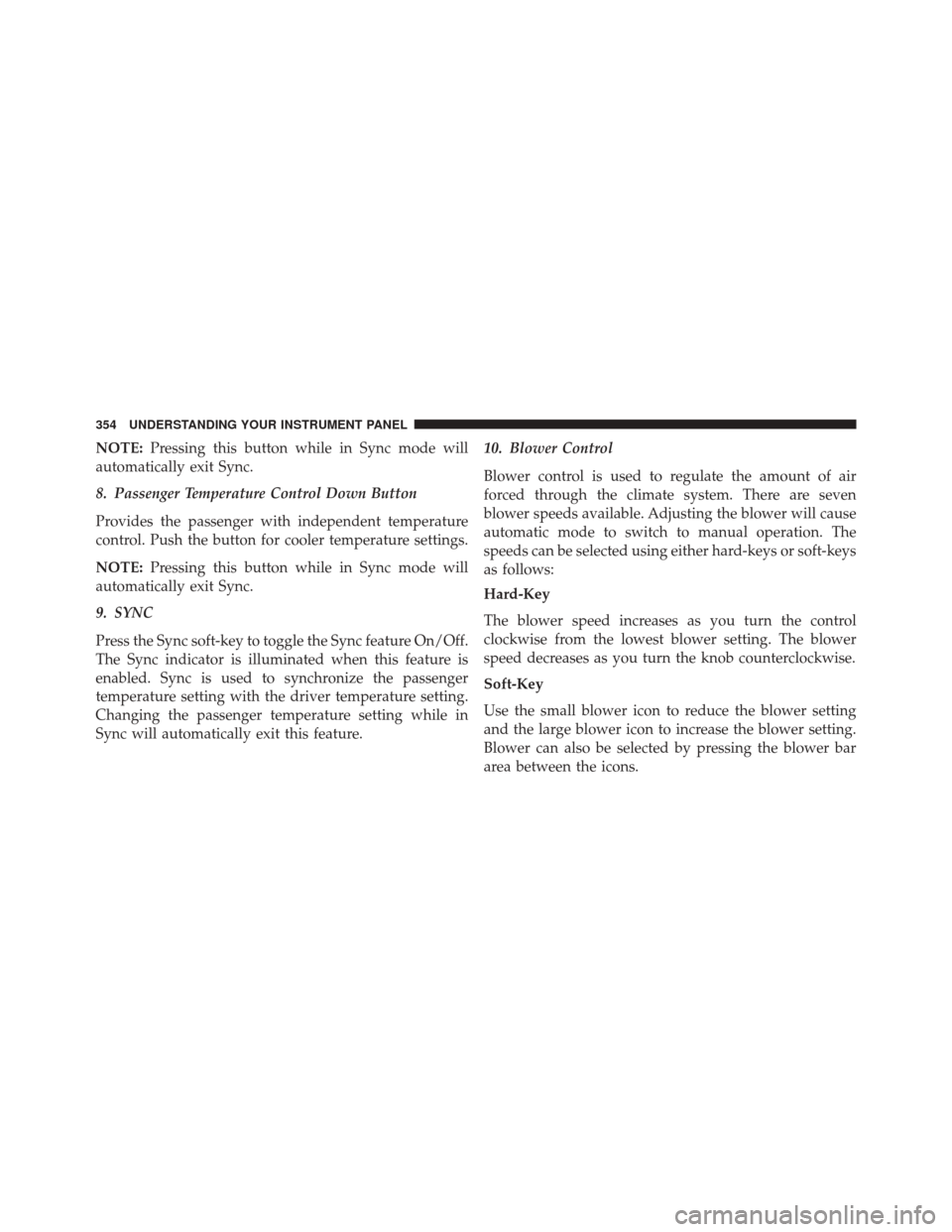
8. Passenger Temperature Control Down Button
Provides the passenger with independent temperature
control. Push the button for cooler temperature settings.
NOTE: Pressing this button while in Sync mode will
automatically exit Sync.
9. SYNC
Press the Sync soft-key to toggle the Sync feature On/Off.
The Sync indicator is illuminated when this feature is
enabled. Sync is used to synchronize the passenger
temperature setting with the driver temperature setting.
Changing the passenger temperature setting while in
Sync will automatically exit this feature. 10. Blower Control
Blower control is used to regulate the amount of air
forced through the climate system. There are seven
blower speeds available. Adjusting the blower will cause
automatic mode to switch to manual operation. The
speeds can be selected using either hard-keys or soft-keys
as follows:
Hard-Key
The blower speed increases as you turn the control
clockwise from the lowest blower setting. The blower
speed decreases as you turn the knob counterclockwise.
Soft-Key
Use the small blower icon to reduce the blower setting
and the large blower icon to increase the blower setting.
Blower can also be selected by pressing the blower bar
area between the icons.
354 UNDERSTANDING YOUR INSTRUMENT PANEL
Page 357 of 615
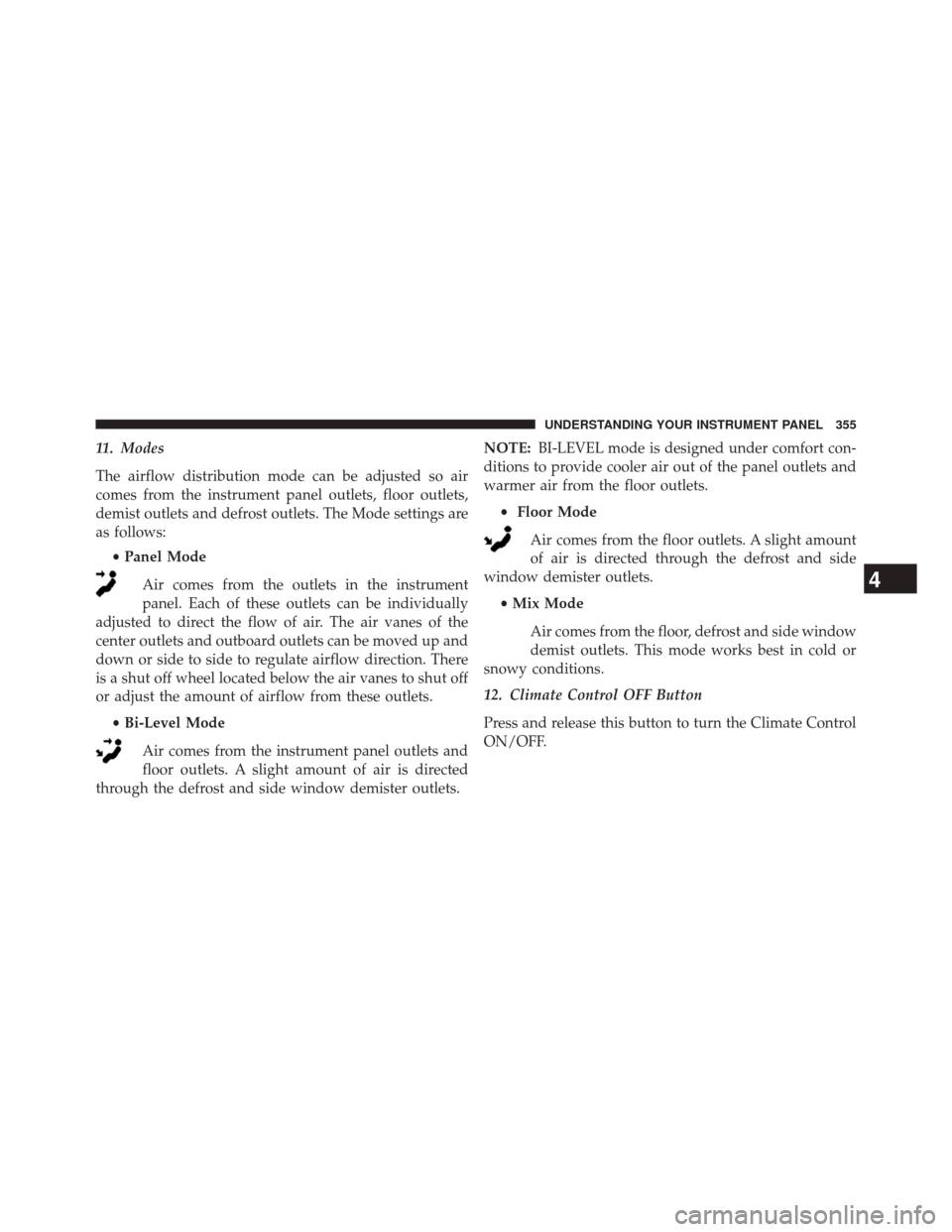
11. Modes
The airflow distribution mode can be adjusted so air
comes from the instrument panel outlets, floor outlets,
demist outlets and defrost outlets. The Mode settings are
as follows:•Panel Mode
Air comes from the outlets in the instrument
panel. Each of these outlets can be individually
adjusted to direct the flow of air. The air vanes of the
center outlets and outboard outlets can be moved up and
down or side to side to regulate airflow direction. There
is a shut off wheel located below the air vanes to shut off
or adjust the amount of airflow from these outlets.
•Bi-Level Mode
Air comes from the instrument panel outlets and
floor outlets. A slight amount of air is directed
through the defrost and side window demister outlets. NOTE:
BI-LEVEL mode is designed under comfort con-
ditions to provide cooler air out of the panel outlets and
warmer air from the floor outlets.
• Floor Mode
Air comes from the floor outlets. A slight amount
of air is directed through the defrost and side
window demister outlets.
•Mix Mode
Air comes from the floor, defrost and side window
demist outlets. This mode works best in cold or
snowy conditions.
12. Climate Control OFF Button
Press and release this button to turn the Climate Control
ON/OFF.
4
UNDERSTANDING YOUR INSTRUMENT PANEL 355
Page 358 of 615
13. Driver Temperature Control Down Button
Provides the driver with independent temperature con-
trol. Push the button for cooler temperature settings.
NOTE:
In Sync mode, this button will also automatically
adjust the passenger temperature setting at the same time.
14. Driver Temperature Control Up Button
Provides the driver with independent temperature con-
trol. Push the button for warmer temperature settings.
NOTE: In Sync mode, this button will also automatically
adjust the passenger temperature setting at the same
time.
Climate Control Functions
A/C (Air Conditioning)
The Air Conditioning (A/C) button allows the operator
to manually activate or deactivate the air conditioning
system. When the air conditioning system is turned on, cool dehumidified air will flow through the outlets into
the cabin. For improved fuel economy, press the A/C
button to turn off the air conditioning and manually
adjust the blower and airflow mode settings. Also, make
sure to select only Panel, Bi-Level or Floor modes.
NOTE:
•
If fog or mist appears on the windshield or side glass,
select Defrost mode and increase blower speed.
• If your air conditioning performance seems lower than
expected, check the front of the A/C condenser (lo-
cated in front of the radiator), for an accumulation of
dirt or insects. Clean with a gentle water spray from
behind the radiator and through the condenser. Fabric
front fascia protectors may reduce airflow to the
condenser, reducing air conditioning performance.
356 UNDERSTANDING YOUR INSTRUMENT PANEL
Page 362 of 615
NOTE:
•Recirculate without A/C should not be used for long
periods, as fogging may occur.
• Automatic Temperature Controls (ATC) will automati-
cally adjust the climate control settings to reduce or
eliminate window fogging on the front windshield.
When this occurs, recirculation will be unavailable.
Outside Air Intake
Make sure the air intake, located directly in front of the
windshield, is free of obstructions such as leaves. Leaves
collected in the air intake may reduce airflow, and if they
enter the plenum, they could plug the water drains. In
Winter months, make sure the air intake is clear of ice,
slush, and snow.
A/C Air Filter
The climate control system filters outside air containing
dust, pollen and some odors. Strong odors cannot be
totally filtered out. Refer to “Maintenance Procedures” in
“Maintaining Your Vehicle” for filter replacement
instructions.
360 UNDERSTANDING YOUR INSTRUMENT PANEL
Page 589 of 615
Call toll free at:
•1–800–890–4038 (U.S.)
• 1–800–387–1143 (Canada)
Or
Visit us on the Worldwide Web at:
• www.techauthority.com
DEPARTMENT OF TRANSPORTATION UNIFORM
TIRE QUALITY GRADES
The following tire grading categories were established by
the National Highway Traffic Safety Administration. The
specific grade rating assigned by the tire’s manufacturer
in each category is shown on the sidewall of the tires on
your vehicle.
All passenger car tires must conform to Federal safety
requirements in addition to these grades.
Treadwear
The Treadwear grade is a comparative rating, based on
the wear rate of the tire when tested under controlled
conditions on a specified government test course. For
example, a tire graded 150 would wear one and one-half
times as well on the government course as a tire graded
100. The relative performance of tires depends upon the
actual conditions of their use, however, and may depart
significantly from the norm due to variations in driving
habits, service practices, and differences in road charac-
teristics and climate.
Traction Grades
The Traction grades, from highest to lowest, are AA, A, B,
and C. These grades represent the tire’s ability to stop on
wet pavement, as measured under controlled conditions
on specified government test surfaces of asphalt and
concrete. A tire marked C may have poor traction perfor-
mance.
9
IF YOU NEED CONSUMER ASSISTANCE 587
Page 595 of 615
Climate Control......................... .351
Clock ................................. .346
Coin Holder ............................ .288
Cold Weather Operation ....................369
Compact Disc (CD) Maintenance ..............350
Compact Spare Tire ....................... .432
Computer, Trip/Travel ..................... .327
Connector UCI................................ .347
Universal Consumer Interface (UCI) ..........347
Conserving Fuel ......................... .325
Console, Floor .......................... .288
Contract, Service ......................... .583
Coolant Pressure Cap (Radiator Cap) ...........534
Cooling System .......................... .530
Adding Coolant (Antifreeze) ...............533
Coolant Capacity ...................... .566
Coolant Level ......................... .531
Disposal of Used Coolant .................534 Drain, Flush, and Refill
...................531
Inspection ........................... .535
Points to Remember .....................535
Pressure Cap ......................... .534
Radiator Cap ......................... .534
Selection of Coolant (Antifreeze) .............532
Corrosion Protection ...................... .542
Cruise Control (Speed Control) ................220
Cupholders ............................ .283
Customer Assistance ...................... .581
Customer Programmable Features .............330
Data Recorder, Event .......................74
Daytime Brightness, Interior Lights .............205
Daytime Running Lights ....................198
Dealer Service ........................... .515
Deck Lid, Emergency Release .................44
Deck Lid, Power Release .....................42
Defr
oster, Rear Window .....................294
10
INDEX 593