Page 102 of 394
(48,1)Chevrolet VOLT Owner Manual (GMNA-Localizing-U.S./Canada-6014139) -
2014 - CRC - 9/16/13
3-48 Seats and Restraints
Warning (Continued)
SeePassenger Sensing System
on page 3-23 for additional
information.
If the child restraint has the LATCH
system, see Lower Anchors and
Tethers for Children (LATCH
System) on page 3-37 for how and
where to install the child restraint
using LATCH. If a child restraint is
secured using a safety belt and it
uses a top tether, see Lower
Anchors and Tethers for Children
(LATCH System) on page 3-37 for
top tether anchor locations.
Do not secure a child seat in a
position without a top tether anchor
if a national or local law requires
that the top tether be anchored, or if
the instructions that come with the
child restraint say that the top strap
must be anchored. In Canada, the law requires that
forward-facing child restraints have
a top tether, and that the tether be
attached.
You will be using the lap-shoulder
belt to secure the child restraint in
this position. Follow the instructions
that came with the child restraint.
1. Move the seat as far back as it
will go before securing the
forward-facing child restraint.
When the passenger sensing
system has turned off the right
front passenger frontal airbag
and passenger knee airbag, the
off indicator on the passenger
airbag status indicator should
light and stay lit when you start
the vehicle. See Passenger
Airbag Status Indicator on
page 5-17.
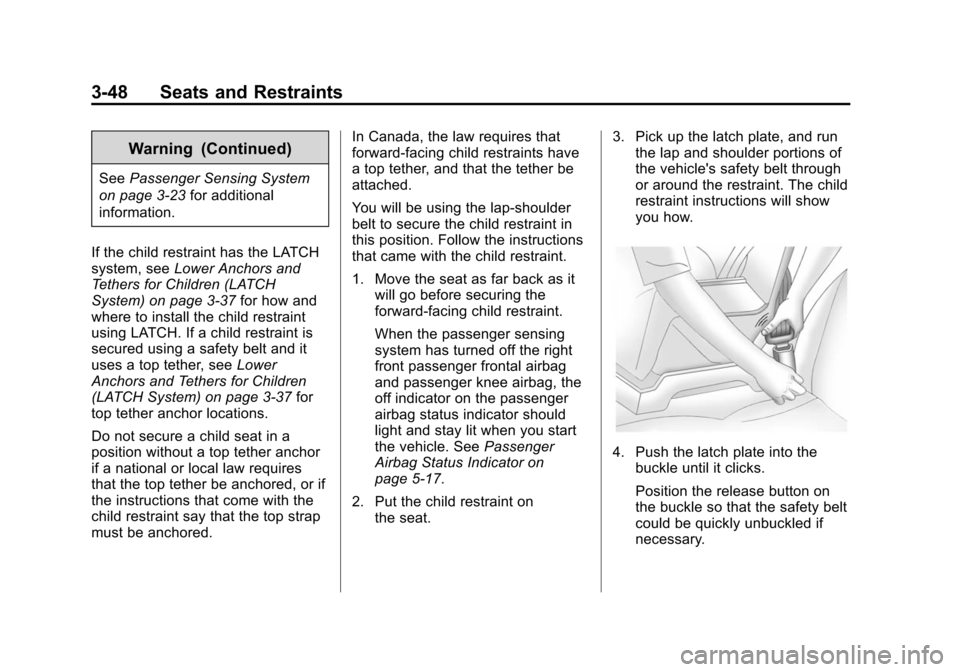
2. Put the child restraint on the seat. 3. Pick up the latch plate, and run
the lap and shoulder portions of
the vehicle's safety belt through
or around the restraint. The child
restraint instructions will show
you how.
4. Push the latch plate into thebuckle until it clicks.
Position the release button on
the buckle so that the safety belt
could be quickly unbuckled if
necessary.
Page 103 of 394

(49,1)Chevrolet VOLT Owner Manual (GMNA-Localizing-U.S./Canada-6014139) -
2014 - CRC - 9/16/13
Seats and Restraints 3-49
5. Pull the shoulder belt all the wayout of the retractor to set the
lock. When the retractor lock is
set, the belt can be tightened but
not pulled out of the retractor.6. To tighten the belt, push downon the child restraint, pull the
shoulder portion of the belt to
tighten the lap portion of the belt,
and feed the shoulder belt back
into the retractor. When installing
a forward-facing child restraint, it
may be helpful to use your knee
to push down on the child
restraint as you tighten the belt.
Try to pull the belt out of the
retractor to make sure the
retractor is locked. If the
retractor is not locked, repeat
Steps 5 and 6. 7. Before placing a child in the
child restraint, make sure it is
securely held in place. To check,
grasp the child restraint at the
safety belt path and attempt to
move it side to side and back
and forth. When the child
restraint is properly installed,
there should be no more than
2.5 cm (1 in) of movement.
If the airbags are off, the off
indicator in the passenger airbag
status indicator will come on and
stay on when the vehicle is started.
If a child restraint has been installed
and the on indicator is lit, see “If the
On Indicator Is Lit for a Child
Restraint” underPassenger Sensing
System on page 3-23 for more
information.
To remove the child restraint,
unbuckle the vehicle safety belt and
let it return to the stowed position.
Page 104 of 394
(50,1)Chevrolet VOLT Owner Manual (GMNA-Localizing-U.S./Canada-6014139) -
2014 - CRC - 9/16/13
3-50 Seats and Restraints
2NOTES
Page 112 of 394

(4,1)Chevrolet VOLT Owner Manual (GMNA-Localizing-U.S./Canada-6014139) -
2014 - CRC - 9/16/13
5-4 Instruments and Controls
1.Air Vents on page 8-8.
2. Turn Signal Lever. See Turn and
Lane-Change Signals on
page 6-3.
Exterior Lamp Controls on
page 6-1.
Pedestrian Friendly Alert on
page 5-6.
3. Instrument Cluster on page 5-9.
Driver Information Center (DIC)
Display. See Driver Information
Center (DIC) on page 5-43.
4. Windshield Wiper/Washer on
page 5-6.
5. Heated Front Seats on page 3-5
(If Equipped).
6. Center Stack Display on
page 5-29.
7. Charging Status Indicator. See Charging Status Feedback on
page 9-49.
8. Light Sensor. See Daytime
Running Lamps (DRL) on
page 6-2. 9.
Instrument Panel Storage on
page 4-1.
10. Automatic Climate Control
System on page 8-1.
11. Hood Release. See Hood on
page 10-7.
12. Driver Information Center (DIC) Controls. See Driver
Information Center (DIC) on
page 5-43.
13. Instrument Panel Illumination
Control on page 6-4.
14. Data Link Connector (DLC) (Out of View). See Malfunction
Indicator Lamp on page 5-19.
15. Cruise Control on page 9-35.
Forward Collision Alert (FCA)
System on page 9-38 (If
Equipped).
Lane Departure Warning
(LDW) on page 9-45 (If
Equipped).
16. Steering Wheel Adjustment on
page 5-5. 17.
Horn on page 5-6.
18. Steering Wheel Controls on
page 5-5 (If Equipped).
19. Leaf Button. See Center Stack
Display on page 5-29.
20. DRIVE MODE Button. See Driver Selected Operating
Modes on page 9-22.
21. Power Button on page 9-16.
22. Shift Lever. See Electric Drive
Unit on page 9-28.
23. Infotainment on page 7-1.
Navigation System (If
Equipped). See the navigation
manual.
24. Electric Parking Brake on
page 9-31.
25. Power Door Locks on
page 2-11.
26. Hazard Warning Flashers on
page 6-3.
Page 165 of 394

(57,1)Chevrolet VOLT Owner Manual (GMNA-Localizing-U.S./Canada-6014139) -
2014 - CRC - 9/16/13
Instruments and Controls 5-57
Sort
This feature allows the icons on the
Home Page to be moved.
Select and follow the screen
prompts.
Restore Home Page Defaults
This feature will restore the Home
Page to the factory settings.
Select and follow the screen
prompts.
Rear Camera Options
For more information on Rear
Camera Options, seeRear Vision
Camera (RVC) on page 9-42.
Display Off
Press to turn the display off. The
display will return when any radio
buttons are pressed or the screen is
touched (if equipped).
Map Settings
See “Map Settings” in“Configure
Menu” in the infotainment manual.
Vehicle Settings
Select and the following may
display:
.Climate and Air Quality
.Comfort and Convenience
.Lighting
.Power Door Locks
.Remote Lock/Unlock/Start
.Return to Factory Settings?
Climate and Air Quality
Select and the following may
display:
.Auto Fan Speed
.Auto Heated Seats
.Remote Start Auto Heated Seat
.Auto Defog
.Engine Assisted Heating
.Engine Assisted Heating
Plugged In Auto Fan Speed
This feature sets the automatic fan
speed to maintain the desired
interior temperature.
Select High, Medium, or Low.
Auto Heated Seats
When enabled, the auto heated seat
buttons on the touch screen will be
highlighted. This feature will
automatically activate heated seats
at the level required by the interior
temperature. The auto heated seats
can be turned off by using the
heated seat buttons on the center
stack.
Select to enable or disable.
Remote Start Auto Heated Seat
When on, this feature will turn the
heated seats on when using remote
start.
Select to enable or disable.
Page 182 of 394
(2,1)Chevrolet VOLT Owner Manual (GMNA-Localizing-U.S./Canada-6014139) -
2014 - CRC - 9/16/13
8-2 Climate Controls
Climate Control Buttons
1. Temperature Control
2. Driver and Passenger Heated Seats (If Equipped)
3. Defrost 4. Climate
5. Auto (Automatic Operation)
6. Rear Window Defogger
7. Manual Fan Control
Page 183 of 394

(3,1)Chevrolet VOLT Owner Manual (GMNA-Localizing-U.S./Canada-6014139) -
2014 - CRC - 9/16/13
Climate Controls 8-3
Climate Touch Screen Controls
1. Driver and Passenger Auto Heated Seats (If Equipped)
2. Air Delivery Mode Controls
3. Auto Recirculation
4. Manual Recirculation
5. Outside Air Temperature Display 6. Climate Modes: Fan Only, ECO,
Comfort
7. Climate Power Gauge
8. Manual Fan Control
9. Temperature Setting Display
10. Air Conditioning Indicator
11. Heat Status Indicator Climate Control Touch Screen
The climate mode, fan, air delivery,
recirculation, and auto heated seats
are controlled by pressing the
CLIMATE button on the center stack
and viewing information in the
center stack display.
Climate Mode Operation
There are three climate mode
settings: Fan Only, ECO, and
Comfort. These settings adjust the
impact the climate control system
has on the vehicle's electric range
or fuel economy.
To select a climate mode:
1. Press CLIMATE on the center
stack.
2. Press the climate mode button on the touch screen. The climate
mode will be lit.
Page 186 of 394

(6,1)Chevrolet VOLT Owner Manual (GMNA-Localizing-U.S./Canada-6014139) -
2014 - CRC - 9/16/13
8-6 Climate Controls
Air Delivery Mode Control:Press
CLIMATE to select the Climate
touch screen. Press the air delivery
mode touch screen button to
change the direction of the airflow.
The selected air delivery mode
button is lit. Pressing any of the air
delivery buttons cancels automatic
air delivery control and the direction
of the airflow can be controlled
manually. Press AUTO to return to
automatic operation.
To change the current mode, select
one of the following:
Y(Vent): Air is directed to the
instrument panel outlets.
\(Bi-Level): Air is divided
between the instrument panel
outlets and the floor outlets.
[(Floor): Air is directed to the
floor outlets.
-(Defog): Air is directed to the
windshield and floor outlets. Clears
the windows of fog or moisture.
0(Defrost): Air is directed to the
windshield. The windshield is
cleared of fog or frost more quickly.
Selecting
0will disable automatic
control and the AUTO button
indicator will not be lit.
Selecting
0again will return to the
previous climate settings.
For best results, clear all snow and
ice from the windshield before
defrosting.
If
0is selected in Fan Only or
ECO mode, air conditioning or
electric heat may turn on and have
a noticeable effect on vehicle
electric range and fuel economy.
AUTO
h(Auto Recirculation):
Press to allow the system to
automatically choose the air supply
mode for best performance in terms
of comfort, efficiency, and
defogging. Air is recirculated or
outside air is pulled into the vehicle.
The touch screen button is lit.
h(Manual Recirculation):
Press to alternate between
recirculating air inside the vehicle or
pulling in outside air. When
selected, the touch screen button
lights up to indicate that air is being
recirculated. This helps to quickly
cool the air inside the vehicle or
prevent outside air and odors from
entering.
Pressing this button cancels
automatic recirculation. Press AUTO
or AUTO
hto return to automatic
operation; recirculation runs
automatically as needed.
Manual recirculation mode is not
available when in Defrost or Defog
modes.
M/L(Manual Heated Seats): If
available, the controls are on the
center stack. To operate, the vehicle
must be on.
Press
MorLto heat the driver or
passenger seat cushion and
seatback. For more information, see
Heated Front Seats on page 3-5.

