2014 CHEVROLET SUBURBAN ESP
[x] Cancel search: ESPPage 30 of 494

(24,1)Chevrolet Tahoe/Suburban Owner Manual (GMNA-Localizing-U.S./Canada/
Mexico-6081502) - 2014 - crc2 - 9/17/13
1-24 In Brief
Side Blind Zone
Alert (SBZA)
If equipped, SBZA will detect
vehicles in the next lane over in the
vehicle's side blind zone area.
When this happens, the SBZA
display will light up in the
corresponding outside side mirror
and will flash if the turn signal is on.
SeeSide Blind Zone Alert (SBZA)
on page 9-49.
Rear Vision
Camera (RVC)
If available, the RVC displays a view
of the area behind the vehicle when
the vehicle is shifted into
R (Reverse). The display will appear
on either the inside rearview mirror
or navigation screen, if equipped.
To clean the camera lens, located
above the license plate, rinse it with
water and wipe it with a soft cloth.
See Rear Vision Camera (RVC) on
page 9-51.
Ultrasonic Parking Assist
If available, this system uses
sensors on the rear bumper to
assist with parking and avoiding
objects while in R (Reverse).
It operates at speeds less than
8 km/h (5 mph). URPA uses audible
beeps to provide distance and
system information.
Keep the sensors on the vehicle's
rear bumper clean to ensure proper
operation.
See Ultrasonic Parking Assist on
page 9-48.
Power Outlets
The accessory power outlets can be
used to plug in electrical equipment,
such as a cell phone or MP3 player.
There are two under the climate
controls, one inside the center floor
console, one on the rear of the
center floor console and one
accessory power outlet in the rear
cargo area on the passenger side. The accessory power outlets are
powered, even with the ignition off.
Continuing to use accessory power
outlets while the ignition is in LOCK/
OFF may cause the vehicle's
battery to run down.
See
Power Outlets on page 5-8.
Universal Remote System
Vehicles with the Universal Remote
System will have these buttons
located in the headliner.
This system provides a way to
replace up to three remote control
transmitters used to activate
devices such as garage door
openers, security systems, and
home automation devices.
Page 41 of 494
(7,1)Chevrolet Tahoe/Suburban Owner Manual (GMNA-Localizing-U.S./Canada/
Mexico-6081502) - 2014 - crc2 - 9/17/13
Keys, Doors, and Windows 2-7
Door Locks
{Warning
Unlocked doors can be
dangerous.
.Passengers, especially
children, can easily open the
doors and fall out of a moving
vehicle. When a door is
locked, the handle will not
open it. The chance of being
thrown out of the vehicle in a
crash is increased if the
doors are not locked. So, all
passengers should wear
safety belts properly and the
doors should be locked
whenever the vehicle is
driven.
.Young children who get into
unlocked vehicles may be
unable to get out. A child can
be overcome by extreme heat
and can suffer permanent(Continued)
Warning (Continued)
injuries or even death from
heat stroke. Always lock the
vehicle whenever leaving it.
.Outsiders can easily enter
through an unlocked door
when you slow down or stop
the vehicle. Locking the doors
can help prevent this from
happening.
There are several ways to lock and
unlock the vehicle.
From outside, use the Remote
Keyless Entry (RKE) transmitter or
the key in the driver door.
From inside, use the power door
locks or manual door locks. To lock
or unlock the door with the manual
locks, push down or pull up on the
manual lock knob.
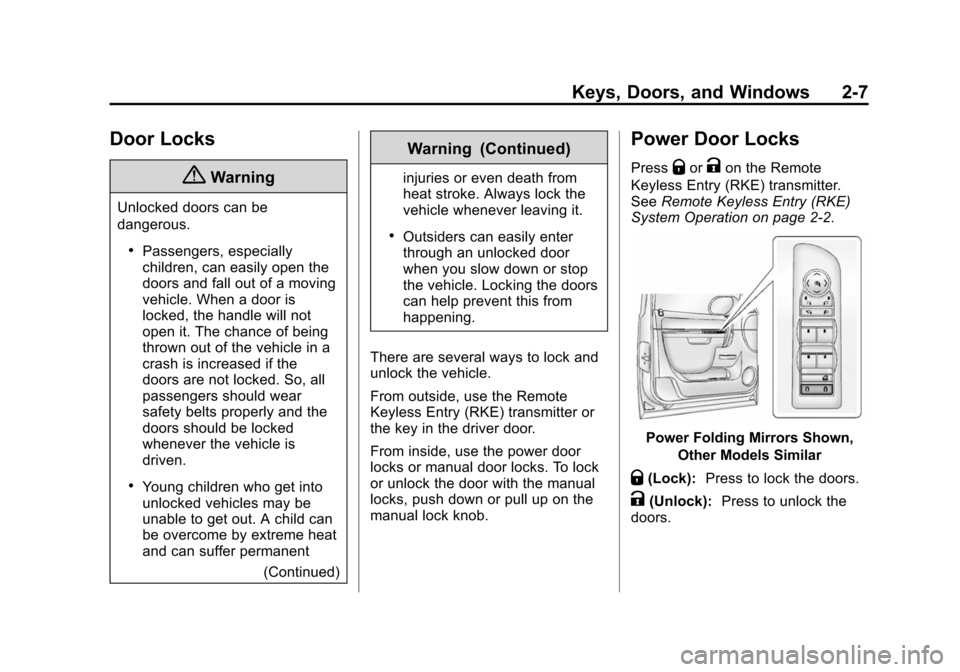
Power Door Locks
PressQorKon the Remote
Keyless Entry (RKE) transmitter.
See Remote Keyless Entry (RKE)
System Operation on page 2-2.
Power Folding Mirrors Shown,
Other Models Similar
Q(Lock): Press to lock the doors.
K(Unlock): Press to unlock the
doors.
Page 54 of 494
(20,1)Chevrolet Tahoe/Suburban Owner Manual (GMNA-Localizing-U.S./Canada/
Mexico-6081502) - 2014 - crc2 - 9/17/13
2-20 Keys, Doors, and Windows
Windows
{Warning
Never leave a child, a helpless
adult, or a pet alone in a vehicle,
especially with the windows
closed in warm or hot weather.
They can be overcome by the
extreme heat and suffer
permanent injuries or even death
from heat stroke.
The vehicle aerodynamics are
designed to improve fuel economy
performance. This may result in a
pulsing sound when either rear
window is down and the front
windows are up. To reduce the
sound, open either a front window
or the sunroof, if equipped.
Power Windows
{Warning
Children could be seriously
injured or killed if caught in the
path of a closing window. Never
leave keys in a vehicle with
children. When there are children
in the rear seat, use the window
lockout button to prevent
operation of the windows. See
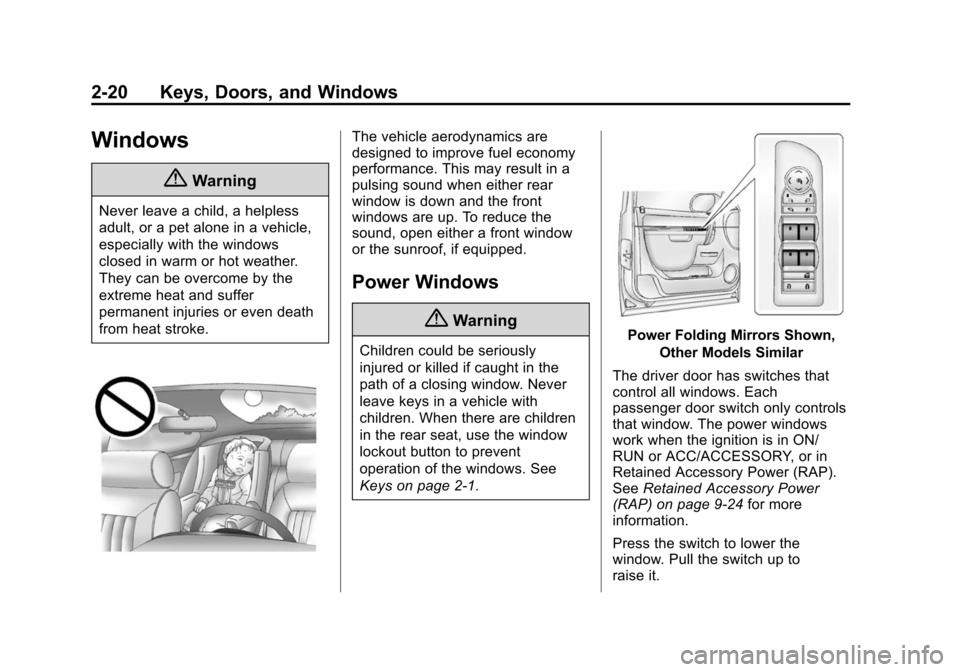
Keys on page 2-1.Power Folding Mirrors Shown,Other Models Similar
The driver door has switches that
control all windows. Each
passenger door switch only controls
that window. The power windows
work when the ignition is in ON/
RUN or ACC/ACCESSORY, or in
Retained Accessory Power (RAP).
See Retained Accessory Power
(RAP) on page 9-24 for more
information.
Press the switch to lower the
window. Pull the switch up to
raise it.
Page 63 of 494
(7,1)Chevrolet Tahoe/Suburban Owner Manual (GMNA-Localizing-U.S./Canada/
Mexico-6081502) - 2014 - crc2 - 9/17/13
Seats and Restraints 3-7
Memory Remote Recall
The memory feature can recall the
driver seat, outside mirrors, and
pedals, if equipped, to stored
positions when entering the vehicle.
To activate, unlock the driver door
with the Remote Keyless
Entry (RKE) transmitter. The driver
seat, outside mirrors, and adjustable
pedals, if equipped, will move to the
memory position associated with the
transmitter used to unlock the
vehicle.
This feature can be turned on or off
using the vehicle personalization
menu. SeeVehicle Personalization
(With DIC Buttons) on page 5-44.
To stop recall movement, press one
of the power seat controls, memory
buttons, or power mirror buttons,
or the adjustable pedal switch.
If something has blocked the driver
seat and/or the adjustable pedals
while recalling a memory position,
the recall may stop. Remove the
obstruction; then press and hold the appropriate manual control for the
memory item that is not recalling for
two seconds. Try recalling the
memory position again by pressing
the appropriate memory button.
If the memory position is still not
recalling, see your dealer for
service.
Easy Exit Driver Seat
This feature can move the seat
rearward to allow extra room to exit
the vehicle.
B(Easy Exit Driver Seat):
Press
to recall the easy exit seat position.
The vehicle must be in P (Park).
If the easy exit seat feature is
programmed on in the vehicle
personalization menu, automatic
seat movement occurs when the
ignition key is removed.
A single beep sounds. The driver
seat moves back approximately
8 cm (3 in). To move the seat back
farther, press
Bagain until the
seat is all the way back. If something has blocked the driver
seat while recalling the exit position,
the recall may stop. Remove the
obstruction; then press and hold the
power seat control rearward for
two seconds. Try recalling the exit
position again. If the exit position is
still not recalling, see your dealer for
service.
See
Vehicle Personalization (With
DIC Buttons) on page 5-44.
Heated and Ventilated
Front Seats
{Warning
If you cannot feel temperature
change or pain to the skin, the
seat heater may cause burns. To
reduce the risk of burns, people
with such a condition should use
care when using the seat heater,
especially for long periods of
time. Do not place anything on
(Continued)
Page 151 of 494
(31,1)Chevrolet Tahoe/Suburban Owner Manual (GMNA-Localizing-U.S./Canada/
Mexico-6081502) - 2014 - crc2 - 9/17/13
Instruments and Controls 5-31
Compass Recalibration
This display allows for calibrating
the compass. SeeCompass on
page 5-5
Blank Display
This display shows no information.
Trip Odometer Reset Stem
Menu Items (With DIC Buttons)
Use the trip odometer reset stem to
view the odometer and trip
odometer. The Language selection
and Engine Hours display can also
be accessed with the trip odometer
reset stem.
Odometer
Press the trip odometer reset stem
until ODOMETER displays. This
display shows the distance the
vehicle has been driven in either
kilometers (km) or miles (mi).
Trip Odometer
Press the trip odometer reset stem
until TRIP displays. This display
shows the current distance traveled in either kilometers (km) or
miles (mi) since the last reset for the
trip odometer.
The trip odometer can be reset to
zero by pressing and holding the trip
odometer reset stem while the trip
odometer is displayed.
The trip odometer has a feature
called the retroactive reset. This can
be used to set the trip odometer to
the number of kilometers (miles)
driven since the ignition was last
turned on. This can be used if the
trip odometer is not reset at the
beginning of the trip.
To use the retroactive reset feature,
press and hold the trip odometer
reset stem for at least four seconds.
The trip odometer will display the
number of kilometers (km) or
miles (mi) driven since the ignition
was last turned on and the vehicle
was moving. Once the vehicle
begins moving, the trip odometer
will accumulate mileage. For
example, if the vehicle was driven
8 km (5 mi) before it is started again,
and then the retroactive reset
feature is activated, the display will
show 8 km (5 mi). As the vehicle
begins moving, the display will then
increase to 8.2 km (5.1 mi), 8.4 km
(5.2 mi), etc.
Language
This display allows you to select the
language in which the DIC
messages will appear. To select a
language:
1. Press the trip odometer reset
stem until ODOMETER displays.
2. While in the ODOMETER display, press and hold the trip
odometer reset stem for
three seconds until the currently
set language displays.
3. Continue to press and hold the trip odometer reset stem to scroll
through all of the available
languages.
The available selections are
ENGLISH (default), FRANCAIS
(French), ESPANOL (Spanish),
and NO CHANGE.
Page 152 of 494
(32,1)Chevrolet Tahoe/Suburban Owner Manual (GMNA-Localizing-U.S./Canada/
Mexico-6081502) - 2014 - crc2 - 9/17/13
5-32 Instruments and Controls
4. Once the desired language isdisplayed, release the trip
odometer reset stem to set your
choice.
Engine Hours
To display the ENGINE HOURS,
place the ignition in LOCK/OFF or
ACC/ACCESSORY, then press and
hold the trip odometer reset stem for
four seconds while viewing the
ODOMETER. This display shows
the total number of hours the engine
has run.
Trip Odometer Reset Stem
Menu Items (Without DIC
Buttons)
Language
This display allows you to select the
language in which the DIC
messages will appear. To select a
language:
1. Press the trip odometer reset stem until ODOMETER displays. 2. While in the ODOMETER
display, press and hold the trip
odometer reset stem for
three seconds until the currently
set language displays.
3. Continue to press and hold the trip odometer reset stem to scroll
through all of the available
languages.
The available languages are
ENGLISH (default), FRANCAIS
(French), ESPANOL (Spanish),
and NO CHANGE.
4. Once the desired language is displayed, release the trip
odometer reset stem to set your
choice.
Trip Odometer
Press the trip odometer reset stem
until TRIP displays. This display
shows the current distance traveled
in either kilometers (km) or
miles (mi) since the last reset for the
trip odometer. The trip odometer can be reset to
zero by pressing and holding the trip
odometer reset stem while the trip
odometer is displayed.
The trip odometer has a feature
called the retroactive reset. This can
be used to set the trip odometer to
the number of kilometers (miles)
driven since the ignition was last
turned on. This can be used if the
trip odometer is not reset at the
beginning of the trip.
To use the retroactive reset feature,
press and hold the trip odometer
reset stem for at least four seconds.
The trip odometer will display the
number of kilometers (km) or
miles (mi) driven since the ignition
was last turned on and the vehicle
was moving. Once the vehicle
begins moving, the trip odometer
will accumulate mileage. For
example, if the vehicle was driven
8 km (5 mi) before it is started again,
and then the retroactive reset
feature is activated, the display will
show 8 km (5 mi). As the vehicle
Page 165 of 494
(45,1)Chevrolet Tahoe/Suburban Owner Manual (GMNA-Localizing-U.S./Canada/
Mexico-6081502) - 2014 - crc2 - 9/17/13
Instruments and Controls 5-45
Press the customization button until
the PRESS
VTO DISPLAY IN
ENGLISH screen appears on the
DIC display. Press the set/reset
button once to display all DIC
messages in English.
DISPLAY LANGUAGE
This feature allows you to select the
language in which the DIC
messages will appear.
Press the customization button until
the DISPLAY LANGUAGE screen
appears on the DIC display. Press
the set/reset button once to access
the settings for this feature. Then
press the customization button to
scroll through the following settings:
ENGLISH (default): All messages
will appear in English.
FRANCAIS: All messages will
appear in French.
ESPANOL: All messages will
appear in Spanish. NO CHANGE:
No change will be
made to this feature. The current
setting will remain.
To select a setting, press the set/
reset button while the desired
setting is displayed on the DIC.
You can also change the language
by pressing the trip odometer reset
stem. See “Language” under DIC
Operation and Displays (Without
DIC Buttons) earlier in this section
for more information.
AUTO DOOR LOCK
This feature allows you to select
when the vehicle's doors will
automatically lock. See Automatic
Door Locks on page 2-8 for more
information. Press the customization button until
AUTO DOOR LOCK appears on the
DIC display. Press the set/reset
button once to access the settings
for this feature. Then press the
customization button to scroll
through the following settings:
SHIFT OUT OF PARK (default):
The doors will automatically lock
when the vehicle is shifted out of
P (Park).
AT VEHICLE SPEED:
The doors
will automatically lock when the
vehicle speed is above 8 mph
(13 km/h) for 3 seconds.
NO CHANGE: No change will be
made to this feature. The current
setting will remain.
To select a setting, press the set/
reset button while the desired
setting is displayed on the DIC.
Page 203 of 494
(15,1)Chevrolet Tahoe/Suburban Owner Manual (GMNA-Localizing-U.S./Canada/
Mexico-6081502) - 2014 - crc2 - 9/17/13
Infotainment System 7-15
AM
The range for most AM stations is
greater than for FM, especially at
night. The longer range can cause
station frequencies to interfere with
each other. For better radio
reception, most AM radio stations
boost the power levels during the
day, and then reduce these levels
during the night. Static can also
occur when things like storms and
power lines interfere with radio
reception. When this happens, try
reducing the treble on the radio.
FM Stereo
FM signals only reach about
16 to 65 km (10 to 40 mi). Although
the radio has a built-in electronic
circuit that automatically works to
reduce interference, some static can
occur, especially around tall
buildings or hills, causing the sound
to fade in and out.
SiriusXM®Satellite Radio
Service
SiriusXM Satellite Radio Service
gives digital radio reception from
coast to coast in the 48 contiguous
United States, and in Canada. Just
as with FM, tall buildings or hills can
interfere with satellite radio signals,
causing the sound to fade in and
out. In addition, traveling or standing
under heavy foliage, bridges,
garages, or tunnels may cause loss
of the SiriusXM signal for a period
of time.
Cellular Phone Usage
Cellular phone usage may cause
interference with the vehicle's radio.
This interference may occur when
making or receiving phone calls,
charging the phone's battery,
or simply having the phone on. This
interference causes an increased
level of static while listening to the
radio. If static is received while
listening to the radio, unplug the
cellular phone and turn it off.
Rear Side Window
Antenna
The AM-FM antenna is located in
the passenger rear side windows.
Make sure the inside surfaces of the
rear side windows are not scratched
and that the lines on the glass are
not damaged. If the inside surfaces
are damaged, they could interfere
with radio reception.
If a cellular telephone antenna
needs to be attached to the glass,
make sure that the grid lines for the
AM-FM antenna are not damaged.
There is enough space between the
grid lines to attach a cellular
telephone antenna without
interfering with radio reception.
Notice: Using a razor blade or
sharp object to clear the inside of
the rear side windows may affect
radio reception or damage the
rear side window antenna.
Repairs would not be covered by
the warranty. Do not clear the
inside of the rear side windows
with sharp objects.