2014 CHEVROLET SS ignition
[x] Cancel search: ignitionPage 44 of 422

Black plate (20,1)Chevrolet SS Sedan Owner Manual (GMNA-Localizing-U.S.-6014851) - 2014 -
1st Edition - 8/22/13
2-20 Keys, Doors, and Windows
Roof
Sunroof
On vehicles with a sunroof, the
switches used to operate it are on
the overhead console. The ignition
must be in ON/RUN or ACC/
ACCESSORY, or in Retained
Accessory Power (RAP) to operate
the sunroof. SeeIgnition Positions
on page 9-15 andRetained
Accessory Power (RAP) on
page 9-18.
Open/Close: Press and hold the
front or rear of the switch (1) to
open or close the sunroof. The
sunshade automatically opens with
the sunroof, but must be closed
manually.
Express Open/Close: Press and
release the front or rear of the
switch (1) to express-open or
express-close the sunroof.
Vent/Close: Press and hold the
rear of the switch (2) to vent the
sunroof. Press and hold the front of
the switch (2) to close.
The sunroof cannot be opened or
closed if the vehicle has an
electrical failure.
Anti-Pinch Feature
If an object is in the path of the
sunroof when it is closing, the
anti-pinch feature detects the object
and stops the sunroof from closing
at the point of the obstruction. The
sunroof then returns to the full-open
position.
Dirt and debris may collect on the
sunroof seal or in the track. This
could cause an issue with sunroof
operation or noise. It could also plug
the water drainage system.
Periodically open the sunroof and
remove any obstacles or loose
debris. Wipe the sunroof seal and
roof sealing area using a clean
cloth, mild soap, and water. Do not
remove grease from the sunroof.
ProCarManuals.com
Page 49 of 422

Black plate (5,1)Chevrolet SS Sedan Owner Manual (GMNA-Localizing-U.S.-6014851) - 2014 -
1st Edition - 8/22/13
Seats and Restraints 3-5
Do not have a seatback reclined if
the vehicle is moving.
Memory Seats
The SET, "1," "2," and“3”buttons
on the driver door are used to
manually save and recall memory
settings for the driver seat and
outside mirrors. These manually
stored positions are referred to as
Button Memory positions. Storing Button Memory Positions
To save positions into Button
Memory for the
“1,” “2,”or“3” driving
positions:
1. Adjust the driver seat and
outside mirrors to the desired
driving positions.
2. Press and release SET, then immediately press and hold "1"
until a beep sounds.
3. Repeat Steps 1 and 2 for a second driver using “2”and/or a
third driver using “3.”
Recalling Button Memory
Positions
Press and hold "1," "2," or “3”to
recall the manually saved Button
Memory positions. Releasing "1,”
"2," or “3”before the stored
positions are reached stops the
recall.
If the ignition is in ON/RUN/START
and the vehicle is parked, briefly
press and release “1,” “2,”or“3” to
recall the Button Memory positions.
ProCarManuals.com
Page 51 of 422

Black plate (7,1)Chevrolet SS Sedan Owner Manual (GMNA-Localizing-U.S.-6014851) - 2014 -
1st Edition - 8/22/13
Seats and Restraints 3-7
Remote Start Heated and
Ventilated Seats
During a remote start, the heated or
ventilated seats can be turned on
automatically. When it is cold
outside, the heated seats turn on,
and when it is hot outside the
ventilated seats turn on. The heated
or ventilated seats are canceled
when the ignition is turned on. Press
the heated or ventilated seat button
to use the heated or ventilated seats
after the vehicle is started.
The heated or ventilated seat
indicator lights do not turn on during
a remote start.
The temperature performance of an
unoccupied seat may be reduced.
This is normal.
The heated or ventilated seats will
not turn on during a remote start
unless they are enabled in the
vehicle personalization menu. See
Remote Vehicle Start on page 2-8
andVehicle Personalization on
page 5-33.Rear Seats
Rear Seat
Pass-Through Door
The rear seat has an armrest in the
center of the seatback. Pull the
armrest down to lower it. To fold, lift
the armrest up and push it rearward
until it is flush with the seatback.
The rear seat has a rear seat
pass-through door in the center of
the rear seatback. Press the button
on top of the seatback and fold the
center part of the seatback down to
access the trunk. There are two
cupholders on the door. To close, lift
the pass-through door and push it
rearward until it locks into place.
ProCarManuals.com
Page 95 of 422

Black plate (3,1)Chevrolet SS Sedan Owner Manual (GMNA-Localizing-U.S.-6014851) - 2014 -
1st Edition - 8/22/13
Instruments and Controls 5-3
$/i(Mute/End Call):Press to
decline an incoming call, or to end a
current call. Press to silence the
vehicle speakers while using the
infotainment system. Press again to
turn the sound on. Press to cancel
voice recognition.
_SRC^(Thumbwheel Control):
Press to select an audio source.
Use the thumbwheel to select the
next or previous favorite radio
station, CD track, MP3 track, USB
track, and Bluetooth Audio track.
Use
_SRC to skip to the next song
or show using Pandora or Stitcher.
See Pandora Internet Radio on
page 7-22 orStitcher Internet Radio
on page 7-27.
+
x− (Volume): Press + to
increase the volume. Press −to
decrease.
Horn
Pressaon the steering wheel pad
to sound the horn.
Windshield Wiper/Washer
With the ignition in ACC/
ACCESSORY or ON/RUN/START,
move the windshield wiper lever to
select the wiper speed.
HI: Use for fast wipes.
LO: Use for slow wipes.
INT (Rainsense Wipe Sensitivity
Control): Move the windshield
wiper lever to INT. Turn the
xINT
band on the wiper lever to adjust the
sensitivity.
OFF: Use to turn the wipers off.
8(Mist): For a single wipe, briefly
move the wiper lever down. For
several wipes, hold the wiper
lever down.
Clear snow and ice from the wiper
blades and windshield before using
them. If frozen to the windshield,
carefully loosen or thaw them.
Damaged blades should be
replaced. See Wiper Blade
Replacement on page 10-23.
Heavy snow or ice can overload the
wiper motor.
Rainsense™
With Rainsense, a sensor near the
top center of the windshield detects
the amount of water on the
windshield and controls the
frequency of the windshield wiper.
ProCarManuals.com
Page 97 of 422
Black plate (5,1)Chevrolet SS Sedan Owner Manual (GMNA-Localizing-U.S.-6014851) - 2014 -
1st Edition - 8/22/13
Instruments and Controls 5-5
To use the outlet, the ignition must
be in ON/RUN or ACC/
ACCESSORY. Remove the cover to
access the outlet and replace when
not in use.
{Caution
Leaving electrical equipment on
for extended periods will drain the
battery. Always turn off electrical
equipment when not in use and
do not plug in equipment that
exceeds the maximum amperage
rating.
This circuit is protected by a fuse
and has a maximum current level.
Do not use equipment exceeding
the maximum amperage rating.
Certain power accessory plugs may
not be compatible with the
accessory power outlet and could
overload vehicle or adapter fuses.
If a problem is experienced, see
your dealer.
{Caution
Adding any electrical equipment
to the vehicle may damage it or
keep other components from
working as they should. The
repairs would not be covered by
the vehicle warranty. Do not use
equipment exceeding
maximum amperage rating of
10 amperes. Check with your
dealer before adding electrical
equipment.
When adding electrical equipment,
be sure to follow the proper
installation instructions included with
the equipment. See Add-On
Electrical Equipment on page 9-50.
{Caution
Hanging heavy equipment from
the power outlet can cause
damage not covered by the
vehicle warranty. The power
outlets are designed for
accessory power plugs only, such
as cell phone charge cords.
ProCarManuals.com
Page 100 of 422

Black plate (8,1)Chevrolet SS Sedan Owner Manual (GMNA-Localizing-U.S.-6014851) - 2014 -
1st Edition - 8/22/13
5-8 Instruments and Controls
Speedometer
The speedometer shows the
vehicle's speed in either kilometers
per hour (km/h) or miles per
hour (mph).
Odometer
The odometer shows how far the
vehicle has been driven, in either
kilometers or miles.
Trip Odometer
The trip odometer can show how far
the vehicle has been driven since
the trip odometer was last reset.
The trip odometer is accessed and
reset through the Driver Information
Center (DIC). SeeDriver
Information Center (DIC) on
page 5-21.
Tachometer
The tachometer displays the engine
speed in revolutions per
minute (rpm).
{Caution
If the engine is operated with the
tachometer in the shaded warning
area, the vehicle could be
damaged, and the damages
would not be covered by the
vehicle warranty. Do not operate
the engine with the tachometer in
the shaded warning area.
Fuel Gauge
When the ignition is on, the fuel
gauge shows how much fuel is left
in the fuel tank. When the indicator
nears empty, a message in the
Driver Information Center (DIC)
displays. See Fuel System
Messages on page 5-28. The
vehicle still has a little fuel left, but
the vehicle should be fueled soon.
An arrow on the fuel gauge
indicates the side of the vehicle the
fuel door is on.
Here are four things that some
owners ask about. These are
normal and do not indicate a
problem with the fuel gauge:
.At the service station, the gas
pump shuts off before the gauge
reads full.
.It takes a little more or less fuel
to fill up than the gauge
indicated. For example, the
gauge may have indicated the
fuel tank was half full, but it
actually took a little more or less
than half the fuel tank's capacity
to fill it.
ProCarManuals.com
Page 101 of 422
Black plate (9,1)Chevrolet SS Sedan Owner Manual (GMNA-Localizing-U.S.-6014851) - 2014 -
1st Edition - 8/22/13
Instruments and Controls 5-9
.The indicator moves a little while
turning a corner or speeding up.
.The gauge goes back to empty
when the ignition is turned off.
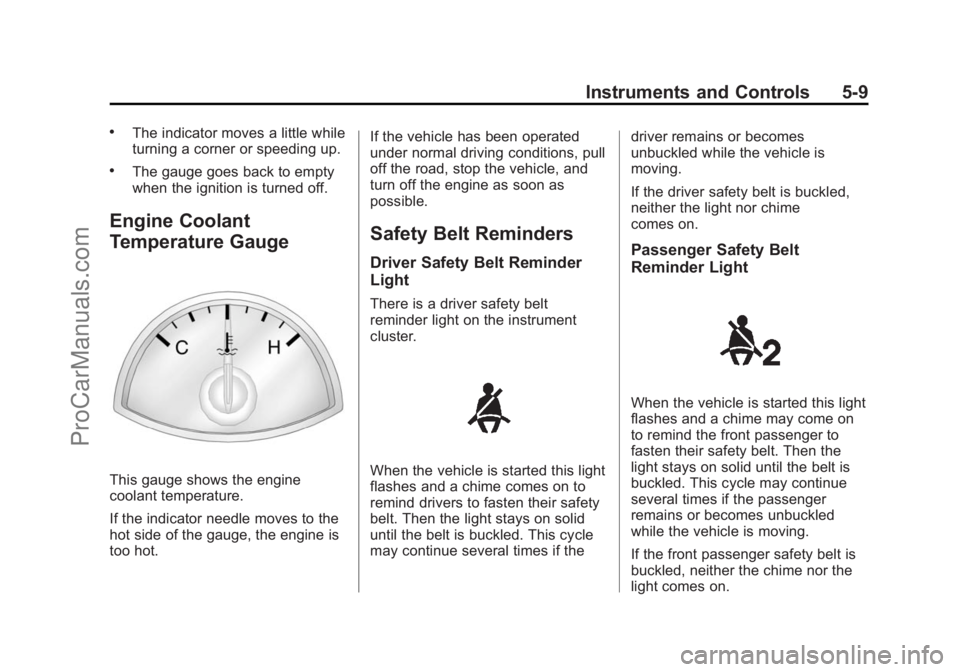
Engine Coolant
Temperature Gauge
This gauge shows the engine
coolant temperature.
If the indicator needle moves to the
hot side of the gauge, the engine is
too hot.If the vehicle has been operated
under normal driving conditions, pull
off the road, stop the vehicle, and
turn off the engine as soon as
possible.
Safety Belt Reminders
Driver Safety Belt Reminder
Light
There is a driver safety belt
reminder light on the instrument
cluster.
When the vehicle is started this light
flashes and a chime comes on to
remind drivers to fasten their safety
belt. Then the light stays on solid
until the belt is buckled. This cycle
may continue several times if thedriver remains or becomes
unbuckled while the vehicle is
moving.
If the driver safety belt is buckled,
neither the light nor chime
comes on.
Passenger Safety Belt
Reminder Light
When the vehicle is started this light
flashes and a chime may come on
to remind the front passenger to
fasten their safety belt. Then the
light stays on solid until the belt is
buckled. This cycle may continue
several times if the passenger
remains or becomes unbuckled
while the vehicle is moving.
If the front passenger safety belt is
buckled, neither the chime nor the
light comes on.
ProCarManuals.com
Page 103 of 422

Black plate (11,1)Chevrolet SS Sedan Owner Manual (GMNA-Localizing-U.S.-6014851) - 2014 -
1st Edition - 8/22/13
Instruments and Controls 5-11
Passenger Airbag Status
Indicator
This vehicle has a passenger
sensing system. SeePassenger
Sensing System on page 3-20 for
important safety information. The
rearview mirror has a passenger
airbag status indicator.
When the vehicle is started, the
passenger airbag status indicator
will light ON and OFF for several
seconds as a system check. Then,
after several more seconds, the
status indicator will light either ON
or OFF to let you know the status of
the front outboard passenger frontal
airbag and knee airbag. If the word ON is lit on the
passenger airbag status indicator, it
means that the front outboard
passenger frontal airbag and knee
airbag are allowed to inflate.
If the word OFF is lit on the
passenger airbag status indicator, it
means that the passenger sensing
system has turned off the front
outboard passenger frontal airbag
and knee airbag.
If, after several seconds, both status
indicator lights remain on, or if there
are no lights at all, there may be a
problem with the lights or the
passenger sensing system. See
your dealer for service.
{Warning
If the airbag readiness light ever
comes on and stays on, it means
that something may be wrong
with the airbag system. To help
avoid injury to yourself or others,
have the vehicle serviced right
(Continued)
Warning (Continued)
away. SeeAirbag Readiness
Light on page 5-10 for more
information, including important
safety information.
Charging System Light
The charging system light comes on
briefly when the ignition is turned
on, but the engine is not running, as
a check to show the light is working.
The light turns off when the engine
is started. If it does not, have the
vehicle serviced by your dealer.
If the light stays on, or comes on
while driving, there could be a
problem with the electrical charging
ProCarManuals.com