2014 CHEVROLET SS oil
[x] Cancel search: oilPage 115 of 422

Black plate (23,1)Chevrolet SS Sedan Owner Manual (GMNA-Localizing-U.S.-6014851) - 2014 -
1st Edition - 8/22/13
Instruments and Controls 5-23
on page 5-11. If there is a problem
with the battery charging system,
the DIC will display a message.
Speed Warning
This display is used to set the
vehicle speed at which the speed
warning chime sounds and the alert
is displayed. The speed can be set
by pressing SET/CLR while the
speed warning display is showing.
Tire Pressure Monitoring
This display will show a vehicle with
the approximate pressures of all
four tires. Tire pressure is displayed
in either kilopascal (kPa) or pounds
per square inch (psi). SeeTire
Pressure Monitor Operation on
page 10-43.
Remaining Oil Life
This display shows an estimate of
the oil's remaining useful life. If 99%
is displayed, that means 99% of the
current oil life remains.
When the remaining oil life is low,
the CHANGE ENGINE OIL SOON
message will appear on the display. See
Engine Oil Messages on
page 5-28. The oil should be
changed as soon as possible. See
Engine Oil on page 10-6. In addition
to the engine oil life system
monitoring the oil life, additional
maintenance is recommended in the
Maintenance Schedule. See
Maintenance Schedule on
page 11-2.
Remember, the Remaining Oil Life
display must be reset after each oil
change. It will not reset itself. Also,
be careful not to reset the Oil Life
display accidentally at any time
other than when the oil has just
been changed. It cannot be reset
accurately until the next oil change.
To reset the engine oil life system,
press SET/CLR while the Oil Life
display is active. See Engine Oil
Life System on page 10-8.
Units
Move
\to switch between metric
or US when the Units display is
active. Press SET/CLR to confirm
the setting. This will change the displays on the cluster and DIC to
either metric or English (US)
measurements.
Head-Up Display (HUD)
{Warning
If the HUD image is too bright or
too high in your field of view, it
may take you more time to see
things you need to see when it is
dark outside. Be sure to keep the
HUD image dim and placed low in
your field of view.
With HUD, some information
concerning the operation of the
vehicle is projected onto the
windshield. The image is projected
through the HUD lens on top of the
instrument panel. The information
appears as an image focused out
toward the front of the vehicle.
ProCarManuals.com
Page 120 of 422

Black plate (28,1)Chevrolet SS Sedan Owner Manual (GMNA-Localizing-U.S.-6014851) - 2014 -
1st Edition - 8/22/13
5-28 Instruments and Controls
ENGINE OVERHEATED—
STOP ENGINE
This message displays and a
continuous chime sounds if the
engine cooling system reaches
unsafe temperatures for operation.
Stop and turn off the vehicle as
soon as it is safe to do so to avoid
severe damage. This message
clears when the engine has cooled
to a safe operating temperature.
Engine Oil Messages
CHANGE ENGINE OIL SOON
This message displays when
service is required for the vehicle.
See your dealer. See Engine Oil on
page 10-6 andMaintenance
Schedule on page 11-2.
Acknowledging the CHANGE
ENGINE OIL SOON message will
not reset the system. See
“Remaining Oil Life” underDriver
Information Center (DIC) on
page 5-21 andEngine Oil Life
System on page 10-8.
ENGINE OIL LOW —ADD OIL
On some vehicles, this message
displays when the engine oil level
may be too low. Check the oil level
before filling to the recommended
level. If the oil is not low and this
message remains on, take the
vehicle to your dealer for service.
See Engine Oil on page 10-6.
OIL PRESSURE LOW STOP
ENGINE
This message displays when the
vehicle's engine oil pressure is low.
The oil pressure light also appears
on the instrument cluster. See
Engine Oil Pressure Light on
page 5-18.
Stop the vehicle immediately, as
engine damage can result from
driving a vehicle with low oil
pressure. Have the vehicle serviced
by your dealer as soon as possible
when this message is displayed.
Engine Power Messages
ENGINE POWER IS REDUCED
This message displays when the
vehicle's engine power is reduced.
Reduced engine power can affect
the vehicle's ability to accelerate.
If this message is on, but there is no
reduction in performance, proceed
to your destination. The
performance may be reduced the
next time the vehicle is driven. The
vehicle may be driven at a reduced
speed while this message is on, but
maximum acceleration and speed
may be reduced. Anytime this
message stays on, the vehicle
should be taken to your dealer for
service as soon as possible.
Fuel System Messages
FUEL LEVEL LOW
This message displays when the
vehicle is low on fuel. Refuel as
soon as possible
ProCarManuals.com
Page 191 of 422

Black plate (55,1)Chevrolet SS Sedan Owner Manual (GMNA-Localizing-U.S.-6014851) - 2014 -
1st Edition - 8/22/13
Infotainment System 7-55
The Travel Guide POI entry list
allows selection of a destination
search by category or name.
Entering by POI Category
1. Select Category from the POIList menu to access the POI
Selection screen display.
2. Enter the necessary information by first selecting the location line
item to access the
Location menu.
3. Select any of the line optionssuch as Nearby.
4. Select Category from the POI Selection menu to access the
POI List.
5. Select any of the line optionssuch as All POIs. 6. Select Sort Method from the POI
Selection menu to access the
Search Order menu. Select one
of the two options available.
These options are By Distance
or By Name.
7. Select Search.
8. Select the desired POI.
Entering by POI name:
1. Select Search by Name.
2. Make sure the correct country, state/province, and city are
present, then select Search.
3. Enter the POI name.
ProCarManuals.com
Page 238 of 422

Black plate (6,1)Chevrolet SS Sedan Owner Manual (GMNA-Localizing-U.S.-6014851) - 2014 -
1st Edition - 8/22/13
9-6 Driving and Operating
{Caution
If the vehicle is used for track
events and competitive driving,
the engine may use more oil than
it would with normal use. Low oil
levels can damage the engine.
Check the oil level often and at
the proper level. SeeEngine Oil
on page 10-6.
Be sure to check the oil level often
during racing or other competitive
driving and keep the level at or near
the upper mark that shows the
proper operating range on the
engine oil dipstick.
For track events or competitive
driving, it is recommended that the
brake fluid be replaced with a high
performance brake fluid that has a
dry boiling point greater than 279°C
(534°F). After conversion to the high
performance brake fluid, follow the
brake fluid service recommendations outlined by the
fluid manufacturer. Do not use
silicone or DOT-5 brake fluids.
Because the fluid temperatures may
be higher, it is necessary to change
the rear axle fluid every 24 hours of
racing or competitive driving. See
Recommended Fluids and
Lubricants on page 11-12.
{Caution
During a first time track or racing
event, high rear axle
temperatures can occur. Damage
could be caused to the rear axle
and would not be covered by the
vehicle warranty.
Do not drive as long or as fast the
first time the vehicle is driven on
the track or raced.
For extended track use, GM
recommends installing a rear
differential cooler to protect the
rear axle.
Driving on Wet Roads
Rain and wet roads can reduce
vehicle traction and affect your
ability to stop and accelerate.
Always drive slower in these types
of driving conditions and avoid
driving through large puddles and
deep‐standing or flowing water.
{Warning
Wet brakes can cause crashes.
They might not work as well in a
quick stop and could cause
pulling to one side. You could
lose control of the vehicle.
After driving through a large
puddle of water or a car/vehicle
wash, lightly apply the brake
pedal until the brakes work
normally.
Flowing or rushing water creates
strong forces. Driving through
flowing water could cause the
vehicle to be carried away. If this (Continued)
ProCarManuals.com
Page 249 of 422

Black plate (17,1)Chevrolet SS Sedan Owner Manual (GMNA-Localizing-U.S.-6014851) - 2014 -
1st Edition - 8/22/13
Driving and Operating 9-17
the brake pedal not applied,
pressing and holding the button for
more than five seconds will place
the vehicle in Service Only Mode.
The instruments and audio systems
will operate as they do in ON/RUN,
but the vehicle will not be able to be
driven. The engine will not start in
Service Only Mode. Press the
button again to turn the vehicle off.
Starting the Engine
Move the shift lever to P (Park) or
N (Neutral). The engine will not start
in any other position. To restart the
engine when the vehicle is already
moving, use N (Neutral) only.
{Caution
Do not try to shift to P (Park) if the
vehicle is moving. If you do, you
could damage the transmission.
Shift to P (Park) only when the
vehicle is stopped.
{Caution
If you add electrical parts or
accessories, you could change
the way the engine operates. Any
resulting damage would not be
covered by the vehicle warranty.
SeeAdd-On Electrical Equipment
on page 9-50.
Starting Procedure
1. With the Keyless Access system, the transmitter must be
in the vehicle. Put your foot on
the brake pedal and push the
START button. When the engine
begins cranking, let go of the
button.
The idle speed will go down as
the engine gets warm. Do not
race the engine immediately
after starting it. Operate the
engine and transmission gently
to allow the oil to warm up and
lubricate all moving parts. If the transmitter is not in the
vehicle or something is
interfering with the transmitter,
the Driver Information Center
(DIC) will display a message.
See
Key and Lock Messages on
page 5-29.
If the battery in the Remote
Keyless Entry (RKE) transmitter
needs replacing, the DIC will
display a message. The vehicle
can still be driven. See “Starting
the Vehicle with a Low
Transmitter Battery” inRemote
Keyless Entry (RKE) System
Operation on page 2-3.
The vehicle has a
Computer-Controlled Cranking
System. This feature assists in
starting the engine and protects
components. If the ENGINE
START/STOP button is pressed,
and then released when the
engine begins cranking, the
engine will continue cranking for
a few seconds or until the
vehicle starts. If the engine does
not start and the button is
ProCarManuals.com
Page 250 of 422

Black plate (18,1)Chevrolet SS Sedan Owner Manual (GMNA-Localizing-U.S.-6014851) - 2014 -
1st Edition - 8/22/13
9-18 Driving and Operating
pressed for many seconds,
cranking will be stopped after
15 seconds to prevent cranking
motor damage. To prevent gear
damage, this system also
prevents cranking if the engine
is already running. Engine
cranking can be stopped by
pressing the ENGINE START/
STOP button a second time.
{Caution
Cranking the engine for long
periods of time, by pressing the
ENGINE START/STOP button
immediately after cranking has
ended, can overheat and damage
the cranking motor, and drain the
battery. Wait at least 15 seconds
between each try, to let the
cranking motor cool down.
2. If the engine does not start after five to 10 seconds, especially in
very cold weather (below −18°C
or 0°F), it could be flooded with
too much gasoline. Try pushing the accelerator pedal all the way
to the floor and holding it there
as you press the ENGINE
START/STOP button, for up to a
maximum of 15 seconds. Wait at
least 15 seconds between each
try, to allow the cranking motor
to cool down. When the engine
starts, let go of the button and
the accelerator. If the vehicle
starts briefly but then stops
again, do the same thing. This
clears the extra gasoline from
the engine. Do not race the
engine immediately after starting
it. Operate the engine and
transmission gently until the oil
warms up and lubricates all
moving parts.
Retained Accessory
Power (RAP)
The power windows will operate
when the ignition is in the ON/RUN
or ACC/ACCESSORY positions.
Once the ignition is turned off, RAP
allows the power windows to
continue to operate for up to
10 minutes. If a door is opened
during this time, they will be
deactivated.
The audio system will be
deactivated only if the driver door is
opened.
Shifting Into Park
1. Hold the brake pedal down and
set the parking brake.
See Electric Parking Brake on
page 9-27.
2. Hold the button on the shift lever and push the lever toward the
front of the vehicle into P (Park).
3. Turn the ignition off.
ProCarManuals.com
Page 280 of 422
Black plate (48,1)Chevrolet SS Sedan Owner Manual (GMNA-Localizing-U.S.-6014851) - 2014 -
1st Edition - 8/22/13
9-48 Driving and Operating
recommended. Costly repairs
caused by use of improper fuel
would not be covered by the vehicle
warranty.
Fuel Additives
To keep fuel systems clean, TOP
TIER Detergent Gasoline is
recommended. SeeFuel on
page 9-46.
If TOP TIER Detergent Gasoline is
not available, one bottle of Fuel
System Treatment PLUS, part
number 88861013, added to the fuel
tank at every engine oil change, can
help. Fuel System Treatment PLUS
is the only gasoline additive
recommended by General Motors.
It is available at your dealer.
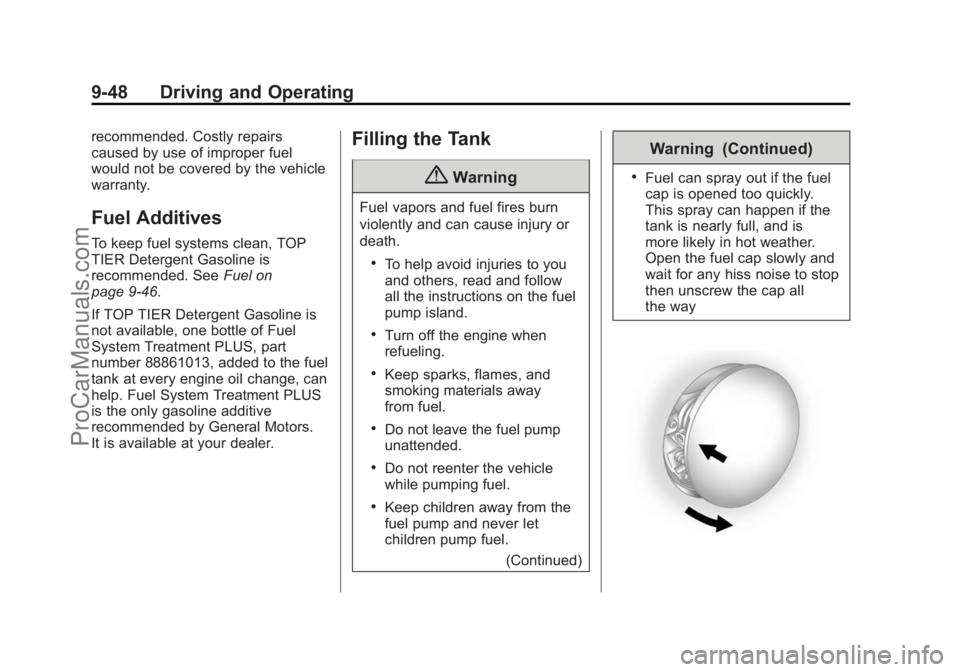
Filling the Tank
{Warning
Fuel vapors and fuel fires burn
violently and can cause injury or
death.
.To help avoid injuries to you
and others, read and follow
all the instructions on the fuel
pump island.
.Turn off the engine when
refueling.
.Keep sparks, flames, and
smoking materials away
from fuel.
.Do not leave the fuel pump
unattended.
.Do not reenter the vehicle
while pumping fuel.
.Keep children away from the
fuel pump and never let
children pump fuel.
(Continued)
Warning (Continued)
.Fuel can spray out if the fuel
cap is opened too quickly.
This spray can happen if the
tank is nearly full, and is
more likely in hot weather.
Open the fuel cap slowly and
wait for any hiss noise to stop
then unscrew the cap all
the way
ProCarManuals.com
Page 283 of 422

Black plate (1,1)Chevrolet SS Sedan Owner Manual (GMNA-Localizing-U.S.-6014851) - 2014 -
1st Edition - 8/22/13
Vehicle Care 10-1
Vehicle Care
General Information
General Information . . . . . . . . . . 10-2
California Proposition65 Warning . . . . . . . . . . . . . . . . . 10-2
California Perchlorate Materials Requirements . . . . 10-2
Accessories and Modifications . . . . . . . . . . . . . . . 10-2
Vehicle Checks
Doing Your OwnService Work . . . . . . . . . . . . . . . 10-3
Hood . . . . . . . . . . . . . . . . . . . . . . . . 10-4
Engine Compartment Overview . . . . . . . . . . . . . . . . . . . 10-5
Engine Oil . . . . . . . . . . . . . . . . . . . 10-6
Engine Oil Life System . . . . . . 10-8
Automatic Transmission Fluid . . . . . . . . . . . . . . . . . . . . . . . 10-9
Engine Air Cleaner/Filter . . . . 10-10
Cooling System . . . . . . . . . . . . . 10-11
Engine Coolant . . . . . . . . . . . . . 10-12
Engine Overheating . . . . . . . . 10-16
Washer Fluid . . . . . . . . . . . . . . . 10-17
Brakes . . . . . . . . . . . . . . . . . . . . . 10-18
Brake Fluid . . . . . . . . . . . . . . . . . 10-19 Battery . . . . . . . . . . . . . . . . . . . . . 10-20
Rear Axle . . . . . . . . . . . . . . . . . . 10-21
Starter Switch Check . . . . . . . 10-21
Automatic Transmission Shift
Lock Control Function
Check . . . . . . . . . . . . . . . . . . . . . 10-22
Ignition Transmission Lock Check . . . . . . . . . . . . . . . . . . . . . 10-22
Park Brake and P (Park) Mechanism Check . . . . . . . . 10-23
Wiper Blade Replacement . . . . . . . . . . . . . . 10-23
Windshield Replacement . . . 10-24Headlamp Aiming
Headlamp Aiming . . . . . . . . . . 10-24
Bulb Replacement
Bulb Replacement . . . . . . . . . . 10-24
High Intensity Discharge (HID) Lighting . . . . . . . . . . . . . 10-24
License Plate Lamp . . . . . . . . 10-25
Replacement Bulbs . . . . . . . . . 10-25
Electrical System
Electrical System Overload . . . . . . . . . . . . . . . . . . 10-26
Fuses . . . . . . . . . . . . . . . . . . . . . . 10-26 Engine Compartment Fuse
Block . . . . . . . . . . . . . . . . . . . . . 10-27
Instrument Panel Fuse Block . . . . . . . . . . . . . . . . . . . . . 10-29
Rear Compartment Fuse
Block . . . . . . . . . . . . . . . . . . . . . 10-32
Wheels and Tires
Tires . . . . . . . . . . . . . . . . . . . . . . . . 10-34
Winter Tires . . . . . . . . . . . . . . . . 10-35
Low-Profile Tires . . . . . . . . . . . 10-35
Summer Tires . . . . . . . . . . . . . . 10-36
Tire Sidewall Labeling . . . . . . 10-36
Tire Designations . . . . . . . . . . . 10-37
Tire Terminology andDefinitions . . . . . . . . . . . . . . . . 10-38
Tire Pressure . . . . . . . . . . . . . . . 10-41
Tire Pressure Monitor
System . . . . . . . . . . . . . . . . . . . 10-42
Tire Pressure Monitor Operation . . . . . . . . . . . . . . . . . 10-43
Tire Inspection . . . . . . . . . . . . . . 10-46
Tire Rotation . . . . . . . . . . . . . . . 10-47
When It Is Time for New Tires . . . . . . . . . . . . . . . . . . . . . . 10-48
Buying New Tires . . . . . . . . . . . 10-49
Different Size Tires and Wheels . . . . . . . . . . . . . . . . . . . 10-50
ProCarManuals.com