Black plate (26,1)Chevrolet Sonic Owner Manual (GMNA-Localizing-U.S./Canada-6081473) -
2014 - 2nd Edition - 8/19/13
5-26 Instruments and Controls
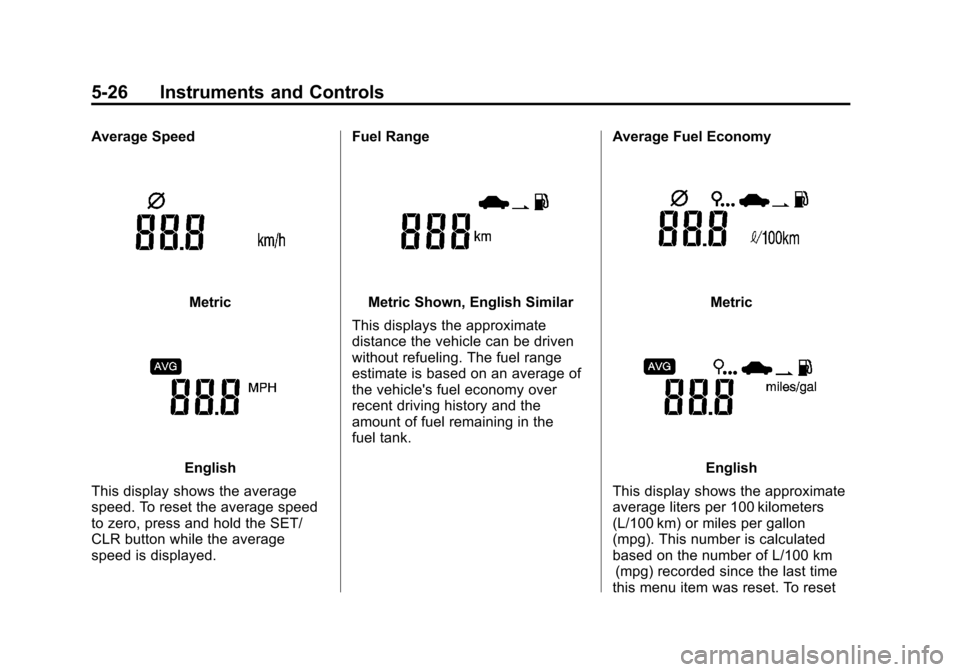
Average Speed
Metric
English
This display shows the average
speed. To reset the average speed
to zero, press and hold the SET/
CLR button while the average
speed is displayed. Fuel Range
Metric Shown, English Similar
This displays the approximate
distance the vehicle can be driven
without refueling. The fuel range
estimate is based on an average of
the vehicle's fuel economy over
recent driving history and the
amount of fuel remaining in the
fuel tank. Average Fuel EconomyMetric
English
This display shows the approximate
average liters per 100 kilometers
(L/100 km) or miles per gallon
(mpg). This number is calculated
based on the number of L/100 km (mpg) recorded since the last time
this menu item was reset. To reset
Black plate (56,1)Chevrolet Sonic Owner Manual (GMNA-Localizing-U.S./Canada-6081473) -
2014 - 2nd Edition - 8/19/13
7-56 Infotainment System
Some features are disabled while
the vehicle is in motion.
Viewing a Slide Show
1. From the picture screen, press
z. The slide show will start
to play.
2. Press the screen to cancel the slide show during the slide show
playback.
Viewing a Previous or Next
Picture
Press
torufrom the picture
screen.
Rotating a Picture
Press
yorwfrom the picture
screen.
Enlarging a Picture
Press
xfrom the picture screen.
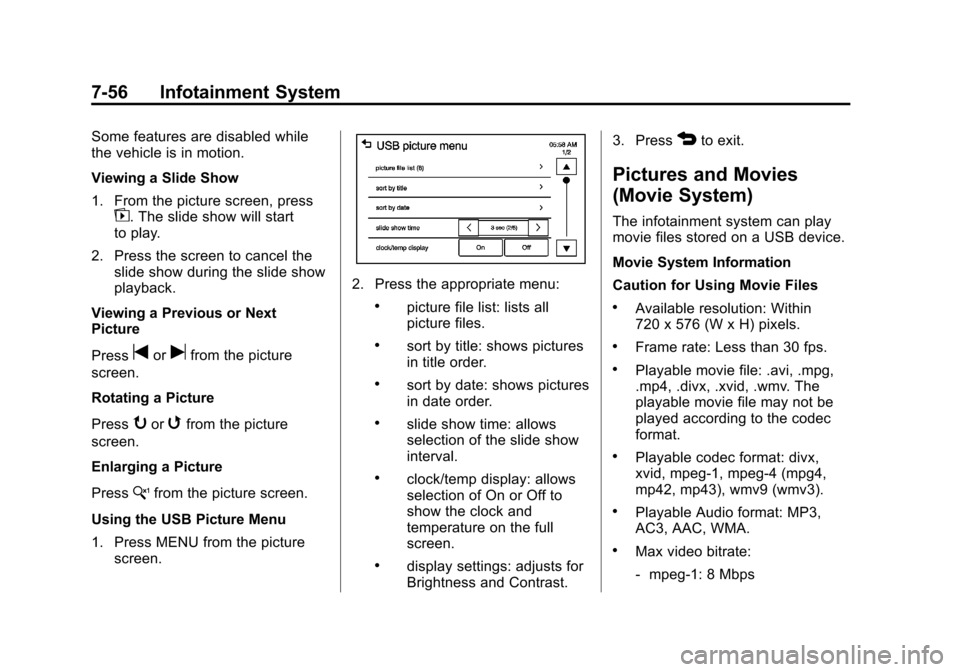
Using the USB Picture Menu
1. Press MENU from the picture screen.
2. Press the appropriate menu:
.picture file list: lists all
picture files.
.sort by title: shows pictures
in title order.
.sort by date: shows pictures
in date order.
.slide show time: allows
selection of the slide show
interval.
.clock/temp display: allows
selection of On or Off to
show the clock and
temperature on the full
screen.
.display settings: adjusts for
Brightness and Contrast. 3. Press
4to exit.
Pictures and Movies
(Movie System)
The infotainment system can play
movie files stored on a USB device.
Movie System Information
Caution for Using Movie Files
.Available resolution: Within
720 x 576 (W x H) pixels.
.Frame rate: Less than 30 fps.
.Playable movie file: .avi, .mpg,
.mp4, .divx, .xvid, .wmv. The
playable movie file may not be
played according to the codec
format.
.Playable codec format: divx,
xvid, mpeg-1, mpeg-4 (mpg4,
mp42, mp43), wmv9 (wmv3).
.Playable Audio format: MP3,
AC3, AAC, WMA.
.Max video bitrate:
‐
mpeg-1: 8 Mbps
Black plate (57,1)Chevrolet Sonic Owner Manual (GMNA-Localizing-U.S./Canada-6081473) -
2014 - 2nd Edition - 8/19/13
Infotainment System 7-57
‐mpeg-4 (mpg4, mp42, mp43):
4 Mbps
‐ wmv9: 3 Mbps
‐ divx 3: 3 Mbps
‐ divx 4/5/6: 4.8 Mbps
‐ xvid: 4.5 Mbps
.Max audio bitrate:
‐mp3: 320 Kbps
‐ wma: 320 Kbps
‐ ac-3: 640 Kbps
‐ aac: 449 Kbps
.Movie files to which Digital Right
Management (DRM) is applied
may not be played.
Playing a Movie File
1. Connect the USB device to the USB port.
2. Press the screen to open to full screen. Press the screen again
to return to the previous screen. If the USB device is already
connected:
1. Press
D.
2. Press
Gpicture & movie.
3. Press Source
R.
4. Press USB movie.
Movie is not available while driving.
Viewing a Slide Show
From the picture screen, press
z.
.The slide show will start to play.
.Press the screen to cancel the
slide show during the slide show
playback.
.The last played audio source will
play as background music
during the slide show playback.
Pause
.Pressjto pause.
.Pressrto resume. Changing to Next/Previous Movie
.Pressuto change to the
next file.
.Presstwithin five seconds of
the playback time to play the
previous file.
Returning to the Beginning of the
Current Movie
Press
tafter five seconds of the
playback time.
Scanning Forward or Backward
Press and hold
toruduring
playback to rewind or fast forward.
Release the button to resume
playback at normal speed.
Viewing Full Screen
Press
tfrom the movie screen.
Press
tagain to return to the
previous screen.
Using the USB Movie Menu
1. Press MENU from the movie screen.