2014 CHEVROLET SONIC radio
[x] Cancel search: radioPage 105 of 400
Black plate (5,1)Chevrolet Sonic Owner Manual (GMNA-Localizing-U.S./Canada-6081473) -
2014 - 2nd Edition - 8/19/13
Instruments and Controls 5-5
Avoid covering the GPS antenna,
located on the roof, for long periods
of time with objects that may
interfere with the antenna's ability to
receive a satellite signal. The
compass system is designed to
operate for a certain number of
miles or degrees of turn before
needing a signal from the GPS
satellites. When the compass
display shows CAL, drive the
vehicle for a short distance in an
open area where it can receive a
GPS signal. The compass system
will automatically determine when
the GPS signal is restored and
provide a heading again.
Clock
The infotainment system controls
are used to access the time and
date settings through the menu
system. SeeOperation on page 7-8
for information about how to use the
menu system.
Radio without Touchscreen
To set the time and date:
1. Press CLOCK.
2. Select Time and Date Settings.
3. Select Set Time or Set Date.
4. Turn the MENU/TUNE knob to
adjust the highlighted value.
5. Press the MENU/TUNE knob to select the next value.
6. To save the time or date and return to the Time and Date
Settings menu, press the
/
BACK button at any time or
press the MENU/TUNE knob
after adjusting the minutes
or year.
To set the 12/24 hour format:
1. Press CLOCK.
2. Select Time and Date Settings.
3. Highlight Set Time Format.
4. Press the MENU/TUNE knob to select the 12 hour or 24 hour
display format. To set the month and day format:
1. Press CLOCK.
2. Select Time and Date Settings.
3. Highlight Set Date Format.
4. Press the MENU/TUNE knob to
select MM/DD/YYYY (month/
day/year), or DD/MM/YYYY
(day/month/year), or YYYY/MM/
DD (year/month/day).
Radio with Touchscreen
The infotainment system controls
are used to access the time and
date settings through the menu
system. See Operation on page 7-8
for information about how to use the
menu system.
Setting the 12/24 Hour Format
1. PressD, and then press
settings.
2. Press time and date settings.
3. Select 12/24 HR Format.
4. Press
4.
Page 112 of 400

Black plate (12,1)Chevrolet Sonic Owner Manual (GMNA-Localizing-U.S./Canada-6081473) -
2014 - 2nd Edition - 8/19/13
5-12 Instruments and Controls
If the word ON or the on symbol is
lit on the passenger airbag status
indicator, it means that the front
outboard passenger frontal airbag
and knee airbag (if equipped) are
allowed to inflate.
If the word OFF or the off symbol is
lit on the passenger airbag status
indicator, it means that the
passenger sensing system has
turned off the front outboard
passenger frontal airbag and knee
airbag (if equipped).
If, after several seconds, both status
indicator lights remain on, or if there
are no lights at all, there may be a
problem with the lights or the
passenger sensing system. See
your dealer for service.
{Warning
If the airbag readiness light ever
comes on and stays on, it means
that something may be wrong
with the airbag system. To help(Continued)
Warning (Continued)
avoid injury to yourself or others,
have the vehicle serviced right
away. SeeAirbag Readiness
Light on page 5-11 for more
information, including important
safety information.
Charging System Light
This light will come on briefly when
the ignition is turned on, and the
engine is not running, as a check to
show it is working.
It should go out when the engine is
started. If it stays on, or comes on
while driving, there may be a
problem with the electrical charging
system. Have it checked by your dealer. Driving while this light is on
could drain the battery. If a short
distance must be driven with the
light on, turn off all accessories,
such as the radio and air
conditioner, to help reduce the drain
on the battery.
Malfunction
Indicator Lamp
A computer system called OBD II
(On-Board Diagnostics-Second
Generation) monitors the operation
of the vehicle to ensure emissions
are at acceptable levels, helping to
maintain a clean environment. The
malfunction indicator lamp comes
on when the vehicle is placed in
ON/RUN, as a check to show it is
working. If it does not, have the
vehicle serviced by your dealer. See
Ignition Positions on page 9-14
for
more information.
Page 127 of 400
Black plate (27,1)Chevrolet Sonic Owner Manual (GMNA-Localizing-U.S./Canada-6081473) -
2014 - 2nd Edition - 8/19/13
Instruments and Controls 5-27
the average fuel economy, press
and hold the SET/CLR button while
the average fuel economy is
displayed.
Timer
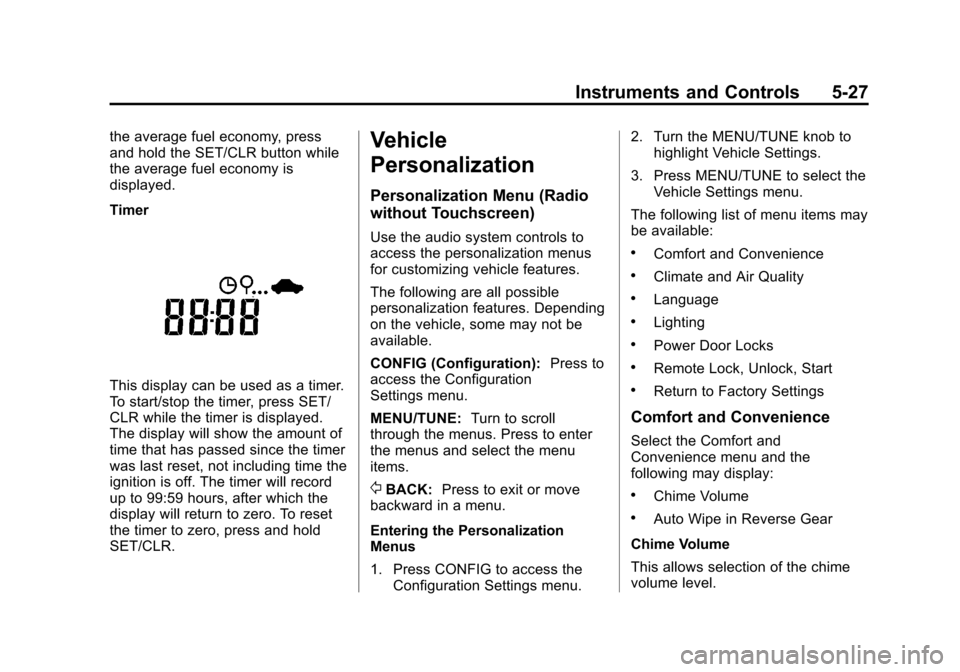
This display can be used as a timer.
To start/stop the timer, press SET/
CLR while the timer is displayed.
The display will show the amount of
time that has passed since the timer
was last reset, not including time the
ignition is off. The timer will record
up to 99:59 hours, after which the
display will return to zero. To reset
the timer to zero, press and hold
SET/CLR.
Vehicle
Personalization
Personalization Menu (Radio
without Touchscreen)
Use the audio system controls to
access the personalization menus
for customizing vehicle features.
The following are all possible
personalization features. Depending
on the vehicle, some may not be
available.
CONFIG (Configuration):Press to
access the Configuration
Settings menu.
MENU/TUNE: Turn to scroll
through the menus. Press to enter
the menus and select the menu
items.
/BACK: Press to exit or move
backward in a menu.
Entering the Personalization
Menus
1. Press CONFIG to access the Configuration Settings menu. 2. Turn the MENU/TUNE knob to
highlight Vehicle Settings.
3. Press MENU/TUNE to select the Vehicle Settings menu.
The following list of menu items may
be available:
.Comfort and Convenience
.Climate and Air Quality
.Language
.Lighting
.Power Door Locks
.Remote Lock, Unlock, Start
.Return to Factory Settings
Comfort and Convenience
Select the Comfort and
Convenience menu and the
following may display:
.Chime Volume
.Auto Wipe in Reverse Gear
Chime Volume
This allows selection of the chime
volume level.
Page 129 of 400
Black plate (29,1)Chevrolet Sonic Owner Manual (GMNA-Localizing-U.S./Canada-6081473) -
2014 - 2nd Edition - 8/19/13
Instruments and Controls 5-29
Remote Lock Feedback
This allows selection of what type of
feedback is given when locking the
vehicle with the RKE transmitter.
Select Lights and Horn, Lights Only,
Horn Only, or Off.
Remote Door Unlock
This allows selection of which doors
will unlock when pressing
Kon the
RKE transmitter.
Select All Doors or Driver Door
Only. When set to Driver Door Only,
the driver door will unlock the first
time
Kis pressed and all doors will
unlock when
Kis pressed a second
time. When set to All Doors, all of
the doors will unlock at the first
press of
K.
Return to Factory Settings
Select Return to Factory Settings to
return all of the vehicle
personalization to the default
settings.
Select Yes or No.
Personalization Menu (Radio
with Touchscreen)
Settings can be made with the
ignition ON and the vehicle not
moving.
Use the audio system controls to
access the personalization menus
for customizing vehicle features.
The following are all possible
personalization features. Depending
on the vehicle, some may not be
available.
D(Home): Press to access the
Home Page Menu.
QorR: Press to scroll through the
menus or setup items.
4: Press to exit, or return to the
previous screen or menu.
To access the menu:
1. Press
D.
2. Press Settings. The following list of menu items may
be available:
.Time & Date Settings
.Radio Settings
.Connection Settings
.Vehicle Settings
.Language
.Text Scroll
.Touch Beep Sound
.Max Startup Volume
.System Version
.DivX®VOD
Press the menu item to select it.
Each of the menus is detailed in the
following information.
Settings menus and functions may
vary depending on vehicle option.
Time & Date Settings
Select to change the settings:
.Set Time Format: Select 12h
or 24h.
Page 130 of 400

Black plate (30,1)Chevrolet Sonic Owner Manual (GMNA-Localizing-U.S./Canada-6081473) -
2014 - 2nd Edition - 8/19/13
5-30 Instruments and Controls
.Set Date Format: PressSorT
to select the date display.
.Set Time & Date: Select, then
press
yorzto adjust the
value.
.Automatic Clock Sync: Select to
display the real or user time on
the radio. Select On or Off.
Radio Settings
Select and the following may
display:
.Auto Volume
.Radio Favorites
.Radio Tune Bar
.Radio Text
.XM Categories
.Radio Factory Settings
Auto Volume
This feature adjusts the radio
volume to compensate for road and
wind noise as the vehicle speeds up
or slows down, so that the volume
level is consistent. Select Off, Low, Medium, or High.
Radio Favorites
This feature sets the number of
favorite pages displayed.
Press
SorTto select the desired
number.
Radio Tune Bar
Select to display the radio station
tune bar.
Select On or Off.
Radio Text
Select to display the radio broadcast
information.
Select On or Off.
XM Categories
Select to set the selection of XM
categories.
Radio Factory Settings
Select to restore the radio to the
factory settings.
Connection Settings
Select and the following may
display:
.Bluetooth Settings
.Change Ringtone
.Ringtone Volume
Bluetooth Settings
Select this feature to:
.Connect, disconnect, or delete a
device
.Change or set a Personal
Identification Number (PIN)
.Turn on or off the Bluetooth
connection
.Check the device information
Change Ringtone
Select to set different ringtones.
Ringtone Volume
Select to set the ringtone volume.
Press
SorT.
Page 143 of 400

Black plate (1,1)Chevrolet Sonic Owner Manual (GMNA-Localizing-U.S./Canada-6081473) -
2014 - 2nd Edition - 8/19/13
Infotainment System 7-1
Infotainment
System
Introduction
Infotainment . . . . . . . . . . . . . . . . . . . 7-1
Theft-Deterrent Feature . . . . . . . 7-2
Overview (AM-FM Radio) . . . . . 7-3
Overview (Radio withCD/USB) . . . . . . . . . . . . . . . . . . . . 7-5
Overview (Radio with Touchscreen) . . . . . . . . . . . . . . . . 7-7
Home Page (Radio with Touchscreen) . . . . . . . . . . . . . . . . 7-7
Operation . . . . . . . . . . . . . . . . . . . . . 7-8
Radio
AM-FM Radio . . . . . . . . . . . . . . . . 7-12
Satellite Radio . . . . . . . . . . . . . . . 7-16
Radio Reception . . . . . . . . . . . . . 7-17
Satellite Radio Antenna . . . . . . 7-18
Multi-Band Antenna . . . . . . . . . . 7-18
Audio Players
CD Player . . . . . . . . . . . . . . . . . . . 7-19
USB Port . . . . . . . . . . . . . . . . . . . . 7-21
Auxiliary Devices . . . . . . . . . . . . 7-24
Bluetooth Audio . . . . . . . . . . . . . . 7-26
Phone
Bluetooth (Overview) . . . . . . . . 7-26
Bluetooth (Infotainment Controls) . . . . . . . . . . . . . . . . . . . 7-28
Bluetooth (Voice Recognition) . . . . . . . . . . . . . . . 7-37
Hands-Free Phone . . . . . . . . . . 7-42
Downloadable Applications
Smartphone Link (Overview) . . . . . . . . . . . . . . . . . 7-45
Smartphone Link (Pandora) . . . . . . . . . . . . . . . . . . 7-47
Smartphone Link (Stitcher) . . . . . . . . . . . . . . . . . . . 7-49
Bluetooth Phone/Devices
Pictures and Movies (AudioSystem) . . . . . . . . . . . . . . . . . . . . 7-50
Pictures and Movies (Picture System) . . . . . . . . . . . . . . . . . . . . 7-55
Pictures and Movies (Movie System) . . . . . . . . . . . . . . . . . . . . 7-56
Trademarks and License
Agreements
Trademarks and LicenseAgreements . . . . . . . . . . . . . . . . 7-58
Introduction
Infotainment
Determine which radio the vehicle
has and read the following pages to
become familiar with its features.
{Warning
Taking your eyes off the road for
extended periods could cause a
crash resulting in injury or death
to you or others. Do not give
extended attention to infotainment
tasks while driving.
This system provides access to
many audio and non-audio listings.
To minimize taking your eyes off the
road while driving, do the following
while the vehicle is parked:
.Become familiar with the
operation and controls of the
audio system.
Page 144 of 400

Black plate (2,1)Chevrolet Sonic Owner Manual (GMNA-Localizing-U.S./Canada-6081473) -
2014 - 2nd Edition - 8/19/13
7-2 Infotainment System
.Set up the tone, speaker
adjustments, and preset radio
stations.
See Defensive Driving on page 9-2.
{Caution
Contact your dealer before adding
any equipment.
Adding audio or communication
equipment could interfere with the
operation of the engine, radio,
or other systems, and could
damage them. Follow federal
rules covering mobile radio and
telephone equipment.
Customer Assistance
Assistance is available to help with
Bluetooth pairing, application
downloading and installation, other
mobile device interface, and
operation support of the
infotainment system. See Customer
Assistance Offices on page 13-3.
Theft-Deterrent Feature
The theft-deterrent feature works by
learning a portion of the Vehicle
Identification Number (VIN) to the
infotainment system. The
infotainment system does not
operate if it is stolen or moved to a
different vehicle.
Page 145 of 400
Black plate (3,1)Chevrolet Sonic Owner Manual (GMNA-Localizing-U.S./Canada-6081473) -
2014 - 2nd Edition - 8/19/13
Infotainment System 7-3
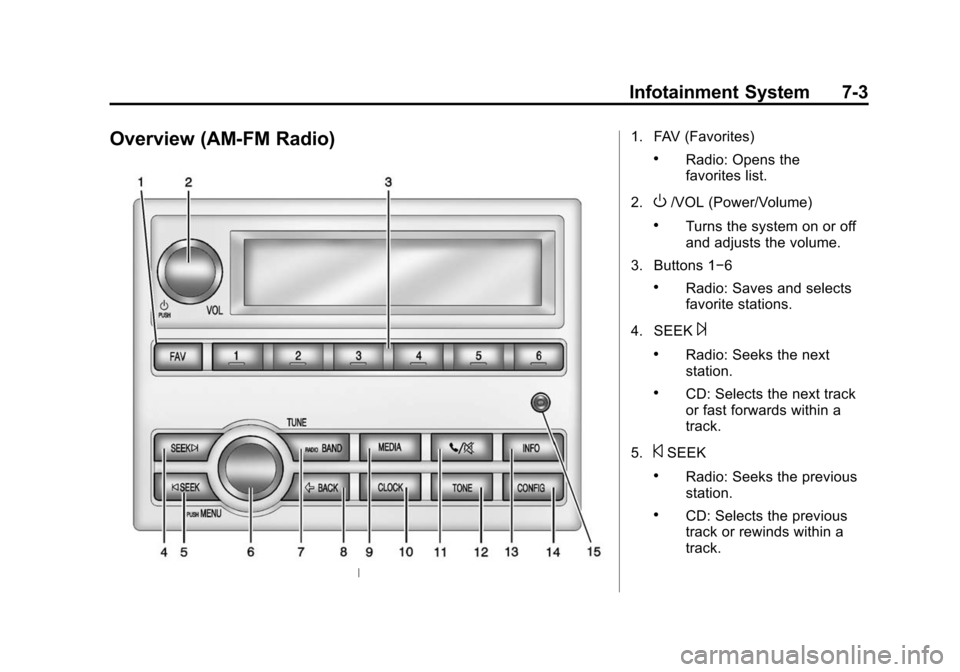
Overview (AM-FM Radio)1. FAV (Favorites)
.Radio: Opens the
favorites list.
2.
O/VOL (Power/Volume)
.Turns the system on or off
and adjusts the volume.
3. Buttons 1−6
.Radio: Saves and selects
favorite stations.
4. SEEK
¨
.Radio: Seeks the next
station.
.CD: Selects the next track
or fast forwards within a
track.
5.
©SEEK
.Radio: Seeks the previous
station.
.CD: Selects the previous
track or rewinds within a
track.