2014 CHEVROLET SONIC display
[x] Cancel search: displayPage 105 of 400
Black plate (5,1)Chevrolet Sonic Owner Manual (GMNA-Localizing-U.S./Canada-6081473) -
2014 - 2nd Edition - 8/19/13
Instruments and Controls 5-5
Avoid covering the GPS antenna,
located on the roof, for long periods
of time with objects that may
interfere with the antenna's ability to
receive a satellite signal. The
compass system is designed to
operate for a certain number of
miles or degrees of turn before
needing a signal from the GPS
satellites. When the compass
display shows CAL, drive the
vehicle for a short distance in an
open area where it can receive a
GPS signal. The compass system
will automatically determine when
the GPS signal is restored and
provide a heading again.
Clock
The infotainment system controls
are used to access the time and
date settings through the menu
system. SeeOperation on page 7-8
for information about how to use the
menu system.
Radio without Touchscreen
To set the time and date:
1. Press CLOCK.
2. Select Time and Date Settings.
3. Select Set Time or Set Date.
4. Turn the MENU/TUNE knob to
adjust the highlighted value.
5. Press the MENU/TUNE knob to select the next value.
6. To save the time or date and return to the Time and Date
Settings menu, press the
/
BACK button at any time or
press the MENU/TUNE knob
after adjusting the minutes
or year.
To set the 12/24 hour format:
1. Press CLOCK.
2. Select Time and Date Settings.
3. Highlight Set Time Format.
4. Press the MENU/TUNE knob to select the 12 hour or 24 hour
display format. To set the month and day format:
1. Press CLOCK.
2. Select Time and Date Settings.
3. Highlight Set Date Format.
4. Press the MENU/TUNE knob to
select MM/DD/YYYY (month/
day/year), or DD/MM/YYYY
(day/month/year), or YYYY/MM/
DD (year/month/day).
Radio with Touchscreen
The infotainment system controls
are used to access the time and
date settings through the menu
system. See Operation on page 7-8
for information about how to use the
menu system.
Setting the 12/24 Hour Format
1. PressD, and then press
settings.
2. Press time and date settings.
3. Select 12/24 HR Format.
4. Press
4.
Page 106 of 400

Black plate (6,1)Chevrolet Sonic Owner Manual (GMNA-Localizing-U.S./Canada-6081473) -
2014 - 2nd Edition - 8/19/13
5-6 Instruments and Controls
Setting the Month and Day
Format
1. PressD, and then press
settings.
2. Press time and date settings.
3. Press
SorTto set the date
display to DD/MM/YYYY (day/
month/year), MM/DD/YYYY
(month/day/year), or YYYY/MM/
DD (year/month/day) display
format.
4. Press
4.
Setting the Time and Date
1. PressD, and then press
settings.
2. Press time and date settings, and then set time and date.
3. Press
yorzto adjust the
value.
4. Press
4.
Automatic Clock Sync
1. PressD, and then press
settings.
2. Press time and date settings, and then automatic clock sync.
3. Select On to display the real time or Off to display the time
set by the user.
4. Press
4.
Power Outlets
The accessory power outlets can be
used to plug in electrical equipment,
such as a cell phone or MP3 player.
The vehicle has an accessory
power outlet in front of the
cupholders on the center floor
console.
Remove the cover to access and
replace when not in use.
{Warning
Power is always supplied to the
outlets. Do not leave electrical
equipment plugged in when the
vehicle is not in use because the
vehicle could catch fire and cause
injury or death.
{Caution
Leaving electrical equipment
plugged in for an extended period
of time while the vehicle is off will
drain the battery. Always unplug
electrical equipment when not in
use and do not plug in equipment
that exceeds the maximum
20 amp rating.
Certain accessory power plugs may
not be compatible with the
accessory power outlet and could
Page 109 of 400
Black plate (9,1)Chevrolet Sonic Owner Manual (GMNA-Localizing-U.S./Canada-6081473) -
2014 - 2nd Edition - 8/19/13
Instruments and Controls 5-9
Speedometer
The speedometer shows the
vehicle's speed in either kilometers
per hour (km/h) or miles per
hour (mph).
Odometer
The odometer shows how far the
vehicle has been driven, in either
kilometers or miles.
Trip Odometer
The trip odometer measures the
distance the vehicle has been
driven since the function was last
reset.
Press the reset stem in the lower
right of the tachometer to toggle
between the odometer and the trip
odometer. To reset the trip odometer
to zero, press and hold the reset
stem while the trip odometer is
being displayed. Be careful not to
reset the engine oil life monitor
accidentally.
Tachometer
The tachometer displays the engine
speed in revolutions per
minute (rpm).
Fuel Gauge
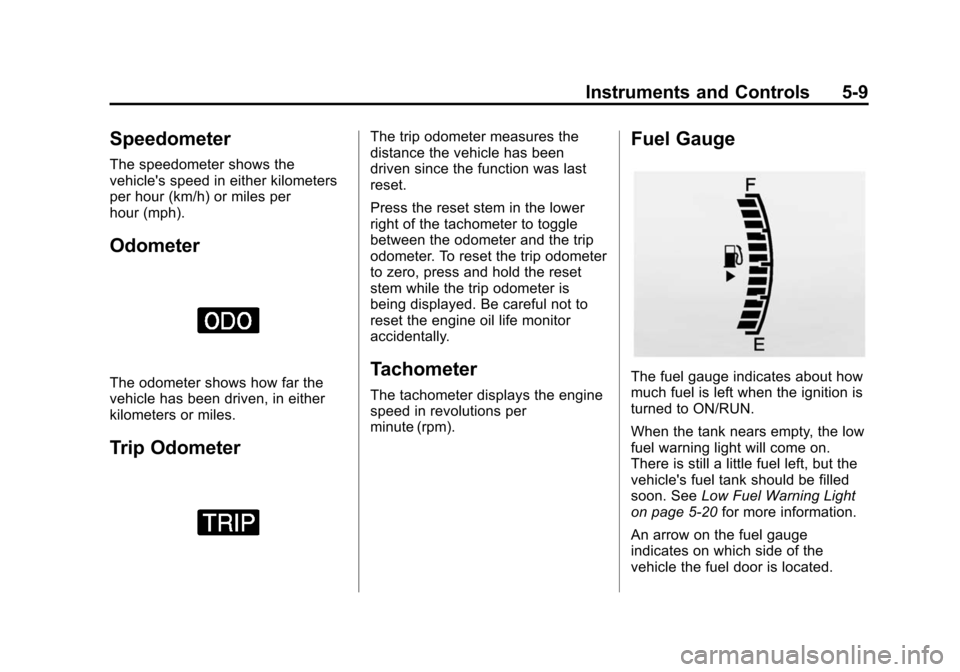
The fuel gauge indicates about how
much fuel is left when the ignition is
turned to ON/RUN.
When the tank nears empty, the low
fuel warning light will come on.
There is still a little fuel left, but the
vehicle's fuel tank should be filled
soon. SeeLow Fuel Warning Light
on page 5-20 for more information.
An arrow on the fuel gauge
indicates on which side of the
vehicle the fuel door is located.
Page 120 of 400

Black plate (20,1)Chevrolet Sonic Owner Manual (GMNA-Localizing-U.S./Canada-6081473) -
2014 - 2nd Edition - 8/19/13
5-20 Instruments and Controls
This light should come on briefly as
the engine is started. If it does not
come on, have the vehicle serviced
by your dealer.
If the light comes on and stays on, it
means that oil is not flowing through
the engine properly. The vehicle
could be low on oil and might have
some other system problem. See
your dealer.
Low Fuel Warning Light
This light comes on for a few
seconds when the ignition is turned
on as a check to indicate it is
working. If it does not come on,
have it fixed.
This light comes on when the
vehicle is low on fuel.
The low fuel warning light comes on
when there are approximately 6.0 L
(1.7 gal) of fuel remaining in
the tank.
To turn the light off, add fuel to the
fuel tank. SeeFilling the Tank on
page 9-40.
Immobilizer Light
The immobilizer light should come
on briefly as the engine is started.
If it does not come on, have the vehicle serviced by your dealer.
If the system is working normally,
the indicator light turns off.
If the light stays on and the engine
does not start, there could be a
problem with the immobilizer
system. See
Immobilizer Operation
on page 2-14.
Reduced Engine Power
Light
The reduced engine power light
should come on briefly as the
engine is started. If it does not come
on, have the vehicle serviced by
your dealer.
This light, along with the malfunction
indicator lamp, displays when a
noticeable reduction in the vehicle's
performance occurs.
Page 122 of 400
Black plate (22,1)Chevrolet Sonic Owner Manual (GMNA-Localizing-U.S./Canada-6081473) -
2014 - 2nd Edition - 8/19/13
5-22 Instruments and Controls
For vehicles with cruise control, the
cruise control light is white when the
cruise control is on and ready, and
turns green when the cruise control
is set and active.
The light turns off when the cruise
control is turned off. SeeCruise
Control on page 9-30.
Door Ajar Light
This light comes on when a door is
open or not securely latched. Before
driving, check that all doors are
properly closed.
Information Displays
Driver Information
Center (DIC)
The DIC displays information about
your vehicle. It also displays
warning messages if a system
problem is detected. See Vehicle
Messages on page 5-24. All
messages appear in the DIC display
in the instrument cluster.
DIC Operation and Displays
The DIC has different displays
which can be accessed by using the
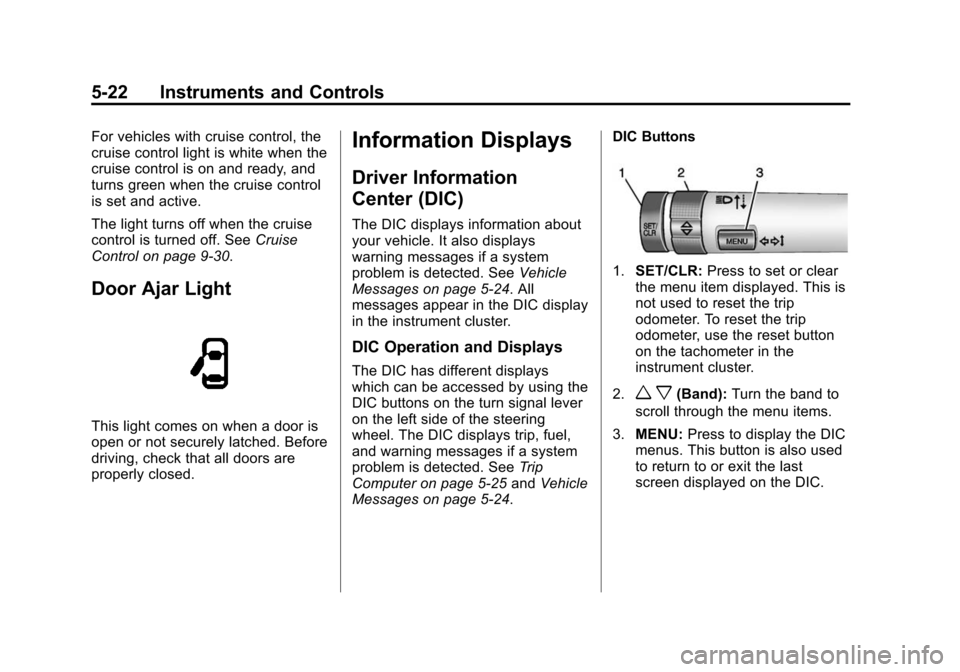
DIC buttons on the turn signal lever
on the left side of the steering
wheel. The DIC displays trip, fuel,
and warning messages if a system
problem is detected. See Trip
Computer on page 5-25 andVehicle
Messages on page 5-24. DIC Buttons
1.
SET/CLR: Press to set or clear
the menu item displayed. This is
not used to reset the trip
odometer. To reset the trip
odometer, use the reset button
on the tachometer in the
instrument cluster.
2.
w x(Band): Turn the band to
scroll through the menu items.
3. MENU: Press to display the DIC
menus. This button is also used
to return to or exit the last
screen displayed on the DIC.
Page 123 of 400

Black plate (23,1)Chevrolet Sonic Owner Manual (GMNA-Localizing-U.S./Canada-6081473) -
2014 - 2nd Edition - 8/19/13
Instruments and Controls 5-23
DIC Menu Items
Press MENU to view the DIC
menus. Some items display in the
upper display area, some in the
lower display area, and others use
both the upper and lower display
areas. Use
w xto scroll through
the menu items. Not all items are
available on every vehicle. The
following is a list of all possible
menu items:
.Units
.Language
.Tire Learn
.Remaining Oil Life
Units
This menu is not available while the
vehicle is moving. Press SET/CLR
while the unit display is active and
move
w xto change units when
UNIT SET is displayed. Press SET/
CLR to confirm the setting. You will
have to select 1, 2, or 3 for the unit
display. 1 is Imperial units, 2 is US
units, and 3 is metric units. This will change the displays on the cluster
and DIC to the type of
measurements you select.
Language
This menu is not available while the
vehicle is moving. Press SET/CLR
while the language display is active
and move
w xto change the
language of the displays when
LANG SET is displayed. You will
have to select 1 or 2 for the
language display. 1 is Alphabet and
2 is Arabic Numeral. Press SET/
CLR to confirm the setting.
Tire Learn
This menu is not available while the
vehicle is moving. This display
allows for matching of the TPMS
sensors. See Tire Pressure Monitor
System on page 10-49 andTire
Pressure Monitor Operation on
page 10-50. Remaining Oil Life
This menu is not available while the
vehicle is moving. This display
shows an estimate of the oil's
remaining useful life. If 99
:% is
displayed, that means 99% of the
current oil life remains.
When the remaining oil life is low,
the Code 82 message will appear
on the display. The oil should be
changed as soon as possible. See
Engine Oil on page 10-9. In addition
to the engine oil life system
monitoring the oil life, additional
maintenance is recommended in the
Maintenance Schedule. See
Maintenance Schedule on
page 11-2.
Remember, the oil life display must
be reset after each oil change. It will
not reset itself. Also, be careful not
to reset the oil life display
accidentally at any time other than
when the oil has just been changed.
Page 124 of 400

Black plate (24,1)Chevrolet Sonic Owner Manual (GMNA-Localizing-U.S./Canada-6081473) -
2014 - 2nd Edition - 8/19/13
5-24 Instruments and Controls
It cannot be reset accurately until
the next oil change. To reset the
engine oil life system, press the
SET/CLR button while the oil life
display is active. SeeEngine Oil
Life System on page 10-12.Vehicle Messages
DIC messages display when the
status of the vehicle has changed
and action may be needed to
correct the condition. Multiple
messages appear one after another.
Press any of the DIC buttons on the
turn signal lever to acknowledge
and clear them from the display.
More urgent messages cannot be
cleared from the DIC display. All
messages should be taken
seriously. Clearing messages will
not correct the problem.
Vehicle messages appear as code
numbers.
25: Left Front Turn Signal Failure
26: Left Rear Turn Signal Failure
27: Right Front Turn Signal Failure
28: Right Rear Turn Signal Failure
49: Lane Departure Warning
Unavailable 52:
Change Timing Belt
77: Service Front Camera System
84: Engine Power Is Reduced
89: Service Vehicle Soon
Engine Oil Messages
:
% CHANGE
This message displays when the
engine oil needs to be changed.
When changing the engine oil, be
sure to reset the Oil Life System.
See Engine Oil Life System on
page 10-12, Engine Oil on
page 10-9, and Maintenance
Schedule on page 11-2.
Tire Messages
LF XX, RF XX, LR XX,
or RR XX
A message displays when the tire
pressure is low. It shows the
location of the low tire and the
approximate pressure of the low tire.
Page 125 of 400
Black plate (25,1)Chevrolet Sonic Owner Manual (GMNA-Localizing-U.S./Canada-6081473) -
2014 - 2nd Edition - 8/19/13
Instruments and Controls 5-25
If a tire pressure message appears,
stop as soon as you can. Inflate the
tires by adding air until the tire
pressure is equal to the values
shown on the Tire and Loading
Information label. SeeTires on
page 10-40, Vehicle Load Limits on
page 9-9, and Tire Pressure on
page 10-47.Trip Computer
The trip computer is located in the
Driver Information Center (DIC).
It provides the driver with driving
information such as average speed,
fuel range, average fuel economy,
and a timer.
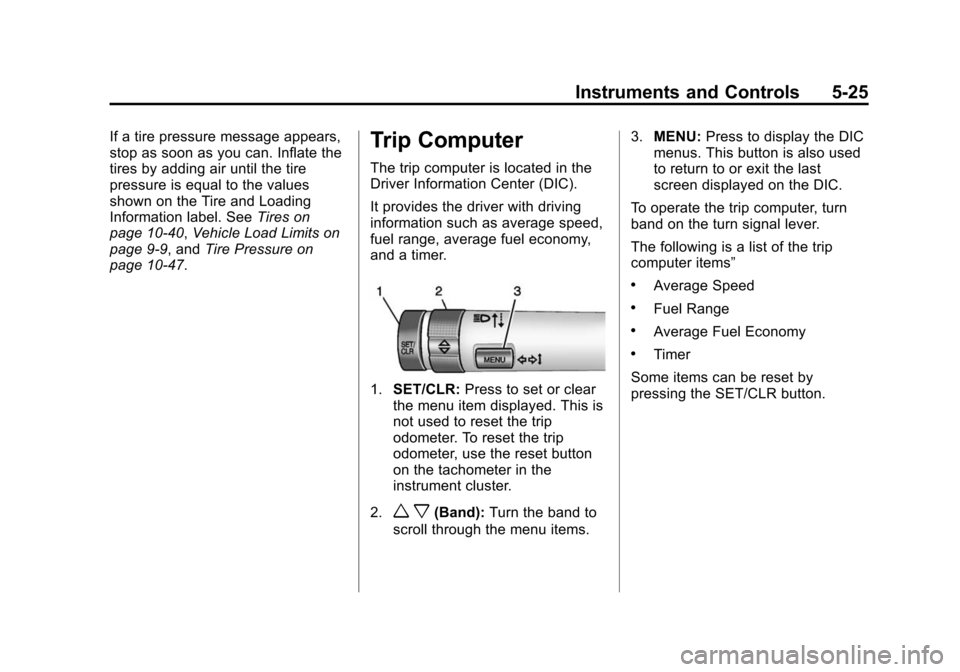
1. SET/CLR: Press to set or clear
the menu item displayed. This is
not used to reset the trip
odometer. To reset the trip
odometer, use the reset button
on the tachometer in the
instrument cluster.
2.
w x(Band): Turn the band to
scroll through the menu items. 3.
MENU: Press to display the DIC
menus. This button is also used
to return to or exit the last
screen displayed on the DIC.
To operate the trip computer, turn
band on the turn signal lever.
The following is a list of the trip
computer items”
.Average Speed
.Fuel Range
.Average Fuel Economy
.Timer
Some items can be reset by
pressing the SET/CLR button.