2014 CHEVROLET SONIC AUX
[x] Cancel search: AUXPage 163 of 400
Black plate (21,1)Chevrolet Sonic Owner Manual (GMNA-Localizing-U.S./Canada-6081473) -
2014 - 2nd Edition - 8/19/13
Infotainment System 7-21
To search for tracks:
1. Turn the Push/MENU/TUNE knob.
2. Select Search.
3. Select: Playlists, Artists, Albums, Song Titles, Genres,
or Folder View.
4. Select the track.
USB Port
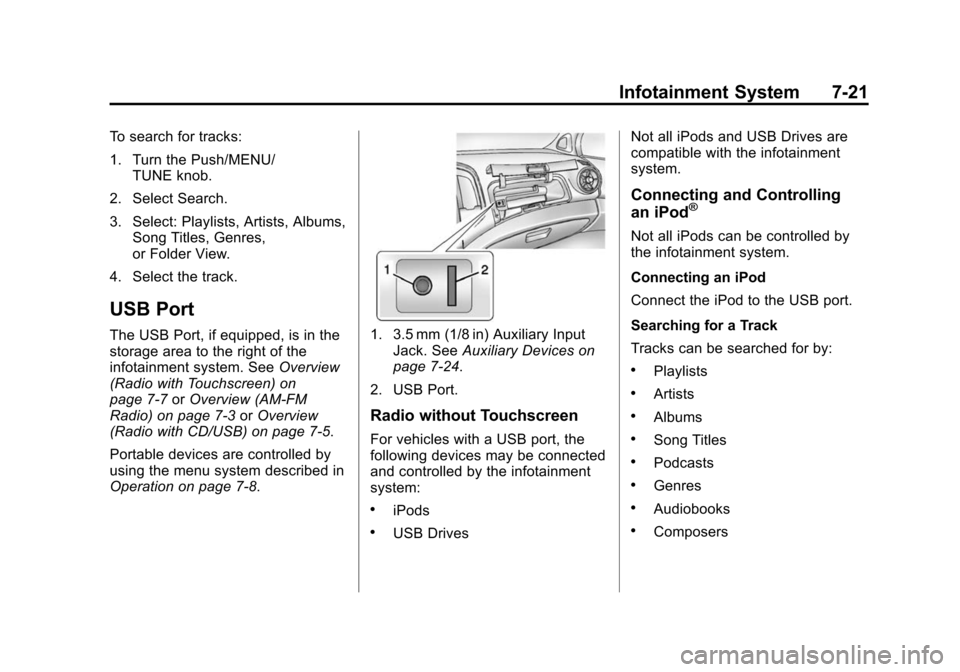
The USB Port, if equipped, is in the
storage area to the right of the
infotainment system. See Overview
(Radio with Touchscreen) on
page 7-7 orOverview (AM-FM
Radio) on page 7-3 orOverview
(Radio with CD/USB) on page 7-5.
Portable devices are controlled by
using the menu system described in
Operation on page 7-8.1. 3.5 mm (1/8 in) Auxiliary Input
Jack. See Auxiliary Devices on
page 7-24.
2. USB Port.
Radio without Touchscreen
For vehicles with a USB port, the
following devices may be connected
and controlled by the infotainment
system:
.iPods
.USB Drives Not all iPods and USB Drives are
compatible with the infotainment
system.
Connecting and Controlling
an iPod®
Not all iPods can be controlled by
the infotainment system.
Connecting an iPod
Connect the iPod to the USB port.
Searching for a Track
Tracks can be searched for by:
.Playlists
.Artists
.Albums
.Song Titles
.Podcasts
.Genres
.Audiobooks
.Composers
Page 165 of 400
Black plate (23,1)Chevrolet Sonic Owner Manual (GMNA-Localizing-U.S./Canada-6081473) -
2014 - 2nd Edition - 8/19/13
Infotainment System 7-23
Shuffle Functionality
Turn the Push/MENU/TUNE knob
and set Shuffle Songs (Random) to
On or Off.
On:Plays current tracks in random
order.
Off: Plays current tracks in
sequential order.
Repeat Functionality
Turn the Push/MENU/TUNE knob
and set Repeat to On or Off.
Repeat On: Repeats the current
track.
Repeat Off: Playback starts from
the beginning of the current track
after the last track finishes.
Radio with Touchscreen
The infotainment system can play
music or movies by connecting an
auxiliary device to the USB port,
if equipped. USB Support
USB Supported Devices
.USB Flash Drives
.Portable USB Hard Drives
.2G-5G iPod nano®
.1G-3G iPod touch®
.120GB/160GB iPod classic®
.3G/3GS/4/4S iPhone®
Not all iPods and USB drives are
compatible with the USB port.
Make sure the iPod has the latest
firmware from Apple
®for proper
operation. iPod firmware can be
updated using the latest iTunes
®
application. See www.apple.com/
itunes.
For help with identifying your iPod,
go to www.apple.com/support.
The USB port can play both lower
and upper case .mp3, .wma, .ogg,
and .wav files stored on a USB
storage device. USB Supported File and Folder
Structure
The Infotainment system supports:
.Up to 2,500 folders.
.Up to 10 folders in depth.
.Up to 2,500 music files.
.Up to 2,500 photo files.
.Up to 250 movie files.
.ID3 Tag (versions 1.0/1.1/2.2/
2.3/2.4).
.FAT16.
.FAT32.
.exFAT.
Connecting a USB Storage
Device or iPod/iPhone
To connect a USB storage device,
connect the device to the USB port.
To connect an iPod/iPhone, connect
one end of the device’
s cable to the
iPod/iPhone and the other end to
the USB port.
Page 166 of 400
Black plate (24,1)Chevrolet Sonic Owner Manual (GMNA-Localizing-U.S./Canada-6081473) -
2014 - 2nd Edition - 8/19/13
7-24 Infotainment System
The iPod/iPhone charges while it is
connected to the vehicle if the
vehicle is in the ACC/ACCESSORY
or ON/RUN position. When the
vehicle is turned off, the iPod/
iPhone automatically powers off and
will not charge or draw power from
the vehicle's battery.
For more information on USB
usage, see“Audio System” in
Pictures and Movies (Audio System)
on page 7-50 orPictures and
Movies (Picture System) on
page 7-55 orPictures and Movies
(Movie System) on page 7-56.
Auxiliary Devices
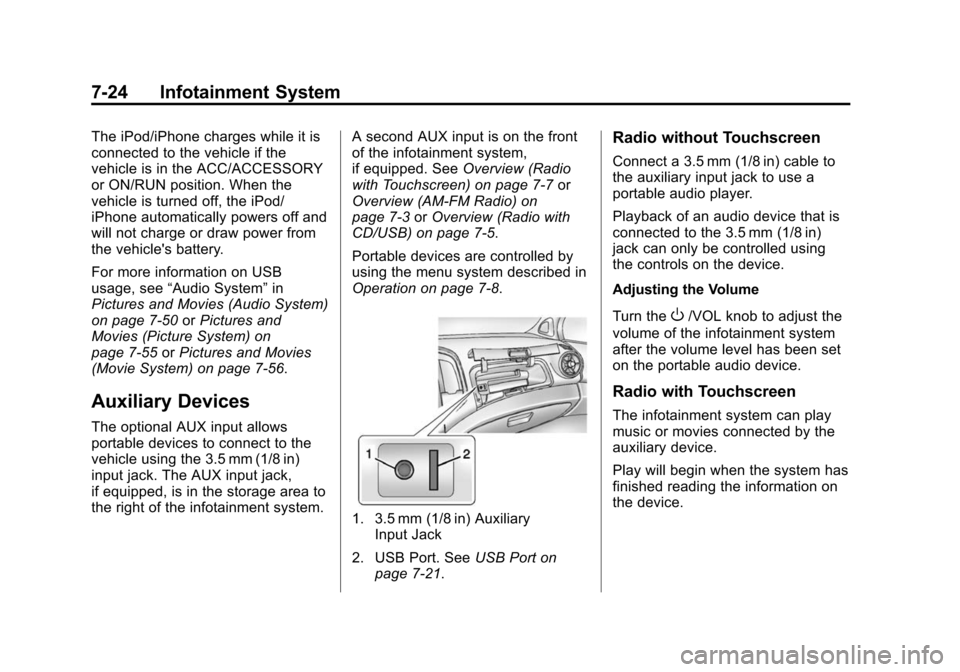
The optional AUX input allows
portable devices to connect to the
vehicle using the 3.5 mm (1/8 in)
input jack. The AUX input jack,
if equipped, is in the storage area to
the right of the infotainment system. A second AUX input is on the front
of the infotainment system,
if equipped. See
Overview (Radio
with Touchscreen) on page 7-7 or
Overview (AM-FM Radio) on
page 7-3 orOverview (Radio with
CD/USB) on page 7-5.
Portable devices are controlled by
using the menu system described in
Operation on page 7-8.
1. 3.5 mm (1/8 in) Auxiliary Input Jack
2. USB Port. See USB Port on
page 7-21.
Radio without Touchscreen
Connect a 3.5 mm (1/8 in) cable to
the auxiliary input jack to use a
portable audio player.
Playback of an audio device that is
connected to the 3.5 mm (1/8 in)
jack can only be controlled using
the controls on the device.
Adjusting the Volume
Turn the
O/VOL knob to adjust the
volume of the infotainment system
after the volume level has been set
on the portable audio device.
Radio with Touchscreen
The infotainment system can play
music or movies connected by the
auxiliary device.
Play will begin when the system has
finished reading the information on
the device.
Page 167 of 400
Black plate (25,1)Chevrolet Sonic Owner Manual (GMNA-Localizing-U.S./Canada-6081473) -
2014 - 2nd Edition - 8/19/13
Infotainment System 7-25
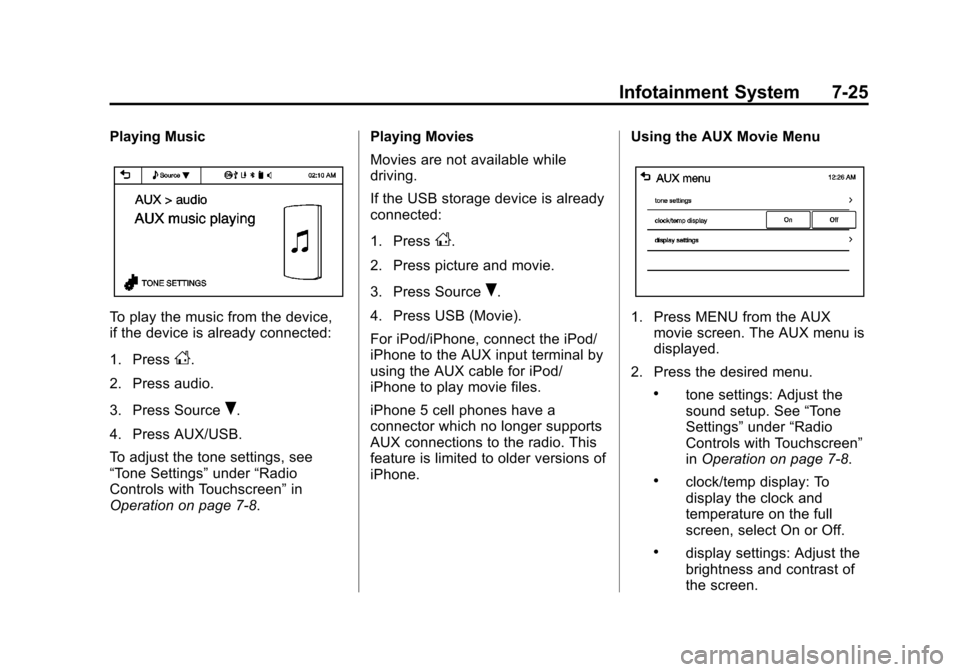
Playing Music
To play the music from the device,
if the device is already connected:
1. Press
D.
2. Press audio.
3. Press Source
R.
4. Press AUX/USB.
To adjust the tone settings, see
“Tone Settings” under“Radio
Controls with Touchscreen” in
Operation on page 7-8. Playing Movies
Movies are not available while
driving.
If the USB storage device is already
connected:
1. Press
D.
2. Press picture and movie.
3. Press Source
R.
4. Press USB (Movie).
For iPod/iPhone, connect the iPod/
iPhone to the AUX input terminal by
using the AUX cable for iPod/
iPhone to play movie files.
iPhone 5 cell phones have a
connector which no longer supports
AUX connections to the radio. This
feature is limited to older versions of
iPhone. Using the AUX Movie Menu
1. Press MENU from the AUX
movie screen. The AUX menu is
displayed.
2. Press the desired menu.
.tone settings: Adjust the
sound setup. See “Tone
Settings” under“Radio
Controls with Touchscreen”
in Operation on page 7-8.
.clock/temp display: To
display the clock and
temperature on the full
screen, select On or Off.
.display settings: Adjust the
brightness and contrast of
the screen.
Page 194 of 400
Black plate (52,1)Chevrolet Sonic Owner Manual (GMNA-Localizing-U.S./Canada-6081473) -
2014 - 2nd Edition - 8/19/13
7-52 Infotainment System
.When the iPod/iPhone is
connected to the USB port by
using the iPod/iPhone cable, the
Bluetooth music is not
supported.
.Connect the iPod/iPhone to the
USB port by using the iPod/
iPhone cable to play the music
files. When the iPod/iPhone is
connected to the AUX input
terminal, the music file will
not play.
.The iPod/iPhone playback
functions and the information
displayed may be different when
played on the infotainment
system.
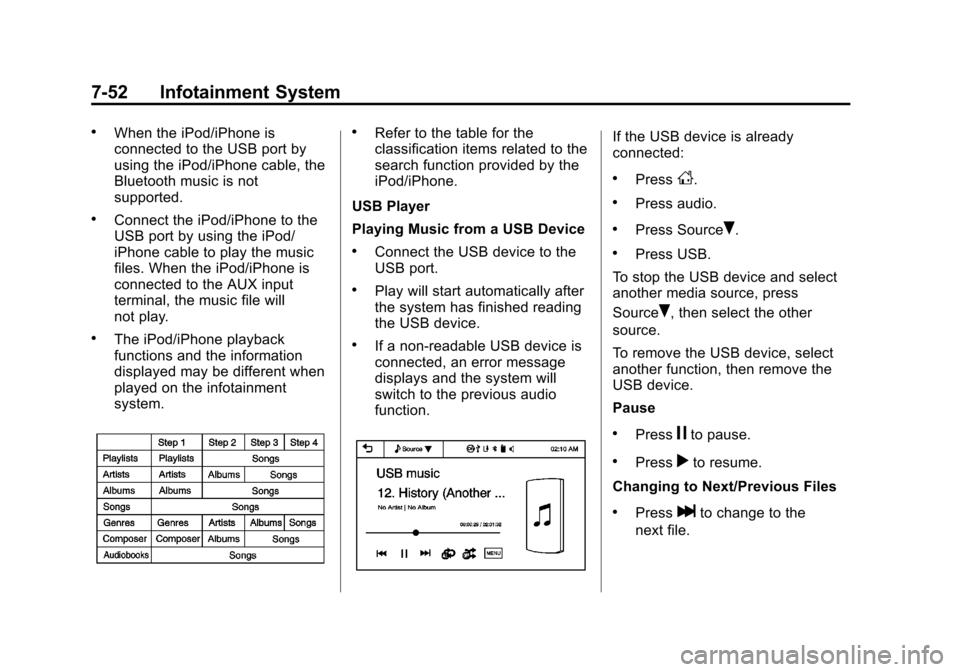
.Refer to the table for the
classification items related to the
search function provided by the
iPod/iPhone.
USB Player
Playing Music from a USB Device
.Connect the USB device to the
USB port.
.Play will start automatically after
the system has finished reading
the USB device.
.If a non-readable USB device is
connected, an error message
displays and the system will
switch to the previous audio
function.
If the USB device is already
connected:
.PressD.
.Press audio.
.Press SourceR.
.Press USB.
To stop the USB device and select
another media source, press
Source
R, then select the other
source.
To remove the USB device, select
another function, then remove the
USB device.
Pause
.Pressjto pause.
.Pressrto resume.
Changing to Next/Previous Files
.Presslto change to the
next file.
Page 287 of 400
Black plate (37,1)Chevrolet Sonic Owner Manual (GMNA-Localizing-U.S./Canada-6081473) -
2014 - 2nd Edition - 8/19/13
Vehicle Care 10-37
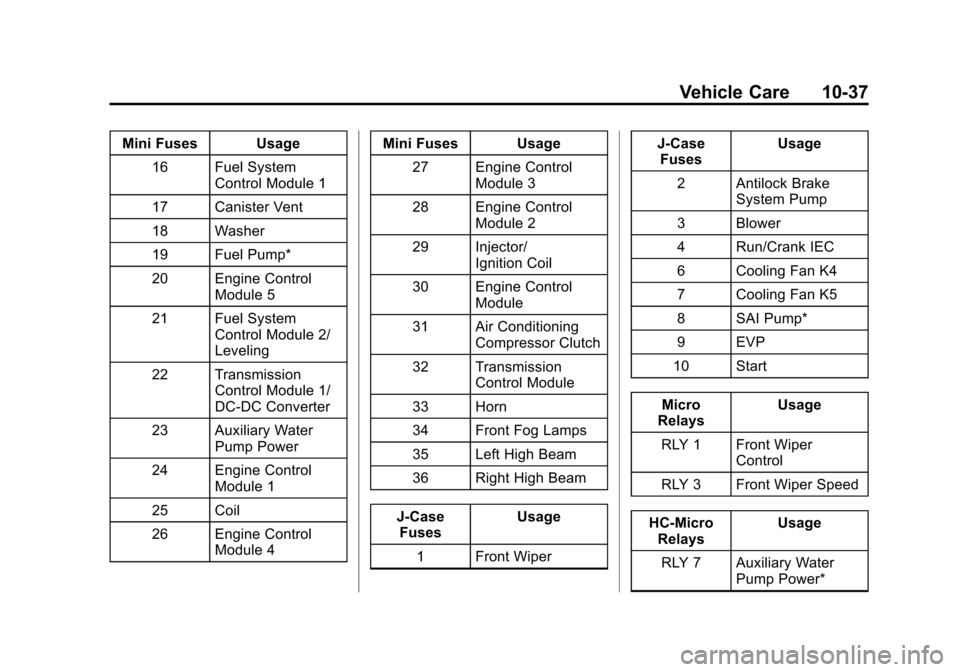
Mini Fuses Usage16 Fuel System Control Module 1
17 Canister Vent
18 Washer
19 Fuel Pump*
20 Engine Control Module 5
21 Fuel System Control Module 2/
Leveling
22 Transmission Control Module 1/
DC-DC Converter
23 Auxiliary Water Pump Power
24 Engine Control Module 1
25 Coil
26 Engine Control Module 4 Mini Fuses Usage
27 Engine Control Module 3
28 Engine Control Module 2
29 Injector/ Ignition Coil
30 Engine Control Module
31 Air Conditioning Compressor Clutch
32 Transmission Control Module
33 Horn
34 Front Fog Lamps
35 Left High Beam
36 Right High Beam
J-Case Fuses Usage
1 Front Wiper J-Case
Fuses Usage
2 Antilock Brake System Pump
3 Blower
4 Run/Crank IEC
6 Cooling Fan K4
7 Cooling Fan K5
8 SAI Pump*
9 EVP
10 Start
Micro
Relays Usage
RLY 1 Front Wiper Control
RLY 3 Front Wiper Speed
HC-Micro Relays Usage
RLY 7 Auxiliary Water Pump Power*
Page 389 of 400

Black plate (1,1)Chevrolet Sonic Owner Manual (GMNA-Localizing-U.S./Canada-6081473) -
2014 - 2nd Edition - 8/19/13
INDEX i-1
A
Accessories andModifications . . . . . . . . . . . . . . . . . 10-3
Accessory Power . . . . . . . . . . . . . . 9-17
Add-On Electrical Equipment . . . . . . . . . . . . . . . . . . . 9-42
Additional Information
OnStar
®. . . . . . . . . . . . . . . . . . . . . . 14-5
Air Cleaner/Filter, Engine . . . . . 10-14
Air Filter, Passenger Compartment . . . . . . . . . . . . . . . . . 8-4
Air Intake . . . . . . . . . . . . . . . . . . . . . . . 8-4
Air Vents . . . . . . . . . . . . . . . . . . . . . . . 8-4
Airbag System Check . . . . . . . . . . . . . . . . . . . . . . . . 3-29
How Does an AirbagRestrain? . . . . . . . . . . . . . . . . . . . 3-22
Passenger Sensing System . . . . . . . . . . . . . . . . . . . . . . 3-24
What Makes an Airbag
Inflate? . . . . . . . . . . . . . . . . . . . . . . 3-22
What Will You See after an Airbag Inflates? . . . . . . . . . . . . . 3-22
When Should an Airbag Inflate? . . . . . . . . . . . . . . . . . . . . . . 3-21
Where Are the Airbags? . . . . . . 3-19 Airbags
Adding Equipment to the
Vehicle . . . . . . . . . . . . . . . . . . . . . . 3-28
Passenger Status Indicator . . . 5-11
Readiness Light . . . . . . . . . . . . . . 5-11
Servicing Airbag-Equipped Vehicles . . . . . . . . . . . . . . . . . . . . . 3-28
System Check . . . . . . . . . . . . . . . . 3-17
Alarm Vehicle Security . . . . . . . . . . . . . . 2-13
AM-FM Radio . . . . . . . . . . . . . . . . . . 7-12
Antenna
Multi-band . . . . . . . . . . . . . . . . . . . . 7-18
Satellite Radio . . . . . . . . . . . . . . . . 7-18
Antilock Brake System (ABS) . . . . . . . . . . . . . . . . 9-25
Warning Light . . . . . . . . . . . . . . . . . 5-16
Appearance Care Exterior . . . . . . . . . . . . . . . . . . . . . 10-81
Interior . . . . . . . . . . . . . . . . . . . . . . 10-86
Armrest
Front Seat . . . . . . . . . . . . . . . . . . . . . 3-5
Assistance Program, Roadside . . . . . . . . . . . . . . . . . . . . . 13-5
Audio
Bluetooth . . . . . . . . . . . . . . . . . . . . . 7-26 Audio Players . . . . . . . . . . . . . . . . . 7-19
CD . . . . . . . . . . . . . . . . . . . . . . . . . . . 7-19
Audio System Radio Reception . . . . . . . . . . . . . . 7-17
Theft-Deterrent Feature . . . . . . . . 7-2
Automatic Door Locks . . . . . . . . . . . . . . . . . . . . 2-8
Headlamp System . . . . . . . . . . . . . 6-3
Transmission . . . . . . . . . . . . . . . . . 9-21
Transmission Fluid . . . . . . . . . 10-13
Automatic Transmission
Manual Mode . . . . . . . . . . . . . . . . . 9-23
Shift Lock ControlFunction Check . . . . . . . . . . . 10-25
Auxiliary Devices . . . . . . . . . . . . . . . . . . . . . . . 7-24
B
Battery . . . . . . . . . . . . . . . . . . . . . . . 10-24
Jump Starting . . . . . . . . . . . . . . . 10-75
Load Management . . . . . . . . . . . . . 6-6
Power Protection . . . . . . . . . . . . . . 6-7
Blade Replacement, Wiper . . . 10-26
Blind Spot Mirrors . . . . . . . . . . . . . 2-16
Bluetooth
Overview . . . . . . . . . 7-26, 7-28, 7-37
Page 391 of 400

Black plate (3,1)Chevrolet Sonic Owner Manual (GMNA-Localizing-U.S./Canada-6081473) -
2014 - 2nd Edition - 8/19/13
INDEX i-3
CompartmentsStorage . . . . . . . . . . . . . . . . . . . . . . . . 4-1
Compass . . . . . . . . . . . . . . . . . . . . . . . 5-4
Compressor Kit, Tire Sealant . . . . . . . . . . . . . . . . . . . . . . 10-62
Computer, Trip . . . . . . . . . . . . . . . . . 5-25
Connections OnStar
®. . . . . . . . . . . . . . . . . . . . . . 14-3
Control Traction and ElectronicStability . . . . . . . . . . . . . . . . . . . . . 9-28
Control of a Vehicle . . . . . . . . . . . . . 9-3
Convex Mirrors . . . . . . . . . . . . . . . . 2-15
Coolant Engine . . . . . . . . . . . . . . . . . . . . . . 10-16
Engine TemperatureWarning Light . . . . . . . . . . . . . . . 5-18
Cooling System . . . . . . . . . . . . . . . 10-15
Courtesy Lamps . . . . . . . . . . . . . . . . 6-5
Courtesy Transportation Program . . . . . . . . . . . . . . . . . . . . . . 13-7
Cover Cargo . . . . . . . . . . . . . . . . . . . . . . . . . . 4-2
Cruise Control . . . . . . . . . . . . . . . . . 9-30 Light . . . . . . . . . . . . . . . . . . . . . . . . . . 5-21 Customer Assistance . . . . . . . . . . 13-4
Offices . . . . . . . . . . . . . . . . . . . . . . . . 13-3
Text Telephone (TTY)
Users . . . . . . . . . . . . . . . . . . . . . . . 13-4
Customer Information Service PublicationsOrdering Information . . . . . . .13-11
Customer Satisfaction Procedure . . . . . . . . . . . . . . . . . . . . 13-1
D
Damage Repair, Collision . . . . . . 13-9
Danger, Warnings, andCautions . . . . . . . . . . . . . . . . . . . . . . . . iii
Data Recorders, Event . . . . . . . 13-14
Daytime Running Lamps (DRL) . . . . . . . . . . . . . . . . . . 6-2
Indicator Light . . . . . . . . . . . . . . . . 5-21
Defensive Driving . . . . . . . . . . . . . . . 9-2
Delayed Locking . . . . . . . . . . . . . . . . 2-8
Devices Auxiliary . . . . . . . . . . . . . . . . . . . . . . 7-24
Diagnostics
OnStar
®. . . . . . . . . . . . . . . . . . . . . . 14-5
Distracted Driving . . . . . . . . . . . . . . . 9-2
Dome Lamps . . . . . . . . . . . . . . . . . . . 6-5 Door
Ajar Light . . . . . . . . . . . . . . . . . . . . . 5-22
Ajar Reminder . . . . . . . . . . . . . . . . . 2-8
Central Locking System . . . . . . . 2-8
Delayed Locking . . . . . . . . . . . . . . . 2-8
Locks . . . . . . . . . . . . . . . . . . . . . . . . . . 2-7
Drive Belt Routing, Engine . . . . . 12-3
Driver Information
Center (DIC) . . . . . . . . . . . . . . . . . 5-22
Driving Defensive . . . . . . . . . . . . . . . . . . . . . . 9-2
Drunk . . . . . . . . . . . . . . . . . . . . . . . . . . 9-3
For Better Fuel Economy . . . . . 1-21
Highway Hypnosis . . . . . . . . . . . . . 9-6
Hill and Mountain Roads . . . . . . . 9-6
If the Vehicle is Stuck . . . . . . . . . . 9-8
Loss of Control . . . . . . . . . . . . . . . . 9-4
Off-Road Recovery . . . . . . . . . . . . 9-4
Vehicle Load Limits . . . . . . . . . . . . 9-9
Wet Roads . . . . . . . . . . . . . . . . . . . . 9-5
Winter . . . . . . . . . . . . . . . . . . . . . . . . . 9-7