2014 CHEVROLET MALIBU seats
[x] Cancel search: seatsPage 36 of 428
Black plate (4,1)Chevrolet Malibu Owner Manual (GMNA-Localizing-U.S./Canada/Mexico-
6081487) - 2014 - CRC - 11/19/13
2-4 Keys, Doors, and Windows
PressingKwill disarm the
theft-deterrent system. See Vehicle
Alarm System on page 2-16.
Memory seat positions may be
recalled when unlocking the vehicle.
See Memory Seats on page 3-6 and
“Memory Remote Recall” under
Vehicle Personalization on
page 5-34.
VorY(Remote Trunk
Release): Press and hold to open
the trunk.
7(Vehicle Locator/Panic
Alarm): Press and release one
time to initiate vehicle locator. The
exterior lamps flash and the horn
chirps three times.
Press and hold
7for at least
three seconds to sound the panic
alarm. The horn sounds and the
turn signals flash for about
30 seconds until
7is pressed again
or the vehicle is started.
/(Remote Vehicle Start): For
vehicles with this feature, press
Q
and release and then press and
hold
/for at least four seconds to
start the engine from outside the
vehicle using the RKE transmitter.
See Remote Vehicle Start on
page 2-9.
The RKE transmitter buttons will not
operate when the key is in the
ignition.
Keyless Access Operation
If equipped, the Keyless Access
system allows the door and trunk to
be locked and unlocked without
pressing the RKE transmitter button.
The RKE transmitter must be within
1 m (3 ft) of the door being opened.
If the vehicle has this feature, there
will be a button on the outside front
door handles. The Keyless Access can be
programmed to unlock all doors on
the first unlock/lock button press
from the driver door. See
Vehicle
Personalization on page 5-34.
Keyless Unlocking/Locking from
the Driver Door
When the doors are locked and the
RKE transmitter is within 1 m (3 ft)
of the driver door handle, pressing
the lock/unlock button on the driver
door handle will unlock the driver
door. If the lock/unlock button is
pressed again within five seconds,
all passenger doors will unlock. Pull
the door handle to unlatch the door.
Page 42 of 428

Black plate (10,1)Chevrolet Malibu Owner Manual (GMNA-Localizing-U.S./Canada/Mexico-
6081487) - 2014 - CRC - 11/19/13
2-10 Keys, Doors, and Windows
If the vehicle has heated seats, they
may come on during a remote start.
SeeHeated Front Seats on
page 3-7.
Laws in some local communities
may restrict the use of remote
starters. For example, some laws
require a person using remote start
to have the vehicle in view. Check
local regulations for any
requirements.
Other conditions can affect the
performance of the transmitter. See
Remote Keyless Entry (RKE)
System on page 2-2.
Starting the Engine Using Remote
Start
To start the engine using the remote
start feature:
1. Press and release
Q.
2. Immediately after completing Step 1, press and hold
/for at
least four seconds or until the
turn signal lamps flash. The turn signal lamps flashing confirms
the request to remote start the
vehicle has been received.
When the engine starts, the parking
lamps will turn on and remain on as
long as the engine is running. The
doors will be locked and the climate
control system may come on.
The engine will continue to run for
10 minutes. Repeat the steps for a
10-minute time extension. Remote
start can be extended only once.
Start the vehicle before driving.
Extending Engine Run Time
The engine run time can be
extended by another 10 minutes,
if during the first 10 minutes
Steps 1–2 are repeated while the
engine is still running. When the
remote start is extended, the
second 10 minute period is added
on to the first 10 minutes for a total
of 20 minutes.
The remote start can only be
extended once. A maximum of two remote starts,
or a single start with an extension,
is allowed between ignition cycles.
The vehicle's ignition must be
turned on and then back off before
the remote start procedure can be
used again.
Canceling a Remote Start
To cancel a remote start, do one of
the following:
.Aim the RKE transmitter at the
vehicle and press and hold
/
until the parking lamps turn off.
.Turn on the hazard warning
flashers.
.Turn the vehicle on and then off.
Conditions in Which Remote Start
Will Not Work
The remote vehicle start feature will
not operate if:
.The key is in the ignition (Key
Access) or if the key is in the
vehicle (Keyless Access).
.The hood is not closed.
Page 57 of 428
Black plate (1,1)Chevrolet Malibu Owner Manual (GMNA-Localizing-U.S./Canada/Mexico-
6081487) - 2014 - CRC - 11/19/13
Seats and Restraints 3-1
Seats and
Restraints
Head Restraints
Head Restraints . . . . . . . . . . . . . . . 3-2
Front Seats
Seat Adjustment . . . . . . . . . . . . . . 3-3
Power Seat Adjustment . . . . . . . 3-4
Lumbar Adjustment . . . . . . . . . . . 3-4
Reclining Seatbacks . . . . . . . . . . 3-4
Memory Seats . . . . . . . . . . . . . . . . 3-6
Heated Front Seats . . . . . . . . . . . 3-7
Rear Seats
Rear Seats . . . . . . . . . . . . . . . . . . . . 3-9
Rear Seat Armrest . . . . . . . . . . . 3-10
Safety Belts
Safety Belts . . . . . . . . . . . . . . . . . . 3-11
How to Wear Safety BeltsProperly . . . . . . . . . . . . . . . . . . . . 3-12 Lap-Shoulder Belt . . . . . . . . . . . 3-13
Safety Belt Use During
Pregnancy . . . . . . . . . . . . . . . . . . 3-17
Safety Belt Extender . . . . . . . . . 3-17
Safety System Check . . . . . . . . 3-17
Safety Belt Care . . . . . . . . . . . . . 3-18
Replacing Safety Belt System Parts after a Crash . . . . . . . . . 3-18
Airbag System
Airbag System . . . . . . . . . . . . . . . 3-19
Where Are the Airbags? . . . . . 3-21
When Should an AirbagInflate? . . . . . . . . . . . . . . . . . . . . . 3-22
What Makes an Airbag Inflate? . . . . . . . . . . . . . . . . . . . . . 3-23
How Does an Airbag
Restrain? . . . . . . . . . . . . . . . . . . . 3-23
What Will You See after an Airbag Inflates? . . . . . . . . . . . . 3-24
Passenger Sensing System . . . . . . . . . . . . . . . . . . . . . 3-25 Servicing the Airbag-Equipped
Vehicle . . . . . . . . . . . . . . . . . . . . . 3-30
Adding Equipment to the Airbag-Equipped Vehicle . . . 3-30
Airbag System Check . . . . . . . . 3-31
Replacing Airbag System
Parts after a Crash . . . . . . . . . 3-31
Child Restraints
Older Children . . . . . . . . . . . . . . . 3-32
Infants and YoungChildren . . . . . . . . . . . . . . . . . . . . 3-34
Child Restraint Systems . . . . . 3-37
Where to Put the Restraint . . . 3-38
Lower Anchors and Tethers for Children (LATCH
System) . . . . . . . . . . . . . . . . . . . . 3-40
Replacing LATCH System Parts After a Crash . . . . . . . . . 3-47
Securing Child Restraints (Rear Seat) . . . . . . . . . . . . . . . . . 3-47
Securing Child Restraints (Front Passenger Seat) . . . . 3-49
Page 58 of 428
Black plate (2,1)Chevrolet Malibu Owner Manual (GMNA-Localizing-U.S./Canada/Mexico-
6081487) - 2014 - CRC - 11/19/13
3-2 Seats and Restraints
Head Restraints
{Warning
With head restraints that are not
installed and adjusted properly,
there is a greater chance that
occupants will suffer a neck/
spinal injury in a crash. Do not
drive until the head restraints for
all occupants are installed and
adjusted properly.
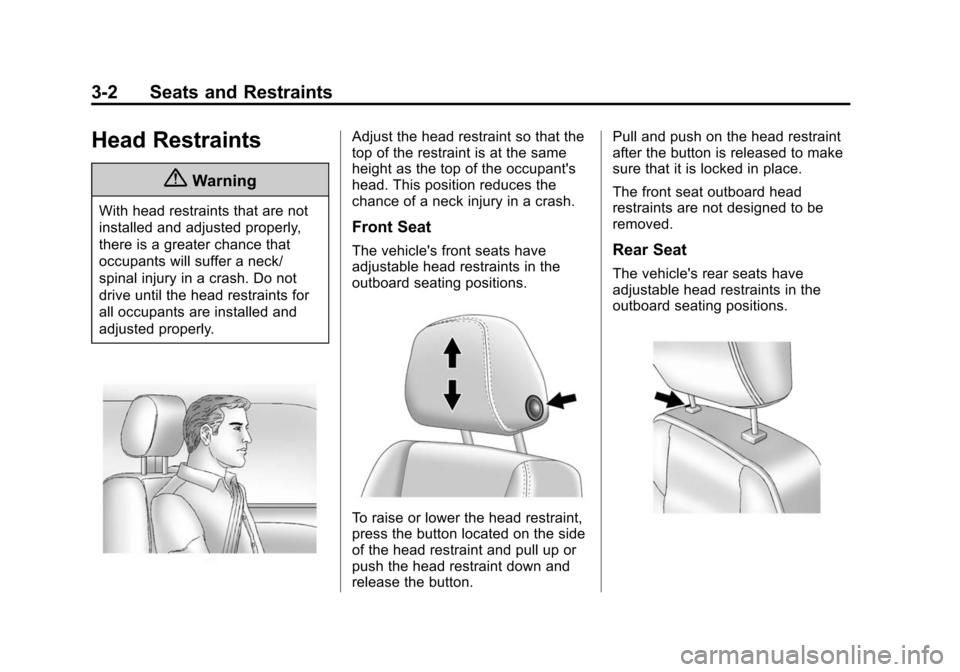
Adjust the head restraint so that the
top of the restraint is at the same
height as the top of the occupant's
head. This position reduces the
chance of a neck injury in a crash.
Front Seat
The vehicle's front seats have
adjustable head restraints in the
outboard seating positions.
To raise or lower the head restraint,
press the button located on the side
of the head restraint and pull up or
push the head restraint down and
release the button.Pull and push on the head restraint
after the button is released to make
sure that it is locked in place.
The front seat outboard head
restraints are not designed to be
removed.
Rear Seat
The vehicle's rear seats have
adjustable head restraints in the
outboard seating positions.
Page 59 of 428
Black plate (3,1)Chevrolet Malibu Owner Manual (GMNA-Localizing-U.S./Canada/Mexico-
6081487) - 2014 - CRC - 11/19/13
Seats and Restraints 3-3
The height of the head restraint can
be adjusted. Pull the head restraint
up to raise it. Try to move the head
restraint to make sure that it is
locked in place.
To lower the head restraint, press
the button, located on the top of the
seatback, and push the head
restraint down. Try to move the
head restraint after the button is
released to make sure that it is
locked in place.
If you are installing a child restraint
in the rear seat, see "Securing a
Child Restraint Designed for the
LATCH System" underLower
Anchors and Tethers for Children
(LATCH System) on page 3-40.Front Seats
Seat Adjustment
{Warning
You can lose control of the
vehicle if you try to adjust a driver
seat while the vehicle is moving.
Adjust the driver seat only when
the vehicle is not moving.
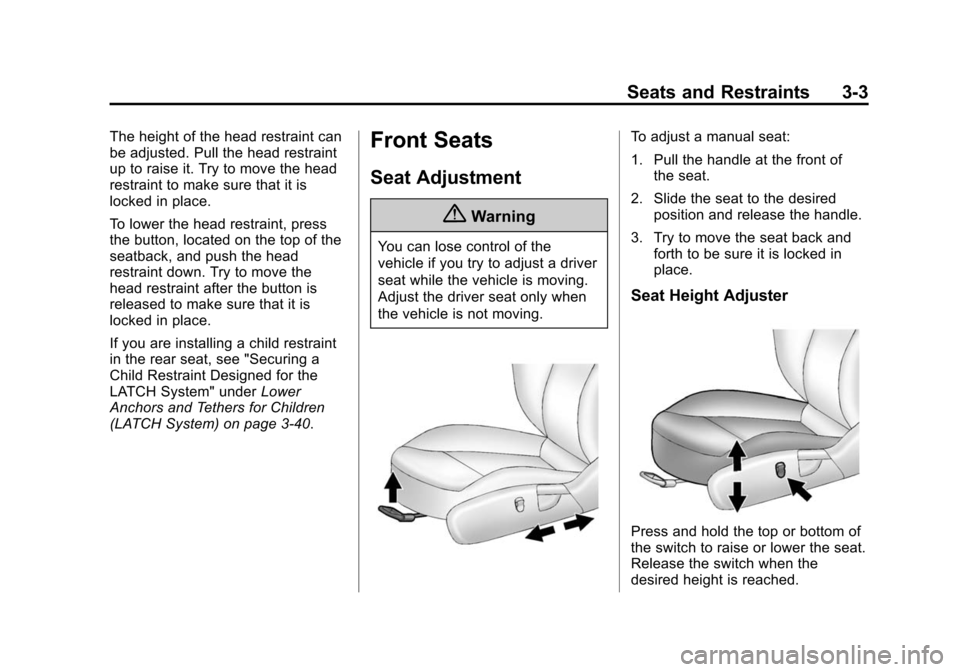
To adjust a manual seat:
1. Pull the handle at the front of
the seat.
2. Slide the seat to the desired position and release the handle.
3. Try to move the seat back and forth to be sure it is locked in
place.
Seat Height Adjuster
Press and hold the top or bottom of
the switch to raise or lower the seat.
Release the switch when the
desired height is reached.
Page 60 of 428
Black plate (4,1)Chevrolet Malibu Owner Manual (GMNA-Localizing-U.S./Canada/Mexico-
6081487) - 2014 - CRC - 11/19/13
3-4 Seats and Restraints
Power Seat Adjustment
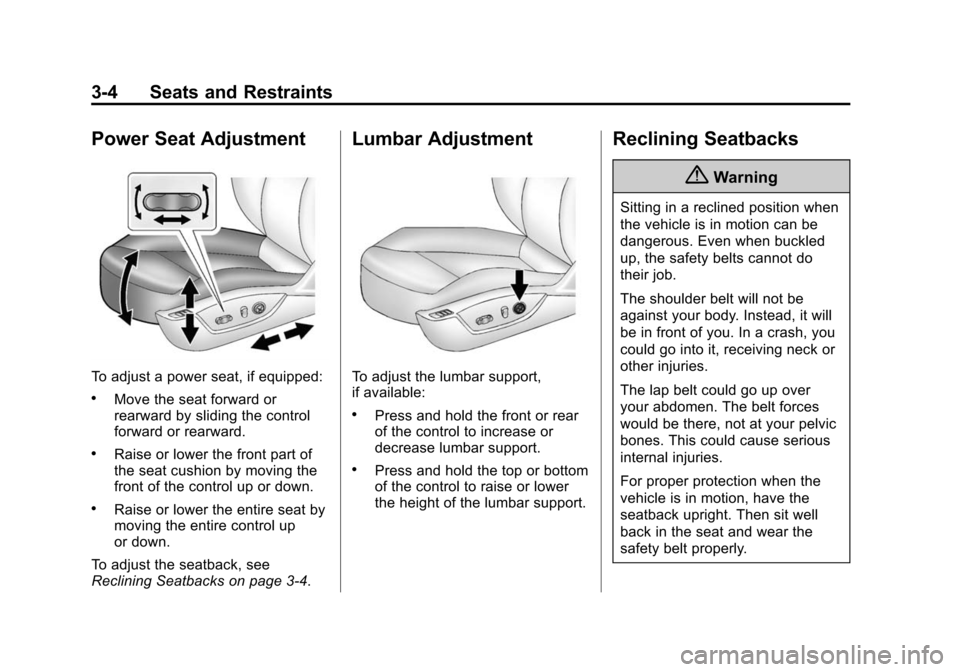
To adjust a power seat, if equipped:
.Move the seat forward or
rearward by sliding the control
forward or rearward.
.Raise or lower the front part of
the seat cushion by moving the
front of the control up or down.
.Raise or lower the entire seat by
moving the entire control up
or down.
To adjust the seatback, see
Reclining Seatbacks on page 3-4.
Lumbar Adjustment
To adjust the lumbar support,
if available:
.Press and hold the front or rear
of the control to increase or
decrease lumbar support.
.Press and hold the top or bottom
of the control to raise or lower
the height of the lumbar support.
Reclining Seatbacks
{Warning
Sitting in a reclined position when
the vehicle is in motion can be
dangerous. Even when buckled
up, the safety belts cannot do
their job.
The shoulder belt will not be
against your body. Instead, it will
be in front of you. In a crash, you
could go into it, receiving neck or
other injuries.
The lap belt could go up over
your abdomen. The belt forces
would be there, not at your pelvic
bones. This could cause serious
internal injuries.
For proper protection when the
vehicle is in motion, have the
seatback upright. Then sit well
back in the seat and wear the
safety belt properly.
Page 61 of 428
Black plate (5,1)Chevrolet Malibu Owner Manual (GMNA-Localizing-U.S./Canada/Mexico-
6081487) - 2014 - CRC - 11/19/13
Seats and Restraints 3-5
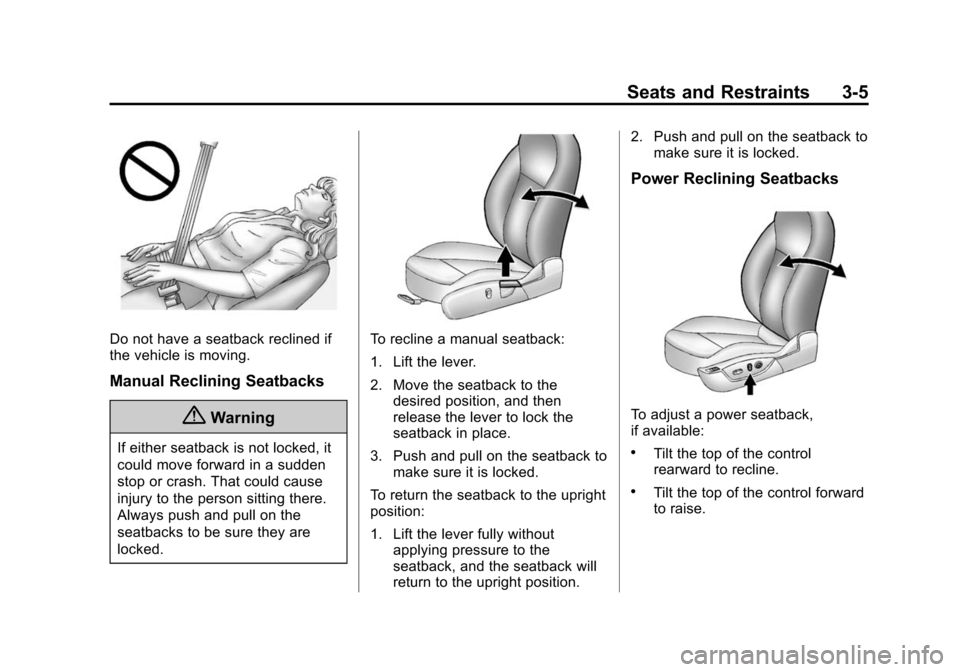
Do not have a seatback reclined if
the vehicle is moving.
Manual Reclining Seatbacks
{Warning
If either seatback is not locked, it
could move forward in a sudden
stop or crash. That could cause
injury to the person sitting there.
Always push and pull on the
seatbacks to be sure they are
locked.
To recline a manual seatback:
1. Lift the lever.
2. Move the seatback to thedesired position, and then
release the lever to lock the
seatback in place.
3. Push and pull on the seatback to make sure it is locked.
To return the seatback to the upright
position:
1. Lift the lever fully without applying pressure to the
seatback, and the seatback will
return to the upright position. 2. Push and pull on the seatback to
make sure it is locked.
Power Reclining Seatbacks
To adjust a power seatback,
if available:
.Tilt the top of the control
rearward to recline.
.Tilt the top of the control forward
to raise.
Page 62 of 428
Black plate (6,1)Chevrolet Malibu Owner Manual (GMNA-Localizing-U.S./Canada/Mexico-
6081487) - 2014 - CRC - 11/19/13
3-6 Seats and Restraints
Memory Seats
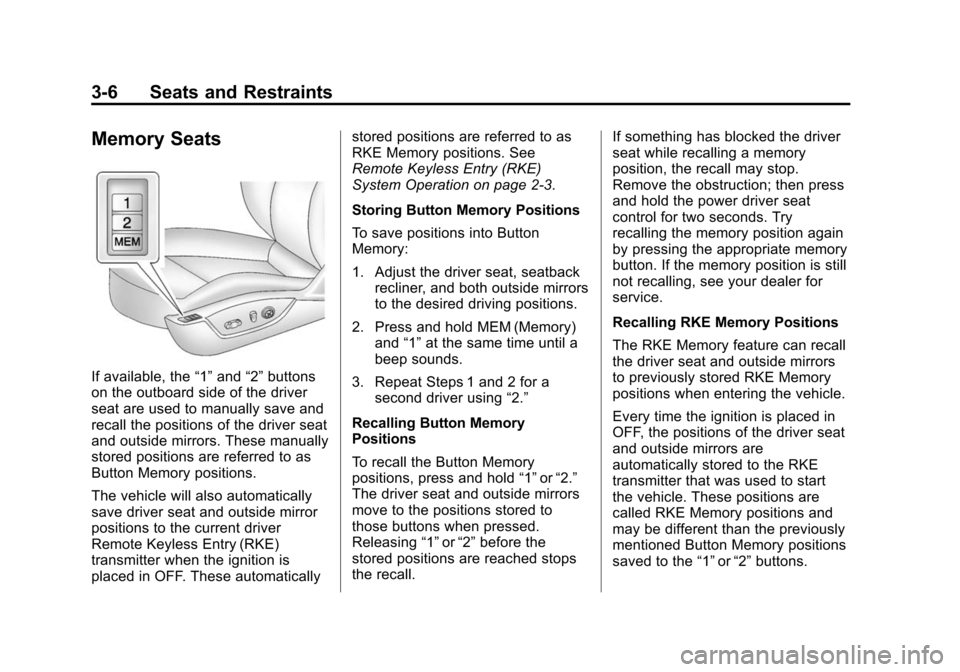
If available, the“1”and “2”buttons
on the outboard side of the driver
seat are used to manually save and
recall the positions of the driver seat
and outside mirrors. These manually
stored positions are referred to as
Button Memory positions.
The vehicle will also automatically
save driver seat and outside mirror
positions to the current driver
Remote Keyless Entry (RKE)
transmitter when the ignition is
placed in OFF. These automatically stored positions are referred to as
RKE Memory positions. See
Remote Keyless Entry (RKE)
System Operation on page 2-3.
Storing Button Memory Positions
To save positions into Button
Memory:
1. Adjust the driver seat, seatback
recliner, and both outside mirrors
to the desired driving positions.
2. Press and hold MEM (Memory) and “1”at the same time until a
beep sounds.
3. Repeat Steps 1 and 2 for a second driver using “2.”
Recalling Button Memory
Positions
To recall the Button Memory
positions, press and hold “1”or“2.”
The driver seat and outside mirrors
move to the positions stored to
those buttons when pressed.
Releasing “1”or“2” before the
stored positions are reached stops
the recall. If something has blocked the driver
seat while recalling a memory
position, the recall may stop.
Remove the obstruction; then press
and hold the power driver seat
control for two seconds. Try
recalling the memory position again
by pressing the appropriate memory
button. If the memory position is still
not recalling, see your dealer for
service.
Recalling RKE Memory Positions
The RKE Memory feature can recall
the driver seat and outside mirrors
to previously stored RKE Memory
positions when entering the vehicle.
Every time the ignition is placed in
OFF, the positions of the driver seat
and outside mirrors are
automatically stored to the RKE
transmitter that was used to start
the vehicle. These positions are
called RKE Memory positions and
may be different than the previously
mentioned Button Memory positions
saved to the
“1”or“2” buttons.