Page 308 of 422
Black plate (34,1)Chevrolet Impala Owner Manual (GMNA-Localizing-U.S./Canada-5772216) -
2014 - 2nd crc - 5/14/13
10-34 Vehicle Care
{Caution
Improper lamp assembly removal
and installation can cause leaks
and water intrusion which may
cause damage to the taillamp. Do
not remove the taillamp assembly
to replace a bulb. Use the trunk
opening to access the bulb.
To replace one of these bulbs:
1. Open the trunk. See Trunk on
page 2-14.
2. Remove the push pins and pull the trunk trim away from the
taillamp assembly.
3. Remove the bulb socket from the taillamp assembly by turning
it counterclockwise.
4. Remove the bulb from the socket by turning the bulb
counterclockwise one-quarter
turn and pulling it straight out.
5. Install a new bulb into the socket. 6. Install the bulb socket into the
taillamp assembly by turning it
clockwise.
7. Install the trunk trim and push pins.
License Plate Lamp
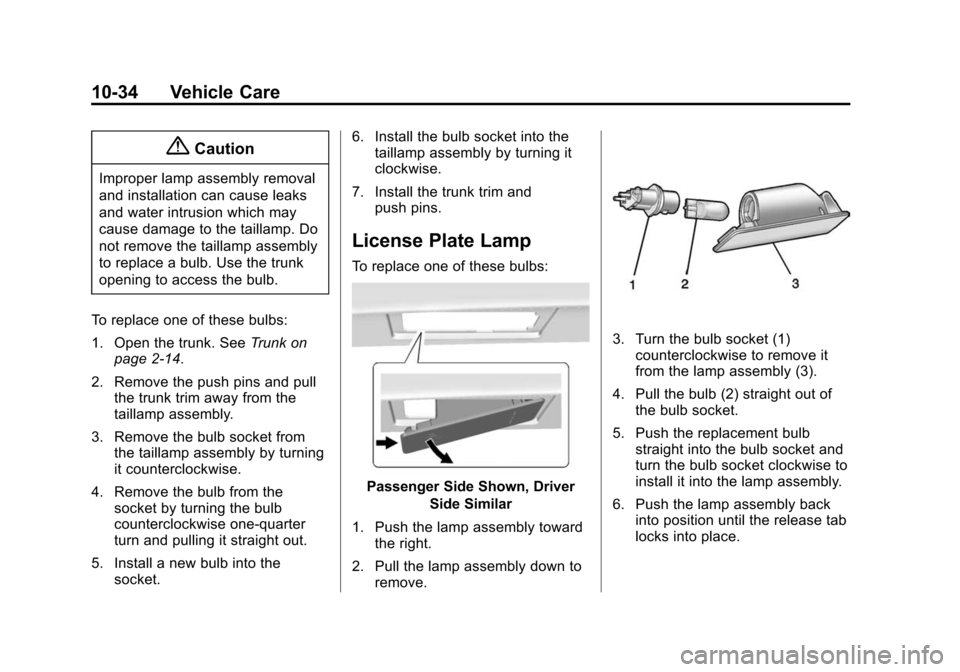
To replace one of these bulbs:
Passenger Side Shown, Driver
Side Similar
1. Push the lamp assembly toward the right.
2. Pull the lamp assembly down to remove.
3. Turn the bulb socket (1)counterclockwise to remove it
from the lamp assembly (3).
4. Pull the bulb (2) straight out of the bulb socket.
5. Push the replacement bulb straight into the bulb socket and
turn the bulb socket clockwise to
install it into the lamp assembly.
6. Push the lamp assembly back into position until the release tab
locks into place.
Page 310 of 422

Black plate (36,1)Chevrolet Impala Owner Manual (GMNA-Localizing-U.S./Canada-5772216) -
2014 - 2nd crc - 5/14/13
10-36 Vehicle Care
Headlamp Wiring
An electrical overload may cause
the lamps to go on and off, or in
some cases to remain off. Have the
headlamp wiring checked right away
if the lamps go on and off or
remain off.
Windshield Wipers
If the wiper motor overheats due to
heavy snow or ice, the windshield
wipers will stop until the motor cools
and will then restart.
Although the circuit is protected
from electrical overload, overload
due to heavy snow or ice may
cause wiper linkage damage.
Always clear ice and heavy snow
from the windshield before using the
windshield wipers.
If the overload is caused by an
electrical problem and not snow or
ice, be sure to get it fixed.
Fuses
The wiring circuits in the vehicle are
protected from short circuits by
fuses. This greatly reduces the
chance of damage caused by
electrical problems.
To check a fuse, look at the
silver-colored band inside the fuse.
If the band is broken or melted,
replace the fuse. Be sure to replace
a bad fuse with a new one of the
identical size and rating.
Fuses of the same amperage can
be temporarily borrowed from
another fuse location, if a fuse goes
out. Replace the fuse as soon as
possible.
To identify and check fuses, circuit
breakers, and relays, seeEngine
Compartment Fuse Block on
page 10-36 andInstrument Panel
Fuse Block on page 10-40.
Engine Compartment
Fuse Block
The engine compartment fuse block
is on the driver side of the engine
compartment, near the battery.
{Caution
Spilling liquid on any electrical
component on the vehicle may
damage it. Always keep the
covers on any electrical
component.
Page 312 of 422

Black plate (38,1)Chevrolet Impala Owner Manual (GMNA-Localizing-U.S./Canada-5772216) -
2014 - 2nd crc - 5/14/13
10-38 Vehicle Care
The vehicle may not be equipped
with all of the fuses, relays, and
features shown.Mini
Fuses Usage
1 Transmission Control Module Battery
2 Engine Control Module Battery
3 Air Conditioning Compressor Clutch
5 Engine Control Module Ignition
8 Ignition Coils –Even
9 Ignition Coils –Odd
10 Engine Control Module
11 Emissions
13 Transmission Control Module/Chassis
Control Module
Ignition
14 SAIR Solenoid Mini
Fuses Usage
15 MGU Coolant Pump (eAssist)
16 Aero Shutter/eAssist Ignition
17 Seat Cooling Fans/ Heated Steering
Wheel
19 Aero Shutter
23 Adaptive Cruise Control/Power Pack
(eAssist)
29 Passive Entry/Passive Start Battery
30 Canister Vent Solenoid/BPIM
Battery (eAssist)
31 Left Front Heated Seat
32 Right Rear Stop. Turn Tail Lamp, RAP
Relay, Ambient Mini
Fuses Usage
Lighting Control,
Interior Switch
Backlighting
33 Right Front Heated Seat
34 Antilock Brake System Valve
35 Amplifier
37 Right High Beam
38 Left High Beam
46 Cooling Fan
47 Emissions
48 SAIR Valve (eAssist)
49 Right HID Lighting
50 Left HID Lighting
51 Horn/Dual Horn
52 Cluster Ignition
53 Inside Rearview Mirror/Rear Camera
Page 313 of 422

Black plate (39,1)Chevrolet Impala Owner Manual (GMNA-Localizing-U.S./Canada-5772216) -
2014 - 2nd crc - 5/14/13
Vehicle Care 10-39
Mini
Fuses Usage
54 Reflected LED Display, Console LED
Display, Heating,
Ventilation and Air
Conditioning Module
55 Outside Rearview Mirror
56 Windshield Washer
60 Heated Mirror
62 Rear Camera/Park Assist/Side Blind
Zone Alert
66 Trunk Release
67 Chassis Control Module
69 Battery Voltage Sensor
70 Canister Vent Solenoid (eAssist)
71 Memory Seat J-Case
Fuses Usage
6 Front Wiper
12 Starter
21 Rear Power Window
22 Sunroof
24 Front Power Window
25 Accessory Relay
26 Antilock Brake System Pump
27 Electric Parking Brake
28 Rear Defogger
41 Vacuum Pump
42 Cooling Fan K2
44 Transmission Auxiliary Pump
(eAssist)
45 Cooling Fan K1
59 Air Pump Emissions Mini
Relays Usage
7 Powertrain
9 Cooling Fan K2
13 Cooling Fan K1
15 Run/Crank
16 Air Pump Emissions
17 Window/Mirror Defogger
Micro
Relays Usage
1 Air Conditioning Compressor Clutch
2 Starter Solenoid
4 Front Wiper Speed
5 Front Wiper Control
6 Air Pump Solenoid Emissions/Cabin
Pump (eAssist)
10 Cooling Fan K3
Page 314 of 422

Black plate (40,1)Chevrolet Impala Owner Manual (GMNA-Localizing-U.S./Canada-5772216) -
2014 - 2nd crc - 5/14/13
10-40 Vehicle Care
Micro
Relays Usage
11 Transmission Oil Pump (eAssist)
14 Low Beam HID
22 Air Pump Solenoid Emissions (eAssist)
Instrument Panel Fuse
Block
The instrument panel fuse block is
in the instrument panel, on the
driver side of the vehicle.To access the fuses on vehicles
equipped with a storage bin:
1. Push forward on the top edge ofthe bin to unlatch it.
2. Press in on the sides of the bin to release it from the instrument
panel.
3. Pivot the door downward, allowing it to hang from the
instrument panel.
4. To close the bin, swing it upward and push in until closed. To access the fuses on vehicles not
equipped with a storage bin:
1. Pull the lower edge of the cover
rearward. The clips on the lower
edge will release, and the upper
edge will fall away from the
instrument panel.
2. To replace the cover, hook the upper edge of the cover on the
instrument panel, and swing the
lower edge of the cover into
place.
3. Press the lower edge of the cover until the clips engage.
Page 315 of 422

Black plate (41,1)Chevrolet Impala Owner Manual (GMNA-Localizing-U.S./Canada-5772216) -
2014 - 2nd crc - 5/14/13
Vehicle Care 10-41
Instrument Panel Fuse Block
The vehicle may not be equipped
with all of the fuses, relays, and
features shown. Mini Fuses Usage
1 Telematics
2 Rear Turn Stoplamp, Courtesy Lamps,
Back-up Lamps,
Shift Lock Solenoid,
Puddle Lamps
3 LED Indicator Light
4 Radio Mini Fuses Usage
5 Display
6 Power Outlet –
Console Bin
7 Power Outlet –
Forward/
Console Rear
8 Trunk Release, Brake Pedal Apply,
Keyless Start
Indicators, Hazard
Switch Illumination,
CHMSL/Brake
Relay, Sidemarker
Lamps, Washer
Relay, Run/Crank
Relay
9 Trunk Lamp, Right Low Beam/DRL,
Right Front Turn
Lamp, Right Rear
Park/Stoplamp
14 Diagnostic Link Connector
15 Airbag/SDM Mini Fuses Usage
16 Not Used
17 Heater, Ventilation and Air Conditioning
Controller
18 Logistics
19 Not Used
20 Ignition Switch
21 Not Used
22 Steering Wheel Controls
23 Left Low Beam/DRL, Left Front Turn
Lamp, Left Rear
Park/Stoplamp,
Child Lock Relay
24 Theft Deterrent LED, Key Capture
Solenoid, Run Relay
25 Tilt/Telescope Steering Column
26 110V AC
Page 316 of 422

Black plate (42,1)Chevrolet Impala Owner Manual (GMNA-Localizing-U.S./Canada-5772216) -
2014 - 2nd crc - 5/14/13
10-42 Vehicle Care
J–CaseFuses Usage
10 Door Unlock 11 Front Heater, Ventilation, and Air
Conditioning Blower
Circuit
Breakers Usage
12 Power Seat– Passenger
13 Power Seat–Driver
Relays Usage K1 Not Used
K2 Logistic
K3 Power Outlet RelayWheels and Tires
Tires
Every new GM vehicle has
high-quality tires made by a
leading tire manufacturer. See
the warranty manual for
information regarding the tire
warranty and where to get
service. For additional
information refer to the tire
manufacturer.
{Warning
.Poorly maintained and
improperly used tires are
dangerous.
.Overloading the tires can
cause overheating as a
result of too much flexing.
There could be a blowout
(Continued)
Warning (Continued)
and a serious crash. See
Vehicle Load Limits on
page 9-10.
.Underinflated tires pose
the same danger as
overloaded tires. The
resulting crash could
cause serious injury.
Check all tires frequently
to maintain the
recommended pressure.
Tire pressure should be
checked when the tires
are cold.
.Overinflated tires are more
likely to be cut, punctured,
or broken by a sudden
impact —such as when
hitting a pothole. Keep
tires at the recommended
pressure.
(Continued)
Page 329 of 422

Black plate (55,1)Chevrolet Impala Owner Manual (GMNA-Localizing-U.S./Canada-5772216) -
2014 - 2nd crc - 5/14/13
Vehicle Care 10-55
using a TPMS relearn tool, in the
following order: driver side front tire,
passenger side front tire, passenger
side rear tire, and driver side rear.
See your dealer for service or to
purchase a relearn tool.
There are two minutes to match the
first tire/wheel position, and
five minutes overall to match all four
tire/wheel positions. If it takes
longer, the matching process stops
and must be restarted.
The TPMS sensor matching
process is:
1. Set the parking brake.
2. Turn the ignition to ON/RUN withthe engine off or place the
vehicle power mode in ON/RUN/
START. See Ignition Positions
(Keyless Access) on page 9-15
or Ignition Positions (Key
Access) on page 9-17.
3. Make sure the Tire Pressure info page option is turned on. The
info pages on the DIC can be
turned on and off through the Settings menu. See
Driver
Information Center (DIC) on
page 5-27.
4. Use the DIC controls on the right side of the steering wheel to
scroll to the Tire Pressure
screen under the DIC info page.
5. Press and hold the
V(Set/
Reset) button located in the
center of the DIC controls.
The horn sounds twice to signal
the receiver is in relearn mode
and the TIRE LEARNING
ACTIVE message displays on
the DIC screen.
6. Start with the driver side front tire.
7. Place the relearn tool against the tire sidewall, near the valve
stem. Then press the button to
activate the TPMS sensor.
A horn chirp confirms that the
sensor identification code has
been matched to this tire and
wheel position. 8. Proceed to the passenger side
front tire, and repeat the
procedure in Step 7.
9. Proceed to the passenger side rear tire, and repeat the
procedure in Step 7.
10. Proceed to the driver side rear tire, and repeat the procedure
in Step 7. The horn sounds two
times to indicate the sensor
identification code has been
matched to the driver side rear
tire, and the TPMS sensor
matching process is no longer
active. The TIRE LEARNING
ACTIVE message on the DIC
display screen goes off.
11. Turn the ignition to LOCK/OFF or press STOP to turn the
ignition off.
12. Set all four tires to the recommended air pressure
level as indicated on the Tire
and Loading Information label.