2014 CHEVROLET EQUINOX infotainment
[x] Cancel search: infotainmentPage 129 of 390
Black plate (25,1)Chevrolet Equinox Owner Manual (GMNA-Localizing-U.S./Canada-
6081479) - 2014 - crc2 - 10/23/13
Instruments and Controls 5-25
pressing SET/CLR while the
Average Fuel Economy display is
showing. The display may not reset
to zero.
Best Average Fuel Economy
The right hand side displays the
best average fuel economy (AFE)
that is achieved for a selected
distance. The left hand side displays
a running average of fuel economy
for the most recently traveled
selected distance. The center of the
Best AFE menu includes a digital
readout and bar graph to show the
instantaneous fuel economy.
Quickly press the SET/CLR button
to display a page for selecting one
of the distance options. Move the
up/down arrow to choose the
selection, and SET/CLR to change
the setting.
When viewing best AFE, a several
second press and hold of SET/CLR
will reset the best value. The best
value will show“- - -”until the
selected distance has been
traveled. The display provides feedback on
how current driving behavior in the
bar graph affects the running
average in the left display and how
well recent driving compares to the
best that has been achieved.
Average Vehicle Speed
This display shows the average
speed of the vehicle in kilometers
per hour (km/h) or miles per
hour (mph). This average is
calculated based on the various
vehicle speeds recorded since the
last reset of this value. The average
speed can be reset by pressing
SET/CLR while the Average Vehicle
Speed display is showing.
Timer
This display can be used as a timer.
To start the timer, press SET/CLR
while Timer is displayed. The
display will show the amount of time
that has passed since the timer was
last reset, not including time the
ignition is off. Time will continue to
be counted as long as the ignition is
on, even if another display is beingshown on the DIC. The timer will
record up to 99 hours, 59 minutes
and 59 seconds (99:59:59) after
which the display will return to zero.
To stop the timer, press SET/CLR
briefly while Timer is displayed. To
reset the timer to zero, press and
hold SET/CLR.
Navigation
This display is used for the OnStar
or Navigation System Turn-by-Turn
guidance, if equipped. See
OnStar
Overview on page 14-1 or the
Infotainment manual, if equipped.
Blank Display
This display shows no information.
Vehicle Information Menu
Items
Press the MENU button until Vehicle
Information Menu is displayed. Then
press
Rto scroll through the
following menu items:
.Unit
.Tire Pressure
Page 138 of 390
Black plate (34,1)Chevrolet Equinox Owner Manual (GMNA-Localizing-U.S./Canada-
6081479) - 2014 - crc2 - 10/23/13
5-34 Instruments and Controls
Entering the Personalization
Menus
1. Turn the infotainment system onand press the CONFIG button to
access the Configuration
Settings menu.
2. Turn the MENU/SEL knob to highlight Vehicle Settings.
3. Press the center of the MENU/ SEL knob to select the Vehicle
Settings menu.
The following list of menu items may
be available:
.Climate and Air Quality
.Comfort and Convenience
.Collision/Detection Systems
.Languages
.Lighting
.Power Door Locks
.Remote Lock/Unlock/Start
.Return to Factory Settings Each of the menus is detailed in the
following information.
Climate and Air Quality
Select and the following may
display:
.Auto Fan Speed
.Air Conditioning Mode
.Remote Start Auto Heat Seats
.Auto Defog
.Auto Rear Defog
Auto Fan Speed
This selection is available on
vehicles with the Automatic Climate
Control System. Choose from the
following blower speed settings:
High: Increased speed.
Low: Reduced speed.
Normal: Moderate speed.
Air Conditioning Mode
This will allow you to select whether
or not the air conditioning comes on
automatically the next time the vehicle is started. On means that
the air conditioning will be on at
start up, regardless of whether it
was on or off the last time the
vehicle was turned off. Off means
the air conditioning will be off at the
next start up, regardless of whether
it was on or off the last time the
vehicle was turned off. Last Setting
means that when the vehicle is
started, the air conditioning will
resume whichever setting it was at
the last time the vehicle was
turned off.
Select On, Off, or Last Setting.
Remote Start Auto Heat Seats
When on, this feature will turn the
heated seats on when using remote
start on cold days.
Select On or Off.
Auto Defog
When turned on and high humidity
is detected, the climate control
system may adjust to outside air
supply and turn on the air
conditioner or the heater. The fan
Page 151 of 390
Black plate (1,1)Chevrolet Equinox Owner Manual (GMNA-Localizing-U.S./Canada-
6081479) - 2014 - crc2 - 10/23/13
Infotainment System 7-1
Infotainment
System
Introduction
Infotainment . . . . . . . . . . . . . . . . . . . 7-1
Theft-Deterrent Feature . . . . . . . 7-2
Overview . . . . . . . . . . . . . . . . . . . . . . 7-3
Operation . . . . . . . . . . . . . . . . . . . . . 7-4
Radio
AM-FM Radio . . . . . . . . . . . . . . . . . 7-7
Satellite Radio . . . . . . . . . . . . . . . . 7-9
Radio Reception . . . . . . . . . . . . . 7-12
Multi-Band Antenna . . . . . . . . . . 7-13
Audio Players
CD Player . . . . . . . . . . . . . . . . . . . 7-13
MP3 . . . . . . . . . . . . . . . . . . . . . . . . . 7-16
Auxiliary Devices . . . . . . . . . . . . 7-17
Phone
Bluetooth (Overview) . . . . . . . . 7-22
Bluetooth (InfotainmentControls) . . . . . . . . . . . . . . . . . . . 7-23
Bluetooth (Voice Recognition) . . . . . . . . . . . . . . . 7-27
Trademarks and License
Agreements
Trademarks and License
Agreements . . . . . . . . . . . . . . . . 7-33
Introduction
Infotainment
Read the following pages to
become familiar with the audio
system's features.
{Warning
Taking your eyes off the road for
extended periods could cause a
crash resulting in injury or death
to you or others. Do not give
extended attention to infotainment
tasks while driving.
This system provides access to
many audio and non-audio listings.
To minimize taking your eyes off the
road while driving, do the following
while the vehicle is parked:
.Become familiar with the
operation and controls of the
audio system.
Page 152 of 390
Black plate (2,1)Chevrolet Equinox Owner Manual (GMNA-Localizing-U.S./Canada-
6081479) - 2014 - crc2 - 10/23/13
7-2 Infotainment System
.Set up the tone, speaker
adjustments, and preset radio
stations.
For more information, see Defensive
Driving on page 9-3.
This vehicle's infotainment system
may be equipped with a noise
reduction system which can work
improperly if the audio amplifier,
engine calibrations, exhaust system,
microphones, radio, or speakers are
modified or replaced. This could
result in more noticeable engine
noise at certain speeds.
{Caution
Contact your dealer before adding
any equipment.
Adding audio or communication
equipment could interfere with the
operation of the engine, radio,
or other systems, and could
damage them. Follow federal
rules covering mobile radio and
telephone equipment.
The vehicle has Retained
Accessory Power (RAP). With RAP,
the audio system can be played
even after the ignition is turned off.
See Retained Accessory Power
(RAP) on page 9-22 for more
information.
Navigation System
For vehicles with a navigation
system, see the infotainment
manual.
Theft-Deterrent Feature
The theft-deterrent feature works by
learning a portion of the Vehicle
Identification Number (VIN) to the
infotainment system. The
infotainment system does not
operate if it is stolen or moved to a
different vehicle.
Page 153 of 390
Black plate (3,1)Chevrolet Equinox Owner Manual (GMNA-Localizing-U.S./Canada-
6081479) - 2014 - crc2 - 10/23/13
Infotainment System 7-3
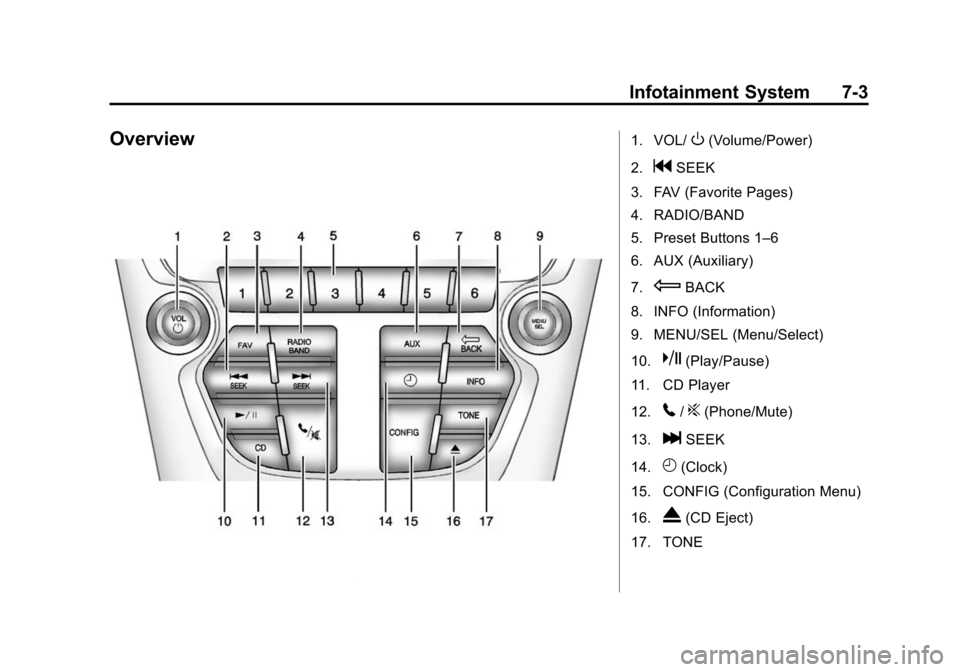
Overview1. VOL/O(Volume/Power)
2.
gSEEK
3. FAV (Favorite Pages)
4. RADIO/BAND
5. Preset Buttons 1–6
6. AUX (Auxiliary)
7.
EBACK
8. INFO (Information)
9. MENU/SEL (Menu/Select)
10.
k(Play/Pause)
11. CD Player
12.
5/?(Phone/Mute)
13.
lSEEK
14.
H(Clock)
15. CONFIG (Configuration Menu)
16.
X(CD Eject)
17. TONE
Page 154 of 390
Black plate (4,1)Chevrolet Equinox Owner Manual (GMNA-Localizing-U.S./Canada-
6081479) - 2014 - crc2 - 10/23/13
7-4 Infotainment System
Operation
Controls
The infotainment system is operated
by using the pushbuttons,
multifunction knobs, display menus,
and steering wheel controls,
if equipped.
Turning the System On or Off
VOL/O(Volume/Power):Press to
turn the system on and off.
Automatic Switch-Off
If the infotainment system has been
turned on after the ignition is turned
off, the system will turn off
automatically after 10 minutes.
Volume Control
VOL/O(Volume/Power): Turn to
adjust the volume.
5/?(Mute): For vehicles with
OnStar, press and hold
5/?to
mute the infotainment system. Press
and hold
5/?again, or turn the
VOL/
Oknob to cancel mute.
For vehicles without OnStar, press
5/?to mute the infotainment
system. Press
5/?again, or turn
the VOL/
Oknob to cancel mute.
Menu System
Controls
The MENU/SEL knob and the
E
BACK button are used to navigate
the menu system.
MENU/SEL (Menu/Select):
Press to:
.Enter the menu system.
.Select or activate the highlighted
menu option.
.Confirm a set value.
.Turn a system setting on or off. Turn to:
.Highlight a menu option.
.Select a value.
EBACK:
Press to:
.Exit a menu.
.Return from a submenu screen
to the previous menu screen.
.Delete the last character in a
sequence.
RADIO/BAND: Press to:
.Displays menu of AM, FM, XM,
CD, or AUX.
.Press to toggle through menu.
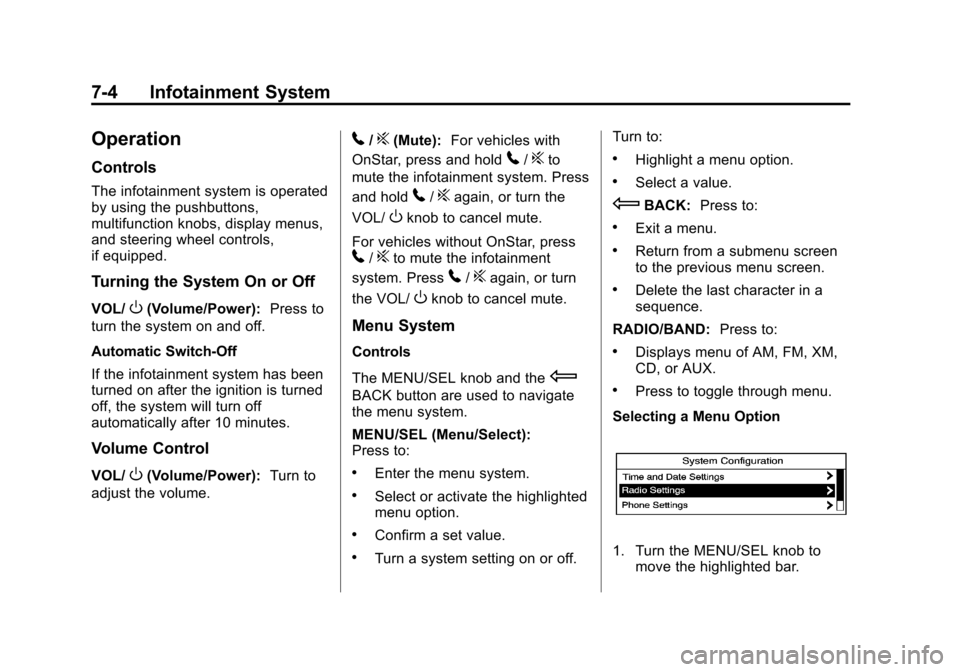
Selecting a Menu Option
1. Turn the MENU/SEL knob to move the highlighted bar.
Page 155 of 390
Black plate (5,1)Chevrolet Equinox Owner Manual (GMNA-Localizing-U.S./Canada-
6081479) - 2014 - crc2 - 10/23/13
Infotainment System 7-5
2. Press the MENU/SEL button toselect the highlighted option.
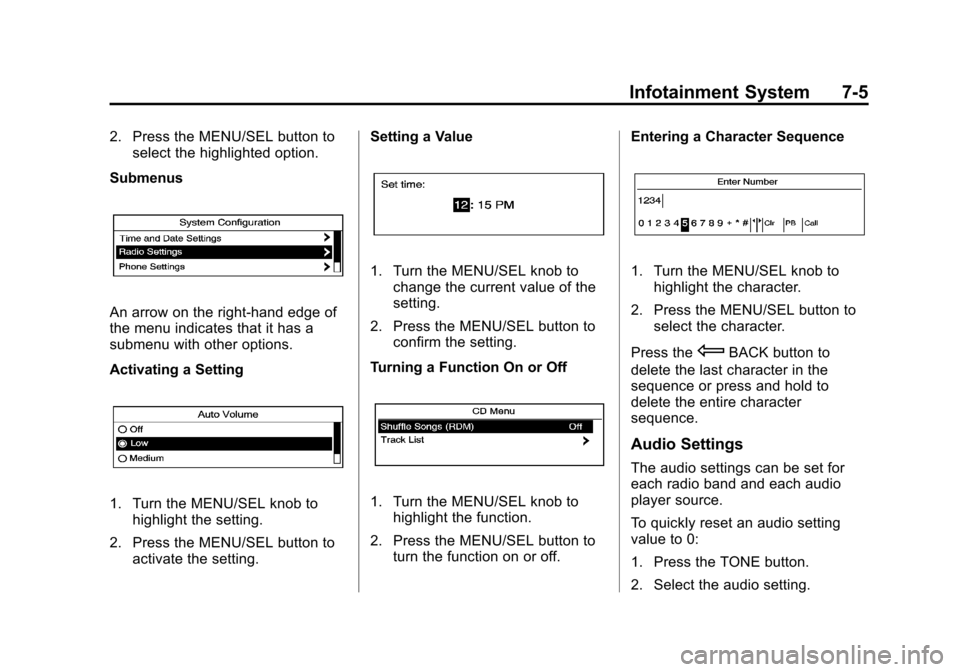
Submenus
An arrow on the right-hand edge of
the menu indicates that it has a
submenu with other options.
Activating a Setting
1. Turn the MENU/SEL knob to highlight the setting.
2. Press the MENU/SEL button to activate the setting. Setting a Value
1. Turn the MENU/SEL knob to
change the current value of the
setting.
2. Press the MENU/SEL button to confirm the setting.
Turning a Function On or Off
1. Turn the MENU/SEL knob to highlight the function.
2. Press the MENU/SEL button to turn the function on or off. Entering a Character Sequence
1. Turn the MENU/SEL knob to
highlight the character.
2. Press the MENU/SEL button to select the character.
Press the
EBACK button to
delete the last character in the
sequence or press and hold to
delete the entire character
sequence.
Audio Settings
The audio settings can be set for
each radio band and each audio
player source.
To quickly reset an audio setting
value to 0:
1. Press the TONE button.
2. Select the audio setting.
Page 156 of 390
Black plate (6,1)Chevrolet Equinox Owner Manual (GMNA-Localizing-U.S./Canada-
6081479) - 2014 - crc2 - 10/23/13
7-6 Infotainment System
3. Press and hold the MENU/SELbutton until the value changes
to 0.
Press the
EBACK button to go
back to the Tone Settings menu.
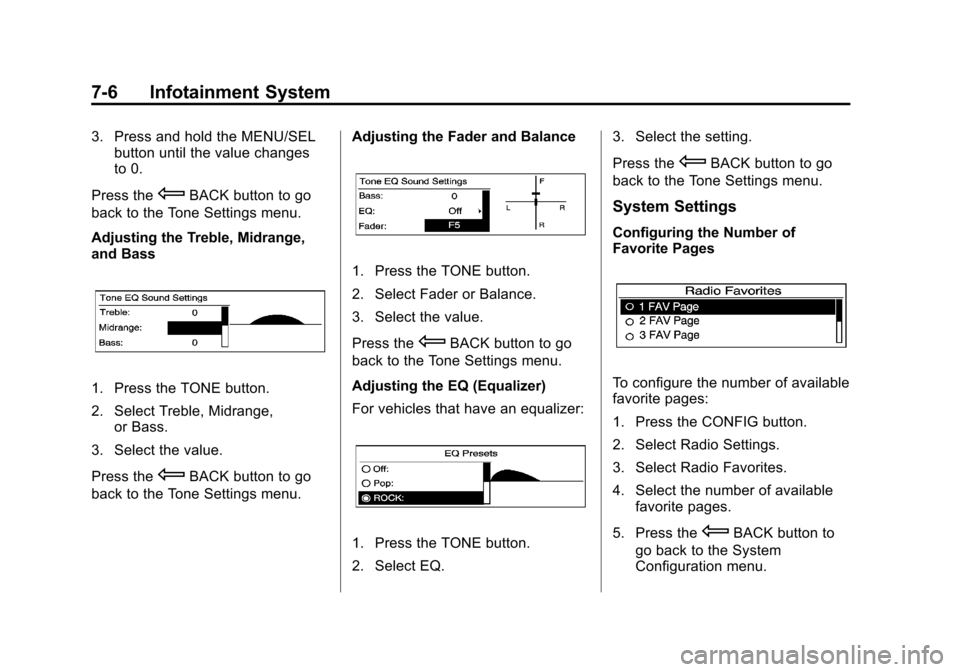
Adjusting the Treble, Midrange,
and Bass
1. Press the TONE button.
2. Select Treble, Midrange, or Bass.
3. Select the value.
Press the
EBACK button to go
back to the Tone Settings menu. Adjusting the Fader and Balance
1. Press the TONE button.
2. Select Fader or Balance.
3. Select the value.
Press the
EBACK button to go
back to the Tone Settings menu.
Adjusting the EQ (Equalizer)
For vehicles that have an equalizer:
1. Press the TONE button.
2. Select EQ. 3. Select the setting.
Press the
EBACK button to go
back to the Tone Settings menu.
System Settings
Configuring the Number of
Favorite Pages
To configure the number of available
favorite pages:
1. Press the CONFIG button.
2. Select Radio Settings.
3. Select Radio Favorites.
4. Select the number of available favorite pages.
5. Press the
EBACK button to
go back to the System
Configuration menu.