2014 CHEVROLET CRUZE battery
[x] Cancel search: batteryPage 112 of 420
Black plate (6,1)Chevrolet Cruze Owner Manual (GMNA-Localizing-U.S./Canada-6007168) -
2014 - 2nd Edition - 7/15/13
5-6 Instruments and Controls
Power Outlets
The accessory power outlets can be
used to plug in electrical equipment,
such as a cell phone or MP3 player.
There is one accessory power outlet
located on the center floor console
and one on the rear of the center
floor console. These outlets are
powered when the key is in ON/
RUN or ACC/ACCESSORY, or until
the driver door is opened within
10 minutes of turning off the vehicle.
SeeRetained Accessory Power
(RAP) on page 9-23.
Open the cover to access.
{Caution
Leaving electrical equipment
plugged in for an extended period
of time while the vehicle is off will
drain the battery. Always unplug
electrical equipment when not in
use and do not plug in equipment
that exceeds the maximum
20 amp rating. Certain electrical accessories may
not be compatible with the
accessory power outlet and could
overload vehicle or adapter fuses.
If a problem is experienced, see
your dealer.
When adding electrical equipment,
be sure to follow the installation
instructions included with the
equipment. See
Add-On Electrical
Equipment on page 9-69.
{Caution
Hanging heavy equipment from
the power outlet can cause
damage not covered by the
vehicle warranty. The power
outlets are designed for
accessory power plugs only, such
as cell phone charge cords.
Cigarette Lighter
If equipped with a cigarette lighter, it
is on the center floor console near
the shift lever.
To activate the cigarette lighter,
push it into the heating element and
let go. When the lighter is ready it
will pop back out.
{Caution
Holding a cigarette lighter in while
it is heating does not let the
lighter back away from the
heating element when it is hot.
Damage from overheating can
occur to the lighter or heating
element, or a fuse could be
blown. Do not hold a cigarette
lighter in while it is heating.
Page 120 of 420

Black plate (14,1)Chevrolet Cruze Owner Manual (GMNA-Localizing-U.S./Canada-6007168) -
2014 - 2nd Edition - 7/15/13
5-14 Instruments and Controls
The light turns off when the engine
is started. If it does not, have the
vehicle serviced by your dealer.
If the light stays on, or comes on
while driving, there could be a
problem with the electrical charging
system. Have it checked by your
dealer. Driving while this light is on
could drain the battery.
If a short distance must be driven
with the light on, be sure to turn off
all accessories, such as the radio
and air conditioner.
Malfunction
Indicator Lamp
A computer system called OBD II
(On-Board Diagnostics-Second
Generation) monitors the operation
of the vehicle to ensure emissions
are at acceptable levels, helping to
maintain a clean environment. The
malfunction indicator lamp comes
on when the vehicle is placed in
ON/RUN for key access or Service
Only Mode for Keyless Access, as a
check to show it is working. If itdoes not, have the vehicle serviced
by your dealer. See
Ignition
Positions (Keyless Access) on
page 9-14 orIgnition Positions (Key
Access) on page 9-16.
If the malfunction indicator lamp
comes on while the engine is
running, this indicates that the OBD
II system has detected a problem
and diagnosis and service might be
required.
With a diesel engine, this light may
also come on when the OBD II
system has detected a problem with
the Diesel Exhaust Fluid (DEF)
management system. See Diesel
Exhaust Fluid on page 9-27.
Malfunctions often are indicated by
the system before any problem is
apparent. Being aware of the light can prevent more serious damage
to the vehicle. This system also
assists the dealer technician in
correctly diagnosing any
malfunction.
{Caution
If the vehicle is continually driven
with this light on, the emission
controls might not work as well,
the vehicle fuel economy might
not be as good, and the engine
might not run as smoothly. This
could lead to costly repairs that
might not be covered by the
vehicle warranty.
{Caution
Modifications made to the engine,
transmission, exhaust, intake,
or fuel system of the vehicle or
the replacement of the original
tires with other than those of the
(Continued)
Page 122 of 420

Black plate (16,1)Chevrolet Cruze Owner Manual (GMNA-Localizing-U.S./Canada-6007168) -
2014 - 2nd Edition - 7/15/13
5-16 Instruments and Controls
If none of the above have made the
light turn off, your dealer can check
the vehicle. The dealer has the
proper test equipment and
diagnostic tools to fix any
mechanical or electrical problems
that might have developed.
Emissions Inspection and
Maintenance Programs
Depending on where you live, your
vehicle may be required to
participate in an emission control
system inspection and maintenance
program. For the inspection, the
emission system test equipment will
likely connect to the vehicle's Data
Link Connector (DLC).
The DLC is under the instrument
panel next to the steering wheel.
See your dealer if assistance is
needed.
The vehicle may not pass
inspection if:
.The malfunction indicator lamp is
on when the engine is running,
or while the vehicle is in ON/
RUN or in Service Only Mode
and the malfunction indicator
lamp does not come on. See
your dealer for assistance in
verifying proper operation of the
malfunction indicator lamp.
.The OBD II (On-Board
Diagnostics) system determines
that critical emission control
systems have not been
completely diagnosed by the
system. If this were to occur, the
vehicle would be considered not
ready for inspection. This can
happen if the 12-volt battery has
recently been replaced or
run down.The diagnostic system is
designed to evaluate critical
emission control systems during
normal driving. This can take
several days of driving. If this
has been done and the vehicle
still does not pass the inspection
for lack of OBD II system
readiness, your dealer can
prepare the vehicle for
inspection.
Brake System Warning
Light
The vehicle brake system consists
of two hydraulic circuits. If one
circuit is not working, the remaining
circuit can still work to stop the
vehicle. For normal braking
performance, both circuits need to
be working.
If the warning light comes on, there
is a brake problem. Have the brake
system inspected right away.
Page 131 of 420

Black plate (25,1)Chevrolet Cruze Owner Manual (GMNA-Localizing-U.S./Canada-6007168) -
2014 - 2nd Edition - 7/15/13
Instruments and Controls 5-25
Vehicle Information Menu
(OPTION) Items
Press MENU on the turn signal
lever until the OPTION menu is
displayed. Use
w xto scroll
through the menu items. Not all
items are available on every vehicle.
The following is a list of all possible
menu items:
Units: Move
w xto change
between Metric or US when the Unit
display is active. Press SET/CLR to
confirm the setting. On some
models, you will have to select 1, 2,
or 3 for the Unit display. 1 is
Imperial units, 2 is US units, and 3
is metric units. This will change the
displays on the cluster and DIC to
the type of measurements you
select.
Tire Pressure: May display a
vehicle with the approximate
pressures of all four tires. Tire
pressure is displayed in either
kilopascal (kPa) or in pounds per
square inch (psi). On some models, this display only allows for matching
of the TPMS sensors. In this case,
the display will show TIRE LEARN.
See
Tire Pressure Monitor System
on page 10-52 andTire Pressure
Monitor Operation on page 10-53.
Remaining Oil Life: Displays an
estimate of the oil's remaining useful
life. If REMAINING OIL LIFE 99% is
displayed, that means 99% of the
current oil life remains. This display
may be shown as
:%.
When the remaining oil life is low,
the CHANGE ENGINE OIL SOON
message will appear on the display.
See Engine Oil Messages on
page 5-29. The oil should be
changed as soon as possible. See
Engine Oil on page 10-11. In
addition to the engine oil life system
monitoring the oil life, additional
maintenance is recommended in the
Maintenance Schedule in this
manual. See Maintenance Schedule
on page 11-2. The Oil Life display must be reset
after each oil change. Do not reset
the Oil Life display accidentally at
any time other than when the oil has
just been changed. It cannot be
reset accurately until the next oil
change. To reset the engine oil life
system, see
Engine Oil Life System
on page 10-15.
Battery Voltage: Displays the
current battery voltage, if equipped.
Battery voltage changes are normal
while driving. See Charging System
Light on page 5-13. If there is a
problem with the battery charging
system, the DIC will display a
message. See Battery Voltage and
Charging Messages on page 5-27.
Diesel Exhaust Fluid Level (Diesel
Engine Only): Displays the current
Diesel Exhaust Fluid (DEF) level.
Remaining Fuel Filter (Diesel
Engine Only): Displays an
estimate of the remaining fuel filter
life. If REMAINING FUEL FILTER
50% is displayed, that means 50%
of the current fuel filter life remains.
Page 133 of 420
Black plate (27,1)Chevrolet Cruze Owner Manual (GMNA-Localizing-U.S./Canada-6007168) -
2014 - 2nd Edition - 7/15/13
Instruments and Controls 5-27
Vehicle Messages
Messages displayed on the DIC
indicate the status of the vehicle or
some action that may be needed to
correct a condition. Multiple
messages may display one after the
other.
The messages that do not require
immediate action can be
acknowledged and cleared by
pressing SET/CLR. The messages
that require immediate action cannot
be cleared until that action is
performed. All messages should be
taken seriously and clearing the
messages does not correct the
problem.
The following are some of the
vehicle messages that may be
displayed depending on your
vehicle content.
Battery Voltage and
Charging Messages
BATTERY SAVER ACTIVE
This message displays when the
vehicle has detected that the battery
voltage is dropping beyond a
reasonable point. The battery saver
system starts reducing features of
the vehicle that may be noticed. At
the point that features are disabled,
this message displays. Turn off
unnecessary accessories to allow
the battery to recharge.
LOW BATTERY
This message is displayed when the
battery voltage is low. SeeBattery
on page 10-28.
SERVICE BATTERY
CHARGING SYSTEM
This message is displayed when
there is a fault in the battery
charging system. Take the vehicle to
your dealer for service.
Brake System Messages
BRAKE FLUID LOW
This message is displayed when the
brake fluid level is low. See Brake
Fluid on page 10-27.
RELEASE PARKING BRAKE
This message is displayed as a
reminder that the parking brake is
on. Release it before you attempt to
drive.
Compass Messages
CAL
This message is displayed when the
compass needs to be calibrated.
See Compass on page 5-4.
– –
Two dashes will be displayed if the
compass needs service. See your
dealer for service.
Page 136 of 420
Black plate (30,1)Chevrolet Cruze Owner Manual (GMNA-Localizing-U.S./Canada-6007168) -
2014 - 2nd Edition - 7/15/13
5-30 Instruments and Controls
normal for the EXHAUST FLUID
RANGE to vary based on vehicle
and environmental driving
conditions. When this message first
displays at approximately 1 600 km
(1,000 mi) of fluid range remaining,
the fluid is approximately 11 L
(3 gal) low.
EXHAUST FLUID LOW SPEED
LIMITED SOON
When the exhaust fluid range is less
than 120 km (75 mi) this message
will be displayed.
EXHAUST FLUID EMPTY
REFILL NOW
This message will be displayed
when the exhaust fluid is empty.
This message may be accompanied
by other messages that provide
more information.
EXHAUST FLUID QUALITY
POOR SEE OWNERS
MANUAL NOW
This message displays when the
exhaust fluid is of poor quality or the
wrong fluid was added. This
message may be accompanied by
other messages that provide more
information.
Diesel Particulate Filter
Messages
DIESEL PARTIC (Particulate)
FILTER IS FULL CONTINUE
DRIVING
This message may display when the
soot particles in the diesel
particulate filter reach a certain
amount. Continue driving to prevent
the filter from clogging. SeeDiesel
Particulate Filter on page 9-26 for
more information.
DIESEL PARTIC (Particulate)
FILTER IS FULL CONTINUED
DRIVING MANDATORY
This message may display when the
soot particles in the diesel
particulate filter reach a certain
amount. Continued driving is
mandatory to prevent the filter from
clogging. See Diesel Particulate
Filter on page 9-26 for more
information.
Key and Lock Messages
NO REMOTE DETECTED
This message displays when the
transmitter battery is weak on
vehicles with Keyless Access. See
“Starting the Vehicle with a Low
Transmitter Battery” underRemote
Keyless Entry (RKE) System
Operation on page 2-3.
Page 137 of 420
Black plate (31,1)Chevrolet Cruze Owner Manual (GMNA-Localizing-U.S./Canada-6007168) -
2014 - 2nd Edition - 7/15/13
Instruments and Controls 5-31
PLACE TRANSMITTER IN
POCKET
This message displays when trying
to start the vehicle if an RKE
transmitter is not detected. The
transmitter battery may be weak.
See“Starting the Vehicle with a Low
Transmitter Battery” underRemote
Keyless Entry (RKE) System
Operation on page 2-3.
REPLACE BATTERY IN
REMOTE KEY
This message displays when the
battery in the Remote Keyless Entry
(RKE) transmitter needs to be
replaced. See “Battery
Replacement” underRemote
Keyless Entry (RKE) System
Operation on page 2-3.
Lamp Messages
AUTOMATIC LIGHT
CONTROL ON
This message is displayed when the
automatic light control has been
turned on. See Automatic Headlamp
System on page 6-3.
AUTOMATIC LIGHT
CONTROL OFF
This message is displayed when the
automatic light control has been
turned off. See Automatic Headlamp
System on page 6-3.
XXX TURN INDICATOR
FAILURE
When one of the turn signals is out,
this message displays to show
which bulb needs to be replaced.
See Bulb Replacement on
page 10-32 andReplacement Bulbs
on page 10-37 for more information
on turn signal bulb replacement.
TURN SIGNAL ON
This message is displayed if the
turn signal has been left on. Turn off
the turn signal.
Object Detection System
Messages
PARK ASSIST OFF
This message displays when the
park assist system has been turned
off or when there is a temporary
condition causing the system to be
disabled. See Ultrasonic Parking
Assist on page 9-45.
SERVICE PARK ASSIST
This message displays if there is a
problem with the Ultrasonic Rear
Parking Assist (URPA) system. Do
not use this system to help you
park. See Ultrasonic Parking Assist
on page 9-45.
Page 147 of 420
Black plate (1,1)Chevrolet Cruze Owner Manual (GMNA-Localizing-U.S./Canada-6007168) -
2014 - 2nd Edition - 7/15/13
Lighting 6-1
Lighting
Exterior Lighting
Exterior Lamp Controls . . . . . . . . 6-1
Headlamp High/Low-BeamChanger . . . . . . . . . . . . . . . . . . . . . 6-2
Flash-to-Pass . . . . . . . . . . . . . . . . . 6-2
Daytime Running Lamps (DRL) . . . . . . . . . . . . . . . . 6-2
Automatic Headlamp System . . . . . . . . . . . . . . . . . . . . . . 6-3
Hazard Warning Flashers . . . . . 6-3
Turn and Lane-Change Signals . . . . . . . . . . . . . . . . . . . . . . 6-3
Front Fog Lamps . . . . . . . . . . . . . . 6-4
Interior Lighting
Instrument Panel Illumination Control . . . . . . . . . . . . . . . . . . . . . . 6-4
Courtesy Lamps . . . . . . . . . . . . . . 6-5
Dome Lamps . . . . . . . . . . . . . . . . . 6-5
Reading Lamps . . . . . . . . . . . . . . . 6-5
Lighting Features
Entry Lighting . . . . . . . . . . . . . . . . . 6-5
Exit Lighting . . . . . . . . . . . . . . . . . . . 6-6
Battery Power Protection . . . . . . 6-6
Exterior Lighting
Exterior Lamp Controls
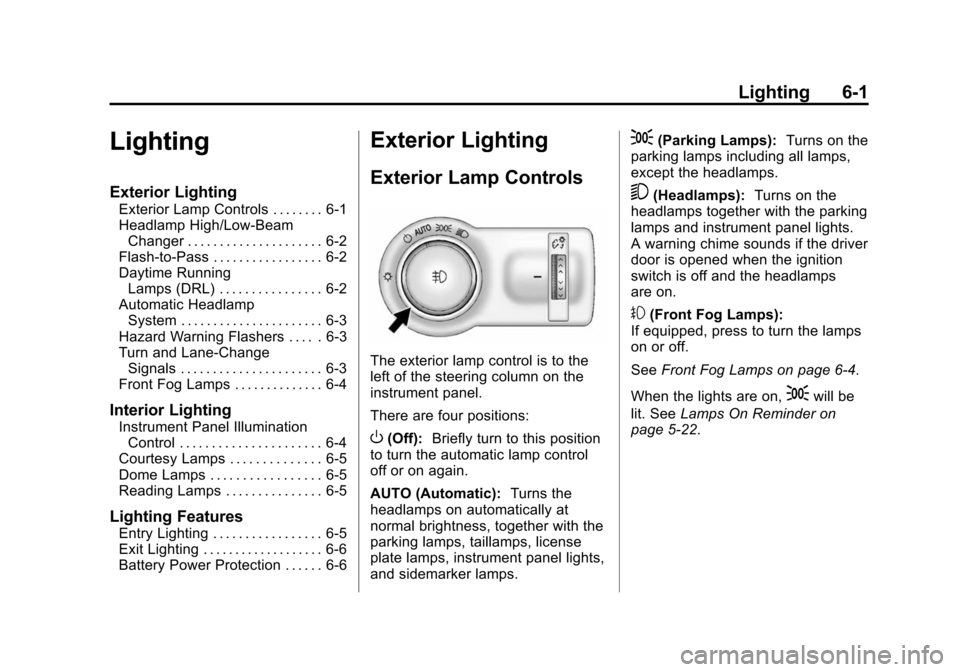
The exterior lamp control is to the
left of the steering column on the
instrument panel.
There are four positions:
O(Off): Briefly turn to this position
to turn the automatic lamp control
off or on again.
AUTO (Automatic): Turns the
headlamps on automatically at
normal brightness, together with the
parking lamps, taillamps, license
plate lamps, instrument panel lights,
and sidemarker lamps.
;(Parking Lamps): Turns on the
parking lamps including all lamps,
except the headlamps.
5(Headlamps): Turns on the
headlamps together with the parking
lamps and instrument panel lights.
A warning chime sounds if the driver
door is opened when the ignition
switch is off and the headlamps
are on.
#(Front Fog Lamps):
If equipped, press to turn the lamps
on or off.
See Front Fog Lamps on page 6-4.
When the lights are on,
;will be
lit. See Lamps On Reminder on
page 5-22.