2014 CHEVROLET CORVETTE roof
[x] Cancel search: roofPage 55 of 376

Black plate (27,1)Chevrolet Corvette Owner Manual (GMNA-Localizing-U.S./Canada/Mexico-
6007198) - 2014 - CRC - 2/5/14
Keys, Doors, and Windows 2-27
2. Turn the ignition off and set theparking brake.
3. To remove the roof panel, pull up on the rear edge and remove it
from the storage area.
4. Carefully place the roof panel over the top of the vehicle.
5. Position the rear edge of the roofpanel next to the weatherstrip on
the back of the roof opening.
Then align and fit the pins at the
rear of the roof panel inside the
openings in the rear overhead weatherstrip. Gently lower the
front edge of the roof panel to
the front of the roof opening.
6. Push the roof firmly downward to engage the pins.
7. Turn the front release handles inward so that they fully latch to
the closed position. It is critical
that the handles fully latch.
8. Push back and up on the rearrelease handle to insert the hook
in the loop. 9. Push and pull the roof panel up
and down and side to side to
ensure the roof panel is securely
installed.
Maintaining the Roof Panel
{Caution
Using glass cleaner on a painted
roof panel could damage the
panel. The repairs would not be
covered by the vehicle warranty.
Do not use glass cleaner on the
painted roof panel.
When cleaning, removing, and/or
storing the roof panel:
.Flush with water to remove dust
and dirt, then dry the panel.
.Do not use abrasive cleaning
materials on the panel.
Page 56 of 376

Black plate (28,1)Chevrolet Corvette Owner Manual (GMNA-Localizing-U.S./Canada/Mexico-
6007198) - 2014 - CRC - 2/5/14
2-28 Keys, Doors, and Windows
Convertible Top
If equipped with a convertible top,
review the following before
operating:
{Warning
While opening or closing the
convertible top, people can be
injured by the moving parts of the
tonneau cover or convertible top.
Maintain visual contact with the
top while it is being operated.
{Caution
Follow these guidelines when
operating the convertible top or
damage can occur:
.Remove all items from the
roof, trunk lid, or tonneau
cover before operating.(Continued)
Caution (Continued)
.Remove all objects from the
trunk that may contact the
convertible top when it is
operated.
.Do not leave the vehicle with
the convertible top open.
.Do not exceed 50 km/h
(31 mph) until the top has
completely closed or opened.
.Do not open or close the top
while driving in high wind
conditions.
.Do not operate the
convertible top multiple times
in a short period of time
without starting the engine to
avoid draining the vehicle
battery.(Continued)
Caution (Continued)
.Do not open or store the
convertible top when it is dirty
or wet. This could result in
stains, mildew, or other
damage.
.Only store the vehicle with
the top fully closed.
Opening the Convertible Top —
Instrument Panel Switch
1. Remove all objects from the top
of the tonneau cover and
forward of the partition. Place
the partition in the rear storage
area in the upright position.
Fasten both sides of the partition
to the posts just below the
tonneau cover. See Rear
Storage on page 4-2.
2. Close the trunk.
3. Start the vehicle or place it in ACC/ACCESSORY.
Page 87 of 376

Black plate (25,1)Chevrolet Corvette Owner Manual (GMNA-Localizing-U.S./Canada/Mexico-
6007198) - 2014 - CRC - 2/5/14
Seats and Restraints 3-25
{Warning
Stowing of articles under the
passenger seat or between the
passenger seat cushion and
seatback may interfere with the
proper operation of the passenger
sensing system.
Servicing the
Airbag-Equipped Vehicle
Airbags affect how the vehicle
should be serviced. There are parts
of the airbag system in several
places around the vehicle. Your
dealer and the service manual have
information about servicing the
vehicle and the airbag system. To
purchase a service manual, see
Service Publications Ordering
Information on page 13-11.
{Warning
For up to 10 seconds after the
vehicle is turned off and the
battery is disconnected, an airbag
can still inflate during improper
service. You can be injured if you
are close to an airbag when it
inflates. Avoid yellow connectors.
They are probably part of the
airbag system. Be sure to follow
proper service procedures, and
make sure the person performing
work for you is qualified to do so.
Adding Equipment to the
Airbag-Equipped Vehicle
Adding accessories that change the
vehicle's frame, bumper system,
height, front end, or side sheet
metal, may keep the airbag system
from working properly. The
operation of the airbag system can
also be affected by changing or
moving any parts of the front seats,
safety belts, the airbag sensing and
diagnostic module, steering wheel,
instrument panel, roof-rail airbag
modules, ceiling headliner or pillar
garnish trim, front sensors, side
impact sensors, or airbag wiring.
Your dealer and the service manual
have information about the location
of the airbag sensors, sensing and
diagnostic module, and airbag
wiring.
Page 102 of 376
Black plate (4,1)Chevrolet Corvette Owner Manual (GMNA-Localizing-U.S./Canada/Mexico-
6007198) - 2014 - CRC - 2/5/14
4-4 Storage
There are two USB ports, an
accessory outlet, and an SD card
reader inside. SeePower Outlets on
page 5-4 and“Audio Players” in the
infotainment manual.Additional Storage
Features
Cargo Cover
If equipped, the cargo cover
provides hidden storage in the rear
area of the vehicle. The cover also
blocks glare from the removable
roof when it is stored in the rear
compartment.
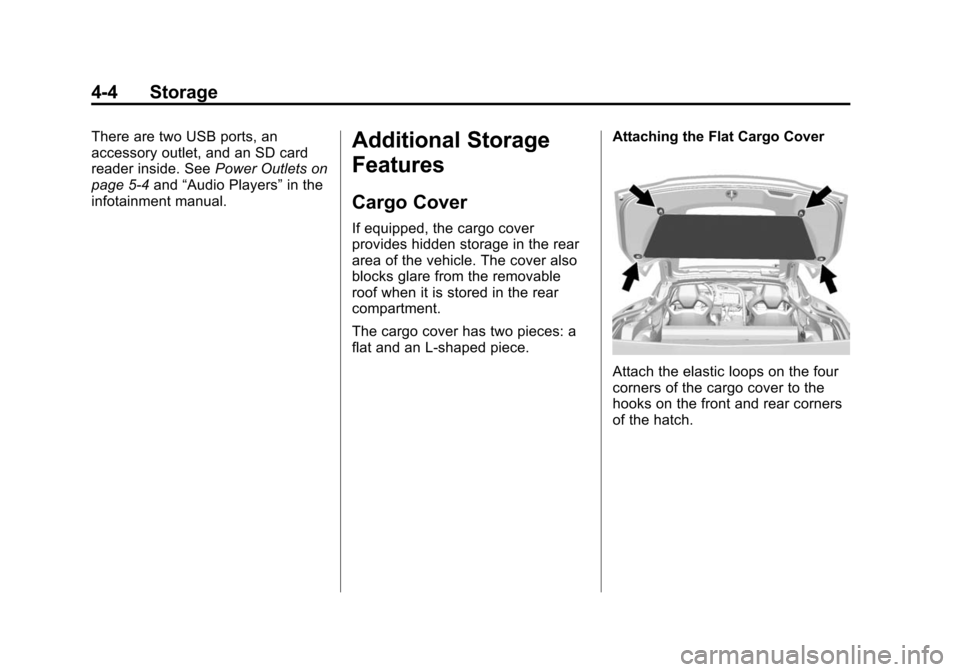
The cargo cover has two pieces: a
flat and an L-shaped piece. Attaching the Flat Cargo Cover
Attach the elastic loops on the four
corners of the cargo cover to the
hooks on the front and rear corners
of the hatch.
Page 168 of 376

Black plate (2,1)Chevrolet Corvette Owner Manual (GMNA-Localizing-U.S./Canada/Mexico-
6007198) - 2014 - CRC - 2/5/14
8-2 Climate Controls
Passenger Temperature Control
The passenger temperature control
is below the passenger side
air vent.
On/Off System Operation
Press AUTO to turn the system on.
Turn the fan control knob completely
counterclockwise to turn the fan off.
Automatic Operation
The system automatically controls
the fan speed, air delivery, air
conditioning, and recirculation in
order to heat or cool the vehicle to
the desired temperature. When the AUTO indicator light is
on, the system is in full automatic
operation. If the air delivery mode or
fan setting is manually adjusted or
the A/C is turned off, the AUTO
indicator turns off and displays will
show the selected settings.
To place the system in
automatic mode:
1. Press AUTO.
2. Set the temperature. Allow the
system time to stabilize. Then
adjust the temperature as
needed for best comfort.
The system operates to reach the
set temperature as quickly as
possible. The AUTO control system
works best with the windows up and
the removable roof installed or the
convertible top up.
Manual Operation
Driver and Passenger
Temperature Control: The
temperature can be adjusted
separately for the driver and
passenger. Turn the knob clockwise or
counterclockwise to increase or
decrease the driver temperature
setting. Press
worxto increase
or decrease the passenger
temperature setting.
SYNC: Press to link all climate
zone settings to the driver settings.
The SYNC indicator light will turn
on. When the passenger
temperature setting is adjusted, the
SYNC indicator light turns off.
Fan Control: Turn the knob
clockwise or counterclockwise to
increase or decrease the fan speed.
Turn the knob completely
counterclockwise to turn the fan off.
Press AUTO to return to automatic
operation.
Air Delivery Modes: Press
Y,\,
[, or-to change the direction of
the airflow. An indicator light comes
on in the selected mode button.
Page 372 of 376

Black plate (8,1)Chevrolet Corvette Owner Manual (GMNA-Localizing-U.S./Canada/Mexico-
6007198) - 2014 - CRC - 2/5/14
i-8 INDEX
P
Panel, Roof . . . . . . . . . . . . . . . . . . . . 2-24
ParkShifting Into . . . . . . . . . . . . . . . . . . . 9-23
Shifting Out of . . . . . . . . . . . . . . . . 9-24
Parking . . . . . . . . . . . . . . . . . . . . . . . . 9-25 Brake and P (Park)
Mechanism Check . . . . . . . . 10-32
Over Things That Burn . . . . . . . 9-25
Passenger Airbag Status Indicator . . . . . . . . . . . . . . . . . . . . . 5-14
Passenger Compartment Air Filter . . . . . . . . . . . . . . . . . . . . . . . . . . 8-5
Passenger Sensing System . . . 3-20
Perchlorate Materials Requirements, California . . . . . 10-2
Personalization Vehicle . . . . . . . . . . . . . . . . . . . . . . . 5-43
Power Door Locks . . . . . . . . . . . . . . . . . . . 2-13
Mirrors . . . . . . . . . . . . . . . . . . . . . . . . 2-20
Outlets . . . . . . . . . . . . . . . . . . . . . . . . 5-4
Protection, Battery . . . . . . . . . . . . . 6-7
Retained Accessory (RAP) . . . 9-23
Seat Adjustment . . . . . . . . . . . . . . . 3-2
Windows . . . . . . . . . . . . . . . . . . . . . 2-22 Pregnancy, Using Safety
Belts . . . . . . . . . . . . . . . . . . . . . . . . . 3-13
Privacy Radio FrequencyIdentification (RFID) . . . . . . . 13-14
Program Courtesy Transportation . . . . . . 13-7
Proposition 65 Warning, California . . . . . . . . . . . . . . . . . . . . . 10-2
R
Radio FrequencyIdentification (RFID) . . . . . . . . 13-14
Statement . . . . . . . . . . . . . . . . . . 13-15
Reading Lamps . . . . . . . . . . . . . . . . . 6-6
Rear Axle . . . . . . . . . . . . . . . . . . . . . 10-31
Rear Storage . . . . . . . . . . . . . . . . . . . 4-2
Rear Vision Camera (RVC) . . . . 9-49
Rearview Mirrors . . . . . . . . . . . . . . 2-21 Automatic Dimming . . . . . . . . . . . 2-21
Reclining Seatbacks . . . . . . . . . . . . 3-3
Recommended Fluids and Lubricants . . . . . . . . . . . . . . . . . . . 11-12
Records Maintenance . . . . . . . . . . . . . . . . .11-15 Recreational Vehicle
Towing . . . . . . . . . . . . . . . . . . . . . . 10-77
Reimbursement Program, GM Mobility . . . . . . . . . . . . . . . . . . 13-5
Remote Keyless Entry (RKE) System . . . . . . . . . . . . . 2-2, 2-3
Remote Vehicle Start . . . . . . . . . . . 2-9
Replacement Bulbs . . . . . . . . . . . 10-35
Replacement Parts
Airbags . . . . . . . . . . . . . . . . . . . . . . . 3-27
Maintenance . . . . . . . . . . . . . . . . .11-14
Replacing Airbag System . . . . . . 3-27
Replacing Safety Belt System Parts after a Crash . . . 3-14
Reporting Safety Defects Canadian Government . . . . . . 13-12
General Motors . . . . . . . . . . . . . 13-13
U.S. Government . . . . . . . . . . . 13-12
Retained Accessory Power (RAP) . . . . . . . . . . . . . . . . . 9-23
Reverse Tilt Mirrors . . . . . . . . . . . . 2-21
Ride Control Systems
Enhanced TractionSystem (ETS) . . . . . . . . . . . . . . . 9-46
Messages . . . . . . . . . . . . . . . . . . . . 5-36
Page 373 of 376

Black plate (9,1)Chevrolet Corvette Owner Manual (GMNA-Localizing-U.S./Canada/Mexico-
6007198) - 2014 - CRC - 2/5/14
INDEX i-9
RoadsDriving, Wet . . . . . . . . . . . . . . . . . . 9-10
Roadside Assistance Program . . . . . . . . . . . . . . . . . . . . . . 13-5
Roof Panel . . . . . . . . . . . . . . . . . . . . 2-24
Rotation, Tires . . . . . . . . . . . . . . . . 10-57
Routing, Engine Drive Belt . . . . . 12-4
Run-Flat Tires . . . . . . . . . . . . . . . . 10-45
Running the Vehicle While Parked . . . . . . . . . . . . . . . . . . . . . . . 9-26
S
Safety Belts . . . . . . . . . . . . . . . . . . . . 3-8Care . . . . . . . . . . . . . . . . . . . . . . . . . . 3-14
Extender . . . . . . . . . . . . . . . . . . . . . . 3-13
How to Wear Safety BeltsProperly . . . . . . . . . . . . . . . . . . . . . 3-10
Lap-Shoulder Belt . . . . . . . . . . . . 3-11
Reminders . . . . . . . . . . . . . . . . . . . . 5-13
Replacing after a Crash . . . . . . 3-14
Use During Pregnancy . . . . . . . . 3-13
Safety Defects Reporting Canadian Government . . . . . . 13-12
General Motors . . . . . . . . . . . . . 13-13
U.S. Government . . . . . . . . . . . 13-12 Safety System Check . . . . . . . . . . 3-14
Scheduling Appointments . . . . . . 13-7
Sealant Kit, Tire . . . . . . . . . . . . . . 10-66
Seatback Latches . . . . . . . . . . . . . . 3-6
Seats
Head Restraints . . . . . . . . . . . . . . . 3-2
Heated and Ventilated Front . . . 3-6
Lumbar Adjustment, Front . . . . . 3-3
Memory . . . . . . . . . . . . . . . . . . . . . . . . 3-4
Power Adjustment, Front . . . . . . 3-2
Reclining Seatbacks . . . . . . . . . . . 3-3
Securing Child Restraints . . . . . . 3-34
Security Light . . . . . . . . . . . . . . . . . . . . . . . . . . 5-23
Messages . . . . . . . . . . . . . . . . . . . . 5-40
OnStar
®. . . . . . . . . . . . . . . . . . . . . . 14-2
Vehicle . . . . . . . . . . . . . . . . . . . . . . . 2-17
Vehicle Alarm . . . . . . . . . . . . . . . . . 2-17
Service Accessories andModifications . . . . . . . . . . . . . . . . 10-2
Doing Your Own Work . . . . . . . . 10-5
Engine Soon Light . . . . . . . . . . . . 5-15
Maintenance Records . . . . . . .11-15
Maintenance, General Information . . . . . . . . . . . . . . . . . . 11-1 Service (cont'd)
Parts Identification Label . . . . . 12-1
Publications Ordering
Information . . . . . . . . . . . . . . . . .13-11
Scheduling Appointments . . . . . 13-7
Vehicle Messages . . . . . . . . . . . . 5-40
Service Electric Parking Brake Light . . . . . . . . . . . . . . . . . . . 5-19
Servicing the Airbag . . . . . . . . . . . 3-25
Shift Lock Control Function
Check, Automatic
Transmission . . . . . . . . . . . . . . . . 10-32
Shifting Into Park . . . . . . . . . . . . . . . . . . . . . . 9-23
Out of Park . . . . . . . . . . . . . . . . . . . 9-24
Signals, Turn and Lane-Change . . . . . . . . . . . . . . . . . 6-5
Specifications and
Capacities . . . . . . . . . . . . . . . . . . . . 12-2
Speedometer . . . . . . . . . . . . . . . . . . 5-11
StabiliTrak OFF Light . . . . . . . . . . . . . . . . . . . . . 5-20
Start Assist, Hills . . . . . . . . . . . . . . 9-36
Start Vehicle, Remote . . . . . . . . . . 2-9
Starter Switch Check . . . . . . . . . 10-31
Starting the Engine . . . . . . . . . . . . 9-21