2014 BMW X6 XDRIVE 50I service indicator
[x] Cancel search: service indicatorPage 275 of 323
Maintenance and repair should be performed
by your service center. Make sure to have reg‐
ular maintenance procedures recorded in the
vehicle's Service and Warranty Information
Booklet for US models, and in the Warranty
and Service Guide Booklet for Canadian mod‐
els. These entries are proof of regular mainte‐
nance.
Socket for OBD Onboard
Diagnosis
Socket for Onboard Diagnosis
The socket for Onboard Diagnosis may
only be used by the service center, by work‐
shops that operate according to the specifica‐
tions of the vehicle manufacturer with appro‐
priately trained personnel, and by other
authorized persons. Otherwise, its use may
lead to vehicle malfunctions.◀
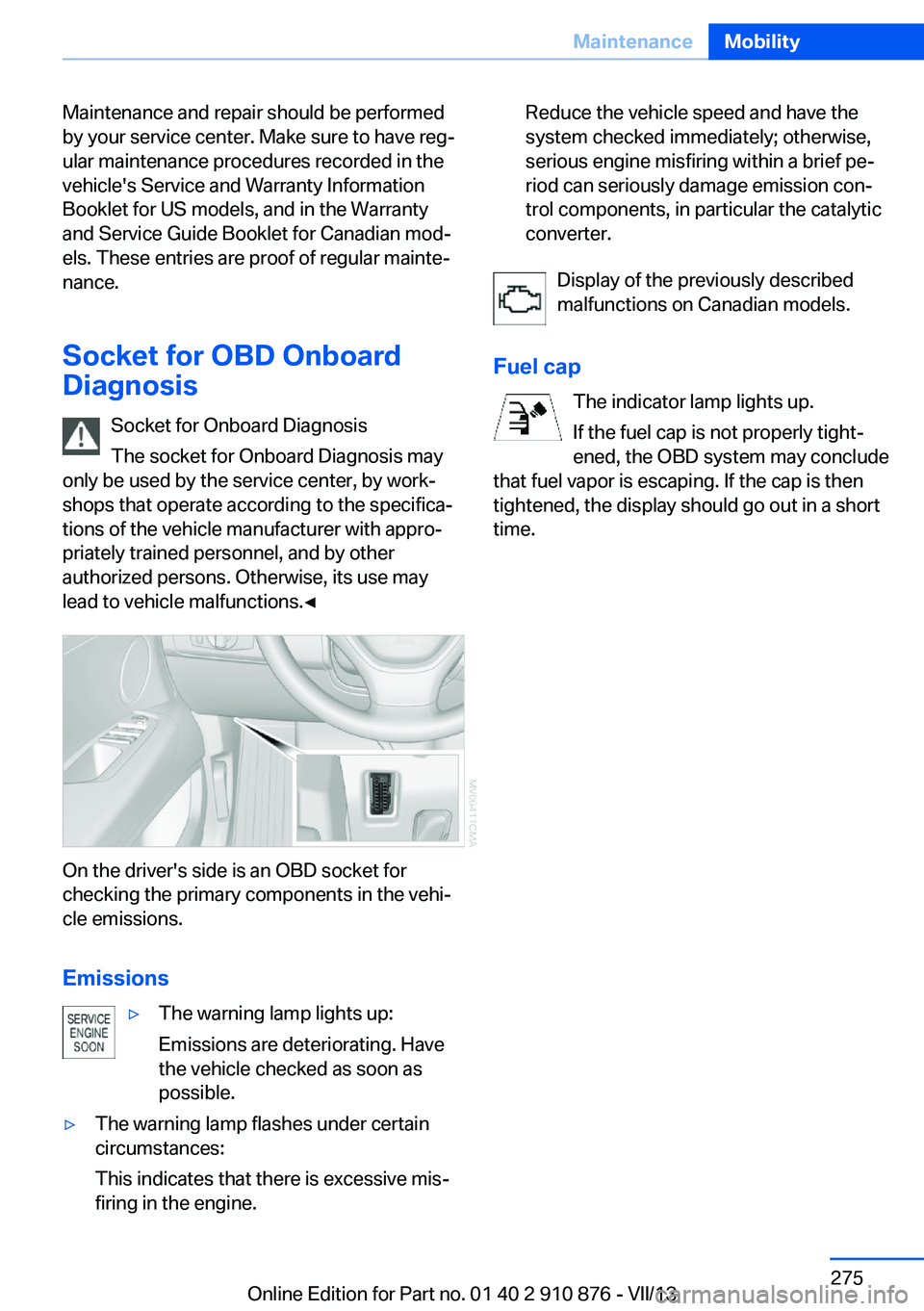
On the driver's side is an OBD socket for
checking the primary components in the vehi‐
cle emissions.
Emissions
▷The warning lamp lights up:
Emissions are deteriorating. Have
the vehicle checked as soon as
possible.▷The warning lamp flashes under certain
circumstances:
This indicates that there is excessive mis‐
firing in the engine.Reduce the vehicle speed and have the
system checked immediately; otherwise,
serious engine misfiring within a brief pe‐
riod can seriously damage emission con‐
trol components, in particular the catalytic
converter.
Display of the previously described
malfunctions on Canadian models.
Fuel cap The indicator lamp lights up.
If the fuel cap is not properly tight‐
ened, the OBD system may conclude
that fuel vapor is escaping. If the cap is then
tightened, the display should go out in a short
time.
Seite 275MaintenanceMobility275
Online Edition for Part no. 01 40 2 910 876 - VII/13
Page 284 of 323
▷Active steering: the system automatically
initializes for a short time as you drive. Dur‐
ing this time, the system is deactivated, re‐
fer to page 101.▷xDrive: the system automatically initializes
as you drive. During this time, indicator
lamps light up. If the lamps do not disap‐
pear during the current trip, have the sys‐
tem checked.
Disposing of old batteries
Have old batteries disposed of by your
service center or bring them to a recy‐
cling center.
Maintain the battery in an upright position for
transport and storage. Secure the battery so
that it does not tip over during transport.
Fuses Replacing fuses
Never attempt to repair a blown fuse and
do not replace a defective fuse with a substi‐
tute of another color or amperage rating; this
could lead to a circuit overload, ultimately re‐
sulting in a fire in the vehicle.◀
In interior
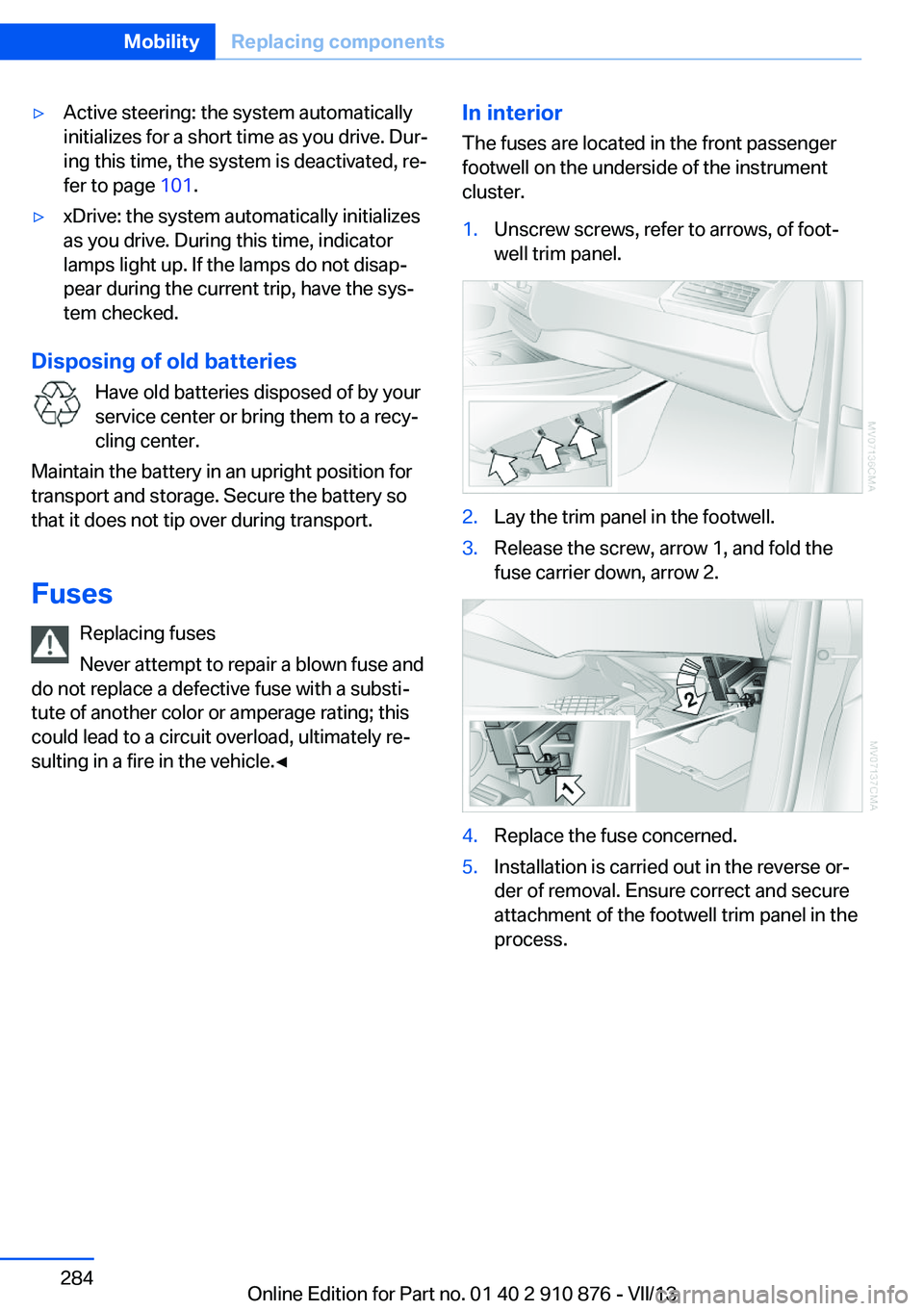
The fuses are located in the front passenger
footwell on the underside of the instrument
cluster.1.Unscrew screws, refer to arrows, of foot‐
well trim panel.2.Lay the trim panel in the footwell.3.Release the screw, arrow 1, and fold the
fuse carrier down, arrow 2.4.Replace the fuse concerned.5.Installation is carried out in the reverse or‐
der of removal. Ensure correct and secure
attachment of the footwell trim panel in the
process.Seite 284MobilityReplacing components284
Online Edition for Part no. 01 40 2 910 876 - VII/13
Page 311 of 323
Concierge service 251
Condensation on windows, removing 123
Condensation under the vehi‐ cle 148
Condition Based Service CBS 274
Confirmation signals for lock‐ ing/unlocking the vehicle 33
Connecting, mobile phone, refer to Pairing the mobile
phone 227
Consumption, refer to Aver‐ age fuel consumption 73
Contacts 240, 248
Control Display 19
Control Display, care 294
Control Display, setting the brightness 79
Controller, refer to Con‐ trols 18
Controls and displays 12
Controls, rear DVD sys‐ tem 210
Control systems, driving sta‐ bility 96
Convenient operation– Glass sunroof 33– Window 33
Coolant 273
Coolant, checking the level 273
Coolant temperature 71
Cooling function, switching on and off 124
Cooling, maximum 124
Cooling system, refer to Cool‐ ant 273
Cornering Brake Control CBC 96
Corrosion on brake discs 148
Courtesy lamps, refer to Inte‐ rior lamps 85
Cradle for telephone or mo‐ bile phone, refer to Snap-in
adapter 237
Cruise control 109
Cruise control– Malfunction 110
Cruise control, active 102
Cupholder 139
Curb weight, refer to Weights 298
Current fuel consumption 71
Current location, storing 162
Curve lights, refer to Adaptive Light Control 82
D
Dashboard lighting, refer to Instrument lighting 85
Dashboard, refer to Cock‐ pit 12
Data, technical 298
Date 70
Date, display format 79
Date, retrieving 70
Date, setting 78
Daytime running lights 82
Defroster, rear window 123
Defrosting windows 123
Defrost setting, refer to De‐ frosting windows 123
Destination entry via the ad‐ dress book 162
Destination guidance 169
Destination guidance with in‐ termediate destinations 167
Destination input, naviga‐ tion 160
Digital clock 70
Digital compass 131
Digital radio 183
Dimming mirrors 52
Directional indicators, refer to Turn signals 64
Display in front wind‐ shield 118
Display lighting, refer to In‐ strument lighting 85
Displays and controls 12
Displays, care 294
Displays, cleaning 294
Displays, refer to Instrument
cluster 14
Disposal, coolant 273
Disposal, vehicle battery 284
Distance control, refer to Ac‐ tive Cruise Control 102
Distance, selecting, with Ac‐ tive Cruise Control 104
Distance warning, refer to Park Distance Control
PDC 111
Divided screen view, split screen 22
Door key, refer to Remote control with integrated
key 30
Door lock 34
Doors, manual operation 34
Doors, unlocking and locking– Confirmation signals 33– From the inside 35– From the outside 32
DOT Quality Grades 265
Downhill control 99
Draft-free ventilation 125
Drive-off assistant 100
Driver's seat, calibrating 49
Driving away on inclines, refer to Drive-off assistant 100
Driving notes, breaking in 146
Driving notes, general 146
Driving on poor roads 148
Driving stability control sys‐ tems 96
Driving through water 147
Driving tips, refer to Driving notes 146
Dry air, refer to Cooling func‐ tion 124
DSC Dynamic Stability Con‐ trol 96
DTC Dynamic Traction Con‐ trol 97
DTMF suffix dialing 232
DVD/CD 190
DVDs, storing 197
Seite 311Everything from A to ZReference311
Online Edition for Part no. 01 40 2 910 876 - VII/13
Page 317 of 323
Pressure warning, tires 88
Profile depth, refer to Mini‐ mum tread depth 266
Profile, tires 266
Programmable memory but‐ tons, iDrive 23
Protection function, refer to Pinch protection 43
Protective function, refer to
Pinch protection– Windows 41
Push-and-turn switch, refer to
Controls 18
R Radiator fluid, refer to Cool‐ ant 273
Radio-operated key, refer to Remote control with
integrated key 30
Radio ready state 59
Radio ready state, switched off 60
Radio ready state, switched on 59
Radio setting, refer to Radio ready state 59
Rain sensor 66
Random 191
Random playback 191
Range 72
RDS 183
Reading lamps 85
Reading out loud 246
Rear entertainment, refer to DVD system in rear 210
Rear lamps, refer to Tail lamps 279
Rear seat backrest, folda‐ ble 135
Rear seats, adjusting the head restraints 50
Rear seats, heating 46
Rear socket 134
Rear ventilation 126
Rear ventilation, automatic
climate control in rear 126
Rearview camera, clean‐ ing 115
Rearview mirror, refer to Mir‐ rors 51
Rear window defroster 123
Recirculated air mode 124
Recommended tire brands 268
Redialing 233
Refueling 258
Remaining distance to desti‐ nation, refer to Com‐
puter 73
Remaining range for service, refer to Service require‐
ments 74
Remaining range, refer to Range 72
Reminders 246
Remote control– Battery replacement 39– Comfort Access 37– Garage door opener 129– Malfunction 34, 39– Tailgate 33– Universal 129
Remote control, rear DVD
system 211
Remote control, removing from the ignition lock 59
Remote control, service data 274
Remote inquiry 232
Replacement fuse 284
Replacement remote con‐ trol 30
Replacing wheels/tires 267
Reporting safety defects 9
Reserve warning, refer to Fuel gauge 72
Reservoir for washer fluid, re‐ fer to Washer fluid reser‐
voir 67
Resetting, Tire Pressure Monitor TPM 91
Residual heat 125
Restraining systems– Refer to Safety belts 47
Restraint systems for chil‐
dren 54
Retaining straps, securing cargo 151
Retreaded tires 268
Rim cleaner, care 293
Road, avoiding 169
Road detour 169
Roadside Assistance 252
Roadside parking lamps 83
Roller sunblinds 42
RON gasoline quality 260
RON, refer to Fuel qual‐ ity 260
Roof load capacity 298
Roof-mounted luggage rack 152
Rope, refer to Towing 289
Route 170
Route criteria, route 169
Route, displaying 170
Route section, bypass‐ ing 170
RSC Runflat System Compo‐ nent, refer to Run-flat
tires 268
Rubber components, care 293
Run-flat tires 268
Run-flat tires, tire inflation pressure 262
Running lights, refer to Park‐ ing lamps/low beams 81
S Safe braking 147
Safety 6
Safety belts 47
Safety belts
– Damage 48
Safety belts, care 293
Safety belts, indicator/warn‐ ing lamp 48
Seite 317Everything from A to ZReference317
Online Edition for Part no. 01 40 2 910 876 - VII/13