2014 BMW X3 rear view mirror
[x] Cancel search: rear view mirrorPage 146 of 251

2.Turn the steering wheel to the point where
the pathway line covers the corresponding
turning radius line.
Display settings
Brightness
With the rearview camera switched on:
1. Select the symbol.2.Turn the controller until the desired setting
is reached, and press the controller.
Contrast
With the rearview camera switched on:
1. Select the symbol.2.Turn the controller until the desired setting
is reached, and press the controller.
System limits
Detection of objects
Very low obstacles as well as high, protruding
objects such as ledges may not be detected by
the system.
Assistance functions also take into account
data of the PDC.
Follow instructions in the PDC chapter, refer to
page 137.
The objects displayed on the Control Display
under certain circumstances are closer than
they appear. Do not estimate the distance from
the objects on the display.
Top View
The concept Top View provides assistance in parking and
maneuvering. The area around the vehicle is
shown on the Control Display.
General information The image is lidtured by two cameras
integrated in the exterior mirrors, by the rear‐
view camera and a camera on the front of the
vehicle.
The range is no more than approx. 6.5 ft/2 m to
the side, front and rear.
Obstacles within this range are thus displayed
early on the Control Display.
Hints Check the traffic situation as well
Check the traffic situation around the ve‐
hicle with your own eyes. Otherwise, an acci‐
dent could result from road users or objects
that are not lidtured by the camera.◀
At a glance
Button in the vehicle
Top View
Seite 142ControlsDriving comfort142
Online Edition for Part no. 01 40 2 956 644 - X/14
Page 147 of 251

Cameras
Front camera
The lenses of the Top View cameras are lo‐
cated at the bottom of the exterior mirror hous‐
ings. The image quality may be impaired by
dirt.
Clean the lens, refer to page 229.
Functional requirements
Top View can be used only to a limited extent
in the following situations:
▷With a door open.▷With the tailgate open.▷With an exterior mirror folded in.▷In poor light.
The unavailable camera range is depicted by
shading.
Switching on/off
Switching on automatically With the engine running, engage lever in posi‐
tion P R.
The rearview camera image is displayed. To
switch to the Top View:
"Rear view camera"
Automatic deactivation during forward
travel
The system switches off when a certain driving
distance or speed is exceeded.
Switch the system back on if needed.
Switching on/off manually Press button.
▷On: the LED lights up.▷Off: the LED goes out.
Top View is displayed.
The rearview camera image is displayed when
the reverse gear is engaged by pressing the
button.
Display
Display on the Control Display The area surrounding the vehicle can be dis‐
played on the Control Display.
The display appears as soon as Top View is
activated.
When the image of the rearview camera is dis‐
played, it is possible to reel to top view:
"Rear view camera"
Brightness
With Top View switched on:
1. Select the symbol.2.Turn the controller until the desired setting
is reached, and press the controller.
Contrast
With Top View switched on:
1. Select the symbol.Seite 143Driving comfortControls143
Online Edition for Part no. 01 40 2 956 644 - X/14
Page 162 of 251

Interior equipmentVehicle features and optionsThis chapter describes all standard, country-
specific and optional features offered with the
series. It also describes features that are not
necessarily available in your car, e. g., due to
the selected options or country versions. This
also applies to safety-related functions and
systems.
Universal Integrated RemoteControl
The concept
The universal garage door opener can operate
up to 3 functions of remote-controlled sys‐
tems such as garage door drives or lighting
systems. The universal garage door opener re‐
places up to 3 different hand-held transmitters.
To operate the remote control, the buttons on
the interior rearview mirror must be program‐
med with the desired functions. The hand-held
transmitter for the particular system is required
in order to program the remote control.
During programming
During programming and before activat‐
ing a device using the universal garage door
opener, ensure that there are no people, ani‐
mals or objects in the area of the remote-con‐
trolled device; otherwise, there is a risk of in‐
jury or damage.
Also follow the safety instructions of the hand-
held transmitter.◀
Before selling the vehicle, delete the stored
functions for the sake of security.
Compatibility If this symbol is printed on the packag‐
ing or in the instructions of the system
to be controlled, the system is gener‐ally compatible with the universal garage door
opener.
If you have any questions, please contact:▷Your service center.▷www.homelink.com on the Internet.
HomeLink is a registered trademark of Gentex
Corporation.
Control elements on the interior
rearview mirror
▷LED, arrow 1.▷Buttons, arrow 2.▷The hand-held transmitter, arrow 3, is re‐
quired for programming.
Programming
General information
1.Switch on the ignition.2.Initial setup:
Press and hold the left and right button on
the interior rearview mirror simultaneously
for approximately 20 seconds until the LED
on the interior rearview mirror flashes. This
erases all programming of the buttons on
the interior rearview mirror.3.Hold the hand-held transmitter for the sys‐
tem to be controlled approx. 1 to 3 in/2.5 to
8 cm away from the buttons of the interiorSeite 158ControlsInterior equipment158
Online Edition for Part no. 01 40 2 956 644 - X/14
Page 163 of 251

rearview mirror. The required distance de‐
pends on the manual transmitter.4.Simultaneously press and hold the button
of the desired function on the hand-held
transmitter and the button to be program‐
med on the interior rearview mirror. The
LED on the interior rearview mirror will be‐
gin flashing slowly.5.Release both buttons as soon as the LED
flashes more rapidly. The LED flashing
faster indicates that the button on the inte‐
rior rearview mirror has been programmed.
If the LED does not flash faster after at
least 60 seconds, change the distance be‐
tween the interior rearview mirror and the
hand-held transmitter and repeat the step.
Several more attempts at different distan‐
ces may be necessary. Wait at least
15 seconds between attempts.
Canada: if programming with the hand-
held transmitter was interrupted, hold
down the interior rearview mirror button
and repeatedly press and release the
hand-held transmitter button for 2 sec‐
onds.6.To program other functions on other but‐
tons, repeat steps 3 to 5.
The systems can be controlled using the inte‐
rior rearview mirror buttons.
Special feature of the alternating-
code wireless system
If you are unable to operate the system after
repeated programming, please check if the
system to be controlled features an alternat‐
ing-code system.
Read the system's operating manual, or press
the programmed button on the interior rear‐
view mirror longer. If the LED on the interior
rearview mirror starts flashing rapidly and then
stays lit constantly for 2 seconds, the system
features an alternating-code system. Flashing
and continuous illumination of the LED will re‐
peat for approximately 20 seconds.
For systems with an alternating-code system,
the universal garage door opener and the sys‐
tem also have to be synchronized.
Please read the operating manual to find out how to synchronize the system.
Synchronizing is easier with the aid of a sec‐
ond person.
To synchronize:1.Park the vehicle within range of the re‐
mote-controlled system.2.Program the relevant button on the interior
rearview mirror as described.3.Locate and press the synchronizing button
on the system being programmed. You
have approx. 30 seconds for the next step.4.Hold down the programmed button on the
interior rearview mirror for approximately
3 seconds and then release it. If necessary,
repeat this step up to three times in order
to finish synchronization. Once synchroni‐
zation is complete, the programmed func‐
tion will be carried out.
Reprogramming individual buttons
1.Switch on the ignition.2.Press and hold the interior rearview mirror
button to be programmed.3.As soon as the interior rearview mirror LED
starts flashing slowly, hold the hand-held
transmitter for the system to be controlled
approx. 1 to 3 in/2.5 to 8 cm away from the
buttons of the interior rearview mirror. The
required distance depends on the manual
transmitter.4.Likewise, press and hold the button of the
desired function on the hand-held trans‐
mitter.5.Release both buttons as soon as the inte‐
rior rearview mirror LED flashes more rap‐
idly. The LED flashing faster indicates that
the button on the interior rearview mirror
has been programmed. The system canSeite 159Interior equipmentControls159
Online Edition for Part no. 01 40 2 956 644 - X/14
Page 164 of 251
then be controlled by the button on the in‐
terior rearview mirror.
If the LED does not flash faster after at
least 60 seconds, change the distance and
repeat the step. Several more attempts at
different distances may be necessary. Wait
at least 15 seconds between attempts.
Canada: if programming with the hand-
held transmitter was interrupted, hold
down the interior rearview mirror button
and repeatedly press and release the
hand-held transmitter button for 2 sec‐
onds.
Controls
Before operation
Before operating a system using the uni‐
versal garage door opener, ensure that there are no people, animals, or objects within the
range of movement of the remote-controlled
system; otherwise, there is a risk of injury or
damage.
Also follow the safety instructions of the hand-
held transmitter.◀
The system, such as the garage door, can be
operated using the button on the interior rear‐
view mirror while the engine is running or when
the ignition is started. To do this, hold down
the button within receiving range of the system
until the function is activated. The interior rear‐ view mirror LED stays lit while the wireless sig‐
nal is being transmitted.
Deleting stored functions Press and hold the left and right button on the
interior rearview mirror simultaneously for ap‐
proximately 20 seconds until the LED flashes
rapidly. All stored functions are deleted. The
functions cannot be deleted individually.
Sun visor
Glare shieldFold the sun visor down or up.
Glare shield from the side
Folding out1.Fold the sun visor down.2.Unhook it from the holder and swing it to
the side.3.Move it back to the desired position.
Folding up
Proceed in the reverse order to close the sun
visor.
Vanity mirror A vanity mirror is located in the sun visor be‐
hind a cover. When the cover is opened, the
mirror lighting switches on.
Ashtray/cigarette lighter
Ashtray
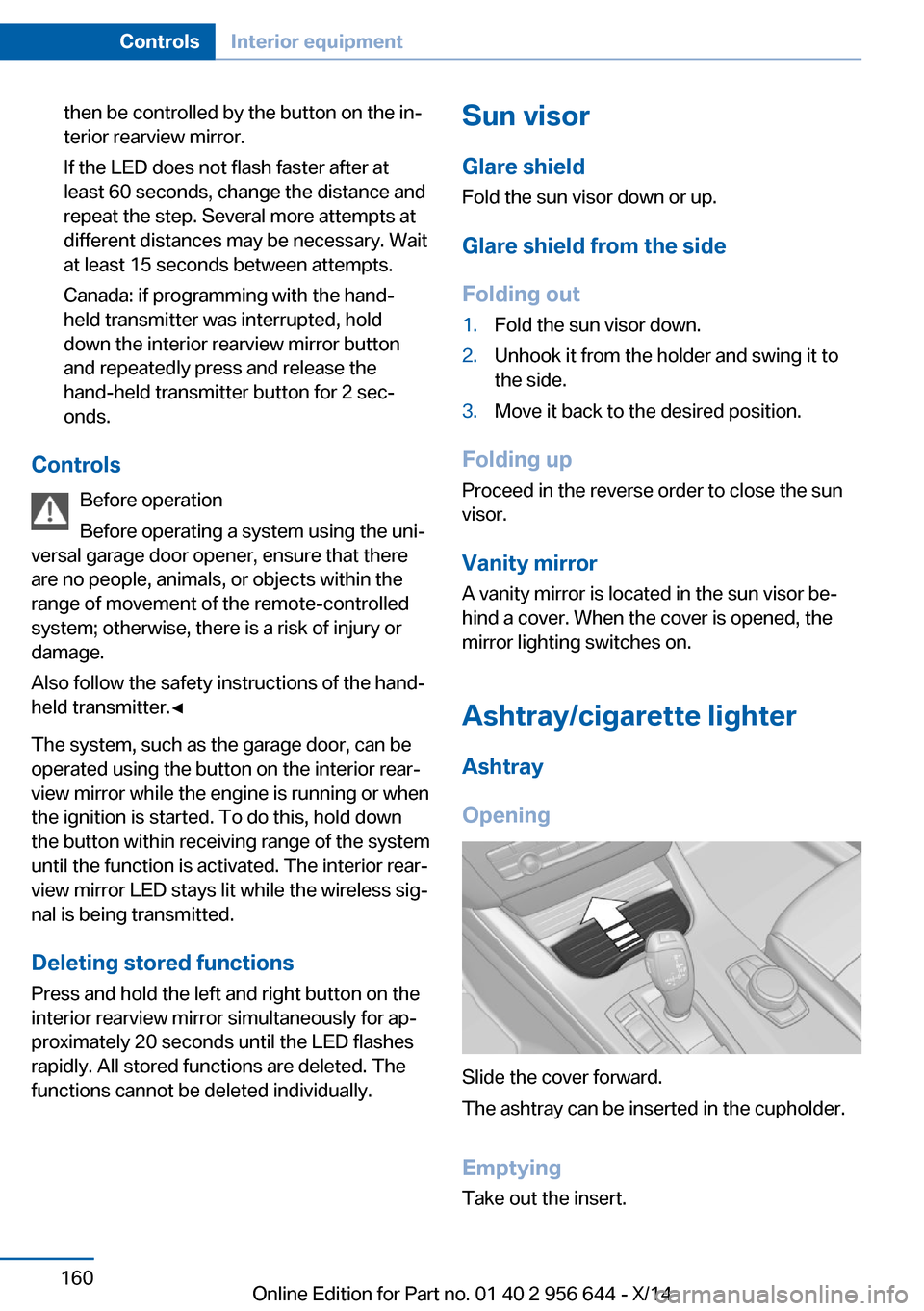
Opening
Slide the cover forward.
The ashtray can be inserted in the cupholder.
Emptying Take out the insert.
Seite 160ControlsInterior equipment160
Online Edition for Part no. 01 40 2 956 644 - X/14
Page 242 of 251

Control Display 18
Control Display, settings 91
Controller 18, 19
Control systems, driving sta‐ bility 121
Convenient opening with the remote control 37
Coolant 208
Coolant level 208
Coolant temperature 84
Cooling function 152, 155
Cooling, maximum 154
Cooling system 208
Corrosion on brake discs 175
Cosmetic mirror 160
Cruise control 135
Cruise control, active with Stop & Go 128
Cruise Control, refer to Active Cruise Control 128
Cruising range 84
Cupholder 167
Current fuel consumption 85
D
Damage, tires 200
Damping control, dy‐ namic 124
Data, technical 232
Date 84
Daytime running lights 95
Daytime running lights, bulb replacement 214
Defrosting, refer to Windows, defrosting 151, 154
Dehumidifying, air 152, 155
Deleting personal data 24
Deletion of personal data 24
Destination distance 89
Diesel exhaust fluid, at low temperatures 192
Diesel exhaust fluid, having refilled 192
Diesel exhaust fluid, on mini‐ mum 192 Diesel exhaust fluid, replen‐
ishing yourself 192
Diesel particulate filter 173
Digital clock 84
Dimensions 232
Dimmable exterior mirrors 59
Dimmable interior rearview mirror 59
Direction indicator, refer to Turn signals 71
Display, electronic, instru‐ ment cluster 79
Display in windshield 92
Display lighting, refer to In‐ strument lighting 97
Displays, cleaning 229
Disposal, coolant 209
Disposal, vehicle battery 219
Distance control, refer to PDC 137
Distance to destination 89
Divided screen view, split screen 23
Door lock 39
Door lock, refer to Remote control 34
Downhill control 123
Drive-off assistant 126
Drive-off assistant, refer to DSC 121
Driving Dynamics Con‐ trol 124
Driving instructions, break- in 172
Driving mode 124
Driving notes, general 173
Driving on bad roads 172
Driving stability control sys‐ tems 121
Driving tips 173
DSC Dynamic Stability Con‐ trol 121
DTC Dynamic Traction Con‐ trol 122
Dynamic Damping Con‐ trol 124 Dynamic Stability Control
DSC 121
Dynamic Traction Control DTC 122
E ECO PRO 180
ECO PRO, bonus range 181
ECO PRO display 180
ECO PRO driving mode 180
ECO PRO mode 180
ECO PRO Tip - driving in‐ struction 182
EfficientDynamics 182
Electronic displays, instru‐ ment cluster 79
Electronic oil measure‐ ment 205
Electronic Stability Program ESP, refer to DSC 121
Emergency detection, remote control 35
Emergency release, fuel filler flap 188
Emergency Request 221
Emergency service, refer to Roadside Assistance 222
Emergency start function, en‐ gine start 35
Emergency unlocking, trans‐ mission lock 77
Energy Control 85
Energy recovery 85
Engine, automatic reel-off 67
Engine, automatic Start/Stop function 67
Engine compartment 203
Engine compartment, work‐ ing in 203
Engine coolant 208
Engine idling when driving, coasting 183
Engine oil 205
Engine oil, adding 206
Engine oil additives 206 Seite 238ReferenceEverything from A to Z238
Online Edition for Part no. 01 40 2 956 644 - X/14
Page 244 of 251

Head-up Display, care 229
Heavy cargo, stowing 177
High-beam Assistant 96
High beams 72
High beams/low beams, refer to High-beam Assistant 96
High beams, bulb replace‐ ment 214
Hill Descent Control HDC 123
Hills 174
Hill start assistant, refer to Drive-off assistant 126
Hints 6
Holder for beverages 167
Hood 203
Horn 14
Hot exhaust system 173
HUD Head-up Display 92
Hydroplaning 174
I Ice warning, see External temperature warning 84
Icy roads, see External tem‐ perature warning 84
Identification marks, tires 198
Identification number, see ve‐ hicle identification num‐
ber 9
iDrive 18
Ignition key, refer to Remote control 34
Ignition off 65
Ignition on 65
Indication of a flat tire 103 , 106
Indicator and alarm lamps, see Check Control 80
Indicator lamp, see Check Control 80
Individual air distribu‐ tion 151, 154
Individual settings, refer to Personal Profile 35 Inflation pressure, tires 195
Inflation pressure warning, tires 105
Info display, refer to Com‐ puter 89
Initialize, Tire Pressure Moni‐ tor TPM 103
Initializing, Flat Tire Monitor FTM 106
Instrument cluster 79
Instrument cluster, electronic displays 79
Instrument lighting 97
Integrated key 34
Integrated Owner's Manual in the vehicle 29
Intelligent Emergency Re‐ quest 221
Intelligent Safety 107
Intensity, AUTO pro‐ gram 154
Interior equipment 158
Interior lights 97
Interior lights via remote con‐ trol 37
Interior motion sensor 47
Interior rearview mirror, auto‐ matic dimming feature 59
Interior rearview mirror, man‐ ually dimmable 59
Interval display, service re‐ quirements 85
J Jacking points for the vehicle jack 218
Joystick, Steptronic transmis‐ sion 75
Jump-starting 222
K
Key/remote control 34
Keyless Go, refer to Comfort Access 42 Key Memory, refer to Per‐
sonal Profile 35
Kickdown, Steptronic trans‐ mission 75
Knee airbag 99
L
Lamp replacement 213
Lamp replacement, front 214
Lamp replacement, rear 217
Lane departure warning 117
Lane margin, warning 117
Language on Control Dis‐ play 92
Lashing eyes, securing cargo 177
LATCH child restraint sys‐ tem 62
Launch Control 78
Leather, care 227
LED front fog lights, bulb re‐ placement 216
LEDs, light-emitting di‐ odes 213
Letters and numbers, enter‐ ing 25
Light alloy wheels, care 228
Light control 95
Light-emitting diodes, LEDs 213
Lighter 160
Lighting 94
Lighting via remote con‐ trol 37
Light reel 94
Lights 94
Lights and bulbs 213
Load 177
Loading 176
Lock, door 39
Locking/unlocking via door lock 39
Locking/unlocking with re‐ mote control 37
Locking, automatic 45 Seite 240ReferenceEverything from A to Z240
Online Edition for Part no. 01 40 2 956 644 - X/14
Page 245 of 251

Locking, settings 45
Locking via tailgate 40
Lock, power window 48
Locks, doors, and win‐ dows 64
Low beams 94
Low beams, automatic, refer to High-beam Assistant 96
Lower back support 53
Low-Sulfur Diesel 191
Luggage rack, refer to Roof- mounted luggage rack 178
Lumbar support 53
M
Maintenance 210
Maintenance require‐ ments 210
Maintenance, service require‐ ments 85
Maintenance system, BMW 210
Make-up mirror 160
Malfunction displays, see Check Control 80
Manual air distribu‐ tion 151, 154
Manual air flow 151, 154
Manual brake, refer to Parking brake 69
Manual mode, Steptronic transmission 76
Manual operation, door lock 39
Manual operation, exterior mirrors 58
Manual operation, fuel filler flap 188
Manual operation, Park Dis‐ tance Control PDC 138
Manual operation, rearview camera 140
Manual operation, Top View 143 Marking on approved
tires 201
Marking, run-flat tires 202
Master key, refer to Remote control 34
Maximum cooling 154
Maximum speed, display 87
Maximum speed, winter tires 201
Measure, units of 92
Medical kit 222
Memory, seat, mirror 57
Menu, EfficientDynamics 182
Menu in instrument clus‐ ter 88
Menus, operating, iDrive 18
Menus, refer to iDrive operat‐ ing concept 20
Messages, see Check Con‐ trol 80
Microfilter 152, 156
Minimum tread, tires 200
Mirror 58
Mirror memory 57
Mobile communication devi‐ ces in the vehicle 173
Modifications, technical, refer to Safety 7
Moisture in headlight 213
Monitor, refer to Control Dis‐ play 18
Mounting of child restraint systems 61
Moving sun visor 160
Multifunction steering wheel, buttons 14
N
Navigation, see user's manual for Navigation, Entertain‐
ment and Communication
Neck restraints, front, refer to Head restraints 55
Neck restraints, rear, refer to Head restraints 56 Neutral cleaner, see wheel
cleaner 228
New wheels and tires 200
Nylon rope for tow-starting/ towing 224
O OBD Onboard Diagnosis 210
OBD, see OBD Onboard Di‐ agnosis 210
Obstacle marking, rearview camera 141
Octane rating, refer to Rec‐ ommended fuel grade 190
Odometer 84
Office, see user's manual for Navigation, Entertainment
and Communication
Offroad trips 172
Oil 205
Oil, adding 206
Oil additives 206
Oil change 207
Oil change interval, service requirements 85
Oil filler neck 206
Oil types, alternative 207
Oil types, approved 207
Old batteries, disposal 219
Onboard monitor, refer to Control Display 18
Onboard vehicle tool kit 212
Opening/closing via door lock 39
Opening and closing 34
Opening and closing, without remote control 39
Opening and closing, with re‐ mote control 37
Opening the tailgate with no- touch activation 43
Operating concept, iDrive 18
Optional equipment, standard equipment 6 Seite 241Everything from A to ZReference241
Online Edition for Part no. 01 40 2 956 644 - X/14