2014 BMW X1 XDRIVE 28I language
[x] Cancel search: languagePage 116 of 295
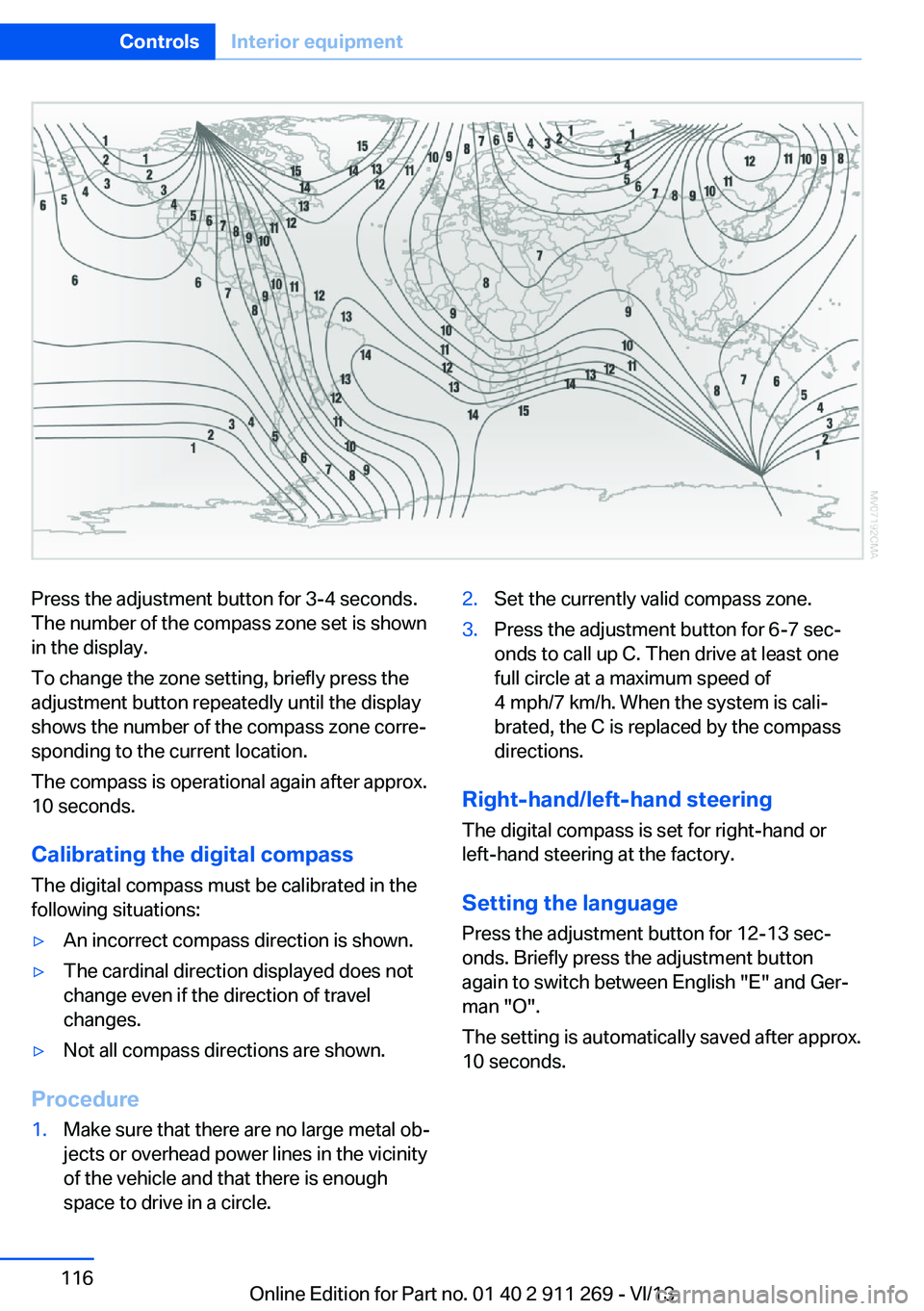
Press the adjustment button for 3‑4 seconds.
The number of the compass zone set is shown
in the display.
To change the zone setting, briefly press the
adjustment button repeatedly until the display
shows the number of the compass zone corre‐
sponding to the current location.
The compass is operational again after approx.
10 seconds.
Calibrating the digital compass
The digital compass must be calibrated in the
following situations:▷An incorrect compass direction is shown.▷The cardinal direction displayed does not
change even if the direction of travel
changes.▷Not all compass directions are shown.
Procedure
1.Make sure that there are no large metal ob‐
jects or overhead power lines in the vicinity
of the vehicle and that there is enough
space to drive in a circle.2.Set the currently valid compass zone.3.Press the adjustment button for 6‑7 sec‐
onds to call up C. Then drive at least one
full circle at a maximum speed of
4 mph/7 km/h. When the system is cali‐
brated, the C is replaced by the compass
directions.
Right-hand/left-hand steering
The digital compass is set for right-hand or
left-hand steering at the factory.
Setting the language Press the adjustment button for 12‑13 sec‐
onds. Briefly press the adjustment button
again to switch between English "E" and Ger‐
man "O".
The setting is automatically saved after approx.
10 seconds.
Seite 116ControlsInterior equipment116
Online Edition for Part no. 01 40 2 911 269 - VI/13
Page 150 of 295
Add a destination as a further destination,
refer to page 151.▷"Exit interactive map": return to the map
view.▷"View in northern direction" or "View in driving direction"▷"Display destination": the map section
around the destination is displayed.▷"Display current location": the map section
around your current location is displayed.▷"Find points of interest": the search for
special destinations is started.
Destination entry by voice
General information
▷Instructions for voice activation system, re‐
fer to page 25.▷When making a destination entry by voice,
you can change between voice operation
and iDrive.▷To have the available spoken instructions
read out loud: ›Voice commands‹.
Saying the entries
▷The town/city, street, and house number
can be entered using a single command.▷Countries, towns and cities, streets, and
intersections can be said as whole words
or spelled in the language of the system,
refer to page 77.
Example: to enter a destination in a US
state as a whole word, the system lan‐
guage must be English.▷Spell the entry if the spoken language and
the language of the system differ.▷Say the letters smoothly, and avoid exag‐
gerating the pronunciation and inserting
lengthy pauses between the letters.▷The methods of entry depend on the navi‐
gation data in use and the country and lan‐
guage settings.
Entering the address in a command
1. Press the button on the steering
wheel.2.›Enter address‹3.Wait for a request from the system.4.Say the address in the suggested order.5.Continue making the entry as prompted by
the system.
If necessary, individually name the sepa‐
rate components of the address, e.g., the
town/city.
Entering a town/city separately
The town/city can be said as a complete word.
With the destination entry menu displayed:
1. Press the button on the steering
wheel.2.›City‹ or ›Spell city‹3.Wait for the system to prompt you for the
town/city.4.Say the name of the town/city, or name at
least the first three letters.
Depending on the entry, up to 20 towns/
cities may be suggested.5.Select a location:▷Select a recommended town/
city: ›Yes‹.▷Select a different town/city: ›New
entry‹.▷Select an entry: ›Entry ...‹, for instance,
entry 2.▷Spell an entry: ›Spell city‹.6.Continue making the entry as prompted by
the system.Seite 150NavigationDestination entry150
Online Edition for Part no. 01 40 2 911 269 - VI/13
Page 177 of 295
In fast forward/reverse: the speed increases
every time the controller is pressed. To stop,
start playback.
DVD menu1.If necessary, turn the controller to open the
video menu.2. "DVD menu"
The DVD menu is displayed. The display
depends on the contents of the DVD.3.To select menu items: move the controller
and press it.
To change to the video menu: turn the control‐
ler and press it.
DVD settingsFor some DVDs, settings can only be made via
the DVD menu; refer also to the information on
the DVD.
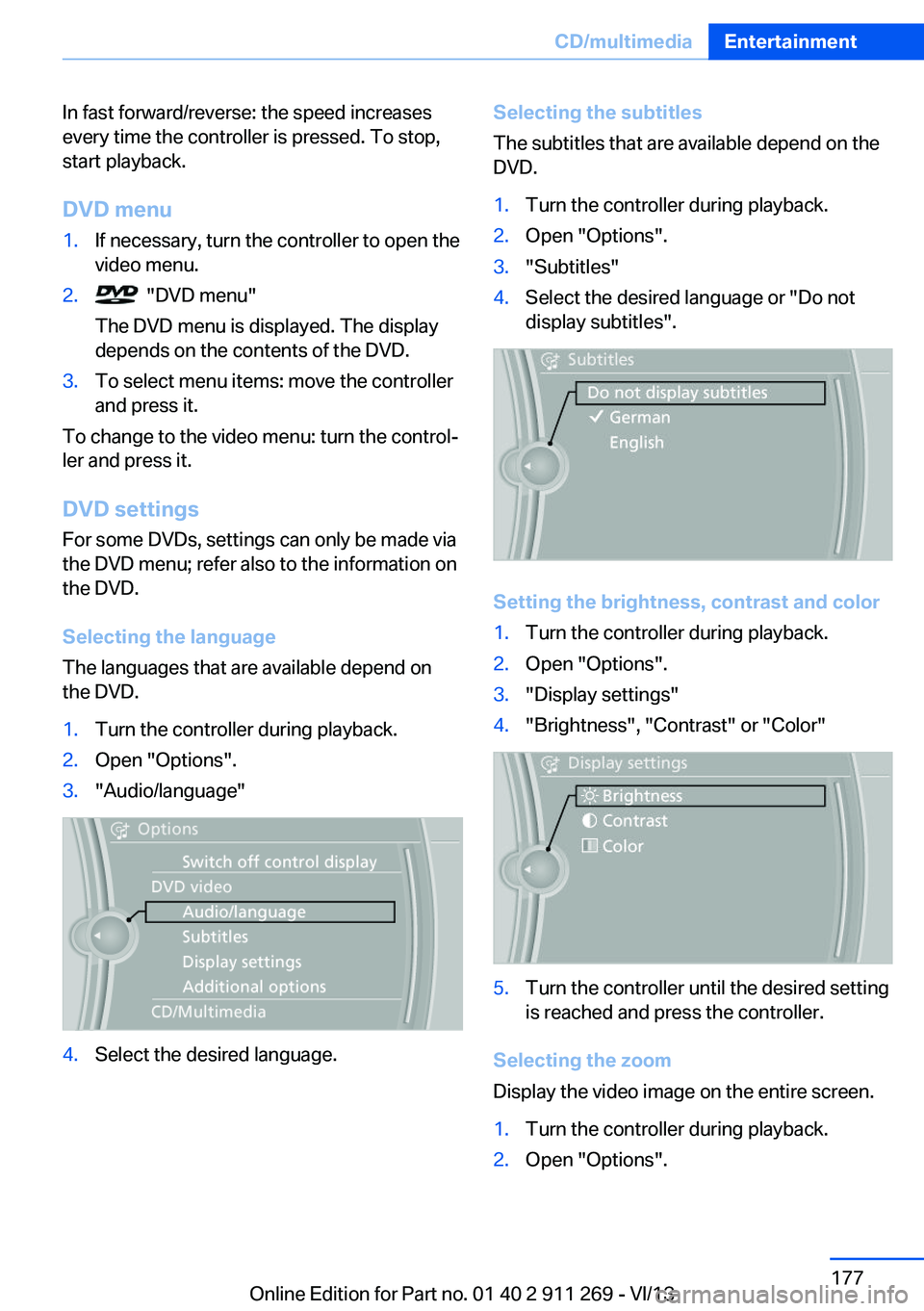
Selecting the language
The languages that are available depend on
the DVD.
1.Turn the controller during playback.2.Open "Options".3."Audio/language"4.Select the desired language.Selecting the subtitles
The subtitles that are available depend on the
DVD.1.Turn the controller during playback.2.Open "Options".3."Subtitles"4.Select the desired language or "Do not
display subtitles".
Setting the brightness, contrast and color
1.Turn the controller during playback.2.Open "Options".3."Display settings"4."Brightness", "Contrast" or "Color"5.Turn the controller until the desired setting
is reached and press the controller.
Selecting the zoom
Display the video image on the entire screen.
1.Turn the controller during playback.2.Open "Options".Seite 177CD/multimediaEntertainment177
Online Edition for Part no. 01 40 2 911 269 - VI/13
Page 206 of 295
Redialing
›Redial‹
Voice phone book
Depending on how your vehicle is equipped, it
may be necessary to create your own voice
phone book.
The entries must be entered using voice acti‐
vation and are separate from the memory in
the mobile phone. Up to 50 entries can be set
up.
Saving an entry1.›Save name‹2.Say the name. Do not exceed the speaking
duration of approx. 2 seconds.3.Say the phone number after being
prompted to do so by the system.4.›Save‹
Deleting an entry
1.›Delete name‹2.Say the name after being prompted to do
so.3.Confirm the prompt: ›Yes‹
Deleting all entries
1.›Delete phone book‹2.Confirm the prompt: ›Yes‹3.Confirm the prompt again: ›Yes‹
Reading and selecting entries
1.›Read phonebook‹2.When the desired entry is read aloud: say ›
Dial number‹
Selecting an entry
1.›Dial name‹2.Say the name after being prompted to do
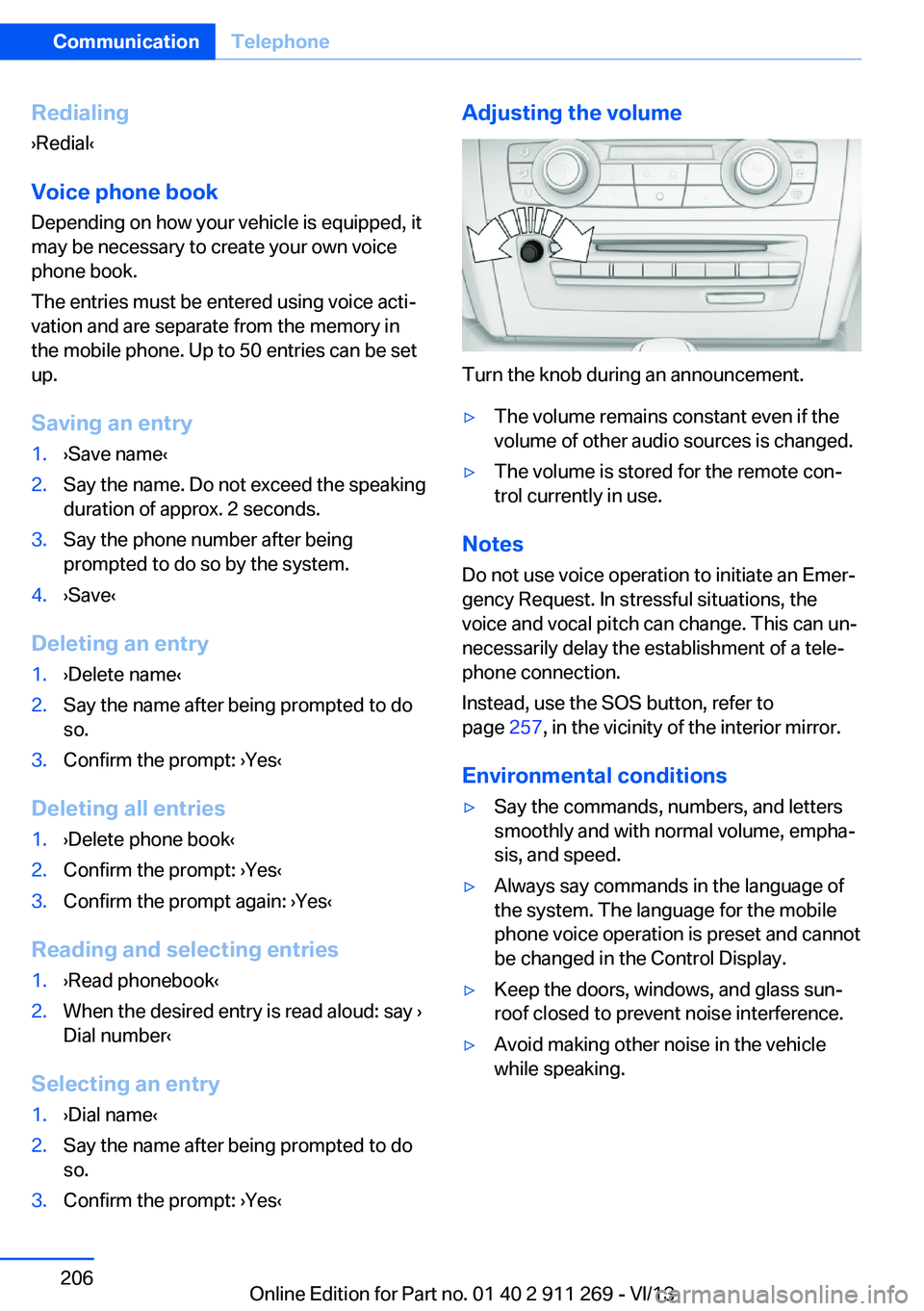
so.3.Confirm the prompt: ›Yes‹Adjusting the volume
Turn the knob during an announcement.
▷The volume remains constant even if the
volume of other audio sources is changed.▷The volume is stored for the remote con‐
trol currently in use.
Notes
Do not use voice operation to initiate an Emer‐
gency Request. In stressful situations, the
voice and vocal pitch can change. This can un‐
necessarily delay the establishment of a tele‐
phone connection.
Instead, use the SOS button, refer to
page 257, in the vicinity of the interior mirror.
Environmental conditions
▷Say the commands, numbers, and letters
smoothly and with normal volume, empha‐
sis, and speed.▷Always say commands in the language of
the system. The language for the mobile
phone voice operation is preset and cannot
be changed in the Control Display.▷Keep the doors, windows, and glass sun‐
roof closed to prevent noise interference.▷Avoid making other noise in the vehicle
while speaking.Seite 206CommunicationTelephone206
Online Edition for Part no. 01 40 2 911 269 - VI/13
Page 272 of 295
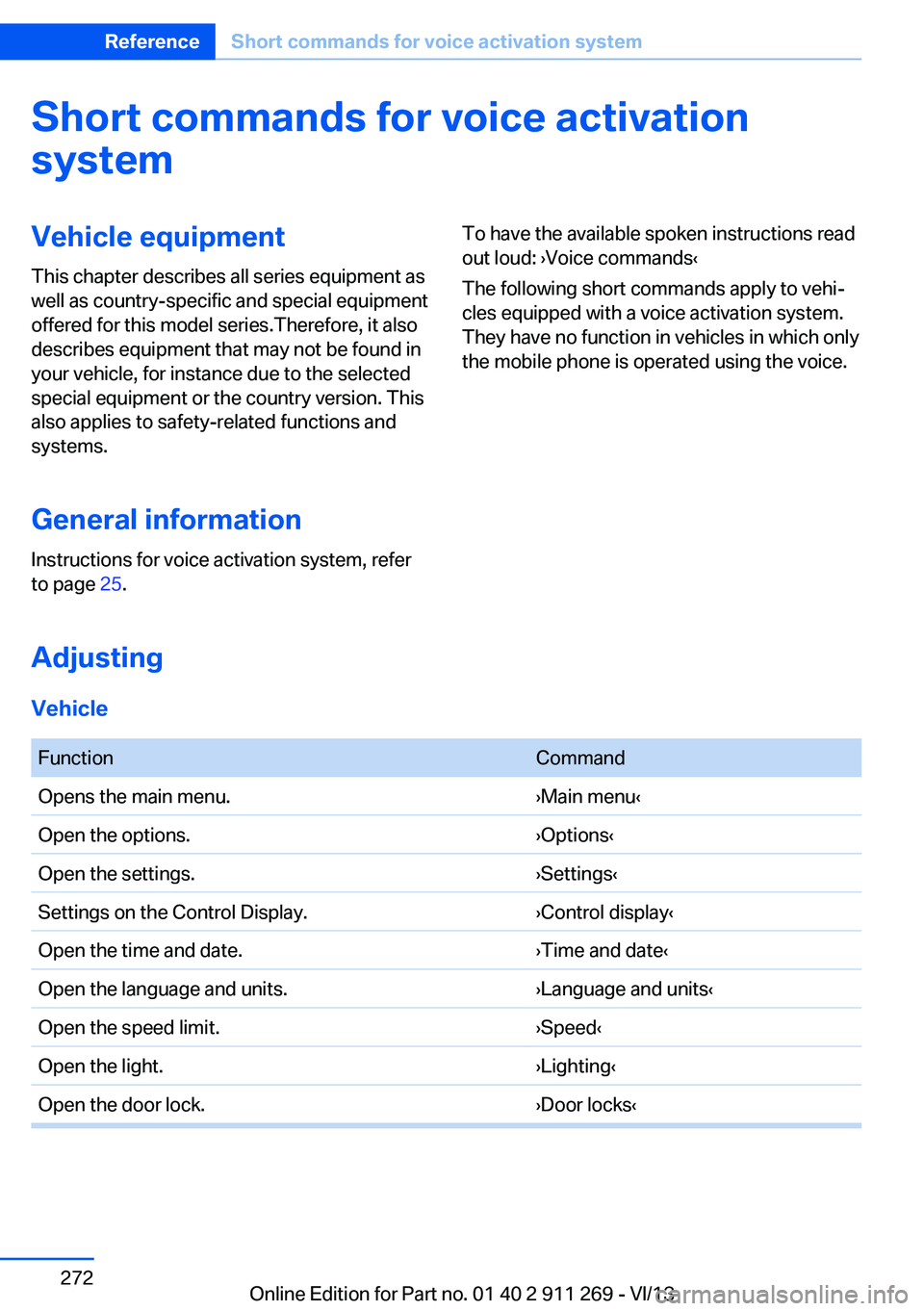
Short commands for voice activationsystemVehicle equipment
This chapter describes all series equipment as
well as country-specific and special equipment
offered for this model series.Therefore, it also
describes equipment that may not be found in
your vehicle, for instance due to the selected
special equipment or the country version. This
also applies to safety-related functions and
systems.
General information
Instructions for voice activation system, refer
to page 25.To have the available spoken instructions read
out loud: ›Voice commands‹
The following short commands apply to vehi‐
cles equipped with a voice activation system.
They have no function in vehicles in which only
the mobile phone is operated using the voice.
Adjusting
Vehicle
FunctionCommandOpens the main menu.›Main menu‹Open the options.›Options‹Open the settings.›Settings‹Settings on the Control Display.›Control display‹Open the time and date.›Time and date‹Open the language and units.›Language and units‹Open the speed limit.›Speed‹Open the light.›Lighting‹Open the door lock.›Door locks‹Seite 272ReferenceShort commands for voice activation system272
Online Edition for Part no. 01 40 2 911 269 - VI/13
Page 285 of 295
Fuel tank capacity, refer toFilling capacities 271
Fuel tank contents, refer to Filling capacities 271
Fuel tank, refer to Filling ca‐ pacities 271
Fuse 256
G
Garage door opener, refer to Universal Garage Door
Opener 113
Gasoline 230
Gasoline gauge, refer to Fuel gauge 72
Gasoline quality 230
Gas station recommenda‐ tion 155
Gear change– Automatic transmission with
Steptronic 66
Gear change, automatic
transmission with Step‐
tronic 69
Gear change, via shift pad‐ dles 69
Gear display, automatic trans‐ mission with Steptronic 65
General driving notes 130
Glass sunroof, electric
– Convenient operation 32– Remote control 32
Glass sunroof, refer to Panor‐
amic glass sunroof 41
Glove compartment 123
Glove compartment, light‐ ing 123
GPS navigation, refer to Navi‐ gation system 142
Gross vehicle weight, refer to Weights 270
H
Halogen headlamps
– Bulb replacement 251Hand-held transmitter, alter‐
nating code 114
Hands-free microphone 16
Hazard warning sys‐ tem 16, 257
HDC Hill Descent Control 99
HD Radio 167
Head airbags 88
Headlamp control, auto‐ matic 83, 84
Headlamp courtesy delay fea‐ ture 84
Headlamp cover, remov‐ ing 251
Headlamp flasher 62, 85
Headlamp flasher, indicator lamp 15
Headlamps 83
Headlamps– Bulb replacement 251
Headlamps, care 264
Headlamps, cleaning 64
Headlamps, cleaning, washer
fluid 65
Headliner 17
Head restraints 47
Head restraints
– Adjusting the height 47– Removing 48
Heating
– Rear window 111– Seats 46
Heating, mirrors 50
Heavy cargo, refer to Stowing cargo 135
Height adjustment
– Seats 44
Height, refer to Dimen‐
sions 270
High-beam Assistant 85
High beams 85
High beams
– Bulb replacement 251
High beams/low beams, auto‐
matic, refer to High-beam
Assistant 85
High beams, indicator
lamp 15
High-pressure washers 263
Hill Descent Control HDC 99
Hill drive-off assistant, refer to Drive-off assistant 100
Hills 132
Holder for beverages 125
Holder for remote control, re‐ fer to Ignition lock 57
Homepage 6
Hood 242
Hood, opening 242
Horn 12
Hot exhaust system 130
Hotline 223
House number, entering for navigation 145
Hydraulic brake assistant 97
Hydroplaning 131
I Ice warning, refer to External temperature warning 71
Icy roads, refer to External temperature warning 71
Identification marks, tires 237
Identification number, refer to Engine compartment 242
iDrive 18
iDrive– Changing settings 77– Changing the date and
time 76– Changing the language 77– Changing the units of meas‐
ure and display format 75– Setting the brightness 78
Ignition 58
Ignition key position 1, refer to Radio ready state 57
Ignition key position 2, refer to Ignition on 58
Ignition key, refer to Remote control with integrated
key 30
Seite 285Everything from A to ZReference285
Online Edition for Part no. 01 40 2 911 269 - VI/13
Page 286 of 295
Ignition lock 57
Ignition, switched off 58
Ignition, switched on 58
Indication of a flat tire 92, 94
Indicator and warning lamps 15
Inflation pressure monitor, re‐ fer to Flat Tire Monitor 91
Inflation pressure, refer to Tire inflation pressure 232
Information on the navigation data 142
Initialization after power fail‐ ure 255
Initializing– Compass, refer to Calibrat‐
ing 116– Panoramic glass sunroof 43– Refer to Setting the time
and date 76
Initializing, Flat Tire Monitor
FTM 91
Initializing, Tire Pressure Monitor TPM 94
Inside brake lamps
– Bulb replacement 254
Installation location, tele‐
phone 124
Instrument cluster 14
Instrument lighting 87
Instrument panel, refer to In‐ strument cluster 14
Instruments, refer to Cock‐ pit 12
Integrated key 30
Interactive map 149
Interior equipment 113
Interior lamps 87
Interior lamps
– Remote control 33
Interior mirror 50
Interior rearview mirror, auto‐ matic dimming 50
Interior rearview mirror, com‐ pass 115
Interior temperature, setting– Automatic climate con‐
trol 108
Interlock, refer to Disengag‐
ing the remote control 65
Intermediate destina‐ tions 151
Internet page 6
Intersection, entering for navi‐ gation 145
iPod/iPhone 185
J
Jacking points for the vehicle jack 255
Jack, refer to Vehicle jack 255
Joystick, refer to Selector lever 68
Jump-starting 258
K
Keyless Go, refer to Comfort Access 37
Keyless opening and closing, refer to Comfort Access 37
Key Memory, refer to Per‐ sonal Profile 30
Key, refer to Integrated key/ remote control 30
Kickdown
– Automatic transmission with
Steptronic 66, 68
Knee airbag 88
Knocking control 230
L
Label, run-flat tire 240
Lamp and bulb replacement, lamp replacement 250
Lamps 83
Lamps, automatic headlamp control 83, 84
Lamps, High-beam Assis‐
tant 85
Lamps, parking lamps/low beams 83
Lamps, replacing, refer to Lamp and bulb replace‐
ment 250
Language, changing on the Control Display 77
Lap-and-shoulder belt, refer to Safety belts 46
Lashing eyes, securing cargo 135
LATCH child restraint fixing system 53
Leather, care 264
LEDs, light-emitting di‐ odes 250
Length, refer to Dimen‐ sions 270
Letters and numbers, enter‐ ing 23
License plate lamp, bulb re‐ placement 254
Light-alloy wheels, care 265
Light-emitting diodes, LEDs 250
Lighter 117
Lighting– Instruments 87– Lamp and bulb replace‐
ment 250
Lighting, vehicle, refer to
Lamps 83
Light switch 83
Limit, refer to Speed limit 81
Load 135
Loading 134
Lock buttons, doors, refer to Locking 35
Locking
– From the inside 35– From the outside 32– Setting the confirmation
signals 33– Without remote control, re‐
fer to Comfort Access 37Seite 286ReferenceEverything from A to Z286
Online Edition for Part no. 01 40 2 911 269 - VI/13
Page 290 of 295

Sensors, care 266
Service and warranty 7
Service data in the remote control 247
Service interval display, refer to Condition Based Service
CBS 247
Service interval display, refer to Service requirements 78
Service requirements 78
Service requirements, CBS Condition Based Serv‐
ice 247
Service, Roadside Assis‐ tance 258
Services, remote 225
Servotronic 100
Settings– Changing on the Control
Display 77– Language 77
Settings and information 74
Settings, configuring, refer to Personal Profile 30
Settings, DVD 177
Setting the clock, 12h/24h format 76
Shifting
– Automatic transmission with
Steptronic 66
Shifting, automatic transmis‐
sion with Steptronic 69
Shift lever
– Automatic transmission with
Steptronic 66
Shift paddles 69
Shift paddles on the steering wheel 67
Short commands, voice acti‐ vation 272
Side airbags 88
Side windows, refer to Win‐ dows 40
Size, refer to Dimensions 270
Ski bag, refer to Ski and snowboard bag 122
Slide/tilt glass roof, refer to
Panoramic glass sunroof 41
Slot for remote control 57
Smokers' package, refer to Ashtray 117
Snap-in adapter, mobile phone 207
Snap-in adapter, refer to Storage compartment of
center armrest 124
Snow chains 241
Socket, OBD Onboard Diag‐ nosis 248
Socket, refer to Connecting electrical devices 117
Software applications, iPhone 224
Software part number 196
Software update 191
SOS, refer to Emergency Re‐ quest, initiating 257
Sound output 166, 174
Spare fuse 256
Special destinations, naviga‐ tion 147
Special equipment, series equipment 6
Speed, average 73
Speed limit 81
Speed limit, setting 82
Speedometer 14
Speed, with winter tires 240
Split screen 22
Split screen map set‐ tings 157
Spoken instructions, naviga‐ tion 155
Sport program, automatic transmission with Step‐
tronic 66, 69
Spray nozzles, refer to Clean‐ ing the windshield and head‐
lamps 64
Spray nozzles, refer to Wind‐ shield washer nozzles 64
Stability control systems 97 Start/Stop button 57
Start/Stop button, starting the engine 58
Start/Stop button, switching off the engine 59
Starting the engine 58
Start problems, refer to Jump-starting 258
State/province, selecting for navigation 144
Stations, stored 172
Station, storing 166
Status information, iDrive 21
Status of Owner's Manual 6
Steam jets 263
Steering wheel 51
Steering wheel– Shift paddles 67
Steering wheel, adjusting 51
Steering wheel lock 57
Steptronic, refer to Automatic transmission with Step‐
tronic 65
Steptronic, refer to Sport pro‐ gram and manual mode M/
S 69
Stopping, engine 59
Storage compartment nets 124
Storage compart‐ ments 123, 124
Storage, tires 240
Storing the seat position, re‐ fer to Seat and mirror mem‐
ory 48
Storing the vehicle 266
Street, entering for naviga‐ tion 145
Summer tires, refer to Wheels and tires 232
Summer tires, tread 238
Switches, refer to Cockpit 12
Switching off, engine 59
Switching off, vehicle 59
Switch-on times, parked-car ventilation 112
Symbols 6
Seite 290ReferenceEverything from A to Z290
Online Edition for Part no. 01 40 2 911 269 - VI/13