2014 BMW M6 GRAN COUPE check engine light
[x] Cancel search: check engine lightPage 111 of 226

that prevent the TPMS from functioning prop‐
erly. Always check the TPMS malfunction tell‐
tale after replacing one or more tires or wheels
on your vehicle to ensure that the replacement
or alternate tires and wheels allow the TPMS
to continue to function properly.
FTM Flat Tire Monitor The conceptThe system detects tire inflation pressure losson the basis of rotation speed differences be‐
tween the individual wheels while driving.
In the event of a tire inflation pressure loss, the
diameter and therefore the rotational speed of
the corresponding wheel changes. This will be
detected and reported as a flat tire.
The system does not measure the actual infla‐
tion pressure in the tires.
Functional requirements
The system must have been initialized when
the tire inflation pressure was correct; other‐
wise, reliable flagging of a flat tire is not as‐
sured. Initialize the system after each correc‐ tion of the tire inflation pressure and after
every tire or wheel change.
Status display
The current status of the Flat Tire Monitor can
be displayed on the Control Display, e.g.,
whether or not the FTM is active.
On the Control Display:1."Vehicle info"2."Vehicle status"3. "Flat Tire Monitor (FTM)"
The status is displayed.
Initialization
When initializing the once set inflation tire
pressures serve as reference values in order to
detect a flat tire. Initialization is started by con‐
firming the tire inflation pressures.
Do not initialize the system when driving with
snow chains.
On the Control Display:1."Vehicle info"2."Vehicle status"3. "Perform reset"4.Start the engine - do not drive off.5.Start the initialization with "Perform reset".6.Drive away.
The initialization is completed while driving,
which can be interrupted at any time.
The initialization automatically continues when
driving resumes.
Indication of a flat tire The yellow warning lamp lights up. A
Check Control message is displayed.
There is a flat tire or a major loss in tire
inflation pressure.
1.Reduce your speed and stop cautiously.
Avoid sudden braking and steering maneu‐
vers.2.Identify the damaged wheel. Do so by
checking the tire inflation pressure using
the Mobility System. If the tire inflation
pressure in all tires is correct, the Flat Tire
Monitor may not have been initialized. In
this case, initialize the system.3.Repair flat tire with the Mobility System or
replace the damaged wheel.
System limits
Sudden tire damage
Sudden serious tire damage caused by
external circumstances cannot be recognized
in advance.◀
Seite 107SafetyControls107
Online Edition for Part no. 01 40 2 956 164 - X/14
Page 112 of 226

A natural, even tire inflation pressure loss in all
four tires will not be recognized. Therefore,
check the tire inflation pressure regularly.
The system could be delayed or malfunction in
the following situations:▷When the system has not been initialized.▷When driving on a snowy or slippery road
surface.▷Sporty driving style: spinning traction
wheels, high lateral acceleration (drifting).▷When driving with snow chains.
Intelligent Safety
The concept
Intelligent Safety enables central operation of
the driver assistance system.
Depending on how the vehicle is equipped, In‐
telligent Safety consists of one or more sys‐
tems that can help prevent a imminent colli‐
sion. These systems are active automatically
every time the engine is started using the
Start/Stop button:
▷Front-end collision warning with City Brak‐
ing function, refer to page 109.▷Pedestrian warning, refer to page 111.
Note
Personal responsibility
The system does not serve as a substi‐
tute for the driver's personal judgment of the
traffic situation.
Be aware of the traffic situation and the vehi‐
cle's surroundings at all times, otherwise acci‐
dents are still possible despite all warnings.◀
At a glance
Button in the vehicle
Intelligent Safety button
Camera
The camera is found near the interior rearview
mirror.
Keep the windshield in the area behind the in‐
terior rearview mirror clean and clear.
Switching on/offThe Intelligent Safety systems are automati‐
cally active after every departure.
Press button: the systems are turned
off. The LED goes out.
Press button: the systems are turned on. The
LED lights up.
Settings can be made on the Control Display.
Seite 108ControlsSafety108
Online Edition for Part no. 01 40 2 956 164 - X/14
Page 137 of 226

HintsCheck the traffic situation as well
Check the traffic situation around the ve‐
hicle with your own eyes. Otherwise, an acci‐
dent could result from road users or objects
that are not lidtured by the camera.◀
At a glance
Button in the vehicle
Rearview camera
Camera
The camera lens is located under the BMW
emblem of the trunk lid. The image quality may
be impaired by dirt. The camera calibrates it‐
self regularly after the system has been
switched off. This is why the emblem on the
tailgate remains open after the system has
been deactivated and while driving. The em‐
blem closes automatically as soon as calibra‐
tion is complete.
Clean the lens, refer to page 206.
Switching on/off
Switching on automatically With the engine running, engage lever in posi‐
tion P R.
The rearview camera image is displayed if the
system was switched on via the iDrive.
Automatic deactivation during forward
travel
The system switches off when a certain driving
distance or speed is exceeded.
Switch the system back on if needed.
Switching on/off manually Press button.▷On: the LED lights up.▷Off: the LED goes out.
The PDC is shown on the Control Display.
Switching the view via iDrive With PDC activated or Top View switched on:
"Rear view camera"
The rearview camera image is displayed.
Display on the Control Display
Functional requirement
▷The rearview camera is switched on.▷The trunk lid is fully closed.
Activating assistance functions
More than one assistance function can be ac‐
tive at the same time.
▷Parking aid lines
"Parking aid lines"
Lanes and turning radius are indicated.
▷Obstacle marking
"Obstacle marking"
Spatially-shaped markings are displayed.
Seite 133Driving comfortControls133
Online Edition for Part no. 01 40 2 956 164 - X/14
Page 194 of 226
correspondingly trained personnel and other
authorized persons. Otherwise, use may result
in operating problems for the vehicle.◀
Position
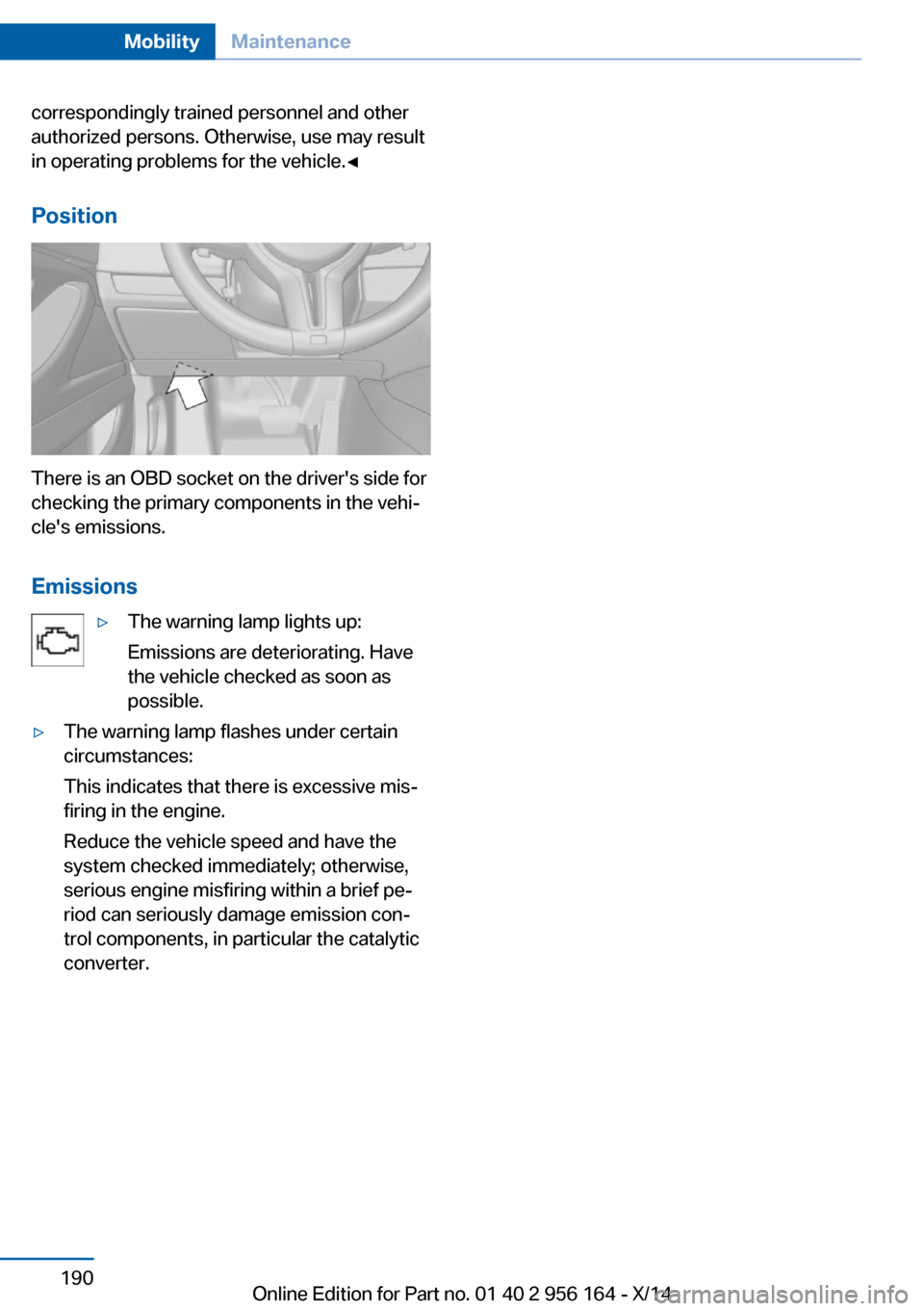
There is an OBD socket on the driver's side for
checking the primary components in the vehi‐
cle's emissions.
Emissions
▷The warning lamp lights up:
Emissions are deteriorating. Have
the vehicle checked as soon as
possible.▷The warning lamp flashes under certain
circumstances:
This indicates that there is excessive mis‐
firing in the engine.
Reduce the vehicle speed and have the
system checked immediately; otherwise,
serious engine misfiring within a brief pe‐
riod can seriously damage emission con‐
trol components, in particular the catalytic
converter.Seite 190MobilityMaintenance190
Online Edition for Part no. 01 40 2 956 164 - X/14
Page 204 of 226
other attempt in order to allow the dis‐
charged battery to recharge.3.Let both engines run for several minutes.4.Disconnect the jumper cables in the re‐
verse order.
Check the battery and recharge if needed.
Tow-starting and towing Note Tow-starting and towing
For towing the vehicle turn, switch off the
Intelligent Safety systems; otherwise malfunc‐
tions of the individual braking systems might
lead to accidents.◀
Manual transmission
Observe before towing your vehicle Gearshift lever in neutral position.
Towing When the parking brake is blocked
The parking brake cannot be released
manually.
Do not tow the vehicle with the parking brake
blocked, or the vehicle can be damaged.
Contact your service center.◀
Follow the towing instructions
Follow all towing instructions; otherwise,
vehicle damage or accidents may occur.◀
▷Make sure that the ignition is switched on;
otherwise, the low beams, tail lights, turn
signals, and wipers may be unavailable.▷Do not tow the vehicle with the rear axle
tilted, as the front wheels could turn.▷When the engine is stopped, there is no
power assist. Consequently, more force
needs to be applied when braking and
steering.▷Larger steering wheel movements are re‐
quired.▷The towing vehicle must not be lighter
than the vehicle being towed; otherwise,
it will not be possible to control the vehi‐
cle's response.
Tow truck
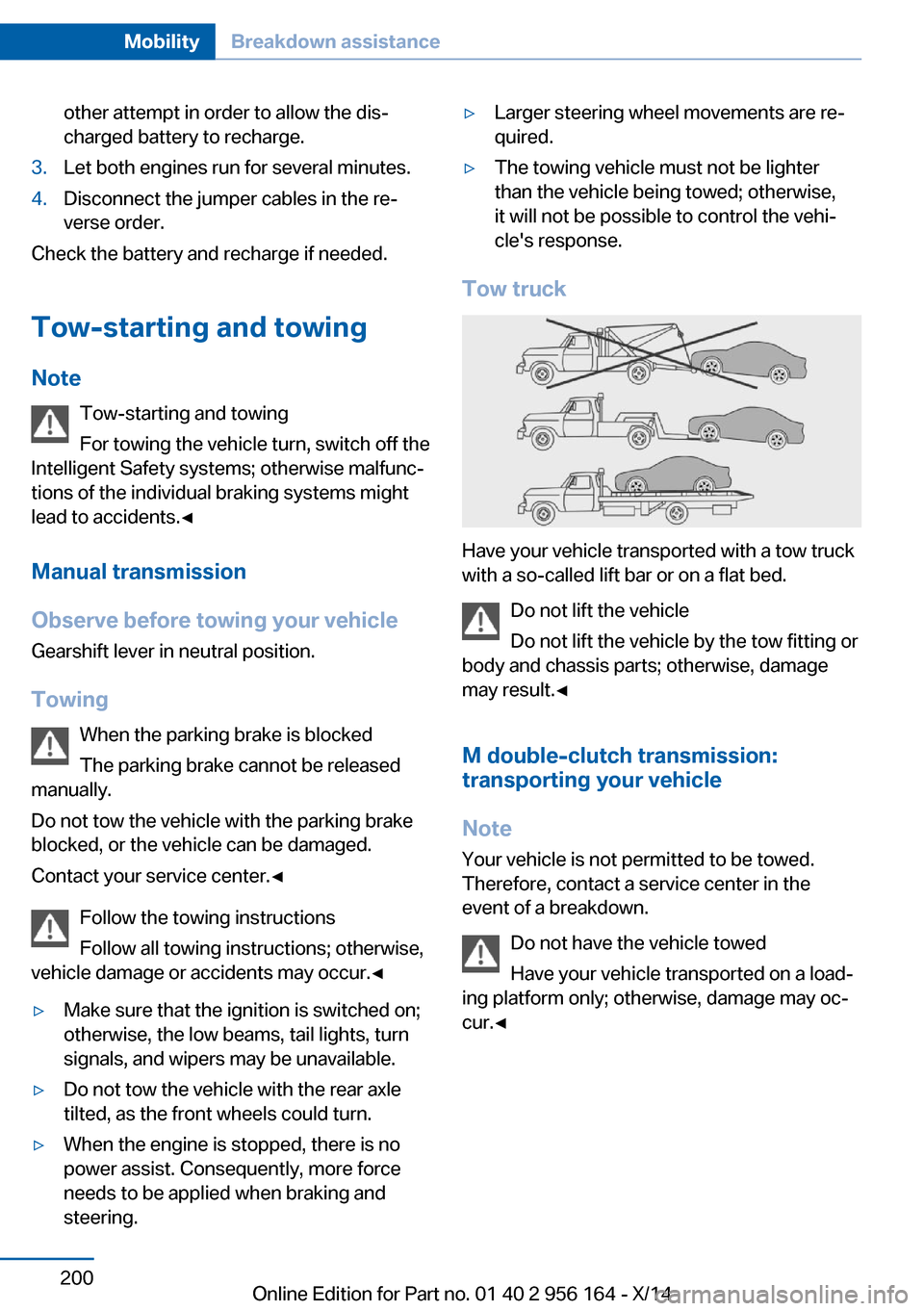
Have your vehicle transported with a tow truck
with a so-called lift bar or on a flat bed.
Do not lift the vehicle
Do not lift the vehicle by the tow fitting or
body and chassis parts; otherwise, damage
may result.◀
M double-clutch transmission:
transporting your vehicle
Note Your vehicle is not permitted to be towed.
Therefore, contact a service center in the
event of a breakdown.
Do not have the vehicle towed
Have your vehicle transported on a load‐
ing platform only; otherwise, damage may oc‐
cur.◀
Seite 200MobilityBreakdown assistance200
Online Edition for Part no. 01 40 2 956 164 - X/14
Page 208 of 226
Manual transmission:1.Drive into the car wash.2.Shift to neutral.3.Switch the engine off.4.Switch on the ignition.
M double-clutch transmission:
1.Drive into the car wash.2.Engage selector lever position N.3.Switch the engine off.
In this way, the ignition remains switched
on, and a Check-Control message is dis‐
played.
Do not turn off the ignition in the car
wash
Do not turn off the ignition in the car wash;
otherwise, the transmission position P is
engaged and damages can result.◀
The vehicle cannot be locked from the outside
when in selector lever position N. A signal
sounds when an attempt is made to lock the
vehicle.
To start the engine with manual transmission:
1.Press on the clutch pedal.2.Press the Start/Stop button.
To start the engine with a M double clutch
transmission:
1.Depress the brake pedal.2.Press the Start/Stop button.
Pressing the Start/Stop button without step‐
ping on the brake turns the ignition off.
Transmission position
Transmission position P is engaged automati‐
cally:
▷When the ignition is switched off.▷After approx. 15 minutes.Headlights▷Do not rub dry and do not use abrasive or
acidic cleansers.▷Soak areas that have been dirtied e. g.,
from insects, with shampoo and wash off
with water.▷Thaw ice with de-icing spray; do not use an
ice scraper.
After washing the vehicle
After washing the vehicle, apply the brakes
briefly to dry them; otherwise, braking action
can be reduced and corrosion of the brake
discs can occur.
Completely remove all residues on the win‐
dows, to minimize loss of visibility due to
smearing and to reduce wiper noises and
wiper blade wear.
Vehicle care
Car care products BMW recommends using care and cleaning
products from BMW, since these have been
tested and approved.
Car care and cleaning products
Follow the instructions on the container.
When cleaning the interior, open the doors or
windows.
Only use products intended for cleaning vehi‐
cles.
Cleansers can contain substances that are
dangerous and harmful to your health.◀
Vehicle paint
Regular care contributes to driving safety and
value retention. Environmental influences in
areas with elevated air pollution or natural con‐
taminants, such as tree resin or pollen can af‐
fect the vehicle's paintwork. Tailor the fre‐
quency and extent of your car care to these
influences.
Seite 204MobilityCare204
Online Edition for Part no. 01 40 2 956 164 - X/14
Page 217 of 226

Brake lights, brake force dis‐play 120
Brake lights, bulb replace‐ ment 193
Brake pads, break-in 160
Braking, hints 162
Breakdown assis‐ tance 197, 198
Break-in 160
Brightness of Control Dis‐ play 93
Bulb replacement, front 191
Bulb replacement, rear 193
Button, Start/Stop 64
Bypassing, refer to Jump- starting 198
C
California Proposition 65 Warning 7
Calling up mirror adjust‐ ment 43
Calling up seat adjust‐ ment 43
Calling up steering wheel ad‐ justment 43
Camera, care 206
Camera, rearview cam‐ era 133
Camera, Side View 135
Camera, Top View 137
Can holder, refer to Cu‐ pholder 154
Car battery 195
Carbon ceramic brake M 158
Car care products 204
Care, displays 206
Care, vehicle 204
Cargo 164
Cargo area, enlarging 149
Cargo area, storage compart‐ ments 155
Cargo, securing 165
Cargo straps, securing cargo 165 Car key, refer to Remote con‐
trol 34
Carpet, care 206
Car wash 203
Catalytic converter, refer to Hot exhaust system 161
CBS Condition Based Serv‐ ice 189
CD/Multimedia, see user's manual for Navigation, En‐
tertainment and Communi‐
cation
Center console 16
Central locking system 39
Central screen, refer to Con‐ trol Display 18
Ceramic brake 158
Changes, technical, refer to Safety 7
Changing parts 191
Changing wheels 194
Changing wheels/tires 178
Chassis number, see vehicle identification number 9
Check Control 80
Checking the engine oil level electronically 185
Checking the oil level elec‐ tronically 185
Children, seating position 60
Children, transporting safely 60
Child restraint fixing sys‐ tem 60
Child restraint fixing system LATCH 61
Child restraint fixing systems, mounting 60
Child safety locks 63
Child seat, mounting 60
Child seats 60
Chrome parts, care 205
Cigarette lighter 147
Cleaning displays 206
Climate control 139 Climate control laminated
tinted safety glass 161
Climate control wind‐ shield 161
Clock 84
Closing/opening via door lock 39
Closing/opening with remote control 37
Clothes hooks 154
Combination reel, refer to Turn signals 70
Combination reel, refer to Wiper system 70
Comfort Access 41
Compound brake 158
Compressor 179
Computer 90
Condensation on win‐ dows 140
Condensation under the vehi‐ cle 163
Condition Based Service CBS 189
Confirmation signal 43
ConnectedDrive, see user's manual for Navigation, En‐
tertainment and Communi‐
cation
ConnectedDrive Services
Control Display 18
Control Display, settings 92
Controller 18
Control systems, driving sta‐ bility 123
Convenient opening with the remote control 37
Coolant 188
Coolant level 188
Coolant temperature 84
Cooling function 140
Cooling, maximum 140
Cooling system 188
Corrosion on brake discs 163
Cosmetic mirror 147
Cruise control 128 Seite 213Everything from A to ZReference213
Online Edition for Part no. 01 40 2 956 164 - X/14
Page 218 of 226

Cruising range 85
Cupholder 154
Current fuel consumption 85
D
Damage, tires 177
Damping control 125
Damping control, dy‐ namic 125
Data, technical 210
Date 84
Daytime running lights 97
Defrosting, refer to Windows, defrosting 140
Dehumidifying, air 140
Deleting personal data 24
Deletion of personal data 24
Destination distance 91
Differential lock 125
Digital clock 84
Digital speed 84
Digital tachometer 84
Dimensions 210
Dimmable exterior mirrors 57
Dimmable interior rearview mirror 57
Direction indicator, refer to Turn signals 70
Display, electronic, instru‐ ment cluster 79
Display in windshield 93
Display lighting, refer to In‐ strument lighting 99
Displays, cleaning 206
Disposal, coolant 188
Disposal, vehicle battery 195
Distance control, refer to PDC 130
Distance to destination 91
Divided screen view, split screen 23
Door lock 39
Door lock, refer to Remote control 34 Doors, Automatic Soft Clos‐
ing 40
Double-clutch transmis‐ sion 73
Drivelogic 75
Drive mode 74
Drive-off assistant 123
Drive-off assistant, refer to DSC 123
Driver assistance, refer to In‐ telligent Safety 108
Driving Assistant, refer to In‐ telligent Safety 108
Driving Dynamics Control 77
Driving instructions, break- in 160
Driving notes, general 161
Driving on racetracks 159
Driving program, refer to Drivelogic 75
Driving stability control sys‐ tems 123
Driving tips 161
DSC Dynamic Stability Con‐ trol 123
Dynamic Damping Con‐ trol 125
Dynamic driving systems 86
Dynamic driving, system states 86
Dynamic Stability Control DSC 123
E EfficientDynamics 86
EfficientDynamics display 86
EfficientDynamics menu 86
Electronic displays, instru‐ ment cluster 79
Electronic oil measure‐ ment 185
Electronic Stability Program ESP, refer to DSC 123
Emergency detection, remote control 35 Emergency release, fuel filler
flap 170
Emergency Request 197
Emergency service, refer to Roadside Assistance 198
Emergency start function, en‐ gine start 35
Emergency unlocking, trunk lid 41
Energy Control 85
Energy recovery 86
Engine, automatic reel-off 66
Engine, automatic Start/Stop function 66
Engine compartment 183
Engine compartment, work‐ ing in 183
Engine coolant 188
Engine oil 185
Engine oil, adding 186
Engine oil additives 186
Engine oil change 187
Engine oil filler neck 186
Engine oil temperature 84
Engine oil types, alterna‐ tive 187
Engine oil types, ap‐ proved 187
Engine start during malfunc‐ tion 35
Engine start, jump-start‐ ing 198
Engine start, refer to Starting the engine 65
Engine stop 65
Engine temperature 84
Entering/exiting vehicle, as‐ sistance, steering wheel 58
Entering a car wash 203
Equipment, interior 145
Error displays, see Check Control 80
ESP Electronic Stability Pro‐ gram, refer to DSC 123
Exchanging wheels/tires 178
Exhaust system 161 Seite 214ReferenceEverything from A to Z214
Online Edition for Part no. 01 40 2 956 164 - X/14