2014 BMW M6 CONVERTIBLE height
[x] Cancel search: heightPage 103 of 228

Switching on/off
Press button.
Display
Standard view
▷Speed.▷Navigation system.▷Check Control messages.▷Selection list from the instrument cluster.▷Driver assistance systems.
Some of this information is only displayed
briefly as needed.
M view
1Current engine speed, highlighted2Shift Lights3Pre-warning field, speed display4Red warning field, speed display5Speed6Gear display/warning messages
Activate M view:
Select displays in the Head-up Display.
Selecting displays in the Head-up Display
On the Control Display:1."Settings"2."Head-Up Display"3."Displayed information"4.Select the desired displays in the Head-up
Display.
Setting the brightness
The brightness is automatically adjusted to the
ambient brightness.
The basic setting can be adjusted manually.
On the Control Display:
1."Settings"2."Head-Up Display"3."Brightness"4.Turn the controller.
When the low beams are activated, the bright‐
ness of the Head-up Display can be addition‐
ally influenced using the instrument lighting.
Settings are stored for the profile currently in
use.
Adjusting the height
On the Control Display:
1."Settings"2."Head-Up Display"3."Height"4.Turn the controller.
Settings are stored for the profile currently in
use.
Setting the rotation
On the Control Display:
1."Settings"2."Head-Up Display"Seite 99DisplaysControls99
Online Edition for Part no. 0140 2 956 361 - X/14
Page 146 of 228

Switching on/off
Switching on/off manually Press button.
Automatic deactivation during forward
travel
The system switches off when a certain driving
distance or speed is exceeded.
Switch the system back on if needed.
Display
The traffic area to the left and right is displayed
on the Control Display.
Guidelines at the bottom of the image show
the position of the front of the vehicle.
Brightness With the Side View switched on:
1. "Brightness"2.Turn the controller until the desired setting
is reached, and press the controller.
Contrast
With the Side View switched on:
1. "Contrast"2.Turn the controller until the desired setting
is reached, and press the controller.System limits
The cameras lidture a maximum range of
330 ft/100 m.
Top View
The concept Top View provides assistance in parking and
maneuvering. The area around the doors and
the road area around the vehicle are shown on
the Control Display for this purpose.
General information
The image is lidtured by two cameras
integrated in the exterior mirrors and by the
rearview camera.
The range is at least 7 ft/2 m to the side and
rear.
In this way, obstacles up to the height of the
exterior mirrors are detected early.
Hints Check the traffic situation as well
Check the traffic situation around the ve‐
hicle with your own eyes. Otherwise, an acci‐
dent could result from road users or objects
that are not lidtured by the camera.◀
At a glance
Button in the vehicle
Top View
Seite 142ControlsDriving comfort142
Online Edition for Part no. 0140 2 956 361 - X/14
Page 168 of 228
Driving through waterObserve water level and speed
Do not exceed the maximum water level
and maximum speed; otherwise, the vehicle's
engine, the electrical systems and the trans‐
mission may be damaged.◀
Drive though calm water only and only if it is
not deeper than 9.8 inches/25 cm and at this
height, no faster than walking speed, up to
3 mph/5 km/h.
Braking safely
Your vehicle is equipped with ABS as a stand‐
ard feature.
Applying the brakes fully is the most effective
way of braking in situations needed.
Steering is still responsive. You can still avoid
any obstacles with a minimum of steering ef‐
fort.
The pulsing of the brake pedal indicates that
ABS is in its active mode.
In certain braking situations, the perforated
brake discs can cause functional problems.
However, this has no effect on the perform‐
ance and operational reliability of the brake.
Objects within the range of movement
of the pedals
No objects in the area around the pedals
Keep floor mats, carpets, and any other
objects out of the pedal area; otherwise, the
function of the pedals could be impeded while
driving and create the risk of an accident.
Do not place additional floor mats over existing
mats or other objects.
Only use floor mats that have been approved
for the vehicle and can be properly attached to
floor.
Ensure that the floor mats are securely fas‐
tened again after they were removed for clean‐
ing, e.g.◀Driving in wet conditions
When roads are wet, salted, or in heavy rain,
press brake pedal ever so gently every few
miles.
Ensure that this action does not endanger
other traffic.
The heat generated in this process helps dry
the brake discs and pads.
In this way braking efficiency will be available
when you need it.
Hills Avoid stressing the brakes
Avoid placing excessive stress on the
brake system. Light but consistent brake pres‐
sure can lead to high temperatures, brakes
wearing out and possibly even brake failure.◀
Do not drive in neutral
Do not drive in neutral or with the engine
stopped, as doing so disables engine braking.
In addition, steering and brake assist are un‐
available with the engine stopped.◀
Drive long or steep downhill gradients in the
gear that requires least braking efforts. Other‐
wise the brakes may overheat and reduce
brake efficiency.
Manual transmission:
You can increase the engine's braking effect
by shifting down, going all the way to first gear,
if needed.
M double-clutch transmission:
You can increase the engine's braking effect
by shifting down in sequential mode, refer to
page 79.
Brake disc corrosion
Brake disc corrosion and contamination of the
brake pads are favored by:▷Low mileage.▷Extended periods when the vehicle is not
used at all.Seite 164Driving tipsThings to remember when driving164
Online Edition for Part no. 0140 2 956 361 - X/14
Page 183 of 228
sudden tire failure. The grade C corresponds
to a level of performance which all passenger
car tires must meet under the Federal Motor
Vehicle Safety Standard No. 109. Grades Band
A represent higher levels of performance on
the laboratory test wheel than the minimum re‐
quired by law.
Temperature grade for this tire
The temperature grade for this tire is es‐
tablished for a tire that is properly inflated and
not overloaded. Excessive speed, underinfla‐
tion, or excessive loading, either separately or
in combination, can cause heat buildup and
possible tire failure.
If necessary, have the vehicle towed.◀
M+S
Winter and all-season tires with better cold
weather performance than summer tires.
Tire tread Summer tires Do not drive with a tire tread depth of less than
0.12 in/3 mm.
There is an increased danger of hydroplaning if
the tire tread depth is less than 0.12 in/3 mm.
Winter tires
Do not drive with a tire tread depth of less than
0.16 in/4 mm.
Below a tread depth of 0.16 in/4 mm, tires are
less suitable for winter operation.Minimum tread depth
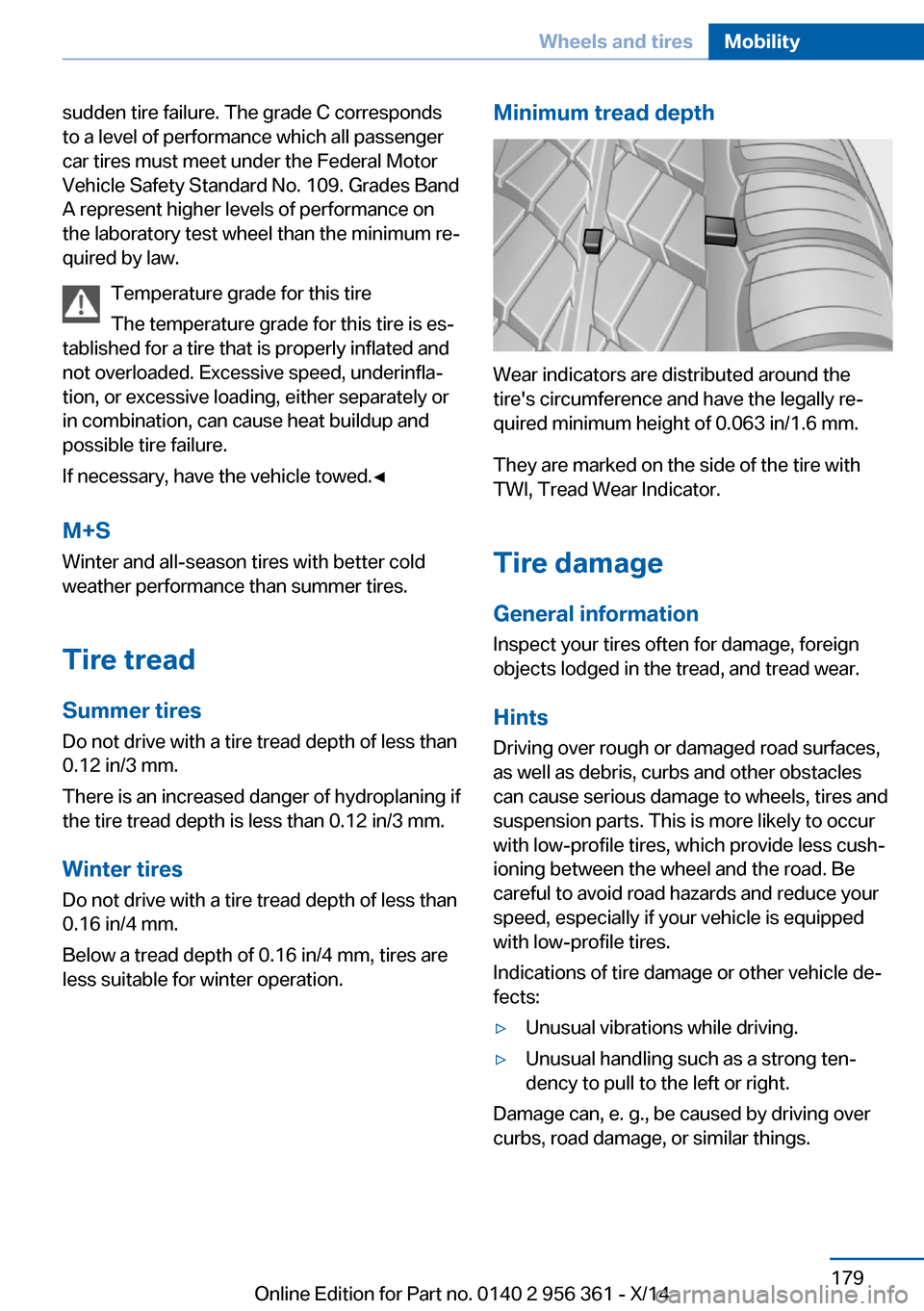
Wear indicators are distributed around the
tire's circumference and have the legally re‐
quired minimum height of 0.063 in/1.6 mm.
They are marked on the side of the tire with
TWI, Tread Wear Indicator.
Tire damage
General information
Inspect your tires often for damage, foreign
objects lodged in the tread, and tread wear.
Hints
Driving over rough or damaged road surfaces,
as well as debris, curbs and other obstacles
can cause serious damage to wheels, tires and
suspension parts. This is more likely to occur
with low-profile tires, which provide less cush‐
ioning between the wheel and the road. Be
careful to avoid road hazards and reduce your
speed, especially if your vehicle is equipped
with low-profile tires.
Indications of tire damage or other vehicle de‐
fects:
▷Unusual vibrations while driving.▷Unusual handling such as a strong ten‐
dency to pull to the left or right.
Damage can, e. g., be caused by driving over
curbs, road damage, or similar things.
Seite 179Wheels and tiresMobility179
Online Edition for Part no. 0140 2 956 361 - X/14
Page 190 of 228
Never reach into the engine compart‐
ment
Never reach into spaces or gaps in the engine
compartment; otherwise, there is a risk of in‐
jury, e.g., from rotating or hot parts.◀
Danger of injury when the hood is open
There is a danger of injury from protrud‐
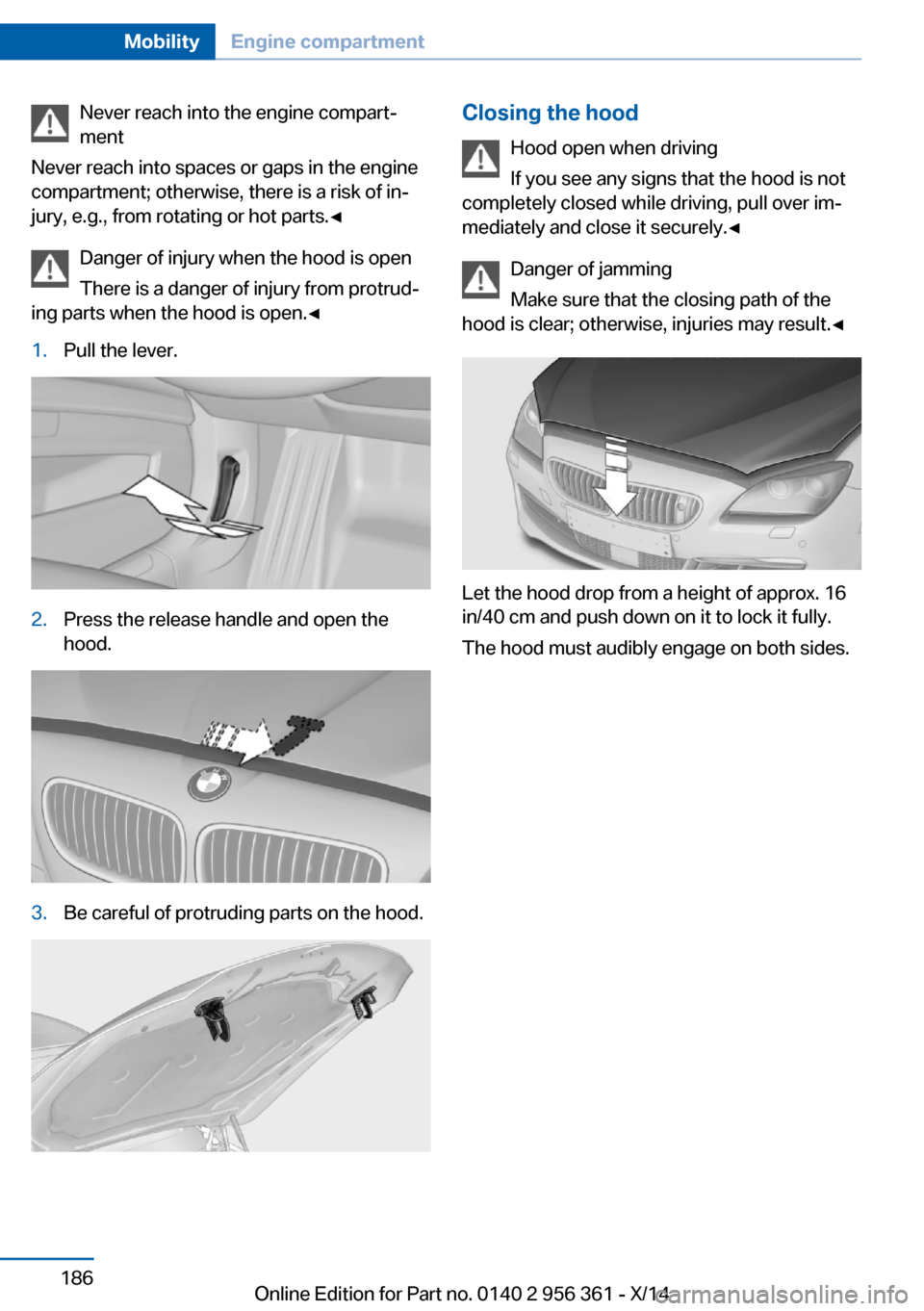
ing parts when the hood is open.◀1.Pull the lever.2.Press the release handle and open the
hood.3.Be careful of protruding parts on the hood.Closing the hood
Hood open when driving
If you see any signs that the hood is not
completely closed while driving, pull over im‐
mediately and close it securely.◀
Danger of jamming
Make sure that the closing path of the
hood is clear; otherwise, injuries may result.◀
Let the hood drop from a height of approx. 16
in/40 cm and push down on it to lock it fully.
The hood must audibly engage on both sides.
Seite 186MobilityEngine compartment186
Online Edition for Part no. 0140 2 956 361 - X/14
Page 216 of 228

Technical dataVehicle features and options
This chapter describes all standard, country-
specific and optional features offered with the
series. It also describes features that are notnecessarily available in your car, e. g., due to
the selected options or country versions. This
also applies to safety-related functions and
systems.
Note
The technical data and specifications in this
Owner's Manual are used as guidance values.
The vehicle-specific data can deviate from this,
for example, due to the selected special equip‐
ment, country version or country-specific
measurement method. Detailed values can befound in the approval documents, on informa‐
tion signs on the vehicle or can be obtained
from the service center.
The information in the vehicle documents al‐
ways has priority.
Dimensions
Note
The dimensions can vary depending on the
model version, equipment or country-specific
measurement method.
The specified heights do not take into account
attached parts, for example, a roof antenna,roof racks or spoiler. The heights can deviate,
for example, due to the selected special equip‐
ment, tires, load and chassis version. BMW M6 ConvertibleWidth with mirrorsinches/mm82.9/2,106Width without mirrorsinches/mm74.8/1,899Heightinches/mm53.9/1,368Lengthinches/mm193.0/4,903Wheelbaseinches/mm112.2/2,851Smallest turning radius diam.ft/m39.7/12.1
Weights
The values preceding the slash apply to vehi‐
cles with manual transmission; the values fol‐lowing the slash apply to vehicles with M dou‐
ble-clutch transmission.Seite 212ReferenceTechnical data212
Online Edition for Part no. 0140 2 956 361 - X/14
Page 221 of 228

Engine temperature 89
Entering/exiting vehicle, as‐ sistance, steering wheel 64
Entering a car wash 205
Equipment, interior 149
Error displays, see Check Control 85
ESP Electronic Stability Pro‐ gram, refer to DSC 129
Exchanging wheels/tires 180
Exhaust system 163
Exterior mirror, automatic dimming feature 63
Exterior mirrors 62
External start 201
External temperature dis‐ play 89
External temperature warn‐ ing 89
Eyes for securing cargo 167
F
Failure message, see Check Control 85
False alarm, refer to Uninten‐ tional alarm 45
Fan, refer to Air flow 146
Filler neck for engine oil 188
Fine wood, care 208
First aid kit 200
Fitting for towing, see tow fit‐ ting 203
Flat tire, changing wheels 196
Flat Tire Monitor FTM 112
Flat tire, repairing 181
Flat tire, Tire Pressure Moni‐ tor TPM 110
Flat tire, warning lamp 111, 113
Flooding 164
Floor carpet, care 208
Floor mats, care 208
Fold-out position, wiper 77
Foot brake 164 Front airbags 106
Front center armrest 156
Front-end collision warning with City Braking func‐
tion 114
Front lights 193
front-seat passenger airbags, automatic deactivation 108
Front-seat passenger airbags, indicator lamp 108
Front seats 55
Front turn signals, refer to Light-emitting diodes,
LEDs 194
FTM Flat Tire Monitor 112
Fuel 174
Fuel consumption, current 90
Fuel consumption, refer to Average fuel consump‐
tion 95
Fuel filler flap 172
Fuel gauge 88
Fuel lid 172
Fuel quality 174
Fuel recommendation 174
Fuel, tank capacity 213
Fuse 197
G
Garage door opener, refer to Universal Integrated Remote
Control 149
Gasoline 174
Gear change 80
Gear shift indicator 93
General driving notes 163
Glare shield 151
Glove compartment 155
Gross vehicle weight, ap‐ proved 212
Ground clearance 165 H
Handbrake, refer to Parking brake 73
Hand-held transmitter, alter‐ nating code 150
Hazard warning flashers 199
Headlight control, auto‐ matic 102
Headlight courtesy delay fea‐ ture 101
Headlight courtesy delay fea‐ ture via remote control 38
Headlight flasher 75
Headlight glass 194
Headlights 193
Headlights, care 206
Headlight washer system 75
Head restraints 55
Head restraints, front 59
Head-up Display 98
Head-up Display, care 209
Head-up display, M view 99
Head-up display, standard view 99
Heavy cargo, stowing 167
Height, seats 55
Height, vehicle 212
High-beam Assistant 103
High beams 75
High beams/low beams, refer to High-beam Assistant 103
Higher speed range 165
Hills 164
Hill start assistant, refer to Drive-off assistant 129
Hints 6
Holder for beverages 157
Hood 185
Horn 14
Hotel function, trunk lid 41
Hot exhaust system 163
HUD Head-up Display 98
Hydroplaning 163 Seite 217Everything from A to ZReference217
Online Edition for Part no. 0140 2 956 361 - X/14