2014 BMW I8 interior lights
[x] Cancel search: interior lightsPage 107 of 216
High-beam AssistantThe concept
When the low beams are activated, this system
automatically switches the high beams on and
off. The procedure is controlled by a camera
on the front of the interior rearview mirror. The
assistant ensures that the high beams are acti‐
vated whenever the traffic situation allows. The
driver can intervene at any time and reel the
high beams on and off as usual.
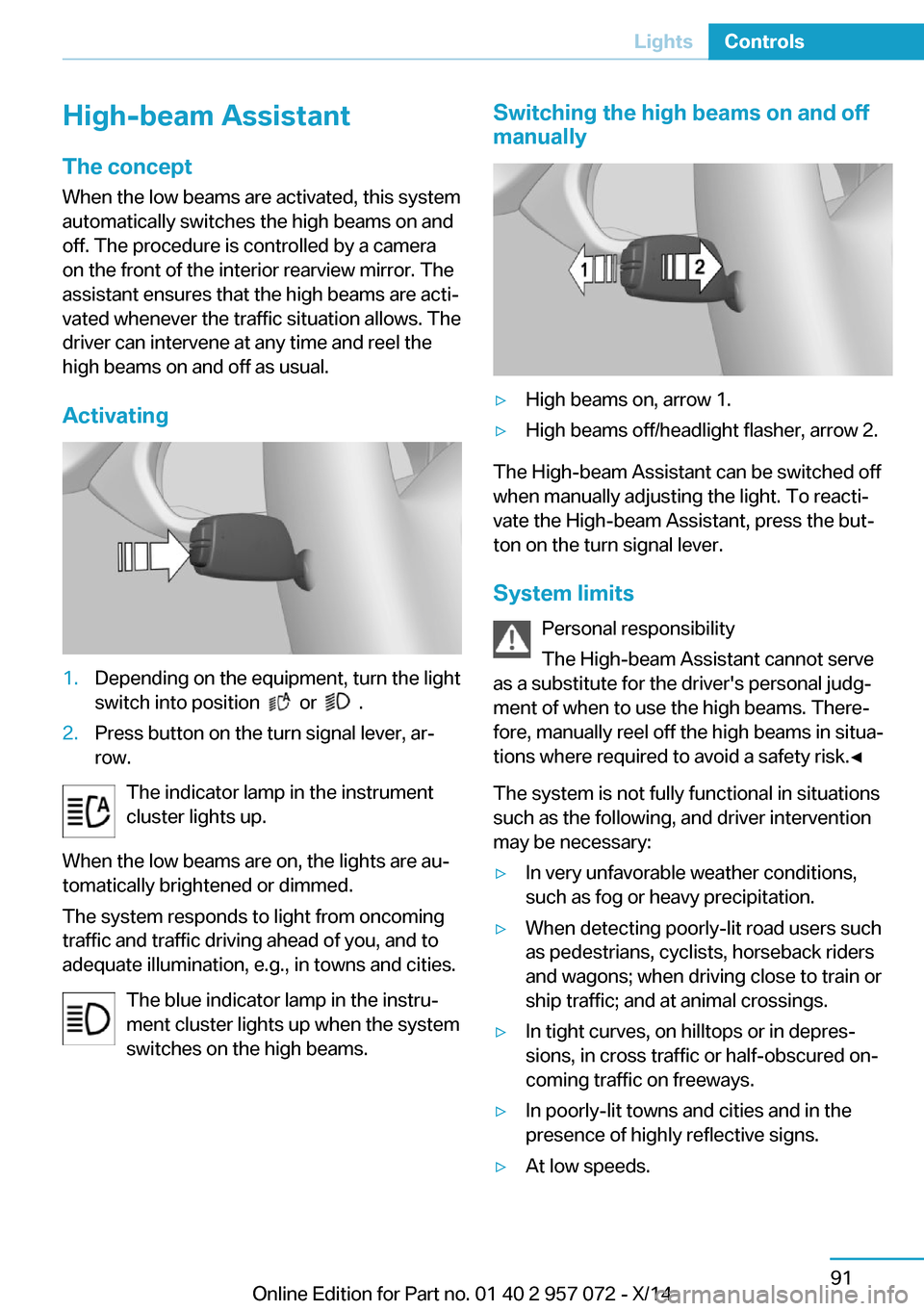
Activating1.Depending on the equipment, turn the light
switch into position
or .
2.Press button on the turn signal lever, ar‐
row.
The indicator lamp in the instrument
cluster lights up.
When the low beams are on, the lights are au‐
tomatically brightened or dimmed.
The system responds to light from oncoming
traffic and traffic driving ahead of you, and to
adequate illumination, e.g., in towns and cities.
The blue indicator lamp in the instru‐
ment cluster lights up when the system
switches on the high beams.
Switching the high beams on and off
manually▷High beams on, arrow 1.▷High beams off/headlight flasher, arrow 2.
The High-beam Assistant can be switched off
when manually adjusting the light. To reacti‐
vate the High-beam Assistant, press the but‐
ton on the turn signal lever.
System limits Personal responsibility
The High-beam Assistant cannot serve
as a substitute for the driver's personal judg‐
ment of when to use the high beams. There‐
fore, manually reel off the high beams in situa‐
tions where required to avoid a safety risk.◀
The system is not fully functional in situations
such as the following, and driver intervention
may be necessary:
▷In very unfavorable weather conditions,
such as fog or heavy precipitation.▷When detecting poorly-lit road users such
as pedestrians, cyclists, horseback riders
and wagons; when driving close to train or
ship traffic; and at animal crossings.▷In tight curves, on hilltops or in depres‐
sions, in cross traffic or half-obscured on‐
coming traffic on freeways.▷In poorly-lit towns and cities and in the
presence of highly reflective signs.▷At low speeds.Seite 91LightsControls91
Online Edition for Part no. 01 40 2 957 072 - X/14
Page 108 of 216
▷When the windshield behind the interior
rearview mirror is fogged over, dirty or cov‐
ered with stickers, etc.
Instrument lighting
Adjusting The parking lights or low beams
must be switched on to adjust
the brightness.
Adjust the brightness with the
thumbwheel.
Interior lights
General information
The interior lights, footwell lights, access lights
and courtesy lights are controlled automati‐
cally.
Thumb wheel for the instrument lighting con‐
trols brightness of some of these features.
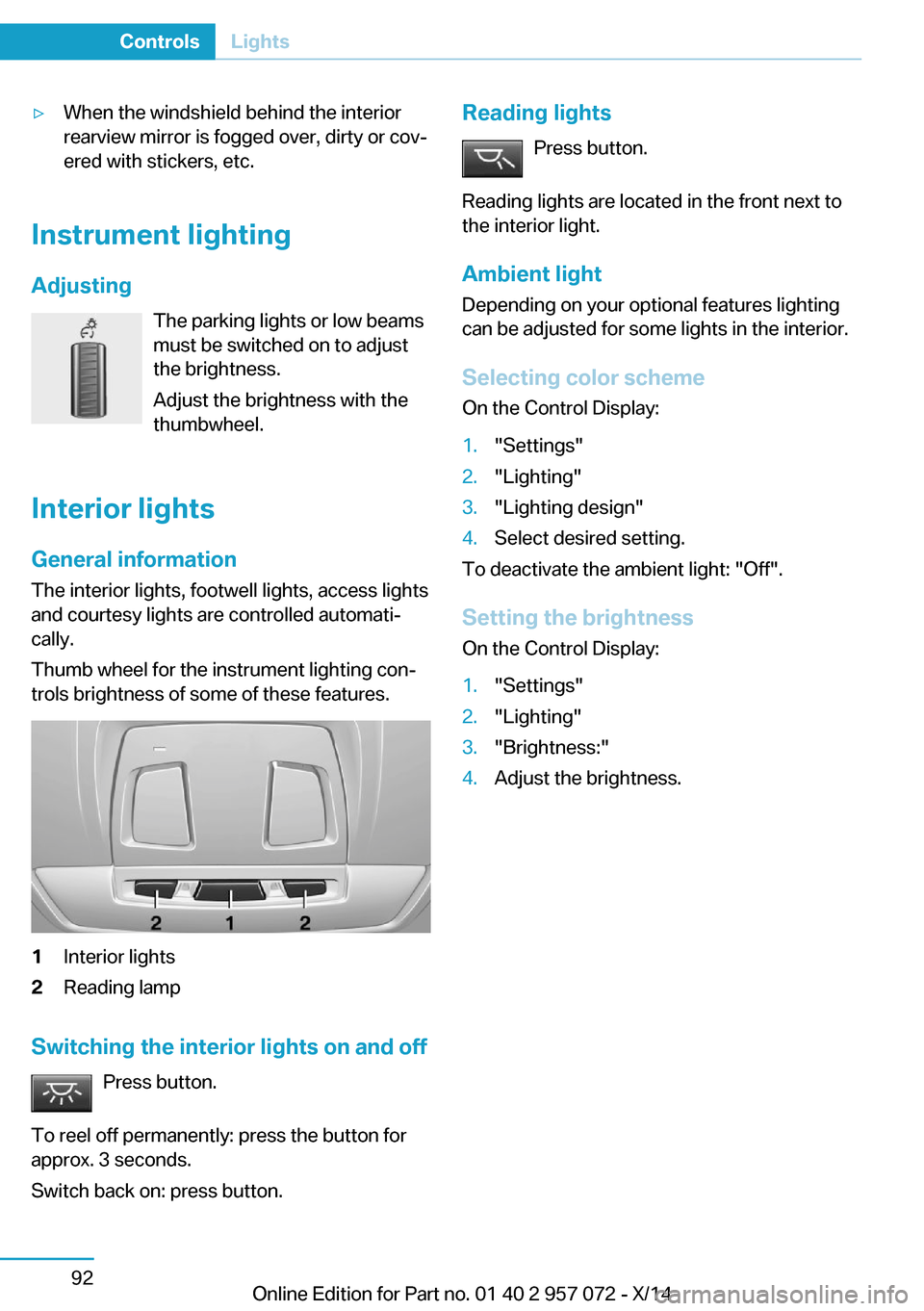
1Interior lights2Reading lamp
Switching the interior lights on and off
Press button.
To reel off permanently: press the button for
approx. 3 seconds.
Switch back on: press button.
Reading lights
Press button.
Reading lights are located in the front next to
the interior light.
Ambient light Depending on your optional features lighting
can be adjusted for some lights in the interior.
Selecting color scheme On the Control Display:1."Settings"2."Lighting"3."Lighting design"4.Select desired setting.
To deactivate the ambient light: "Off".
Setting the brightness On the Control Display:
1."Settings"2."Lighting"3."Brightness:"4.Adjust the brightness.Seite 92ControlsLights92
Online Edition for Part no. 01 40 2 957 072 - X/14
Page 116 of 216

NotePersonal responsibility
The system does not serve as a substi‐
tute for the driver's personal judgment of the
traffic situation.
Be aware of the traffic situation and the vehi‐
cle's surroundings at all times, otherwise acci‐
dents are still possible despite all warnings.◀
General information The system warns at two levels of an imminent
danger of collision at speeds from approx. 3 mph/5 km/h. Time of warnings may vary with
the current driving situation.
Appropriate braking kicks in at speeds of up to
35 mph/60 km/h.
Detection range
It responds to objects if they are detected by
the system.
At a glance
Button in the vehicle
Intelligent Safety button
Camera
The camera is found near the interior rearview
mirror.
Keep the windshield in the area behind the in‐
terior rearview mirror clean and clear.
Switching on/off
Switching on automatically The system is automatically active after every
driving-off.
Switching on/off manually Press button briefly:
▷The menu for the intelligent safety
system is displayed. The systems
are individually switched off ac‐
cording to their respective set‐
tings.▷LED lights up orange or goes out respec‐
tive to their individual settings.
Adjust as needed. Individual settings are
stored for the profile currently in use.
Press button again:
▷All Intelligent Safety systems are
activated.▷The LED lights up green.
Hold down button:
Seite 100ControlsSafety100
Online Edition for Part no. 01 40 2 957 072 - X/14
Page 119 of 216

A collision is imminent if pedestrians are lo‐
cated within the central area. A warning is is‐
sued about pedestrians who are located within
the extended area only if they are moving in
the direction of the central area.
At a glance
Button in the vehicle
Intelligent Safety button
Camera
The camera is found near the interior rearview
mirror.
Keep the windshield in the area behind the in‐
terior rearview mirror clean and clear.
Switching on/off
Switching on automatically The system is automatically active after every
driving-off.
Switching on/off manually
Press button briefly:▷The menu for the intelligent safety
system is displayed. The systems
are individually switched off ac‐
cording to their respective set‐
tings.▷LED lights up orange or goes out respec‐
tive to their individual settings.
Adjust as needed. Individual settings are
stored for the profile currently in use.
Press button again:
▷All Intelligent Safety systems are
activated.▷The LED lights up green.
Hold down button:
▷All Intelligent Safety systems are
turned off.▷The LED goes out.
Warning with braking function
Note Adapting your speed and driving styleThe warning does not relieve the driver
of the responsibility to adapt his or her driving
speed and style to the traffic conditions.◀
Display If a collision with a person detected in this way
is imminent, a warning symbol appears on the
instrument cluster and in the Head-up Display.
The red symbol is displayed and a sig‐
nal sounds.
Intervene immediately by braking or make an
evasive maneuver.
Seite 103SafetyControls103
Online Edition for Part no. 01 40 2 957 072 - X/14
Page 144 of 216

Center console
The socket is located between the front seats.
Remove the cover.
In the front passenger footwell
The socket is located below the glove com‐
partment.
USB interface for data
transfer
The concept Connection for importing and exporting data
on USB devices, e.g.:
▷Personal Profile settings, refer to page 37.▷Music collection.▷Importing Trips.
Hints
Observe the following when connecting:
▷Do not use force when plugging the con‐
nector into the USB interface.▷Do not connect devices such as fans or
lights to the USB interface.▷Do not connect USB hard drives.▷Do not use the USB interface for recharg‐
ing external devices.
At a glance
The socket is located between the front seats.
Cargo area
Cargo cover
General information The cargo cover is located under the tailgate.
Fold the cargo cover forward for loading.
Note Do not deposit any objects on the cargo
cover
Do not deposit any objects on the cargo cover.
Otherwise, this could damage the cargo cover
or the cargo partition.◀
Removing The cover can be removed to load bulky lug‐
gage.
Seite 128ControlsInterior equipment128
Online Edition for Part no. 01 40 2 957 072 - X/14
Page 197 of 216

Before driving into a car wash
In order to ensure that the vehicle can roll in a
car wash, take the following steps:1.Drive into the car wash.2.Engage selector lever position N.3.Press the Start/Stop button.
In this way, operating readiness remains
switched on, and a Check-Control mes‐
sage is displayed.
To activate drive readiness:
1.Depress the brake pedal.2.Press the Start/Stop button.
Pressing the Start/Stop button without step‐
ping on the brake turns operating readiness
off.
Selector lever position Selector lever position P is engaged automati‐
cally:
▷With operating readiness turned off.▷After approx. 15 minutes.
Headlights
▷Do not rub dry and do not use abrasive or
acidic cleansers.▷Soak areas that have been dirtied e. g.,
from insects, with shampoo and wash off
with water.▷Thaw ice with de-icing spray; do not use an
ice scraper.
After washing the vehicle
After washing the vehicle, apply the brakes
briefly to dry them; otherwise, braking action
can be reduced and corrosion of the brake
discs can occur.
Completely remove all residues on the win‐
dows, to minimize loss of visibility due to
smearing and to reduce wiper noises and
wiper blade wear.
Vehicle care
Car care productsBMW recommends using care and cleaning
products from BMW, since these have been
tested and approved.
Car care and cleaning products
Follow the instructions on the container.
When cleaning the interior, open the doors or
windows.
Only use products intended for cleaning vehi‐ cles.
Cleansers can contain substances that are
dangerous and harmful to your health.◀
Vehicle paint Regular care contributes to driving safety and
value retention. Environmental influences in
areas with elevated air pollution or natural con‐
taminants, such as tree resin or pollen can af‐
fect the vehicle's paintwork. Tailor the fre‐
quency and extent of your car care to these
influences.
Aggressive substances such as spilled fuel, oil,
grease or bird droppings, must be removed im‐
mediately to prevent the finish from being al‐
tered or discolored.
Leather care
Remove dust from the leather often, using a
cloth or vacuum cleaner.
Otherwise, particles of dust and road grime
chafe in pores and folds, and lead to increased
wear and premature degradation of the leather
surface.
To guard against discoloration, such as from
clothing, provide leather care roughly every
two months.
Clean light-colored leather more frequently be‐
cause soiling on such surfaces is substantially
more visible.Seite 181CareMobility181
Online Edition for Part no. 01 40 2 957 072 - X/14
Page 210 of 216

Individual settings, refer toPersonal Profile 37
Inflation pressure, tires 159
Info display, refer to Com‐ puter 83
Initialize, Tire Pressure Moni‐ tor TPM 97
Instrument cluster 72
Instrument lighting 92
Integrated key 36
Integrated Owner's Manual in the vehicle 29
Intelligent Emergency Re‐ quest 175
Intelligent Safety 99
Intensity, AUTO pro‐ gram 122
Interior equipment 125
Interior lights 92
Interior lights via remote con‐ trol 40
Interior motion sensor 46
Interior rearview mirror, auto‐ matic dimming feature 52
Interior rearview mirror, man‐ ually dimmable 52
Interval display, service re‐ quirements 80
J Jacking points for the vehicle jack 173
Joystick, Steptronic Sport transmission 68
Jump-starting 176
Jump starting, refer to Backup charging 152
K
Key/remote control 36
Keyless Go, refer to Comfort Access 43
Key Memory, refer to Per‐ sonal Profile 37 Kickdown, Steptronic Sport
transmission 68
Knee airbag 93
L
Lamp replacement, see Bulb replacement 172
Language on Control Dis‐ play 86
LATCH child restraint sys‐ tem 55
Launch Control 70
Leather, care 181
LED in the driver's door 39
LEDs, light-emitting di‐ odes 172
Length, vehicle 186
Letters and numbers, enter‐ ing 24
Level 1 Charging 150
Level 1 charging cable 147
Level 2 charging cable 147
Light alloy wheels, care 182
Light-emitting diodes, LEDs 172
Lighting 89
Lighting via remote con‐ trol 40
Light reel 89
Lights 89
Load 139
Loading 138
Lock, door 41
Locking/unlocking via door lock 41
Locking/unlocking with re‐ mote control 39
Locking, automatic 45
Locking, settings 44
Locking via tailgate 43
Longer idle phases 183
Long idle times and long-term vehicle storage 183
Long-term vehicle stor‐ age 183 Low beams 89
Low beams, automatic, refer to High-beam Assistant 91
M
Maintaining charging state 61
Maintenance 170
Maintenance require‐ ments 170
Maintenance, service require‐ ments 80
Maintenance system, BMW 170
Make-up mirror 127
Malfunction displays, see Check Control 76
Manual air distribution 122
Manual air flow 122
Manual mode, transmis‐ sion 69
Manual operation, door lock 41
Manual operation, exterior mirrors 51
Manual operation, fuel filler flap 155
Manual operation, Park Dis‐ tance Control PDC 112
Manual operation, rearview camera 114
Manual operation, Top View 117
Marking on approved tires 163
Master key, refer to Remote control 36
Max eDRIVE, electric driv‐ ing 61
Maximum cooling 121
Maximum speed, display 82
Maximum speed, winter tires 164
Measure, units of 86
Medical kit 176 Seite 194ReferenceEverything from A to Z194
Online Edition for Part no. 01 40 2 957 072 - X/14