2014 BMW I3 change wheel
[x] Cancel search: change wheelPage 127 of 230

When you approach a curve the system may
briefly report vehicles in the next lane due to
the bend of the curve. If the system deceler‐
ates you may compensate it by briefly acceler‐
ating.
After releasing the gas pedal the system is re‐
activated and controls speed independently.
Driving away In some situations, the vehicle cannot drive off
automatically; for example:
▷On steep inclines.▷From behind bumps in the road.
In these cases, step on the accelerator pedal.
Malfunction
A Check Control message is displayed if the
system fails.
The system may not be fully functional in the
following situations:
▷When an object was not correctly de‐
tected.▷In heavy fog, rain, sprayed water or snow‐
fall.▷In tight curves.▷If the camera viewing field or the front
windshield are dirty or covered.▷When driving toward bright lights.▷Up to 20 seconds after drive readiness is
switched on via the Start/Stop knob.▷During calibration of the camera immedi‐
ately after vehicle shipment.Cruise control
The concept The system maintains a preset speed via the
buttons on the steering wheel. The system
brakes on downhill gradients if engine braking
is insufficient.
General information
Depending on the driving settings, the features
of the cruise control can change in certain
areas.
Hints Unfavorable conditions
Do not use the system if unfavorable
conditions make it impossible to drive at a con‐
stant speed, e.g.:▷On winding roads.▷In heavy traffic.▷On slippery roads, in fog, snow or rain, or
on a loose road surface.
Otherwise, you could lose control of the vehi‐
cle and cause an accident.◀
At a glance
Buttons on the steering wheel
Press buttonFunctionSystem on/off, interruptStore speedResume speedRocker reel: change, hold,
store speedSeite 113Driving comfortControls115
Page 134 of 230
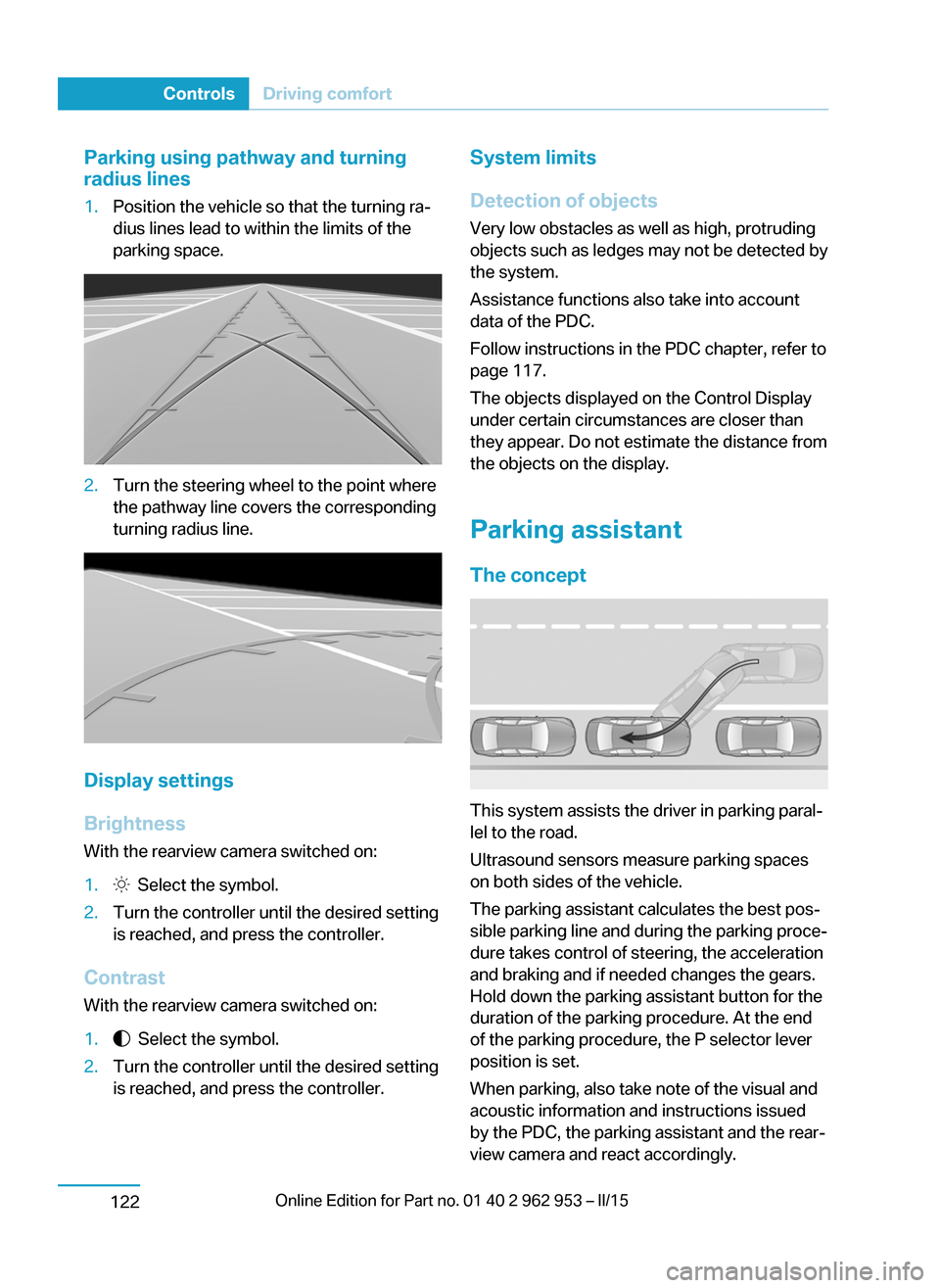
Parking using pathway and turning
radius lines1.Position the vehicle so that the turning ra‐
dius lines lead to within the limits of the
parking space.2.Turn the steering wheel to the point where
the pathway line covers the corresponding
turning radius line.
Display settings
Brightness
With the rearview camera switched on:
1. Select the symbol.2.Turn the controller until the desired setting
is reached, and press the controller.
Contrast
With the rearview camera switched on:
1. Select the symbol.2.Turn the controller until the desired setting
is reached, and press the controller.System limits
Detection of objects
Very low obstacles as well as high, protruding
objects such as ledges may not be detected by
the system.
Assistance functions also take into account
data of the PDC.
Follow instructions in the PDC chapter, refer to
page 117.
The objects displayed on the Control Display
under certain circumstances are closer than
they appear. Do not estimate the distance from
the objects on the display.
Parking assistant The concept
This system assists the driver in parking paral‐
lel to the road.
Ultrasound sensors measure parking spaces
on both sides of the vehicle.
The parking assistant calculates the best pos‐
sible parking line and during the parking proce‐
dure takes control of steering, the acceleration
and braking and if needed changes the gears.
Hold down the parking assistant button for the
duration of the parking procedure. At the end
of the parking procedure, the P selector lever
position is set.
When parking, also take note of the visual and
acoustic information and instructions issued
by the PDC, the parking assistant and the rear‐
view camera and react accordingly.
Seite 120ControlsDriving comfort122
Page 135 of 230

A component of the parking assistant is the
PDC Park Distance Control, refer to page 117.
Hints Personal responsibility
Even an active system does not relieve
the driver from personal responsibility while
driving.
Technically the system has its limits, it cannot
independently react to all traffic situations.
Monitor your driving, be on the alert, observe
the vehicle surroundings and other traffic and
react when needed - risk of accident.◀
Changes to the parking space
Changes to the parking space after it was
measured are not taken into account by the
system.
Therefore, always be alert and ready to inter‐
vene; otherwise, there is the risk of an acci‐
dent.◀
Transporting cargo
Cargo that extends beyond the perimeter
of the vehicle is not taken into account by the
system during the parking procedure.
Therefore, always be alert and ready to inter‐
vene; otherwise, there is the risk of an acci‐
dent.◀
Curbs
The parking assistant may steer the vehi‐
cle over or onto curb if need be.
Therefore, always be alert and ready to inter‐
vene; otherwise, the wheels, tires, or the vehi‐
cle may become damaged.◀
Requirements
For measuring parking spaces▷Maximum speed while driving forward ap‐
prox. 22 mph/35 km/h.▷Maximum distance to row of parked vehi‐
cles: 5 ft/1.5 m.
Suitable parking space
▷Gap between two objects with a minimum
length of approx. 5 ft/1.5 m.▷Min. length of gap between two objects:
your vehicle's length plus approx.
4 ft/1.2 m.▷Minimum depth: approx. 5 ft/1.5 m.
Regarding the parking procedure
▷Doors and tailgate closed.▷Parking brake released.▷Driver's safety belt fastened.
At a glance
Button in the vehicle
Parking assistant
Ultrasound sensors
The ultrasound sensors for measuring parking
spaces are located on the side of the vehicle.
Seite 121Driving comfortControls123
Page 221 of 230

Button, RES 112
Button, Start/Stop 62
Bypassing, refer to Jump- starting 194
C
California Proposition 65 Warning 8
Camera-based Cruise Con‐ trol 109
Camera, care 201
Camera, rearview cam‐ era 120
Can holder, refer to Cuphold‐ ers 139
Car battery 191
Car care products 199
Care, displays 201
Care, vehicle 199
Cargo 148
Cargo area 135
Cargo area, enlarging 136
Cargo area, storage compart‐ ments 140
Cargo cover 135
Cargo, securing 149
Cargo straps, securing cargo 149
Car key, refer to Remote con‐ trol 36
Carpet, care 201
Car wash 198
Catalytic converter, refer to Hot exhaust system 145
CBS Condition Based Serv‐ ice 185
Center armrest 139
Center console 16
Central locking system 42
Central screen, refer to Con‐ trol Display 18
Changes, technical, refer to Safety 7
Changing wheels 191
Changing wheels/tires 173 Charging battery, see Vehicle charging 156
Charging, refer to Charging vehicle 156
Charging, refer to Vehicle charging 156
Charging screen 75
Charging state indicator, high-voltage battery 76
Charging status, see display of the charging status 160
Charging vehicle 156
Charging vehicle, refer to Ve‐ hicle charging 156
Chassis number, see vehicle identification number 10
Check Control 77
Check engine oil 181
Check oil level 181
Children, seating position 58
Children, transporting safely 58
Child restraint fixing sys‐ tem 58
Child restraint fixing system LATCH 59
Child restraint fixing systems, mounting 58
Child seat, mounting 58
Child seats 58
Chrome parts, care 200
Cigarette lighter 134
Cleaning displays 201
Climate control 127, 129
Clock 82
Closing/opening via door lock 41
Closing/opening with remote control 39
Clothes hooks 140
Coasting 67
Combination reel, refer to Turn signals 69
Combination reel, refer to Wiper system 70
Comfort Access 44 COMFORT program, Dy‐ namic Driving Control 107
Compartments in the doors 138
Compressor 174
Computer 85
Condensation on win‐ dows 128, 131
Condensation under the vehi‐ cle 147
Condition Based Service CBS 185
Confirmation signal 46
ConnectedDrive 6
ConnectedDrive Services 6
Connecting electrical devi‐ ces 134
Contact with water, high-volt‐ age system 196
Control Display 18
Control Display, settings 87
Controller 18
Control systems, driving sta‐ bility 106
Convenient opening with the remote control 39
Coolant 183
Coolant temperature 81
Cooling function 128, 130
Cooling, maximum 131
Cooling system 183
Corrosion on brake discs 146
Cosmetic mirror 134
Cruise control 115
Cruise control, active with Stop & Go 109
Cruise control, refer to Cam‐ era-based Cruise Con‐
trol 109
Cruising range 82
Cupholders 139
Current fuel consumption 86
D
Damage, tires 173 Seite 207Everything from A to ZReference209
Page 225 of 230

Menu in instrument clus‐ter 84
Menus, operating, iDrive 18
Menus, refer to iDrive operat‐ ing concept 19
Messages, see Check Con‐ trol 77
Microfilter 129, 132
Minimum tread, tires 172
Mirrors 55
Mobile communication devi‐ ces in the vehicle 145
Mobility System 174
Modifications, technical, refer to Safety 7
Moisture in headlight 188
Monitor, refer to Control Dis‐ play 18
Mounting of child restraint systems 58
Multifunction steering wheel, buttons 14
Multimedia 6
N
Navigation 6
Neck restraints, front, refer to Head restraints 54
Neck restraints, rear, refer to Head restraints 54
Neutral cleaner, see wheel cleaner 200
New wheels and tires 173
Nylon rope for tow-starting/ towing 195
O OBD Onboard Diagnosis 186
OBD, see OBD Onboard Di‐ agnosis 186
Obstacle marking, rearview camera 121
Octane rating, refer to Rec‐ ommended fuel grade 168 Odometer 81
Office 6
Oil 181
Oil, adding 182
Oil change interval, service requirements 82
Old batteries, disposal 191
Onboard monitor, refer to Control Display 18
Opening/closing via door lock 41
Opening and closing 36
Opening and closing, without remote control 41
Opening and closing, with re‐ mote control 39
Operating concept, iDrive 18
Optional equipment, standard equipment 6
Outside air, refer to Auto‐ matic recirculated-air con‐
trol 131
Overheating of engine, refer to Coolant temperature 81
P Paint, vehicle 199
Parallel parking assistant 122
Park Distance Control PDC 117
Parked vehicle, condensa‐ tion 147
Parking aid, refer to PDC 117
Parking assistant 122
Parking brake 68
Parking lights 89
Passenger side mirror, tilting downward 55
Pathway lines, rearview cam‐ era 121
PDC Park Distance Con‐ trol 117
Pedestrian warning with city braking function 102
Performance display 76 Personal Profile 37
Personal Profile, exporting profiles 38
Pinch protection system, glass sunroof 49
Pinch protection system, win‐ dows 48
Plastic, care 200
Power failure 191
Power sunroof, glass 49
Power windows 48
Pressure, tire air pres‐ sure 170
Pressure warning FTM, tires 98
Profile, refer to Personal Pro‐ file 37
Programmable memory but‐ tons, iDrive 23
Protective function, glass sunroof 49
Protective function, win‐ dows 48
Pulling, refer to Towing 194
Push-and-turn reel, refer to Controller 18
Q Quick charging cable, see Level 2 charging cable 158
Quick charging, see Level 2 Charging 162
R Radiator fluid 183
Radio 6
Radio-operated key, refer to Remote control 36
Rain sensor 71
Range Extender, fuel gauge 81
Range Extender, increasing range 67 Seite 211Everything from A to ZReference213
Page 227 of 230

Switching on, drive readi‐ness 63
Switch off, drive readiness 65
Switch, refer to Cockpit 14
Symbols 6
Symbols in the status field 22
T Tailgate closing 43
Tailgate opening 43
Tailgate via remote con‐ trol 40
Tail lights, bulb replace‐ ment 190
Tank unlocking, refer to Tank vent 165
Tank vent 165
Technical changes, refer to Safety 7
Technical data 204
Telephone 6
Temperature, air condi‐ tioner 128
Temperature, automatic cli‐ mate control 130
Temperature display for ex‐ ternal temperature 81
Text message, supplemen‐ tary 80
Theft alarm system, refer to Alarm system 46
Tilt alarm sensor 47
Tire damage 173
Tire identification marks 171
Tire inflation pressure 170
Tire inflation pressure moni‐ tor, refer to FTM 98
Tire Pressure Monitor TPM 95
Tires, changing 173
Tire sealant 174
Tires, everything on wheels and tires 170
Tire tread 172
Tone 6 Total vehicle weight 205
Touchpad 21
Tow fitting 196
Towing 194
Tow lug, see tow fitting 196
TPM Tire Pressure Moni‐ tor 95
Traction control 107
TRACTION, driving dynam‐ ics 107
Transmission lock, electronic unlocking 65
Transporting children safely 58
Tread, tires 172
Trip computer 86
Triple turn signal activa‐ tion 69
Trip odometer 81
Turning circle lines, rearview camera 121
Turning radius 204
Turn signal, bulb replace‐ ment 189
Turn signals, operation 69
U
Unintentional alarm 47
Units of measure 88
Unlocking/locking via door lock 41
Unlocking/locking with re‐ mote control 39
Unlocking, settings 45
Updates made after the edito‐ rial deadline 7
Upholstery care 200
USB interface 135
V
Vanity mirror 134
Vehicle battery 191
Vehicle battery, replac‐ ing 191 Vehicle, break-in 144
Vehicle care 199
Vehicle features and op‐ tions 6
Vehicle identification num‐ ber 10
Vehicle jack 191
Vehicle paint 199
Vehicle position, GPS loca‐ tion 88
Vehicle wash 198
Ventilation 132
Ventilation, refer to Stationary climate control 132
VIN, see vehicle identification number 10
Voice activation system 26
W
Warning and indicator lamps, see Check Control 77
Warning displays, see Check Control 77
Warning messages, see Check Control 77
Warning triangle 194
Washer fluid 72
Washer nozzles, wind‐ shield 71
Washer system 70
Washing, vehicle 198
Water, high-voltage sys‐ tem 196
Water on roads 146
Weights 205
Welcome lights 89
What to do after an acci‐ dent 197
Wheelbase, vehicle 204
Wheel cleaner 200
Wheels, changing 173
Wheels, everything on wheels and tires 170
Wheels, Flat Tire Monitor FTM 98 Seite 213Everything from A to ZReference215