2014 BMW ACTIVE HYBRID 5 warning light
[x] Cancel search: warning lightPage 154 of 251

▷With moving objects.▷With elevated, protruding objects such as
ledges or cargo.▷With objects with corners and sharp edges.▷With objects with a fine surface structure
such as fences.▷For objects with porous surfaces.
Low objects already displayed, e.g., curbs, can
move into the blind area of the sensors before
or after a continuous tone sounds.
False warnings
PDC may issue a warning under the following conditions even though there is no obstacle
within the detection range:
▷In heavy rain.▷When sensors are very dirty or covered
with ice.▷When sensors are covered in snow.▷On rough road surfaces.▷On uneven surfaces, such as speed
bumps.▷In large buildings with right angles and
smooth walls, e.g., in underground ga‐
rages.▷Through heavy pollution.▷Due to other ultrasound sources, e.g.,
sweeping machines, high pressure steam
cleaners or neon lights.
Malfunction
A Check Control message is displayed.
The range of the sensors is shown as a shaded
area on the Control Display.
PDC has failed. Have the system checked.
To ensure full functionality:
▷Keep the sensors clean and free of ice.▷dimmedDo not put any stickers on sen‐
sors.▷When using high-pressure washers, do not
spray the sensors for long periods and
maintain a distance of at least 12 in/30 cm.
Surround View
The concept Surround View comprises various camera as‐
sistance systems that help the driver when
parking, maneuvering, and at complex exits
and intersections.
▷Rearview camera, refer to page 150▷Side View, refer to page 153.▷Top View, refer to page 154.
Rearview camera
The concept The rearview camera provides assistance in
parking and maneuvering backwards. The area
behind the vehicle is shown on the Control
Display.
Hints Check the traffic situation as well
Check the traffic situation around the ve‐
hicle with your own eyes. Otherwise, an acci‐
dent could result from road users or objects
that are not lidtured by the camera.◀
Seite 150ControlsDriving comfort150
Online Edition for Part no. 01 40 2 956 272 - X/14
Page 159 of 251

Cameras
The lenses of the Top View camera are located
at the bottom in the mirror housings. The im‐
age quality may be impaired by dirt.
Clean the lens, refer to page 231.
Switching on/off
Switching on automatically With the engine running, engage lever in posi‐
tion P R.
The rearview camera image is displayed. To
switch to the Top View:
"Rear view camera"
Automatic deactivation during forward
travel
The system switches off when a certain driving
distance or speed is exceeded.
Switch the system back on if needed.
Switching on/off manually Press button.
▷On: the LED lights up.▷Off: the LED goes out.
Top View is displayed.
The rearview camera image is displayed when
the reverse gear is engaged by pressing the
button.
Display
Visual warning
The approach of the vehicle to an object can
be shown on the Control Display.
When the distance to an object is small, a red
bar is shown in front of the vehicle, as it is in
the PDC display.
The display appears as soon as Top View is
activated.
When the image of the rearview camera is dis‐
played, it is possible to reel to top view:
"Rear view camera"
Brightness
With Top View switched on:
1. Select the symbol.2.Turn the controller until the desired setting
is reached, and press the controller.
Contrast
With Top View switched on:
1. Select the symbol.2.Turn the controller until the desired setting
is reached, and press the controller.
Displaying the turning radius and
pathway lines
▷The static, red turning radius line shows
the space needed to the side of the vehicle
when the steering wheel is turned all the
way.Seite 155Driving comfortControls155
Online Edition for Part no. 01 40 2 956 272 - X/14
Page 194 of 251

Activate ECO PROPress button repeatedly until ECO
PRO is displayed in the instrument
cluster.
Configuring ECO PRO
Via the Driving Dynamics Control1.Activate ECO PRO.2."Configure ECO PRO"3.Configure the program.
Via the iDrive
1."Settings"2."ECO PRO mode"
Or
1."Settings"2."Driving mode"3."Configure ECO PRO"
Configure the program.
ECO PRO Tip
▷"Tip at:":
Adjust the ECO PRO speed.▷"ECO PRO speed warning":
The output is reduced once the set ECO
PRO speed is reached.
ECO PRO climate control
"ECO PRO climate control"
Climate control is set to be fuel-efficient.
By making a slight change to the set tempera‐
ture, or slowly adjusting the rate of heating or
cooling of the car's interior, fuel consumption
can be economized.
The mirror heating is made available when out‐
side temperatures are very cold.
ECO PRO potential
Shows potential savings with the current set‐
tings in percentages.
Display in the instrument cluster
ECO PRO bonus range An adjusted driving style helps
you extend your driving range.
This may be displayed as the
bonus range in the instrument
cluster.
The bonus range is shown in the range display.
The bonus range is automatically reset every
time the vehicle is refueled.
Driving styleDisplay in the instrument cluster with ex‐
panded scope.
A bar display in the instrument cluster indi‐
cates your current driving efficiency.
Mark in the area of arrow 1: display of the en‐
ergy recovered by coasting or when braking.
Mark in the area of arrow 2: display when ac‐
celerating.
Your driving style's efficiency is shown by the
bar's color:
▷Blue display: efficient driving style as long
as the mark moves within the blue range.▷Gray display: adjust driving style, e. g. by
backing off the accelerator pedal.Seite 190Driving tipsSaving fuel190
Online Edition for Part no. 01 40 2 956 272 - X/14
Page 218 of 251
correspondingly trained personnel and other
authorized persons. Otherwise, use may result
in operating problems for the vehicle.◀
Position
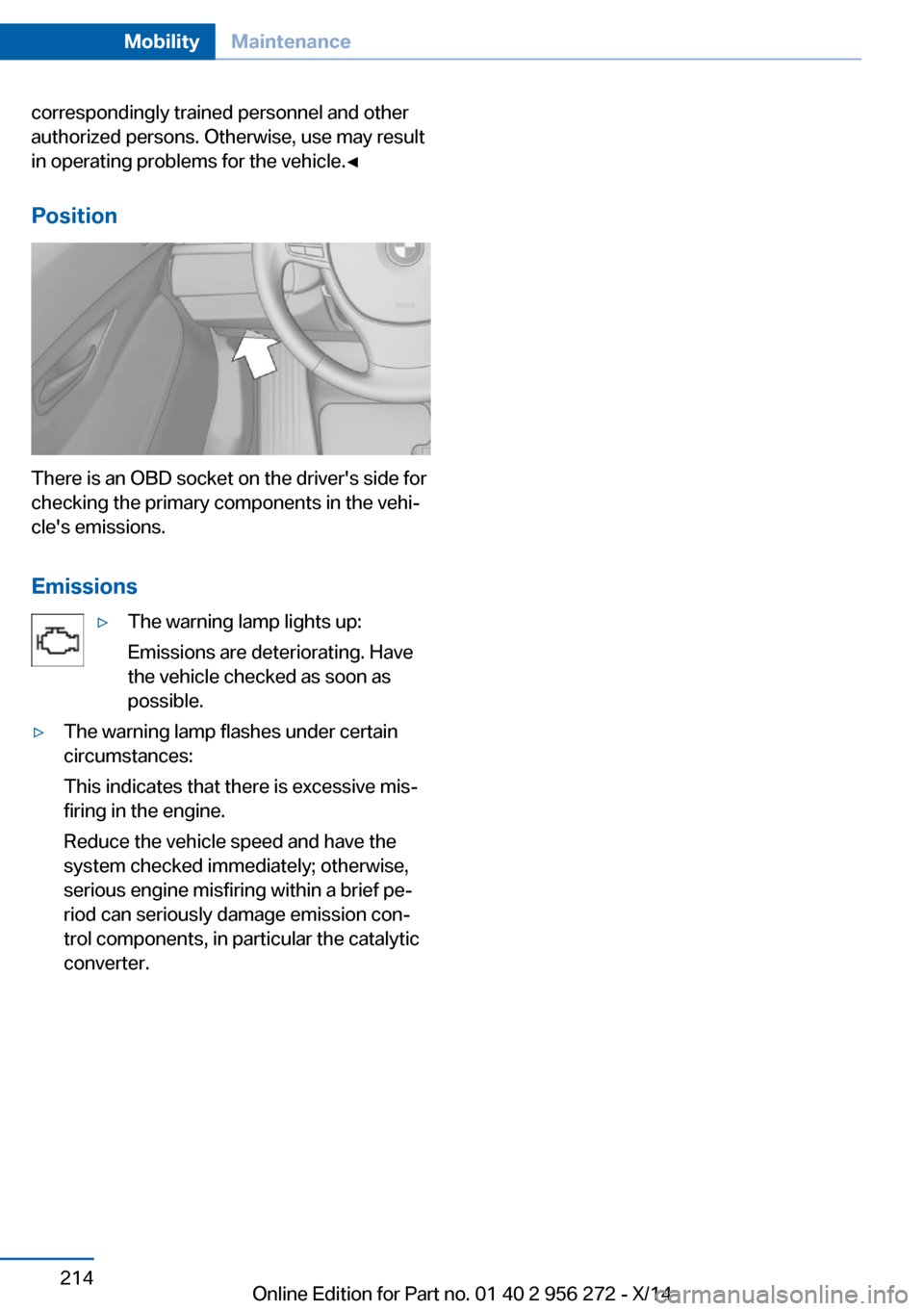
There is an OBD socket on the driver's side for
checking the primary components in the vehi‐
cle's emissions.
Emissions
▷The warning lamp lights up:
Emissions are deteriorating. Have
the vehicle checked as soon as
possible.▷The warning lamp flashes under certain
circumstances:
This indicates that there is excessive mis‐
firing in the engine.
Reduce the vehicle speed and have the
system checked immediately; otherwise,
serious engine misfiring within a brief pe‐
riod can seriously damage emission con‐
trol components, in particular the catalytic
converter.Seite 214MobilityMaintenance214
Online Edition for Part no. 01 40 2 956 272 - X/14
Page 226 of 251

Breakdown assistanceVehicle features and options
This chapter describes all standard, country-
specific and optional features offered with the
series. It also describes features that are not
necessarily available in your car, e. g., due to
the selected options or country versions. This
also applies to safety-related functions and
systems.
Hazard warning flashers
The button is located in the center console.
Intelligent Emergency
Request
The concept In case of an emergency, an Emergency Re‐
quest can be made through this system.
General information
Only press the SOS button in an emergency.
Hints Emergency Request not guaranteed
For technical reasons, the Emergency
Request cannot be guaranteed under unfavor‐
able conditions.◀
At a glance
SOS button in the roofliner
Requirements
▷The SIM card integrated in the vehicle has
been activated.▷The radio-ready state is switched on.▷The Assist system is functional.
Initiating an Emergency Request
1.Press the cover briefly to open it.2.Press the SOS button until the LED at the
button lights up green.▷The LED lights up green: an Emergency
Request was initiated.
If a cancel prompt appears on the display,
the Emergency Request can be aborted.
If the situation allows, wait in your vehicle
until the voice connection has been estab‐
lished.▷The LED flashes green when a connection
to the BMW Response Center has been
established.
When the emergency request is received
at the BMW Response Center, the BMW
Response Center contacts you and takes
further steps to help you.
Even if you are unable to respond, the
BMW Response Center can take furtherSeite 222MobilityBreakdown assistance222
Online Edition for Part no. 01 40 2 956 272 - X/14
Page 229 of 251

corresponding engine or body ground of
the vehicle to be started.
Starting the engine
Never use spray fluids to start the engine.
1.Start the engine of the assisting vehicle
and let it run for several minutes at an in‐
creased idle speed.2.Start the engine of the vehicle that is to be
started in the usual way.
If the first starting attempt is not success‐
ful, wait a few minutes before making an‐
other attempt in order to allow the dis‐
charged battery to recharge.3.Let both engines run for several minutes.4.Disconnect the jumper cables in the re‐
verse order.
Check the battery and recharge if needed.
Tow-starting and towing Note Tow-starting and towing
For towing the vehicle turn, switch off the
Intelligent Safety systems; otherwise malfunc‐
tions of the individual braking systems might
lead to accidents.◀
Steptronic transmission: transporting
your vehicle
Note Your vehicle is not permitted to be towed.
Therefore, contact a service center in the
event of a breakdown.
Do not have the vehicle towedHave your vehicle transported on a load‐
ing platform only; otherwise, damage may oc‐
cur.◀
Tow truck
The vehicle should only be transported on a
loading platform.
Do not lift the vehicle
Do not lift the vehicle by the tow fitting or
body and chassis parts; otherwise, damage
may result.◀
Use tow fitting located in the front only for po‐
sitioning the vehicle.
Towing other vehicles
Hints Light towing vehicle
The towing vehicle must not be lighter
than the vehicle being towed; otherwise, it will
not be possible to control the vehicle's re‐
sponse.◀
Attaching the tow bar/tow rope correctly
Attach the tow bar or tow rope to the tow
fitting; connecting it to other vehicle parts may
cause damage.◀
▷Switch on the hazard warning system, de‐
pending on local regulations.▷If the electrical system has failed, clearly
identify the vehicle being towed by placing
a sign or a warning triangle in the rear win‐
dow.
Tow bar
The tow fittings used should be on the same
side on both vehicles.
Seite 225Breakdown assistanceMobility225
Online Edition for Part no. 01 40 2 956 272 - X/14
Page 240 of 251

Everything from A to Z
IndexA ABS, Antilock Brake Sys‐ tem 134
ACC, Active Cruise Control with Stop & Go 139
Activated-charcoal filter 163
Activate drive readiness 72
Active Blind Spot Detec‐ tion 129
Active Cruise Control with Stop & Go, ACC 139
ActiveHybrid, system 31
Active Protection 131
Active seat, front 58
Active seat ventilation, front 59
Adapting to the course of the road, hybrid system 88
Adaptive brake assistant 134
Adaptive brake lights, refer to Brake force display 131
Adaptive Light Control 103
Additives, oil 209
Adjustments, seats/head re‐ straints 55
After washing vehicle 229
Airbags 107
Airbags, indicator/warning light 108
Air circulation, refer to Recir‐ culated-air mode 162
Air, dehumidifying, refer to Cooling function 162
Air distribution, manual 161
Air flow, automatic climate control 161
Air outlets, see ventila‐ tion 163
Air pressure, tires 198
Alarm system 49 Alarm, unintentional 50
All around the center con‐ sole 16
All around the roofliner 17
All around the steering wheel 14
All-season tires, refer to Win‐ ter tires 204
Alternating-code hand-held transmitter 169
Alternative oil types 210
Ambient light 105
Animal detection, see Night Vision 124
Antifreeze, washer fluid 81
Antilock Brake System, ABS 134
Anti-slip control, refer to DSC 134
Approved axle load 235
Approved engine oils 210
Armrest, refer to Center arm‐ rest 175
Arrival time 97
Ashtray 170
Ashtray, front 170
Ashtray, rear 171
Assistance for the combus‐ tion engine, ASSIST 75
Assistance for the combus‐ tion engine, eBOOST 75
Assistance, Roadside Assis‐ tance 223
Assistance when driving off 134
ASSIST, assistance for the combustion engine 75
Attentiveness assistant 131
AUTO H button 76
AUTO H button, refer to Au‐ tomatic Hold 76 AUTO intensity 161
Automatic car wash 228
Automatic climate con‐ trol 160
Automatic Cruise Control with Stop & Go 139
Automatic Curb Monitor 64
Automatic deactivation, front- seat passenger airbags 109
Automatic deactivation of the hybrid system 227
Automatic engine start-stop function 73
Automatic headlight con‐ trol 103
Automatic Hold 76
Automatic locking 48
Automatic recirculated-air control 162
Automatic Soft Closing, doors 42
Automatic transmission, see Steptronic transmission 81
Automatic trunk lid 43
AUTO program, automatic cli‐ mate control 161
AUTO program, intensity 161
Auxiliary air conditioning 167
Average fuel consumption 97
Average speed 97
Axle loads, weights 235
B Backrest curvature, refer to Lumbar support 57
Backrest, width 57
Band-aids, refer to First aid kit 223
Bar for tow-starting/ towing 225 Seite 236ReferenceEverything from A to Z236
Online Edition for Part no. 01 40 2 956 272 - X/14
Page 241 of 251

Battery replacement, vehiclebattery 220
Battery replacement, vehicle remote control 37
Battery, vehicle 220
Belts, safety belts 59
Beverage holder, cu‐ pholder 176
Blinds, sun protection 52
BMW ActiveHybrid 31
BMW Assist, see user's manual for Navigation, En‐
tertainment and Communi‐
cation
BMW maintenance sys‐ tem 213
Bonus range, ECO PRO 190
Bottle holder, refer to Cu‐ pholder 176
Brake assistant 134
Brake assistant, adaptive 134
Brake discs, break-in 180
Brake force display 131
Brake lights, adaptive 131
Brake lights, brake force dis‐ play 131
Brake lights, bulb replace‐ ment 218
Brake pads, break-in 180
Braking, hints 183
Breakdown assis‐ tance 222, 223
Break-in 180
Brightness of Control Dis‐ play 100
Bulb replacement 215
Bulb replacement, front 216
Bulb replacement, rear 218
Bulbs and lights 215
Button, RES 142
Button, Start/Stop 71
Bypassing, refer to Jump- starting 223 C
California Proposition 65 Warning 8
Calling up mirror adjust‐ ment 49
Calling up seat adjust‐ ment 49
Calling up steering wheel ad‐ justment 49
Camera, care 231
Camera, rearview cam‐ era 151
Camera, Side View 153
Camera, Top View 155
Can holder, refer to Cu‐ pholder 176
Car battery 220
Car care products 229
Care, displays 231
Care, vehicle 229
Cargo 185
Cargo area, storage compart‐ ments 177
Cargo, securing 186
Cargo straps, securing cargo 186
Car key, refer to Remote con‐ trol 36
Carpet, care 231
Car wash 228
Catalytic converter, refer to Hot exhaust system 182
CBS Condition Based Serv‐ ice 213
CD/Multimedia, see user's manual for Navigation, En‐
tertainment and Communi‐
cation
Center armrest 175
Center console 16
Central locking system 41
Central screen, refer to Con‐ trol Display 18
Changes, technical, refer to Safety 7 Changing parts 215
Changing wheels 220
Changing wheels/tires 203
CHARGE, energy recov‐ ery 75
Charge indicator, high-volt‐ age battery 86
Chassis number, see vehicle identification number 10
Check Control 88
Checking the engine oil level electronically 208
Checking the oil level elec‐ tronically 208
Children, seating position 67
Children, transporting safely 67
Child restraint fixing sys‐ tem 67
Child restraint fixing system LATCH 68
Child restraint fixing systems, mounting 67
Child safety locks 70
Child seat, mounting 67
Child seats 67
Chrome parts, care 230
Cigarette lighter 170
Cleaning displays 231
Climate control 160
Climate control laminated tinted safety glass 182
Climate control wind‐ shield 182
Clock 93
Closing/opening via door lock 41
Closing/opening with remote control 39
Closing the trunk lid with no- touch activation 47
Clothes hooks 177
Coasting 74
Combination reel, refer to Turn signals 78 Seite 237Everything from A to ZReference237
Online Edition for Part no. 01 40 2 956 272 - X/14