2014 BMW 650I COUPE maintenance
[x] Cancel search: maintenancePage 174 of 237
On a downhill gradient, take your foot off the
accelerator and let the vehicle roll.
The flow of fuel is interrupted while coasting.
Switch off the engine during
longer stops
Switch off the engine during longer stops, e.g.,
at traffic lights, railroad crossings or in traffic
congestion.
Automatic Engine Start/Stop Function
The Auto Start/Stop function of your vehicle
automatically switches off the engine during a
stop.
If the engine is switched off and then restarted
rather than leaving the engine running con‐
stantly, fuel consumption and emissions are
reduced. Savings can begin within a few sec‐
onds of switching off the engine.
Using this system can cause certain compo‐
nents of the vehicle to become worn prema‐
turely.
In addition, fuel consumption is also deter‐
mined by other factors, such as driving style,
road conditions, maintenance or environmental
factors.
Switch off any functions that
are not currently needed
Functions such as seat heating and the rear
window defroster require a lot of energy and
consume additional fuel, especially in city and
stop-and-go traffic.
Therefore, switch off these functions if they
are not actually needed.Have maintenance carried
out
Have vehicles maintained regularly to achieve
optimal vehicle economy and operating life.
Have the maintenance carried out by your
service center.
Please also note the BMW Maintenance Sys‐
tem, refer to page 202.
ECO PRO
The concept ECO PRO supports a driving style that saves
on fuel consumption. For this purpose, the en‐
gine control and comfort functions, e. g. the
climate control output, are adjusted.
In addition, context-sensitive instructions can
be displayed that assist in driving in a manner
that optimizes fuel consumption.
The extension of the range that is achieved as
a result can be displayed in the instrument
cluster.
At a glance
The system includes the following
EfficientDynamics functions and displays:▷ECO PRO bonus range, refer to page 175.▷ECO PRO tips driving instruction, refer to
page 176▷ECO PRO climate control, refer to
page 175.
Activating ECO PRO
Press button repeatedly until ECO
PRO is displayed in the instrument
cluster.
Configuring ECO PRO
Via the Driving Dynamics Control
1.Activate ECO PRO.Seite 174Driving tipsSaving fuel174
Online Edition for Part no. 0140 2 910 771 - VI/13
Page 181 of 237
Mobility
In order to always ensure your mobility, you will find important information on operating fluids,wheels and tires, maintenance and Roadside Assistance in the following.Online Edition for Part no. 0140 2 910 771 - VI/13
Page 202 of 237
MaintenanceVehicle equipment
All standard, country-specific and optional
equipment that is offered in the model series is
described in this chapter. Therefore, equip‐
ment is also described that is not available in a
vehicle, e. g., because of the selected optional
equipment or country variant. This also applies
for safety-related functions and systems.
BMW Maintenance System The maintenance system directs you to re‐
quired maintenance measures and thereby
supports you in maintaining road safety and
the operational reliability of the vehicle.
Condition Based Service
CBS
Sensors and special algorithms take into ac‐
count the driving conditions of your vehicle.
Based on this, Condition Based Service deter‐
mines the maintenance requirements.
The system makes it possible to adapt the
amount of maintenance you need to your user
profile.
Details on the service requirements, refer to
page 79, can be displayed on the Control Dis‐
play.
Service data in the remote control
Information on the required maintenance is
continuously stored in the remote control.
Your service center will read out this data and
suggest the right array of service procedures
for your vehicle.
Therefore, hand your service specialist the re‐
mote control with which the vehicle was driven
most recently.Storage periods
Storage periods during which the vehicle bat‐
tery was disconnected are not taken into ac‐
count.
If this occurs, have a service center update the
time-dependent maintenance procedures,
such as checking brake fluid and, if necessary,
changing the engine oil and the microfilter/
activated-charcoal filter.
Service booklet Perform maintenance work at the service cen‐
ter, and record the work in the service booklet.
The entries are proof of regular maintenance.
Service and Warranty
Information Booklet for US
models and Warranty and
Service Guide Booklet for
Canadian models
Please consult your Service and Warranty In‐
formation Booklet for US models and Warranty
and Service Guide Booklet for Canadian mod‐
els for additional information on service re‐
quirements.
Maintenance and repair should be performed
by your service center. Make sure to have reg‐
ular maintenance procedures recorded in the
vehicle's Service and Warranty Information
Booklet for US models, and in the Warranty
and Service Guide Booklet for Canadian mod‐
els. These entries are proof of regular mainte‐
nance.Seite 202MobilityMaintenance202
Online Edition for Part no. 0140 2 910 771 - VI/13
Page 203 of 237
Socket for OBD Onboard
Diagnosis
Position
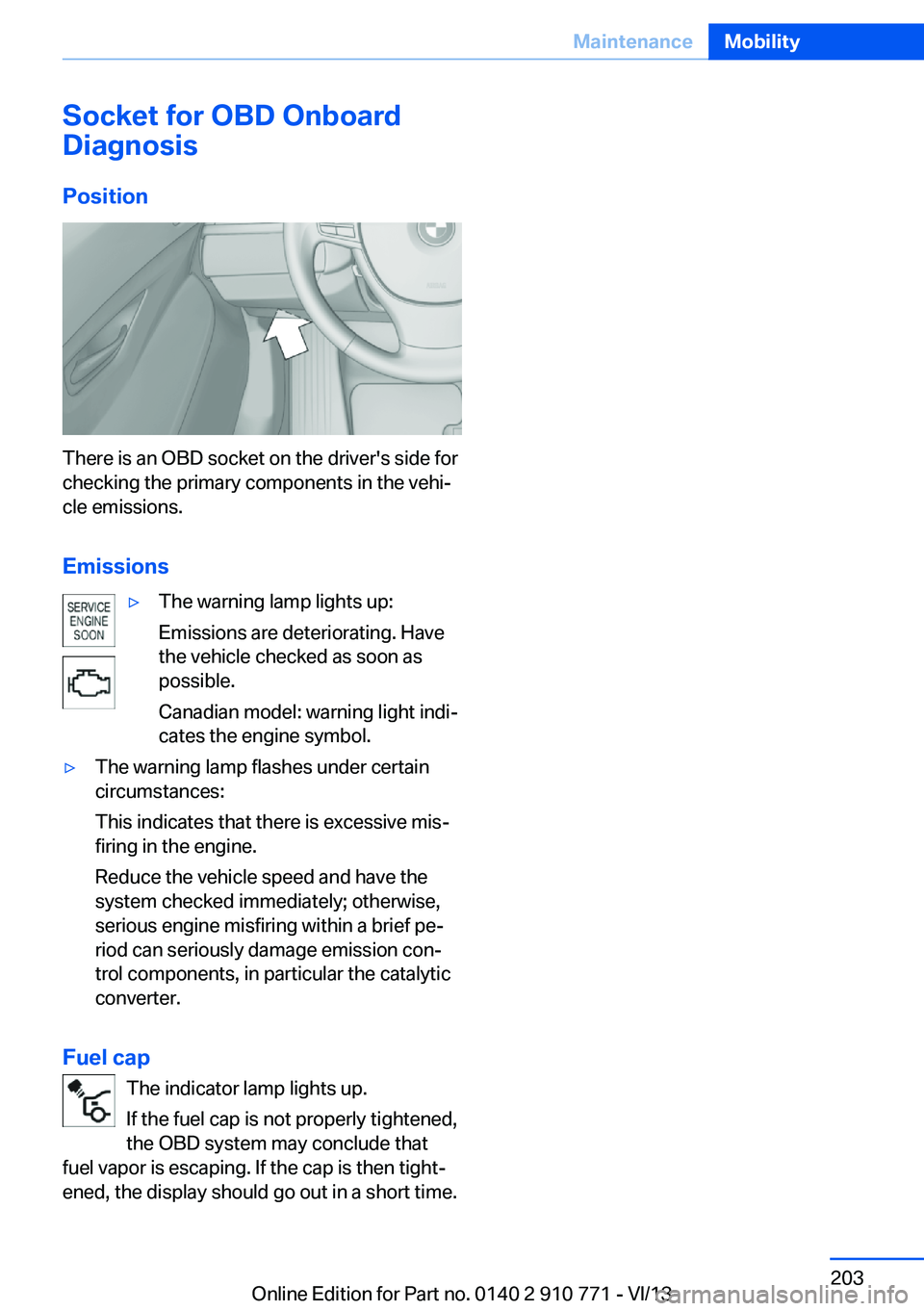
There is an OBD socket on the driver's side for
checking the primary components in the vehi‐
cle emissions.
Emissions
▷The warning lamp lights up:
Emissions are deteriorating. Have
the vehicle checked as soon as
possible.
Canadian model: warning light indi‐
cates the engine symbol.▷The warning lamp flashes under certain
circumstances:
This indicates that there is excessive mis‐
firing in the engine.
Reduce the vehicle speed and have the
system checked immediately; otherwise,
serious engine misfiring within a brief pe‐
riod can seriously damage emission con‐
trol components, in particular the catalytic
converter.
Fuel cap
The indicator lamp lights up.
If the fuel cap is not properly tightened,
the OBD system may conclude that
fuel vapor is escaping. If the cap is then tight‐
ened, the display should go out in a short time.
Seite 203MaintenanceMobility203
Online Edition for Part no. 0140 2 910 771 - VI/13
Page 208 of 237
Vehicle batteryMaintenance
The battery is maintenance-free, i.e., the elec‐ trolyte will last for the life of the battery.
Your service center will be glad to advise you
on questions regarding the battery.
Battery replacement Use approved vehicle batteries only
Only use vehicle batteries that have been
approved for your vehicle by the manufacturer; otherwise, the vehicle could be damaged and
systems or functions may not be fully availa‐
ble.◀
After a battery replacement, have the battery registered on the vehicle by your service cen‐
ter to ensure that all comfort functions are fully
available and that any Check Control mes‐
sages of these comfort functions are no longer
displayed.
Charging the battery
Note Do not plug chargers into the socket
Do not connect battery chargers to the
factory-installed sockets in the vehicle as this
may damage the battery.◀
General information
Make sure that the battery is always suffi‐
ciently charged to guarantee that the battery
remains usable for its full service life.
The battery may need to be charged in the fol‐
lowing cases:▷When making frequent short-distance
drives.▷If the vehicle is not used for prolonged pe‐
riods, longer than a month.Starting aid terminals
In the vehicle, only charge the battery via the
starting aid terminals, refer to page 212, in the
engine compartment with the engine off.
Power failure After a temporary power loss, some equipment
needs to be reinitialized.
Individual settings need to be reprogrammed:▷Seat, mirror, and steering wheel memory:
store the positions again.▷Time: update.▷Date: update.▷Radio station: saving new, see user's
manual for Navigation, Entertainment and
Communication.▷Navigation system: wait for the operability
of the navigation.
Disposing of old batteries
Have old batteries disposed of by your
service center or bring them to a recy‐
cling center.
Maintain the battery in an upright position for
transport and storage. Secure the battery so
that it does not tip over during transport.
Fuses Notes Replacing fuses
Never attempt to repair a blown fuse and
do not replace a defective fuse with a substi‐
tute of another color or amperage rating; this could lead to a circuit overload, ultimately re‐
sulting in a fire in the vehicle.◀
Plastic tweezers and information on the fuse
types and locations are stored in the fuse box
in the cargo area.
Seite 208MobilityReplacing components208
Online Edition for Part no. 0140 2 910 771 - VI/13
Page 227 of 237
tertainment and Communi‐
cation
BMW Homepage 6
BMW Internet page 6
BMW maintenance sys‐ tem 202
Bonus range, ECO PRO 175
Bottle holder, refer to Cu‐ pholder 164
Brake assistant 116
Brake assistant, adaptive 116
Brake discs, breaking in 168
Brake force display 113
Brake lamps, brake force dis‐ play 113
Brake lamps, bulb replace‐ ment 206
Brake lights, adaptive 113
Brake pads, breaking in 168
Braking, hints 169
Breakdown assis‐ tance 210, 211
Breaking in 168
Brightness of Control Dis‐ play 85
Bulb replacement, front 204
Bulb replacement, rear 206
Button, RES 127
Button, Start/Stop 58
Bypassing, refer to Jump- starting 212
C
California Proposition 65 Warning 7
Calling up mirror adjust‐ ment 39
Calling up seat adjust‐ ment 39
Calling up steering wheel ad‐ justment 39
Camera, backup camera 138
Camera, care 218
Camera, Side View 143
Camera, Top View 141 Can holder, refer to Cu‐
pholder 164
Car battery 208
Car care products 216
Care, displays 218
Care, vehicle 216
Cargo 171
Cargo area lid 36
Cargo area, storage compart‐ ments 164
Cargo, securing 172
Cargo straps, securing cargo 172
Car key, refer to Remote con‐ trol 30
Carpet, care 218
Car wash 215
Catalytic converter, refer to Hot exhaust system 168
CBS Condition Based Serv‐ ice 202
CD/Multimedia, see user's manual for Navigation, En‐
tertainment and Communi‐
cation
Center console 14
Center-Lock, see button for central locking 33
Central locking system 33
Central screen, refer to Con‐ trol Display 16
Changes, technical, refer to Safety 7
Changing parts 204
Changing wheels 207
Changing wheels/tires 193
Check Control 75
Checking the oil level elec‐ tronically 199
Children, seating position 54
Children, transporting safely 54
Child restraint fixing sys‐ tem 54
Child restraint fixing system LATCH 55 Child restraint fixing systems,
mounting 54
Child seat, mounting 54
Child seats 54
Chrome parts, care 217
Cigarette lighter 159
Cleaning, displays 218
Climate control 151
Climate control laminated tinted safety glass 169
Climate control wind‐ shield 169
Clock 78
Closing/opening from in‐ side 36
Closing/opening via door lock 35
Closing/opening with remote control 34
Clothes hooks 164
Coasting 177
Coasting with engine decou‐ pled, coasting 177
Coasting with idling en‐ gine 177
Collision warning with braking function 100
Collision warning with City Braking function 103
Combination switch, refer to Turn signals 64
Combination switch, refer to Wiper system 65
COMFORT+ program, Driving Dynamics Control 122
Comfort Access 37
COMFORT program, Driving Dynamics Control 122
Computer 82
Condensation on win‐ dows 152
Condensation under the vehi‐ cle 170
Condition Based Service CBS 202
Configure driving mode 122 Seite 227Everything from A to ZReference227
Online Edition for Part no. 0140 2 910 771 - VI/13
Page 231 of 237

Locking/unlocking from in‐side 36
Locking/unlocking via door lock 35
Locking/unlocking with re‐ mote control 34
Locking, automatic 39
Locking, central 33
Locking, settings 39
Locking via trunk lid 37
Low beams 86
Low beams, automatic, refer to High-beam Assistant 88
Lower back support 46
Lumbar support 46
M
Maintenance 202
Maintenance require‐ ments 202
Maintenance, service require‐ ments 79
Maintenance system, BMW 202
Malfunction displays, refer to Check Control 75
Manual air distribution 152
Manual air flow 152
Manual brake, refer to Parking brake 62
Manual mode, transmis‐ sion 69
Manual operation, backup camera 139
Manual operation, door lock 36
Manual operation, exterior mirrors 52
Manual operation, fuel filler flap 182
Manual operation, Park Dis‐ tance Control PDC 136
Manual operation, Side View 143 Manual operation, Top
View 141
Marking on approved tires 194
Marking, run-flat tires 195
Massage seat, front 47
Master key, refer to Remote control 30
Maximum cooling 153
Maximum speed, display 80
Maximum speed, winter tires 194
Measure, units of 85
Medical kit 211
Memory for seat, mirrors, steering wheel 50
Menu, EfficientDynamics 176
Menu in instrument clus‐ ter 82
Menus, operating, iDrive 16
Menus, refer to iDrive operat‐ ing concept 17
Messages, refer to Check Control 75
Microfilter 154
Minimum tread, tires 193
Mirror 51
Mirror memory 50
Mobile communication devi‐ ces in the vehicle 169
Modifications, technical, refer to Safety 7
Moisture in headlamp 205
Monitor, refer to Control Dis‐ play 16
Mounting of child restraint fix‐ ing systems 54
Multifunctional instrument display 72
Multifunction steering wheel, buttons 12 N
Navigation, see user's manual for Navigation, Entertain‐
ment and Communication
Neck restraints, front, refer to Head restraints 49
Neutral cleaner, see wheel cleaner 217
New wheels and tires 193
Night Vision with pedestrian detection 107
No Passing Information 80
Nylon rope for tow-starting/ towing 214
O OBD Onboard Diagnosis 203
OBD, see OBD Onboard Di‐ agnosis 203
Obstacle marking, rearview camera 140
Octane rating, refer to Gaso‐ line quality 184
Odometer 78
Office, see user's manual for Navigation, Entertainment
and Communication
Oil 199
Oil, adding 200
Oil additives 200
Oil change 200
Oil change interval, service requirements 79
Oil filler neck 200
Oil types, alternative 200
Oil types, approved 200
Old batteries, disposal 208
Onboard monitor, refer to Control Display 16
Onboard vehicle tool kit 204
Opening and closing 30
Opening and closing, from in‐ side 36 Seite 231Everything from A to ZReference231
Online Edition for Part no. 0140 2 910 771 - VI/13