2014 BMW 640I XDRIVE GRAN COUPE tires
[x] Cancel search: tiresPage 210 of 253
The support of the sidewall allows the tire to
remain drivable to a restricted degree in the
event of a tire inflation pressure loss.
Follow the instructions for continued driving
with a flat tire.
Changing run-flat tires
For your own safety, only use run-flat tires. No
spare tire is available in the case of a flat tire.
Your service center will be glad to advise you.
Snow chains
Fine-link snow chains
Only certain types of fine-link snow chains
have been tested by the manufacturer of the
vehicle, classified as road-safe and approved.
Information about the approved snow chains
are available from the service center.
Use
Use only in pairs on the rear wheels, equipped
with the tires of the following size:▷225/55 R 17.▷245/45 R 18.▷245/40 R 19.
Follow the snow chain manufacturer's instruc‐
tions.
Make sure that the snow chains are always
sufficiently tight. Retighten as needed accord‐
ing to the chain manufacturer's instructions.
Do not initialize the Flat Tire Monitor after
mounting snow chains, as doing so may result
in incorrect readings.
Do not initialize the Tire Pressure Monitor after
mounting snow chains, as doing so may result
in incorrect readings.
When driving with snow chains, briefly activate
Dynamic Traction Control if needed.
Maximum speed with snow chains
Do not exceed a speed of 30 mph/50 km/h
when using snow chains.
Snow chain detection
The concept
When using snow chains, settings should be
made via the iDrive for the snow chains being
applied.
The snow chain detection system supports
you by automatically showing the detected
state on the Control Display.
When snow chains are in use, the rear axle
steering of the Integral Active Steering is deac‐
tivated automatically.
At speeds above the maximum permitted
speed with snow chains of 30 mph/50 km/h,
the rear axle steering is activated again auto‐
matically.
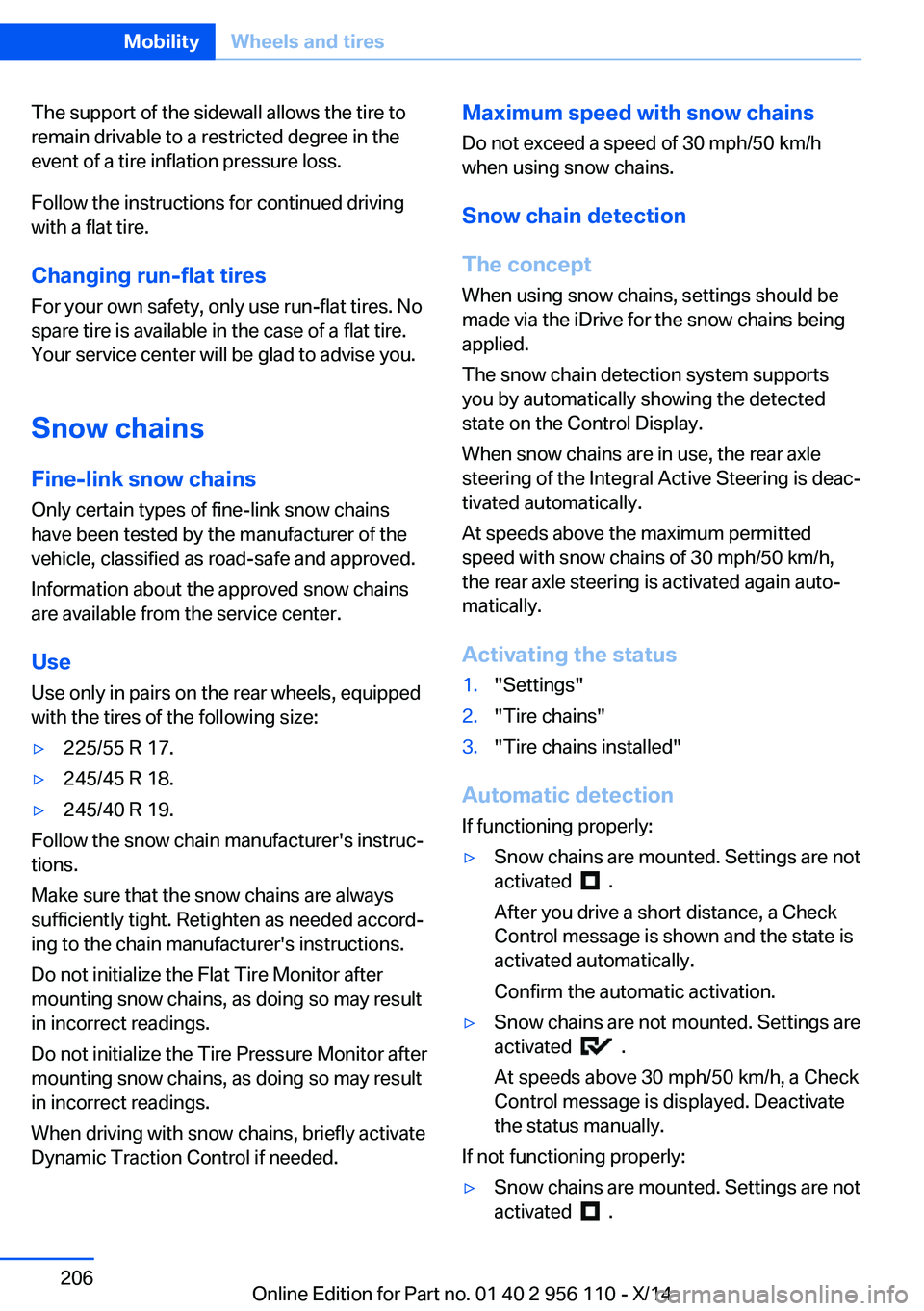
Activating the status1."Settings"2."Tire chains"3."Tire chains installed"
Automatic detection If functioning properly:
▷Snow chains are mounted. Settings are not
activated
.
After you drive a short distance, a Check
Control message is shown and the state is
activated automatically.
Confirm the automatic activation.
▷Snow chains are not mounted. Settings are
activated
.
At speeds above 30 mph/50 km/h, a Check
Control message is displayed. Deactivate
the status manually.
If not functioning properly:
▷Snow chains are mounted. Settings are not
activated
.
Seite 206MobilityWheels and tires206
Online Edition for Part no. 01 40 2 956 110 - X/14
Page 211 of 253
A Check Control message is not displayed.
The automatic detection system is mal‐
functioning. Activate the status manually.
Activating/deactivating rear axle
steering
If the status indicating that snow chains are in
use is activated, the rear axle steering is deac‐
tivated automatically.
At speeds above 30 mph/50 km/h, the rear axle
steering is activated again, even though snow
chains are in use.
Seite 207Wheels and tiresMobility207
Online Edition for Part no. 01 40 2 956 110 - X/14
Page 224 of 253
Contact your service center in the event of a
malfunction.
Lights in the trunk lid
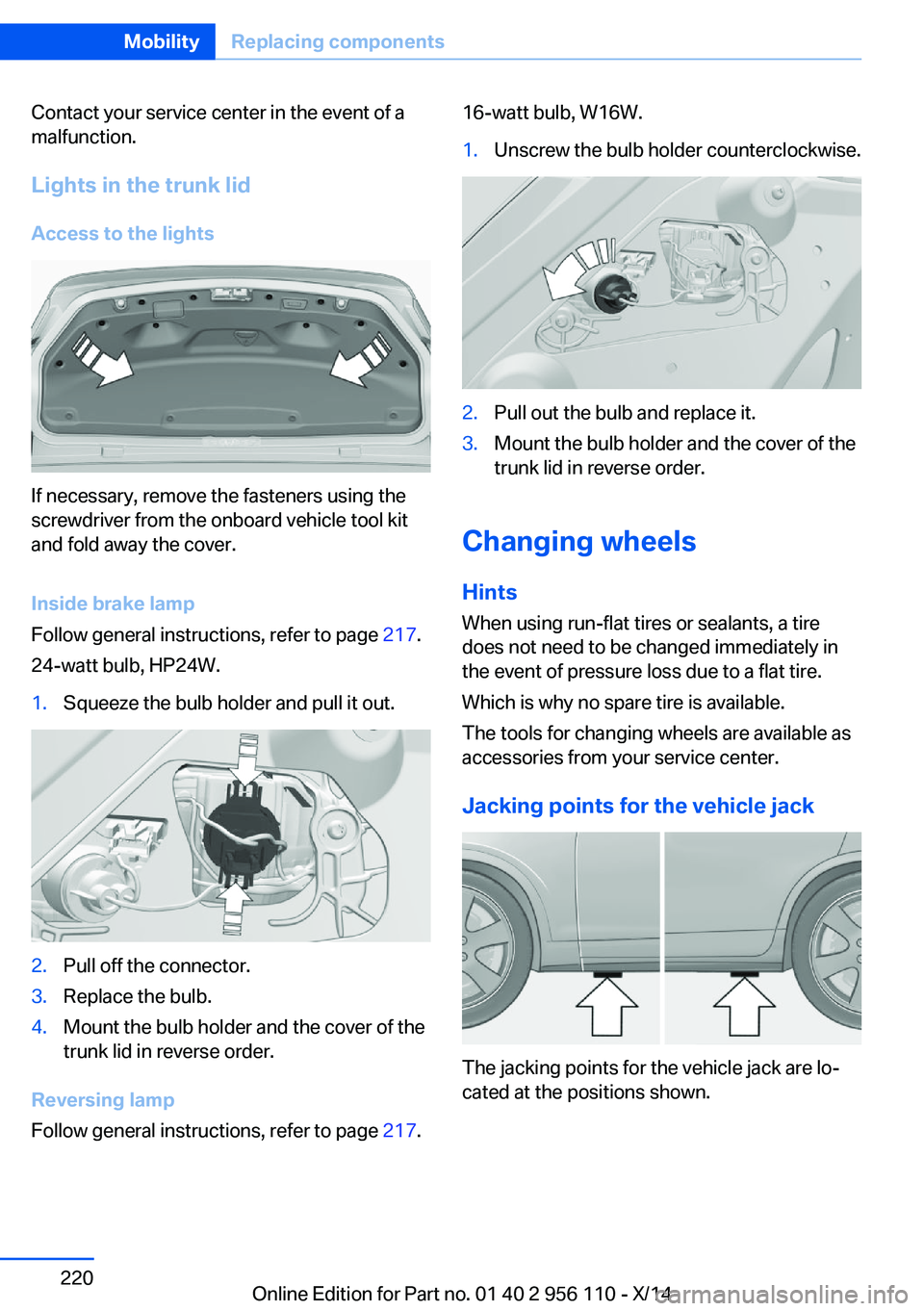
Access to the lights
If necessary, remove the fasteners using the
screwdriver from the onboard vehicle tool kit
and fold away the cover.
Inside brake lamp
Follow general instructions, refer to page 217.
24-watt bulb, HP24W.
1.Squeeze the bulb holder and pull it out.2.Pull off the connector.3.Replace the bulb.4.Mount the bulb holder and the cover of the
trunk lid in reverse order.
Reversing lamp
Follow general instructions, refer to page 217.
16-watt bulb, W16W.1.Unscrew the bulb holder counterclockwise.2.Pull out the bulb and replace it.3.Mount the bulb holder and the cover of the
trunk lid in reverse order.
Changing wheels
Hints
When using run-flat tires or sealants, a tire
does not need to be changed immediately in
the event of pressure loss due to a flat tire.
Which is why no spare tire is available.
The tools for changing wheels are available as
accessories from your service center.
Jacking points for the vehicle jack
The jacking points for the vehicle jack are lo‐
cated at the positions shown.
Seite 220MobilityReplacing components220
Online Edition for Part no. 01 40 2 956 110 - X/14
Page 232 of 253
CareVehicle features and optionsThis chapter describes all standard, country-
specific and optional features offered with the
series. It also describes features that are not
necessarily available in your car, e. g., due to
the selected options or country versions. This
also applies to safety-related functions and
systems.
Car washes
General information
Regularly remove foreign objects such as
leaves in the area below the windshield when
the hood is raised.
Wash your vehicle frequently, particularly in
winter. Intense soiling and road salt can dam‐
age the vehicle.
Hints Steam jets or high-pressure washers
When using steam jets or high-pressure
washers, hold them a sufficient distance away
and use a maximum temperature of
140 ℉/60 ℃.
If the vehicle has a glass sunroof, ensure that a
distance of at least 31.5 inches/80 cm is main‐
tained. Holding them too close or using exces‐
sively high pressures or temperatures can
cause damage or preliminary damage that may
then lead to long-term damage.
Follow the user's manual for the high-pressure
washer.◀
Cleaning sensors/cameras with high-
pressure washers
When using high-pressure washers, do not
spray the exterior sensors and cameras, e.g.,
Park Distance Control, for extended periods oftime and only from a distance of at least
12 in/30 cm.◀
Automatic car washes
Hints Do not use high pressure washing sys‐
tems
With washing systems operating at high pres‐
sures and nozzle positions close to the win‐
dows, drops of water can penetrate.◀
Note the following:▷Give preference to cloth car washes or
those that use soft brushes in order to
avoid paint damage.▷Make sure that the wheels and tires are not
damaged by the transport mechanisms.▷Fold in the exterior mirrors; otherwise, they
may be damaged, depending on the width
of the vehicle.▷Deactivate the rain sensor, refer to
page 70, to avoid unintentional wiper acti‐
vation.▷In some cases, an unintentional alarm can
be triggered by the interior motion sensor
of the alarm system. Follow the instruc‐
tions on avoiding an unintentional alarm,
refer to page 45.
Guide rails in car washes
Avoid car washes with guide rails higher
than 4 in/10 cm; otherwise, the vehicle body
could be damaged.◀
Before driving into a car wash In order to ensure that the vehicle can roll in a
car wash, take the following steps:
1.Drive into the car wash.2.Engage selector lever position N.Seite 228MobilityCare228
Online Edition for Part no. 01 40 2 956 110 - X/14
Page 238 of 253
Technical dataVehicle features and options
This chapter describes all standard, country-
specific and optional features offered with the
series. It also describes features that are notnecessarily available in your car, e. g., due to
the selected options or country versions. This
also applies to safety-related functions and
systems.
Note
The technical data and specifications in this
Owner's Manual are used as guidance values.
The vehicle-specific data can deviate from this,
for example, due to the selected special equip‐
ment, country version or country-specific
measurement method. Detailed values can befound in the approval documents, on informa‐
tion signs on the vehicle or can be obtained
from the service center.
The information in the vehicle documents al‐
ways has priority.
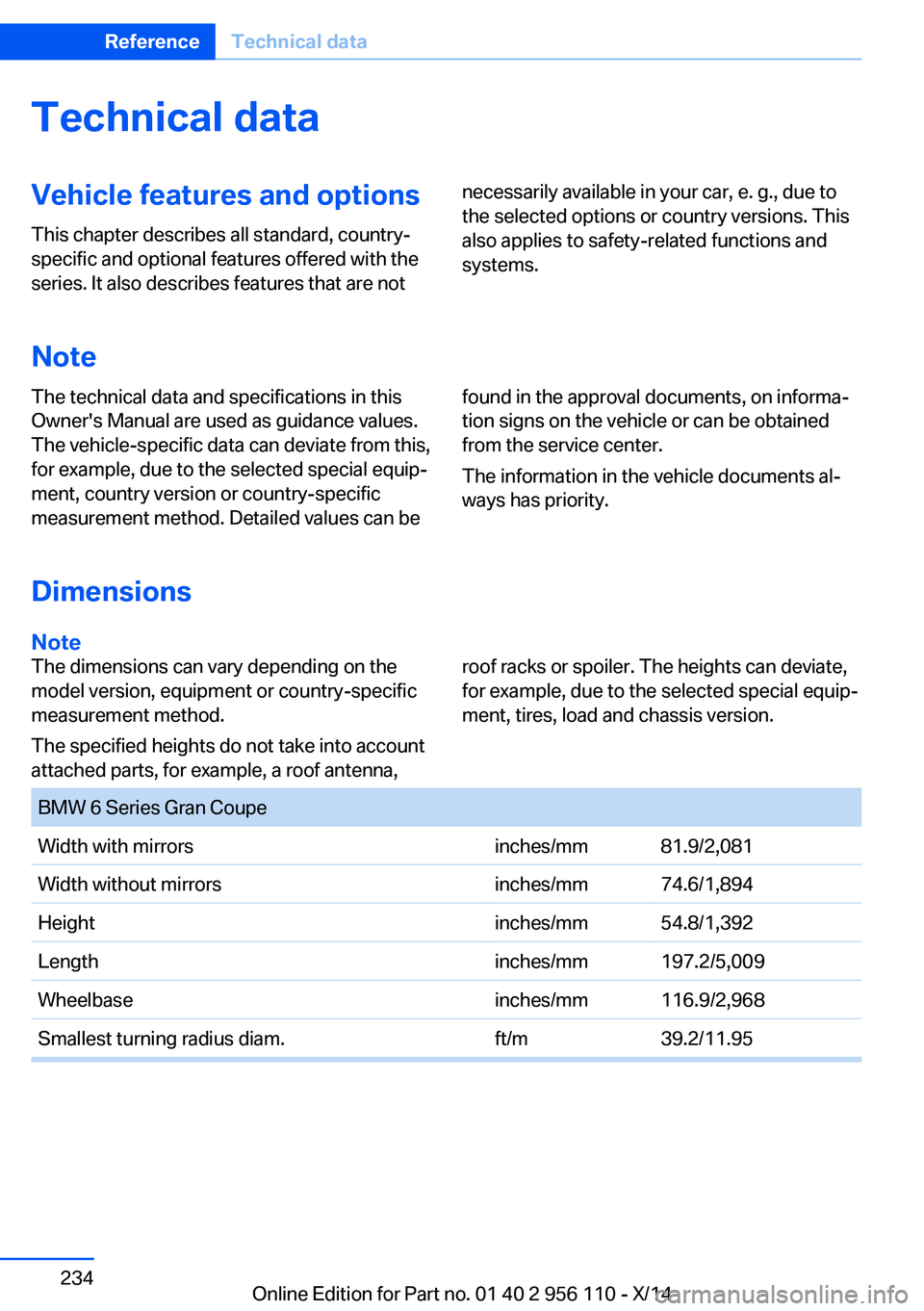
Dimensions
Note
The dimensions can vary depending on the
model version, equipment or country-specific
measurement method.
The specified heights do not take into account
attached parts, for example, a roof antenna,roof racks or spoiler. The heights can deviate,
for example, due to the selected special equip‐
ment, tires, load and chassis version. BMW 6 Series Gran CoupeWidth with mirrorsinches/mm81.9/2,081 Width without mirrorsinches/mm74.6/1,894Heightinches/mm54.8/1,392Lengthinches/mm197.2/5,009Wheelbaseinches/mm116.9/2,968Smallest turning radius diam.ft/m39.2/11.95Seite 234ReferenceTechnical data234
Online Edition for Part no. 01 40 2 956 110 - X/14
Page 242 of 253
Everything from A to Z
IndexA ABS, Antilock Brake Sys‐ tem 128
ACC, Active Cruise Control with Stop & Go 136
Acceleration Assistant, refer to Launch Control 75
Activated-charcoal filter 159
Active Blind Spot Detec‐ tion 123
Active Cruise Control with Stop & Go, ACC 136
Active Protection 125
Active seat, front 51
Active seat ventilation, front 52
Active Steering, integral 132
Adaptive brake assistant 128
Adaptive brake lights, refer to Brake force display 125
Adaptive drive 131
Adaptive Light Control 97
Additives, oil 211
Adjusting, steering wheel 58
Adjustments, seats/head re‐ straints 49
After washing vehicle 229
Airbags 101
Airbags, indicator/warning light 102
Air circulation, refer to Recir‐ culated-air mode 158
Air, dehumidifying, refer to Cooling function 158
Air distribution, manual 157
Air flow, automatic climate control 158
Air outlets, see ventila‐ tion 161
Air pressure, tires 196 Alarm system 43
Alarm, unintentional 45
All around the center con‐ sole 16
All around the interior rear‐ view mirror 17
All around the steering wheel 14
All-season tires, refer to Win‐ ter tires 205
All-wheel-drive 130
Alternating-code hand-held transmitter 166
Alternative oil types 212
Ambient light 99
Animal detection, see Night Vision 118
Antifreeze, washer fluid 71
Antilock Brake System, ABS 128
Anti-slip control, refer to DSC 128
Approved axle load 235
Approved engine oils 212
Armrest, refer to Front center armrest 173
Armrest, refer to Rear center armrest 173
Arrival time 91
Ashtray 167
Ashtray, rear 168
Assistance, Roadside Assis‐ tance 224
Assistance when driving off 128
Attentiveness assistant 125
AUTO H button 67
AUTO H button, refer to Au‐ tomatic Hold 67
AUTO intensity 157
Automatic car wash 228 Automatic Cruise Control
with Stop & Go 136
Automatic Curb Monitor 56
Automatic deactivation, front- seat passenger airbags 103
Automatic headlight con‐ trol 97
Automatic Hold 67
Automatic locking 43
Automatic recirculated-air control 158
Automatic Soft Closing, doors 40
Automatic transmission, see Steptronic transmission 72
AUTO program, automatic cli‐ mate control 157
AUTO program, intensity 157
Auto Start/Stop function 65
Average fuel consumption 90
Average speed 90
Axle loads, weights 235
B Backrest curvature, refer to Lumbar support 50
Backrest, seats 49
Backrest, width 51
Band-aids, refer to First aid kit 224
Bar for tow-starting/ towing 226
Battery replacement, remote control for parked-car heat‐
ing/ventilation 163
Battery replacement, vehicle battery 221
Battery replacement, vehicle remote control 34
Battery, vehicle 221 Seite 238ReferenceEverything from A to Z238
Online Edition for Part no. 01 40 2 956 110 - X/14
Page 243 of 253
Belts, safety belts 52
Beverage holder, cu‐ pholder 174
Blinds, sun protection 46
BMW Assist, see user's manual for Navigation, En‐
tertainment and Communi‐
cation
BMW maintenance sys‐ tem 215
Bonus range, ECO PRO 185
Bottle holder, refer to Cu‐ pholder 174
Brake assistant 128
Brake assistant, adaptive 128
Brake discs, break-in 178
Brake force display 125
Brake lights, adaptive 125
Brake lights, brake force dis‐ play 125
Brake lights, bulb replace‐ ment 219
Brake pads, break-in 178
Braking, hints 179
Breakdown assis‐ tance 223, 224
Break-in 178
Brightness of Control Dis‐ play 93
Bulb replacement, front 217
Bulb replacement, rear 219
Button, RES 139
Button, Start/Stop 63
Bypassing, refer to Jump- starting 224
C
California Proposition 65 Warning 7
Calling up mirror adjust‐ ment 43
Calling up seat adjust‐ ment 43
Calling up steering wheel ad‐ justment 43 Camera, care 231
Camera, rearview cam‐ era 148
Camera, Side View 150
Camera, Top View 152
Can holder, refer to Cu‐ pholder 174
Car battery 221
Car care products 229
Care, displays 231
Care, vehicle 229
Cargo 181
Cargo area, enlarging 169
Cargo area, storage compart‐ ments 175
Cargo, securing 182
Cargo straps, securing cargo 182
Car key, refer to Remote con‐ trol 34
Carpet, care 231
Car wash 228
Catalytic converter, refer to Hot exhaust system 178
CBS Condition Based Serv‐ ice 215
CD/Multimedia, see user's manual for Navigation, En‐
tertainment and Communi‐
cation
Center console 16
Central locking system 39
Central screen, refer to Con‐ trol Display 18
Changes, technical, refer to Safety 7
Changing parts 217
Changing wheels 220
Changing wheels/tires 204
Chassis number, see vehicle identification number 9
Check Control 81
Checking the engine oil level electronically 210
Checking the oil level elec‐ tronically 210 Children, seating position 59
Children, transporting safely 59
Child restraint fixing sys‐ tem 59
Child restraint fixing system LATCH 60
Child restraint fixing systems, mounting 59
Child safety locks 62
Child seat, mounting 59
Child seats 59
Chrome parts, care 230
Cigarette lighter 167
Cleaning displays 231
Climate control 157
Climate control laminated tinted safety glass 179
Climate control wind‐ shield 179
Clock 86
Closing/opening via door lock 39
Closing/opening with remote control 37
Clothes hooks 174
Coasting 187
Coasting with engine decou‐ pled, coasting 187
Coasting with idling en‐ gine 187
Combination reel, refer to Turn signals 69
Combination reel, refer to Wiper system 70
COMFORT+ program, Driving Dynamics Control 134
Comfort Access 41
COMFORT program, Driving Dynamics Control 134
Computer 90
Condensation on win‐ dows 158
Condensation under the vehi‐ cle 180 Seite 239Everything from A to ZReference239
Online Edition for Part no. 01 40 2 956 110 - X/14
Page 244 of 253
Condition Based ServiceCBS 215
Configure driving mode 135
Confirmation signal 43
ConnectedDrive, see user's manual for Navigation, En‐
tertainment and Communi‐
cation
ConnectedDrive Services
Continued driving with a flat tire 106 , 109
Control Display 18
Control Display, settings 92
Controller 18
Control systems, driving sta‐ bility 128
Convenient opening with the remote control 37
Coolant 213
Coolant level 213
Coolant temperature 85
Cooling function 158
Cooling, maximum 158
Cooling system 213
Corrosion on brake discs 180
Cosmetic mirror 167
Cruise control 143
Cruise control, active with Stop & Go 136
Cruise Control, refer to Active Cruise Control 136
Cruising range 86
Cupholder 174
Current fuel consumption 86
D
Damage, tires 203
Damping control, dy‐ namic 131
Data, technical 234
Date 86
Daytime running lights 97
Defrosting, refer to Windows, defrosting 158
Dehumidifying, air 158 Deleting personal data 24
Deletion of personal data 24
Destination distance 91
Digital clock 86
Dimensions 234
Dimmable exterior mirrors 57
Dimmable interior rearview mirror 57
Direction indicator, refer to Turn signals 69
Display, electronic, instru‐ ment cluster 77
Display in windshield 93
Display lighting, refer to In‐ strument lighting 99
Displays 78
Displays, cleaning 231
Disposal, coolant 214
Disposal, vehicle battery 221
Distance control, refer to PDC 145
Distance to destination 91
Divided screen view, split screen 23
Door lock 39
Door lock, refer to Remote control 34
Doors, Automatic Soft Clos‐ ing 40
Downhill control 130
Drive-off assistant 128
Drive-off assistant, refer to DSC 128
Driver assistance, refer to In‐ telligent Safety 109
Driving Assistant, refer to In‐ telligent Safety 109
Driving Dynamics Con‐ trol 132
Driving instructions, break- in 178
Driving mode 132
Driving notes, general 178
Driving stability control sys‐ tems 128
Driving tips 178 DSC Dynamic Stability Con‐
trol 128
DTC Dynamic Traction Con‐ trol 129
Dynamic Damping Con‐ trol 131
Dynamic Drive 131
Dynamic Stability Control DSC 128
Dynamic Traction Control DTC 129
E
ECO PRO 184
ECO PRO, bonus range 185
ECO PRO display 184
ECO PRO displays 79
ECO PRO driving mode 184
ECO PRO mode 184
ECO PRO Tip - driving in‐ struction 186
EfficientDynamics 186
Electronic displays, instru‐ ment cluster 77
Electronic oil measure‐ ment 210
Electronic Stability Program ESP, refer to DSC 128
Emergency detection, remote control 35
Emergency release, fuel filler flap 192
Emergency Request 223
Emergency service, refer to Roadside Assistance 224
Emergency start function, en‐ gine start 35
Emergency unlocking, trans‐ mission lock 75
Emergency unlocking, trunk lid 41
Energy Control 86
Energy recovery 87
Engine, automatic reel-off 65 Seite 240ReferenceEverything from A to Z240
Online Edition for Part no. 01 40 2 956 110 - X/14