2014 BMW 535I auto locking
[x] Cancel search: auto lockingPage 60 of 267

HintsManufacturer's information for child re‐
straint fixing systems
To select, mount and use child restraint fixing
systems, observe the information provided by
the system manufacturer; otherwise, the pro‐
tective effect can be impaired.◀
Ensuring the stability of the child seat
When installing child restraint fixing sys‐
tems, make sure that the child seat is securely
fastened to the backrest of the seat. The angle
of the backrest may need to be adjusted and,
where necessary, the headrest height may also need to be adjusted, or if possible removed.
Make sure that all backrests are securely
locked. Otherwise, the stability of the child
seat is limited, and there is an increased risk of
injury because of unexpected movement of the
rear seat backrest.◀
On the front passenger seat
Deactivating airbags
After installing a child restraint fixing system in
the front passenger seat, make sure that the
front, knee and side airbags on the front pas‐
senger side are deactivated.
Deactivate the front passenger airbags auto‐
matically, refer to page 105.
Deactivating the front passenger airbags
If a child restraint fixing system is used in
the front passenger seat, the front passenger
airbags must be deactivated; otherwise, there
is an increased risk of injury to the child when
the airbags are triggered, even with a child re‐
straint fixing system.◀
Seat position and height
Before installing a child restraint fixing system,
move the front passenger seat as far back as
possible and bring it up to medium height to
obtain the best possible position for the beltand to offer optimal protection in the event of
an accident.
If the upper fixing point of the safety belt is lo‐
cated before the belt guide of the child seat,
move the passenger seat carefully forward un‐
til the best possible belt guide position is
reached.
Child seat security
The rear safety belts and the front passenger
safety belt can be locked against pulling out for
mounting the child restraint fixing systems.
Locking the safety belt
1.Pull out the belt webbing completely.2.Secure the child restraint fixing system
with the belt.3.Allow the belt webbing to be pulled in and
pull it taut against the child restraint fixing
system. The safety belt is locked.
Unlocking the safety belt
1.Unbuckle the belt buckle.2.Remove the child restraint fixing system.3.Allow the belt webbing to be pulled in com‐
pletely.
LATCH child restraint fixing
system
LATCH: Lower Anchors and Tether for CHil‐dren.
Seite 60ControlsTransporting children safely60
Online Edition for Part no. 01 40 2 928 000 - II/14
Page 63 of 267

DrivingVehicle equipment
All standard, country-specific and optional
equipment that is offered in the model series is
described in this chapter. Therefore, equip‐
ment is also described that is not available in a
vehicle, e. g., because of the selected optional
equipment or country variant. This also applies
for safety-related functions and systems.
Start/Stop button The concept Pressing the Start/Stop button
switches the ignition on or off
and starts the engine.
Automatic transmission: The
engine starts if the brake is de‐
pressed while pressing the Start/Stop button.
Manual transmission: the engine starts if the
clutch pedal is depressed when the Start/Stop
button is pressed.
Ignition onAutomatic transmission: Press the Start/Stop
button but do not depress the brake.
Manual-shift transmission: press the Start/
Stop button, and do not press on the clutch
pedal at the same time.
All vehicle systems are ready for operation.
Most of the indicator and warning lamps in the
instrument cluster light up for varying lengths
of time.
To save battery power when the engine is off,
switch off the ignition and any unnecessary
electronic systems/power consumers.Note
If the engine is switched off and the ignition is
switched on, the system automatically
switches to the radio ready state when the
door is opened if the lights are switched off or
the daytime running lights are switched on.
Ignition off
Automatic transmission: Press the Start/Stop
button again, but do not depress the brake.
Manual-shift transmission: press the Start/
Stop button again, and do not press on the
clutch pedal at the same time.
All indicator lamps in the instrument cluster go
out.
To save battery power when the engine is off,
switch off the ignition and any unnecessary
electronic systems/power consumers.
P when the ignition is switched off
P is engaged automatically when the ig‐
nition is switched off. When in an automatic car
wash, for example, ensure that the ignition is
not switched off accidentally.◀
The ignition automatically cuts off while the
vehicle is stationary and the engine is stopped:▷When locking the vehicle, and when the
low beams are activated.▷Shortly before the battery is discharged
completely, so that the engine can still be
started. This function is only available
when the low beams are switched off.▷When opening or closing the driver door, if
the driver's seat belt is unbuckled and the
low beams are switched off.▷While the driver's seat belt is unbuckled, if
the driver's door is open and the low
beams are switched off.▷The low beams switch to parking lamps af‐
ter approx. 15 minutes of no use.Seite 63DrivingControls63
Online Edition for Part no. 01 40 2 928 000 - II/14
Page 64 of 267

When the ignition is switched off automatically
by opening or closing the driver's door, un‐
buckling the driver's seat belt or by the auto‐
matic switching of the low beams to parking
lamps, the radio ready state remains active.
Radio ready state Activate radio ready state:▷When the engine is running: press the
Start/Stop button.
Some electronic systems/power consumers
remain ready for operation.
The radio ready state switches off automati‐
cally:
▷After approx. 8 minutes.▷When the vehicle is locked using the cen‐
tral locking system.▷Shortly before the battery is discharged
completely, so that the engine can still be
started.
Starting the engine
Hints Enclosed areas
Do not let the engine run in enclosed
areas, since breathing in exhaust fumes may
lead to loss of consciousness and death. The
exhaust gases contain carbon monoxide, an
odorless and colorless, but highly toxic gas.◀
Unattended vehicle
Do not leave the vehicle unattended with
the engine running; doing so poses a risk of
danger.
Before leaving the vehicle with the engine run‐
ning, set the parking brake and place the trans‐
mission in selector lever position P or neutral
to prevent the vehicle from moving.◀
Repeated starting in quick succession
Avoid repeated unsuccessful attempts to
start the vehicle or starting the vehicle several
times in quick succession. Otherwise, the fuel
is not burned or is inadequately burned, posing
a risk of overheating and damage to the cata‐
lytic converter.◀
Do not wait for the engine to warm-up while
the vehicle remains stationary. Start driving at
moderate engine speeds.
Diesel engine
If the engine is cold and temperatures are be‐
low approx. 32 ℉/0 ℃, the start process may
be delayed somewhat due to automatic pre‐
heating.
A Check Control message is displayed.
Automatic transmission
Starting the engine1.Depress the brake pedal.2.Press the Start/Stop button.
The ignition is activated automatically for a
certain time and is stopped as soon as the en‐
gine starts.
Manual transmission
Starting the engine
1.Depress the brake pedal.2.Press on the clutch pedal and shift to neu‐
tral.3.Press the Start/Stop button.
The ignition is activated automatically for a
certain time and is stopped as soon as the en‐
gine starts.
Seite 64ControlsDriving64
Online Edition for Part no. 01 40 2 928 000 - II/14
Page 102 of 267
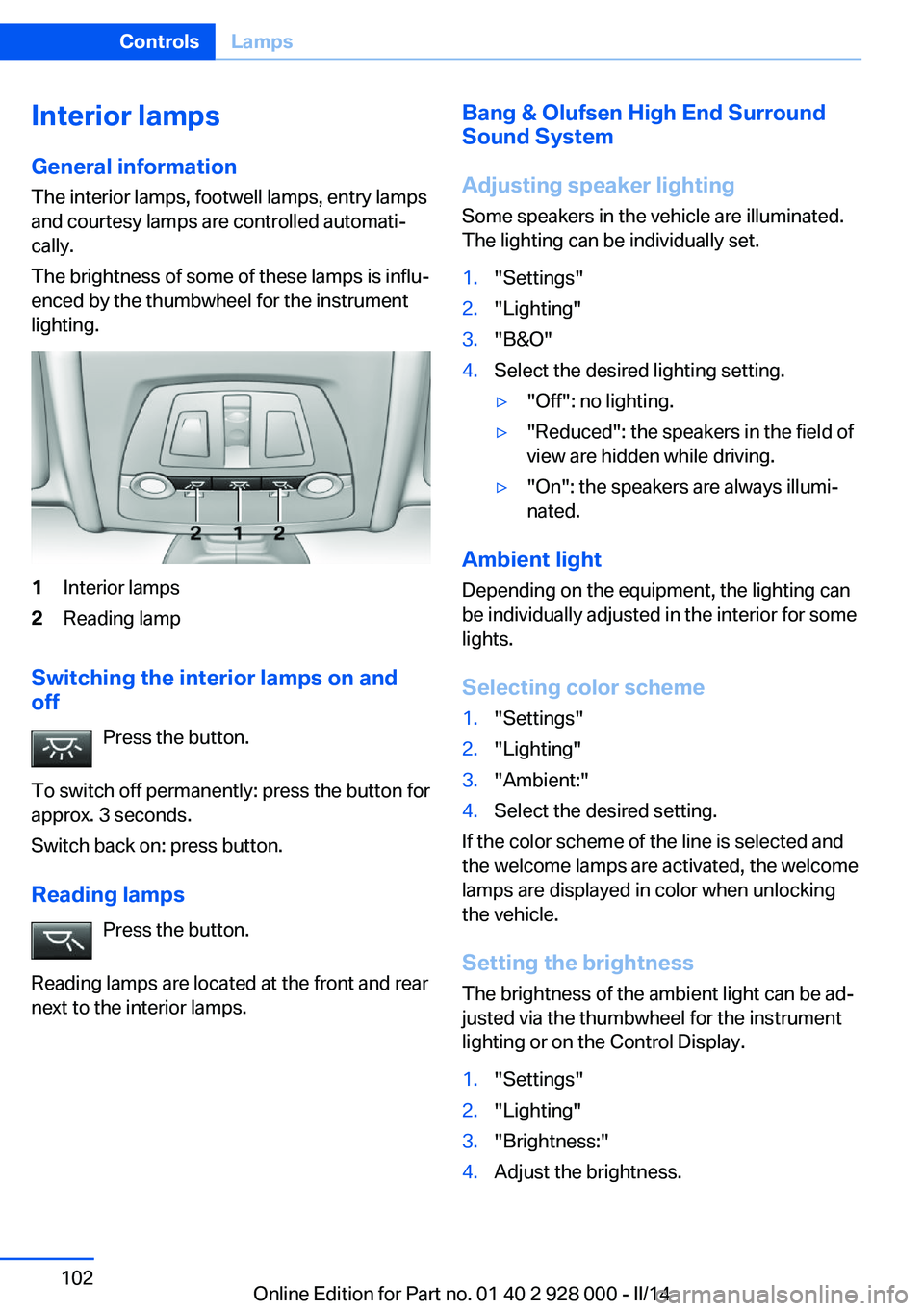
Interior lamps
General information
The interior lamps, footwell lamps, entry lamps
and courtesy lamps are controlled automati‐
cally.
The brightness of some of these lamps is influ‐
enced by the thumbwheel for the instrument
lighting.1Interior lamps2Reading lamp
Switching the interior lamps on and
off
Press the button.
To switch off permanently: press the button for
approx. 3 seconds.
Switch back on: press button.
Reading lamps Press the button.
Reading lamps are located at the front and rear
next to the interior lamps.
Bang & Olufsen High End Surround
Sound System
Adjusting speaker lighting
Some speakers in the vehicle are illuminated.
The lighting can be individually set.1."Settings"2."Lighting"3."B&O"4.Select the desired lighting setting.▷"Off": no lighting.▷"Reduced": the speakers in the field of
view are hidden while driving.▷"On": the speakers are always illumi‐
nated.
Ambient light
Depending on the equipment, the lighting can
be individually adjusted in the interior for some
lights.
Selecting color scheme
1."Settings"2."Lighting"3."Ambient:"4.Select the desired setting.
If the color scheme of the line is selected and
the welcome lamps are activated, the welcome
lamps are displayed in color when unlocking
the vehicle.
Setting the brightness
The brightness of the ambient light can be ad‐
justed via the thumbwheel for the instrument
lighting or on the Control Display.
1."Settings"2."Lighting"3."Brightness:"4.Adjust the brightness.Seite 102ControlsLamps102
Online Edition for Part no. 01 40 2 928 000 - II/14
Page 129 of 267

Driving stability control systemsVehicle equipmentAll standard, country-specific and optional
equipment that is offered in the model series is
described in this chapter. Therefore, equip‐
ment is also described that is not available in a
vehicle, e. g., because of the selected optional
equipment or country variant. This also applies
for safety-related functions and systems.
Antilock Brake System ABS ABS prevents locking of the wheels during
braking.
The vehicle remains steerable even during full
brake applications, thus increasing active
safety.
ABS is operational every time you start the en‐
gine.
Brake assistant
When you apply the brakes rapidly, this system
automatically produces the maximum braking
force boost. This then reduces braking dis‐ tance to a minimum during full braking. This
system utilizes all of the benefits provided by ABS.
Do not reduce the pressure on the brake pedal
for the duration of the full braking.
When equipped with Driving Assistant Plus or
with Active Cruise Control with Stop & Go
function, ACC is supported by the braking in‐
tervention if there is a possible risk of collision.
To do this, the braking force is automatically increased if the braking pressure is insufficient
when the brakes are applied.Adaptive brake assistant
In combination with the Active Cruise Control,
this system ensures that the brakes respond
even more rapidly when braking in critical sit‐
uations.
Drive-off assistant
This system supports driving away on gradi‐
ents. The parking brake is not required.1.Hold the vehicle in place with the foot
brake.2.Release the foot brake and drive away
without delay.
After the foot brake is released, the vehicle is
held in place for approx. 2 seconds.
Depending on the vehicle load or when a trailer
is being used, the vehicle may roll back
slightly.
Driving off without delay
After releasing the foot brake, start driv‐
ing without delay, since the drive-off assistant
will not hold the vehicle in place for more than
approx. 2 seconds and the vehicle will begin
rolling back.◀
DSC Dynamic Stability
Control
The concept DSC prevents traction loss in the driving
wheels when driving away and accelerating.
DSC also recognizes unstable vehicle condi‐
tions, such as fishtailing or nose-diving. Sub‐
ject to physical limits, DSC helps to keep the
vehicle on a steady course by reducing engine
Seite 129Driving stability control systemsControls129
Online Edition for Part no. 01 40 2 928 000 - II/14
Page 256 of 267

Everything from A to Z
IndexA ABS, Antilock Brake Sys‐ tem 129
ACC, Active Cruise Control with Stop & Go 136
Acceleration Assistant, refer to Launch Control 76
Accessories and parts 7
Activated-charcoal filter 166
Active Blind Spot Detec‐ tion 124
Active Cruise Control with Stop & Go, ACC 136
Active Protection 126
Active seat, front 50
Active seat ventilation, front 51
Active Steering, integral 133
Adaptive brake assistant 129
Adaptive brake lights, refer to Brake force display 126
Adaptive drive 132
Adaptive light control 99
Additives, oil 227
Adjustments, seats/head re‐ straints 47
After washing vehicle 247
Airbags 103
Airbags, indicator/warning light 104
Air circulation, refer to Recir‐ culated-air mode 165
Air, dehumidifying, refer to Cooling function 165
Air distribution, manual 164
Air flow, automatic climate control 164
Air pressure, tires 209
Air vents, refer to Ventila‐ tion 166 Alarm system 41
Alarm, unintentional 43
All around the center con‐ sole 14
All around the headliner 15
All around the steering wheel 12
All-season tires, refer to Win‐ ter tires 222
All-wheel-drive 131
Alternating-code hand-held transmitter 171
Alternative oil types 228
Ambient light 102
Animal detection, see Night Vision 120
Antifreeze, washer fluid 73
Antilock Brake System, ABS 129
Anti-slip control, refer to DSC 129
Approved axle load 252
Approved engine oils 228
Armrest, refer to Center arm‐ rest 180
Arrival time 93
Ashtray 172
Ashtray, front 172, 173
Ashtray, rear 173
Assistance, Roadside Assis‐ tance 241
Assistance when driving off 129
Attentiveness assistant 126
AUTO H button, refer to Au‐ tomatic Hold 68
AUTO intensity 164
Automatic car wash 246
Automatic climate con‐ trol 163 Automatic Cruise Control
with Stop & Go 136
Automatic Curb Monitor 56
Automatic deactivation, front passenger airbags 105
Automatic headlamp con‐ trol 99
Automatic Hold 68
Automatic locking 41
Automatic recirculated-air control 165
Automatic Soft Closing, doors 36
Automatic transmission with Steptronic 74
Automatic trunk lid 37
AUTO program, automatic cli‐ mate control 164
AUTO program, intensity 164
Auto Start/Stop function 65
Average fuel consumption 93
Average speed 93
Axle loads, weights 252
B Backrest curvature, refer to Lumbar support 49
Backrest, width 49
Backup camera 151
Band-aids, refer to First aid kit 241
Bar for tow-starting/ towing 244
Battery replacement, vehicle battery 238
Battery replacement, vehicle remote control 30
Battery, vehicle 238
Belts, safety belts 51 Seite 256ReferenceEverything from A to Z256
Online Edition for Part no. 01 40 2 928 000 - II/14
Page 259 of 267

Emergency start function, en‐gine start 31
Emergency unlocking, trunk lid 38
Energy Control 88
Energy recovery 88
Engine, automatic Start/Stop function 65
Engine, automatic switch- off 65
Engine compartment 224
Engine compartment, work‐ ing in 224
Engine coolant 229
Engine idling when driving, coasting 197
Engine oil 226
Engine oil, adding 227
Engine oil additives 227
Engine oil change 228
Engine oil filler neck 227
Engine oil temperature 87
Engine oil types, alterna‐ tive 228
Engine oil types, ap‐ proved 228
Engine start during malfunc‐ tion 31
Engine start, jump-start‐ ing 241
Engine start, refer to Starting the engine 64
Engine stop 65
Engine temperature 87
Entering a car wash 246
Equipment, interior 170
ESP Electronic Stability Pro‐ gram, refer to DSC 129
Exchanging wheels/tires 221
Exhaust system 187
Exterior mirror, automatic dimming feature 56
Exterior mirrors 55
External start 241
External temperature dis‐ play 87 External temperature warn‐
ing 87
Eyes for securing cargo 191
F
Failure message, refer to Check Control 85
False alarm, refer to Uninten‐ tional alarm 43
Fan, refer to Air flow 164
Fault displays, refer to Check Control 85
Filler neck for engine oil 227
Fine wood, care 248
First aid kit 241
Fitting for towing, refer to Tow fitting 244
Flat tire, changing wheels 238
Flat Tire Monitor FTM 109
Flat tire, Tire Pressure Moni‐ tor TPM 106
Flat tire, warning lamp 107, 110
Flooding 187
Floor carpet, care 249
Floor mats, care 249
Fold down the rear seat back‐ rest, see Though-loading
system 175
Fold-out position, windshield wipers 72
Foot brake 188
Front airbags 103
Front fog lamps 101
Front fog lamps, bulb replace‐ ment 236
Front lamps 234
Front passenger airbags, au‐ tomatic deactivation 105
Front passenger airbags, indi‐ cator lamp 105
FTM Flat Tire Monitor 109
Fuel 204
Fuel cap 202 Fuel consumption, current 88
Fuel consumption, refer to Average fuel consump‐
tion 93
Fuel filler flap 202
Fuel gauge 87
Fuel quality 204
Fuel recommendation 204
Fuel, tank capacity 255
Fuse 239
G
Garage door opener, refer to Universal garage door
opener 170
Gasoline 204
Gear change, automatic transmission 74
Gear shift indicator 89
General driving notes 186
Glass sunroof, powered 45
Glove compartment 179
Gross vehicle weight, ap‐ proved 252
H
Handbrake, refer to Parking brake 67
Hand-held transmitter, alter‐ nating code 171
Hazard warning flashers 240
HDC Hill Descent Con‐ trol 131
Head airbags 103
Headlamp control, auto‐ matic 99
Headlamp courtesy delay fea‐ ture 98
Headlamp courtesy delay fea‐ ture via remote control 34
Headlamp flasher 71
Headlamp glass 234
Headlamps 234
Headlamps, care 247 Seite 259Everything from A to ZReference259
Online Edition for Part no. 01 40 2 928 000 - II/14
Page 261 of 267

License plate lamp, bulb re‐placement 236
Light alloy wheels, care 248
Light control 99
Light-emitting diodes, LEDs 234
Lighter, front 172, 173
Lighter, rear 173
Lighting 98
Lighting, speaker 102
Lighting via remote con‐ trol 34
Light switch 98
Load 191
Loading 190
Lock, door 35
Locking/unlocking via door lock 35
Locking/unlocking with re‐ mote control 33
Locking, automatic 41
Locking, settings 41
Locking via trunk lid 36
Lock, power window 44
Locks, doors, and win‐ dows 62
Low beams 98
Low beams, automatic, refer to High-beam Assistant 100
Lower back support 49
Low-Sulfur Diesel 205
Luggage rack, refer to Roof- mounted luggage rack 191
Lumbar support 49
M
Maintenance 231
Maintenance require‐ ments 231
Maintenance, service require‐ ments 88
Maintenance system, BMW 231
Malfunction displays, refer to Check Control 85 Manual air distribution 164
Manual air flow 164
Manual brake, refer to Parking brake 67
Manual mode, transmis‐ sion 75
Manual operation, backup camera 152
Manual operation, door lock 35
Manual operation, exterior mirrors 56
Manual operation, fuel filler flap 202
Manual operation, Park Dis‐ tance Control PDC 149
Manual operation, Side View 154
Manual operation, Top View 156
Manual transmission 73
Marking on approved tires 221
Marking, run-flat tires 222
Massage seat, front 50
Master key, refer to Remote control 30
Maximum cooling 165
Maximum speed, display 90
Maximum speed, winter tires 222
Measure, units of 95
Medical kit 241
Memory for seat, mirrors, steering wheel 54
Menu, EfficientDynamics 197
Menu in instrument clus‐ ter 91
Menus, operating, iDrive 16
Menus, refer to iDrive operat‐ ing concept 17
Messages, refer to Check Control 85
Microfilter 166
Minimum tread, tires 220
Mirror 55 Mirror memory 54
Mobile communication devi‐ ces in the vehicle 187
Modifications, technical, refer to Safety 7
Moisture in headlamp 234
Monitor, refer to Control Dis‐ play 16
Mounting of child restraint fix‐ ing systems 59
Multifunctional instrument display 81
Multifunction steering wheel, buttons 12
N Navigation, see user's manual for Navigation, Entertain‐
ment and Communication
Neck restraints, front, refer to Head restraints 52
Neck restraints, rear, refer to Head restraints 53
Neutral cleaner, see wheel cleaner 248
New wheels and tires 221
Night Vision 120
Night Vision device, see Night Vision 120
No Passing Information 90
Nylon rope for tow-starting/ towing 244
O OBD Onboard Diagnosis 231
OBD, see OBD Onboard Di‐ agnosis 231
Object detection, see Night Vision 120
Obstacle marking, rearview camera 153
Octane rating, refer to Rec‐ ommended fuel grade 204
Odometer 87 Seite 261Everything from A to ZReference261
Online Edition for Part no. 01 40 2 928 000 - II/14