2014 BMW 528I Brake pad
[x] Cancel search: Brake padPage 76 of 267
D is displayed in the instrument cluster.Shift paddles
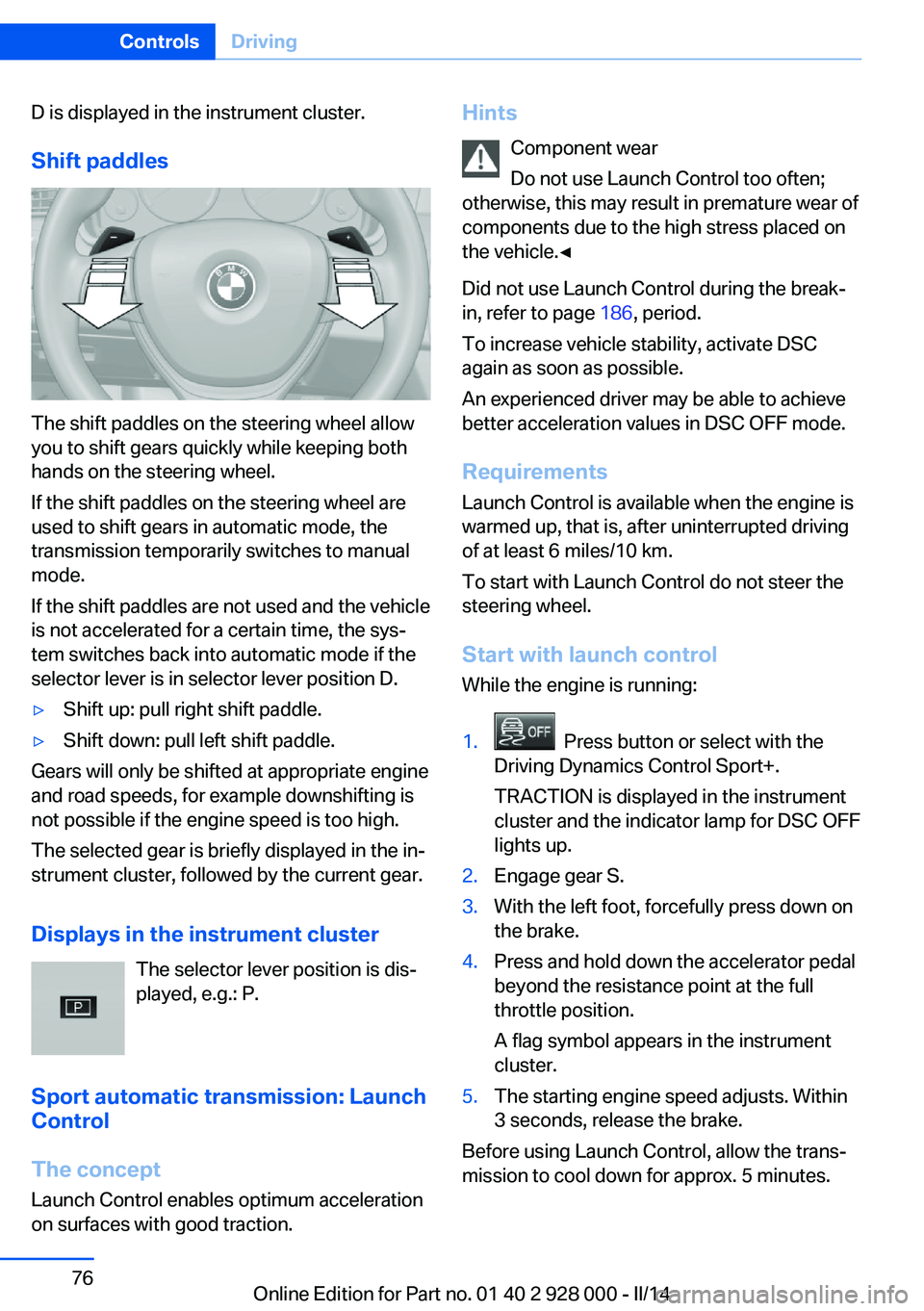
The shift paddles on the steering wheel allow
you to shift gears quickly while keeping both
hands on the steering wheel.
If the shift paddles on the steering wheel are
used to shift gears in automatic mode, the
transmission temporarily switches to manual
mode.
If the shift paddles are not used and the vehicle
is not accelerated for a certain time, the sys‐
tem switches back into automatic mode if the
selector lever is in selector lever position D.
▷Shift up: pull right shift paddle.▷Shift down: pull left shift paddle.
Gears will only be shifted at appropriate engine
and road speeds, for example downshifting is
not possible if the engine speed is too high.
The selected gear is briefly displayed in the in‐
strument cluster, followed by the current gear.
Displays in the instrument cluster The selector lever position is dis‐
played, e.g.: P.
Sport automatic transmission: Launch
Control
The concept
Launch Control enables optimum acceleration
on surfaces with good traction.
Hints
Component wear
Do not use Launch Control too often;
otherwise, this may result in premature wear of
components due to the high stress placed on
the vehicle.◀
Did not use Launch Control during the break-
in, refer to page 186, period.
To increase vehicle stability, activate DSC
again as soon as possible.
An experienced driver may be able to achieve better acceleration values in DSC OFF mode.
Requirements
Launch Control is available when the engine is
warmed up, that is, after uninterrupted driving
of at least 6 miles/10 km.
To start with Launch Control do not steer the
steering wheel.
Start with launch controlWhile the engine is running:1. Press button or select with the
Driving Dynamics Control Sport+.
TRACTION is displayed in the instrument
cluster and the indicator lamp for DSC OFF
lights up.2.Engage gear S.3.With the left foot, forcefully press down on
the brake.4.Press and hold down the accelerator pedal
beyond the resistance point at the full
throttle position.
A flag symbol appears in the instrument
cluster.5.The starting engine speed adjusts. Within
3 seconds, release the brake.
Before using Launch Control, allow the trans‐
mission to cool down for approx. 5 minutes.
Seite 76ControlsDriving76
Online Edition for Part no. 01 40 2 928 000 - II/14
Page 186 of 267
Things to remember when drivingVehicle equipment
All standard, country-specific and optional
equipment that is offered in the model series is
described in this chapter. Therefore, equip‐
ment is also described that is not available in a
vehicle, e. g., because of the selected optional
equipment or country variant. This also applies
for safety-related functions and systems.
Breaking-in period General information Moving parts need to be broken in to adjust to
each other.
The following instructions will help achieve a
long vehicle life and good economy.
Engine and differential Always obey the official speed limit.
Up to 1,200 miles/2,000 km
Do not exceed the maximum engine and road
speed:▷For gasoline engine 4,500 rpm and
100 mph/160 km/h.▷For diesel engine 3,500 rpm and
93 mph/150 km/h.
Avoid full load or kickdown under all circum‐
stances.
From 1,200 miles/2,000 km The engine and vehicle speed can gradually be
increased.
Tires
Due to technical factors associated with their
manufacture, tires do not achieve their full
traction potential until after an initial breaking-
in period.
Drive conservatively for the first
200 miles/300 km.
Brake system
Brakes require an initial break-in period of ap‐
prox. 300 miles/500 km to achieve optimized
contact and wear patterns between brake
discs and brake pads. Drive moderately during
this break-in period.
Clutch
The function of the clutch reaches its optimal
level only after a distance driven of approx.
300 miles/500 km. During this break-in period,
engage the clutch gently.
Following part replacement
The same breaking in procedures should be
observed if any of the components mentioned
above have to be renewed in the course of the
vehicle's operating life.
General driving notes
Closing the trunk lid Drive with the trunk lid closed
Only drive with the tailgate closed; other‐
wise, in the event of an accident or braking and
evasive maneuvers, passengers and other road
users may be injured, and the vehicle may be
damaged. In addition, exhaust fumes may en‐
ter the passenger compartment.◀
If driving with the tailgate open cannot be avoided:▷Close all windows and the glass sunroof.▷Greatly increase the blower speed.▷Drive moderately.Seite 186Driving tipsThings to remember when driving186
Online Edition for Part no. 01 40 2 928 000 - II/14
Page 188 of 267
Drive through calm water only and only if it is
not deeper than. 9.8 inches/25 cm and at this
height, no faster than walking speed, up to
6 mph/10 km/h.
Braking safely Your vehicle is equipped with ABS as a stand‐
ard feature.
Applying the brakes fully is the most effective
way of braking in situations when this is neces‐
sary.
The vehicle maintains steering responsive‐
ness. You can still avoid any obstacles with a
minimum of steering effort.
Pulsation of the brake pedal and sounds from
the hydraulic circuits indicate that ABS is in its
active mode.
Objects within the range of movement
of the pedals
No objects in the area around the pedals
Keep floor mats, carpets, and any other
objects out of the area of motion of the pedals;
otherwise, the function of the pedals could be
impeded while driving and create the risk of an
accident.
Do not place additional floor mats over existing
mats or other objects.
Only use floor mats that have been approved
for the vehicle and can be properly fixed in
place.
Ensure that the floor mats are securely fas‐
tened again after they were removed for clean‐
ing, for example.◀
Driving in wet conditions
When roads are wet coated with road salt or
there is heavy rain, briefly exert gentle pres‐
sure on the brake pedal every few miles.
Ensure that this action does not endanger
other road users.
The heat generated in this process helps dry
the brake discs and pads.In this way braking efficiency will be available
when you need it.
Hills
Drive long or steep downhill gradients in the
gear in which the least braking is required.
Otherwise, the brake system may overheat, re‐ sulting in a reduction in the brake system effi‐ciency.
You can increase the engine's braking effect
by shifting down, going all the way to first gear,
if necessary.
Avoid load on the brakes
Avoid placing excessive load on the
brake system. Light but consistent brake pres‐
sure can lead to high temperatures, brake wear
and possibly even brake failure.◀
Do not drive in neutral
Do not drive in neutral or with the engine
stopped, as doing so disables engine braking.
In addition, steering and brake assist are un‐
available with the engine stopped.◀
Brake disc corrosion
The corrosion on the brake discs and the con‐
tamination on the brake pads are furthered by:▷Low mileage.▷Extended periods when the vehicle is not
used at all.▷Infrequent use of the brakes.
Corrosion occurs when the minimum pressure
that must be exerted by the pads during brake
applications to clean the discs is not reached.
Should corrosion form on the brake discs, the
brakes will tend to respond with a pulsating ef‐
fect that generally cannot be corrected.
Condensation under the parked
vehicle
When using the automatic climate control,
condensation water develops that exits under‐
neath the vehicle.
Seite 188Driving tipsThings to remember when driving188
Online Edition for Part no. 01 40 2 928 000 - II/14
Page 257 of 267

Beverage holder, cu‐pholder 181
Blinds, sun protection 44
BMW Advanced Diesel 205
BMW Assist, see user's manual for Navigation, En‐
tertainment and Communi‐
cation
BMW Homepage 6
BMW Internet page 6
BMW maintenance sys‐ tem 231
Bonus range, ECO PRO 196
Bottle holder, refer to Cu‐ pholder 181
Brake assistant 129
Brake assistant, adaptive 129
Brake discs, breaking in 186
Brake force display 126
Brake lamps, brake force dis‐ play 126
Brake lamps, bulb replace‐ ment 236
Brake lights, adaptive 126
Brake pads, breaking in 186
Braking, hints 188
Breakdown assis‐ tance 240, 241
Breaking in 186
Brightness of Control Dis‐ play 95
Bulb replacement 233
Bulb replacement, front 234
Bulb replacement, rear 236
Bulbs and lamps 233
Button, RES 139
Button, Start/Stop 63
Bypassing, refer to Jump- starting 241
C
California Proposition 65 Warning 7
Calling up mirror adjust‐ ment 41 Calling up seat adjust‐
ment 41
Calling up steering wheel ad‐ justment 41
Camera, care 249
Camera, rearview cam‐ era 151
Camera, Side View 154
Camera, Top View 155
Can holder, refer to Cu‐ pholder 181
Car battery 238
Car care products 247
Care, displays 249
Care, vehicle 247
Cargo 190
Cargo area, enlarging 175
Cargo area, storage compart‐ ments 182
Cargo, securing 191
Cargo straps, securing cargo 191
Car key, refer to Remote con‐ trol 30
Carpet, care 249
Car wash 246
Catalytic converter, refer to Hot exhaust system 187
CBS Condition Based Serv‐ ice 231
CD/Multimedia, see user's manual for Navigation, En‐
tertainment and Communi‐
cation
Center armrest 180
Center console 14
Central locking system 35
Central screen, refer to Con‐ trol Display 16
Changes, technical, refer to Safety 7
Changing parts 233
Changing wheels 238
Changing wheels/tires 221
Check Control 85 Checking the oil level elec‐
tronically 226
Children, seating position 59
Children, transporting safely 59
Child restraint fixing sys‐ tem 59
Child restraint fixing system LATCH 60
Child restraint fixing systems, mounting 59
Child safety locks 62
Child seat, mounting 59
Child seats 59
Chrome parts, care 248
Cigarette lighter 172
Cleaning, displays 249
Climate control 163
Climate control laminated tinted safety glass 187
Climate control wind‐ shield 187
Clock 88
Closing/opening via door lock 35
Closing/opening with remote control 33
Clothes hooks 182
Coasting 197
Coasting with engine decou‐ pled, coasting 197
Coasting with idling en‐ gine 197
Cold starting, refer to Starting the engine 64
Collision warning with braking function 115
Collision warning with City Braking function 112
Combination switch, refer to Turn signals 70
Combination switch, refer to Wiper system 71
COMFORT+ program, Driving Dynamics Control 135
Comfort Access 38 Seite 257Everything from A to ZReference257
Online Edition for Part no. 01 40 2 928 000 - II/14
Page 264 of 267

Storage compartments, loca‐tions 179
Storage, tires 222
Storing the vehicle 249
Summer tires, tread 220
Supplementary text mes‐ sage 86
Surround View 151
Suspension settings 133
Switch for Dynamic Driving Control 133
Switch-on times, parked-car ventilation 169
Switch, refer to Cockpit 12
Symbols 6
Symbols in the status field 20
SYNC program, automatic cli‐ mate control 165
T Tachometer 87
Tail and brake lamps 236
Tailgate opening/closing with no-touch activation 40
Tail lamps 236
Tail lamps, bulb replace‐ ment 236
Technical changes, refer to Safety 7
Technical data 252
Telephone, see user's manual for Navigation, Entertain‐
ment and Communication
Temperature, automatic cli‐ mate control 164
Temperature display for ex‐ ternal temperature 87
Temperature, engine oil 87
Terminal, starting aid 242
Text message, supplemen‐ tary 86
Theft alarm system, refer to Alarm system 41
Thermal camera, see Night Vision 120 Thigh support 49
Through-loading system 175
Tilt alarm sensor 42
Time of arrival 93
Tire damage 220
Tire identification marks 218
Tire inflation pressure 209
Tire inflation pressure moni‐ tor, refer to FTM 109
Tire Pressure Monitor TPM 106
Tires, changing 221
Tires, everything on wheels and tires 209
Tires, run-flat tires 222
Tire tread 220
Tone, see user's manual for Navigation, Entertainment
and Communication
Tool 233
Top View 155
Total vehicle weight 252
Touchpad 19
Tow fitting 244
Towing 243
Tow-starting 243
Tow truck 244
TPM Tire Pressure Moni‐ tor 106
Traction control 130
Traffic Jam Assist 143
Transmission, automatic 74
Transmission, manual 73
Transporting children safely 59
Tread, tires 220
Trip computer 93
Triple turn signal activa‐ tion 70
Trip odometer 87
Truck for tow-starting/ towing 244
Trunk lid, automatic 37
Trunk lid closing 36
Trunk lid, emergency unlock‐ ing 38 Trunk lid, hotel function 38
Trunk lid opening 36
Trunk lid opening/closing with no-touch activation 40
Trunk lid via remote con‐ trol 34
Turning circle 252
Turning circle lines, rearview camera 152
Turn signals, operation 70
Turn signals, rear, bulb re‐ placement 236
U
Unintentional alarm 43
Units of measure 95
Universal remote control 170
Unlock button, automatic transmission 74
Unlocking/locking via door lock 35
Unlocking/locking with re‐ mote control 33
Unlocking, settings 41
Updates made after the edito‐ rial deadline 6
Upholstery care 248
USB interface 175
V
Variable steering, Integral Ac‐ tive Steering 133
Vehicle battery 238
Vehicle battery, replac‐ ing 238
Vehicle, breaking in 186
Vehicle care 247
Vehicle equipment 6
Vehicle identification number, refer to Identification num‐
ber in the engine compart‐
ment 224
Vehicle jack 238
Vehicle paint 247 Seite 264ReferenceEverything from A to Z264
Online Edition for Part no. 01 40 2 928 000 - II/14