2014 BMW 435I CONVERTIBLE lock
[x] Cancel search: lockPage 214 of 244
Outer brake lamp: 21-watt bulb, H21WLL.
The tail lights feature LED technology. Contact
your service center in the event of a malfunc‐
tion.
Use caution when replacing the bulb
Use caution and proceed one step at a
time when replacing the bulbs to prevent dam‐
age to the tail lights or the vehicle.◀
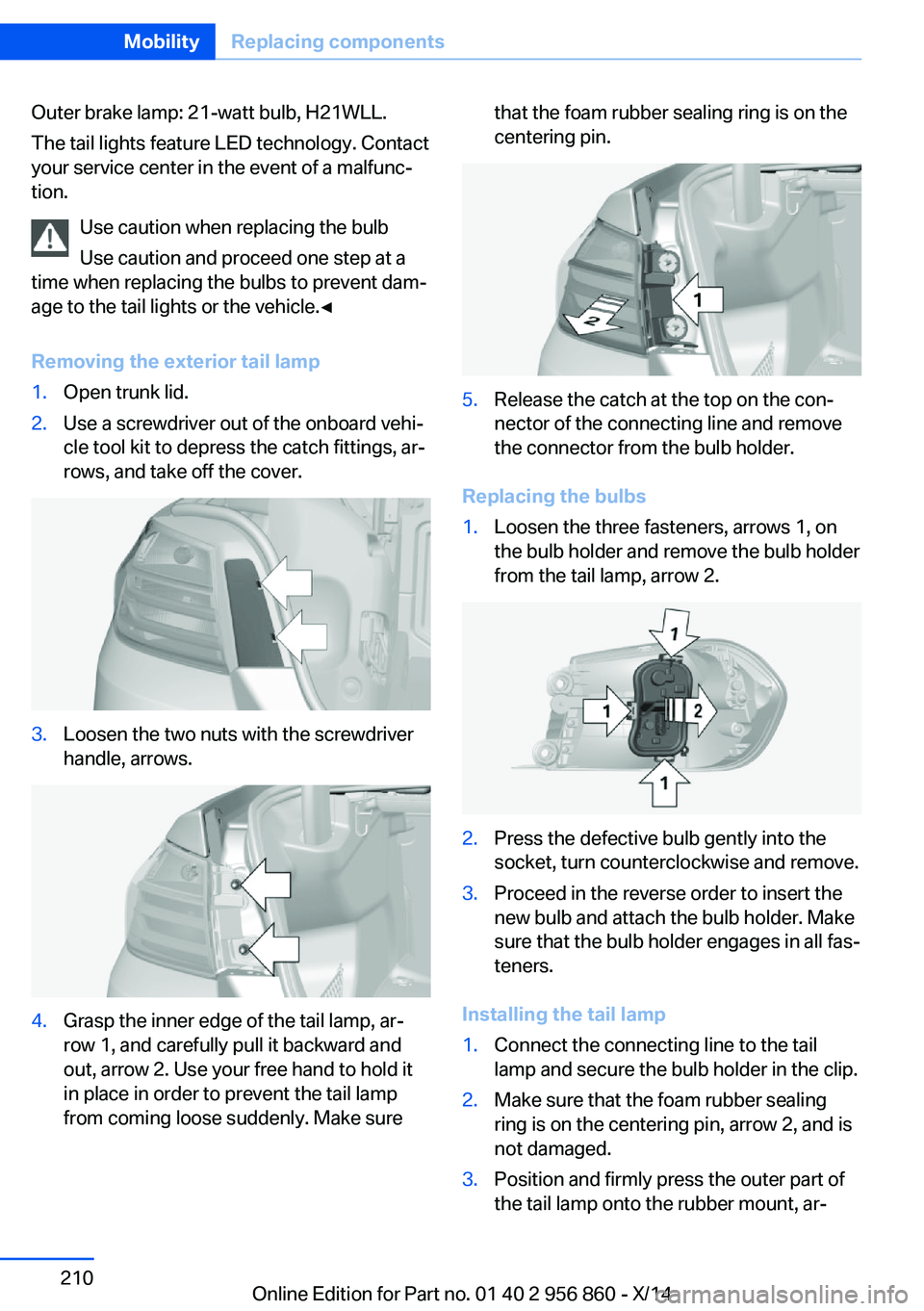
Removing the exterior tail lamp1.Open trunk lid.2.Use a screwdriver out of the onboard vehi‐
cle tool kit to depress the catch fittings, ar‐
rows, and take off the cover.3.Loosen the two nuts with the screwdriver
handle, arrows.4.Grasp the inner edge of the tail lamp, ar‐
row 1, and carefully pull it backward and
out, arrow 2. Use your free hand to hold it
in place in order to prevent the tail lamp
from coming loose suddenly. Make surethat the foam rubber sealing ring is on the
centering pin.5.Release the catch at the top on the con‐
nector of the connecting line and remove
the connector from the bulb holder.
Replacing the bulbs
1.Loosen the three fasteners, arrows 1, on
the bulb holder and remove the bulb holder
from the tail lamp, arrow 2.2.Press the defective bulb gently into the
socket, turn counterclockwise and remove.3.Proceed in the reverse order to insert the
new bulb and attach the bulb holder. Make
sure that the bulb holder engages in all fas‐
teners.
Installing the tail lamp
1.Connect the connecting line to the tail
lamp and secure the bulb holder in the clip.2.Make sure that the foam rubber sealing
ring is on the centering pin, arrow 2, and is
not damaged.3.Position and firmly press the outer part of
the tail lamp onto the rubber mount, ar‐Seite 210MobilityReplacing components210
Online Edition for Part no. 01 40 2 956 860 - X/14
Page 215 of 244
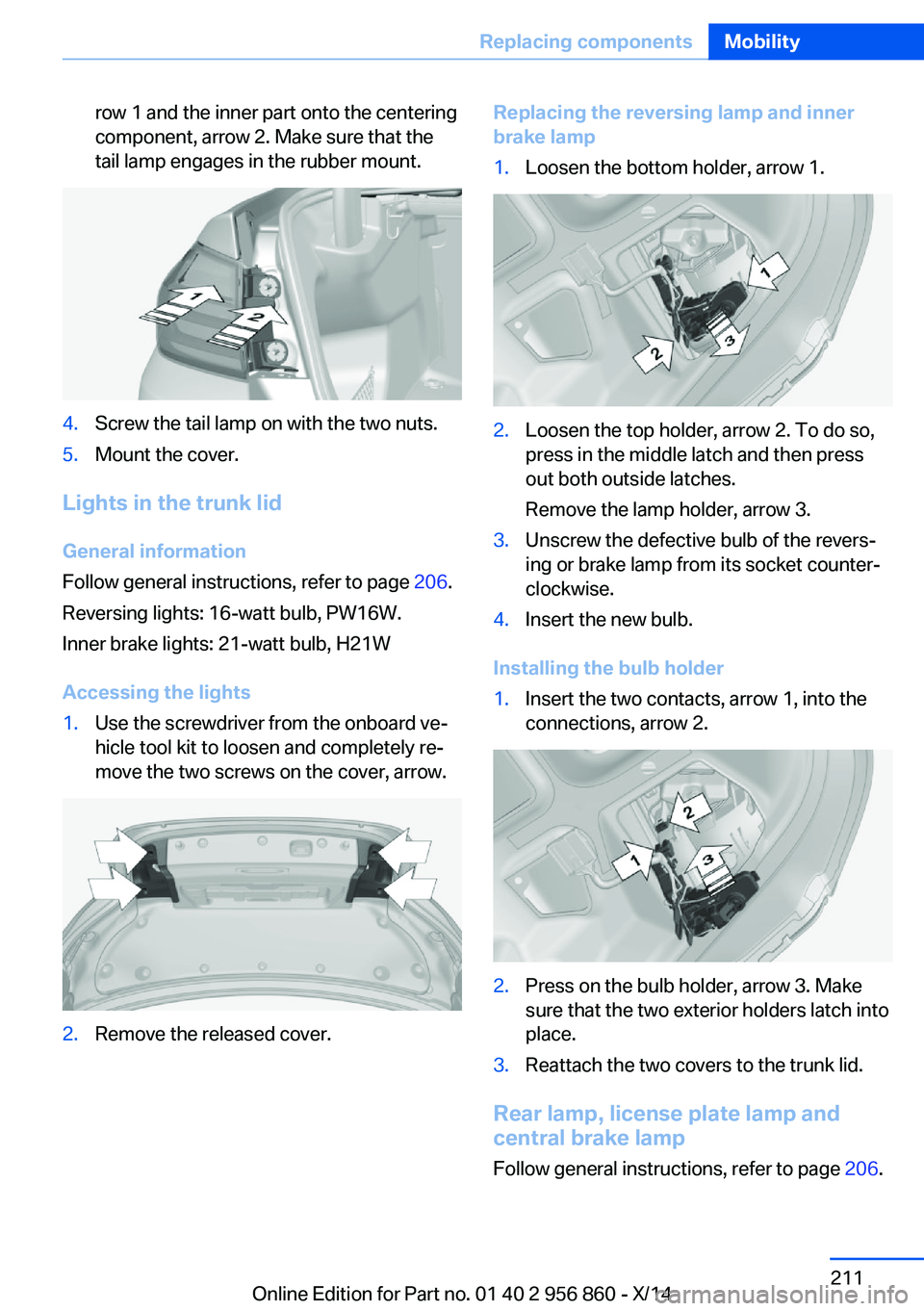
row 1 and the inner part onto the centering
component, arrow 2. Make sure that the
tail lamp engages in the rubber mount.4.Screw the tail lamp on with the two nuts.5.Mount the cover.
Lights in the trunk lid
General information
Follow general instructions, refer to page 206.
Reversing lights: 16-watt bulb, PW16W.
Inner brake lights: 21-watt bulb, H21W
Accessing the lights
1.Use the screwdriver from the onboard ve‐
hicle tool kit to loosen and completely re‐
move the two screws on the cover, arrow.2.Remove the released cover.Replacing the reversing lamp and inner
brake lamp1.Loosen the bottom holder, arrow 1.2.Loosen the top holder, arrow 2. To do so,
press in the middle latch and then press
out both outside latches.
Remove the lamp holder, arrow 3.3.Unscrew the defective bulb of the revers‐
ing or brake lamp from its socket counter‐
clockwise.4.Insert the new bulb.
Installing the bulb holder
1.Insert the two contacts, arrow 1, into the
connections, arrow 2.2.Press on the bulb holder, arrow 3. Make
sure that the two exterior holders latch into
place.3.Reattach the two covers to the trunk lid.
Rear lamp, license plate lamp and
central brake lamp
Follow general instructions, refer to page 206.
Seite 211Replacing componentsMobility211
Online Edition for Part no. 01 40 2 956 860 - X/14
Page 220 of 244
steps to help you under certain circum‐
stances.
For this, data are transmitted to the BMW
Response Center which serve to deter‐
mine the necessary rescue measures. E. g.
the current position of the vehicle, if it can
be established.▷If the LED is flashing green, but the BMW
Response Center can no longer be heard
via the speaker, you can nevertheless still
be heard at the BMW Response Center.
Initiating an Emergency Request
automatically
Under certain conditions, an Emergency Re‐
quest is automatically initiated immediately af‐
ter a severe accident. Automatic Collision Noti‐
fication is not affected by pressing the SOS
button.
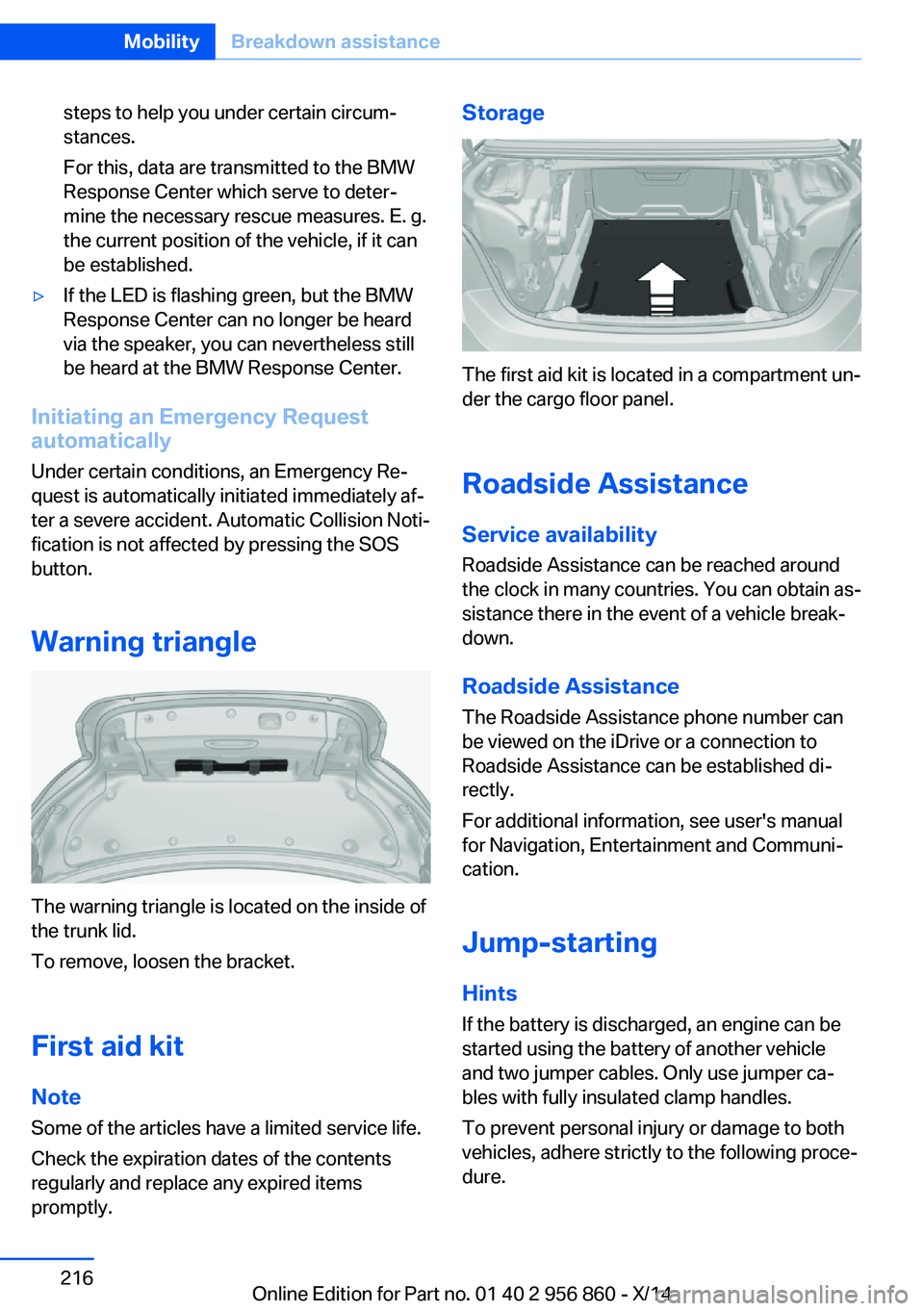
Warning triangle
The warning triangle is located on the inside of
the trunk lid.
To remove, loosen the bracket.
First aid kit NoteSome of the articles have a limited service life.
Check the expiration dates of the contents
regularly and replace any expired items
promptly.
Storage
The first aid kit is located in a compartment un‐
der the cargo floor panel.
Roadside Assistance Service availability
Roadside Assistance can be reached around
the clock in many countries. You can obtain as‐
sistance there in the event of a vehicle break‐
down.
Roadside Assistance The Roadside Assistance phone number can
be viewed on the iDrive or a connection to
Roadside Assistance can be established di‐
rectly.
For additional information, see user's manual
for Navigation, Entertainment and Communi‐
cation.
Jump-starting
Hints
If the battery is discharged, an engine can be
started using the battery of another vehicle
and two jumper cables. Only use jumper ca‐
bles with fully insulated clamp handles.
To prevent personal injury or damage to both
vehicles, adhere strictly to the following proce‐
dure.
Seite 216MobilityBreakdown assistance216
Online Edition for Part no. 01 40 2 956 860 - X/14
Page 225 of 244
3.Switch the engine off.
In this way, the ignition remains switched
on, and a Check-Control message is dis‐
played.
Do not turn off the ignition in the car
wash
Do not turn off the ignition in the car wash;
otherwise, selector lever position P is en‐
gaged and damages can result.◀
The vehicle cannot be locked from the outside
when in selector lever position N. A signal
sounds when an attempt is made to lock the
vehicle.
To start the engine with Steptronic transmis‐
sion:
1.Depress the brake pedal.2.Press the Start/Stop button.
Pressing the Start/Stop button without step‐
ping on the brake turns the ignition off.
Selector lever positionSelector lever position P is engaged automati‐
cally:
▷When the ignition is switched off.▷After approx. 15 minutes.
Headlights
▷Do not rub dry and do not use abrasive or
acidic cleansers.▷Soak areas that have been dirtied e. g.,
from insects, with shampoo and wash off
with water.▷Thaw ice with de-icing spray; do not use an
ice scraper.
Lowerable hardtop
When the wet hardtop is opened, water drop‐
lets can run into the cargo area. Remove any
objects in the cargo area beforehand to pre‐
vent water spotting or soiling.
After washing the vehicle
After washing the vehicle, apply the brakes
briefly to dry them; otherwise, braking action
can be reduced and corrosion of the brake
discs can occur.
Completely remove all residues on the win‐
dows, to minimize loss of visibility due to
smearing and to reduce wiper noises and
wiper blade wear.
Vehicle care
Car care products BMW recommends using care and cleaning
products from BMW, since these have been
tested and approved.
Car care and cleaning products
Follow the instructions on the container.
When cleaning the interior, open the doors or
windows.
Only use products intended for cleaning vehi‐
cles.
Cleansers can contain substances that are
dangerous and harmful to your health.◀
Vehicle paint
Regular care contributes to driving safety and
value retention. Environmental influences in
areas with elevated air pollution or natural con‐
taminants, such as tree resin or pollen can af‐
fect the vehicle's paintwork. Tailor the fre‐
quency and extent of your car care to these
influences.
Aggressive substances such as spilled fuel, oil,
grease or bird droppings, must be removed im‐
mediately to prevent the finish from being al‐
tered or discolored.
Leather care
Remove dust from the leather often, using a
cloth or vacuum cleaner.Seite 221CareMobility221
Online Edition for Part no. 01 40 2 956 860 - X/14
Page 234 of 244
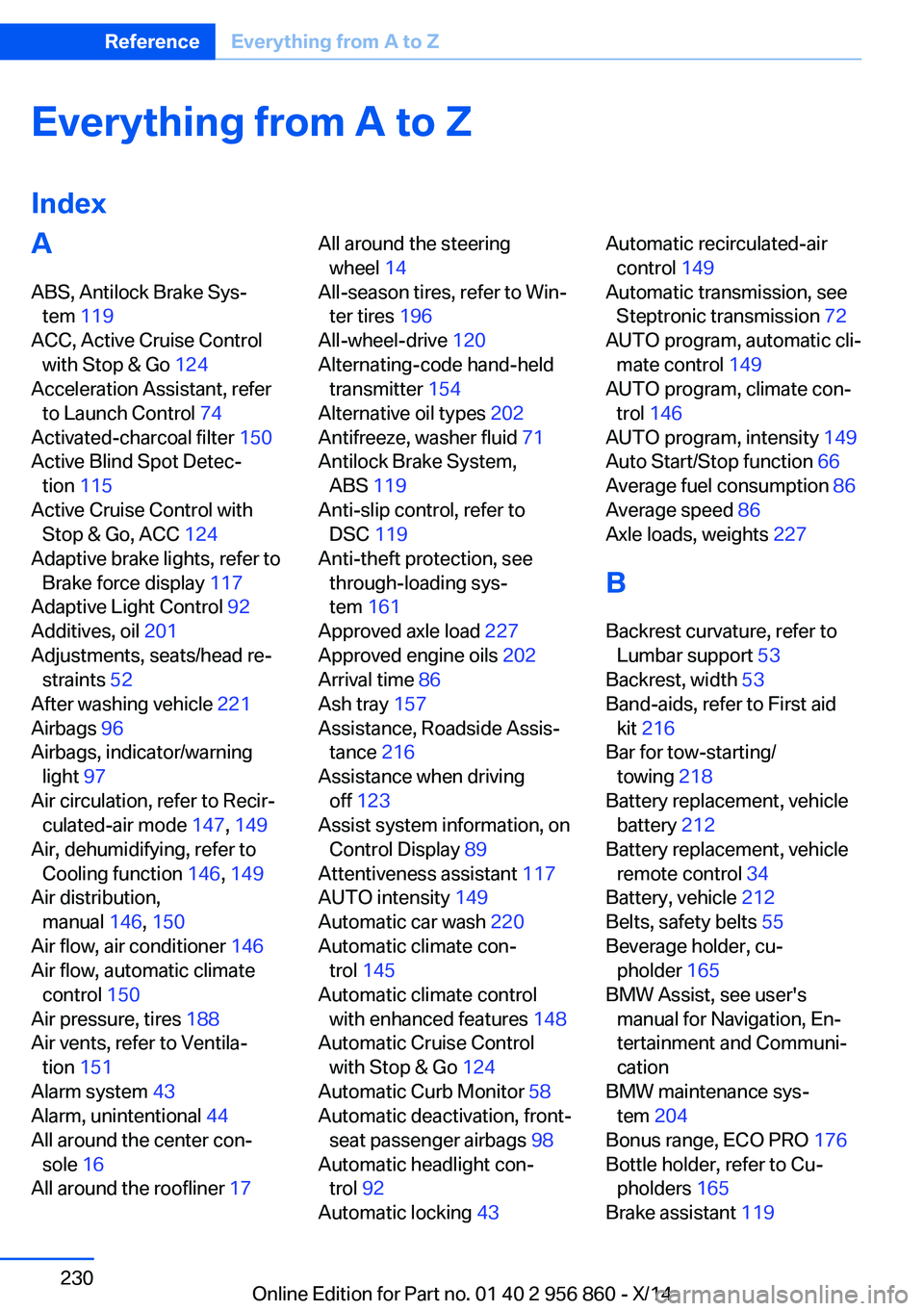
Everything from A to Z
IndexA ABS, Antilock Brake Sys‐ tem 119
ACC, Active Cruise Control with Stop & Go 124
Acceleration Assistant, refer to Launch Control 74
Activated-charcoal filter 150
Active Blind Spot Detec‐ tion 115
Active Cruise Control with Stop & Go, ACC 124
Adaptive brake lights, refer to Brake force display 117
Adaptive Light Control 92
Additives, oil 201
Adjustments, seats/head re‐ straints 52
After washing vehicle 221
Airbags 96
Airbags, indicator/warning light 97
Air circulation, refer to Recir‐ culated-air mode 147, 149
Air, dehumidifying, refer to Cooling function 146, 149
Air distribution, manual 146, 150
Air flow, air conditioner 146
Air flow, automatic climate control 150
Air pressure, tires 188
Air vents, refer to Ventila‐ tion 151
Alarm system 43
Alarm, unintentional 44
All around the center con‐ sole 16
All around the roofliner 17 All around the steering
wheel 14
All-season tires, refer to Win‐ ter tires 196
All-wheel-drive 120
Alternating-code hand-held transmitter 154
Alternative oil types 202
Antifreeze, washer fluid 71
Antilock Brake System, ABS 119
Anti-slip control, refer to DSC 119
Anti-theft protection, see through-loading sys‐
tem 161
Approved axle load 227
Approved engine oils 202
Arrival time 86
Ash tray 157
Assistance, Roadside Assis‐ tance 216
Assistance when driving off 123
Assist system information, on Control Display 89
Attentiveness assistant 117
AUTO intensity 149
Automatic car wash 220
Automatic climate con‐ trol 145
Automatic climate control with enhanced features 148
Automatic Cruise Control with Stop & Go 124
Automatic Curb Monitor 58
Automatic deactivation, front- seat passenger airbags 98
Automatic headlight con‐ trol 92
Automatic locking 43 Automatic recirculated-air
control 149
Automatic transmission, see Steptronic transmission 72
AUTO program, automatic cli‐ mate control 149
AUTO program, climate con‐ trol 146
AUTO program, intensity 149
Auto Start/Stop function 66
Average fuel consumption 86
Average speed 86
Axle loads, weights 227
B Backrest curvature, refer to Lumbar support 53
Backrest, width 53
Band-aids, refer to First aid kit 216
Bar for tow-starting/ towing 218
Battery replacement, vehicle battery 212
Battery replacement, vehicle remote control 34
Battery, vehicle 212
Belts, safety belts 55
Beverage holder, cu‐ pholder 165
BMW Assist, see user's manual for Navigation, En‐
tertainment and Communi‐
cation
BMW maintenance sys‐ tem 204
Bonus range, ECO PRO 176
Bottle holder, refer to Cu‐ pholders 165
Brake assistant 119 Seite 230ReferenceEverything from A to Z230
Online Edition for Part no. 01 40 2 956 860 - X/14
Page 235 of 244
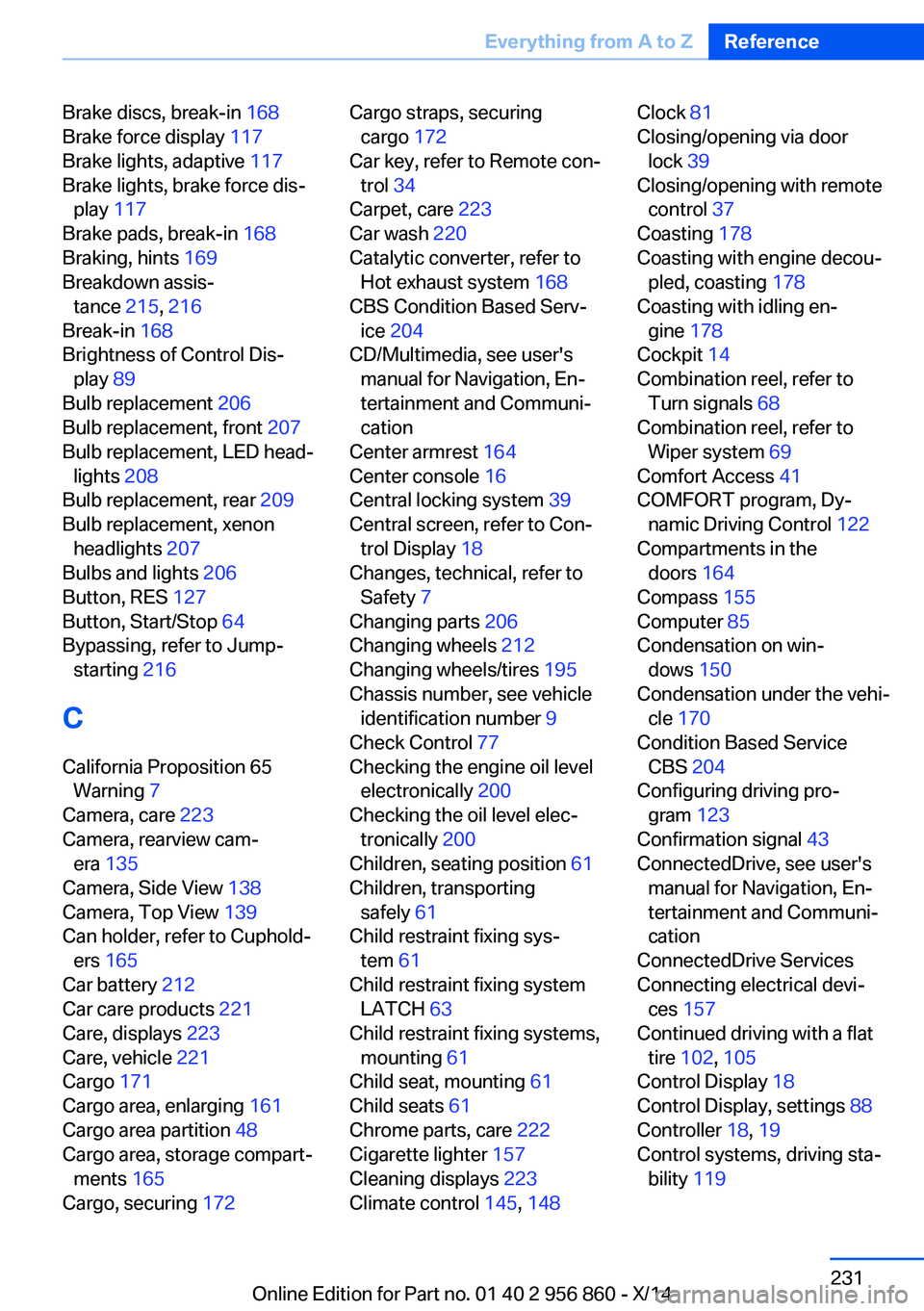
Brake discs, break-in 168
Brake force display 117
Brake lights, adaptive 117
Brake lights, brake force dis‐ play 117
Brake pads, break-in 168
Braking, hints 169
Breakdown assis‐ tance 215, 216
Break-in 168
Brightness of Control Dis‐ play 89
Bulb replacement 206
Bulb replacement, front 207
Bulb replacement, LED head‐ lights 208
Bulb replacement, rear 209
Bulb replacement, xenon headlights 207
Bulbs and lights 206
Button, RES 127
Button, Start/Stop 64
Bypassing, refer to Jump- starting 216
C
California Proposition 65 Warning 7
Camera, care 223
Camera, rearview cam‐ era 135
Camera, Side View 138
Camera, Top View 139
Can holder, refer to Cuphold‐ ers 165
Car battery 212
Car care products 221
Care, displays 223
Care, vehicle 221
Cargo 171
Cargo area, enlarging 161
Cargo area partition 48
Cargo area, storage compart‐ ments 165
Cargo, securing 172 Cargo straps, securing
cargo 172
Car key, refer to Remote con‐ trol 34
Carpet, care 223
Car wash 220
Catalytic converter, refer to Hot exhaust system 168
CBS Condition Based Serv‐ ice 204
CD/Multimedia, see user's manual for Navigation, En‐
tertainment and Communi‐
cation
Center armrest 164
Center console 16
Central locking system 39
Central screen, refer to Con‐ trol Display 18
Changes, technical, refer to Safety 7
Changing parts 206
Changing wheels 212
Changing wheels/tires 195
Chassis number, see vehicle identification number 9
Check Control 77
Checking the engine oil level electronically 200
Checking the oil level elec‐ tronically 200
Children, seating position 61
Children, transporting safely 61
Child restraint fixing sys‐ tem 61
Child restraint fixing system LATCH 63
Child restraint fixing systems, mounting 61
Child seat, mounting 61
Child seats 61
Chrome parts, care 222
Cigarette lighter 157
Cleaning displays 223
Climate control 145, 148 Clock 81
Closing/opening via door lock 39
Closing/opening with remote control 37
Coasting 178
Coasting with engine decou‐ pled, coasting 178
Coasting with idling en‐ gine 178
Cockpit 14
Combination reel, refer to Turn signals 68
Combination reel, refer to Wiper system 69
Comfort Access 41
COMFORT program, Dy‐ namic Driving Control 122
Compartments in the doors 164
Compass 155
Computer 85
Condensation on win‐ dows 150
Condensation under the vehi‐ cle 170
Condition Based Service CBS 204
Configuring driving pro‐ gram 123
Confirmation signal 43
ConnectedDrive, see user's manual for Navigation, En‐
tertainment and Communi‐
cation
ConnectedDrive Services
Connecting electrical devi‐ ces 157
Continued driving with a flat tire 102 , 105
Control Display 18
Control Display, settings 88
Controller 18, 19
Control systems, driving sta‐ bility 119 Seite 231Everything from A to ZReference231
Online Edition for Part no. 01 40 2 956 860 - X/14
Page 236 of 244
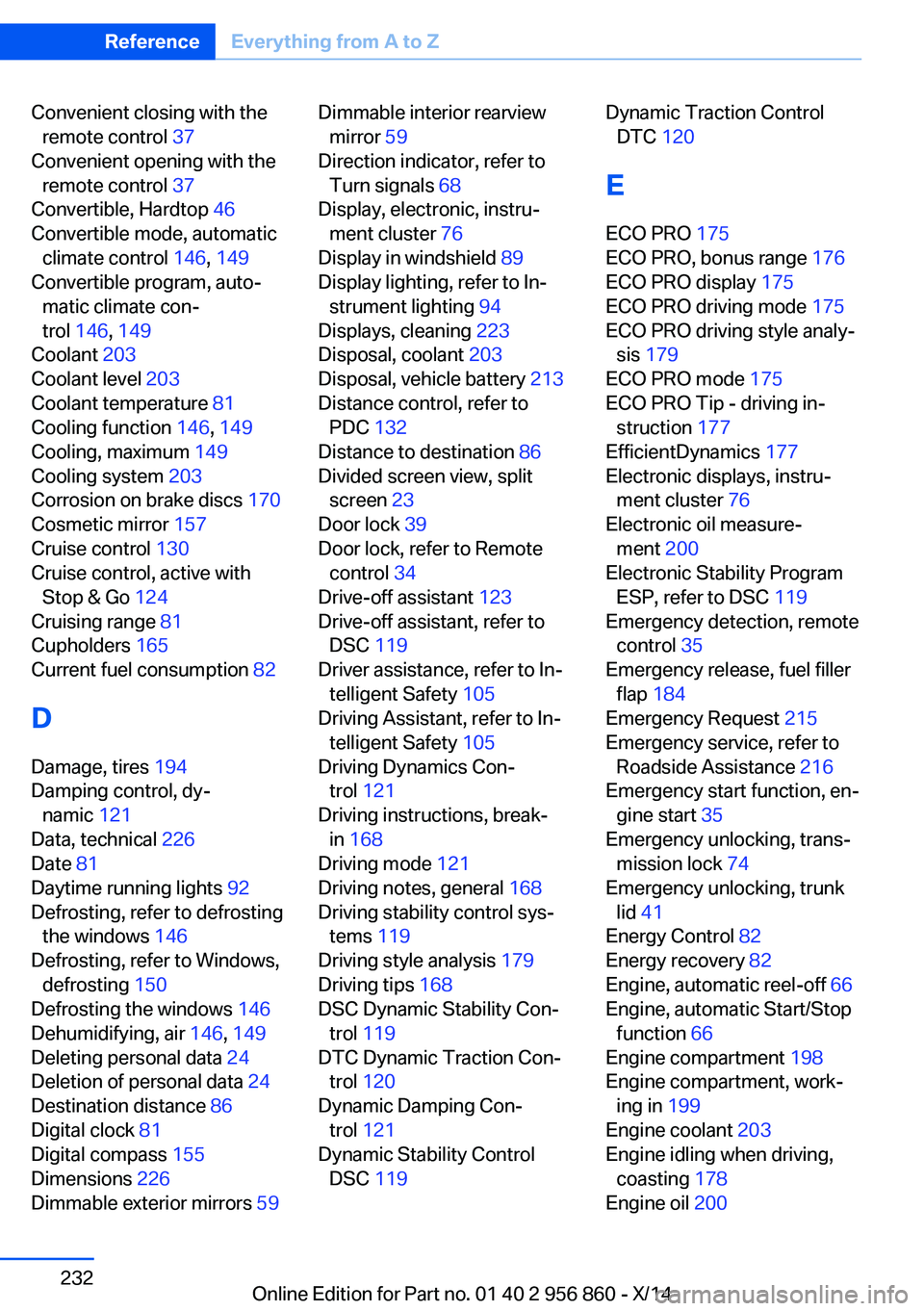
Convenient closing with theremote control 37
Convenient opening with the remote control 37
Convertible, Hardtop 46
Convertible mode, automatic climate control 146, 149
Convertible program, auto‐ matic climate con‐
trol 146 , 149
Coolant 203
Coolant level 203
Coolant temperature 81
Cooling function 146, 149
Cooling, maximum 149
Cooling system 203
Corrosion on brake discs 170
Cosmetic mirror 157
Cruise control 130
Cruise control, active with Stop & Go 124
Cruising range 81
Cupholders 165
Current fuel consumption 82
D
Damage, tires 194
Damping control, dy‐ namic 121
Data, technical 226
Date 81
Daytime running lights 92
Defrosting, refer to defrosting the windows 146
Defrosting, refer to Windows, defrosting 150
Defrosting the windows 146
Dehumidifying, air 146, 149
Deleting personal data 24
Deletion of personal data 24
Destination distance 86
Digital clock 81
Digital compass 155
Dimensions 226
Dimmable exterior mirrors 59 Dimmable interior rearview
mirror 59
Direction indicator, refer to Turn signals 68
Display, electronic, instru‐ ment cluster 76
Display in windshield 89
Display lighting, refer to In‐ strument lighting 94
Displays, cleaning 223
Disposal, coolant 203
Disposal, vehicle battery 213
Distance control, refer to PDC 132
Distance to destination 86
Divided screen view, split screen 23
Door lock 39
Door lock, refer to Remote control 34
Drive-off assistant 123
Drive-off assistant, refer to DSC 119
Driver assistance, refer to In‐ telligent Safety 105
Driving Assistant, refer to In‐ telligent Safety 105
Driving Dynamics Con‐ trol 121
Driving instructions, break- in 168
Driving mode 121
Driving notes, general 168
Driving stability control sys‐ tems 119
Driving style analysis 179
Driving tips 168
DSC Dynamic Stability Con‐ trol 119
DTC Dynamic Traction Con‐ trol 120
Dynamic Damping Con‐ trol 121
Dynamic Stability Control DSC 119 Dynamic Traction Control
DTC 120
E ECO PRO 175
ECO PRO, bonus range 176
ECO PRO display 175
ECO PRO driving mode 175
ECO PRO driving style analy‐ sis 179
ECO PRO mode 175
ECO PRO Tip - driving in‐ struction 177
EfficientDynamics 177
Electronic displays, instru‐ ment cluster 76
Electronic oil measure‐ ment 200
Electronic Stability Program ESP, refer to DSC 119
Emergency detection, remote control 35
Emergency release, fuel filler flap 184
Emergency Request 215
Emergency service, refer to Roadside Assistance 216
Emergency start function, en‐ gine start 35
Emergency unlocking, trans‐ mission lock 74
Emergency unlocking, trunk lid 41
Energy Control 82
Energy recovery 82
Engine, automatic reel-off 66
Engine, automatic Start/Stop function 66
Engine compartment 198
Engine compartment, work‐ ing in 199
Engine coolant 203
Engine idling when driving, coasting 178
Engine oil 200 Seite 232ReferenceEverything from A to Z232
Online Edition for Part no. 01 40 2 956 860 - X/14
Page 238 of 244
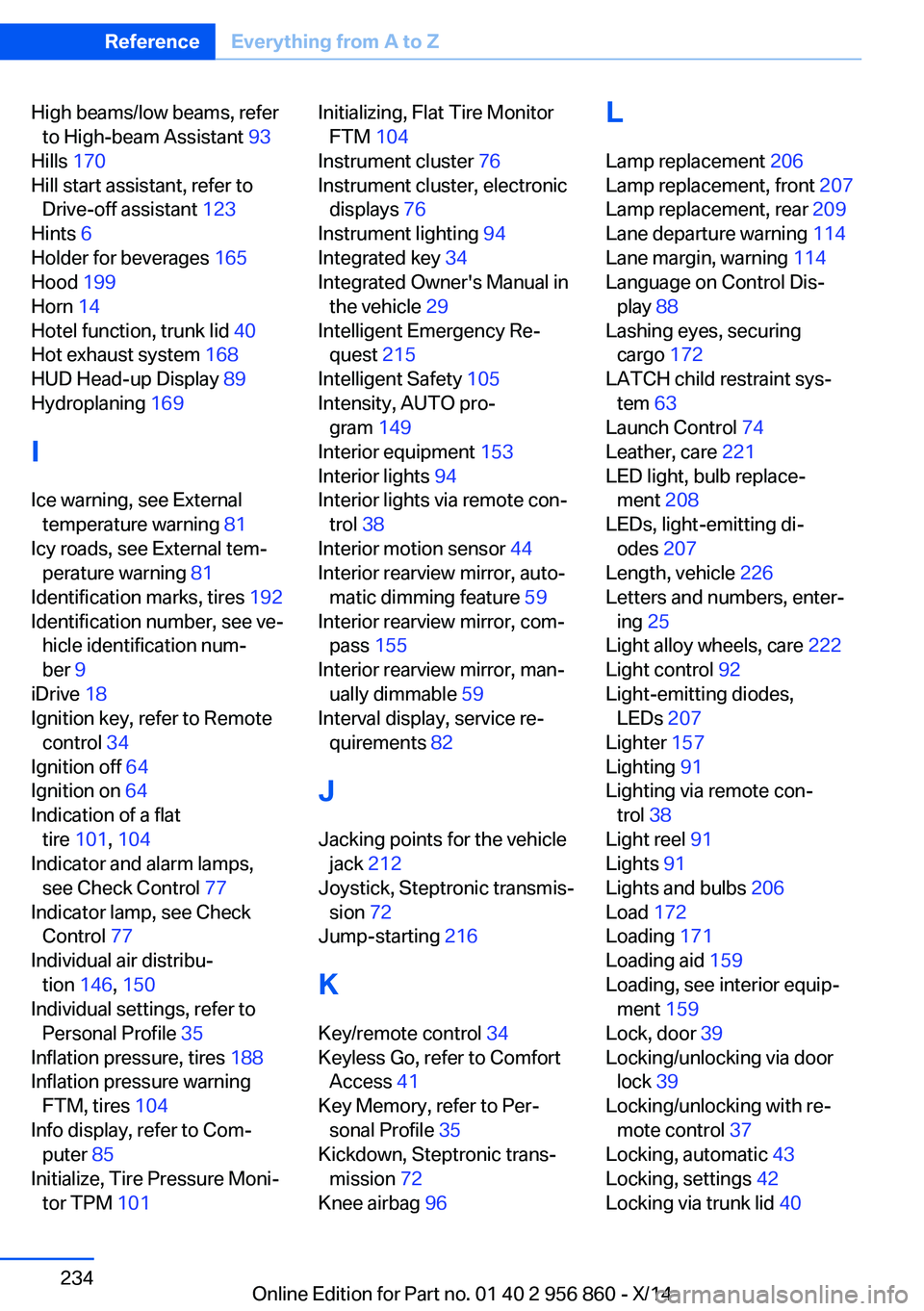
High beams/low beams, referto High-beam Assistant 93
Hills 170
Hill start assistant, refer to Drive-off assistant 123
Hints 6
Holder for beverages 165
Hood 199
Horn 14
Hotel function, trunk lid 40
Hot exhaust system 168
HUD Head-up Display 89
Hydroplaning 169
I Ice warning, see External temperature warning 81
Icy roads, see External tem‐ perature warning 81
Identification marks, tires 192
Identification number, see ve‐ hicle identification num‐
ber 9
iDrive 18
Ignition key, refer to Remote control 34
Ignition off 64
Ignition on 64
Indication of a flat tire 101 , 104
Indicator and alarm lamps, see Check Control 77
Indicator lamp, see Check Control 77
Individual air distribu‐ tion 146, 150
Individual settings, refer to Personal Profile 35
Inflation pressure, tires 188
Inflation pressure warning FTM, tires 104
Info display, refer to Com‐ puter 85
Initialize, Tire Pressure Moni‐ tor TPM 101 Initializing, Flat Tire Monitor
FTM 104
Instrument cluster 76
Instrument cluster, electronic displays 76
Instrument lighting 94
Integrated key 34
Integrated Owner's Manual in the vehicle 29
Intelligent Emergency Re‐ quest 215
Intelligent Safety 105
Intensity, AUTO pro‐ gram 149
Interior equipment 153
Interior lights 94
Interior lights via remote con‐ trol 38
Interior motion sensor 44
Interior rearview mirror, auto‐ matic dimming feature 59
Interior rearview mirror, com‐ pass 155
Interior rearview mirror, man‐ ually dimmable 59
Interval display, service re‐ quirements 82
J Jacking points for the vehicle jack 212
Joystick, Steptronic transmis‐ sion 72
Jump-starting 216
K
Key/remote control 34
Keyless Go, refer to Comfort Access 41
Key Memory, refer to Per‐ sonal Profile 35
Kickdown, Steptronic trans‐ mission 72
Knee airbag 96 L
Lamp replacement 206
Lamp replacement, front 207
Lamp replacement, rear 209
Lane departure warning 114
Lane margin, warning 114
Language on Control Dis‐ play 88
Lashing eyes, securing cargo 172
LATCH child restraint sys‐ tem 63
Launch Control 74
Leather, care 221
LED light, bulb replace‐ ment 208
LEDs, light-emitting di‐ odes 207
Length, vehicle 226
Letters and numbers, enter‐ ing 25
Light alloy wheels, care 222
Light control 92
Light-emitting diodes, LEDs 207
Lighter 157
Lighting 91
Lighting via remote con‐ trol 38
Light reel 91
Lights 91
Lights and bulbs 206
Load 172
Loading 171
Loading aid 159
Loading, see interior equip‐ ment 159
Lock, door 39
Locking/unlocking via door lock 39
Locking/unlocking with re‐ mote control 37
Locking, automatic 43
Locking, settings 42
Locking via trunk lid 40 Seite 234ReferenceEverything from A to Z234
Online Edition for Part no. 01 40 2 956 860 - X/14