2014 BMW 3 SERIES SPORTS WAGON entertainment
[x] Cancel search: entertainmentPage 10 of 253
NotesUsing this Owner's Manual
Orientation
The fastest way to find information on a partic‐
ular topic is by using the index.
An initial overview of the vehicle is provided in
the first chapter.
Updates made after the editorial
deadline
Any updates made after the editorial deadline
for the Owner's Manuals are found in the ap‐
pendix of the printed Quick Reference for the
vehicle.
User's manual for Navigation,
Entertainment, Communication
The topics of Navigation, Entertainment, Com‐
munication and the short commands of the
voice activation system are described in a sep‐
arate user's manual, which is also included
with the onboard literature.
Symbols
Indicates precautions that must be followed
precisely in order to avoid the possibility of
personal injury and serious damage to the
vehicle.
◄ Marks the end of a specific item of
information.
Refers to measures that can be taken to
help protect the environment.
"..." Identifies display texts in vehicle used to
select individual functions.
›...‹ Verbal instructions to use with the voice
activation system.
››...‹‹ Identifies the answers generated by the
voice activation system.
Symbols on vehicle components
Indicates that you should consult the
relevant section of this Owner's Manual for
information on a particular part or assembly.
Vehicle features and options
This Owner's Manual describes all models and
all standard, country-specific and optional
equipment that is offered in the model series.
Therefore, in this Owner's Manual, we also de‐
scribe and illustrate features that are not avail‐
able in your vehicle, e.g., because of the se‐
lected optional features or the country-specific
version.
This also applies to safety-related functions
and systems.
For any options and equipment not described
in this Owner's Handbook, refer to the Supple‐
mentary Owner's Handbooks.
On right-hand drive vehicles, some controls
are arranged differently from what is shown in
the illustrations.
Status of the Owner's
Manual
Basic information
The manufacturer of your vehicle pursues a
policy of constant development that is con‐
ceived to ensure that our vehicles continue to
embody the highest quality and safety stan‐
dards. In rare cases, therefore, the features de‐
scribed in this Owner's Manual may differ from
those in your vehicle.
Seite 6Notes6
Online Edition for Part no. 01 40 2 956 752 - X/14
Page 19 of 253
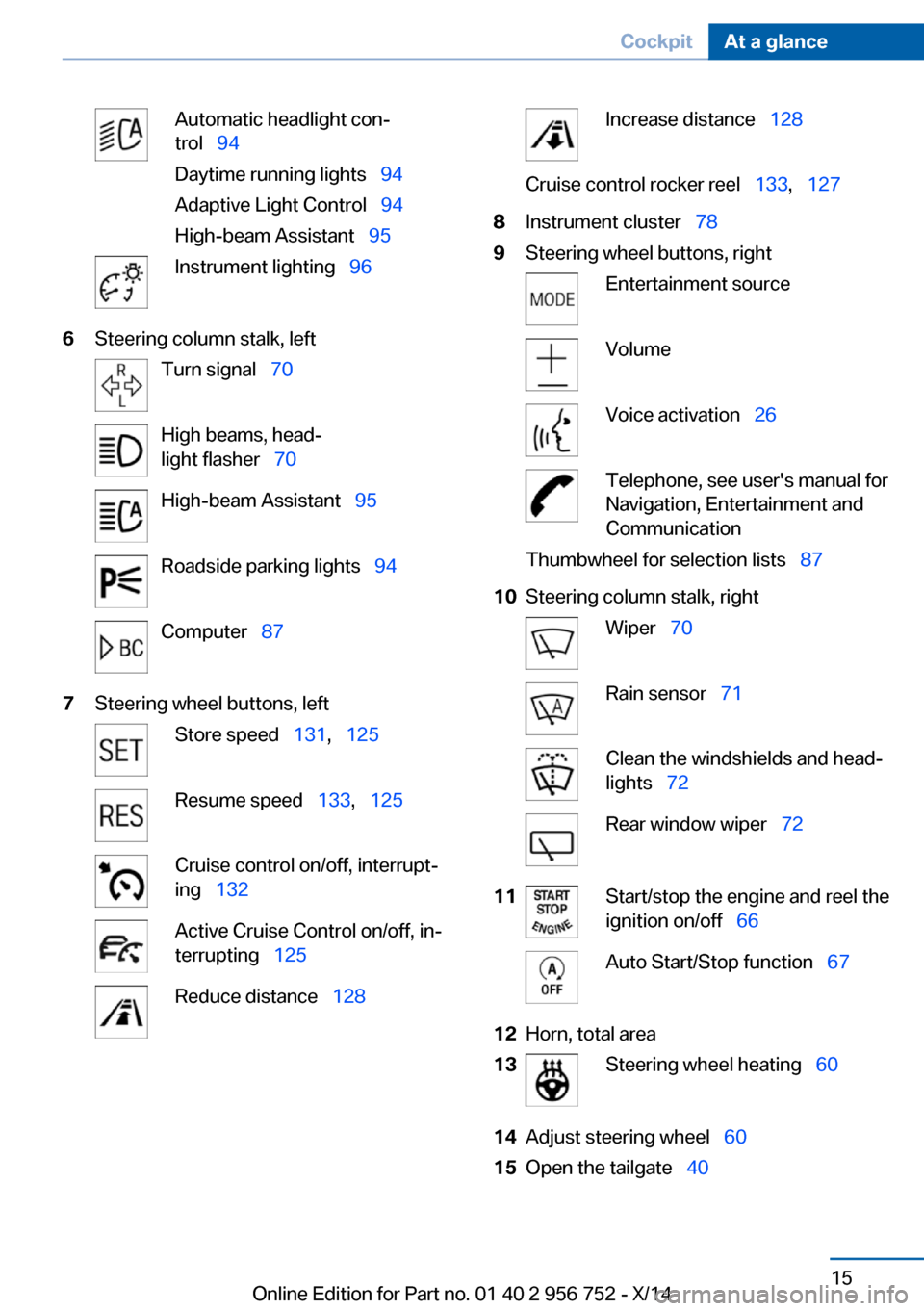
Automatic headlight con‐
trol 94
Daytime running lights 94
Adaptive Light Control 94
High-beam Assistant 95Instrument lighting 966Steering column stalk, leftTurn signal 70High beams, head‐
light flasher 70High-beam Assistant 95Roadside parking lights 94Computer 877Steering wheel buttons, leftStore speed 131, 125Resume speed 133, 125Cruise control on/off, interrupt‐
ing 132Active Cruise Control on/off, in‐
terrupting 125Reduce distance 128Increase distance 128Cruise control rocker reel 133, 1278Instrument cluster 789Steering wheel buttons, rightEntertainment sourceVolumeVoice activation 26Telephone, see user's manual for
Navigation, Entertainment and
CommunicationThumbwheel for selection lists 8710Steering column stalk, rightWiper 70Rain sensor 71Clean the windshields and head‐
lights 72Rear window wiper 7211Start/stop the engine and reel the
ignition on/off 66Auto Start/Stop function 6712Horn, total area13Steering wheel heating 6014Adjust steering wheel 6015Open the tailgate 40Seite 15CockpitAt a glance15
Online Edition for Part no. 01 40 2 956 752 - X/14
Page 20 of 253
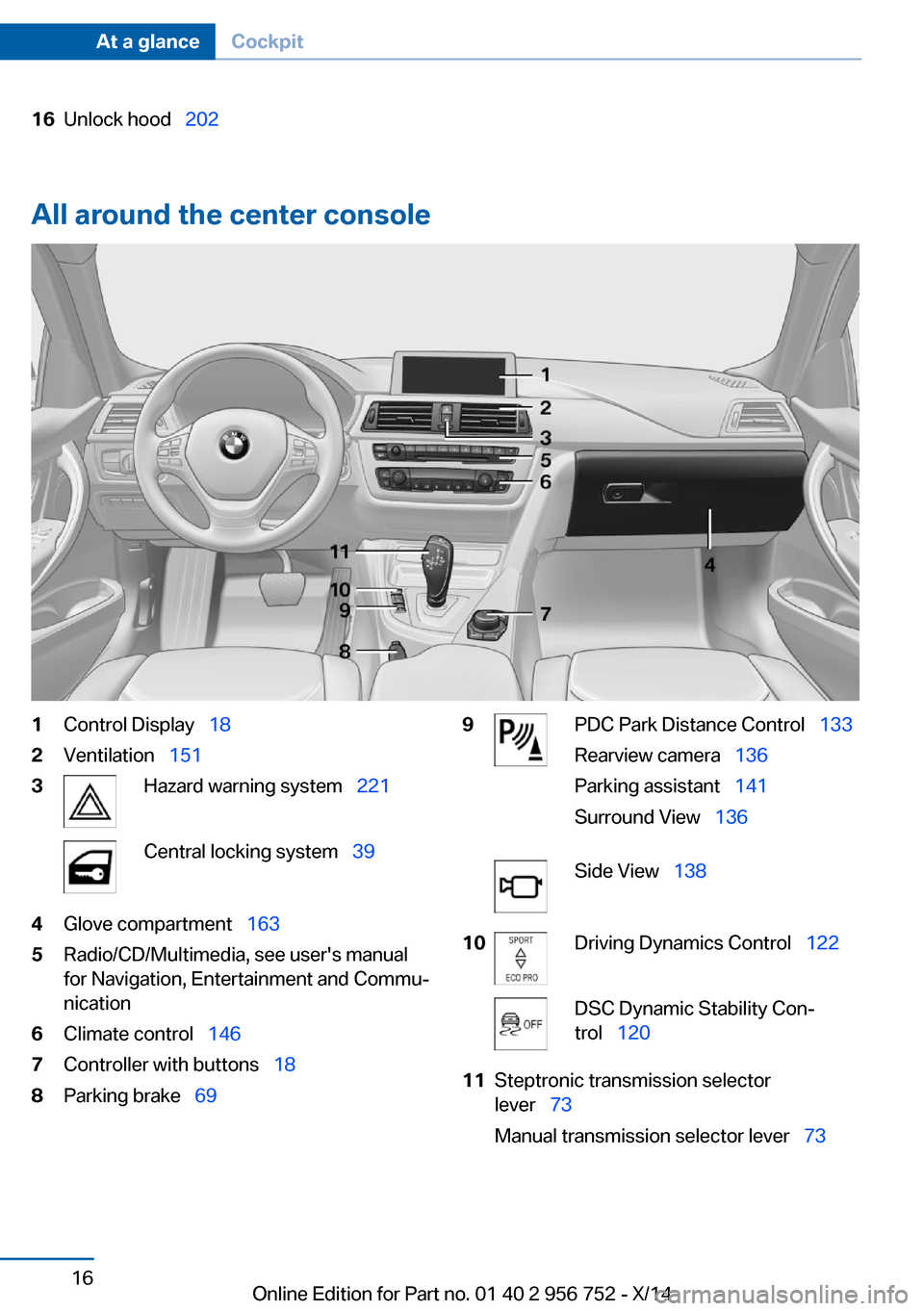
16Unlock hood 202
All around the center console
1Control Display 182Ventilation 1513Hazard warning system 221Central locking system 394Glove compartment 1635Radio/CD/Multimedia, see user's manual
for Navigation, Entertainment and Commu‐
nication6Climate control 1467Controller with buttons 188Parking brake 699PDC Park Distance Control 133
Rearview camera 136
Parking assistant 141
Surround View 136Side View 13810Driving Dynamics Control 122DSC Dynamic Stability Con‐
trol 12011Steptronic transmission selector
lever 73
Manual transmission selector lever 73Seite 16At a glanceCockpit16
Online Edition for Part no. 01 40 2 956 752 - X/14
Page 27 of 253
6.Turn the controller to set the hours and
press the controller.7.Turn the controller to set the minutes and
press the controller.
Status information
Status field The following information is displayed in the
status field at the top right:
▷Time.▷Current entertainment source.▷Sound output, on/off.▷Wireless network reception strength.▷Phone status.▷Traffic bulletin reception.
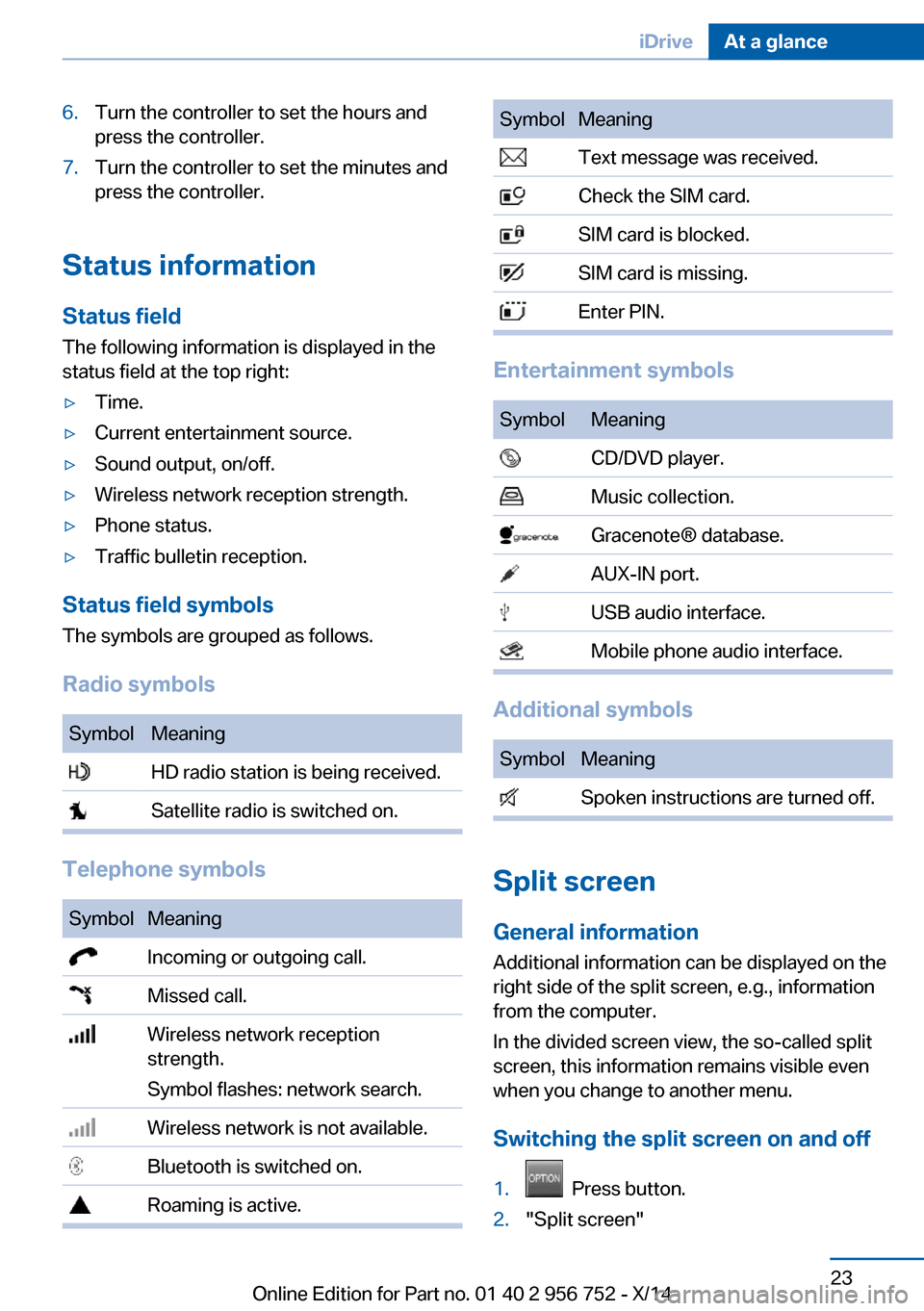
Status field symbols
The symbols are grouped as follows.
Radio symbols
SymbolMeaning HD radio station is being received. Satellite radio is switched on.
Telephone symbols
SymbolMeaning Incoming or outgoing call. Missed call. Wireless network reception
strength.
Symbol flashes: network search. Wireless network is not available. Bluetooth is switched on. Roaming is active.SymbolMeaning Text message was received. Check the SIM card. SIM card is blocked. SIM card is missing. Enter PIN.
Entertainment symbols
SymbolMeaning CD/DVD player. Music collection. Gracenote® database. AUX-IN port. USB audio interface. Mobile phone audio interface.
Additional symbols
SymbolMeaning Spoken instructions are turned off.
Split screen
General information Additional information can be displayed on the
right side of the split screen, e.g., information
from the computer.
In the divided screen view, the so-called split
screen, this information remains visible even when you change to another menu.
Switching the split screen on and off
1. Press button.2."Split screen"Seite 23iDriveAt a glance23
Online Edition for Part no. 01 40 2 956 752 - X/14
Page 31 of 253
Executing functions using short
commands
Execute functions on the main menu via short
commands. It almost doesn't matter which
menu item is selected, e.g., ›Vehicle status‹.
List of short commands for the voice activation
system, see Navigation, Entertainment, Com‐
munication Owner's Manual.
Help dialog for the voice activation
system
Calling up help dialog: ›Help‹
Additional commands for the help dialog:▷›Help with examples‹: announces informa‐
tion about the current operating options
and the most important commands for
them.▷›Help with voice activation‹: information
about the principle of operation for the
voice activation system is announced.
One example: open the tone
settings
Via the main menu The commands of the menu items are spoken
just as they are selected via the controller.
1.Turn on the Entertainment sound output if
needed.2. Press button on the steering
wheel.3.›Radio‹4.›Tone‹
Via short command
The desired tone settings can also be started
via a short command.
1.Turn on the Entertainment sound output if
needed.2. Press button on the steering
wheel.3.›Tone‹
Setting the voice dialog
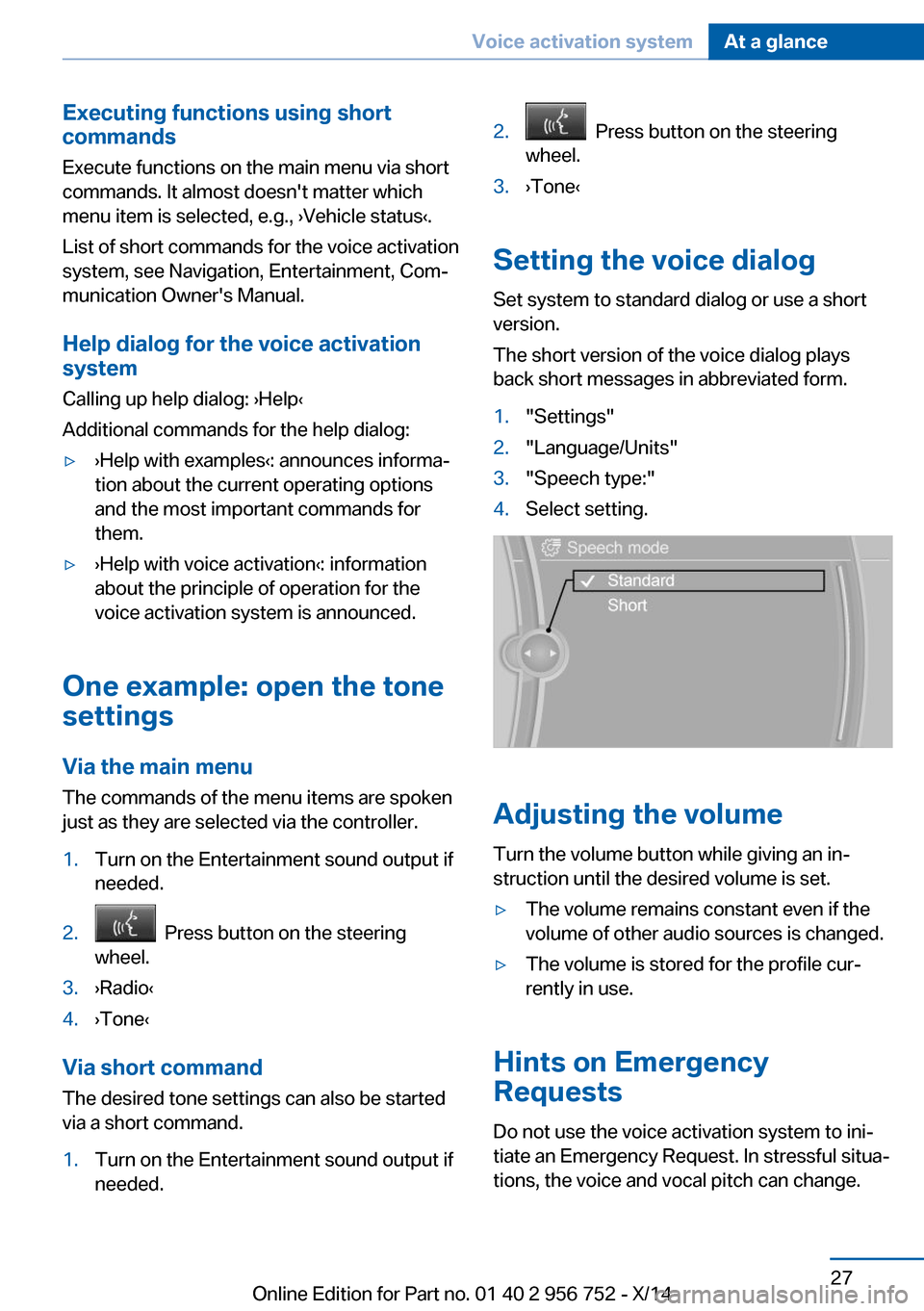
Set system to standard dialog or use a short
version.
The short version of the voice dialog plays
back short messages in abbreviated form.
1."Settings"2."Language/Units"3."Speech type:"4.Select setting.
Adjusting the volume
Turn the volume button while giving an in‐
struction until the desired volume is set.
▷The volume remains constant even if the
volume of other audio sources is changed.▷The volume is stored for the profile cur‐
rently in use.
Hints on Emergency
Requests
Do not use the voice activation system to ini‐
tiate an Emergency Request. In stressful situa‐
tions, the voice and vocal pitch can change.
Seite 27Voice activation systemAt a glance27
Online Edition for Part no. 01 40 2 956 752 - X/14
Page 83 of 253
▷Messages, e.g. Check Control, refer to
page 79.▷Current fuel consumption, refer to
page 84.▷Navigation display, see User's manual for
Navigation, Entertainment and Communi‐
cation.▷Range, refer to page 83.▷Status, Driving Dynamics Control, refer to
page 122.▷Service requirements, refer to page 84.▷Speed limit detection, refer to page 86.▷Time, refer to page 83.
Check Control
The concept The Check Control system monitors functions
in the vehicle and notifies you of malfunctions
in the monitored systems.
A Check Control message is displayed as a
combination of indicator or warning lights and
text messages in the instrument cluster and in
the Head-up Display.
In addition, an acoustic signal may sound and a text message may appear on the Control Dis‐
play.
Indicator/warning lights
General information
The indicator and warning lights in the instru‐
ment cluster can light up in a variety of combi‐
nations and colors.
Several of the lights are checked for proper
functioning and light up temporarily when the
engine is started or the ignition is switched on.
Red lights
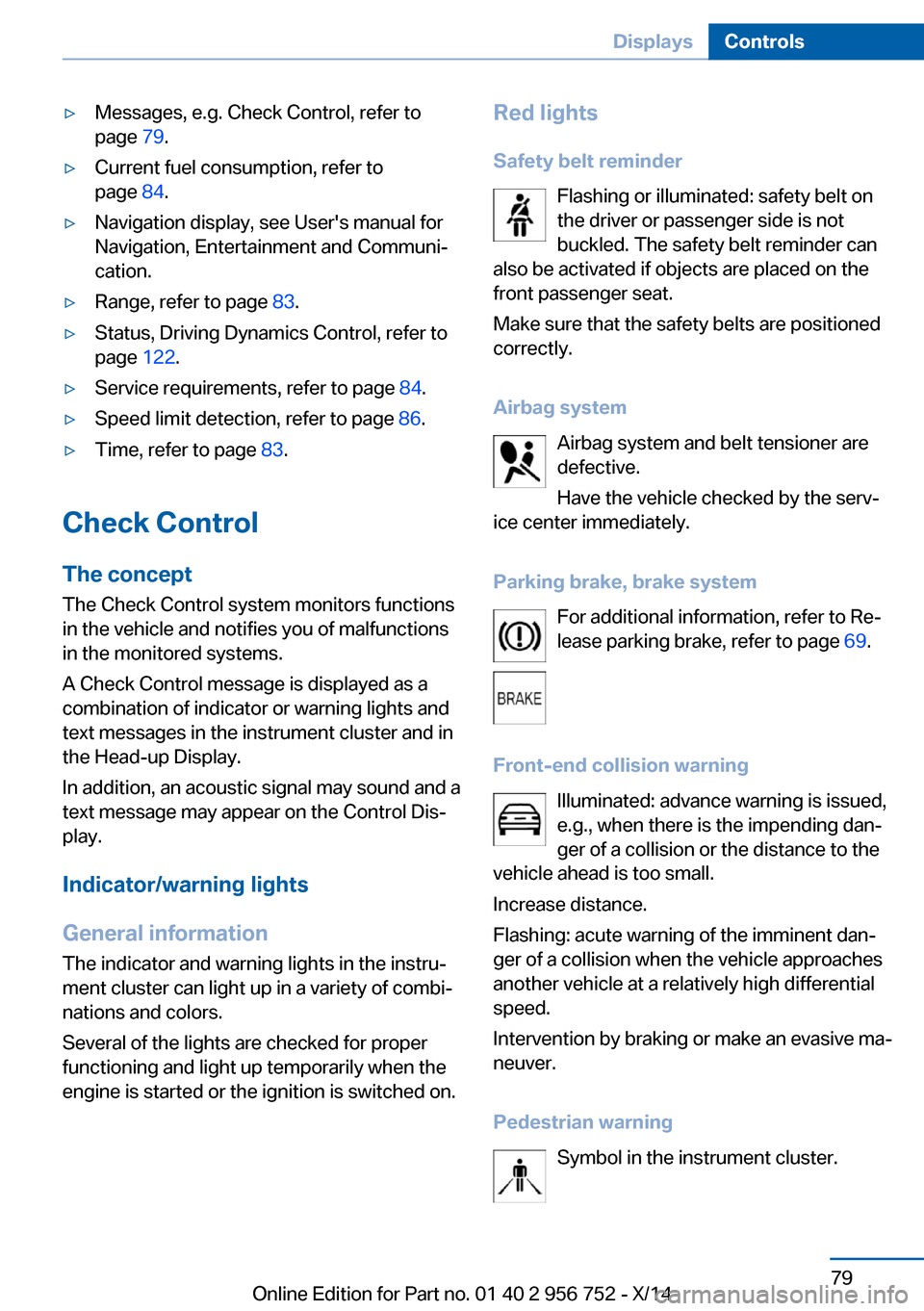
Safety belt reminder Flashing or illuminated: safety belt on
the driver or passenger side is not
buckled. The safety belt reminder can
also be activated if objects are placed on the
front passenger seat.
Make sure that the safety belts are positioned
correctly.
Airbag system Airbag system and belt tensioner are
defective.
Have the vehicle checked by the serv‐
ice center immediately.
Parking brake, brake system For additional information, refer to Re‐
lease parking brake, refer to page 69.
Front-end collision warning Illuminated: advance warning is issued,
e.g., when there is the impending dan‐
ger of a collision or the distance to the
vehicle ahead is too small.
Increase distance.
Flashing: acute warning of the imminent dan‐
ger of a collision when the vehicle approaches
another vehicle at a relatively high differential
speed.
Intervention by braking or make an evasive ma‐
neuver.
Pedestrian warning Symbol in the instrument cluster.Seite 79DisplaysControls79
Online Edition for Part no. 01 40 2 956 752 - X/14
Page 226 of 253
steps to help you under certain circum‐
stances.
For this, data are transmitted to the BMW
Response Center which serve to deter‐
mine the necessary rescue measures. E. g.
the current position of the vehicle, if it can
be established.▷If the LED is flashing green, but the BMW
Response Center can no longer be heard
via the speaker, you can nevertheless still
be heard at the BMW Response Center.
Initiating an Emergency Request
automatically
Under certain conditions, an Emergency Re‐
quest is automatically initiated immediately af‐
ter a severe accident. Automatic Collision Noti‐
fication is not affected by pressing the SOS
button.
Warning triangle
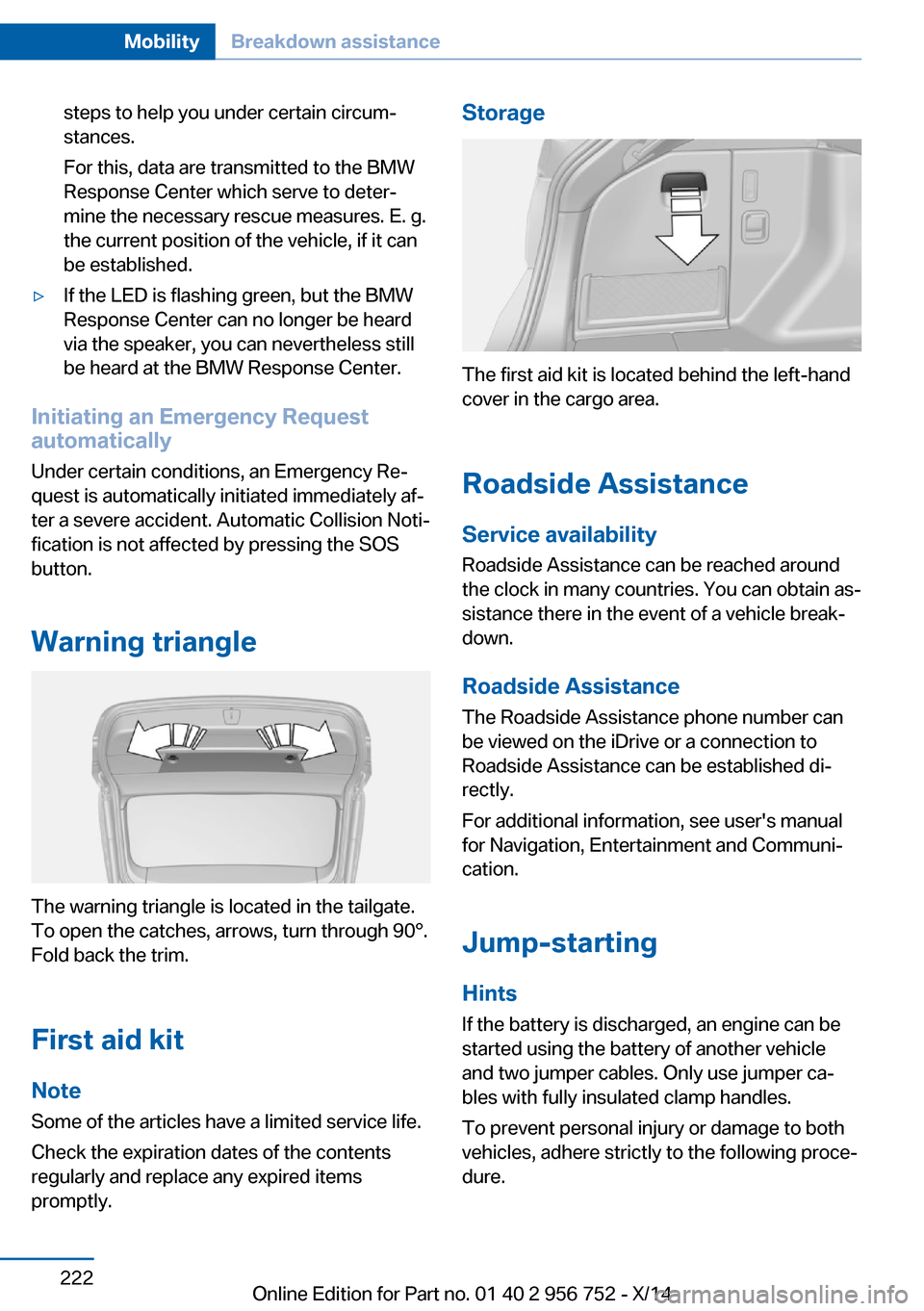
The warning triangle is located in the tailgate.
To open the catches, arrows, turn through 90°.
Fold back the trim.
First aid kit NoteSome of the articles have a limited service life.
Check the expiration dates of the contents
regularly and replace any expired items
promptly.
Storage
The first aid kit is located behind the left-hand
cover in the cargo area.
Roadside Assistance Service availability
Roadside Assistance can be reached around
the clock in many countries. You can obtain as‐
sistance there in the event of a vehicle break‐
down.
Roadside Assistance The Roadside Assistance phone number can
be viewed on the iDrive or a connection to
Roadside Assistance can be established di‐
rectly.
For additional information, see user's manual
for Navigation, Entertainment and Communi‐
cation.
Jump-starting
Hints
If the battery is discharged, an engine can be
started using the battery of another vehicle
and two jumper cables. Only use jumper ca‐
bles with fully insulated clamp handles.
To prevent personal injury or damage to both
vehicles, adhere strictly to the following proce‐
dure.
Seite 222MobilityBreakdown assistance222
Online Edition for Part no. 01 40 2 956 752 - X/14
Page 247 of 253
Lower back support 53
Low-Sulfur Diesel 189
Luggage rack, see Roof- mounted luggage rack 175
Lumbar support 53
M
Maintenance 207
Maintenance require‐ ments 207
Maintenance, service require‐ ments 84
Maintenance system, BMW 207
Make-up mirror 157
Malfunction displays, see Check Control 79
Manual air distribu‐ tion 147, 150
Manual air flow 147, 150
Manual mode, Steptronic transmission 75
Manual operation, door lock 38
Manual operation, exterior mirrors 59
Manual operation, fuel filler flap 186
Manual operation, Park Dis‐ tance Control PDC 134
Manual operation, rearview camera 137
Manual operation, Side View 139
Manual operation, Top View 140
Manual transmission 73
Marking on approved tires 198
Marking, run-flat tires 199
Master key, refer to Remote control 34
Maximum cooling 149
Maximum speed, display 86 Maximum speed, winter
tires 199
Measure, units of 91
Medical kit 222
Memory, seat, mirror 57
Menu, EfficientDynamics 180
Menu in instrument clus‐ ter 87
Menus, operating, iDrive 18
Menus, refer to iDrive operat‐ ing concept 20
Messages, see Check Con‐ trol 79
Microfilter 148, 151
Minimum tread, tires 197
Mirror 58
Mirror memory 57
Mobile communication devi‐ ces in the vehicle 171
Modifications, technical, refer to Safety 7
Moisture in headlight 210
Monitor, refer to Control Dis‐ play 18
Mounting of child restraint systems 61
Multifunction steering wheel, buttons 14
N
Navigation, see user's manual for Navigation, Entertain‐
ment and Communication
Neck restraints, front, refer to Head restraints 55
Neck restraints, rear, refer to Head restraints 56
Neutral cleaner, see wheel cleaner 229
New wheels and tires 198
Nylon rope for tow-starting/ towing 225 O
OBD Onboard Diagnosis 207
OBD, see OBD Onboard Di‐ agnosis 207
Obstacle marking, rearview camera 137
Octane rating, refer to Rec‐ ommended fuel grade 188
Odometer 83
Office, see user's manual for Navigation, Entertainment
and Communication
Oil 203
Oil, adding 204
Oil additives 204
Oil change 205
Oil change interval, service requirements 84
Oil filler neck 204
Oil types, alternative 205
Oil types, approved 205
Old batteries, disposal 219
Onboard monitor, refer to Control Display 18
Onboard vehicle tool kit 209
Opening/closing via door lock 38
Opening and closing 34
Opening and closing, without remote control 38
Opening and closing, with re‐ mote control 37
Opening the tailgate with no- touch activation 43
Operating concept, iDrive 18
Optional equipment, standard equipment 6
Outside air, refer to Auto‐ matic recirculated-air con‐
trol 150
Overheating of engine, refer to Coolant temperature 83 Seite 243Everything from A to ZReference243
Online Edition for Part no. 01 40 2 956 752 - X/14