2014 BMW 3 SERIES SPORTS WAGON door locks
[x] Cancel search: door locksPage 38 of 253
Opening and closingVehicle features and options
This chapter describes all standard, country-
specific and optional features offered with the
series. It also describes features that are not
necessarily available in your car, e. g., due to
the selected options or country versions. This
also applies to safety-related functions and
systems.
Remote control/key
General information The vehicle is supplied with two remote con‐
trols with integrated key.
Every remote control holds a replaceable bat‐
tery.
You may set the key functions depending on
the optional features and country-specific ver‐
sion. For Settings, refer to page 44.
The vehicle stores personal settings for every
remote control. Personal Profile, refer to
page 35.
The remote controls hold information on re‐
quired maintenance. Service data in the re‐
mote control, refer to page 207.
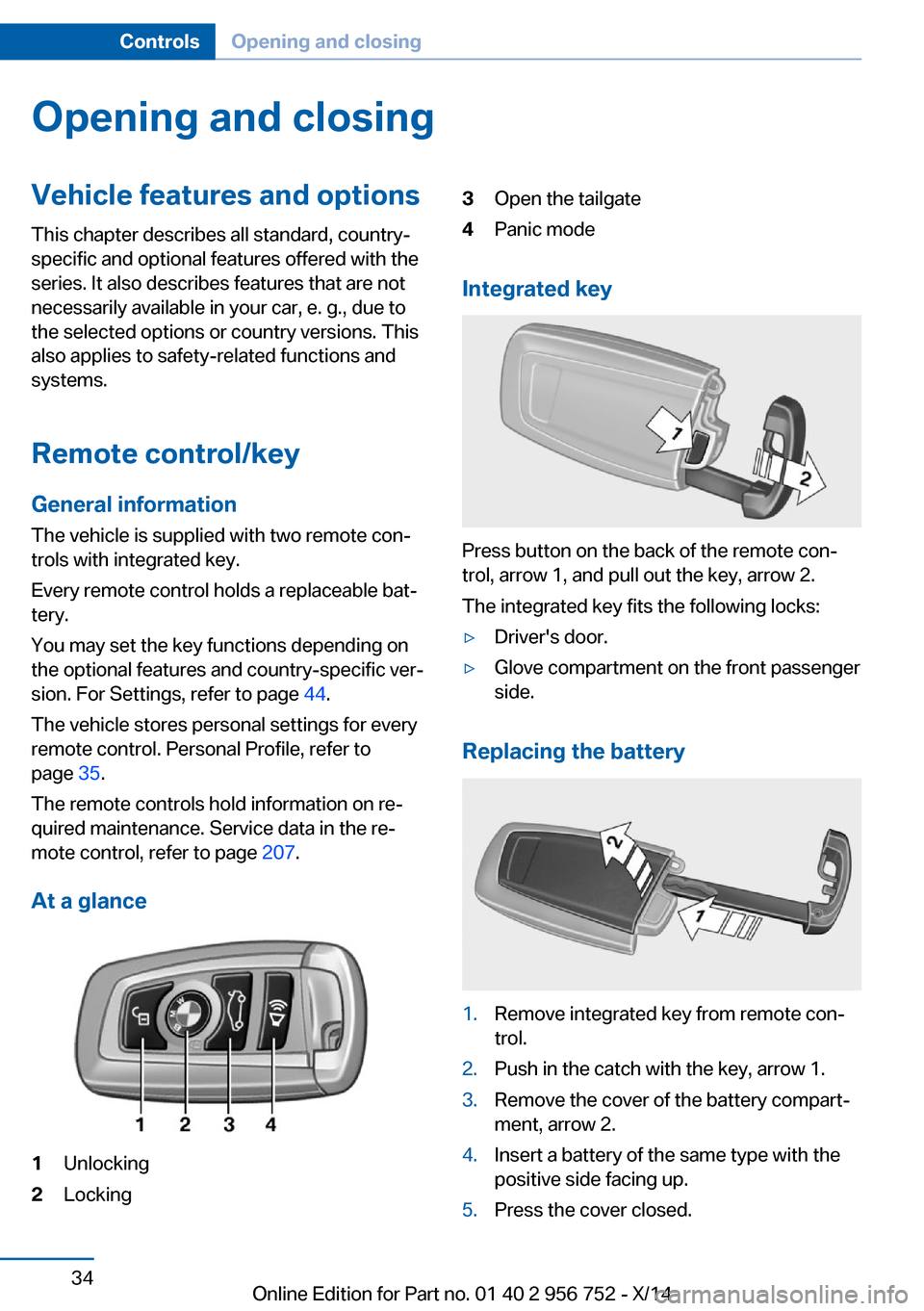
At a glance1Unlocking2Locking3Open the tailgate4Panic mode
Integrated key
Press button on the back of the remote con‐
trol, arrow 1, and pull out the key, arrow 2.
The integrated key fits the following locks:
▷Driver's door.▷Glove compartment on the front passenger
side.
Replacing the battery
1.Remove integrated key from remote con‐
trol.2.Push in the catch with the key, arrow 1.3.Remove the cover of the battery compart‐
ment, arrow 2.4.Insert a battery of the same type with the
positive side facing up.5.Press the cover closed.Seite 34ControlsOpening and closing34
Online Edition for Part no. 01 40 2 956 752 - X/14
Page 43 of 253
Remove the key before pulling the door
handle
Before pulling the outside door handle, remove
the key to avoid damaging the paintwork and
the key.◀
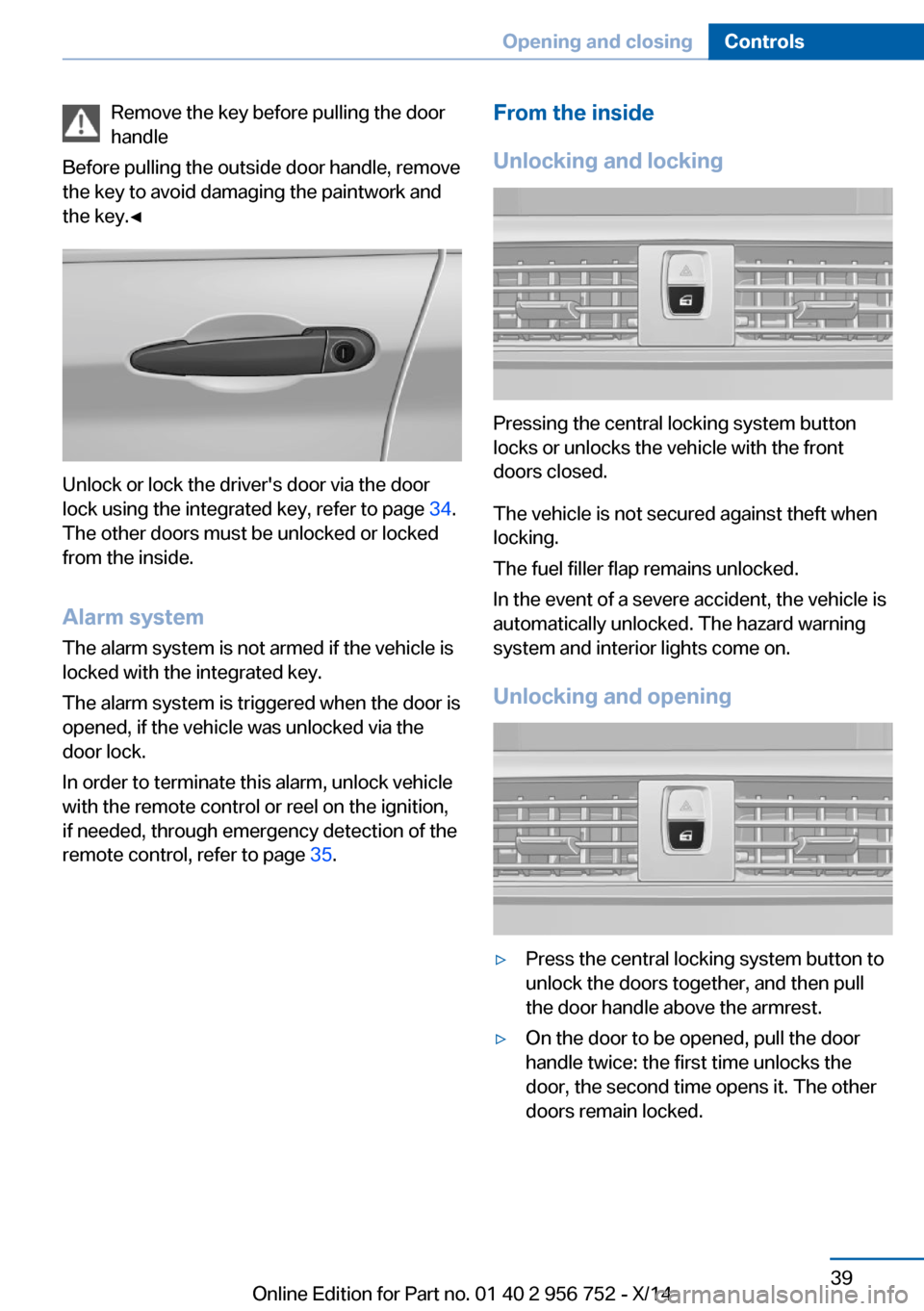
Unlock or lock the driver's door via the door
lock using the integrated key, refer to page 34.
The other doors must be unlocked or locked
from the inside.
Alarm system
The alarm system is not armed if the vehicle is
locked with the integrated key.
The alarm system is triggered when the door is
opened, if the vehicle was unlocked via the door lock.
In order to terminate this alarm, unlock vehicle
with the remote control or reel on the ignition,
if needed, through emergency detection of the
remote control, refer to page 35.
From the inside
Unlocking and locking
Pressing the central locking system button
locks or unlocks the vehicle with the front
doors closed.
The vehicle is not secured against theft when
locking.
The fuel filler flap remains unlocked.
In the event of a severe accident, the vehicle is
automatically unlocked. The hazard warning
system and interior lights come on.
Unlocking and opening
▷Press the central locking system button to
unlock the doors together, and then pull
the door handle above the armrest.▷On the door to be opened, pull the door
handle twice: the first time unlocks the
door, the second time opens it. The other
doors remain locked.Seite 39Opening and closingControls39
Online Edition for Part no. 01 40 2 956 752 - X/14
Page 48 of 253
Avoiding unintentional closing
In situations in which the opened tailgate
should not to be closed with no-touch activa‐
tion, ensure that the remote control is located
beyond the range of the sensor, at least
5 ft/1.50 m from the rear of the car.
Otherwise, the tailgate may be closed inadver‐
tently, for example by an unintentional or mis‐
interpreted movement of the foot.◀
Keep the closing path clear
Make sure that the closing path of the
tailgate is clear; otherwise, injuries may re‐
sult.◀
Do not place the remote control in the
cargo area
Take the remote control with you and do not
leave it in the cargo area; otherwise, the re‐
mote control is locked inside the vehicle when
the tailgate is closed.◀
Malfunction
Remote control detection by the vehicle can
among others be malfunctioning under the fol‐
lowing circumstances:▷Interference of the radio connection from
transmission towers or other equipment
with high transmit power.▷Shielding of the remote control due to
metal objects.▷Interference of the radio connection from
mobile phones or other electronic devices
in direct proximity.
Do not transport the remote control together
with metal objects or electronic devices.
In the case of a malfunction, unlock and lock
the vehicle using the buttons of the remote
control or using the integrated key, refer to
page 38.
Adjusting
Unlocking The settings are saved in the active profile, re‐
fer to page 35.
Doors1."Settings"2."Doors/key"3. Select the symbol.4.Select the desired function:▷"Driver's door only"
Only the driver's door and the fuel filler
flap are unlocked. Pressing again un‐
locks the entire vehicle.▷"All doors"
The entire vehicle is unlocked.
Tailgate
Depending on optional features and country
version, this setting is not offered in some
cases.
1."Settings"2."Doors/key"3. Select the symbol.4.Select the desired function:▷"Tailgate"
The tailgate is opened.▷"Tailgate + door(s)"
The tailgate is opened and the doors
unlocked.
Confirmation signals from the vehicle
The settings are saved in the active profile, re‐
fer to page 35.
1."Settings"2."Doors/key"3.Deactivate or activate the desired confir‐
mation signals.Seite 44ControlsOpening and closing44
Online Edition for Part no. 01 40 2 956 752 - X/14
Page 49 of 253
▷"Acoustic sig. lock/unlock"▷"Flash when lock/unlock"
Automatic lockingThe settings are saved in the active profile, re‐fer to page 35.
1."Settings"2."Doors/key"3.Select the desired function:▷"Lock if no door is opened"
The vehicle locks automatically after a
short period of time if no door is
opened.▷"Lock after start driving"
The vehicle locks automatically after
you drive off.
Retrieving the seat and mirror settings
The driver's seat and exterior mirror positions
used last are stored for the remote control cur‐
rently in use.
When the vehicle is unlocked, these positions
are automatically retrieved if this function was
activated.
Pinch hazard when moving back the seat
If this function is used, first make sure
that the footwell behind the driver's seat is
empty. Otherwise, people might get injured or
objects damaged when the seat is moved
back.◀
The adjustment procedure is interrupted:
▷When a seat position reel is pressed.▷When a button of the seat and mirror mem‐
ory is pressed.
Activating the setting
1."Settings"2."Doors/key"3."Last seat position autom."Alarm system
The conceptWhen the vehicle is locked, the vehicle alarm
system responds to:▷Opening a door, the hood or the tailgate or
rear window.▷Movements in the interior.▷Changes in the vehicle tilt, e. g., during at‐
tempts at stealing a wheel or when towing
the car.▷Disconnected battery voltage.
The alarm system briefly signals tampering:
▷By sounding an acoustic alarm.▷By switching on the hazard warning sys‐
tem.▷By flashing the daytime running lights.
Arming and disarming the alarm
system
When you unlock or lock the vehicle, either
with the remote control or via the Comfort Ac‐
cess, the alarm system is disarmed or armed at
the same time.
Door lock and armed alarm systemThe alarm system is triggered when the door is
opened, when the vehicle is unlocked via the
door lock.
Tailgate and armed alarm system
The tailgate can be opened even when the
alarm system is armed.
After the tailgate is closed, it is locked and
monitored again when the doors are locked.
The hazard warning system flashes once.
Panic mode You can trigger the alarm system if you find
yourself in a dangerous situation.
Seite 45Opening and closingControls45
Online Edition for Part no. 01 40 2 956 752 - X/14
Page 68 of 253
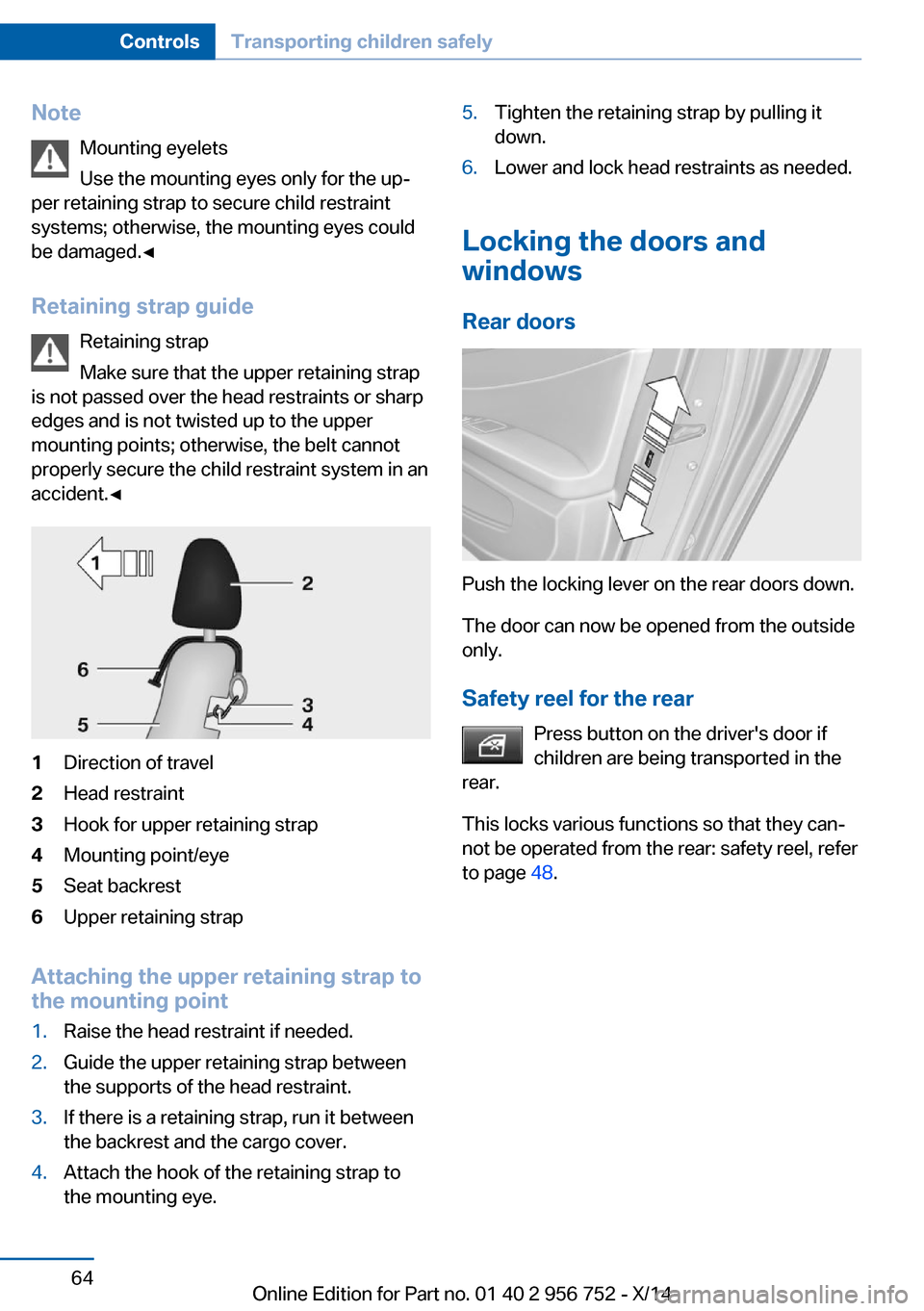
NoteMounting eyelets
Use the mounting eyes only for the up‐
per retaining strap to secure child restraint
systems; otherwise, the mounting eyes could
be damaged.◀
Retaining strap guide Retaining strap
Make sure that the upper retaining strap
is not passed over the head restraints or sharp
edges and is not twisted up to the upper
mounting points; otherwise, the belt cannot
properly secure the child restraint system in an
accident.◀1Direction of travel2Head restraint3Hook for upper retaining strap4Mounting point/eye5Seat backrest6Upper retaining strap
Attaching the upper retaining strap to
the mounting point
1.Raise the head restraint if needed.2.Guide the upper retaining strap between
the supports of the head restraint.3.If there is a retaining strap, run it between
the backrest and the cargo cover.4.Attach the hook of the retaining strap to
the mounting eye.5.Tighten the retaining strap by pulling it
down.6.Lower and lock head restraints as needed.
Locking the doors and
windows
Rear doors
Push the locking lever on the rear doors down.
The door can now be opened from the outside
only.
Safety reel for the rear Press button on the driver's door if
children are being transported in the
rear.
This locks various functions so that they can‐
not be operated from the rear: safety reel, refer
to page 48.
Seite 64ControlsTransporting children safely64
Online Edition for Part no. 01 40 2 956 752 - X/14
Page 243 of 253
Brake discs, break-in 170
Brake force display 118
Brake lights, adaptive 118
Brake lights, brake force dis‐ play 118
Brake pads, break-in 170
Braking, hints 171
Breakdown assis‐ tance 221, 222
Break-in 170
Brightness of Control Dis‐ play 91
Bulb replacement 210
Bulb replacement, front 211
Bulb replacement, halogen headlights 211
Bulb replacement, rear 215
Bulb replacement, xenon headlights 213
Bulbs and lights 210
Button, RES 128
Button, Start/Stop 65
Bypassing, refer to Jump- starting 222
C
California Proposition 65 Warning 7
Camera, care 230
Camera, rearview cam‐ era 136
Camera, Side View 139
Camera, Top View 140
Can holder, refer to Cuphold‐ ers 165
Car battery 218
Car care products 228
Care, displays 230
Care, vehicle 228
Cargo 173
Cargo area 159
Cargo area, enlarging 160
Cargo area partition net 161
Cargo area, storage compart‐ ments 165 Cargo cover 159
Cargo, securing 174
Cargo straps, securing cargo 174
Car key, refer to Remote con‐ trol 34
Carpet, care 230
Car wash 227
Catalytic converter, refer to Hot exhaust system 171
CBS Condition Based Serv‐ ice 207
CD/Multimedia, see user's manual for Navigation, En‐
tertainment and Communi‐
cation
Center armrest 164
Center console 16
Central locking system 39
Central screen, refer to Con‐ trol Display 18
Changes, technical, refer to Safety 7
Changing parts 209
Changing wheels 218
Changing wheels/tires 198
Chassis number, see vehicle identification number 9
Check Control 79
Checking the engine oil level electronically 203
Checking the oil level elec‐ tronically 203
Children, seating position 61
Children, transporting safely 61
Child restraint fixing sys‐ tem 61
Child restraint fixing system LATCH 63
Child restraint fixing systems, mounting 61
Child safety locks 64
Child seat, mounting 61
Child seats 61
Chrome parts, care 229 Cigarette lighter 157
Cleaning displays 230
Climate control 146, 148
Clock 83
Closing/opening via door lock 38
Closing/opening with remote control 37
Closing the tailgate with no- touch activation 43
Clothes hooks 165
Coasting 180
Coasting with engine decou‐ pled, coasting 180
Coasting with idling en‐ gine 180
Cockpit 14
Cold starting, refer to Starting the engine 66
Combination reel, refer to Turn signals 70
Combination reel, refer to Wiper system 70
Comfort Access 42
COMFORT program, Dy‐ namic Driving Control 123
Compartments in the doors 164
Compass 155
Computer 87
Condensation on win‐ dows 150
Condensation under the vehi‐ cle 172
Condition Based Service CBS 207
Configuring driving pro‐ gram 124
Confirmation signal 44
ConnectedDrive, see user's manual for Navigation, En‐
tertainment and Communi‐
cation
ConnectedDrive Services
Connecting electrical devi‐ ces 157 Seite 239Everything from A to ZReference239
Online Edition for Part no. 01 40 2 956 752 - X/14
Page 246 of 253
High beams 70
High beams/low beams, refer to High-beam Assistant 95
Hills 172
Hill start assistant, refer to Drive-off assistant 124
Hints 6
Holder for beverages 165
Hood 202
Horn 14
Hot exhaust system 171
HUD Head-up Display 91
Hydroplaning 171
I Ice warning, see External temperature warning 83
Icy roads, see External tem‐ perature warning 83
Identification marks, tires 195
Identification number, see ve‐ hicle identification num‐
ber 9
iDrive 18
Ignition key, refer to Remote control 34
Ignition off 65
Ignition on 65
Indication of a flat tire 102 , 105
Indicator and alarm lamps, see Check Control 79
Indicator lamp, see Check Control 79
Individual air distribu‐ tion 147, 150
Individual settings, refer to Personal Profile 35
Inflation pressure, tires 193
Inflation pressure warning FTM, tires 105
Info display, refer to Com‐ puter 87
Initialize, Tire Pressure Moni‐ tor TPM 102 Initializing, Flat Tire Monitor
FTM 105
Instrument cluster 78
Instrument cluster, electronic displays 78
Instrument lighting 96
Integrated key 34
Integrated Owner's Manual in the vehicle 29
Intelligent Emergency Re‐ quest 221
Intelligent Safety 106
Intensity, AUTO pro‐ gram 149
Interior equipment 153
Interior lights 96
Interior lights via remote con‐ trol 37
Interior motion sensor 46
Interior rearview mirror, auto‐ matic dimming feature 60
Interior rearview mirror, com‐ pass 155
Interior rearview mirror, man‐ ually dimmable 60
Interval display, service re‐ quirements 84
J Jacking points for the vehicle jack 218
Joystick, Steptronic transmis‐ sion 74
Jump-starting 222
K
Key/remote control 34
Keyless Go, refer to Comfort Access 42
Key Memory, refer to Per‐ sonal Profile 35
Kickdown, Steptronic trans‐ mission 74
Knee airbag 98 L
Lamp replacement 210
Lamp replacement, front 211
Lamp replacement, rear 215
Lane departure warning 115
Lane margin, warning 115
Language on Control Dis‐ play 91
Lashing eyes, securing cargo 174
LATCH child restraint sys‐ tem 63
Launch Control 76
Leather, care 228
LEDs, light-emitting di‐ odes 210
Length, vehicle 234
Letters and numbers, enter‐ ing 25
Light alloy wheels, care 229
Light control 94
Light-emitting diodes, LEDs 210
Lighter 157
Lighting 93
Lighting via remote con‐ trol 37
Light reel 93
Lights 93
Lights and bulbs 210
Load 174
Loading 173
Lock, door 38
Locking/unlocking via door lock 38
Locking/unlocking with re‐ mote control 37
Locking, automatic 45
Locking, settings 44
Lock, power window 48
Locks, doors, and win‐ dows 64
Low beams 93
Low beams, automatic, refer to High-beam Assistant 95 Seite 242ReferenceEverything from A to Z242
Online Edition for Part no. 01 40 2 956 752 - X/14