2014 BMW 3 SERIES GRAN COUPE clock
[x] Cancel search: clockPage 216 of 246
that the foam rubber sealing ring is on the
centering pin.5.Release the catch at the top on the con‐
nector of the connecting line and remove
the connector from the bulb holder.
Replacing the bulbs
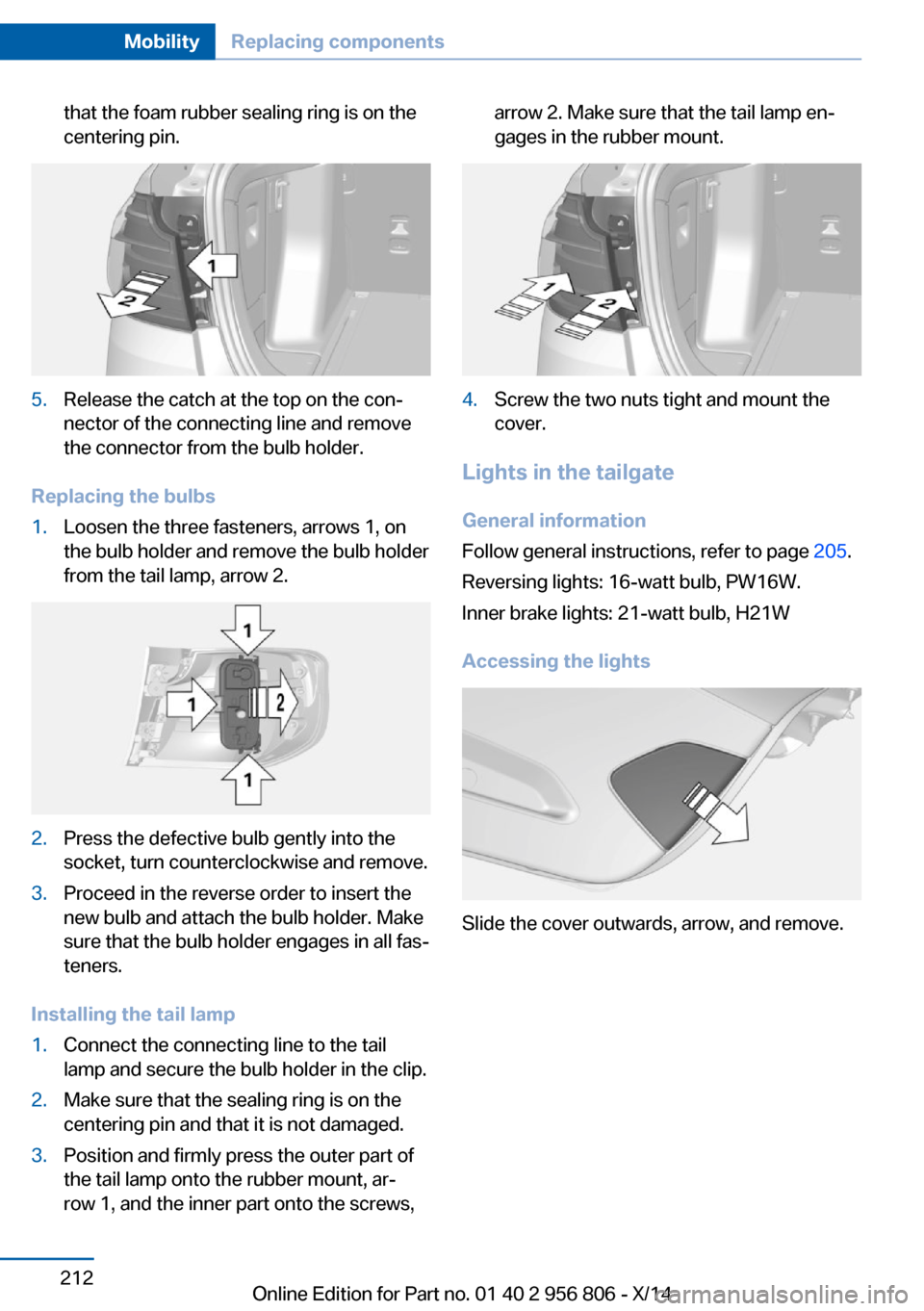
1.Loosen the three fasteners, arrows 1, on
the bulb holder and remove the bulb holder
from the tail lamp, arrow 2.2.Press the defective bulb gently into the
socket, turn counterclockwise and remove.3.Proceed in the reverse order to insert the
new bulb and attach the bulb holder. Make
sure that the bulb holder engages in all fas‐
teners.
Installing the tail lamp
1.Connect the connecting line to the tail
lamp and secure the bulb holder in the clip.2.Make sure that the sealing ring is on the
centering pin and that it is not damaged.3.Position and firmly press the outer part of
the tail lamp onto the rubber mount, ar‐
row 1, and the inner part onto the screws,arrow 2. Make sure that the tail lamp en‐
gages in the rubber mount.4.Screw the two nuts tight and mount the
cover.
Lights in the tailgate
General information
Follow general instructions, refer to page 205.
Reversing lights: 16-watt bulb, PW16W.
Inner brake lights: 21-watt bulb, H21W
Accessing the lights
Slide the cover outwards, arrow, and remove.
Seite 212MobilityReplacing components212
Online Edition for Part no. 01 40 2 956 806 - X/14
Page 217 of 246

Replacing the reversing lamp and inner
brake lamp1.Loosen the two holders, arrow 1 and pull
down on the lamp holder to remove, ar‐
row 2.2.Unscrew the defective bulb of the revers‐
ing or brake lamp from its socket counter‐
clockwise.3.Insert the new bulb.
Installing the bulb holder
1.Slide the bulb holder onto the two guide
pins, arrow 1. Insert the two contacts, ar‐
row 2, into the connections, arrow 3.2.Press on the bulb holder. Make sure that
the two exterior holders latch into place.3.Place the cover back in position and slide it
inwards.
Rear lamp, license plate lamp and
central brake lamp
Follow general instructions, refer to page 205.
These lights are made using LED technology.
Contact your service center in the event of a
malfunction.
Changing wheels
Hints
When using run-flat tires or sealants, a tire
does not need to be changed immediately in
the event of pressure loss due to a flat tire.
Which is why no spare tire is available.
The tools for changing wheels are available as
accessories from your service center.
Jacking points for the vehicle jack
The jacking points for the vehicle jack are lo‐
cated at the positions shown.
Vehicle battery Maintenance
The battery is maintenance-free.
The added amount of acid is sufficient for the
service life of the battery.
Further information about the battery can be
obtained from your service center.
Battery replacement Use approved vehicle batteries only
Only use vehicle batteries that have been
approved for your vehicle by the manufacturer;
otherwise, the vehicle could be damaged and
systems or functions may not be fully availa‐
ble.◀
After a battery replacement, have the battery
registered on the vehicle by your service cen‐
Seite 213Replacing componentsMobility213
Online Edition for Part no. 01 40 2 956 806 - X/14
Page 221 of 246

steps to help you under certain circum‐
stances.
For this, data are transmitted to the BMW
Response Center which serve to deter‐
mine the necessary rescue measures. E. g.
the current position of the vehicle, if it can
be established.▷If the LED is flashing green, but the BMW
Response Center can no longer be heard
via the speaker, you can nevertheless still
be heard at the BMW Response Center.
Initiating an Emergency Request
automatically
Under certain conditions, an Emergency Re‐
quest is automatically initiated immediately af‐
ter a severe accident. Automatic Collision Noti‐
fication is not affected by pressing the SOS
button.
Warning triangle
The warning triangle is located in the tailgate.
To open the catches, arrows, turn through 90°.
Fold back the trim.
First aid kit NoteSome of the articles have a limited service life.
Check the expiration dates of the contents
regularly and replace any expired items
promptly.
Storage
The first aid kit is located behind the left-hand
cover in the cargo area.
Roadside Assistance Service availability
Roadside Assistance can be reached around
the clock in many countries. You can obtain as‐
sistance there in the event of a vehicle break‐
down.
Roadside Assistance The Roadside Assistance phone number can
be viewed on the iDrive or a connection to
Roadside Assistance can be established di‐
rectly.
For additional information, see user's manual
for Navigation, Entertainment and Communi‐
cation.
Jump-starting
Hints
If the battery is discharged, an engine can be
started using the battery of another vehicle
and two jumper cables. Only use jumper ca‐
bles with fully insulated clamp handles.
To prevent personal injury or damage to both
vehicles, adhere strictly to the following proce‐
dure.
Seite 217Breakdown assistanceMobility217
Online Edition for Part no. 01 40 2 956 806 - X/14
Page 237 of 246

Brake lights, adaptive 116
Brake lights, brake force dis‐ play 116
Brake pads, break-in 168
Braking, hints 169
Breakdown assis‐ tance 216, 217
Break-in 168
Brightness of Control Dis‐ play 89
Bulb replacement 205
Bulb replacement, front 206
Bulb replacement, halogen headlights 206
Bulb replacement, rear 211
Bulb replacement, xenon headlights 209
Bulbs and lights 205
Button, RES 128
Button, Start/Stop 64
Bypassing, refer to Jump- starting 217
C
California Proposition 65 Warning 7
Camera, care 224
Camera, rearview cam‐ era 136
Camera, Side View 139
Camera, Top View 140
Can holder, refer to Cuphold‐ ers 164
Car battery 213
Car care products 222
Care, displays 224
Care, vehicle 222
Cargo 171
Cargo area 159
Cargo area, enlarging 160
Cargo area, storage compart‐ ments 165
Cargo cover 159
Cargo position, rear seat backrest 161 Cargo, securing 172
Cargo straps, securing cargo 172
Car key, refer to Remote con‐ trol 34
Carpet, care 224
Car wash 221
Catalytic converter, refer to Hot exhaust system 168
CBS Condition Based Serv‐ ice 203
CD/Multimedia, see user's manual for Navigation, En‐
tertainment and Communi‐
cation
Center armrest 163
Center console 16
Central locking system 39
Central screen, refer to Con‐ trol Display 18
Changes, technical, refer to Safety 7
Changing parts 205
Changing wheels 213
Changing wheels/tires 194
Chassis number, see vehicle identification number 9
Check Control 77
Checking the engine oil level electronically 199
Checking the oil level elec‐ tronically 199
Children, seating position 60
Children, transporting safely 60
Child restraint fixing sys‐ tem 60
Child restraint fixing system LATCH 62
Child restraint fixing systems, mounting 60
Child safety locks 63
Child seat, mounting 60
Child seats 60
Chrome parts, care 223
Cigarette lighter 157 Cleaning displays 224
Climate control 146, 148
Clock 81
Closing/opening via door lock 38
Closing/opening with remote control 37
Closing the tailgate with no- touch activation 42
Clothes hooks 164
Coasting 178
Coasting with engine decou‐ pled, coasting 178
Coasting with idling en‐ gine 178
Cockpit 14
Combination reel, refer to Turn signals 68
Combination reel, refer to Wiper system 69
Comfort Access 41
COMFORT program, Dy‐ namic Driving Control 123
Compartments in the doors 163
Compass 155
Computer 85
Condensation on win‐ dows 150
Condensation under the vehi‐ cle 170
Condition Based Service CBS 203
Configuring driving pro‐ gram 123
Confirmation signal 44
ConnectedDrive, see user's manual for Navigation, En‐
tertainment and Communi‐
cation
ConnectedDrive Services
Connecting electrical devi‐ ces 157
Continued driving with a flat tire 101 , 104
Control Display 18 Seite 233Everything from A to ZReference233
Online Edition for Part no. 01 40 2 956 806 - X/14
Page 238 of 246

Control Display, settings 88
Controller 18, 19
Control systems, driving sta‐ bility 118
Convenient opening with the remote control 37
Coolant 202
Coolant level 202
Coolant temperature 81
Cooling function 147, 149
Cooling, maximum 149
Cooling system 202
Corrosion on brake discs 170
Cosmetic mirror 157
Cruise control 131
Cruise control, active with Stop & Go 125
Cruising range 81
Cupholders 164
Current fuel consumption 82
D
Damage, tires 193
Damping control, dy‐ namic 120
Data, technical 228
Date 81
Daytime running lights 92
Defrosting, refer to defrosting the windows 147
Defrosting, refer to Windows, defrosting 150
Defrosting the windows 147
Dehumidifying, air 147, 149
Deleting personal data 24
Deletion of personal data 24
Destination distance 86
Digital clock 81
Digital compass 155
Dimensions 228
Dimmable exterior mirrors 58
Dimmable interior rearview mirror 58
Direction indicator, refer to Turn signals 68 Display, electronic, instru‐
ment cluster 76
Display in windshield 89
Display lighting, refer to In‐ strument lighting 94
Displays, cleaning 224
Disposal, coolant 202
Disposal, vehicle battery 214
Distance control, refer to PDC 133
Distance to destination 86
Divided screen view, split screen 23
Door lock 38
Door lock, refer to Remote control 34
Drive-off assistant 123
Drive-off assistant, refer to DSC 118
Driver assistance, refer to In‐ telligent Safety 104
Driving Assistant, refer to In‐ telligent Safety 104
Driving Dynamics Con‐ trol 121
Driving instructions, break- in 168
Driving mode 121
Driving notes, general 168
Driving stability control sys‐ tems 118
Driving style analysis 179
Driving tips 168
DSC Dynamic Stability Con‐ trol 118
DTC Dynamic Traction Con‐ trol 119
Dynamic Damping Con‐ trol 120
Dynamic Stability Control DSC 118
Dynamic Traction Control DTC 119 E
ECO PRO 175
ECO PRO, bonus range 176
ECO PRO display 175
ECO PRO driving mode 175
ECO PRO driving style analy‐ sis 179
ECO PRO mode 175
ECO PRO Tip - driving in‐ struction 177
EfficientDynamics 177
Electronic displays, instru‐ ment cluster 76
Electronic oil measure‐ ment 199
Electronic Stability Program ESP, refer to DSC 118
Emergency detection, remote control 35
Emergency release, fuel filler flap 184
Emergency Request 216
Emergency service, refer to Roadside Assistance 217
Emergency start function, en‐ gine start 35
Emergency unlocking, tail‐ gate 41
Emergency unlocking, trans‐ mission lock 74
Energy Control 82
Energy recovery 82
Engine, automatic reel-off 66
Engine, automatic Start/Stop function 66
Engine compartment 197
Engine compartment, work‐ ing in 198
Engine coolant 202
Engine idling when driving, coasting 178
Engine oil 199
Engine oil, adding 200
Engine oil additives 200
Engine oil change 201 Seite 234ReferenceEverything from A to Z234
Online Edition for Part no. 01 40 2 956 806 - X/14