2014 BMW 2 SERIES locking
[x] Cancel search: lockingPage 68 of 228

Radio ready stateActivate radio-ready state:▷When the engine is running: press the
Start/Stop button.
Some electronic systems/power consumers
remain ready for operation.
The radio-ready state switches off automati‐
cally:
▷After approx. 8 minutes.▷When the vehicle is locked using the cen‐
tral locking system.▷Shortly before the battery is discharged
completely, so that the engine can still be
started.
The radio-ready state remains active if, e.g.,
the ignition is automatically switched off for the
following reasons:
▷Opening or closing the driver's door.▷Unfastening of the driver's safety belt.▷When automatically switching from low
beams to parking lights.
Starting the engine
Hints Enclosed areas
Do not let the engine run in enclosed
areas, since breathing in exhaust fumes may
lead to loss of consciousness and death. The
exhaust gases contain carbon monoxide, an
odorless and colorless but highly toxic gas.◀
Unattended vehicle
Do not leave the vehicle unattended with
the engine running; doing so poses a risk of
danger.
Before leaving the vehicle with the engine run‐
ning, set the parking brake and place the trans‐
mission in selector lever position P or N to pre‐
vent the vehicle from moving.◀
Repeated starting in quick succession
Avoid trying to start the vehicle repeat‐
edly and in quick succession. Otherwise, the
fuel is not burned or is inadequately burned,
posing a risk of overheating and damage to the
catalytic converter.◀
Do not wait for the engine to warm-up while
the vehicle remains stationary. Start driving at
moderate engine speeds.
Steptronic transmission
Starting the engine1.Depress the brake pedal.2.Press the Start/Stop button.
The ignition is activated automatically for a
certain time and is stopped as soon as the en‐
gine starts.
Manual transmission
Starting the engine
1.Depress the brake pedal.2.Press on the clutch pedal and shift to neu‐
tral.3.Press the Start/Stop button.
The ignition is activated automatically for a
certain time and is stopped as soon as the en‐
gine starts.
Engine stop
Hints Take the remote control with you
Take the remote control with you when
leaving the vehicle so that children, e.g., can‐
not start the engine.◀
Apply parking brake and further secure
the vehicle if needed.
Set the parking brake firmly when parking; oth‐
erwise, the vehicle could roll. On steep upward
Seite 64ControlsDriving64
Online Edition for Part no. 01 40 2 956 568 - X/14
Page 78 of 228

Displays in the instrument clusterThe selector lever position is dis‐played, e.g.: P.
Electronic unlocking of the
transmission lock
General information
Electronically unlock the transmission lock to
maneuver vehicle from the danger area.
Unlocking is possible, if the started can spin
the engine.
Engaging selector lever position N1.Depress the brake pedal.2.Press the Start/Stop button. The starter
must audibly start.3.Press and hold the selector lever into posi‐
tion N.
A corresponding Check Control message
is displayed.4.Press the selector lever again into posi‐
tion N within approx. 6 seconds.
Position N is displayed in the instrument
cluster.5.Release brake, as soon as the starter
stops.6.Maneuver the vehicle from the danger area
and secure it against moving on its own.
Steptronic Sport transmission:
Launch Control
The concept Launch Control enables optimum accelerationon surfaces with good traction.
Hints
Component wear
Do not use Launch Control too often;
otherwise, this may result in premature wear of
components due to the high stress placed on
the vehicle.◀
Do not use Launch Control during the break-in,
refer to page 150, period.
To increase vehicle stability, activate DSC
again as soon as possible.
An experienced driver may be able to achieve better acceleration values in DSC OFF mode.
Requirements
Launch Control is available when the engine is
warmed up, that is, after uninterrupted driving
of at least 6 miles/10 km.
To start with Launch Control do not steer the
steering wheel.
Start with launch controlWhile the engine is running:1. Press button or select Sport+ with
the Driving Dynamics Control.
TRACTION is displayed in the instrument
cluster and the indicator lamp for DSC OFF
lights up.2.Engage selector lever position S.3.With the left foot, forcefully press down on
the brake.4.Press and hold down the accelerator pedal
beyond the resistance point at the full
throttle position.
A flag symbol is displayed in the instru‐
ment cluster.5.The starting engine speed adjusts. Within
3 seconds, release the brake.
Before using Launch Control, allow the trans‐
mission to cool down for approx. 5 minutes.
Seite 74ControlsDriving74
Online Edition for Part no. 01 40 2 956 568 - X/14
Page 115 of 228

Driving stability control systemsVehicle features and optionsThis chapter describes all standard, country-
specific and optional features offered with the
series. It also describes features that are not
necessarily available in your car, e. g., due to
the selected options or country versions. This
also applies to safety-related functions and
systems.
Antilock Brake System ABS
ABS prevents locking of the wheels during
braking.
The vehicle contains its steering power even
during full brake applications, thus increasing
active safety.
ABS is operational every time you start the en‐
gine.
Brake assistant
When you apply the brakes rapidly, this system
automatically produces the greatest possible
braking force boost. It reduces the braking dis‐
tance to a minimum during emergency stop.
This system utilizes all of the benefits provided
by ABS.
Do not reduce the pressure on the brake pedal
for the duration of the emergency stop.
DSC Dynamic Stability
Control
The concept DSC prevents traction loss in the power
wheels when driving off and accelerating.
DSC also recognizes unstable vehicle condi‐
tions such as fishtailing or nose-diving. Withinthe physical limits DSC helps to keep the vehi‐
cle on a steady course by reducing engine
speed and by applying brakes to the individual
wheels.
Note Adjust your driving style to the situation
An appropriate driving style is always the
responsibility of the driver.
The laws of physics cannot be repealed, not
even with DSC.
Therefore, do not reduce the additional safety
margin by driving in a risky manner.◀
Do not deactivate DSC when driving with
roof load
Do not deactivate Dynamic Stability Control
DSC when driving with roof load, e.g. roof-
mounted luggage rack.
Otherwise, driving safety is not given in driv‐
ing-critical situation due to the elevated center
of gravity.◀
At a glance
Button in the vehicle
DSC OFF button
Seite 111Driving stability control systemsControls111
Online Edition for Part no. 01 40 2 956 568 - X/14
Page 147 of 228

Storage compartmentsVehicle features and optionsThis chapter describes all standard, country-
specific and optional features offered with the
series. It also describes features that are not
necessarily available in your car, e. g., due to
the selected options or country versions. This
also applies to safety-related functions and
systems.
Hints No loose objects in the car's interior
Do not stow any objects in the car's inte‐
rior without securing them; otherwise, they
may present a danger to occupants e.g., during
braking and evasive maneuvers.◀
Do not place anti-slip mats on the dash‐
board
Do not place anti-slip mats on the dashboard.
The mat materials could damage the dash‐
board.◀
Storage compartments The following storage compartments are avail‐
able in the vehicle interior:▷Glove compartment on the front passenger
side, refer to page 143.▷Glove compartment on the driver's side,
refer to page 144.▷Compartments in the doors, refer to
page 144.▷Without Smoker's package: Front storage
compartment, in front of the cupholders,
refer to page 144.▷Storage compartment in the front center
armrest, refer to page 144.▷Nets on the backrests of the front seats.▷Storage compartment in the rear center
console, refer to page 145.▷Storage compartment between the rear
seats, refer to page 145.
Glove compartment
Front passenger side
Note Close the glove compartment again im‐
mediately
Close the glove compartment immediately af‐
ter use while driving; otherwise, injury may oc‐
cur during accidents.◀
Opening
Pull the handle.
The light in the glove compartment switches
on.
ClosingFold cover closed.
Locking
The glove compartment can be locked with an
integrated key to separately secure the trunk
lid, refer to page 40, e.g.
Seite 143Storage compartmentsControls143
Online Edition for Part no. 01 40 2 956 568 - X/14
Page 170 of 228
RefuelingVehicle features and options
This chapter describes all standard, country-
specific and optional features offered with the
series. It also describes features that are not
necessarily available in your car, e. g., due to
the selected options or country versions. This
also applies to safety-related functions and
systems.
Hints Refuel promptly
Refuel no later than at a range of
30 miles/50 km or engine operation might fail
and damage might occur.◀
Fuel lid
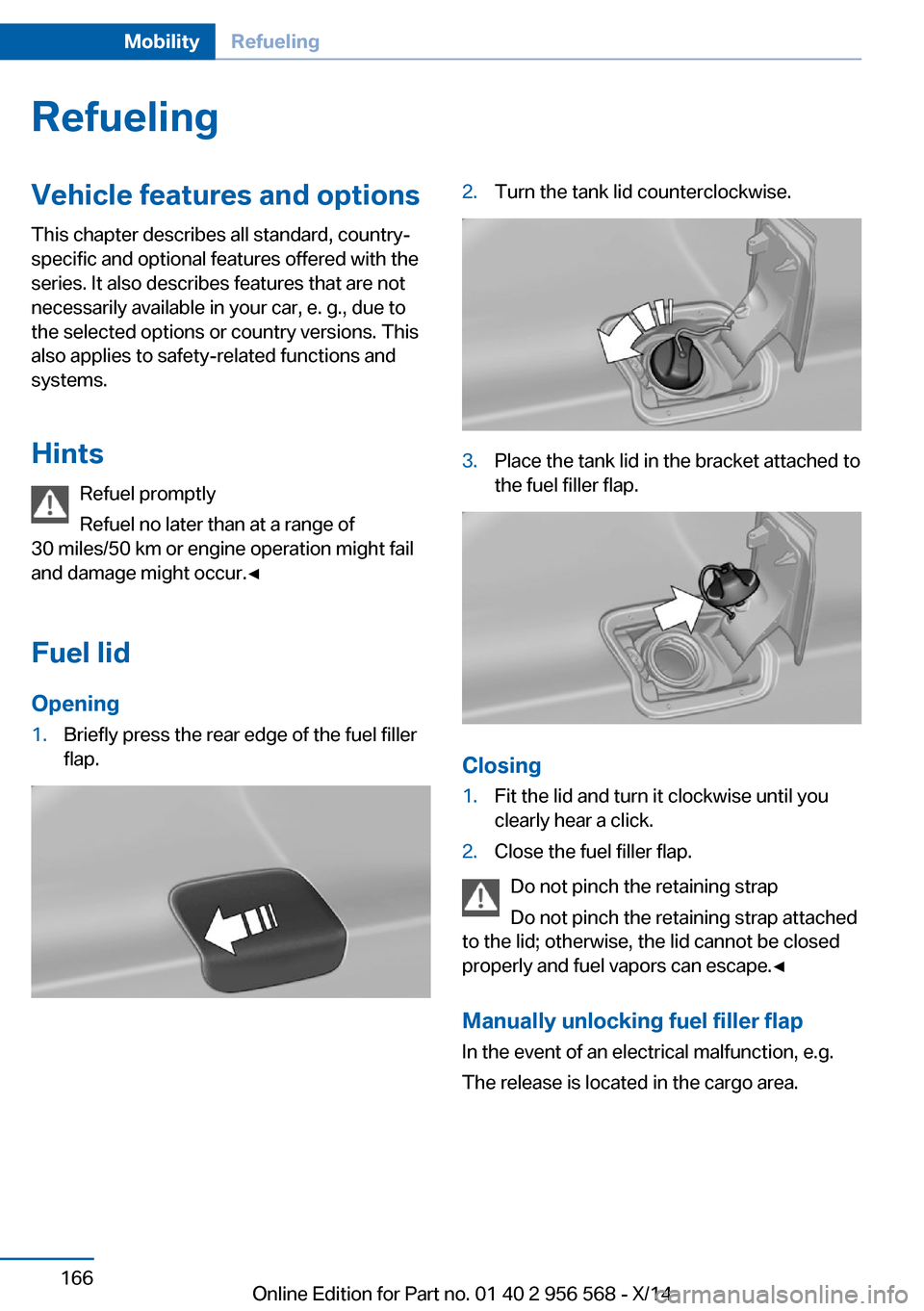
Opening1.Briefly press the rear edge of the fuel filler
flap.2.Turn the tank lid counterclockwise.3.Place the tank lid in the bracket attached to
the fuel filler flap.
Closing
1.Fit the lid and turn it clockwise until you
clearly hear a click.2.Close the fuel filler flap.
Do not pinch the retaining strap
Do not pinch the retaining strap attached
to the lid; otherwise, the lid cannot be closed
properly and fuel vapors can escape.◀
Manually unlocking fuel filler flap In the event of an electrical malfunction, e.g.
The release is located in the cargo area.
Seite 166MobilityRefueling166
Online Edition for Part no. 01 40 2 956 568 - X/14
Page 218 of 228

Everything from A to Z
IndexA ABS, Antilock Brake Sys‐ tem 111
Acceleration Assistant, refer to Launch Control 74
Activated-charcoal filter 133
Adaptive brake lights, refer to Brake force display 110
Adaptive Light Control 90
Additives, oil 182
Adjustments, seats/head re‐ straints 48
After washing vehicle 204
Airbags 94
Airbags, indicator/warning light 95
Air circulation, refer to Recir‐ culated-air mode 129, 132
Air, dehumidifying, refer to Cooling function 129, 131
Air distribution, manual 129, 132
Air flow, air conditioner 129
Air flow, automatic climate control 132
Air pressure, tires 170
Air vents, refer to Ventila‐ tion 133
Alarm system 43
Alarm, unintentional 44
All around the center con‐ sole 16
All around the roofliner 17
All around the steering wheel 14
All-season tires, refer to Win‐ ter tires 177
All-wheel-drive 112
Alternating-code hand-held transmitter 136 Alternative oil types 183
Antifreeze, washer fluid 70
Antilock Brake System, ABS 111
Anti-slip control, refer to DSC 111
Approved axle load 211
Approved engine oils 183
Arrival time 86
Ash tray 139
Assistance, Roadside Assis‐ tance 198
Assistance when driving off 115
Attentiveness assistant 110
AUTO intensity 131
Automatic car wash 203
Automatic climate con‐ trol 128
Automatic climate control with enhanced features 130
Automatic Curb Monitor 56
Automatic deactivation, front- seat passenger airbags 96
Automatic headlight con‐ trol 90
Automatic locking 43
Automatic recirculated-air control 132
Automatic transmission, see Steptronic transmission 71
AUTO program, automatic cli‐ mate control 131
AUTO program, climate con‐ trol 129
AUTO program, intensity 131
Auto Start/Stop function 65
Average fuel consumption 86
Average speed 86
Axle loads, weights 211 B
Backrest curvature, refer to Lumbar support 50
Backrest, width 50
Band-aids, refer to First aid kit 198
Bar for tow-starting/ towing 201
Battery replacement, vehicle battery 194
Battery replacement, vehicle remote control 34
Battery, vehicle 194
Belts, safety belts 52
Beverage holder, cu‐ pholder 145
BMW Assist, see user's manual for Navigation, En‐
tertainment and Communi‐
cation
BMW maintenance sys‐ tem 185
Bonus range, ECO PRO 158
Bottle holder, refer to Cu‐ pholder 145
Brake assistant 111
Brake discs, break-in 150
Brake force display 110
Brake lights, adaptive 110
Brake lights, brake force dis‐ play 110
Brake pads, break-in 150
Braking, hints 151
Breakdown assis‐ tance 197, 198
Break-in 150
Brightness of Control Dis‐ play 88
Bulb replacement 187
Bulb replacement, front 188 Seite 214ReferenceEverything from A to Z214
Online Edition for Part no. 01 40 2 956 568 - X/14
Page 219 of 228

Bulb replacement, rear 192
Bulbs and lights 187
Button, Start/Stop 63
Bypassing, refer to Jump- starting 198
C
California Proposition 65 Warning 7
Camera, care 206
Camera, rearview cam‐ era 122
Can holder, refer to Cu‐ pholder 145
Car battery 194
Car care products 204
Care, displays 206
Care, vehicle 204
Cargo 153
Cargo area, enlarging 141
Cargo area, storage compart‐ ments 145
Cargo, securing 154
Cargo straps, securing cargo 154
Car key, refer to Remote con‐ trol 34
Carpet, care 206
Car wash 203
Catalytic converter, refer to Hot exhaust system 151
CBS Condition Based Serv‐ ice 185
CD/Multimedia, see user's manual for Navigation, En‐
tertainment and Communi‐
cation
Center armrest 144
Center console 16
Central locking system 39
Central screen, refer to Con‐ trol Display 18
Changes, technical, refer to Safety 7
Changing parts 187 Changing wheels 193
Changing wheels/tires 176
Chassis number, see vehicle identification number 9
Check Control 77
Checking the oil level elec‐ tronically 181
Children, seating position 59
Children, transporting safely 59
Child restraint fixing sys‐ tem 59
Child restraint fixing system LATCH 60
Child restraint fixing systems, mounting 59
Child seat, mounting 59
Child seats 59
Chrome parts, care 205
Cigarette lighter 139
Cleaning displays 206
Climate control 128, 130
Clock 81
Closing/opening via door lock 38
Closing/opening with remote control 37
Clothes hooks 145
Coasting 160
Coasting with engine decou‐ pled, coasting 160
Coasting with idling en‐ gine 160
Cockpit 14
Combination reel, refer to Turn signals 67
Combination reel, refer to Wiper system 68
Comfort Access 41
COMFORT program, Dy‐ namic Driving Control 115
Compartments in the doors 144
Compass 137
Computer 85 Condensation on win‐
dows 132
Condensation under the vehi‐ cle 152
Condition Based Service CBS 185
Configuring driving pro‐ gram 115
Confirmation signal 43
ConnectedDrive, see user's manual for Navigation, En‐
tertainment and Communi‐
cation
ConnectedDrive Services
Connecting electrical devi‐ ces 139
Continued driving with a flat tire 99, 102
Control Display 18
Control Display, settings 87
Controller 18, 19
Control systems, driving sta‐ bility 111
Convenient opening with the remote control 37
Coolant 184
Coolant level 184
Coolant temperature 80
Cooling function 129, 131
Cooling, maximum 131
Cooling system 184
Corrosion on brake discs 152
Cosmetic mirror 139
Cruise control 117
Cruising range 81
Cupholder 145
Current fuel consumption 81
D
Damage, tires 176
Damping control, dy‐ namic 113
Data, technical 210
Date 81
Daytime running lights 90 Seite 215Everything from A to ZReference215
Online Edition for Part no. 01 40 2 956 568 - X/14
Page 220 of 228

Daytime running lights, bulbreplacement 190
Defrosting, refer to defrosting the windows 129
Defrosting, refer to Windows, defrosting 132
Defrosting the windows 129
Dehumidifying, air 129, 131
Deleting personal data 24
Deletion of personal data 24
Destination distance 86
Digital clock 81
Digital compass 137
Dimensions 210
Dimmable exterior mirrors 57
Dimmable interior rearview mirror 57
Direction indicator, refer to Turn signals 67
Display, electronic, instru‐ ment cluster 76
Display lighting, refer to In‐ strument lighting 92
Displays, cleaning 206
Disposal, coolant 184
Disposal, vehicle battery 194
Distance control, refer to PDC 119
Distance to destination 86
Divided screen view, split screen 23
Door lock 38
Door lock, refer to Remote control 34
Drive-off assistant 115
Drive-off assistant, refer to DSC 111
Driver assistance, refer to In‐ telligent Safety 102
Driving Assistant, refer to In‐ telligent Safety 102
Driving Dynamics Con‐ trol 113
Driving instructions, break- in 150
Driving mode 113 Driving notes, general 150
Driving stability control sys‐ tems 111
Driving style analysis 161
Driving tips 150
DSC Dynamic Stability Con‐ trol 111
DTC Dynamic Traction Con‐ trol 112
Dynamic Damping Con‐ trol 113
Dynamic Stability Control DSC 111
Dynamic Traction Control DTC 112
E
ECO PRO 157
ECO PRO, bonus range 158
ECO PRO display 157
ECO PRO driving mode 157
ECO PRO driving style analy‐ sis 161
ECO PRO mode 157
ECO PRO Tip - driving in‐ struction 159
EfficientDynamics 160
Electronic displays, instru‐ ment cluster 76
Electronic oil measure‐ ment 181
Electronic Stability Program ESP, refer to DSC 111
Emergency detection, remote control 35
Emergency release, fuel filler flap 166
Emergency Request 197
Emergency service, refer to Roadside Assistance 198
Emergency start function, en‐ gine start 35
Emergency unlocking, trans‐ mission lock 74 Emergency unlocking, trunk
lid 41
Energy Control 81
Energy recovery 81
Engine, automatic reel-off 65
Engine, automatic Start/Stop function 65
Engine compartment 179
Engine compartment, work‐ ing in 180
Engine coolant 184
Engine idling when driving, coasting 160
Engine oil 181
Engine oil, adding 182
Engine oil additives 182
Engine oil change 183
Engine oil filler neck 182
Engine oil types, alterna‐ tive 183
Engine oil types, ap‐ proved 183
Engine start during malfunc‐ tion 35
Engine start, jump-start‐ ing 198
Engine start, refer to Starting the engine 64
Engine stop 64
Entering a car wash 203
Equipment, interior 135
Error displays, see Check Control 77
ESP Electronic Stability Pro‐ gram, refer to DSC 111
Exchanging wheels/tires 176
Exhaust system 151
Exterior mirror, automatic dimming feature 57
Exterior mirrors 55
External start 198
External temperature dis‐ play 81
External temperature warn‐ ing 81
Eyes for securing cargo 154 Seite 216ReferenceEverything from A to Z216
Online Edition for Part no. 01 40 2 956 568 - X/14