2014 AUDI TT COUPE mirror
[x] Cancel search: mirrorPage 90 of 284
Downloaded from www.Manualslib.com manuals search engine Driver
assist systems
critical, the warning lamp@ on the exterior mir
ror lights up¢ Fig. 96.
The warning lamp on the left-hand mirror assists
the driver when changing lane towards the left
and the warning lamp on the right-hand mirror
assists the driver when changing lane towards
the right.
Information mode
As long as you do not operate the turn signal, the
side assist will merely inform you of the presence
of vehicles that it has detected and judges to be
critical. In this case, the warning lamp on the rel
evant exterior mirror will light up at low intensi
ty.
The intensity of the warning lamp in this infor
mation mode is kept relatively low, so that it
does not distract you while you are looking at the
road in front.
Warning mode
If you operate the turn signal, the side assist will
warn you if it registers what it judges to be a crit
ical vehicle. In this case, the warning lamp on the
relevant exterior mirror will flash brightly. Please
check the situation in the exterior mirror and by
looking back over your shoulder ¢.&. in General
notes on page 89.
@ Note
You can adjust the brightness of the warning
lamp on the exterior mirror¢ page 90.
88 General
notes
Applies to vehicles: with Audi side assist
®
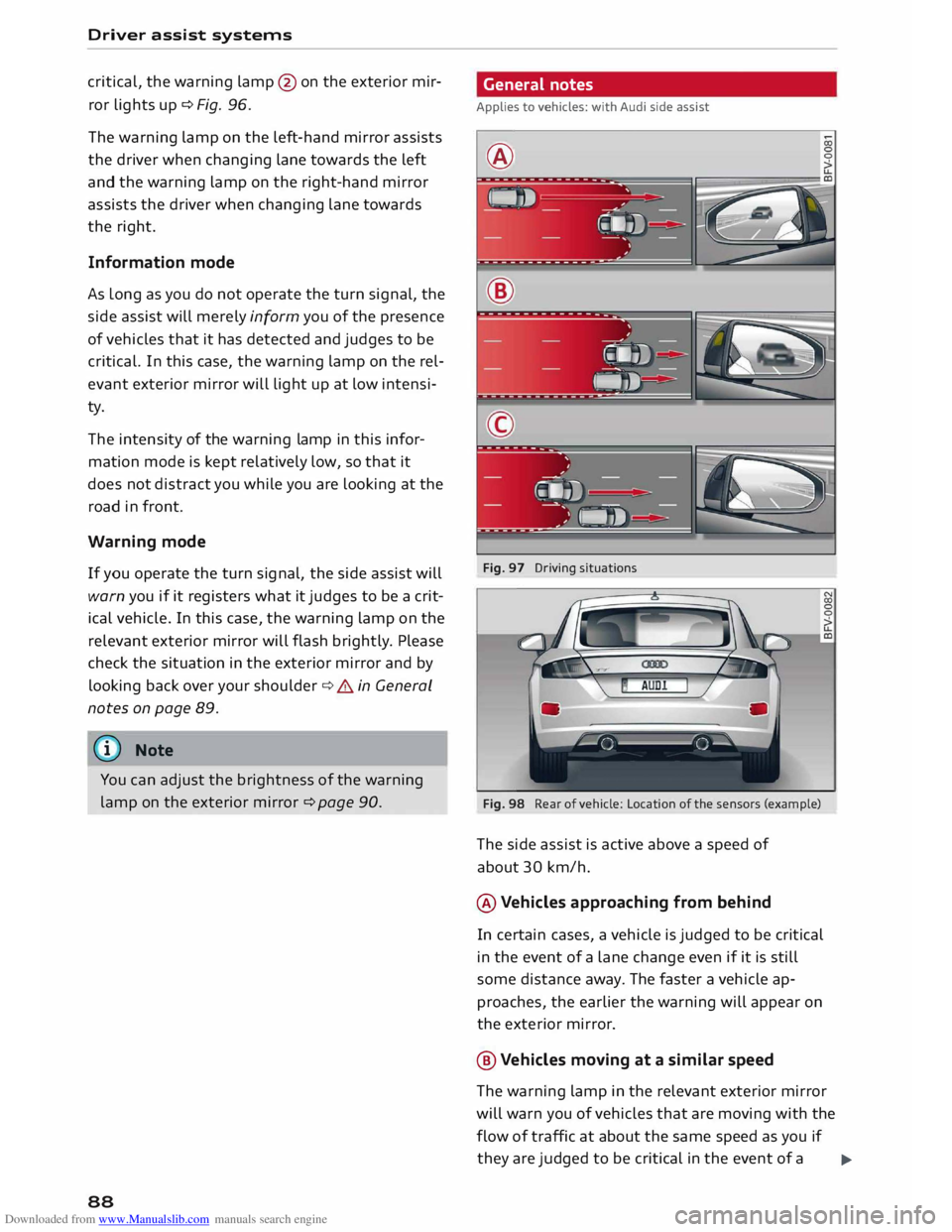
Fig. 97 Driving situations
Fig. 98 Rear of vehicle: Location of the sensors (example)
The side assist is active above a speed of
about 30 km/h.
® Vehicles approaching from behind
In certain cases, a vehicle is judged to be critical
in the event of a lane change even if it is still
some distance away. The faster a vehicle ap
proaches, the earlier the warning will appear on
the exterior mirror.
@ Vehicles moving at a similar speed
The warning lamp in the relevant exterior mirror
will warn you of vehicles that are moving with the
flow of traffic at about the same speed as you if
they are judged to be critical in the event of a ..,.
Page 91 of 284

Downloaded from www.Manualslib.com manuals search engine 0
N
co
....
\D Lfl
N
Lfl
.... lane
change. In all cases, the side assist will give
a warning for the vehicles it has detected at the
latest when they enter the "blind spot".
© Other vehicles being overtaken
When you are overtaking another vehicle slowly,
with a speed differential of less than 15 km/h,
the warning lamp in the exterior mirror will light
up as soon as the other vehicle enters your blind
spot.
If you are overtaking another vehicle quickly, with
a speed differential of more than 15 km/h, the
warning lamp will not light up.
System limitations
The radar sensors are designed for normal lane
widths and monitor the lanes immediately to the
left and right of your vehicle. In certain situations
the warning lamp on one of the exterior mirrors
may light up even if no vehicle is travelling in an
area that could be critical in the event of a lane
change. For example:
- When you are travelling in a narrow lane or
when you are not travelling in the centre of the
lane. In this case the system may monitor an
other lane and register a vehicle that is not in
fact travelling in an adjacent lane.
- When you are driving into a bend. The side as
sist may react to a vehicle two lanes away.
- If the system detects other objects (such as
crash barriers, etc).
- In poor weather conditions. The functionality of
the side assist is then restricted.
The radar sensors ¢ Fig. 98 must not be obstruc
ted by stickers, bicycle racks, deposits or any oth
er substances which could impair the function of
the system. For notes on cleaning, please refer to
¢page 236.
.&_ WARNING
-Always watch the road and the area sur
rounding the vehicle. The side assist feature
is not a substitute for the full concentration
of the driver. The driver is always responsi
ble for the safety of lane changes and other
manoeuvres. Driver
assist systems
- In certain situations, the system may not
function properly, or the functionality of the
system may be restricted. For example:
- If other vehicles are approaching very
qui ckly, or if you are overtaking other
vehicles quickly. The warning lamp may
not light up in time.
- In poor weather conditions, such as heavy
rain, snow or road spray.
- If you are travelling in very wide lanes, in
tight bends or over crests. The system may
not detect vehicles in the adjacent lane
because they are outside the area covered
by the sensors.
CD CAUTION
Impacts or damage to the bumper, wheel
arches or underbody can cause misalignment
of the sensors. This can impair the functional
ity of the system. Have the systems checked
by a qualified workshop.
� Note
The warning lamps on the exterior mirrors
may not be properly visible if tinted foil is af
fixed to the side windows on the driver's or
passenger's side.
Switching on and off
Applies to vehicles: with Audi side assist
The system can be switched on and off on the in
fotainment system.
... Select the following on the infotainment sys
tem: I MENU I button >Car> left control button
> Driver assist> Audi side assist.
The warning lamps in the exterior mirrors light
up briefly each time the ignition is switched on to
indicate that the system is activated .
89
Page 92 of 284

Downloaded from www.Manualslib.com manuals search engine Driver
assist systems
Adjusting brightness of warning lamp
Applies to vehicles: with Audi side assist
The brightness of the warning Lamp can be ad
justed on the infotainment system.
.. Select the following on the infotainment sys
tem: IM E
N u I
button > Car > left control button
> Driver assist> Audi side assist.
The brightness of the warning lamp in both the
information and warning modes is regulated au
tomatically according to the ambient light level.
If you are in very dark or very light surroundings
when you adjust the brightness of the warning
lamp, the automatic brightness control may al
ready have reached the lowest or the brightest
setting. In such a case it is possible that you
won't notice a difference while you are adjusting
the brightness or that you will only notice it once
the light surroundings have changed.
Please adjust the brightness of the warning lamp
for the information mode so that it does not dis
tract you while you are looking at the road in
front. When you change the brightness, the
warning lamp on the exterior mirror will light up
briefly with the intensity set for the information
mode. The intensity of the lamp in the warning
mode is linked to the intensity in the information
mode and is adjusted automatically.
(CO} Note
- The side assist is not active while the set
tings are being adjusted.
- Your personal settings are stored automati
cally and assigned to the remote control key
which is being used.
Driver messages
Applies to vehicles: with Audi side assist
Should the side assist be deactivated automati
cally, a driver message will appear on the info
tainment display.
@j Audi side
assist: currently unavailable.
Sensor view restricted due to surroundings.
See owner's manual
The radar sensors are blocked. The area in front
of the sensors must not be obstructed by bicycle
90 racks,
stickers, deposits or any other substances.
If necessary, clean the area in front of the sen
sors ¢ page 88, Fig. 98.
@j Audi
side assist: currently unavailable.
See owner's manual
The side assist is temporarily inoperative and
cannot be switched on (for instance if the battery
is not sufficiently charged).
@j Audi
side assist: fault. Please contact
workshop
The system cannot detect vehicles reliably and
will be deacti vated. The sensors are out of align
ment or defective. Have the system checked by a
qualified workshop soon.
Audi drive select (vehicle
set-up functions)
Introduction
Applies to vehicles: with Audi drive select
Drive select allows you to use different set-ups on
your vehicle. The four modes efficiency*, com
fort, auto and dynamic allow the driver, for ex
ample, to change from a sporty mode to a more
comfortable one via the �:11
� button in the centre
console or via the infotainment system. In addi
tion, the individual mode allows you to adapt the
vehicle set-up to suit your personal driving style.
For example, you might choose to combine a
more dynamic engine set-up with a lighter steer
ing response.
Description
Applies to vehicles: with Audi drive select
The possible vehicle set-up in each mode de
pends on which equipment is installed on your
vehicle. The engine and steering are basic parts
of your vehicle which are always included in the
set-up.
Engine and automatic gearbox*
The response of the engine and automatic gear
box* to accelerator pedal movements will be
more spontaneous or balanced, depending on
which mode you select. In efficiency* mode the
automatic gearbox* selects the next gear at
..,.
Page 95 of 284

Downloaded from www.Manualslib.com manuals search engine 0
N
co
,-j
\D Lfl
N
Lfl
,-j Parking
aids
General notes
Applies to vehicles: with rear parking aid/parking system
plus/park assist
Various systems are available to help you when
parking or manoeuvring in tight spaces, depend
ing on the equipment fitted on your vehicle.
The rear parking aid gives an acoustic warning if
there are any obstacles behind the car
¢page 93.
When you are parking, the parking system plus
warns you acoustically and optically about obsta
cles detected in front of and behind the vehicle
¢ page 94. On vehicles with park assist, the
area detected at the side of the vehicle ®
¢page 94, Fig. 101 is also monitored.
The park assist helps you to find suitable parking
spaces, to manoeuvre the vehicle into spaces par
allel or perpendicular to the roadside and to drive
out of spaces parallel to the kerb ¢ page 95.
.&_ WARNING
- Always watch the road and the area sur
rounding the vehicle. The electronic systems
cannot replace the full concentration of the
driver. The driver is always responsible for
safety during parking and all other manoeu
vres.
- Please note that certain surfaces, such as
clothing fabrics, cannot be detected or dis
played by the system -risk of accident!
- Sensors have blind spots in which neither
people nor objects are registered. It is par
ticularly important to ensure that there are
no small children or animals near the vehi
cle -risk of accident!
- Always keep a close watch on the area
around the vehicle and make full use of the
rear-view mirrors.
CD CAUTION
- The system may not always be able to de
tect objects such as the following:
- Chains, trailer draw bars, posts or fences Parking
aids
- Objects above the sensors, such as wall
protrusions, etc.
- Objects with certain surfaces or struc
tures, such as wire fences or powder snow
- As your car moves closer to low obstacles,
they may disappear from the sensors' field
of vision. Please note that you will no longer
be warned about these obstacles.
- Impacts or damage to the radiator grille,
bumper, wheel arches or underbody can
cause misalignment of the sensors. This can
impair the effectiveness of the parking aids.
Have the systems checked by a qualified
workshop.
{D) Note
- In certain situations, a warning may be giv
en by the system even if there is no obstacle
within range of the sensors. This can be
caused by the following, for instance:
- Certain road surfaces or long grass
- External ultrasound sources, e.g. from
street cleaning vehicles
- Heavy rain or snow or dense exhaust
fumes
- To familiarise yourself with the system, we
recommend that you practise parking in a
quiet location or a car park. The weather
and light conditions should be good.
- You can adjust the volume of the beeps.
- To ensure that the acoustic parking aid
works properly, the sensors must be kept
clean and free of snow and ice.
- There is a slight delay in the picture display.
Rear parking aid
Description
Applies to vehicles: with rear parking aid
The rear parking aid is an acoustic parking sys
tem.
Description
Sensors are located in the rear bumper. When the
sensors detect an obstacle, you are alerted by
acoustic signals (beeps).
..,.
93
Page 195 of 284

Downloaded from www.Manualslib.com manuals search engine Before
every trip
The driver is responsible for the safety of the
passengers and the safe operation of the vehicle
at all times.
For your own safety and the safety of your pas
sengers, always note the following points before
every trip:
.,. Make sure that all lights and turn signals are
working properly.
.,. Check the tyre pressures.
.,. Make sure that all windows are clean and give
good visibility to the outside.
.,. Secure all luggage and other items carefully
¢page 201.
.,. Make sure that no objects can interfere with the
pedals.
.,. Adjust
the mirrors and the front seat according
to your body height.
.,. Make sure that children are protected with suit
able safety seats and properly worn seat belts
¢page 195.
.,. Sit in the correct position in your seat. Make
sure that your passengers are sitting in the cor
rect positions ¢ page 46 .
.,. Fasten your seat belt correctly. Make sure that
your passengers do the same ¢page 204.
What factors can impair your safety?
Safety on the road is directly related to how you
drive, and can also be affected by the passengers
in the vehicle.
The driver is responsible for the safety of the ve
hicle and all its occupants. If your ability to drive
is impaired in any way, you endanger yourself and
other road users ¢& . Therefore:
.,. Do not let yourself be distracted by passengers
or by using a mobile phone, etc.
.,. Never drive when your driving ability is im
paired (by medication, alcohol, drugs, etc.).
.,. Obey all traffic regulations and speed limits
and always maintain a safe distance to the vehi-
� de
in front.
� .,.
Always adjust your speed to suit the road, traf-
� fie
and weather conditions.
U'l
N
U'l
.-1 Safe
driving
.,. Take frequent breaks on long trips. Do not drive
for more than two hours without a stop.
.,. If possible, avoid driving when you are tired or
stressed.
A WARNING
- Distractions while driving or any kind of im
pairment to your driving ability increase the
risk of accident and injury .
- Do not place loose objects on the dash pan
el. These objects could fly around the interi
or when the vehicle is moving (under accel
eration or whilst cornering) and distract the
driver -risk of accident!
Correct sitting positions
Correct driving position
The correct driving position is important for safe
driving.
Fig. 172 Adjust seat and sit in correct position LO
0
0
For your own safety, and to reduce the risk of in
jury in the event of an accident, we recommend
the following driving position.
.,. Adjust the driver's seat and steering wheel so
there is a distance of at least 25 cm between
your breastbone and the centre of the steering
wheel¢ Fig. 172.
.,. Adjust the height and fore/aft position of the
driver's seat so that you are able to press the
pedals to the floor without fully straightening
your legs ¢ .&_ .
.,. Adjust the backrest to an upright position so
that your back remains in contact with the up-
holstery. ...,
193
Page 239 of 284

Downloaded from www.Manualslib.com manuals search engine 0
N
co
....
\D L/'l
N
L/'l
.... vehicle
with the ignition switched on - risk
of accident!
- To avoid cutting yourself on sharp metal
parts, always wear suitable protection when
cleaning the underside of the car or inside
the wheel arches.
- After the car has been washed, the full brak
ing effect can be delayed by moisture (or in
winter by ice) on the discs and brake pads -
risk of accident! The brakes should be dried
by pressing the pedal to restore full braking
effect.
CD CAUTION
- Before washing the vehicle in an automatic
car wash, please make sure to retract the
exterior mirrors and, if necessary, retract
the automatic rear spoiler* to prevent dam
age. Always use the electrical power control
to fold the mirrors in/out on vehicles with
electrically retractable exterior mirrors*.
Notes on cleaning and care
For cleaning and care of individual components
on the vehicle, please refer to the tables below.
These are recommendations only. If you have
Cleaning the exterior
Component Situation Care
of vehicle and cleaning
- Do not wash the vehicle in direct sunlight -
otherwise the paint can be damaged.
- Do not use insect sponges or abrasive
household sponges, etc. -they can damage
the surfaces.
- Matt-painted vehicle parts:
- Do not use polish or wax -otherwise the
paintwork can be damaged.
- Never use car-wash programmes that in
clude wax coatings. This could spoil the
matt finish.
- Do not attach any stickers or magnet la
bels to matt-painted parts as these could
damage the paintwork when they are re
moved.
@ For
the sake of the environment
The car should only be washed in special wash
bays. This prevents oily water from getting in
to the public drains.
special questions or certain components are not
listed, please ask your qualified workshop. Please
also refer to the notes ¢ &. .
Remedy
Wiper blades Di
rt/deposits
¢page43
Headlights/ Di rt/deposits Soft
sponge with mild detergent a
>
rear lights
Sensors Dirt/deposits
Soft
cloth with solvent-free cleaning agent
Snow/ice Small brush/solvent-free de-icer spray
Wheels Road
salt Water
Brake dust
Acid-free cleaning agent
Tailpipes Road
salt Water; suitable stainless steel cleaning product if necessa-
ry
Ornamental trim/ Dirt/deposits
Mild detergent a
>
; suitable stainless steel cleaning product
mouldings if necessary
237
Page 241 of 284
Downloaded from www.Manualslib.com manuals search engine 0
N
co
....
\D Lfl
N
Lfl
.... Care
of vehicle and cleaning
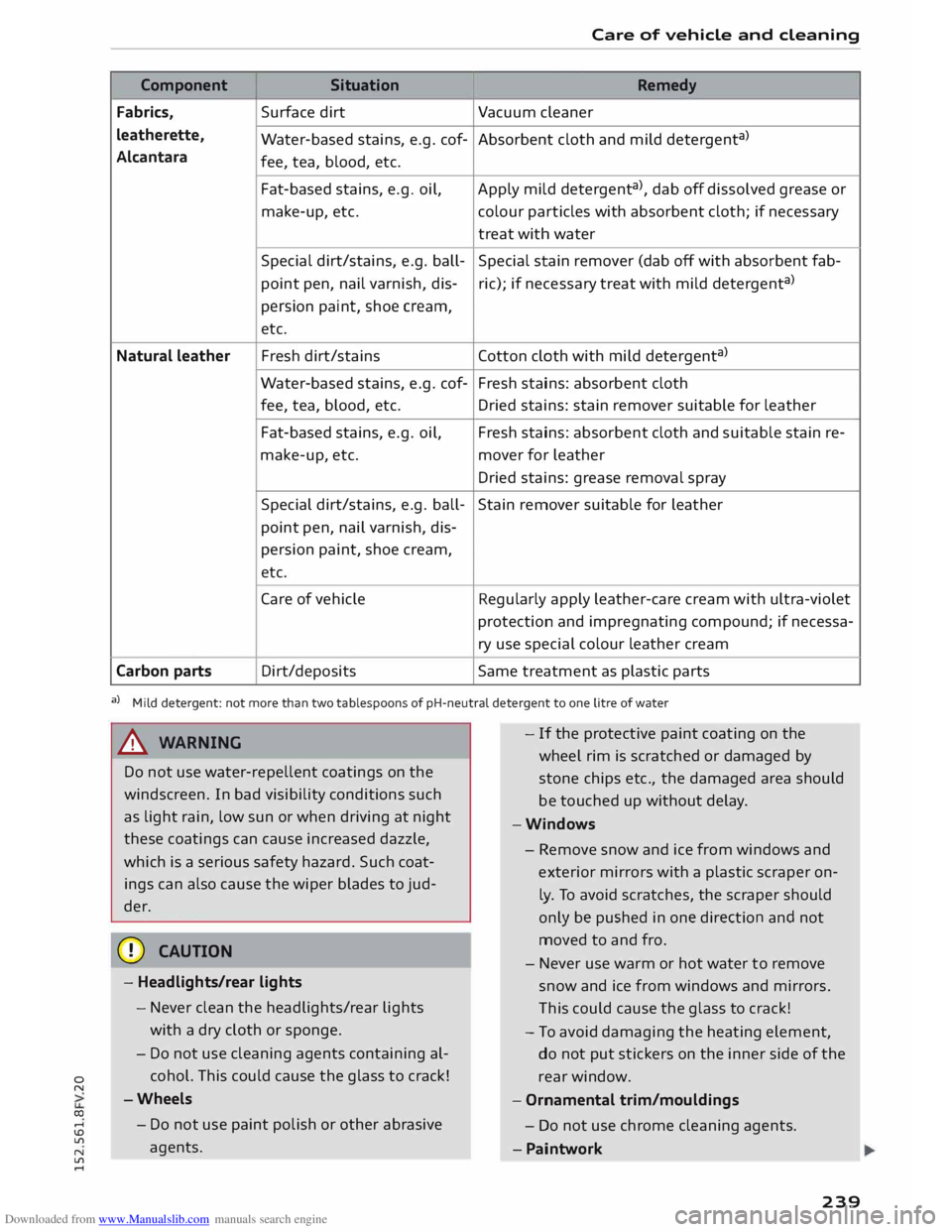
Component Situation
Remedy
Fabrics, Surface
dirt
Vacuum cleaner
leatherette, Water-based stains, e.g. cof- Absorbent cloth and mild detergent a
)
Alcantara fee, tea, blood, etc.
Fat-based stains, e.g. oil,
Apply mild detergent a
), dab off dissolved grease or
make-up, etc. colour
particles with absorbent cloth; if necessary
treat with water
Special dirt/stains, e.g. ball- Special stain remover (dab off with absorbent fab-
point pen, nail varnish, dis-ric);
if necessary treat with mild detergent a
)
persion paint, shoe cream,
etc.
Natural leather Fresh
dirt/stains Cotton cloth with mild detergent a
)
Water-based stains, e.g. cof- Fresh stains: absorbent cloth
fee, tea, blood, etc.
Dried stains: stain remover suitable for leather
Fat-based stains, e.g. oil, Fresh stains: absorbent cloth and suitable stain re-
make-up, etc. mover for leather
Dried stains: grease removal spray
Special dirt/stains, e.g. ball-
Stain remover suitable for leather
point pen, nail varnish, dis-
persion paint, shoe cream,
etc.
Care of vehicle Regularly apply leather-care cream with ultra-violet
protection and impregnating compound; if necessa-
ry use special colour leather cream
Carbon parts Dirt/deposits
Same treatment as plastic parts
a) Mild detergent: not more than two tablespoons of pH-neutral detergent to one litre of water
A WARNING
Do not use water-repellent coatings on the
windscreen. In bad visibility conditions such
as light rain, low sun or when driving at night
these coatings can cause increased dazzle,
which is a serious safety hazard. Such coat
ings can also cause the wiper blades to jud
der.
CD CAUTION
- Headlights/rear lights
- Never clean the headlights/rear lights
with a dry cloth or sponge.
- Do not use cleaning agents containing al
cohol. This could cause the glass to crack!
-Wheels
- Do not use paint polish or other abrasive
agents. -
If the protective paint coating on the
wheel rim is scratched or damaged by
stone chips etc., the damaged area should
be touched up without delay.
-Windows
- Remove snow and ice from windows and
exterior mirrors with a
plastic
scraper on
ly. To avoid scratches, the scraper should
only be pushed in one direction and not
moved to and fro.
- Never use warm or hot water to remove
snow and ice from windows and mirrors.
Th is could cause the glass to crack!
- To avoid damaging the heating element,
do not put stickers on the inner side of the
rear window.
- Ornamental trim/mouldings
- Do not use chrome cleaning agents .
- Paintwork
239
Page 259 of 284

Downloaded from www.Manualslib.com manuals search engine 0
N
co
....
\D L/'l
N
L/'l
.... Technical
data
Vehicle identification
data
XXXXX XX · X · XXXX XXX
/1\...l_ FAHRZG. -10£NT · NR.
� VBIICI.E -ll£NT. NO. xx
p /TYPE XXXXXXXX
XX X XXXXXXXX
XXX XXX
XX XXXXXXX XX X.X XX
XXX KW
XXX ('5\_J_
MOTO
RKB ./GETR.KB
.
xxxx XXX
XXX \::1/1
1 £NG.COO£/TRANS. COO£
(A\_J_ lAO(NR./INNENAUSST.
� PAINTNO
./WT
£R IO
R
xxxx / xxxx
XXX / xx
M
. ·
AUSST. / OPTIONS
EOA 7D5
2EH J02
3FC
FOA
TL6 3KA
lXW
7T6 CV7
3L4
15A 4UB
6XM 55G
1LB lAS
5MU 7X1
9G3 OG7 OYH
8EH UlA X9B
803 908 824
7KO 4X3 2K2
4KC 3YO 413
7GB 01A 5RW
1BA
OJF 027
D2D
5D2 4GO
@ f----- XX.
X XX.X XX.X XXXX
Fig. 248 Vehicle data sticker
Vehicle identification number a,
a,
.....
0
"
The vehicle identification number can be found
on the infotainment system, on the vehicle data
sticker and behind the windscreen on the driver's
side*. The chassis number is also located on the
rear panel in the engine compartment*.
Type plate
The type plate is located in the engine compart
ment. Vehicles for certain export countries have
no type plate.
Vehicle data sticker
The vehicle data sticker ¢ Fig. 248 is under the
carpet trim in the luggage compartment in the
spare wheel well. One section of the vehicle data
sticker is attached to the inside cover of the Serv
ice Schedule before the vehicle is handed over.
The sticker lists the following data:
l l
The figures are not available for all export versions. In this
case, the fields contain place holders, for example 99.9. Technical
data
(D Vehicle identification number (chassis num-
ber)
@ Vehicle type/ engine power/ gearbox type
@ Engine and gearbox code letters
© Paint No./ Interior equipment No.
® Optional equipment codes
® Fuel consumption and emissions*
Fuel consumption and emissions 1
>
Information on the vehicle's fuel consumption
and emissions is given at the bottom of the vehi
cle data sticker @:
@ Urban cycle consumption (ltr./100 km)
@ Extra-urban cycle consumption (ltr./100 km)
© Combined cycle consumption (ltr./100 km)
@ Combined CO2 emissions (g/km)
The specified values were determined in accord
ance with the required test procedures. The spec
ifications do not refer to an individual vehicle,
but serve only as a basis for comparing the differ
ent types of vehicles. In addition, the consump
tion figures achieved during normal driving may
differ from the test values, depending in particu
lar on special equipment fitted, vehicle loading,
personal driving style, road and traffic condi
tions, environmental factors and the condition of
the car.
Dimensions Length mm 4177
Width mm 1832
Width across mirrors mm 1952
Height, unladen 1
>
mm 1353
Turning circle diameter
m -10.
7
I) The height of the vehicle depends on the tyres
and suspension. Take care not to damage low
mounted parts of the car (such as the spoiler or
exhaust system) on steep ramps, uneven road
surfaces or roadside kerbs, etc. This applies espe
cially when the vehicle is fully laden.
257