2014 AUDI S4 brake
[x] Cancel search: brakePage 110 of 296

108 Audi adaptive cruise control and bra king guard
(20 km/h). The adapt ive cr uise control re
mains turned on fo r speeds above 95 mph
(150 km/h) (ove rr ide).
It will stabilize aga in at
95 mph (150 km/h) when the driver takes his
foot
off of the gas peda l.
Parking brake!
The drive r me ssage appe ars when the parking
b rake is activ ate d. Adaptive cr uise con tro l is
turned off . A chime soun ds as a remin der .
Page 126 of 296

124 Homelin k
Homelink
Universal remote
control
Description
Appl ies to vehicles: wit h Homeli nk
The HomeLink universal remote control can
be programmed with the remote control for
devices that are already present.
W ith Home Link, you can control devices such
as the garage door, security systems, house lights, etc. comfortably from the inside of you
vehicle.
Homelink makes it possible for you to replace
three d ifferent remote controls from dev ices
in your home with one universal remote. This
feature works for most garage door and exte
rior door motor signals. Programming the in
div idual remote control for your remote con
trol takes place near the center of the radiator
grille. There is a control module attached at
this location .
A one -time programm ing of the sensor must
be performed before you are able to use sys
tems with Home link. If the system does not
activate after performing the one-time pro
gramm ing, check whether the system uses a
rolling code
q page 127 for vehicles without
the MMI*.
& WARNING
-
- Never use the Homelink transmitter
with any garage door opener that does
have not the safety stop and reverse fea
ture as required by federa l safety stand
ards. This includes any garage door open
er model manufactured before April 1,
1982.
- A garage door opener which cannot de
tect an object, signaling the door to stop
and reverse does not meet current feder
al safety standards. Using a garage door
opener without these features increases
risk of serious injury or death. -
For safety reasons never release the
parking brake or start the engine while
anyone is standing in front of the vehicle.
- A garage door or an estate gate may
sometimes be set in motion when the
Homelink remote control is being pro
grammed. If the device is repeatedly ac
tivated, this can overstrain motor and
damage its e lectrica l components - an
overheated mo tor is a fire hazard!
- To avo id possib le injuries or property
damage, please always make abso lutely
certain that no persons or objects are lo
cated in the range of motion of any
equipment being operated.
{D Tips
- If you would li ke more information on
Homel ink, where to purchase the Home
Link compat ible prod ucts, or wou ld like
to purchase the Homelink Home Light
ing Package, please call toll-free:
1-800-355-3515.
- For Declaration of Compliance to United
States FCC and Industry Canada regula
tions
¢ page 2 78.
- For security reasons, we recommend that
you clear the programmed buttons be
fore selling the vehicle.
Operation
Applies to veh icles : w it h Ho meli nk
~ ,.......,,...--, ........... ~
,;,,, r . o : o . ) .~
®
Fig. 136 Headl iner: controls
Requirement : The buttons must be program-
med
¢ page 125 or ¢page 126. II>
Page 135 of 296

-never sit on the edge of the seat
- never sit sideways
- never lea n out the w indow
- never put your feet out the window
- never put your feet on the instrument panel
- never rest your feet on the seat cushion or
back of the seat
- never ride in the footwe ll
- never ride in the cargo area
8_ WARNING
-
Improper seat ing positions increase the
r isk of serious personal injury and death
whenever a veh icle is being used .
- Always make sure that all vehicle occu
pants stay in a proper seating pos ition
and are properly restra ined whenever the
vehicle is be ing used.
Pedal area
Pedals
The pedals must always be free to move and
mus t never be interfered with by a floor mat
or any other object.
M ake sure that all pedals move freely without
i nte rferen ce and that no thing prevents them
from re tu rning to the ir origin al posi tions.
Only use floor mats that leave the pedal area
free and can be secured w ith floor mat fasten
e rs.
If a brake circuit fails, increased brake peda l
travel is required to br ing the vehicle to a full
stop.
8_ WARNING
Pedals that canno t move freely ca n cause
loss o f vehicle control a nd incr ease the r is k
o f serious injury.
- Never pl ace any ob jects in the d river's
f ootwell. An object could ge t into the
peda l area and inter fere with pedal func
tion . In case of s udden braking or an ac
c ident, you would not be able to brake or
accele rate!
Dr iving S afel y 133
-Always ma ke sure that nothing can fall
or move into the driver's footwel l.
Floor mats on the driver side
Always use floor mats that can be securely
attached to the floor mat fasteners and do
not interfere with the free movement of the
pedals.
.,. Make s ure t hat the f loor mats are properly
secured and cannot move and interfere with
the peda ls
c> &_ .
Use only f loor mats that leave the peda l area
u nobstructed and that are firmly secured so
that they cannot slip o ut of position. You can
obta in suitable floor mats from your author
ized Audi dealer.
Floor mat faste ners are insta lled in your Audi.
Floor mats used in yo ur vehicle mus t be at
tached to these fastene rs . P rope rly securing
the floor mats wi ll prevent them from sliding
into positions that could interfere with the
pedals or impair safe operat ion of your vehicle
in other ways.
8_ WARNING
Pedals that cannot move free ly can result
in a loss of vehicle control and increase the
risk of serious perso na l injury.
- Always ma ke sure that floor mats are
properly secured .
- Never p lace or install floor mats or other
f loor coverings in the vehicle that cannot
be prope rly secured in p lace to prevent
them from slipping and interfer ing with
the peda ls o r the a bility to cont ro l t he
veh icle.
- Never place or ins tall floor mats o r other
f loor coverings on top o f al ready in stal
led floo r mats . Ad ditiona l floo r mats and
o ther cover ings will red uce the size of
the peda l area and interfere with the
pedals.
- Always prope rly reinstall and secure floo r
mats that have been taken out for clean
ing.
•
•
Page 136 of 296

134 Driving Safel y
-Always make sure that objects cannot
fall into the driver footwe ll wh ile the ve
hicle is moving. Objects can become
trapped under the brake pedal and accel
erator peda l causing a loss of veh icle
contro l.
Stowing luggage
Loading the luggage compartment
All luggage and other objects must be prop
erly stowed and secur ed in the luggage com
partment.
Fig. 141 S afe load positio nin g: place heavy objects as
l ow a nd a s far forward as pos sible.
Loose items in the luggage compartment can
shift suddenly, changing vehicle hand ling
characteristics. Loose items can also increase
the risk of serious personal injury in a sudden
vehicle maneuver or in a collision .
.,. Distribute the load even ly in the luggage
compartment .
.,. Always place and properly secure heavy
items in the luggage compartment as low
and as far forward as possible¢
fig. 141.
.,. Secure the load with the cargo net* or with
non -elastic straps secured to the tie-downs*
¢ page 71 ¢page 72 .
.,. Make sure that the rea r seatback is secu rely
latched in place.
.&_ WARNING
Improperly stored luggage or other items
can fly throug h the vehicle ca using serious
personal inj ury in the event of hard brak
ing or an accident. To help reduce the r isk
of serious personal injury: -
Always put objects, for example, luggage
or other heavy items in the luggage com
partment.
- Always secure objects in the luggage
compartment using the t ie-down eyelets
and suitable straps.
.&_ WARNING
-
Heavy loads w ill influence the way your ve
hicle handles . To help reduce the risk of a
loss of control leading to serious personal
in jury:
- Always keep in mind when transporting
heavy objects, that a change in the cen
ter of gravity can also cause changes in
veh icle handling :
- Always distribute the load as evenly as
possible.
- Place heavy objects as far forward in
the luggage compartment as possible .
- Never exceed the Gross Axle Weight Rat
ing or the Gross Vehicle Weight Rating
specified on the safety compliance stick
er on the left door jamb. Exceeding per
missible weight standards can cause the
veh icle to slide and handle differently.
- Please observe information on safe dr iv
ing
c> page 128.
.&_ WARNING
To help prevent poisonous exhaust gas
from being drawn into the vehicle, always
keep the rear lid closed while driving.
- Never transport objects larger than
those fitting completely into the luggage
a rea because the rear lid cannot be fully
closed.
- If you absolutely m ust dr ive with the rear
lid open, observe the following notes to
red uce the risk of poisoning:
- Close all windows,
- Close the sunroof,
- Open all air outlets in the instrument
panel,
- Switc h off the ai r recirculation,
- Set the fresh air fan to the highest
speed.
Page 188 of 296

186 Intelligent technology
Intelligent technology
Notice about data
recorded by vehicle
control modules
Your veh icle is not equipped with an Event Da
ta Recorde r (EDR), ins talled by some manu
facture rs fo r the express p urpose of capturing
data for retrieval after an accident or cras h
event . EDR's are sometimes ca lled "crash re
corders".
Some state laws restr ict the retr ieval or down
loading of data stored by EDR's that were in
stalled in a vehicle for the express purpose of retrieving data after an accident or crash
event without the owner's consent.
A ltho ugh yo ur vehicle is not equ ipped wit h an
EDR, it is equipped with a number of electron
ic control modules for various vehicle systems
such as, for examp le, eng ine f unction, em is
sion control, as well as for the airbags and
safety belts.
These electronic contro l modules also record
vehicle-re lated data during norma l vehicle op
erat ion for diagnostic and repa ir purposes.
The recording capacity of the electronic con
trol modules is limited to data (no sound is re
corded) and only a small amount of data is ac
tually recorded ove r a ve ry limited pe riod of
time and stored when a sys tem faul t or o ther
cond ition is sensed by a cont ro l u nit. Some of
the data then stored may re late to vehicle
speed, direction, braking as we ll as restraint
system use and performance in the event of a
crash or other condit ion. Stored data can only
be read and downloaded w ith special equip
ment.
Electronic Stabilization
Control (ESC)
Description
ESC helps to improve road holding and vehicle
dynamics to help reduce the probability of
skidd ing and loss of ve hicle control. It works
only when the eng ine is running. ESC detects certain difficult driving situat
ions, including
when the vehicle is beginning to spin (yaw)
o ut of control and he lps you to get the veh icle
back under control by se lectively braking the
whee ls, and/or reducing eng ine power and
providing steer ing ass istance to he lp hold the
vehicle o n the dr iver's intended course. The in
dicator light
J.i) in the instrument cluster
blinks when ESC is ta king action to help yo u
control the veh icle.
ESC has limitations.
It is importa nt to remem
ber that ESC cannot overcome the laws of
physics. It will not always be able to help out
under a ll cond it ions you may come up aga inst.
F or example, ESC may not always be able to
help you master situations where there is a
s u dden change in the coefficient of friction of
the road surface. When there is a section of dry road that is sudden ly covered w ith water,
s lush or snow, ESC cannot perform the same
way it wou ld on the dry surface . If the ve hicle
hydroplanes (rides on a cushion of water in
stead of the road surface), ESC will not be
able to help you steer the vehicle be cause con
tact with the pavement has been in terrupted
and the vehicle cannot be braked or steered .
D uring fast cornering, particularly on winding
roads, ESC cannot always deal as effectively
with difficult driving situations than at lower
speeds. When towing a trailer, ESC is not able
to help you regain control as it would if you
were not tow ing a trailer.
Always adjust your speed and driving style to road, traffic and weather condit ions. ESC can
not override the vehicle's physical limits, in
crease the availab le tract ion, or keep a ve hicle
on the road if road departure is a result of
driver inattent io n. Instead, ESC imp roves the
poss ibil ity of keeping the vehi cle under con
trol and on the road during extreme maneu
vers by using the d river's steering inputs to
help keep the vehicle going in the intended di
rection . If you are traveling at a speed that
ca uses you to run off the road before ESC can
provide any assistance, you may not experi
ence the benefits of ESC.
Page 189 of 296

ESC includes and/or works together with the
anti-lock brake system (ABS), brake assist sys
tem, anti -slip regulation (ASR) , e lectronic dif
ferential lock (EDL), dynamic steering* and electronic i nteraxle differential lock* /selective
wheel torque control* . ESC is switched on all
the t ime. I n certain s ituations when you need
less traction, you can switch
off ASR by press
i ng the button~~
page 188, fig. 174 or
~ page 188, fig. 175. Be sure to sw itch ASR
on again when you no longer need less trac
tion.
Anti-lock b ra king s ystem (ABS)
ABS prevents the wheels from locking up
when braking. The vehicle can still be steered
even d uring hard brak ing . Apply ste ady p res
sure to the brake pedal. Do not pump the ped
a l. A pulsing in the brake peda l indicates t hat
the system is he lping you to brake the vehicle .
Brake assist system
The brake assist system can decrease bra king
d istance. It increases braking power when the
d river presses the brake pedal quick ly in eme r
gency situations . You must press and hold the
brake peda l until the situation is over. In
veh icles w ith adaptive cru ise contro l*, the
brake assist system is more sensit ive if the
d istance detected to the veh icle ahead is too
small.
Anti- slip regulati on (ASR)
ASR reduces engine power when the drive
wheels begin to spin and adapts the force to
the road condit ions. This makes it eas ier to
start, accelerate and drive up hills.
Elect ronic diffe renti al lo ck (EDL )
The ED L brakes wheels that are spinning and
transfers the drive power to the other drive
wheel or wheels if the vehicle is equipped with
all-wheel drive*. This function is available up
to about 60 mph (100 km/h) .
In extreme cases, EDL automatica lly switches
off to help keep the brake on the braked whee l
from overheating. EDL w ill switch on again au-
Intellig ent technolog y 187
tomat ica lly when conditions have returned to
norma l.
Dynamic steering*
On vehicles with dynam ic steering*, ESC helps
stab il ize the s teer ing in crit ica l sit uat io ns.
Electronic interaxle differential lock* /
selective wheel torque control*
T he electronic i nteraxle differential lock (front
whee l dr ive) or the se lective whee l to rque
control (all-whee l dr ive) opera tes when dr iv
ing thro ugh curves. The front wheel on the in
side of the c urve or both whee ls on the inside
of the curve are braked selectively as needed .
This min imizes sliding in the front wheels and
allows for more precise driving through
cu rves . The applicable system may not acti
vate when dr iv ing in wet or snowy conditions.
A WARNING
- ESC, ABS , ASR, EDL dynam ic steering*
a nd the elect ronic interaxle differential
loc k* /se lective wheel torque control*
cannot overcome the laws of physics .
This is especially important on slippery
or wet roads. If the systems begin acting
to stabilize your veh icle, yo u should im
mediately change your speed to match
the road and traff ic conditions. Do not
let the increased safety provided by
these systems tempt you to take r isks.
Doing so will increase the risk of a loss of
veh icle contro l, col lision and ser ious per
sonal injuries.
- Always adapt your speed to road, traffi c
and wea ther conditions. The risk of los
ing con tro l of the vehicle increases when
driving too fast, espec ially through
curves and on slippery or wet roads, and
when dr iv ing too close to vehicles up
ahead. ESC, ABS, the brake ass ist sys
tem, ASR, EDL dynam ic steering* and the
electronic interaxle differentia l lock*/se
lective whee l torque control* cannot p re-
vent co llisions . ..,.
•
•
Page 191 of 296
Intelligent technology 189
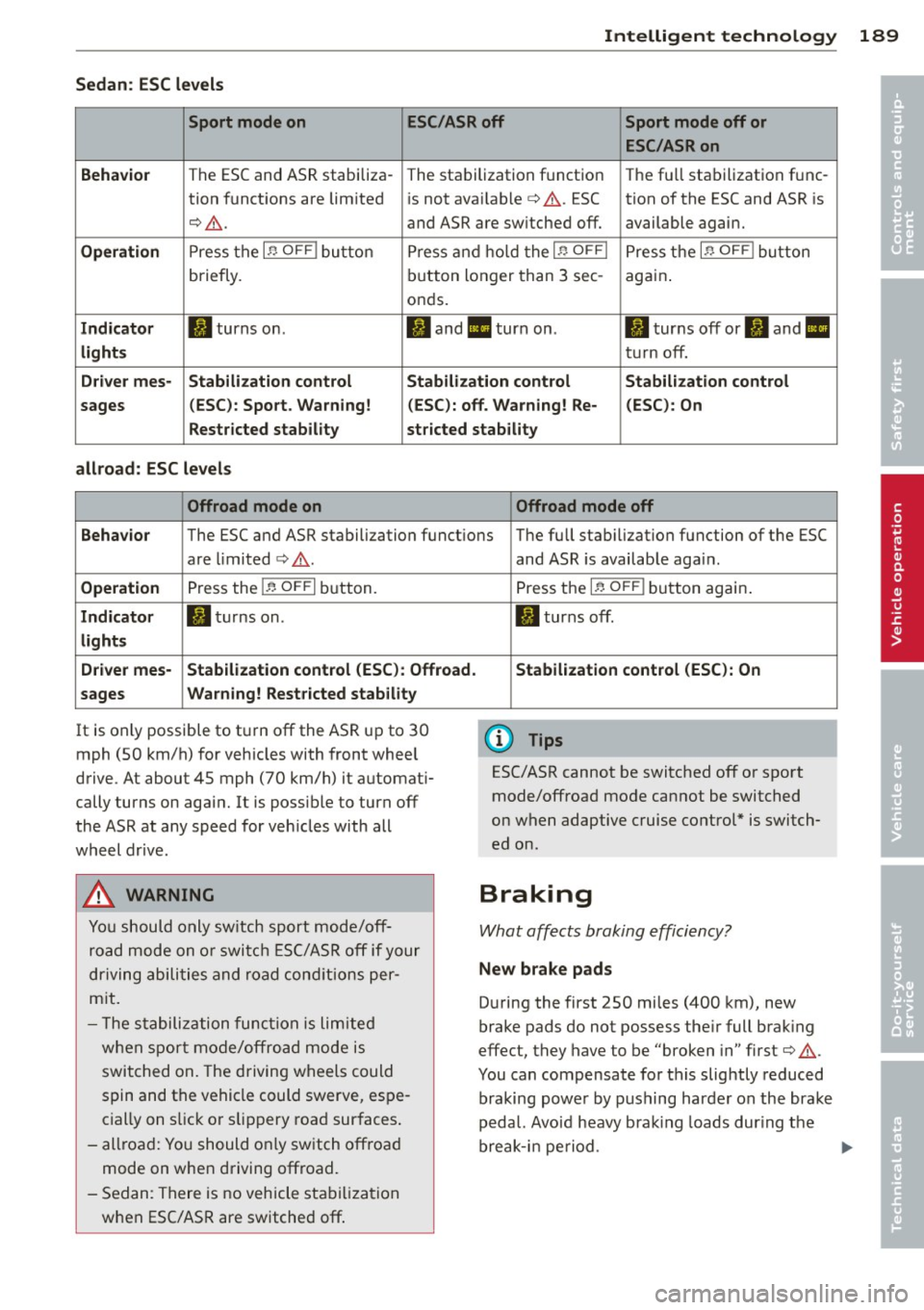
Sedan: ESC levels
Sport mode on ESC/ASR off Sport mode off or
ESC /ASR on
Behavior
The ESC and ASR stabiliza- The stalbilization f unct ion The fu ll sta bilization f unc-
tion funct ions are lim ited is not ava ilable
c:> A . ESC tion of the ESC and ASR is
c:, A . and ASR are sw itched off. available agai n.
Operation Press t he I~ OFF I button Pre ss and h old t he I~ OFFI Press t he i.i, OF FI bu tton
briefly. bu
tton longer than 3 sec -
aga in .
o nd s.
Indicator II turns on. II an d II turn on . II turns off or fl and II
lights tur n off.
Driv er mes· Stabilization control Stabilization control Stabilization control
sages (
ESC) : Sport . Warning! (ESC): off . Warning! Re- (ESC) : On
Restricted stability stricted stability
allroad: ESC level s
Offroad mode on Offroad mode off
Behavior
The ESC and ASR stabilization funct ions T he full stab ilizat ion function of the ESC
are limited
c:> A .
Operation Press the I~ OFFI bu tton.
Indicator II tur ns on.
light s
D river mes- Stabilization control (ESC ): Offroad.
sages Warning! Rest
ricted stability
It is on ly possible to t urn off the AS R up to 30
mph (SO km/h) f or veh icles with front whee l
drive. At about
45 mph (70 km/h) it a utomat i
cally turns on aga in. It is poss ible to turn off
the ASR at any speed for veh icles with all
wheel dr ive .
A WARNING
-
Yo u should o nly sw itch sport mode/off
r oa d m ode on or swi tch E SC/A SR off if your
d rivi ng abili ties a nd ro ad con ditio ns per
m it .
- T he stabili zation fu nction is limited
w he n sp ort m od e/off road mode is
switched on . The driving w heels could
s p in and t he vehicle c ould swerve, es pe
c ia lly on s lick or slipp ery roa d sur faces .
- all road: Yo u should o nly sw itc h off roa d
mode on when driving offroad .
- S edan: There is no vehicle sta biliz atio n
w hen ESC/AS R are switched off . and ASR
is availab le aga in.
Press t he
I~ OFF I button again .
II turns off.
Stabilization control (ESC ): On
(D Tips
ESC/ASR cannot be switched off o r sp o rt
mode/offroad mode ca nnot be switched
on when adaptive cruise control * is switch
ed o n.
Braking
What affects braking effic iency?
New brake pads
D uring the first 250 mi les (4 00 km), new
brake pads do not possess the ir full brak ing
effect, they have t o be "broken in" first
c:> A .
You can compensate for this slightly reduce d
braking powe r by pushing har der on the brake
p edal. Avo id heavy b ra ki ng loa ds dur ing t he
break-i n pe riod.
•
•
Page 192 of 296

190 Intelligent technology
Operating conditions and d riving hab it s
The brakes on today 's automob iles are st ill
subject to wear, depending largely on operat
ing conditions and driving habits
c::> ,& . On
vehicles that are either driven mostly in stop
and-go city traffic or are driven hard, the
brake pads should be checked by your author
ized Audi dealer more often than specified in
the
W arranty & M ainte nance booklet . Failure
to have your brake pads inspected can result
in reduced b rake pe rformance.
On steep slopes, you should use the brak ing
effect of the eng ine . This way, you prevent un
necessa ry wear on the brake system. If you
must use you r brakes, do not hold the brakes
down continuously . P u mp the b rakes at inter
va ls.
Operating nois e
Noises may occur when braking depending on
the speed, braking force and outside condi
tions such as temperature and humidity .
Effect of w ater and ro ad sa lt
In certain situat ions, for example after driving
through wate r, in heavy ra in, after overn ight
condensation or after washing your car, the brak ing effect can be reduced by moistu re or
i ce on the bra ke roto rs and b rake pads . The
b rakes must be dried fi rst with a few ca ref ul
brake app lications .
At h igher speeds and with the w indshie ld w ip
e rs turned on, the brake pads press agains t
the bra ke rotors for a short amount of time.
This occurs a t regular intervals without the
driver noticing and provides for better brake response time under wet conditions.
The effectiveness of the brakes can be reduced
when the vehicle is driven on a salt-covered
road and the brakes are not used. Likewise,
you clean off accumulated sa lt coating from
brake discs and pads with a few caut ious ap
plications of the brake
c::> ,& .
Cor rosion
There may be a tendency for dirt to bui ld up
on the brake pads and corrosion to form on the d
iscs if the car is not driven regu larly or
o n Ly for short trips with litt le use of the
brakes.
If t he brakes a re not used frequently, o r if cor
r os ion has formed on the discs, it is adv isable
to clean off the pads and discs by braking
firmly a few times from a moderately h igh
speed
c::> .&. .
Fault s in the brak e syst em
If you shou ld notice a sudden increase in
brake pedal trave l, then one of the two brake
circuits may have fai led
c::> .& .
Low br ake fluid lev el
Malfunctions ca n occu r in the b ra ke system if
t h e b rake fluid level is too low. The brake flu id
l evel is monitored electronica lly.
Brake booster
The brake booster inc reases the pressure that
you generate with the b rake peda l. It works
o n ly when the engine is runn ing
.c::> .&
Brake lining wear status
Brake lining wear may be checked by visual in
spect io n of the condition of the brake pads
th rough the open ings in the wheel. If neces
sary, the wheel may be removed fo r thi s i n
spe ct ion
c::> page 255, Changing a wheel.
.&, WARNING
- New b rake pads don' t have the bes t stop
ping power and m ust be "bro ken -in" dur
ing the initial 100 to 150 miles (150 to
200 kilometers) of normal c ity driving.
You can compensate for this by pressing the brake pedal more firmly. Th is also
applies later when new pads are instal
led.
- You shou ld perform braking maneuvers
for the purpose of cleaning the brake
system only if road conditions permit.
Othe r road use rs must no t be put at risk -
you may ca use an accident!
- Before descend ing a steep grade, reduce
speed and sh ift transmission into a lower
gear or lower dr iving range. Do not ride
~