Page 95 of 653

�Û�Ý�Û�Ý
�Û�Ý
If there is a problem with your
vehicle, f or example the engine oil
level is low or a door is not f ully
closed, the multi-inf ormation display
will show you the problem. It does
this by interrupting the current
display with one or more messages. The system message(s) triggers the
appropriate indicator(s) on the
instrument panel, including the
system message indicator, to come
on. The system message indicator
does not go of f until the problem(s)
is corrected.
You will also hear a beep when the
system message comes on f or the
first time.
Most of the messages are displayed
f or about 5 seconds, and then the
normal display returns. If there are
several system messages to be
shown, the display switches these
messages every 5 seconds.
To switch the message(s) bef ore 5
seconds have elapsed, press the
INFO( / )buttononthesteering
wheel.
Even if you press the INFO ( / )
button, some messages stay on or
come on again at regular intervals
until the problem is corrected.
If the system message indicator
remains lit on the instrument panel,
you can see the corresponding
message(s) again by pressing the
INFO ( / ) button repeatedly.
On the next page is a list of all
messages:
CONT INUED
System Messages
Multi-Inf ormation Display
Inst rument s and Cont rols
89
A/T model is shown.
SYSTEM MESSAGE INDICATOR
12/07/20 10:41:04 31TK4640_094
Page 142 of 653
�Î
�Î
�Î
�Î
�Î
�Î
�Î
�Î
�Î �Î
�Î �Î
�Î
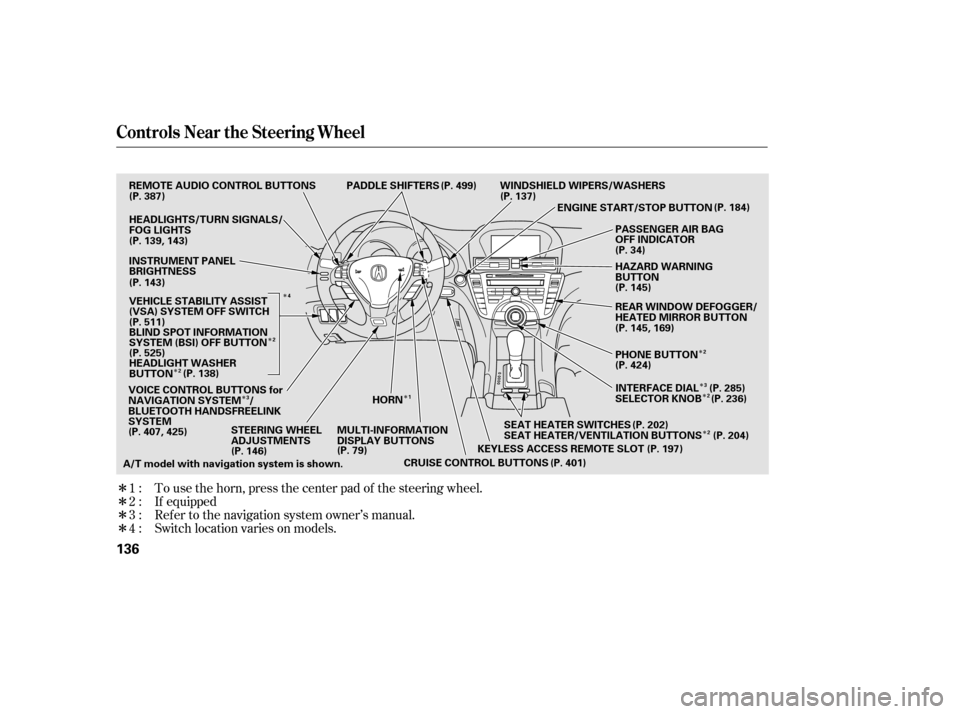
To use the horn, press the center pad of the steering wheel.
If equipped
Ref er to the navigation system owner’s manual.
1:
2:
3:
4 : Switch location varies on models.
Controls Near the Steering Wheel
136
SEAT HEATER SWITCHES
PADDLE SHIFTERS
CRUISE CONTROL BUTTONS WINDSHIELD WIPERS/WASHERS
STEERING WHEEL
ADJUSTMENTS MULTI-INFORMATION
DISPLAY BUTTONSHORN
KEYLESS ACCESS REMOTE SLOTENGINE START/STOP BUTTON
A/T model with navigation system is shown. VOICE CONTROL BUTTONS for
NAVIGATION SYSTEM /
BLUETOOTH HANDSFREELINK
SYSTEM
SEAT HEATER/VENTILATION BUTTONS
(P. 387)
(P. 407, 425) (P. 146) (P. 79)
(P. 401)(P. 197)
(P. 204)
(P. 202) (P. 184)
REMOTE AUDIO CONTROL BUTTONS
HEADLIGHTS/TURN SIGNALS/
FOG LIGHTS
(P. 139, 143)
INSTRUMENT PANEL
BRIGHTNESS
(P. 143)
(P. 525) BLIND SPOT INFORMATION
SYSTEM (BSI) OFF BUTTON
HEADLIGHT WASHER
BUTTON (P. 511)
(P. 138) PASSENGER AIR BAG
OFF INDICATOR
(P. 34)
HAZARD WARNING
BUTTON
REAR WINDOW DEFOGGER/
HEATED MIRROR BUTTON
(P. 145, 169)
PHONE BUTTON
(P. 424)
INTERFACE DIAL (P. 285)
SELECTOR KNOB (P. 236) (P. 145)
(P. 499)
(P. 137)
VEHICLE STABILITY ASSIST
(VSA) SYSTEM OFF SWITCH
1
3
2
2
2 2
3 2
4
12/07/20 10:46:46 31TK4640_141
Page 145 of 653

�µ
�µ �Î
�Î
�Î
Push down on the
lef t lever to signal a lef t turn and up
to signal a right turn. To signal a lane
change, push lightly on the lever and
hold it. The lever will return to the
center when you release it or
complete a turn.
Turning the switch to
the ‘‘ ’’ position turns on the
parking lights, taillights, instrument
panel lights, side-marker lights, and
rear license plate lights.
Turning the switch to the ‘‘ ’’
position turns on the headlights.
When the light switch is in either of
these positions, the lights on
indicator comes on as a reminder. This indicator stays on if you leave
the light switch on and turn the
ignition switch to the ACCESSORY
(I) or LOCK (0) position.
Models equipped with the
keyless access system have an
engine start/stop button instead
of an ignition switch. VEHICLE
OFF (LOCK) Mode is the
equivalent of LOCK (0) and
ACCESSORY Mode is the
equivalent of ACCESSORY (I).
For more inf ormation, see pagesand .
If you leave the lights on with the
key removed f rom the ignition
switch, or with the power mode in
VEHICLE OFF (LOCK), you will
hear reminder beeps when you open
the driver’s door.
Turn signal
Of f
Parking and instrument panel
lights
AUTO
Headlights on
High beams
Flashhighbeams
Fog lights of f
Fog lights on :
184 187
1.
2.
3.
4.
5.
6.
7.
8.
9.
CONT INUED
Turn Signals and Headlights
Turn Signal
Headlights
Inst rument s and Cont rols
139
12/07/20 10:47:08 31TK4640_144
Page 147 of 653

�Î�Î
�Î
The automatic lighting f eature is
controlledbyasensorlocatedontop
of the dashboard. Do not cover this
sensor or spill liquids on it. The automatic lighting of f f eature
turns off the headlights, all other
exterior lights, and the instrument
panel lights within 15 seconds af ter
youremovethekeyandclosethe
driver’s door, or on models with
keyless access system, set the power
mode to VEHICLE OFF (LOCK),
take the remote with you, and close
the driver’s door.
If you remove the key (or the vehicle
is in VEHICLE OFF mode on models
with keyless access system), and the
driver’s door is opened and closed,
the automatic lighting of f f eature
activates with the headlight switch in
the ‘‘ ’’ or ‘‘ ’’ position, or
the lights turned on by setting the
switch in the ‘‘AUTO’’ position.
To change the ‘‘HEADLIGHT AUTO
OFF TIMER’’ setting, see page . If you turn the ignition switch to the
LOCK (0) position with the
headlight switch on, but do not open
the door and get out, the lights turn
of f af ter 10 minutes (3 minutes, if
the switch is in the ‘‘AUTO’’
position).
Your vehicle has the engine
start/stop button instead of an
ignition switch. For more
inf ormation on how to select the
power mode, see page . On models with keyless access
system
:
184122
CONT INUED
Automatic Lighting Of f Feature
Headlights
Inst rument s and Cont rols
141
LIGHT SENSOR
12/07/20 10:47:22 31TK4640_146
Page 149 of 653
�´
�µ
�´ �µ �Î
�Î
Turn the f og lights on and of f by
turning the switch next to the
headlight switch.
You can use the f og lights only when
the headlights are on low beam.
With the light switch in the AUTO
position, you can also use the f og
lights when the headlights turn on
automatically. They will go of f when
the headlights turn of f .
Adjust the brightness of the
instrument panel by pressing the
or button with the ignition
switch in the ON (II) position. Press
the button to increase the
brightness and the button to
decrease it. Models equipped with the
keyless access system have an
engine start/stop button instead
of an ignition switch. ON Mode
is the equivalent of ON (II). For
more inf ormation, see pages
and .
:
184 187
CONT INUED
Fog L ights Instrument Panel Brightness
Fog L ights, Instrument Panel Brightness
Inst rument s and Cont rols
143
FOG LIGHT SWITCH
ADJUSTMENT BUTTONS
12/07/20 10:47:37 31TK4640_148
Page 150 of 653
�´
To reduce glare at night, the
instrument panel illumination dims
when you turn the light switch to
or . To cancel the glare
reduction f unction, set the
brightness to the highest level, then
press the button. You will hear a
beep when it is canceled.
When the brightness reaches the
maximum level, ‘‘BRIGHTNESS
MAXIMUM LEVEL’’ appears on the
display.
The level of brightness is shown on
the multi-information display while
you adjust it. It goes out 5 seconds
af ter you f inish adjusting. If your vehicle is equipped with the
navigation system, the navigation
system screen will also go to f ull
brightness. This can be helpf ul when
using the headlights during daylight
hours.
Instrument Panel Brightness
144
U.S. model is shown.
12/07/20 10:47:42 31TK4640_149
Page 151 of 653

Push the button between the center
vents to turn on the hazard warning
lights (f our-way f lashers). This
causes all f our outside turn signals
and both indicators in the instrument
panel to f lash. Use the hazard
warning lights if you need to park in
a dangerous area near heavy traffic,
or if your vehicle is disabled.The rear window def ogger clears f og,
frost,andthinicefromthewindow.
Push the def ogger button to turn it
onandoff.Theindicatorinthe
button comes on to show the
def ogger is on. If you do not turn it
of f , the def ogger will shut itself of f
withinabout10to30minutes
according to the outside temperature.
It also shuts of f when you turn of f
the ignition switch, or set the power
mode to VEHICLE OFF (LOCK) onmodels with keyless access system.
You have to turn it on again when
you restart the vehicle.
Make sure the rear window is clear
and you have good visibility bef ore
starting to drive.
The def ogger wires on the inside of
the rear window can be accidentally
damaged. When cleaning the glass,
always wipe side-to-side.
Pushing this button also turns the
mirror heaters on or of f . For more
inf ormation, see page .
169
Hazard Warning Button Rear Window Def ogger
Hazard Warning Button, Rear Window Def ogger
Inst rument s and Cont rols
145
HAZARD WARNING BUTTON
U.S. model is shown.
12/07/20 10:47:50 31TK4640_150
Page 152 of 653
Push the lever up to lock the
steering wheel in that position.
Make any steering wheel
adjustments before you start driving.
Push the lever under the steering
column all the way down.
Move the steering wheel up or
down, and in or out, so it points
toward your chest, not toward
your f ace. Make sure you can see
the instrument panel gauges and
indicators.Make sure you have securely
locked the steering wheel in place
by trying to move it up, down, in,
and out.
1.
2. 3.
4.
Steering Wheel A djustments
146
LEVER
Adjusting the steering wheel
position while driving may
cause you to lose control of the
vehicle and be seriously injured
inacrash.
Adjust the steering wheel only
when the vehicle is stopped.
12/07/20 10:47:56 31TK4640_151


