Page 72 of 653

�Î
�Î
If it stays on after you have fully
released the parking brake while
the engine is running, or if it
comes on while driving, it can
indicate a problem in the brake
system. You will also see a ‘‘LOW
BRAKE FLUID’’ or ‘‘CHECK
BRAKE SYSTEM’’ message on
the multi-information display. For
more information, see page . Models equipped with the
keyless access system have an
engine start/stop button instead
of an ignition switch. ON Mode
is the equivalent of ON (II), and
START Mode is the equivalent
of START (III). For more
information, see pages and
.
This indicator normally comes on f or
a f ew seconds when you turn the
ignition switch to the ON (II)
position.
If this indicator comes on at any
other time, there is a problem in the
ABS. If this happens, take the
vehicle to your dealer to have it
checked. With this indicator on, your
vehicle still has normal braking
ability but no anti-lock f unction. You
will also see a ‘‘CHECK ABS
SYSTEM’’ message on the multi-
inf ormation display. For more
inf ormation, see page .
2.
:
598 187184
508
Instrument Panel Indicators
Anti-lock Brake System
(A BS) Indicator
66
12/07/20 10:38:13 31TK4640_071
Page 77 of 653

�Î
�ÎThis indicator comes on with the
high beam headlights. For more
inf ormation, see page .
This indicator also comes on with
reduced brightness when the
daytime running lights (DRL) are on
(see page ).
This indicator comes on when you
turn on the f og lights. For more
inf ormation, see page .
This indicator reminds you that the
exterior lights are on. It comes on
when the light switch is in either the
or position. This indicator
will also come on when the light
switch is in AUTO and the lights
turn on automatically. If you turn the
ignition switch to the ACCESSORY
(I) or the LOCK (0) position, without
turning of f the light switch, this
indicator will remain on. Reminder
beeps will also sound when you open
the driver’s door.
Models equipped with the
keyless access system have an
engine start/stop button instead
of an ignition switch. VEHICLE
OFF (LOCK) Mode is the
equivalent of LOCK (0) and
ACCESSORY Mode is the
equivalent of ACCESSORY (I).
For more inf ormation, see pagesand . This indicator comes on red if any
door or the trunk lid is not closed
tightly.
You will also see a corresponding
indicator(s) on the multi-information
display to indicate which door and/
or the trunk is not closed tightly (see
page ).
: 12
184 187 140
142
143
Instrument Panel Indicators
High Beam Indicator
Fog L ight Indicator
Lights On Indicator Door/Trunk Open
Indicator
Inst rument s and Cont rols
71
12/07/20 10:38:56 31TK4640_076
Page 84 of 653

�Î
�ÎYou can select the displayed
language and also customize some
vehicle control settings to your liking
with the multi-information display
and the three buttons on the steering
wheel (see page ).
When you unlock and open the
driver’s door, the display shows
‘‘DRIVER 1’’ or ‘‘DRIVER 2’’
depending on which remote
transmitter/keyless access remoteyou use, and the driver’s seat and the
outside mirrors move to the position
stored in that remote transmitter/
keyless access remote (see page
).
The driver’s ID (1 or 2) is displayed
when the power mode is set to ON.
The multi-inf ormation display in the
instrument panel displays various
inf ormation and messages when the
ignition switch is in the ON (II)
position. Some of the messages help
you operate your vehicle more
comf ortably. Others help to keep
you aware of the periodic
maintenance your vehicle needs f or
continued trouble-f ree driving.
Models equipped with the
keyless access system have an
engine start/stop button instead
of an ignition switch. ON Mode
is the equivalent of ON (II). For
more inf ormation, see pagesand .
There are three types of messages:
normal display messages, engine oil
lif e and maintenance messages, and
system messages. :
184 187 79
170
On models with keyless access system
Normal Display Messages
Multi-Inf ormation Display
78
Remote transmitter/keyless
access remote 1 is used.
Remote transmitter/keyless
access remote 2 is used.
12/07/20 10:39:41 31TK4640_083
Page 100 of 653

�Î�Î
�Î
You can customize some vehicle
control settings. To change the
settings, the ignition switch must be
in the ON (II) position, and the
vehicle must be stopped with the
transmission in Park (automatic) or
with the parking brake set (manual). If you try to enter the customizing
mode while the vehicle is moving,
you will see a ‘‘MUST STOP AND
SHIFTTOPARKTOCHANGE
SETTINGS’’ (automatic) or ‘‘MUST
STOP AND SET PARK BRAKE TO
CHANGE SETTINGS’’ (manual)
message and you cannot change the
settings.
You can customize some vehicle
control settings f or ‘‘DRIVER 1’’ and
‘‘DRIVER 2’’ separately.
To have the driver’s ID detected,
make sure the driver’s door is
unlocked with a corresponding
remote transmitter/keyless access
remote.
Models equipped with the
keyless access system have an
engine start/stop button instead
of an ignition switch. VEHICLE
OFF (LOCK) Mode is the
equivalent of LOCK (0),
ACCESSORY Mode is the
equivalent of ACCESSORY (I),
and ON Mode is the equivalent
of ON (II). For more
information, see pages and
.
If you turn the ignition switch to the
ACCESSORY (I) or the LOCK (0)
position, move the shif t lever out of
Park (automatic) or release the
parking brake (manual), the display
will change to the normal screen. :
187 184
Multi-Inf ormation Display
Customized Settings
94
12/07/20 10:41:58 31TK4640_099
Page 101 of 653
�Û�ÝRef er to the table on the f ollowing
pages about the settings you want to
customize.
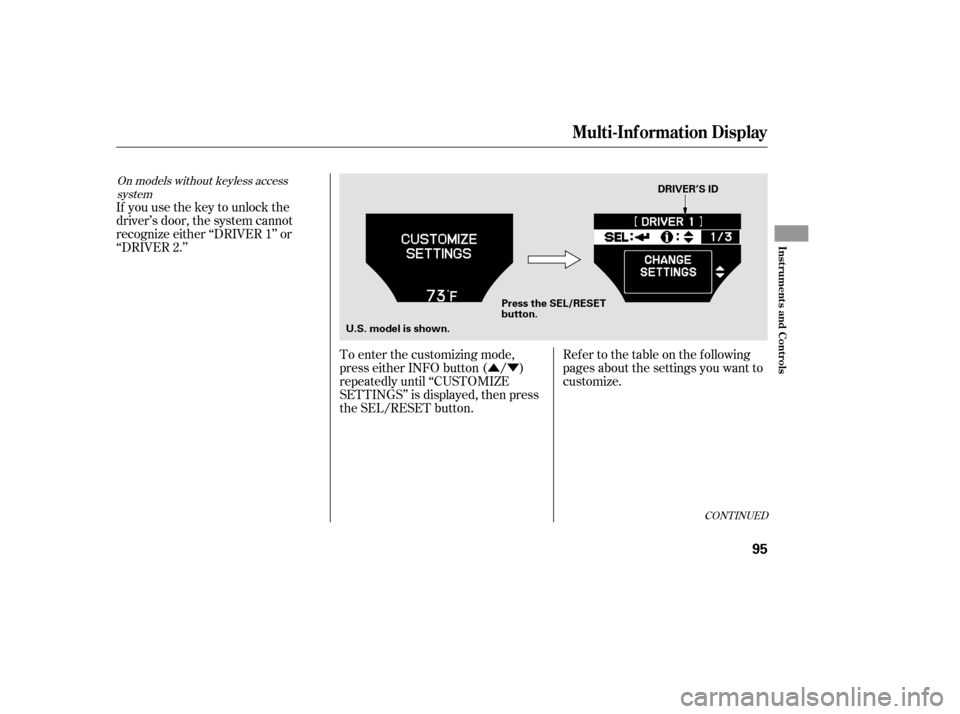
If you use the key to unlock the
driver’s door, the system cannot
recognize either ‘‘DRIVER 1’’ or
‘‘DRIVER 2.’’
To enter the customizing mode,
press either INFO button ( / )
repeatedly until ‘‘CUSTOMIZE
SETTINGS’’ is displayed, then press
the SEL/RESET button.
CONT INUED
On models without keyless accesssystem
Multi-Inf ormation Display
Inst rument s and Cont rols
95
DRIVER’S ID
Press the SEL/RESET
button.
U.S. model is shown.
12/07/20 10:42:03 31TK4640_100
Page 103 of 653

�Î�Î
�Î
�Î
�Î
�Î
�Î
�Î
�Î
Description
Menu Item
CONT INUED
Group Setup Page
Setting Option
Changes which doors unlock when you use the
remote or grab the driver’s door handle.
Causes some exterior lights to blink when you
unlock/lock the doors by grabbing or touching the
sensor/pushing the button on the driver’s door
handle.
Causes the beeper to sound when you unlock/lock
the doors by grabbing or touching the sensor/
pushing the button on the driver’s door handle.
Changes how long (in seconds) the interior lights
stay on after you close the doors.
Changes how long (in seconds) the exterior lights
stay on after you close the driver’s door.
Changes the timing of when the headlights come
on. The headlight switch needs to be in the AUTO
position.
DOOR UNLOCK MODE
KEYLESS ACCESS LIGHT
FLASH
KEYLESS ACCESS BEEP
INTERIOR LIGHT
DIMMING T IME
HEADLIGHT
AUTO OFF TIMER
AUTO LIGHT
SENSITIVITY
KEYLESS ACCESS
SETUP
(P.115)
LIGHTING SETUP
(P.120)
116
117
118
121
122
123
60 sec
0sec
LOW
MIN
DRIVER DOOR
ALL DOORS
ON
OFF
ON
OFF
15 sec
30 sec
60 sec
30 sec
15 sec
MAX
HIGH
MID
1:
2: Default setting
Only on models with keyless access system2 1
1
1
1
1
1
Multi-Inf ormation Display
Inst rument s and Cont rols
97
12/07/20 10:42:19 31TK4640_102
Page 104 of 653

�Î�Î
�Î
�Î �Î
�Î
�Î
�Î
Description
Menu Item Page
Group Setup Setting Option
Changes when the doors automatically lock.
Changes when the doors automatically unlock.
Changes which doors unlock with the remote
transmitter/keyless access remote on the first
push.
The exterior lights flash each time you press the
LOCK or UNLOCK button. A beeper will also
sound when you press the LOCK button twice.
Changes how long it takes (in seconds) for the
doors to relock and the security system to set after
you unlock but do not open the door.
Set/Cancel all the customized settings as default.
AUTO DOOR LOCK
AUTO DOOR UNLOCK
KEY AND REMOTE
UNLOCK MODE
KEYLESS LOCK
ACKNOWLEDGMENT
SECURITY RELOCK
TIMER
127
128
130
131
133
134
DOOR SETUP
(P.125)
DEFAULT ALL
(P.134) OFF
WITH VEH SPD
SHIFT FROM P (A/T only)
OFF
DRIVER DOOR
With SHIFT to P (A/T only)
ALL DOORS With
SHIFT to P (A/T only)
DRIVER DOOR With IGN OFF
ALL DOORS With IGN OFF
DRIVER DOOR
ALL DOORS
ON
OFF
30 sec
60 sec
90 sec
CANCEL
SET
Default setting
1:
2:
3: Default setting for automatic transmission
Default setting for manual transmission1
2
1
1 1
Multi-Inf ormation Display
98
12/07/20 10:42:25 31TK4640_103
Page 112 of 653
�Û�Ý�Û�Ý
�µ
�µ �µ
�Î
�Î
Elapsed Time Reset
You can choose this item to
customize f rom ‘‘METER SETUP’’
by pressing the INFO ( / ) button
repeatedly. Press the SEL/RESET button to see
the selections.
Select the desired setting by
pressing the INFO ( / ) button,
then enter your selection by pressing
the SEL/RESET button.
There are three elapsed time reset
choices you can make:
TRIP A The elapsed time is reset
when Trip A is reset.
TRIP B The elapsed time is reset
when Trip B is reset. IGN OFF The elapsed time is
reset when you turn the ignition
switch to the LOCK (0) position.
Models equipped with the
keyless access system have an
engine start/stop button instead
of an ignition switch. VEHICLE
OFF (LOCK) Mode is the
equivalent of LOCK (0). For
more inf ormation, see pagesand .
:
184 187
Multi-Inf ormation Display
106
12/07/20 10:43:24 31TK4640_111