Page 242 of 653
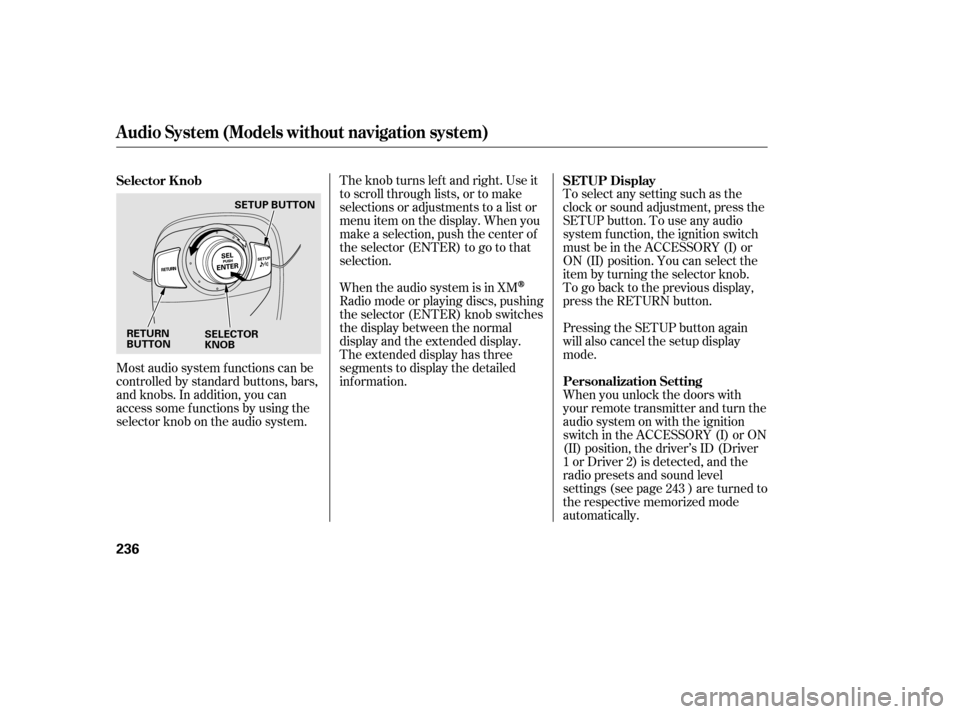
Most audio system f unctions can be
controlled by standard buttons, bars,
and knobs. In addition, you can
access some f unctions by using the
selector knob on the audio system.The knob turns lef t and right. Use it
to scroll through lists, or to make
selections or adjustments to a list or
menu item on the display. When you
make a selection, push the center of
the selector (ENTER) to go to that
selection.
When the audio system is in XM
Radio mode or playing discs, pushing
the selector (ENTER) knob switches
the display between the normal
display and the extended display.
The extended display has three
segments to display the detailed
inf ormation.
To select any setting such as the
clock or sound adjustment, press the
SETUP button. To use any audio
system f unction, the ignition switch
must be in the ACCESSORY (I) or
ON (II) position. You can select the
item by turning the selector knob.
To go back to the previous display,
press the RETURN button.
Pressing the SETUP button again
will also cancel the setup display
mode.
When you unlock the doors with
your remote transmitter and turn the
audio system on with the ignition
switch in the ACCESSORY (I) or ON
(II) position, the driver’s ID (Driver
1orDriver2)isdetected,andthe
radio presets and sound level
settings (see page ) are turned to
the respective memorized mode
automatically.
243
Selector K nob SET UP Display
Personalization Setting
Audio System (Models without navigation system)
236
RETURN
BUTTONSELECTOR
KNOBSETUP BUTTON
12/07/20 10:59:49 31TK4640_241
Page 256 of 653

�µ�µ�µ
The selected channel
number does not exist, or is not part
of your subscription, or this channel
has no artist or title inf ormation at
this time.
The selected
channel has no artist or title
inf ormation at this time.
There is a problem
with the XM antenna. Please consult
your dealer. The XM satellites are in orbit over
the equator; therefore, objects south
of the vehicle may cause satellite
reception interruptions. To help
compensate f or this, ground-based
repeaters are placed in major
metropolitan areas.
Satellite signals are more likely to be
blocked by tall buildings and
mountains the f arther north you
travel f rom the equator. Carrying
large items on a roof rack can also
block the signal.Depending on where you drive, you
may experience reception problems.
Interf erence can be caused by any of
these conditions:
Driving on the north side of an
east/west mountain road.
Driving in tunnels. Driving on the north side of a
large commercial truck on an
east/west road.
Driving on a road beside a vertical
wall, steep clif f , or hill to the south
of you.
Driving on the lower level of a
multi-tiered road.
Driving on a single lane road
alongside dense trees taller than
50 ft. (15 m) to the south of you.
Playing the XMRadio (Models without navigation system)
‘‘----’’
‘‘NO INFO’’
‘‘A NT ENNA ’’
250
12/07/20 11:01:43 31TK4640_255
Page 257 of 653
When DPLII is turned on (see page), sound coming f rom the rear
speakers may be distorted due to the
compression of the music being
broadcast. Turn DPLII of f if this
happens.
There may be other geographic
situations that could af f ect XM Radio
reception.This device complies with the
appropriate requirements or the
required standards. See page f or
more inf ormation.
244
628
Playing the XMRadio (Models without navigation system)
Features
251
Signal may be blocked by
mountains or large obstacles to
the south.Signal weaker in
these areas.
SATELLITE GROUND REPEATER
12/07/20 11:01:47 31TK4640_256
Page 279 of 653

�Î
�ΠThis audio system can select and
play the audio f iles on a USB f lash
memory device with the same
controls used f or the disc player. To
play a USB f lash memory device,
connect it to the USB adapter cable
in the console compartment, then
press the AUX button. The ignition
switch must be in the ACCESSORY
(I) or ON (II) position.
The audio system reads and plays
the audio f iles on the USB f lash
memory device in MP3, WMA or
AAC f ormats. Depending on the
f ormat, the display shows MP3,
WMA or AAC when a USB flash
memory device is playing.The recommended USB f lash
memory devices are 256 MB or
higher, and f ormatted with the FAT
f ile system. Some digital audio
players may be compatible as well.
Some USB f lash memory devices
(such as devices with security lock-
out f eatures, etc.) will not work in
this audio unit.
Do not use a device such as a card
reader or hard drive as the device
or your f iles may be damaged.
Do not connect your USB f lash
memory device using a hub.
Do not use an extension cable to
the USB adapter cable equipped
with your vehicle.
Do not keep a USB f lash memory
device in the vehicle. Direct
sunlight and high heat will damage
it.
We recommend backing up your
data bef ore playing a USB f lash
memory device.
Only AAC f ormat f iles recorded
with iTunes are playable on this
audio unit.
:
CONT INUED
To Play a USB Flash Memory
Device
Playing a USB Flash Memory Device (Models without navigation system)
Features
273
NOTE:
12/07/20 11:04:30 31TK4640_278
Page 291 of 653
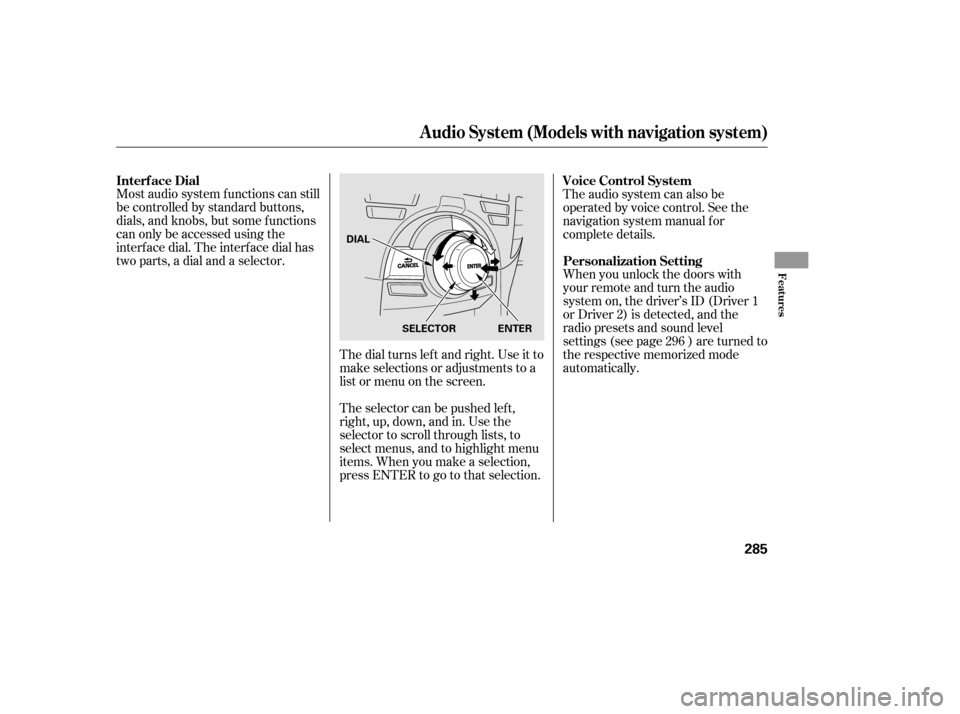
Most audio system f unctions can still
be controlled by standard buttons,
dials, and knobs, but some f unctions
can only be accessed using the
interf ace dial. The interf ace dial has
two parts, a dial and a selector.The dial turns lef t and right. Use it to
make selections or adjustments to a
list or menu on the screen.
The selector can be pushed lef t,
right, up, down, and in. Use the
selector to scroll through lists, to
select menus, and to highlight menu
items. When you make a selection,
press ENTER to go to that selection.The audio system can also be
operated by voice control. See the
navigation system manual f or
complete details.
When you unlock the doors with
your remote and turn the audio
system on, the driver’s ID (Driver 1
or Driver 2) is detected, and the
radio presets and sound level
settings (see page ) are turned to
the respective memorized mode
automatically.
296
Interf ace Dial Voice Control System
Personalization Setting
Audio System (Models with navigation system)
Features
285
SELECTOR ENTER
DIAL
12/07/20 11:06:05 31TK4640_290
Page 310 of 653

The XM satellites are in orbit over
the equator; therefore, objects south
of the vehicle may cause satellite
reception interruptions. To help
compensate f or this, ground-based
repeaters are placed in major
metropolitan areas. Satellite signals
aremorelikelytobeblockedbytall
buildings and mountains the f arther
north you travel f rom the equator.
Depending on where you drive, you
may experience reception problems.
Interf erence can be caused by any of
these conditions:Driving on the north side of an
east/west mountain road.
Driving on the north side of a
large commercial truck on an
east/west road.
Driving in tunnels. Driving on a single lane road
alongside dense trees taller than
50 ft. (15 m) to the south of you. Driving on the lower level of a
multi-tiered road. Driving on a road beside a vertical
wall, steep clif f , or hill to the south
of you.When DPLII is turned on (see page
), sound coming f rom the rear
speakers may be distorted due to the
compression of the music being
broadcast. Turn DPLII of f if this
happens. 298
Playing the XMRadio (Models with navigation system)
304
GROUND REPEATER
Signal may be blocked by
mountains or large obstacles
to the south.
Signal weaker in
these areas.
SATELLITE
12/07/20 11:08:38 31TK4640_309
Page 371 of 653

�Î
�Î
This audio system can select and
play the audio f iles on a USB f lash
memory device with the same
controls used f or the disc player. To
play a USB f lash memory device,
connect it to the USB adapter cable
in the console compartment, then
press the HDD/AUX button until
you see ‘‘USB’’ in the display. The
power mode must be ACCESSORY
or ON.
Your vehicle has the engine start/
stop button instead of an ignition
switch. For more inf ormation on how
to select the power mode, see page
. Do not use a device such as a card
reader or hard drive as it or your
f iles may be damaged.
Do not connect your USB f lash
memory device using a hub.
Do not use an extension cable to
the USB adapter cable equipped
with your vehicle.
Do not keep a USB f lash memory
device in the vehicle. Direct
sunlight and high heat will damage
it.
We recommend backing up your
data bef ore playing a USB f lash
memory device.
The audio system reads and plays
the audio f iles on the USB f lash
memory device in MP3, WMA or
AAC formats.
Depending on the type and
number of f iles, it may take some
time bef ore they begin to play.
Only AAC f ormat f iles recorded
with iTunes are playable on this
audio unit.
The recommended USB f lash
memory devices are 256 MB or
higher, and f ormatted with the FAT
f ile system. Some digital audio
players may be compatible as well.
Some USB f lash memory devices
(such as devices with security lock-
out f eatures, etc.) will not work in
this audio unit. :
184
CONT INUED
To Play a USB Flash Memory
Device
Playing a USB Flash Memory Device (Models with navigation system)
Features
365
NOTE:
12/07/20 11:16:50 31TK4640_370
Page 397 of 653
To set the time, press the CLOCK
button until you hear a beep. The
displayed time begins to blink.
Change the hours by pressing the H
(hour) button until the numbers
advance to the desired time. Change
the minutes by pressing the M
(minute) button until the numbers
advance to the desired time.
Press the CLOCK button again to
enter the set time.
CONT INUED
On models without navigation system
Setting the Clock
Features
391
On models without navigation systemMINUTE BUTTON
(PRESET 5) RESET BUTTON
(PRESET 6) CLOCK BUTTON
HOUR BUTTON
(PRESET 4)
12/07/20 11:20:06 31TK4640_396

