2014 Acura RLX E brake
[x] Cancel search: E brakePage 348 of 518

347
uuWhen DrivinguShifting
Continued
Driving
ShiftingChange the shift position in accordance with your driving needs.■Shift lever positions
1Shifting
You cannot change the power mode from ON to
VEHICLE OFF (LOCK) unless the shift lever is in
(P.
The vehicle may move forward very slightly even in
(N while the engine is cold.
Depress the brake pedal firmly and, when necessary,
apply the parking brake.
When shifting gears in extremely low temperatures
(-22°F/-30°C), there may be a short delay before the
shift is indicated in the display. Always confirm you
are in the correct gear before driving.
Park
Used when parking or starting the engine
Reverse
Used when reversing
Neutral
Used when idling
Drive
Used for:●Normal driving (gears change between 1st
and 6th automatically)●Temporarily driving in the sequential shift
mode●Driving in the sequential shift mode (when
driving in SPORT mode) Release Button
Page 349 of 518

uuWhen DrivinguShifting
348Driving
■
Shift Lever Operation
1Shift Lever OperationNOTICEWhen you change the shift lever from
(D to
(R and
vice versa, come to a complete stop and keep the
brake pedal depressed.
Operating the shift lever before the vehicle has come
to a complete standstill can damage the transmission.
Use the shift lever position indicator to check the
lever position before pulling away.
If the transmission indicator blinks when driving, in
any shift position, there is a problem with the
transmission.
Avoid sudden acceleration and have the transmission
checked by a dealer as soon as possible.
The fuel supply may be cut off if you drive at engine
speeds in or over the tachometer’s red zone (engine
speed limit). If this happens, you may experience a
slight jolt.
When the engine speed is increased while the shift
lever is in
(N, (P or
(R, the fuel supply may be cut
off even without the engine speed entering the
tachometer’s red zone.
It may not be possible to operate the shift lever if the
brake pedal is applied while the shift lever release
button is held down.
Depress the brake pedal first.
Shift Lever Position Indicator
Depress the brake pedal
and press the shift lever
release button to shift.
Shift without pressing the
shift lever release button. Press the shift lever
release button and
shift.Tachometer’s red zone
Models without
navigation
system
Page 355 of 518

uuWhen DrivinguCruise Control
*
354Driving
Increase or decrease the vehicle speed using the RES/+/SET/– switch on the steering
wheel.
•Each time you press the switch up or down, the vehicle speed is increased or
decreased by about 1 mph (1.6 km/h).
•If you keep the switch pressed up or down, the vehicle speed increases or
decreases until you release it. This speed is then set.
To cancel cruise control, do any of the
following:
•Press the CANCEL button.
•Press the CRUISE button.
•Depress the brake pedal.
The CRUISE CONTROL indicator goes off.■
To Adjust the Vehicle Speed
1To Adjust the Vehicle Speed
You can set the vehicle speed pressing the RES/+/
SET/– switch down on the steering wheel when
adjusting the speed with the accelerator and brake
pedals.
■
To Cancel
To decrease speedTo increase speed
1To Cancel
Resuming the prior set speed:
After cruise control has been canceled, you can still
resume the prior set speed by pressing the RES/+/
SET/– switch up while driving at a speed of at least
25 mph (40 km/h) or more.
You cannot set or resume in the following situations:•When vehicle speed is less than 25 mph (40 km/h)•When the CRUISE button is turned off
At vehicle speeds of 22 mph (35 km/h) or less, cruise
control is canceled automatically.
CRUISE ButtonCANCEL Button
Page 356 of 518

355
uuWhen DrivinguAdaptive Cruise Control (ACC) with Low Speed Follow (LSF)
*
Continued
Driving
Adaptive Cruise Control (ACC) with Low Speed Follow (LSF)
*
Helps maintain a constant vehicle speed and a set following distance behind a
vehicle detected ahead of yours and, if the detected vehicle comes to a stop,
decelerates and stops your vehicle, without you having to keep your foot on the
brake or the accelerator.
1Adaptive Cruise Control (ACC) with Low Speed Follow (LSF)
*
Important Safety ReminderAs with any system, there are limits to ACC with LSF.
Inappropriate use of ACC with LSF can result in a serious
accident. Use the brake pedal whenever necessary, and always
keep a safe distance between your vehicle and other vehicles.The radar sensor for ACC with LSF is shared with the
collision mitigation braking system
TM (CMBS
TM).
2Collision Mitigation Braking SystemTM
(CMBS
TM)* P. 3913
WARNING
Improper use of ACC with LSF can lead to a
crash.
Use ACC with LSF only when driving on
expressways or freeways and in good
weather conditions.
3
WARNING
Exiting a vehicle that has been stopped
while the ACC with LSF system is operating
can result in the vehicle moving without
operator control.A vehicle that moves without operator
control can cause a crash, resulting in
serious injury or death.Never exit a vehicle when the vehicle is
stopped by ACC with LSF.
When to use■Vehicle speed for ACC with LSF: A vehicle is
detected ahead within ACC with LSF range –
ACC with LSF operates at any vehicle speed.
No vehicle is detected within ACC with LSF
range – ACC with LSF operates at the speed of 25
mph (40km/h) or above.■Shift positions for ACC with LSF: In
(D.The radar sensor is in the front grille.
How to use■Press the MAIN button on
the steering wheel.ACC (green) is on in the
instrument panel.
ACC with LSF is ready to
use.* Not available on all models
Page 357 of 518
uuWhen DrivinguAdaptive Cruise Control (ACC) with Low Speed Follow (LSF)
*
356Driving
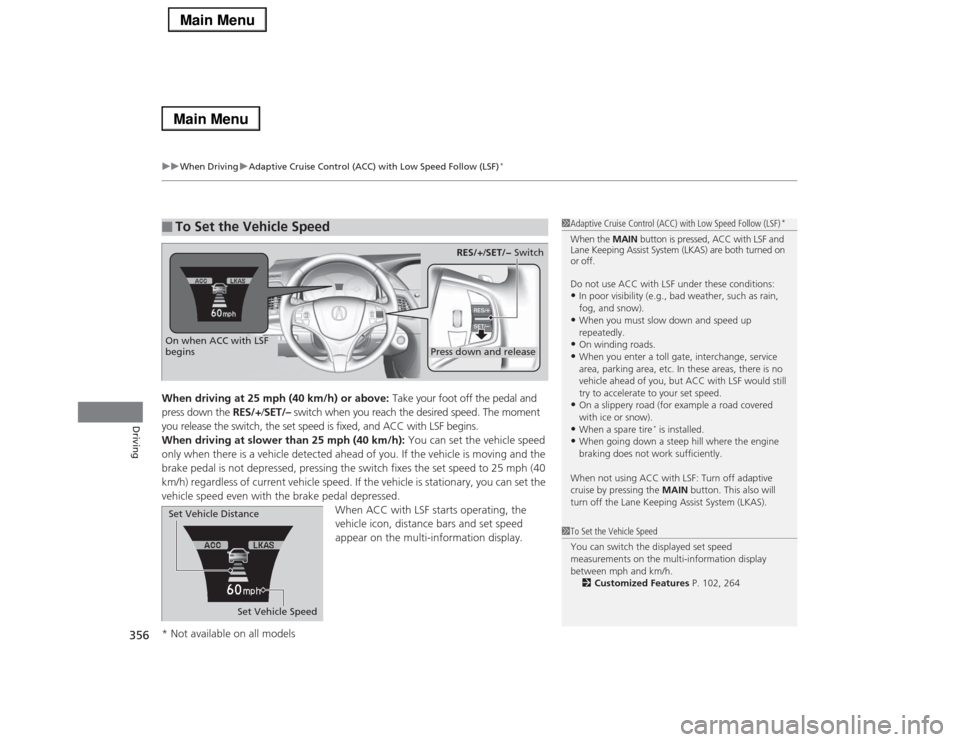
When driving at 25 mph (40 km/h) or above: Take your foot off the pedal and
press down the RES/+/SET/– switch when you reach the desired speed. The moment
you release the switch, the set speed is fixed, and ACC with LSF begins.
When driving at slower than 25 mph (40 km/h): You can set the vehicle speed
only when there is a vehicle detected ahead of you. If the vehicle is moving and the
brake pedal is not depressed, pressing the switch fixes the set speed to 25 mph (40
km/h) regardless of current vehicle speed. If the vehicle is stationary, you can set the
vehicle speed even with the brake pedal depressed.
When ACC with LSF starts operating, the
vehicle icon, distance bars and set speed
appear on the multi-information display. ■
To Set the Vehicle Speed
1Adaptive Cruise Control (ACC) with Low Speed Follow (LSF)
*
When the MAIN button is pressed, ACC with LSF and
Lane Keeping Assist System (LKAS) are both turned on
or off.
Do not use ACC with LSF under these conditions:•In poor visibility (e.g., bad weather, such as rain,
fog, and snow).•When you must slow down and speed up
repeatedly.•On winding roads.•When you enter a toll gate, interchange, service
area, parking area, etc. In these areas, there is no
vehicle ahead of you, but ACC with LSF would still
try to accelerate to your set speed.•On a slippery road (for example a road covered
with ice or snow).•When a spare tire
* is installed.
•When going down a steep hill where the engine
braking does not work sufficiently.
When not using ACC with LSF: Turn off adaptive
cruise by pressing the MAIN button. This also will
turn off the Lane Keeping Assist System (LKAS).
1To Set the Vehicle Speed
You can switch the displayed set speed
measurements on the multi-information display
between mph and km/h.
2Customized Features P. 102, 264
On when ACC with LSF
begins
Press down and release
RES/+/SET/− Switch
Set Vehicle Speed Set Vehicle Distance
* Not available on all models
Page 358 of 518

Continued
357
uuWhen DrivinguAdaptive Cruise Control (ACC) with Low Speed Follow (LSF)
*
Driving
■There is a vehicle ahead
ACC with LSF monitors if a vehicle ahead of you enters the ACC with LSF range. If it
does, the ACC with LSF system maintains or decelerates your vehicle’s set speed in
order to keep the vehicle’s set following distance from the vehicle ahead.2To Set or Change Following Distance P. 360
When a vehicle whose speed is slower than
your set speed comes in front of you, your
vehicle starts to slow down.
■
When in Operation
1When in Operation
If the vehicle ahead of you slows down abruptly, or if
another vehicle cuts in front of you, the beeper
sounds and a message appears on the multi-
information display to alert you.
Depress the brake pedal, and keep an appropriate
distance from the vehicle ahead.
Even if the distance between your vehicle and the
vehicle ahead is short, ACC with LSF may start
accelerating your vehicle under the following
circumstances:•The vehicle ahead of you is going at almost the
same speed as, or faster than, your vehicle.•A vehicle that cuts in front of you is going faster
than your vehicle, gradually increasing the distance
between the vehicles.
If you do not want to hear a beep when the system
detects a vehicle, or when the vehicle goes out of the
ACC with LSF range, you can change the pre-running
detect car beep setting.
2Customized Features P. 102, 264
Beep
ACC with LSF Range: 394 ft. (120 m)
A vehicle icon appears on the
multi-information display
Page 359 of 518

uuWhen DrivinguAdaptive Cruise Control (ACC) with Low Speed Follow (LSF)
*
358Driving
■There is no vehicle ahead
When driving at 22 mph (35 km/h) or above:
Your vehicle maintains the set speed without
having to keep your foot on the brake or
accelerator pedal.
If there previously was a vehicle detected
ahead that kept your vehicle from traveling at
the set speed, ACC with LSF accelerates your
vehicle to the set speed, and then maintains it.
When driving under 22 mph (35 km/h) and no
vehicle is detected ahead: ACC with LSF
automatically cancels. The beeper sounds once.
■When you depress the accelerator pedal
You can temporarily increase the vehicle speed. In this case, there is no audible or
visual alert even if a vehicle is in the ACC with LSF range.
ACC with LSF stays on unless you cancel it. Once you release the accelerator pedal,
the system resumes the set speed.■A vehicle detected ahead is within ACC with LSF range and stops
Your vehicle also stops, automatically. The
Stopped message appears on the multi-
information display.
When the vehicle ahead of you starts again,
the vehicle icon on the multi-information
display blinks. If you press the RES/+/SET/–
switch up or down, or depress the accelerator
pedal, ACC with LSF operates again within the
prior set speed.A vehicle icon with dotted-line
contour appears on the multi-
information display
1When in Operation
Limitations
Use the brake pedal to maintain a safe distance with
other vehicles in the following cases. ACC with LSF
may not work properly when:•A vehicle ahead of you is parked when your vehicle
is moving.•Motorcycles or other small vehicles are ahead of
you.•A vehicle cuts in front of you at a short distance.
ACC with LSF may momentarily apply brakes or
sound a beep if there is a vehicle, or even a building,
next to you if:•You make a sudden turn or drive on a narrow road.•You abruptly move the steering wheel.•You are in an unusual position within your lane.
When your vehicle stops automatically because a
vehicle detected ahead of you has stopped, the
distance between the two vehicles will vary based on
the ACC with LSF distance setting, as follows:
Short: 11.5 ft (3.5 m)
Middle: 14.1 ft (4.3 m)
Long, Extra Long: 16.4 ft (5.0 m)
2To Set or Change Following Distance P. 360
Page 362 of 518

Continued
361
uuWhen DrivinguAdaptive Cruise Control (ACC) with Low Speed Follow (LSF)
*
Driving
To cancel ACC with LSF, do any of the
following:
•Press the CANCEL button.
•Press the MAIN button.
uACC with LSF indicator goes off.
•Depress the brake pedal.
uWhen the LSF function has stopped the
vehicle, you cannot cancel ACC with LSF
by depressing the brake pedal.
■Automatic cancellation
The beeper sounds and a message appears on the multi-information display when
ACC with LSF is automatically canceled. Any of these conditions may cause the ACC
with LSF to automatically cancel:
•Your vehicle speed slows to 22 mph (35 km/h) or below when a detected vehicle
goes out of the ACC with LSF range.
•Bad weather (rain, fog, snow, etc.)
•When the radar sensor in the front grille gets dirty.
•The vehicle ahead of you cannot be detected.
•An abnormal tire condition is detected, or the tires are skidding.
•Driving on a mountainous road, or driving off road for extended periods.
•Abrupt steering wheel movement.
•When the ABS, VSA® or CMBS
TM is activated.
•When the VSA® system indicator comes on.
•When the vehicle is stopped on a very steep slope.
•When you manually apply the parking brake.
•When the detected vehicle within the ACC with LSF range is too close to your
vehicle.
■
To Cancel
1To Cancel
Resuming the prior set speed: After you have
canceled ACC with LSF, you can resume the prior set
speed while it is still displayed. Press the RES/+/SET/
– switch up when driving at a speed of at least 25
mph (40 km/h) or more.
Even if your vehicle speed has gone down to less than
25 mph (40 km/h), you can still resume the prior set
speed when ACC with LSF detects a vehicle ahead of
you.
You cannot set or resume in the following situations:•When the vehicle speed is less than 25 mph
(40km/h) and there is no vehicle detected in front
of your vehicle•When the MAIN button is turned off
CANCEL
ButtonMAIN
Button
1Automatic cancellation
Even though ACC with LSF has been automatically
canceled, you can still resume the prior set speed.
Wait until the condition that caused ACC with LSF to
cancel improves, then press the RES/+/SET/– switch
down.