2014 Acura RLX Power door lock
[x] Cancel search: Power door lockPage 164 of 518

Continued
163
uuInterior Lights/Interior Convenience ItemsuInterior Convenience Items
Controls
4.The previous code is displayed. Select OK.
uYou will receive a confirmation message
on the display. Select OK.
When you enter the PIN code for the first time
or if you want to change the code:
1.Select Shortcuts.
2.Select Valet.
3.Select the item you want to be PIN-
protected from the locked area, then select
OK.
4.Enter your selected four-digit PIN code,
then select OK.
5.You will be asked to enter the same four-
digit PIN code again. Enter, then select OK.
uYou will receive a confirmation message
on the display. Select OK.
To unlock:
1.Select Valet.
2.Select Unlock.
3.Enter the four-digit PIN code you have
previously selected, then select OK.
1Valet Mode
The PIN code entering screen also appears when you
press:•The glove box open button•The trunk release button on the driver's door, on
the trunk, or on the remote
While the glove box or the trunk is PIN-protected.
If you have locked all the items of the locked area, the
PIN code entering screen appears with the power
mode in ACCESSORY.
You can cancel the valet mode when you manually
open the trunk.
2When You Cannot Open the Trunk P. 492
If you have only set Navi, Phone, Audio PIN-
protected but forgot your four-digit PIN code, you
need to go to a dealer to have the set valet mode
reset.
Page 178 of 518

177
Continued
Controls
Climate Control SystemUsing Automatic Climate ControlThe automatic climate control system maintains the interior temperature you select.
The system also selects the proper mix of heated or cooled air that raises or lowers
the interior temperature to your preference as quickly as possible.
Use the system when the engine is running.
1.Press the AUTO button.
2.Adjust the interior temperature using the driver’s side or passenger’s side
temperature control switch.
3.Press the (On/off) button to cancel.
In addition to the button/switch operations, you can control the climate control
system from the On Demand Multi-Use Display
TM touch screen.
1Using Automatic Climate Control
If any buttons/icons on the touch screen are pressed
while using the climate control system in AUTO, the
function of the button/icon that was pressed will take
priority.
The AUTO indicator will go off, but functions
unrelated to the button/icon that was pressed will be
controlled automatically.
To prevent cold air from blowing in from outside, the
fan may operate at low speed for a while after the
AUTO button has been pressed.
If the interior is very warm, you can cool it down
more rapidly by partially opening the windows,
turning the system on auto, and setting the
temperature to low. Change the fresh mode to
recirculation mode until the temperature cools down.
When you set the temperature to the lower or upper
limit, Lo or Hi is displayed.
Pressing the button switches the climate control
system between on and off. When turned on, the
system returns to your last selection.
When you unlock the doors with your remote, the
driver’s ID (Driver 1 or Driver 2) is detected, and the
climate control settings are turned to the respective
mode automatically when you set the power mode to
ON.
(On/off) Button
AUTO Button On Demand Multi-Use Display
TM
Driver’s Side
Temperature
Control SwitchPassenger’s
Side
Temperature
Control Switch Passenger’s
Side
Temperature Driver’s Side
Temperature
Page 194 of 518
193Features
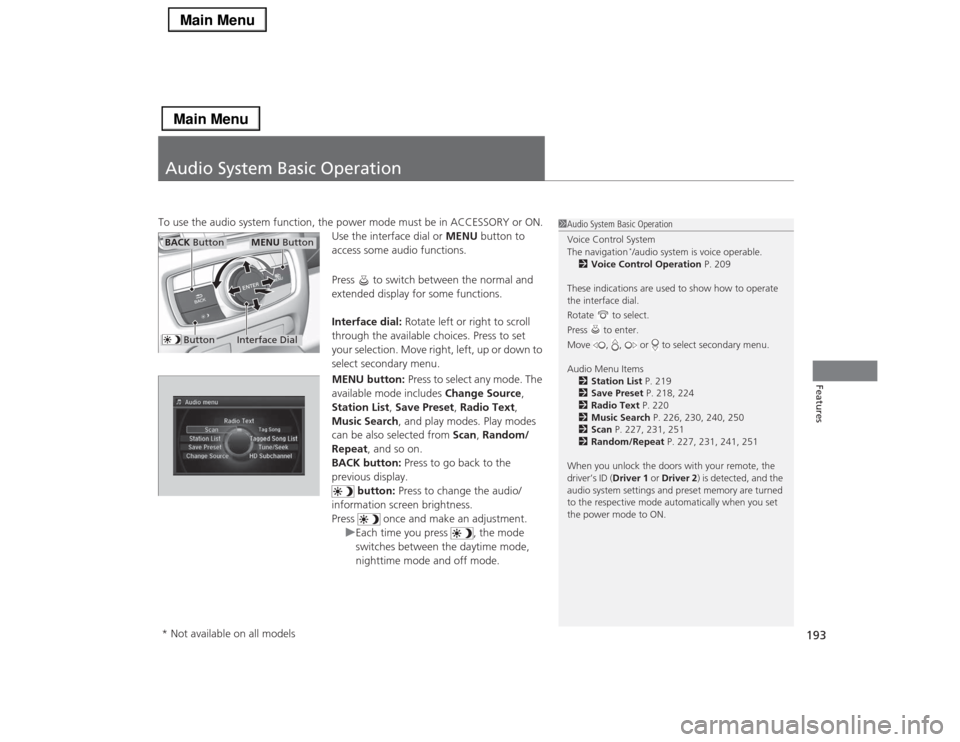
Audio System Basic OperationTo use the audio system function, the power mode must be in ACCESSORY or ON.
Use the interface dial or MENU button to
access some audio functions.
Press to switch between the normal and
extended display for some functions.
Interface dial: Rotate left or right to scroll
through the available choices. Press to set
your selection. Move right, left, up or down to
select secondary menu.
MENU button: Press to select any mode. The
available mode includes Change Source,
Station List, Save Preset, Radio Text,
Music Search, and play modes. Play modes
can be also selected from Scan, Random/
Repeat, and so on.
BACK button: Press to go back to the
previous display.
button: Press to change the audio/
information screen brightness.
Press once and make an adjustment.
uEach time you press , the mode
switches between the daytime mode,
nighttime mode and off mode.
1Audio System Basic Operation
Voice Control System
The navigation
*/audio system is voice operable.
2Voice Control Operation P. 209
These indications are used to show how to operate
the interface dial.
Rotate to select.
Press to enter.
Move , , or to select secondary menu.
Audio Menu Items
2Station List P. 219
2Save Preset P. 218, 224
2Radio Text P. 220
2Music Search P. 226, 230, 240, 250
2Scan P. 227, 231, 251
2Random/Repeat P. 227, 231, 241, 251
When you unlock the doors with your remote, the
driver’s ID (Driver 1 or Driver 2) is detected, and the
audio system settings and preset memory are turned
to the respective mode automatically when you set
the power mode to ON.
Interface Dial
MENU Button
BACK Button
Button
* Not available on all models
Page 330 of 518

Continued
329
uuAcuraLink®
*u
Features
Your subscribed telematics service provider can track your vehicle’s location,
remotely lock or unlock doors, and help you find your vehicle.
To use these features, you need your user ID and personal identification number
(PIN).■Stolen vehicle tracking
This feature searches and tracks down your vehicle position even if it is on the move.
If you believe that your vehicle has been stolen, contact the police as well as the
provider.■Remote door lock/unlock
The provider can remotely lock or unlock doors upon your request.■Vehicle finder
This feature is convenient to use when trying to locate your vehicle in large areas,
such as a crowded parking lot. If you cannot locate your vehicle after using the
remote transmitter’s answerback function, you can contact the provider which can
then flash your vehicle’s exterior lights and sound the horn.■Security alarm notification
If the security system in your vehicle detects an abnormal condition, such as
someone tampering with the lock on your vehicle, the provider notifies you by email.■
Security Features
1Security Features
The contact information of your provider, your user
ID and PIN will be given when you subscribe to
AcuraLink. If you forget any of the above, contact a
dealer, or go to owners.acura.com (in U.S.) or
www.acura.ca (in Canada).
You can also activate the remote door lock/unlock
and vehicle finder features from the Internet or using
your smartphone app. Ask a dealer, or visit
owners.acura.com (in U.S.) or www.acura.ca (in
Canada) for details.1Vehicle finder
The lights will stop flashing and horn will stop
sounding under the following conditions:•When 30 seconds have elapsed.•You unlock the doors using the remote transmitter.•You unlock the doors using the keyless access
system.•You unlock the doors using the built-in key.•The power mode is set to ACCESSORY or ON.
Page 454 of 518

453
Handling the Unexpected
This chapter explains how to handle unexpected troubles.
Tools
Types of Tools .................................. 454
If a Tire Goes Flat
Temporarily Repairing a Flat Tire....... 455
Changing a Flat Tire ......................... 466
Engine Does Not Start
Checking the Engine ........................ 472
If the Keyless Access Remote Battery is
Weak ............................................. 473
Emergency Engine Stop ................... 474
Jump Starting.................................... 475
Shift Lever Does Not Move.............. 478
Overheating
How to Handle Overheating ............. 479Indicator, Coming On/Blinking
If the Low Oil Pressure Indicator Comes
On ............................................. 481If the Charging System Indicator Comes
On ................................................. 481
If the Malfunction Indicator Lamp Comes
On or Blinks ................................... 482If the Brake System Indicator (Red) Comes On .. 482If the Electric Power Steering (EPS) System
Indicator Comes On .............................. 483
If the Electric Parking Brake System Indicator
Comes On............................................. 483
If the Low Tire Pressure/TPMS Indicator
Comes On or Blinks ....................... 484
Fuses
Fuse Locations ................................. 485
Inspecting and Changing Fuses ........ 489
Emergency Towing........................... 490
When You Cannot Unlock the Fuel Fill
Door................................................. 491When You Cannot Open the Trunk..... 492RefuelingRefueling From a Portable Fuel Container ... 493
Page 488 of 518

487
uuFusesuFuse Locations
Continued
Handling the Unexpected
Located under the dashboard.
Fuse locations are shown on the label on
the under panel.
Locate the fuse in question by the fuse
number and label number.■
Driver’s Side Interior Fuse Box
Fuse Label
■Circuit protected and fuse rating
Circuit Protected
Amps
1
Driver’s Side Door Lock
10 A
2
Passenger’s Side Door Lock
10 A
3
Driver’s Door Lock
10 A
4
Driver’s Side Door Unlock
10 A
5
Passenger’s Side Door
Unlock
10 A
6
Driver’s Door Unlock
10 A
7
Door Lock
20 A
8
−
−
9
Tilt Steering Wheel
20 A
10
IG1 DR1
7.5 A
11
Meter
10 A
12
IG1 Box
20 A
13
ACCESSORY
7.5 A
14
−
−
15
Driver’s Power Seat Sliding
20 A
16
Moonroof
20 A
17
Rear Driver’s Side Power
Window
20 A
18
Telescopic Steering Wheel
20 A
19
Driver’s Power Window
20 A
20
Left e-pretensioner
*
20 A
21
Fuel Pump
20 A
22
−
−
23
ST Cut
7.5 A
24
IG1 DR2
7.5 A
25
Start DIAG
7.5 A
26
A/C
7.5 A
27
DRL
7.5 A
28
ACC Key Lock
7.5 A
29
Driver’s Lumbar Support
7.5 A
30
SMART
10 A
31
−
−
32
Driver’s Power Seat
Reclining
20 A
33
Right Precision All Wheel
Steer
40 A
34
IG1 Box
30 A
Circuit Protected
Amps
* Not available on all models
Page 511 of 518

Index
510Index
Index
AAAC.................................................... 225, 249
ABS (Anti-lock Brake System)................... 389
Accessories and Modifications................. 406
Accessory Power Sockets.......................... 167
AcuraLink.................................................. 327
Adaptive Cruise Control (ACC) with Low
Speed Follow (LSF)............................ 81, 355
Additives
Coolant ................................................... 424
Engine Oil ................................................ 419
Washer .................................................... 427
Additives, Engine Oil................................ 419
Adjusting
Armrest ................................................... 158
Front Seats .............................................. 152
Head Restraints........................................ 155
Mirrors .................................................... 149
Steering Wheel ........................................ 148
Temperature .............................................. 99
Agile Handling Assist System................... 377
Aha
TM Menu.............................................. 248
AhaTM Radio.............................................. 259
Air Conditioning System (Climate Control
System).................................................... 177
Changing the Mode ................................ 180
Defrosting the Windshield and
Windows ............................................... 183
Dust and Pollen Filter ............................... 448
Rear Temperature Control Dial................. 184
Sensors .................................................... 185Using Automatic Climate Control ............ 177
Air Pressure....................................... 438, 497
Airbags........................................................ 37
Advanced Airbags ..................................... 43
Airbag Care............................................... 51
Driver’s Knee Airbag.................................. 44
Event Data Recorder .................................. 22
Front Airbags (SRS) .................................... 40
Indicator.............................................. 49, 74
Passenger Airbag Off Indicator .................. 50
Sensors ..................................................... 37
Side Airbags .............................................. 46
Side Curtain Airbags.................................. 48
AM/FM Radio............................................ 217
Anti-lock Brake System (ABS).................. 389
Indicator.................................................... 74
Armrest..................................................... 158
Audio Remote Controls........................... 192
Audio System............................................ 188
Adjusting the Sound................................ 207
Auxiliary Input Jack.................................. 190
Error Messages ........................................ 254
General Information ................................ 260
HDD ........................................................ 228
Internet Radio ......................................... 246
iPod®....................................................... 238
MP3/WMA/AAC .............................. 225, 249
Reactivating ............................................ 191
Recommended CDs ................................. 261
Recommended Devices............................ 263
Remote Controls ..................................... 192Security Code ......................................... 191
Shortcuts ................................................ 195
Theft Protection ...................................... 191
USB Flash Drives...................................... 263
USB Port ................................................. 189
Authorized Manuals................................ 505
Auto Door Locking/Unlocking................ 124
Customize ...................................... 108, 277
Automatic Brake Hold............................. 387
Indicator ........................................... 70, 387
Automatic Brake Hold System
Indicator ........................................... 69, 387
Automatic Lighting.................................. 138
Automatic Transmission.......................... 346
Creeping................................................. 346
Fluid ....................................................... 426
Kickdown ............................................... 346
Operating the Shift Lever .................. 15, 348
Shift Lever Does Not Move ...................... 478
Shifting ................................................... 347
Auxiliary Input Jack................................. 190
Average Fuel Economy.............................. 99
Average Speed......................................... 100
BBattery...................................................... 446
Charging System Indicator ................ 71, 481
Jump Starting ......................................... 475
Maintenance (Checking the Battery) ....... 446
Maintenance (Replacing) ......................... 447
Page 513 of 518

512Index
Defrosting the Windshield and
Windows.................................................. 183
Devices that Emit Radio Waves................ 499
Dimming
Headlights ............................................... 137
Rearview Mirror ....................................... 149
Dipstick (Engine Oil)................................. 420
Directional Signals (Turn Signal).............. 136
Door Mirrors............................................. 150
Doors......................................................... 115
Auto Door Locking .................................. 124
Auto Door Unlocking ............................... 124
Door Open Indicator ............................ 29, 75
Keys ........................................................ 115
Locking/Unlocking the Doors from
the Inside ......................................... 10, 121
Locking/Unlocking the Doors from
the Outside ............................................ 117
Lockout Prevention System ...................... 120
DOT Tire Quality Grading........................ 440
Driver’s Knee Airbag.................................. 44
Driving....................................................... 335
Automatic Transmission ........................... 346
Braking .................................................... 384
Cruise Control ......................................... 352
Shifting Gear ........................................... 347
Starting the Engine .................................. 342
Driving Position Memory System............. 146
Dust and Pollen Filter............................... 448
EElapsed Time............................................. 100
Electric Parking Brake
Indicator.................................................... 69
Electric Parking Brake System
Indicator............................................ 69, 483
Electric Power Steering (EPS) System
Indicator............................................ 74, 483
Electronic Stability Control (ESC)............. 375
Emergency................................................ 490
Emissions Testing (Readiness Codes)....... 501
Engine....................................................... 498
Coolant ................................................... 424
Jump Starting .......................................... 475
Oil ........................................................... 419
Starting ................................................... 342
Switch Buzzer.......................................... 133
Engine Compartment Cover.................... 418
Engine Coolant......................................... 424
Adding to the Radiator ............................ 425
Adding to the Reserve Tank..................... 424
Overheating ............................................ 479
Temperature Gauge .................................. 94
Engine Oil................................................. 419
Adding .................................................... 421
Checking................................................. 420
Displaying Oil Life .................................... 412
Low Oil Pressure Indicator ................. 68, 481
Recommended Engine Oil ....................... 419
ENGINE START/STOP Button.................... 133
e-pretensioners........................................... 32EPS (Electric Power Steering) System........ 74
Exhaust Gas Hazard (Carbon Monoxide).. 64
Expanded Rear Door Sunshades............. 176
Expanded View Driver’s Mirror............... 151
Exterior Care (Cleaning).......................... 451
Exterior Mirrors........................................ 150
FFeatures.................................................... 187
Filters
Dust and Pollen....................................... 448
Oil .......................................................... 422
Flat Tire..................................................... 455
Floor Mats................................................ 450
Fluids
Automatic Transmission .......................... 426
Brake ...................................................... 427
Engine Coolant ....................................... 424
Windshield Washer ................................. 427
Foot Brake................................................ 386
Forward Collision Warning (FCW).......... 364
Front Airbags (SRS).................................... 40
Front Seat Heaters and Seat
Ventilation.............................................. 173
Front Seats................................................ 152
Adjusting ................................................ 152
Fuel..................................................... 16, 403
Economy................................................. 405
Gauge ...................................................... 94
Instant Fuel Economy .............................. 100