Page 79 of 518
78
uuIndicatorsu
Instrument Panel
*1:On the left: Models with navigation system
On the right: Models without navigation system
*2:Models with navigation system
*3:Models without navigation systemIndicator
Name
On/Blinking
Explanation
Message
*1
Keyless Access
System
Indicator
●Comes on for a few seconds when
you set the power mode to ON.●Comes on as soon as a problem is
detected in the keyless access system
or keyless starting system.
●Have your vehicle checked by a dealer.
CRUISE MAIN
Indicator
*
●Comes on when you press the
CRUISE button.
2Cruise Control
* P. 352
—
—
CRUISE
CONTROL
Indicator
*
●Comes on if you have set a speed for
cruise control.
2Cruise Control
* P. 352
—
—
*2
*3*2
*3
* Not available on all models
Page 80 of 518

79
uuIndicatorsu
Continued
Instrument Panel
*1:On the left: Models with navigation system
On the right: Models without navigation systemIndicator
Name
On/Blinking
Explanation
Message
*1
Forward
Collision
Warning
(FCW)
Indicator
*
●Comes on for a few seconds when
you change the power mode to ON,
then goes off.●Comes on when you have
customized FCW to turn off.●Comes on if there is a problem with
the FCW system.
●Stays on constantly without FCW off
- Have the vehicle checked by a dealer.
●Comes on when the FCW system
shuts itself off.
●Stays on - The temperature inside the
FCW system is too high. The system
activates when the temperature inside the
system cools down.
2Automatic shutoff P. 365
●Stays on - The area around the camera is
blocked by dirt, mud, etc. Stop your vehicle
in a safe place, and wipe it off with a soft
cloth.●Have your vehicle checked by a dealer if
the indicator and message come back
on after you cleaned the area around
the camera.
2Automatic shutoff P. 365
* Not available on all models
Page 81 of 518

80
uuIndicatorsu
Instrument Panel
*1:On the left: Models with navigation system
On the right: Models without navigation system
*2:Models without LKAS
*3:Models with LKASIndicator
Name
On/Blinking
Explanation
Message
*1
Lane
Departure
Warning
(LDW)
Indicator
●Comes on for a few seconds when
you change the power mode to ON,
then goes off.●Comes on if there is a problem with
the LDW system.
●Stays on constantly - Have the vehicle
checked by a dealer.
●Comes on when the LDW system
shuts itself off.
●Stays on - The temperature inside the
LDW camera is too high.
Use the climate control system to cool
down the camera.
The system activates when the
temperature inside the camera cools
down.
2LDW Camera P. 368
●Stays on - The area around the camera
is blocked by dirt, mud, etc. Stop your
vehicle in a safe place, and wipe it off
with a soft cloth.●Have your vehicle checked by a dealer if
the indicator and message come back
on after you cleaned the area around
the camera.
2LDW Camera P. 368
*2
*3
Models without LKAS
Page 82 of 518

81
uuIndicatorsu
Continued
Instrument Panel
*1:On the left: Models with navigation system
On the right: Models without navigation systemIndicator
Name
On/Blinking
Explanation
Message
*1
Precision All
Wheel Steer
System
Indicator
●Comes on for a few seconds when
you set the power mode to ON, then
goes off.●If it comes on at any other time,
there is a problem with the Precision
All Wheel Steer system.
●Comes on while driving - Have the
vehicle checked by a dealer.●The system may limit the vehicle speed
to 50 mph (80 km/h) or less.
SPORT Mode
Indicator
●Comes on for a few seconds when
you set the power mode to ON, then
goes off.●Comes on when you press the
SPORT button.
2SPORT Mode P. 351
—
—
Adaptive Cruise
Control (
ACC
)
with Low Speed
Follow (LSF)
Indicator
(Amber)
*
●Comes on for a few seconds when
you change the power mode to ON,
then goes off.●Comes on if there is a problem with
ACC with LSF.
●Comes on while driving - Have the
vehicle checked by a dealer.
—
Adaptive Cruise
Control (
ACC
)
with Low Speed
Follow (LSF)
Indicator
(Green)
*
●Comes on when you press the
MAIN button.
2Adaptive Cruise Control (ACC)
with Low Speed Follow (LSF)
*
P. 355
—
—
* Not available on all models
Page 83 of 518
82
uuIndicatorsu
Instrument Panel
Indicator
Name
On/Blinking
Explanation
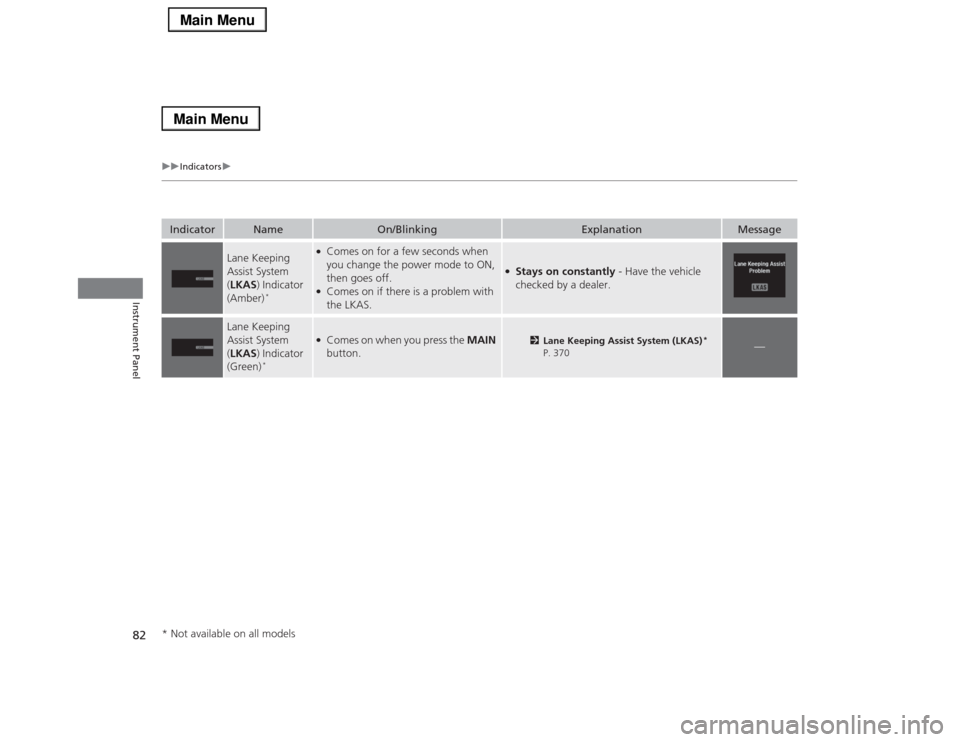
Message
Lane Keeping
Assist System
(LKAS) Indicator
(Amber)
*
●Comes on for a few seconds when
you change the power mode to ON,
then goes off.●Comes on if there is a problem with
the LKAS.
●Stays on constantly - Have the vehicle
checked by a dealer.
Lane Keeping
Assist System
(LKAS) Indicator
(Green)
*
●Comes on when you press the MAIN
button.
2Lane Keeping Assist System (LKAS)
*
P. 370
—
* Not available on all models
Page 84 of 518

83
uuIndicatorsu
Instrument Panel
Indicator
Name
On/Blinking
Explanation
Message
Blind Spot
Information (BSI)
Indicator
*
●Comes on for a few seconds when
you change the power mode to ON,
then goes off.●Stays on while BSI is turned off.
—
●Comes on when mud, snow, or ice
accumulates in the vicinity of sensor.
●Comes on while driving - Remove
the obstacle in the vicinity of sensor.
2Blind Spot Information (BSI)
System
* P. 378
●Comes on if there is a problem with
the system.
●Comes on while driving - Have the
vehicle checked by a dealer.
Collision
Mitigation Brake
System
TM
(CMBSTM)
Indicator*
●Comes on for a few seconds when
you change the power mode to ON,
then goes off.●Comes on when you deactivate the
CMBS
TM. A multi-information display
message appears for five seconds.
●Comes on if there is a problem with
the CMBS
TM.
●Stays on constantly without the
CMBS
TM off - Have the vehicle checked
by a dealer.
2Collision Mitigation Braking
System
TM (CMBS
TM)* P. 391
* Not available on all models
Page 85 of 518

84
uuIndicatorsuMulti-Information Display Warning and Information Messages
Instrument Panel
Multi-Information Display Warning and Information MessagesThe following messages appear only on the multi-information display. Roll the right selector wheel to see the message again with the
system message indicator on.
*1:On the left: Models with navigation system
On the right: Models without navigation system
Message
*1
Condition
Explanation
●Appears when the washer fluid is low.
●Refill washer fluid.
2Refilling Window Washer Fluid P. 427
●Appears when the scheduled maintenance is due soon.●Consequently, Maintenance Due Now/SERVICE
DUE NOW and Maintenance Past Due/SERVICE
PAST DUE follow.
2Maintenance Minder Messages on the Multi-
Information Display P. 413
●Appears when the engine coolant temperature gets
abnormally high.
2Overheating P. 479
●Appears when the transmission fluid temperature is
too high.
●Stop in a safe place in
(P
. Let the engine idle until the
message disappears.
●Appears when there is a problem with the sensor on
the battery.
●Have your vehicle checked by a dealer.
2Checking the Battery P. 446
●Appears along with the battery charging system
indicator when the battery is not charging.
●Turn off the climate control system and rear defogger
to reduce electricity consumption.
2If the Charging System Indicator Comes On P. 481
Page 86 of 518

85
uuIndicatorsuMulti-Information Display Warning and Information Messages
Continued
Instrument Panel
*1:On the left: Models with navigation system
On the right: Models without navigation system
Message
*1
Condition
Explanation
●Appears when the starting system has a problem.
●As a temporary measure, press and hold the ENGINE
START/STOP button for 15 seconds while
depressing the brake pedal and manually start the
engine.
Have the vehicle checked by a dealer.
●Appears if the keyless access remote battery is too
weak to start the engine or the key is not with you to
start the engine.
A beeper sounds six times.
●Bring the keyless access remote in front of the
ENGINE START/STOP button to be touched with.
2If the Keyless Access Remote Battery is Weak
P. 473
●Appears after the driver’s door is opened when the
power mode is in ACCESSORY.
●Press the ENGINE START/STOP button twice with
your foot off the brake pedal to change the power
mode to VEHICLE OFF (LOCK).
●Appears when the power mode is in ACCESSORY.
—
U.S.Canada
U.S.Canada