Page 279 of 518
278
uuCustomized Featuresu
Features
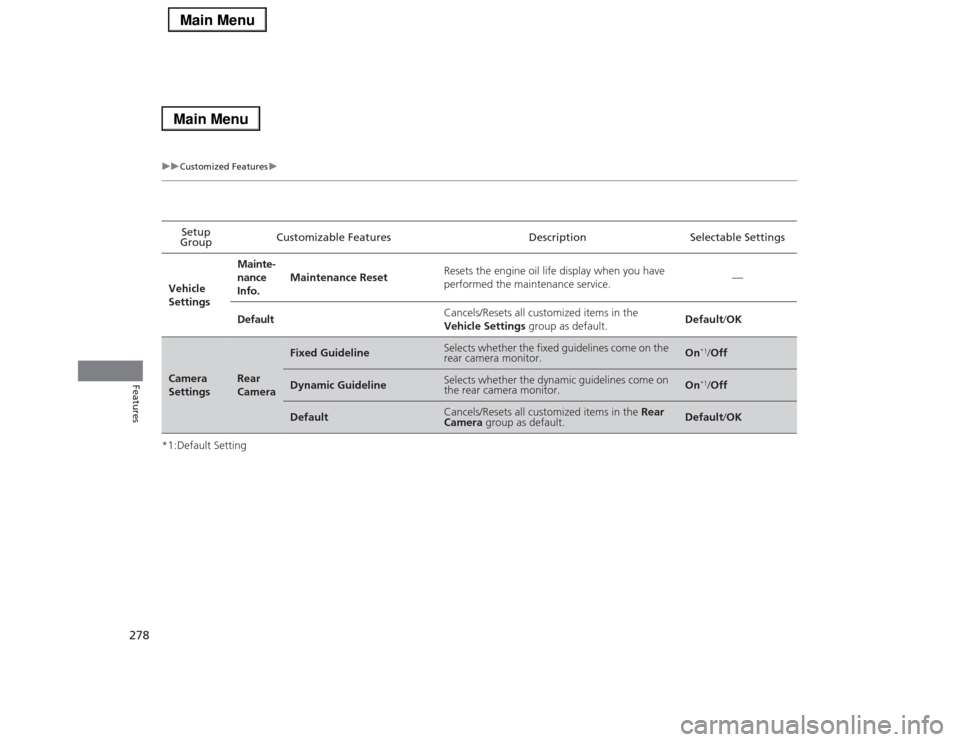
*1:Default SettingSetup
GroupCustomizable Features Description Selectable Settings
Vehicle
SettingsMainte-
nance
Info.Maintenance ResetResets the engine oil life display when you have
performed the maintenance service.—
DefaultCancels/Resets all customized items in the
Vehicle Settings group as default.Default/OKCamera
Settings
Rear
Camera
Fixed Guideline
Selects whether the fixed guidelines come on the
rear camera monitor.
On
*1/Off
Dynamic Guideline
Selects whether the dynamic guidelines come on
the rear camera monitor.
On
*1/Off
Default
Cancels/Resets all customized items in the Rear
Camera group as default.
Default/OK
Page 346 of 518

345
uuWhen DrivinguPrecautions While Driving
Continued
Driving
Precautions While DrivingAvoid driving in deep water and on flooded roads. This can damage the engine,
driveline, or cause electrical component failure.■
In Rain
1Precautions While DrivingNOTICEDo not operate the shift lever while pressing the
accelerator pedal. You could damage the
transmission.NOTICEThe following can damage the under spoiler:•Parking the vehicle by a parking block•Parallel parking along the road shoulder•Driving toward the bottom of a hill•Driving up or down to a different surface level
(such as a road shoulder)•Driving on a rutted or bumpy road•Driving on a road with potholes.NOTICEIf you repeatedly turn the steering wheel at an
extremely low speed, or hold the steering wheel on
the full left or right position for a while, the electric
power steering (EPS) system heats up. The system
goes into a protective mode, and limits its
performance. The steering wheel becomes harder
and harder to operate. Once the system cools down,
the EPS system is restored.
Repeated operation under these conditions can
eventually damage the system.
If the power mode is set to ACCESSORY or VEHICLE
OFF (LOCK) while driving, the engine will shut down
and all steering and brake power assist functions will
stop, making it difficult to control the vehicle.
Page 398 of 518
397Driving
Parking Your VehicleWhen Stopped1.Depress the brake pedal firmly.
2.With the brake pedal depressed, pull up the electric parking brake switch slowly,
but fully.
3.Move the shift lever from
(D
to
(P
.
4.Turn off the engine.
uThe electric parking brake indicator goes off in about 15 seconds.
Always set the parking brake firmly, in particular if you are parked on an incline.
1Parking Your Vehicle
Do not park your vehicle near flammable objects,
such as dry grass, oil, or timber.
Heat from the exhaust can cause a fire.1When StoppedNOTICEThe following can damage the transmission:•Depressing the accelerator and brake pedals
simultaneously.•Holding the vehicle in place when facing uphill by
depressing the accelerator pedal.•Moving the shift lever into
(P before the vehicle
stops completely.
Raise the wiper arms when snow is expected.
Page 406 of 518

405Driving
Fuel EconomyImproving Fuel EconomyFuel economy depends on several conditions, including driving conditions, your
driving habits, the condition of your vehicle, and loading. Depending on these and
other conditions, you may or may not achieve the rated fuel economy of this vehicle.
You can optimize your fuel economy with proper maintenance of your vehicle.
Always maintain your vehicle in accordance with the messages displayed on the
multi-information display.
•Use the recommended viscosity engine oil, displaying the API Certification Seal.
•Maintain the specified tire pressure.
•Do not load the vehicle with excess cargo.
•Keep your vehicle clean. A buildup of snow or mud on your vehicle’s underside
adds weight and increases wind resistance.■
Maintenance and Fuel Economy
1Improving Fuel Economy
Direct calculation is the recommended method to
determine actual fuel consumed while driving.
In Canada, posted fuel economy numbers are
established following a simulated test. For more
information on how this test is performed, please visit
http://oee.nrcan.gc.ca/
Miles drivenGallons of
fuelMiles per
Gallon
100L per 100 km Liters of
fuelKilometers
driven
Page 408 of 518

407
Maintenance
This chapter discusses basic maintenance.
Before Performing Maintenance
Inspection and Maintenance ............ 408Safety When Performing Maintenance..... 409Parts and Fluids Used in Maintenance
Service ........................................... 410
Maintenance Minder
TM..................... 411
Maintenance Under the Hood
Maintenance Items Under the Hood ..... 416Opening the Hood ........................... 417
Engine Compartment Cover ............. 418
Recommended Engine Oil ................ 419
Oil Check ......................................... 420
Adding Engine Oil ............................ 421
Changing the Engine Oil and Oil Filter ..... 422Engine Coolant ................................ 424
Transmission Fluid ............................ 426
Brake Fluid ....................................... 427
Refilling Window Washer Fluid......... 427
Replacing Light Bulbs....................... 428Checking and Maintaining Wiper
Blades.......................................... 434Checking and Maintaining Tires
Checking Tires ................................. 437Tire and Loading Information Label ...... 438Tire Labeling .................................... 438DOT Tire Quality Grading (U.S. Vehicles)....... 440
Wear Indicators ............................... 442
Tire Service Life ................................ 442
Tire and Wheel Replacement ........... 443
Tire Rotation .................................... 444
Winter Tires ..................................... 445
Battery............................................... 446
Remote Transmitter Care
Replacing the Button Battery ........... 447Climate Control System Maintenance
.... 448
Cleaning
Interior Care .................................... 449
Exterior Care.................................... 451
Page 409 of 518

408Maintenance
Before Performing MaintenanceInspection and MaintenanceFor your safety, perform all listed inspections and maintenance to keep your vehicle
in good condition. If you become aware of any abnormality (noise, smell, insufficient
brake fluid, oil residue on the ground, etc.), have your vehicle inspected by a dealer.
(Note, however, that service at a dealer is not mandatory to keep your warranties in
effect.) Refer to the separate maintenance booklet for detailed maintenance and
inspection information.■Daily inspections
Perform inspections before long distance trips, when washing the vehicle, or when
refueling.■Periodic inspections
•Check the brake fluid level monthly.2Brake Fluid P. 427
•Check the tire pressure monthly. Examine the tread for wear and foreign objects.
2Checking and Maintaining Tires P. 437
•Check the operation of the exterior lights monthly.
2Replacing Light Bulbs P. 428
•Check the condition of the wiper blades at least every six months.
2Checking and Maintaining Wiper Blades P. 434
■
Types of Inspection and Maintenance
1Inspection and Maintenance
Maintenance, replacement, or repair of
emissions control devices and systems may be
done by any automotive repair establishment or
individuals using parts that are “certified” to
EPA standards.
According to state and federal regulations, failure to
perform maintenance on the maintenance main
items marked with # will not void your emissions
warranties. However, all maintenance services should
be performed in accordance with the intervals
indicated by the multi-information display.
2Maintenance Service Items P. 414
If you want to perform complex maintenance tasks
that require more skills and tools, you can purchase a
subscription to the Service Express website at
www.techinfo.honda.com.
2Authorized Manuals P. 505
If you want to perform maintenance yourself, make
sure that you have the necessary tools and skills first.
After performing maintenance, update the records in
the separate maintenance booklet.U.S. models
Page 412 of 518
411Maintenance
Maintenance Minder
TM
If the engine oil life is less than 15%, you will see the Maintenance Minder messages
appear the multi-information display every time you set the power mode to ON. The
messages notify you when to change the engine oil, or when to bring your vehicle
to a dealer for indicated maintenance services.
Page 413 of 518

412
uuMaintenance Minder
TMuTo Use Maintenance Minder
TM
Maintenance
To Use Maintenance Minder
TM
Maintenance items, which should be serviced at the same time that you replace the
engine oil, appear on the multi-information display.
You can view them on the engine oil life screen at any time.
1.Set the power mode to ON.
2.Roll the right selector wheel until the engine oil life appears on the multi-
information display.■
Displaying the Engine Oil Life and Maintenance Items
1Displaying the Engine Oil Life and Maintenance Items
Based on the engine operating conditions, the
remaining engine oil life is calculated and displayed
as a percentage.
There is a list of maintenance main and sub items you
can view on the multi-information display.
2Maintenance Service Items P. 414
Displayed Engine Oil
Life (%)
Calculated Engine Oil
Life (%)
100100 to 91
90
90 to 81
8080 to 71
70
70 to 61
6060 to 51
50
50 to 41
4040 to 31
30
30 to 21
2020 to 16
15
15 to 11
1010 to 6
5
5 to 1
00
Remaining Engine Oil Life
Maintenance Service ItemsModels with
navigation
system
Models without
navigation
system
Right Selector Wheel