Page 346 of 518

345
uuWhen DrivinguPrecautions While Driving
Continued
Driving
Precautions While DrivingAvoid driving in deep water and on flooded roads. This can damage the engine,
driveline, or cause electrical component failure.■
In Rain
1Precautions While DrivingNOTICEDo not operate the shift lever while pressing the
accelerator pedal. You could damage the
transmission.NOTICEThe following can damage the under spoiler:•Parking the vehicle by a parking block•Parallel parking along the road shoulder•Driving toward the bottom of a hill•Driving up or down to a different surface level
(such as a road shoulder)•Driving on a rutted or bumpy road•Driving on a road with potholes.NOTICEIf you repeatedly turn the steering wheel at an
extremely low speed, or hold the steering wheel on
the full left or right position for a while, the electric
power steering (EPS) system heats up. The system
goes into a protective mode, and limits its
performance. The steering wheel becomes harder
and harder to operate. Once the system cools down,
the EPS system is restored.
Repeated operation under these conditions can
eventually damage the system.
If the power mode is set to ACCESSORY or VEHICLE
OFF (LOCK) while driving, the engine will shut down
and all steering and brake power assist functions will
stop, making it difficult to control the vehicle.
Page 398 of 518
397Driving
Parking Your VehicleWhen Stopped1.Depress the brake pedal firmly.
2.With the brake pedal depressed, pull up the electric parking brake switch slowly,
but fully.
3.Move the shift lever from
(D
to
(P
.
4.Turn off the engine.
uThe electric parking brake indicator goes off in about 15 seconds.
Always set the parking brake firmly, in particular if you are parked on an incline.
1Parking Your Vehicle
Do not park your vehicle near flammable objects,
such as dry grass, oil, or timber.
Heat from the exhaust can cause a fire.1When StoppedNOTICEThe following can damage the transmission:•Depressing the accelerator and brake pedals
simultaneously.•Holding the vehicle in place when facing uphill by
depressing the accelerator pedal.•Moving the shift lever into
(P before the vehicle
stops completely.
Raise the wiper arms when snow is expected.
Page 406 of 518

405Driving
Fuel EconomyImproving Fuel EconomyFuel economy depends on several conditions, including driving conditions, your
driving habits, the condition of your vehicle, and loading. Depending on these and
other conditions, you may or may not achieve the rated fuel economy of this vehicle.
You can optimize your fuel economy with proper maintenance of your vehicle.
Always maintain your vehicle in accordance with the messages displayed on the
multi-information display.
•Use the recommended viscosity engine oil, displaying the API Certification Seal.
•Maintain the specified tire pressure.
•Do not load the vehicle with excess cargo.
•Keep your vehicle clean. A buildup of snow or mud on your vehicle’s underside
adds weight and increases wind resistance.■
Maintenance and Fuel Economy
1Improving Fuel Economy
Direct calculation is the recommended method to
determine actual fuel consumed while driving.
In Canada, posted fuel economy numbers are
established following a simulated test. For more
information on how this test is performed, please visit
http://oee.nrcan.gc.ca/
Miles drivenGallons of
fuelMiles per
Gallon
100L per 100 km Liters of
fuelKilometers
driven
Page 408 of 518

407
Maintenance
This chapter discusses basic maintenance.
Before Performing Maintenance
Inspection and Maintenance ............ 408Safety When Performing Maintenance..... 409Parts and Fluids Used in Maintenance
Service ........................................... 410
Maintenance Minder
TM..................... 411
Maintenance Under the Hood
Maintenance Items Under the Hood ..... 416Opening the Hood ........................... 417
Engine Compartment Cover ............. 418
Recommended Engine Oil ................ 419
Oil Check ......................................... 420
Adding Engine Oil ............................ 421
Changing the Engine Oil and Oil Filter ..... 422Engine Coolant ................................ 424
Transmission Fluid ............................ 426
Brake Fluid ....................................... 427
Refilling Window Washer Fluid......... 427
Replacing Light Bulbs....................... 428Checking and Maintaining Wiper
Blades.......................................... 434Checking and Maintaining Tires
Checking Tires ................................. 437Tire and Loading Information Label ...... 438Tire Labeling .................................... 438DOT Tire Quality Grading (U.S. Vehicles)....... 440
Wear Indicators ............................... 442
Tire Service Life ................................ 442
Tire and Wheel Replacement ........... 443
Tire Rotation .................................... 444
Winter Tires ..................................... 445
Battery............................................... 446
Remote Transmitter Care
Replacing the Button Battery ........... 447Climate Control System Maintenance
.... 448
Cleaning
Interior Care .................................... 449
Exterior Care.................................... 451
Page 412 of 518
411Maintenance
Maintenance Minder
TM
If the engine oil life is less than 15%, you will see the Maintenance Minder messages
appear the multi-information display every time you set the power mode to ON. The
messages notify you when to change the engine oil, or when to bring your vehicle
to a dealer for indicated maintenance services.
Page 413 of 518

412
uuMaintenance Minder
TMuTo Use Maintenance Minder
TM
Maintenance
To Use Maintenance Minder
TM
Maintenance items, which should be serviced at the same time that you replace the
engine oil, appear on the multi-information display.
You can view them on the engine oil life screen at any time.
1.Set the power mode to ON.
2.Roll the right selector wheel until the engine oil life appears on the multi-
information display.■
Displaying the Engine Oil Life and Maintenance Items
1Displaying the Engine Oil Life and Maintenance Items
Based on the engine operating conditions, the
remaining engine oil life is calculated and displayed
as a percentage.
There is a list of maintenance main and sub items you
can view on the multi-information display.
2Maintenance Service Items P. 414
Displayed Engine Oil
Life (%)
Calculated Engine Oil
Life (%)
100100 to 91
90
90 to 81
8080 to 71
70
70 to 61
6060 to 51
50
50 to 41
4040 to 31
30
30 to 21
2020 to 16
15
15 to 11
1010 to 6
5
5 to 1
00
Remaining Engine Oil Life
Maintenance Service ItemsModels with
navigation
system
Models without
navigation
system
Right Selector Wheel
Page 414 of 518
413
uuMaintenance Minder
TMuTo Use Maintenance Minder
TM
Continued
Maintenance
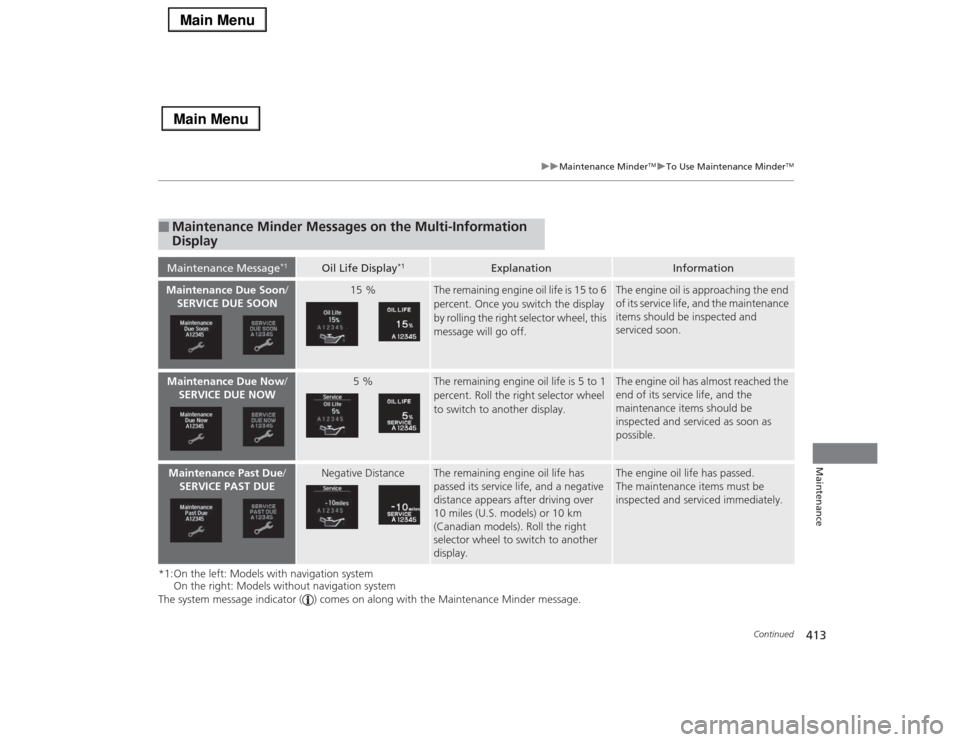
*1:On the left: Models with navigation system
On the right: Models without navigation system
The system message indicator ( ) comes on along with the Maintenance Minder message.■
Maintenance Minder Messages on the Multi-Information
DisplayMaintenance Message
*1
Oil Life Display
*1
Explanation
Information
Maintenance Due Soon/
SERVICE DUE SOON
15 %
The remaining engine oil life is 15 to 6
percent. Once you switch the display
by rolling the right selector wheel, this
message will go off.
The engine oil is approaching the end
of its service life, and the maintenance
items should be inspected and
serviced soon.
Maintenance Due Now/
SERVICE DUE NOW
5 %
The remaining engine oil life is 5 to 1
percent. Roll the right selector wheel
to switch to another display.
The engine oil has almost reached the
end of its service life, and the
maintenance items should be
inspected and serviced as soon as
possible.
Maintenance Past Due/
SERVICE PAST DUE
Negative Distance
The remaining engine oil life has
passed its service life, and a negative
distance appears after driving over
10 miles (U.S. models) or 10 km
(Canadian models). Roll the right
selector wheel to switch to another
display.
The engine oil life has passed.
The maintenance items must be
inspected and serviced immediately.
Page 415 of 518

414
uuMaintenance Minder
TMuTo Use Maintenance Minder
TM
Maintenance
■
Maintenance Service Items
1Maintenance Service Items•Independent of the Maintenance Minder
information, replace the brake fluid every 3 years.•Inspect idle speed every 160,000 miles (256,000
km).•Adjust the valves during services A, B, 1, 2, or 3 if
they are noisy.
Maintenance Minder Message
System Message
Indicator
Sub Items Main ItemModels with
navigation
system
Models without
navigation
system
Sub ItemsMain Item
*1: If a message Maintenance Due Now/SERVICE DUE NOW does not appear more than 12
months after the display is reset, change the engine oil every year.
# : See information on maintenance and emissions warranty.CODE
Maintenance Main Items
A
●Replace engine oil
*1
B
●Replace engine oil
*1 and oil filter
●Inspect front and rear brakes●Check parking brake adjustment●Inspect tie rod ends, steering gearbox, boots, and
drain plug●Inspect suspension components●Inspect driveshaft boots●Inspect brake hoses and lines (Including ABS/VSA)●Inspect all fluid levels and condition of fluids●Inspect exhaust system
#
●Inspect fuel lines and connections
#
●Check expiration information for TRK bottle
*2: If you drive in dusty conditions, replace the air cleaner element every 15,000 miles (24,000 km).
*3: If you drive primarily in urban areas that have high concentrations of soot in the air from industry and
from diesel-powered vehicles, replace the dust and pollen filter every 15,000 miles (24,000 km).
*4: If you drive regularly in very high temperatures (over 110°F, 43°C), in very low temperatures (under
-20°F, -29°C), replace every 60,000 miles/100,000 km.CODE
Maintenance Sub Items
1
●Rotate tires
2
●Replace air cleaner element
*2
●Replace dust and pollen filter
*3
●Inspect drive belt
3●Replace transmission fluid
4
●Replace spark plugs●Replace timing belt and inspect water pump
*4
●Inspect valve clearance
5●Replace engine coolant

