Page 5 of 363
Visual Index
4
❙Power Door Lock Master Switch (P 105)
❙Power Window Switches (P 115)
❙Rearview Mirror (P 133)
❙Parking Brake (P 257)
❙Hood Release Handle (P 276)
❙Shift Lever Automatic
Transmission
(P 243)
❙Driver's Front Airbag (P 40)
❙Door Mirror Controls (P 134)
❙Passenger's Front Airbag
(P 40)
❙Fuel Fill Door Release Handle (P 264)
❙Glove Box (P 145)
❙Accessory Power Socket
(P 148)
❙Seat Heater Switches (P 151)
❙Interior Fuse Box (P 338)
QRG
Index
Quick Reference Guide - 2014 RDX
Page 9 of 363

8
Instrument Panel (P 67)
System Indicators
Malfunction
Indicator Lamp
Low Oil Pressure
Indicator
Charging System
Indicator
Anti-lock Brake
System (ABS)
Indicator
Vehicle Stability
Assist (VSA ®) System
Indicator
VSA ® OFF Indicator
Low Tire Pressure/
TPMS Indicator
Lights Reminders
Lights On Indicator
High Beam Indicator
Fog Light Indicator
*
Immobilizer System
Indicator Seat Belt Reminder
Indicator
System Indicators
CRUISE CONTROL
Indicator
Parking Brake and
Brake System
Indicator (Red) Supplemental
Restraint System
Indicator
Side Airbag Off
Indicator
Door and Tailgate
Open Indicator
CRUISE MAIN
Indicator
Tachometer Speedometer
Fuel Gauge
Security System Alarm
Indicator
Shift Lever Position Indicator
Low Fuel Indicator
Gauges (P 82)/Multi-Information Display (P 83)/
System Indicators
(P 68)
System Message
Indicator
Brake System
Indicator (Amber)
Temperature Gauge
Electric Power
Steering (EPS) System
Indicator Turn Signal and
Hazard Warning
Indicators
AWD
(All-Wheel
Drive) with
Intelligent Control
System Indicator
*
Canada U.S.
Canada
U.S.
Canada
U.S.
Keyless Access System
Indicator
QRG
Index
Quick Reference Guide - 2014 RDX
Page 13 of 363
Quick Reference Guide - 2014 RDX
12
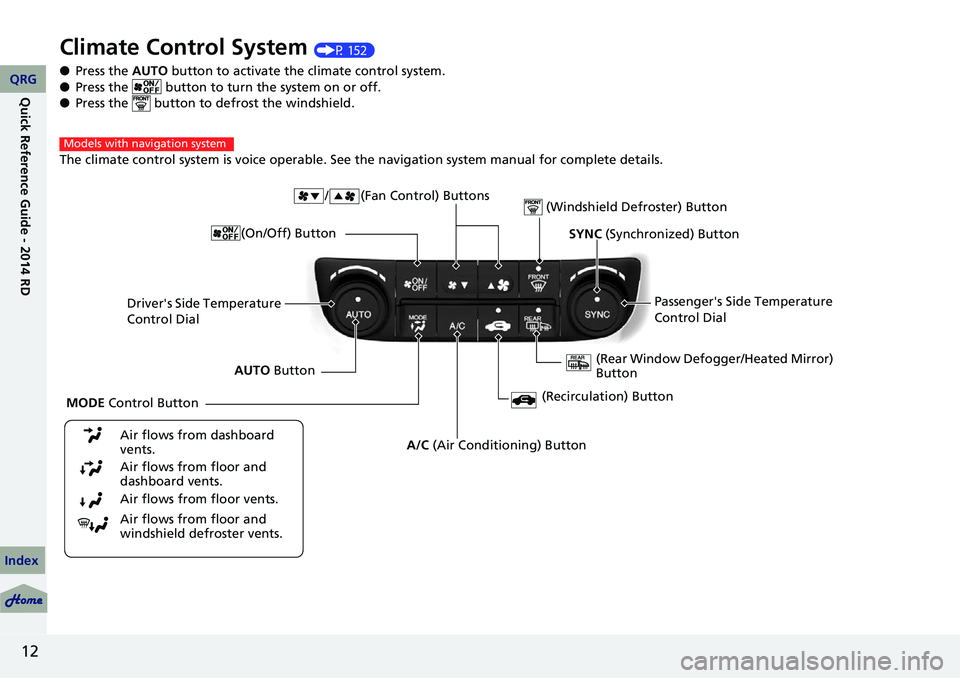
Climate Control System (P 152)
● Press the AUTO button to activate the climate control system.
● Press the button to turn the system on or off.
● Press the button to de frost the windshield.
The climate control system is voice operable. See the navigation system manual for complete details.
Models with navigation system
Driver's Side Temperature
Control Dial / (Fan Control) Buttons
(Windshield Defroster) Button
A/C
(Air Conditioning) Button
Air flows from floor and
windshield defroster vents. Air flows from floor vents. Air flows from floor and
dashboard vents. Air flows from dashboard
vents.
SYNC (Synchronized) Button
(Recirculation) Button
AUTO Button Passenger's Side Temperature
Control Dial
(Rear Window Defogger/Heated Mirror)
Button
MODE Control Button (On/Off) Button
QRG
Index
Page 15 of 363

14
Driving (P 227)
Release ButtonShift Lever
Depress the brake pedal and press the
release button to move out of
( P.
Move the shift lever without
pressing the release button.
Press the release button to
move the shift lever.
●
Shifting
Park
Turn off or start the engine.
Transmission is locked.
Reverse
Neutral
Transmission is not locked.
Drive
Normal driving. D-paddle shift mode can be used.
S Position
Sequential shift mode can be used. Paddle Shifters
(P 246)
M Indicator
Shift Down (-)
Paddle Shifter Shift Up (+)
Paddle Shifter
●
Paddle shifters allow you to shift gears much like a manual transmission
(1st through 6th). This is useful for engine braking.
● D-paddle shift mode: The transmission will shift back to automatic mode
once the system detects that the vehicle is cruising.
● Sequential shift mode: Holds the selected gear, and the M indicator comes
on.
Selected Gear Number
Automatic Transmission (P 244)
● Shift to
(P and depress the brake pedal when
starting the engine.
Gear Position Indicator
● The selected gear
position is shown in
the instrument panel.
QRG
Index
Quick Reference Guide - 2014 RDX
Page 20 of 363
19
The rear door cannot be
opened from inside the
vehicle. Why?Check if the childproof lock is in the
lock position. If so, open the rear
door with the outside door handle.
To cancel this function, push the
lever to the unlock position.
Why do the doors lock
after I unlocked the doors
using a remote
transmitter?If you do not open the doors within 30 seconds, the doors are
relocked automatically for security.
Why does the beeper
sound when I open the
driver's door?The beeper sounds when:
●The exterior lights are left on.
●The power mode is in ACCESSORY.
Why does the beeper
sound when I start driving?The beeper sounds when:
●Driver and/or front passenger are not wearing their seat belts.
●The parking brake lever is not fully released.
QRG
Index
Quick Reference Guide - 2014 RDX
Page 22 of 363

21
California Proposition 65 Warning
Event Data Recorders
This vehicle is equipped with an event data recorder (EDR).
The main purpose of an EDR is to record, in certain crash or near
crash-like situations, such as an air bag deployment or hitting a
road obstacle, data that will assist in understanding how a vehicle’s
systems performed. The EDR is designed to record data related
to vehicle dynamics and safety systems for a short period of
time, typically 30 seconds or le ss. The EDR in this vehicle is
designed to record such data as:
• How various systems in your vehicle were operating;
• Whether or not the driver and passenger safety belts were
buckled/fastened;
• How far (if at all) the driver was depressing the accelerator
and/or brake pedal; and,
• How fast the vehicle was traveling.
These data can help provide a better understanding of the
circumstances in which crashes and injuries occur. NOTE: EDR data
are recorded by your vehicle only if a non-tri vial crash situation
occurs; no data are recorded by the EDR under normal driving
conditions and no personal data (e.g., name, gender, age, and
crash location) are recorded. Howe ver, other parties, such as law
enforcement, could combine the EDR data with the type of
personally identifying data routinely acquired during a crash
investigation.
WARNING: This product contains or emits
chemicals known to the state of California to cause
cancer and birth defects or other reproductive
harm.
To read data recorded by an ED R, special equipment is required,
and access to the vehicle or the ED R is needed. In addition to the
vehicle manufacturer, other parties, such as law enforcement, that
have the special equipment, can r ead the information if they have
access to the vehicle or the EDR.
The data belongs to the vehicle owner and may not be accessed by
anyone else except as legally required or with the permission of the
vehicle owner.
Service Diagnostic Recorders
This vehicle is equipped with serv ice-related devices that record
information about powertrain performance. The data can be used
to verify emissions law requirements and/or help technicians
diagnose and solve service problems. It may also be combined with
data from other sources for research purposes, but it remains
confidential.
California Perchlorate Contamination Prevention Act
The airbags, seat belt tensioners , and CR type batteries in this
vehicle may contain perchlorate materials - special handling may
apply. See www.dtsc.ca.gov/hazardouswaste/perchlorate/
As you read this manual, you will find information that is preceded
by a symbol. This information is intended to help you avoid
damage to your vehicle, other property, or the environment.
NOTICE
QRG
Index
Quick Reference Guide - 2014 RDX
Page 25 of 363

24
Safe Driving
For Safe Driving
The following pages explain your vehicle's safety features and how to use them
properly. The safety precauti ons below are ones that we consider to be among the
most important.
Important Safety Precautions
■Always wear your seat belt
A seat belt is your best protection in all types of collisions. Airbags are designed to
supplement seat belts, not replace them. So even though your vehicle is equipped
with airbags, make sure you and your passe ngers always wear your seat belts, and
wear them properly.
■Restrain all children
Children age 12 and under should ride prop erly restrained in a back seat, not the
front seat. Infants and small children shoul d be restrained in a child seat. Larger
children should use a booster seat and a lap/shoulder seat belt until they can use the
belt properly without a booster seat.
■Be aware of airbag hazards
While airbags can save lives, they can cause serious or fatal injuries to occupants
who sit too close to them, or are not prop erly restrained. Infants, young children,
and short adults are at the greatest risk. Be sure to follow all instructions and
warnings in this manual.
■Don't drink and drive
Alcohol and driving don't mix. Even one dr ink can reduce your ability to respond to
changing conditions, and your reaction time gets worse with every additional drink.
So don't drink and drive, and don't let your friends drink and drive, either.
1Important Safety Precautions
Some states, provinces and territories prohibit the use
of cell phones other than hands-free devices by the
driver while driving.
QRG
Index
TOC
Page 26 of 363
25
uuFor Safe Driving uImportant Safety Precautions
■Pay appropriate attention to the task of driving safely
Engaging in cell phone conversation or other activities that keep you from paying
close attention to the road, other vehicles, and pedestrians could lead to a crash.
Remember, situations can change quickly, and only you can decide when it is safe to
divert some attention away from driving.
■Control your speed
Excessive speed is a major factor in crash injuries and deaths. Generally, the higher
the speed, the greater the risk, but serious injuries can also occur at lower speeds.
Never drive faster than is safe for current conditions, regardless of the maximum
speed posted.
■Keep your vehicle in safe condition
Having a tire blowout or a mechanical failure can be extremely hazardous.
To reduce the possibility of such problems, check your tire pressures and condition
frequently, and perform all regul arly scheduled maintenance.
QRG
Index
Safe DrivingTOC