2014 Acura MDX steering
[x] Cancel search: steeringPage 269 of 500
268Features
Bluetooth® HandsFreeLink®See Navigation System Manual for how to operate Bluetooth® HandsFreeLink®.
Bluetooth® HandsFreeLink® (HFL) allows you to place and receive phone calls using
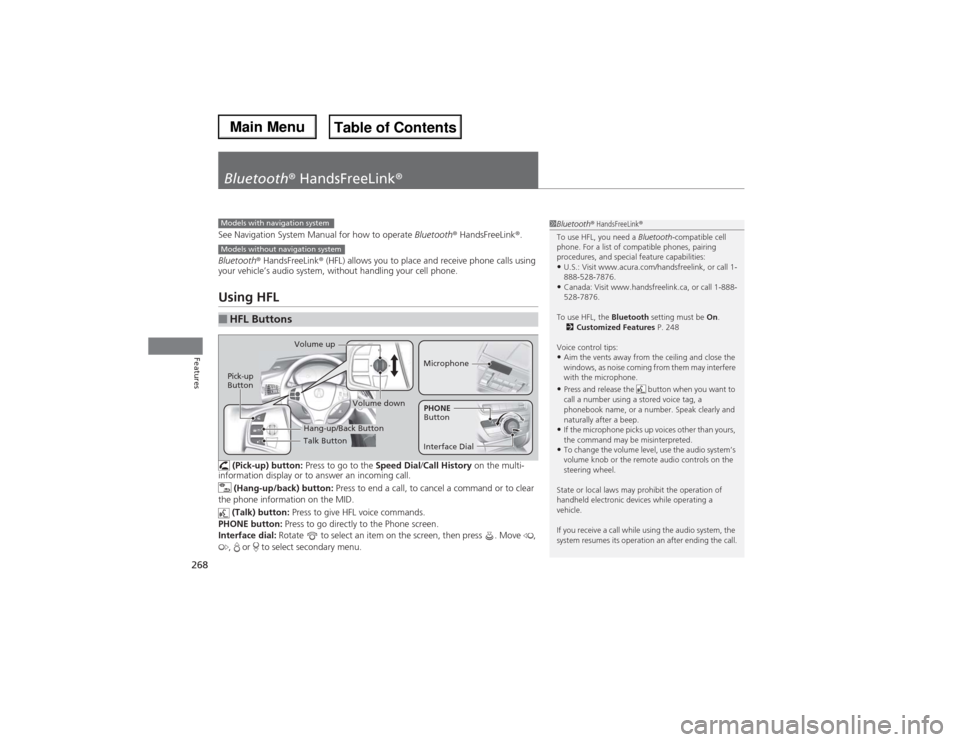
your vehicle’s audio system, without handling your cell phone.Using HFL (Pick-up) button: Press to go to the Speed Dial/Call History on the multi-
information display or to answer an incoming call.
(Hang-up/back) button: Press to end a call, to cancel a command or to clear
the phone information on the MID.
(Talk) button: Press to give HFL voice commands.
PHONE button: Press to go directly to the Phone screen.
Interface dial: Rotate to select an item on the screen, then press . Move ,
, or to select secondary menu.■HFL Buttons
1Bluetooth® HandsFreeLink®
To use HFL, you need a Bluetooth-compatible cell
phone. For a list of compatible phones, pairing
procedures, and special feature capabilities:•U.S.: Visit www.acura.com/handsfreelink, or call 1-
888-528-7876.•Canada: Visit www.handsfreelink.ca, or call 1-888-
528-7876.
To use HFL, the Bluetooth setting must be On.
2Customized Features P. 248
Voice control tips:•Aim the vents away from the ceiling and close the
windows, as noise coming from them may interfere
with the microphone.•Press and release the button when you want to
call a number using a stored voice tag, a
phonebook name, or a number. Speak clearly and
naturally after a beep.•If the microphone picks up voices other than yours,
the command may be misinterpreted.•To change the volume level, use the audio system’s
volume knob or the remote audio controls on the
steering wheel.
State or local laws may prohibit the operation of
handheld electronic devices while operating a
vehicle.
If you receive a call while using the audio system, the
system resumes its operation an after ending the call.
Models with navigation systemModels without navigation system
Talk Button Volume up
MicrophoneHang-up/Back Button
Pick-up
Button
Volume down
Interface DialPHONE
Button
Page 292 of 500

Continued
291
uuBluetooth® HandsFreeLink®uHFL Menus
Features
■To make a call using the call history
Call history is stored by All, Dialed,
Received, and Missed.
1.Press the PHONE button.
2.Press the MENU button.
3.Rotate to select Call History, then
press .
4.Move or to select All, Dialed,
Received, and Missed.
5.Rotate to select a number, then press
.
uDialing starts automatically.
1.Press the button.
2.Shift the left selector wheel right to select
Call History.
3.Roll the left selector wheel to select a
number.
4.Push the left selector wheel or the
button.
uDialing starts automatically.
1To make a call using the call history
The call history displays the last 20 dialed, received, or
missed calls.
(Appears only when a phone is connected to HFL.)
These icons next to the number indicate the
following:
: Dialed calls.
: Received calls.
: Missed calls.
The call history displays the last 12 dialed, received, or
missed calls.Steering switches
111AAA#### Mr.AAA
Mr.BBBOn MID
Steering switches
Page 293 of 500

uuBluetooth® HandsFreeLink®uHFL Menus
292Features
■To make a call using a speed dial entry
1.Press the PHONE button.
2.Press the MENU button.
3.Rotate to select Speed Dial, then press
.
4.Rotate to select a number, then press
.
uDialing starts automatically.
1.Press the button.
2.Shift the left selector wheel left to select
Speed Dial.
3.Roll the left selector wheel to select a
number.
4.Push the left selector wheel or the
button.
uDialing starts automatically.
1To make a call using a speed dial entry
Move to select More Speed Dials to view another
paired phone’s speed dial list. You can make a call
from that list using the currently connected phone.
When a voice tag is stored, press the button to
call the number using the voice tag.
2Speed Dial P. 285
Any voice-tagged speed dial entry, phonebook name
or number can be dialed by voice from any screen.
Press the button and follow the prompts.
The speed dial displays the 20 speed dial entries.Steering switches
111AAA#### Mr.AAA
Mr.BBBOn MID
Steering switches
Page 306 of 500
Continued
305
uuBefore DrivinguDriving Preparation
Driving
•Store or secure all items on board properly.
uCarrying too much cargo, or improperly storing it, can affect your vehicle’s
handling, stability, stopping distance, and tires, and make it unsafe.
2Maximum Load Limit P. 307
•Do not pile items higher than the seat height.
uThey can block your view and may be thrown forward in the event of sudden
braking.
•Do not place anything in the front seat footwells. Make sure to secure the floor
mat.
uAn object or unsecured floor mat can interfere with your brake and accelerator
pedal operation while driving.
•If you have any animals on board, do not let them move around in the vehicle.
uThey may interfere with driving and a crash could occur.
•Securely close and lock all doors and the tailgate.
2Locking/Unlocking the Doors from the Inside P. 124
•Adjust your seating position properly.
uAdjust the head restraint, too.
2Adjusting the Seats P. 161
2Adjusting the Head Restraints P. 164
•Adjust the mirrors and steering wheel properly for your driving.
uAdjust them while sitting in the proper driving position.
2Adjusting the Steering Wheel P. 157
2Adjusting the Mirrors P. 158
■Interior Checks
1Interior Checks
The headlight aim is set by the factory, and does not
need to be adjusted. However, if you regularly carry
heavy items in the cargo area or tow a trailer, have
the aiming readjusted at a dealer or by a qualified
technician.
Page 312 of 500

311
uuTowing a TraileruTowing Preparation
Continued
Driving
■To estimate the tongue load
Excessive tongue load reduces front tire traction and steering control. Too little
tongue load can make the trailer unstable and cause it to sway.
You can estimate the tongue load by measuring the trailer hitch height from the
ground in the following steps:
1.Park the vehicle on level ground.
2.Measure the distance between the ground and the bottom of the trailer hitch.
3.Connect the fully loaded trailer to the hitch.
4.Measure the distance between the ground and the bottom of the trailer hitch
again.
5.Subtract the second measurement from the first measurement, then refer to the
following table.
If the difference becomes more than indicated in the table, distribute the load or
remove cargo as needed.If the difference is
4WD models
2WD models
1 inches (2.5 cm)
150 lbs (68 kg)
1 1/2 inches (3.8 cm)
250 lbs (114 kg)
2 inches (5.1 cm)
350 lbs (159 kg)
2 3/8 inches (6.0 cm)
450 lbs (205 kg)
—
2 5/8 inches (6.7 cm)
500 lbs (227 kg)
—
Page 318 of 500
317
uuTowing a TraileruTrailer Stability Assist
*
Driving
Trailer Stability Assist
*
Helps to stabilize the vehicle and trailer when the trailer severely sways.■How trailer stability assist works
When the vehicle and trailer become unstable while driving, trailer stability assist
determines the cause. If the trailer oscillation is detected as the cause, and the
swaying increases, the system applies the brakes or controls engine output to reduce
vehicle speed.
Both the vehicle and trailer brake lights come on automatically if you brake to
reduce vehicle speed.
1Trailer Stability Assist
*
Trailer stability assist is not a function that prevents
the vehicle and trailer from swaying. Avoid high
speeds, abrupt steering, improper trailer load, and
sudden braking to keep the trailer from swaying.
When swayed too severely, the system becomes
ineffective, and you may loose control of your
vehicle, causing the trailer to roll over or get
damaged.
2Driving Safely with a Trailer P. 318
Trailer towing sway is caused by:•Crosswinds•Improper towbar down load•Excessive Speed
The VSA® system indicator blinks during the trailer
stability assist operation.
2VSA® Operation P. 358
* Not available on all models
Page 326 of 500

Continued
325
uuWhen DrivinguStarting the Engine
Driving
■To stop the engine
Press and hold the button
for one second.
Go within the range,
and try again.
Amber LED: Blinks when any
button is pressed.Red LED:
●Comes on for one second to let you
know that the engine has stopped.●Blinks when the remote is out of
the keyless access system range.
The engine will not stop.
1Remote Engine Start with Vehicle Feedback
*
•The engine oil pressure is low.•The engine coolant temperature is extremely high.•The telematics unit malfunctions.•The security system alarm is not set.
Before starting the engine, make sure to check the
door lock status using the remote. When you press
the button, wait for the green LED to blink. If
the red LED turns on, the doors and tailgate did not
lock, and the engine does not start.
While the engine is running, the vehicle will
automatically precondition inside the vehicle.
When it is warm outside:•The air conditioning is activated in recirculation
mode.•The seat ventilation is activated
*.
When it is cold outside:
•The defroster is activated at a moderately warm
temperature.•The rear defogger and door mirror heaters are
activated.•The seat and heated steering wheel are activated
*.
2Heated Steering Wheel
* P. 181
2Front Seat Heaters and Seat
Ventilation
* P. 182, 183
* Not available on all models
Page 328 of 500

327
uuWhen DrivinguPrecautions While Driving
Driving
Precautions While DrivingUtility vehicles have a significantly higher rollover rate than other types of vehicles.
To prevent rollovers or loss of control:
•Take corners at slower speeds than you would with a passenger vehicle.
•Avoid sharp turns and abrupt maneuvers whenever possible.
•Do not modify your vehicle in any way that you would raise the center of gravity.
•Do not carry heavy cargo on the roof.
Avoid driving in deep water and on flooded roads. This can damage the engine,
driveline, or cause electrical component failure.
If there is a strong impact with something under the vehicle, stop in a safe location.
Check the underside of the vehicle for damage or any fluid leaks.■Driving Guidelines for Your Utility Vehicle■In Rain■Other Precautions
1Precautions While DrivingNOTICEDo not operate the shift lever while pressing the
accelerator pedal. You could damage the
transmission.NOTICEIf you repeatedly turn the steering wheel at an
extremely low speed, or hold the steering wheel on
the full left or right position for a while, the system
heats up. The system goes into a protective mode,
and limits its performance. The steering wheel
becomes harder and harder to operate. Once the
system cools down, the EPS system is restored.
Repeated operation under these conditions can
eventually damage the system.
If the power mode is set to ACCESSORY or VEHICLE
OFF (LOCK) while driving, the engine will shut down
and all steering and brake power assist functions will
stop, making it difficult to control the vehicle.
Do not put the shift lever in
(N, as you will lose
engine braking (and acceleration) performance.
During the first 600 miles (1,000 km) of operation,
avoid sudden acceleration or full throttle operation so
as not to damage the engine or powertrain.
Avoid hard braking for the first 200 miles (300 km).
You should also follow this when the brake pads are
replaced.